Screen Capture – A Vector Quantisation Approach
Jesse S. Jin and Sue R. Wu
Biomedical and Multimedia Information Technology Group School of Information Technologies, F09
University of Sydney, NSW, 2006
{jesse,suewu}@it.usyd.edu.au
Abstract
Over the last couple of decades, more and more presentations are done on computer screen. The need to store or broadcast such presentation efficiently is in high demand across different application areas. This paper proposes a screen capture representation called vector quantisation. This system captures sequence of actions on a computer screen and minimizes its video file size for storage. It also minimizes bandwidth requirement if used for teleconferencing. .
Keywords: vector quantisation, video compression 1 Introduction
The usage of computer is rapidly growing in the last few decades, and penetrates into different fields and industries including entertainment and information science. One of the most important and convenient human computer interaction (HCI) methods is the computer screen. Computer screen can not only capture input for the main processor, such as “touch screen”, the more popular use is presentation of output, such as WYSIWYG (What You See Is What You Get). People communicate through presentations. Written character is one form of communication presentation. Video is a preferred form in some cases where sequence of actions may be worth a thousand words. Capturing sequence of actions on a computer screen is equivalent to a video. Since more and more computer users produce their presentation on computer screen for both commercial and non-commercial uses, examples can be easily found to show the great potential of capturing computer screen motions. Businessman use MicroSoft PowerPoint for market briefing, product demonstration; university academics
Copyright © 2004, Australian Computer Society, Inc. This paper appeared at the Pan-Sydney Area Workshop on Visual Information Processing (VIP2003), Sydney. Conferences in Research and Practice in Information Technology, Vol. 36. M. Piccardi, T. Hintz, X. He, M. L. Huang, D. D. Feng, J. Jin, Eds. Reproduction for academic, not-for profit purposes permitted
provided this text is included.
connect their computer screen onto digital overhead projector to give lectures, etc.
One way to record these presentations is via video recording, either use traditional or digital technology. Video can produce very satisfying motion result for human eyes. One major draw back is a video film’s huge file size, which makes it difficult for storage and bandwidth requirement if the video is used for tele-conference streaming or as product demonstration for customers to download over the Internet.
Several commercial products and academic research results exist to compress screen capture video. Some of these are Camtesia [1], PAL PC Spy [2], NTSE [3], work from Allen and Jin [4]. A more recent commercial product in this field is the CaptureCam-Pro [5]. Most of them are specifically designed for either storage or desktop screen teleconferencing, but not for both purpose. Allen and Jin’s work aims at real time teleconferencing. The CaptureCam-Pro is a two-stage product that targets at minimizing final video size.
Most of the screen capture approaches are very similar to traditional video production, which uses frame-by-frame recording. The difference between the two is the former use compression mechanism to reduce file size for certain interval of time. Traditional video production records sceneries at some time intervals, say t. Each scenery recorded is considered as one frame. When these frames are displayed in sequence less than t interval, it is considered as fast motion movie; if the display time is greater than t, it is slow motion movie; otherwise normal movie. Each frame displayed is a complete graphic like a normal photograph. Hence quality of a computer screen captured movie depends on two major components:
display time interval and quality of each frame taken.
Modern computer screen has very high resolution and color depth, which can be easily up to 1280 * 1024 (1,310,720 pixels), or even higher. The original color image of Figs. 1 and 2 shown in the Appendix has color depth of 24 bits per pixel, which has 16 million colors. The raw captured screen frame image has the same color depth as the screen itself, and cost a lot of computer memory to store. If each frame image can be compressed, the whole video file size can be reduced. Most images contain some amount of redundancy and human eyes are very tolerant to wide variety of information loss. The video re-screening will still be considered as high quality if the removed redundancy of each frame is not detectable by human eyes or do not contribution to degradation of the image. Hence, the final video file can be greatly compressed via changing the quality of each frame image by removing its redundancy data. This method might depend on performance settings and produce slow or jerky motion at high computer screen resolution [1].
The second approach is to analyze the whole video file at certain time interval and look for the least amount of frame images needed to store during that interval. Presentations on computer screen usually have high temporal and spatial redundancy. For example, a businessman might need to pause and give 2 minutes oral explanation before moving onto a new PowerPoint slide. The computer screen does not need to be changed during the 2 minutes period. If the recording process is on 24 frames per second (fps), this approach can save a storage size of 48 frames comparing to the previous method, because only one frame is stored instead of 49 frames. This approach usually employs a temporally seeded history buffer and good pattern matching algorithms to detect changes between frames [4,5].
Both approaches mentioned in section one can be viewed as bitmap approach, which treat the complete computer screen as one single image. What bitmap means in this paper is different to graphic formats, like BMP or JPEG. Bitmap in general represent images as 2-dimensional
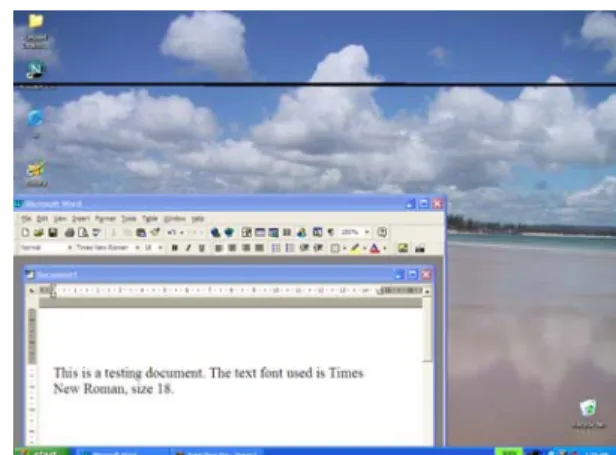
arrays where each array element represents a colour to be displayed at a specific location. For example, in Fig. 1, a pixel (x1, y1), located at where the Microsoft Word window is, is an element of the array (x, y), which represents the whole frame image. After the window has been moved to a new location in Fig. 2, (x1, y1) does not belong to the Word window any more. The color at location (x1, y1) has to change, hence a new frame image Fig. 2, which has the same dimension as in Fig. 1, has to be stored in memory.
The following section introduces the proposed vector approach, which is suitable for both high quality computer screen teleconferencing and small file storage size. Then some details regarding the design for both usages are described, followed by a comparison between the bitmap and the proposed vector approach.
2 The Vector Quantisation Approach
Vector quantisation is a building block. It breaks up the image into a small number of canonical pieces and stores only a reference to which piece goes where.
Vector quantisation has been used widely in 2 dimensional graphic productions long before the pixel mapping bitmap method, which most modern computer monitors are currently using [6,7]. One example is using primitives to draw pictures. An arc of a circle is a primitive in some graphic drawing software. Two arcs with different radius but their end points meet together can form a picture of a quarter of the moon. The vector approach proposed below extends this concept to a 3 dimensional space on computer screen.
The vector approach treats a normal computer screen as a collection of several different objects. For example, Fig. 1 consists of the following objects:
• the background wallpaper,
• several application icons on the left hand side of the image (each icon as one single object),
• the task bar at the bottom,
• several icons on the task bar (each icon as one single object),
• the Microsoft Word window.
Each object carries three values: its own global address, which is with respect to the complete computer screen, the queue number with respect to the front most object, and its own 2-dimentional colour value array. The first two values determine the global relative location of the object. The last value is the object’s local actual value (its content).
For example, the queue number of the Word window in Fig.2 shows that it is in front of all application icons, therefore should be displayed last. The Word in Fig. 3 is at the same position as in Fig. 2, but is inactive. Its queue number should reflect this by having a value less than the front-most object. When the Word window is displayed, the global address shows where exactly it should be display on the screen. The whole display process is like an oil painting. Each object is a layer. The whole picture is painted layer by layer. On the other hand, the bitmap approach is “hit and fetch”. When it moves to a new location, fetch the location corresponding pixel value from the memory and display. It is like multiple objects/layers collapse into a flat-out one-layer version.
Figs.1 and 2 show movement of one application window during capture session, we can compare the difference between the bitmap and vector approach from here. Bitmap approach treats Figs. 1 and 2 as two distinguish and independent images. The vector approach treat the two images as having the same amount and contents of components, so no new memory storage is required. The global address of Word window in Fig.1 is differ to that in Fig. 2, hence the only action needed to be recorded is the modification of the object’s global address on the time line at the point when Fig. 2 takes place.
3 Detail of System Design
3.1 Computer Screen Capture Area
The system can be used to capture either the full computer screen or a chosen rectangular area of screen portion. The choice is up to the user. The complete screen capture is an easy one-to-one
mapping. The porion screen area capture is done via the following mapping procedure. To make a customised capture area, the user has to click at one point of the screen, (x1, y1), and drag the mouse to define the diagonal of the rectangular area, which produce the other end point of the diagonal, (x2, y2). Hence the customised recording area can use the follow matrix to map all objects appearing in the capture area onto an independent local window:
[1 0 (x2-x1)] [0 1 (y2-y1)] [0 0 1 ]
3.2 Object Capture and Change Detection
When a computer is turned on, most displayable and non-displayable items are managed as objects by the operating system manager. To capture all the displayable items on the screen, a program is already written to extract the upper left corner location and size of the item/object, the pixel values or image content of the object is stored as part of the object. Object components are detailed in section 2. The program can also detect which layer (or order in the queue) the object is currently at. The program is run in real time, which means as soon as change occurs in the OS manager, the program reflects such change. There is no preset time cycle or performance set. Time line of recording is managed in a separate channel/buffer.
One very important object on the computer screen is the mouse cursor. The size of a mouse cursor is very small, but it contributes to at least half of the screen changes that cause the bitmap methods to create and store new images in a video production process. The proposed vector quantisation detects the mouse movement and updates its global address instantly in the reference point, which cause the video controller to display the same object content in a new location on the monitor without change in memory frame buffer. In the proposed system, the mouse movement is recorded in a different channel separate to the screen.
3.3 Teleconferencing vs. Storage
Most methods described in section one are designed for only one application area or the
other, either teleconferencing or small storage. The vector system is suitable for both areas. If the teleconferencing option is chosen, the program operates in a mode similar to server-client communication. The server-client display update is on demand. This service allows multiple users to share the same video stream. At the initial stage of connection establishment, the server computer transfers all the existing screen object contents across to the client computer and store in a temporal frame buffer. During the communication period, if any change in the server screen has been detected, the change command is sent across the connection instantly and client computer updates its display according to the change. If the change involves new object contents, i.e. a new application window has been opened, only the new object is needed for the transfer, the rest remain the same in memory. If an application has been closed, the change command will represent a destroy-signal to free the memory and its reference allocated to the object. If no change has been detected, no transfer is required; hence the connection is free for other packet transfer on the network.
If recording option is chosen, one extra memory allocation, the time line frame buffer, is needed to record change of actions correspond to time, rather than instant reflection of change on the client computer as described above. The rest of the recording is simply appending sequence of object reference changes to the time line according to the action performed on the computer screen.
3.4 Compression of Object Contents
The raw object contents are in bitmap format when first captured from the screen. The bitmap is first converted from raw RGB (Red Green Blue) color space to HSV (Hue Saturation Value) color space [8] for more efficient comparison and process with pixel values of the image. Document analysis is then applied to the bitmap and separate text area from graphic region; hence break the bitmap image down to smaller pieces of images, which is another vector quantisation. Since graphic image usually have continuous change in color tone or density, graphic compression techniques is
applied to these regions. Image or region that contain text is more likely to have two discrete colors, one for background, one for the text. Hence text image can have better compression rate than graphic image by storing the following in memory: ASCII text, text font, text color, text size, background color and size of the image. To regenerate the text image, the whole image is first filled with background color, then ASCII text is painted on top of the background object with specific font, size and color. The text image compression is another application of vector quantisation.
4 Comparison: Bitmap and Vector Approaches
The initial overhead of vector approach is relatively greater than bitmap approach, but the running cost will be absolutely smaller than bitmap since only portion of the complete bitmap is transferred or stored at certain time. Figs. 1 and 2 show the dragging movement for the Word window. A bitmap approach needs to store 2 frame images to represent the change. The vector approach only need to transfer all the original object contents and store in the frame buffer once, then refer to the memory location to display them at different location at different point of time recorded on the time line. When the average difference between frames is very small, a lot of storage space is wasted just for a simple shift in mouse position or flickering of a cursor in bitmap approach. The vector approach also performs well with large degree of change such as key frames or bringing another application to the foreground, since the change only needs modification on queue numbers, without the change of actual object pixel value, which occupies memory space. The longer the recording, the more memory storage saving is vector quantisation comparing to bitmap representation.
Vector quantisation also provides ease of post editing, which is almost impossible from bitmap frames. For example, a task of “how to open a document” is performed within Microsoft Word window and is recorded by the proposed vector system. If the background object of such task is replaced with a Microsoft Excel application
window, the video produced will be about Excel rather than Word. The theme of the video has been edited without another recording. Besides of the above post editing advantage, the proposed system also provide what normal bitmap approach can afford, such as segmenting, appending file to make the recording process easy.
5 Conclusion
This paper presents a vector quantisation approach to provide solutions to capture computer screen actions with efficient network bandwidth and storage requirements. Through comparison with existing approaches, theoretically, the vector approach can achieve better result, especially for extensive period of recording.
6 References
[1] Camtasia: Camtasia Screen Capture SDK,
http://www.techsmith.com.
[2] PAL: PAL PC Spy, http://www.palsol.com/. [3] NTSE: http://www.software.hp.com/.
[4] Allen, J. G. and Jin, J. S., (2001): Enhancing Screen Teleconferencing with Streaming SIMD Extensions.
Pan-Sydney Workshop on Visual Information Processing, Sydney, Australia, 11: 143-149, ACS. [5] Burnell, J. (2003): CaptureCam-Pro presentation
seminar in School of Information Technology, University of Sydney, 27th August, 2003.
http://www.capturecampro.com
[6] Miano, J. (2000): Compressed Image File Formats, Addison-Wesley, New York.
[7] Linde, Y. Buzo A. and Gray, R.M. (January, 1980): An Algorithm for Vector Quantizer Design, IEEE Trans. on Communications, COM-28(1), 84-95. [8] Sangwine S.J. and Horne, R.E.N. (eds.) (1998): The
Colour Image Processing Handbook, Chapman & Hall, London, UK.
7 Appendix
Fig 1. A computer screen shot
Fig. 2. Same screen shot of Fig. 1, after moving the application window
Fig. 3. Screen shot of Word application in the same position as Fig. 2, but inactive.