RW1067
34COM/80SEG DRIVER & CONTROLLER FOR DOT MATRIX LCD
INTRODUCTION
RW1067 is a dot matrix LCD driver & controller LSI which is fabricated by low power CMOS technology.
It can display 4 lines x 16 ( 5 x 8 dot format ) or 2 lines x 16 ( 5 x 8 dot format ). It is ideal for multi-language application. Standard code RW1067-0B can support up to 25 different multi-language. With the extended CGROM, maximum 1008 fonts can be included. Customized codes are available.
FUNCTIONS
- Character type dot matrix LCD driver & controller
- Internal drivers: 34 common and 80 segment or 18 common and 80 segment output
- Easy interface with 4-bit or 8-bit MPU or standard 4 lines / 3 lines serial peripheral interface ( SPI ) - 5 x 8 dot matrix possible
- Bi-directional shift function - All character reverse display - Display shift per line
- Voltage converter for LCD drive voltage : 10 V max (2 times / 3 times) - Various instruction functions
- Automatic power on reset
FEATURES
- Internal Memory
- Character Generator ROM (CGROM): 9,600 bits x 1+10,240 bits x 3 (240+256 x 3 characters x 5 x 8 dot)
- Character Generator RAM (CGRAM) : 64 x 8 bits (8 characters x 5 x 8 dot) - Icon RAM (SEGRAM) : 16 x 8 bits (80 icons max.)
- Display Data RAM (DDRAM) : 80 x 10 bits (80 characters max.) - Low power operation
- Power supply voltage range : 2.7 ~ 5.5 V (VDD) - LCD Drive voltage range : 3.0 ~ 10 V (V0 – Vss) - CMOS process
- Programmable duty cycle :1/17, 1/33 (refer to Table 1.) - Internal oscillator with an external resistor
- Low power consumption - Bare chip available
RW1067
34COM/80SEG DRIVER & CONTROLLER FOR DOT MATRIX LCD
RW1067 Serial Revision History
Version
Date
Description
1.1 2006/04/11
Modify Time Characteristics
AC Characteristics
、
DC Characteristics
、
1.2 2006/07/05
Pad Configuration add Substrate connects to
VSS
1.3 2006/07/14
Add CHIP LAYOUT
Add 4-PIN
、
3-PIN SPI Circuit and initializing by
instruction
1.4 2006/09/01
Add 4-line display mode circuit
1.5 2006/10/25
Add the Hebrew language
1.6 2007/1/22
Correct typing mistake for DDRAM. Add explanation toDDRAM section
1.7 2007/4/23
Add I/O pad configuration and modify MPU
RW1067
34COM/80SEG DRIVER & CONTROLLER FOR DOT MATRIX LCD
Programmable duty cycles
(Table 1)
Single-chip Operation
Display Line
Numbers
Duty Ratio
Displayable characters
Possible icons
2
1/17
2 lines of 16 characters ( 5
x 8 dots )
80
4
1/33
4 lines of 16 characters ( 5
x 8 dots )
80
RW1067
34COM/80SEG DRIVER & CONTROLLER FOR DOT MATRIX LCD
BLOCK DIAGRAM //34 bit Sh Register 34 bit Shift Register 34 bit Shift Register Instruction Register (IR) Instruction Decoder Address Counter Display Data RAM (DDRAM) 80 x 10 bit Oscillator Power On Reset (POR) System Interface Serial 4 bit 8 bit Input / Output Buffer Timing Generator Data Regist er (DR) Busy Flag VD2 Voltage Converter Segment RAM ( SEGRAM) 16 bytes Character Generator RAM (CGRAM) 64 bytes
Parallel / Serial Converter
34 bit Shift Register Common Driver 84 bit Shift Register 84 bit Latch Circuit Segment Driver LCD Driver Voltage Selector Character Generator ROM (CGROM) 9600 bits x 4 Cursor and Blink controller PSB RS E E / SCLK RW DB7/SID DB6/SCLK DB5/CS DB4 ~DB0 VR C1N C1P C2N C2P Vout VDD GND ( VSS ) XRESET OSC1 OSC2 COM1 ~ COM33 ICON SEG1~ SEG80 V0 ~ V4 7 7 8 8 3 8 10 8 7 10 5/6 5/6 8
RW1067
34COM/80SEG DRIVER & CONTROLLER FOR DOT MATRIX LCD
PAD CONFIGURATION 14 2 S E G 5 5 14 1 S E G 5 4 14 0 S E G 5 3 13 9 S E G 5 2 13 8 S E G 5 1 13 7 S E G 5 0 13 6 S E G 4 9 13 5 S E G 4 8 13 4 S E G 4 7 13 3 S E G 4 6 13 2 S E G 4 5 13 1 S E G 4 4 13 0 S E G 4 3 12 9 S E G 4 2 12 8 S E G 4 1 12 7 S E G 4 0 12 6 S E G 3 9 12 5 S E G 3 8 12 4 S E G 3 7 12 3 S E G 3 6 12 2 S E G 3 5 12 1 S E G 3 4 12 0 S E G 3 3 11 9 S E G 3 2 11 8 S E G 3 1 11 7 S E G 3 0 11 6 S E G 2 9 11 5 S E G 2 8 11 4 S E G 2 7 SEG56 1 SEG57 2 SEG58 3 SEG59 4 SEG60 5 SEG61 6 SEG62 7 SEG63 8 SEG64 9 SEG65 10 SEG66 11 SEG67 12 SEG68 13 SEG69 14 SEG70 15 SEG71 16 SEG72 17 SEG73 18 SEG74 19 SEG75 20 SEG76 21 SEG77 22 SEG78 23 SEG79 24 SEG80 25 COM32 26 COM31 27 COM30 28 COM29 29 COM28 30 COM27 31 COM26 32 COM25 33 COM16 34 COM15 35 COM14 36 COM13 37 COM12 38 COM11 39 COM10 40 COM09 41 ICON1 42 113 SEG26 112 SEG25 111 SEG24 110 SEG23 109 SEG22 108 SEG21 107 SEG20 106 SEG19 105 SEG18 104 SEG17 103 SEG16 102 SEG15 101 SEG14 100 SEG13 99 SEG12 98 SEG11 97 SEG10 96 SEG9 95 SEG8 94 SEG7 93 SEG6 92 SEG5 91 SEG4 90 SEG3 89 SEG2 88 SEG1 87 COM24 86 COM23 85 COM22 84 COM21 83 COM20 82 COM19 81 COM18 80 COM17 79 COM8 78 COM7 77 COM6 76 COM5 75 COM4 74 COM3 73 COM2 72 COM1 VDD 43 OSC2 44 OSC1 45 XR E S E T 4 6 PS B 47 V R 48 VSS 49 RS 50 R W 51 E 52 DB0 53 DB1 54 DB2 55 DB3 56 DB4 57 DB 5 /C S B 58 DB 6 /SC LK 59 DB 7 /S ID 60 C2P 61 C2N 62 C1P 63 C1N 64 VO UT 65 V0 66 V1 67 V2 68 V3 69 V4 70 I C O N 2 71 X Y ( 0, 0 ) Chip size: 4856 x 3455 Pad Pitch: 105~130 Pad size: 90 x 90 Unit:µm Substrate connects to VSS + MARK
RW1067
34COM/80SEG DRIVER & CONTROLLER FOR DOT MATRIX LCD
CHIP LAYOUT
Digital
Analog
ROM
PIN 1ROM
ROM
ROM
RAM
RW1067
34COM/80SEG DRIVER & CONTROLLER FOR DOT MATRIX LCD
PAD LOCATION
UNIT: (µm )
COORDINATE COORDINATE COORDINATE
PAD NUMB ER PAD NAME X Y PAD NU MBE R PAD NAME X Y PAD NU MBE R PAD NAME X Y 1 SEG56 -2203 -1623 49 VSS 2323 -831 97 SEG10 -474 1623 2 SEG57 -2073 -1623 50 RS 2323 -727 98 SEG11 -580 1623 3 SEG58 -1953 -1623 51 RW 2323 -623 99 SEG12 -685 1623 4 SEG59 -1843 -1623 52 E 2323 -519 100 SEG13 -790 1623 5 SEG60 -1738 -1623 53 DB0 2323 -415 101 SEG14 -895 1623 6 SEG61 -1632 -1623 54 DB1 2323 -312 102 SEG15 -1000 1623 7 SEG62 -1527 -1623 55 DB2 2323 -208 103 SEG16 -1106 1623 8 SEG63 -1422 -1623 56 DB3 2323 -104 104 SEG17 -1211 1623 9 SEG64 -1316 -1623 57 DB4 2323 0 105 SEG18 -1316 1623 10 SEG65 -1211 -1623 58 DB5 / CSB 2323 104 106 SEG19 -1422 1623 11 SEG66 -1106 -1623 59 DB6 / SCLK 2323 208 107 SEG20 -1527 1623 12 SEG67 -1000 -1623 60 DB7 / SID 2323 312 108 SEG21 -1632 1623 13 SEG68 -895 -1623 61 C2P 2323 416 109 SEG22 -1738 1623 14 SEG69 -790 -1623 62 C2N 2323 519 110 SEG23 -1843 1623 15 SEG70 -685 -1623 63 C1P 2323 623 111 SEG24 -1953 1623 16 SEG71 -579 -1623 64 C1N 2323 727 112 SEG25 -2073 1623 17 SEG72 -474 -1623 65 VOUT 2323 831 113 SEG26 -2203 1623 18 SEG73 -369 -1623 66 V0 2323 935 114 SEG27 -2323 1503 19 SEG74 -263 -1623 67 V1 2323 1039 115 SEG28 -2323 1373 20 SEG75 -158 -1623 68 V2 2323 1143 116 SEG29 -2323 1253 21 SEG76 -53 -1623 69 V3 2323 1253 117 SEG30 -2323 1143 22 SEG77 53 -1623 70 V4 2323 1373 118 SEG31 -2323 1039 23 SEG78 158 -1623 71 ICON2 2323 1503 119 SEG32 -2323 935 24 SEG79 263 -1623 72 COM1 2203 1623 120 SEG33 -2323 831 25 SEG80 369 -1623 73 COM2 2073 1623 121 SEG34 -2323 727 26 COM32 474 -1623 74 COM3 1953 1623 122 SEG35 -2323 623 27 COM31 579 -1623 75 COM4 1843 1623 123 SEG36 -2323 519 28 COM30 684 -1623 76 COM5 1738 1623 124 SEG37 -2323 416 29 COM29 790 -1623 77 COM6 1632 1623 125 SEG38 -2323 312 30 COM28 895 -1623 78 COM7 1527 1623 126 SEG39 -2323 208 31 COM27 1000 -1623 79 COM8 1422 1623 127 SEG40 -2323 104 32 COM26 1106 -1623 80 COM17 1316 1623 128 SEG41 -2323 0 33 COM25 1211 -1623 81 COM18 1211 1623 129 SEG42 -2323 -104 34 COM16 1316 -1623 82 COM19 1106 1623 130 SEG43 -2323 -208 35 COM15 1422 -1623 83 COM20 1000 1623 131 SEG44 -2323 -312 36 COM14 1527 -1623 84 COM21 895 1623 132 SEG45 -2323 -415 37 COM13 1632 -1623 85 COM22 790 1623 133 SEG46 -2323 -519 38 COM12 1738 -1623 86 COM23 684 1623 134 SEG47 -2323 -623 39 COM11 1843 -1623 87 COM24 579 1623 135 SEG48 -2323 -727 40 COM10 1953 -1623 88 SEG1 474 1623 136 SEG49 -2323 -831 41 COM9 2073 -1623 89 SEG2 369 1623 137 SEG50 -2323 -935 42 ICON1 2203 -1623 90 SEG3 263 1623 138 SEG51 -2323 -1039 43 VDD 2323 -1503 91 SEG4 158 1623 139 SEG52 -2323 -1143 44 OSC2 2323 -1373 92 SEG5 53 1623 140 SEG53 -2323 -1253 45 OSC1 2323 -1253 93 SEG6 -53 1623 141 SEG54 -2323 -1373 46 XRESET 2323 -1143 94 SEG7 -158 1623 142 SEG55 -2323 -1503
47 PSB 2323 -1039 95 SEG8 -263 1623
48 VR 2323 -935 96 SEG9 -369 1623
RW1067
34COM/80SEG DRIVER & CONTROLLER FOR DOT MATRIX LCD
PAD DESCRIPTION
PAD(NO) INPUT/OU TPUT
DESCRIPTION
INTERFACE
VDD For logical circuit(+3V,+5V)
VSS 0V (GND)
V0-V4
- Power supply
Bias voltage level for LCD driving
Power supply
VR Input input voltage Reference Reference voltage input to generate V0 -
SEG1-SEG80 Output Segment output Segment signal output for LCD drive LCD
ICON1、ICON2 Output Common
output Common signal output for LCD drive LCD
COM1-COM32 Output Common
output Common signal output for LCD drive LCD
OSC1,OSC2 Input (OSC1), Output (OSC2) Oscillator
When use internal oscillator, connect external Rf resistor.
If external clock is used, connect it to OSC1,
OSC2 is floating. External resistor/oscillator (OSC1) C1N,C1P C2N,C2P Input External Capacitance input
To use the voltage converter (2 times/ 3 times), these pins must be connected to the external capacitance.
(Please see page 36 for more detail)
External Capacitance
XRESET Input Reset pin Initialized to Low -
VOUT Output
Two / Three times converter
output
Voltage converter output voltage
RW1067
34COM/80SEG DRIVER & CONTROLLER FOR DOT MATRIX LCD
PAD DESCRIPTION (continued)
PAD(NO) INPUT/OU TPUT DESCRIPTION INTERFACE PSB Input Interface mode selection
Select Interface mode with the MPU. When PSB = “Low” : Serial mode,
When PSB = “High”: 4 -bit / 8 -bit bus mode.
MPU
RS Input Register select
In bus mode, used as register selection input. When RS = “High”, Date register is selected. When RS = “Low”, Instruction register is selected.
MPU
E Input Read. Write
enable In bus mode, used as read write enable signal. MPU
RW Input Read.
Write
In bus mode, used as read / write selection input. When RW =”High”, read operation.
When RW =”Low”, write operation.
MPU
DB0-DB3 Input.
Output Data bus 0~3
In 8-bit bus mode, used as low order bi-directional data bus. During 4-bit bus mode or serial mode, open these pins.
.
MPU
DB4 Output Input. Data bus 4 In 8-bit bus mode, used as high order bi-directional data bus. In case of 4-bit bus mode, used as both high and low order. MPU
DB5/CSB Input. Output
Data bus 5 / Chip select
In 8-bit bus mode, used as high order bi-directional data bus. In case of 4-bit bus mode, used as both high and low order. In serial mode, used as chip selection input.
When CSB = “Low”, selected
When CSB = “High”, not selected. ( Low access enable )
MPU
DB6/SCLK Input. Output
Data bus 6 / Serial clock
In 8-bit bus mode, used as high order bi-directional data bus. In case of 4-bit bus mode, used as both high and low order. In serial mode, used as serial clock input pin.
MPU DB7/SID Input. Output Data bus 7 / Serial input data
In 8-bit bus mode, used as high order bi-directional data bus. In case of 4-bit bus mode, used as both high and low order. DB7 used for Busy Flag output.
In serial mode, used for data input pin.
RW1067
34COM/80SEG DRIVER & CONTROLLER FOR DOT MATRIX LCD
INSTRUCTION DESCRIPTION Instruction Code Instruction RE RS R/W DB7 DB6 DB5 DB4 DB3 DB2 DB1 DB0 Description Execution Time ( fosc = 270 kHz ) Clear
Display x 0 0 0 0 0 0 0 0 0 1 Write “20H” to DDRAM. and set
DDRAM address to “00H” from AC. 1.53ms
Return
Home 0 0 0 0 0 0 0 0 0 1 X
Set DDRAM address to “00H” from AC and return cursor to its original position if shifted.
The contents of DDRAM are not changed. 1.53ms Power Down Mode 1 0 0 0 0 0 0 0 0 1 PD
Set power down mode bit. PD = “1” : power down mode set, PD = “0”: power down mode disable.
37µs
0 0 0 0 0 0 0 0 1 I/D S
Assign cursor moving direction. I/D = “1”: increment I/D = “0”: decrement And display shift enable bit. S = “1”: make display shift of the
enabled lines by the DS4 - DS1 bits in the Shift Enable instruction.
S = “0”: display shift disable Entry
Mode Set
1 0 0 0 0 0 0 0 1 1 BID
Segment bi-direction function. BID = “1”: Seg80→Seg1 BID = “0”: Seg1→Seg80
37µs
Display ON/OFF
Control 0 0 0 0 0 0 0 1 D C B
Set display / cursor / blink on/off D = “1”: display on, D = “0”: display off, C = “1”: cursor on, C = “0”: cursor off, B = “1”: blink on, B = “0: blink off. 37µs Extended Function set 1 0 0 0 0 0 0 1 0 B/W NW
Assign black/white inverting of cursor, and 4-line display mode control bit.
B/W = “1”: black/white inverting of cursor enable, B/W = “0”: black/white inverting of
cursor disable NW =”1”: 4-line display mode, NW =”0”: 2-line display mode.
RW1067
34COM/80SEG DRIVER & CONTROLLER FOR DOT MATRIX LCD
Instruction Code Instruction RE RS R/W DB7 DB6 DB5 DB4 DB3 DB2 DB1 DB0 Description Execution Time ( fosc = 270 kHz ) Cursor or Display shift 0 0 0 0 0 0 1 S/C R/L X X
Cursor or display shift. S/C = “1” : display shift, S/C = “0” : cursor shift, R/L = “1” : shift to right, R/L = “0” : shift to left. 37µs Shift Enable 1 0 0 0 0 0 1 DS4 DS3 DS2 DS1 (when DC = “1“ )
Determine the line for display shift. DS1 = “1/0”: 1st line display shift
enable/disable DS2 = “1/0”: 2nd line display shift
enable/disable DS3 = “1/0”: 3rd line display shift enable/disable DS4 = “1/0: “4th line display shift enable/disable.
37µs
Code Bank
Selection 1 0 0 0 0 0 1 X X CB1 CB0 (when DC = “0“ )
(CB1, CB0) = ( 0, 0 ) ROM code Bank 0 selected ( 0, 1 ) ROM code Bank 1 selected ( 1, 0 ) ROM code Bank 2 selected ( 1, 1 ) ROM code Bank 3 selected
37µs
0 0 0 0 0 1 IF X RE(0) DC REV
Set interface data length (IF =”1”: 8-bit, IF =”0”: 4-bit ), extension register, RE(“0”), shift enable.
DC=”1”: enable display shift per line. DC=”0”: enable the selection of code bank. Reverse bit
REV =”1”: reverse display, REV =”0”: normal display.
37µs Function
Set
1 0 0 0 0 1 IF X RE(1) BE 0
Set IF,N, RE(“1”) and CGRAM/SEGRAM blink enable (BE)
BE = “1/0”: CGRAM/SEGRAM blink enable/disable.
RW1067
34COM/80SEG DRIVER & CONTROLLER FOR DOT MATRIX LCD
Instruction Code Instruction RE RS R/W DB7 DB6 DB5 DB4 DB3 DB2 DB1 DB0 Description Execution Time ( fosc = 270 kHz ) Set CGRAM Address
0 0 0 0 1 AC5 AC4 AC3 AC2 AC1 AC0 Set CGRAM address in address
counter. 37µs Set
SEGRAM Address
1 0 0 0 1 X X AC3 AC2 AC1 AC0 Set SEGRAM address in address
counter. 37µs Set
DDRAM Address
0 0 0 1 AC6 AC5 AC4 AC3 AC2 AC1 AC0 Set DDRAM address in address
counter. 37µs
Set Data
Length 1 0 0 1 SD6 SD5 SD4 SD3 SD2 SD1 SD0 Set data length for 3 line SPI 37µs
Read Busy flag and Address
X 0 1 BF AC6 AC5 AC4 AC3 AC2 AC1 AC0
Can know internal operation is ready or not by reading BF.
The contents of address counter can also be read.
BF = “1” : busy state, BF = ”0” : ready state.
0µs
Write Data X 1 0 D7 D6 D5 D4 D3 D2 D1 D0 Write data into internal RAM. (DDRAM / CGRAM / SEGRAM).
43µs
Read Data X 1 1 D7 D6 D5 D4 D3 D2 D1 D0 Read data from internal RAM. (DDRAM / CGRAM / SEGRAM).
43µs
Note : 1. When an MPU program with Busy Flag(DB7) checking is made, 1/ 2 FOSC ( is necessary ) for executing the next instruction by the “ E “ signal after the Busy Flag ( DB7) goes to “ Low ”.
RW1067
34COM/80SEG DRIVER & CONTROLLER FOR DOT MATRIX LCD
RW1067
34COM/80SEG DRIVER & CONTROLLER FOR DOT MATRIX LCD
RW1067
34COM/80SEG DRIVER & CONTROLLER FOR DOT MATRIX LCD
FUNCTION DESCRIPTION
SYSTEM INTERFACE
This chip has all three kinds interface type with MPU : serial, 4-bit bus and 8-bit bus. Serial and bus (4-bit/8-bit) is selected by PSB input, and 4-bit bus and 8-bit bus is selected by IF bit in the instruction register. During read or write operation, two 8-bit registers are used. One is data register (DR), the other is instruction register (IR). The data register (DR) is used as temporary data storage place for being written into or read from DDRAM/CGRAM/SEGRAM, target RAM is selected by RAM address setting instruction. Each internal operation, reading from or writing into RAM, is done automatically. So to speak, after MPU reads DR data, the data in the next DDRAM/CGRAM/SEGRAM address is transferred into DR automatically. Also after MPU writes data to DR, the data in DR is transferred into DDRAM/CGRAM/SEGRAM automatically.
The Instruction register (IR) is used only to store instruction code transferred from MPU. MPU cannot use it to read instruction data. To select register, use RS input pin in 4-bit/8-bit bus mode (PSB = "High") or RS bit in serial mode (PSB= "Low").
RS R/W Operation
0 0 Instruction write operation (MPU writes Instruction code into IR)
0 1 Read busy flag (DB7) and address counter (DB0 - DB6)
1 0 Data write operation (MPU writes data into DR)
1 1 Data read operation (MPU reads data from DR)
BUSY FLAG (BF)
When BF = "High", it indicates that the internal operation is being processed. So during this time the next instruction cannot be accepted. BF can be read, when RS = Low and R / W = High (Read Instruction Operation), through DB7 Before executing the next instruction, be sure that BF is not High.
RW1067
34COM/80SEG DRIVER & CONTROLLER FOR DOT MATRIX LCD
DISPLAY DATA RAM (DDRAM)
DDRAM stores display data of maximum 80 x 10 bits (80 characters). DDRAM address is set in the address counter (AC) as a hexadecimal number. (refer to Figure 1.)
MSB LSB
AC6 AC5 AC4 AC3 AC2 AC1 AC0
Figure 1. DDRAM Address
Since DDRAM has 10 bits data. It is possible to access 1024 CGROM/CGRAM fonts. Please first set the code bank which is described in page 27 (2bits) then use “data write”(8 bits data). Total 10 bits of data will be stored in DDRAM by this way. Code bank data doesn’t need to be set repeatedly if selected characters are in the same bank. Please also be noted that CGRAM only exit in bank 0 locations.
RW1067
34COM/80SEG DRIVER & CONTROLLER FOR DOT MATRIX LCD
5-dot 2-line Display
In case of 2-line display with 5-dot font, the address range of DDRAM is 00H-27H, 40H-67H (refer to Figure 2.)
1 2 3 4 5 6 7 8 9 10 11 12 13 14 15 16 ← Display Position
COM1 ←
COM8 00 01 02 03 04 05 06 07 08 09 0A 0B 0C 0D 0E 0F DDRAM Address
COM9 COM16 40 41 42 43 44 45 46 47 48 49 4A 4B 4C 4D 4E 4F
1 2 3 4 5 6 7 8 9 10 11 12 13 14 15 16 COM1 COM8 01 02 03 04 05 06 07 08 09 0A 0B 0C 0D 0E 0F 10 COM9 COM16 41 42 43 44 45 46 47 48 49 4A 4B 4C 4D 4E 4F 50
(After Shift Left)
1 2 3 4 5 6 7 8 9 10 11 12 13 14 15 16
COM1 COM8 27 00 01 02 03 04 05 060 07 08 09 0A 0B 0C 0D 0E COM9 COM16 67 40 41 42 43 44 45 46 47 48 49 4A 4B 4C 4D 4E
(After Shift Right)
( Figure 2.) 2 - line X 16ch. Display ( 5-dot Font Width )
RW1067
34COM/80SEG DRIVER & CONTROLLER FOR DOT MATRIX LCD
5-dot 4-line Display
In case of 4-line display with 5-dot font, the address range of DDARM is 00H-13H, 20H-33H, 40H-53H, 60H-73H.
(refer to Figure 3)
1 2 3 4 5 6 7 8 9 10 11 12 13 14 15 16 ← Display Position COM1
COM8 00 01 02 03 04 05 06 07 08 09 0A 0B 0C 0D 0E 0F ← DDRAM Address COM9 COM16 20 21 22 23 24 25 26 27 29 29 2A 2B 2C 2D 2E 2F COM17 COM24 40 41 42 43 44 45 46 47 48 49 4A 4B 4C 4D 4E 4F COM25 COM32 60 61 62 63 64 65 66 67 68 69 6A 6B 6C 6D 6E 6F
SEG1 RW1067 SEG80
1 2 3 4 5 6 7 8 9 10 11 12 13 14 15 16 COM1 COM8 01 02 03 04 05 06 07 08 09 0A 0B 0C 0D 0E 0F 10 COM9 COM16 21 22 23 24 25 26 27 28 29 2A 2B 2C 2D 2E 2F 30 COM17 COM24 41 42 43 44 45 46 47 48 49 4A 4B 4C 4D 4E 4F 50 COM25 COM32 61 62 63 64 65 66 67 68 69 6A 6B 6C 6D 6E 6F 70 (After Shift Left)
1 2 3 4 5 6 7 8 9 10 11 12 13 14 15 16 COM1 COM8 13 00 01 02 03 04 05 06 07 08 09 0A 0B 0C 0D 0E COM9 COM16 33 20 21 22 23 24 25 26 27 28 29 2A 2B 2C 2D 2E COM17 COM24 53 40 41 42 43 44 45 46 47 48 49 4A 4B 4C 4D 4E COM25 COM32 73 60 61 62 63 64 65 66 67 68 69 6A 6B 6C 6D 6E (After Shift Right)
RW1067
34COM/80SEG DRIVER & CONTROLLER FOR DOT MATRIX LCD
TIMING GENERATION CIRCUIT
Timing generation circuit generates clock signals for the internal operations.
ADDRESS COUNTER (AC)
Address Counter (AC) stores DDRAM/CGRAM/SEGRAM address, transferred from IR. After writing into (reading from) DDRAM/CGRAM/SEGRAM, AC is automatically increased (decreased) by 1.
When RS = "Low" and R/W = "High", AC can be read through DB0-DB6
CURSOR/BLINK CONTROL CIRCUIT
It controls cursor/blink ON/OFF and black/white inversion at cursor position.
LCD DRIVER CIRCUIT
LCD Driver circuit has 34 common and 80 segment signals for LCD driving.
Data from SEGRAM/CGRAM/CGROM is transferred to 80 bit segment latch serially,
and then it is stored to 80 bit shift latch. When each COM is selected by 34bit common register, segment data also output through segment driver from 80 bit segment latch. In case of 2 line (5 dots width) display mode, COM0-COM17 have 1/17 duty, In 4-line mode, COM0-COM33 have 1/33 duty ratio.
RW1067
34COM/80SEG DRIVER & CONTROLLER FOR DOT MATRIX LCD
CGROM (CHARACTER GENERATOR ROM)
CGROM has 9,600 bits x 1+10,240 bits x 3 (240+256 x 3 characters x 5 x 8 dot)
CGRAM (CHARACTER GENERATOR RAM)
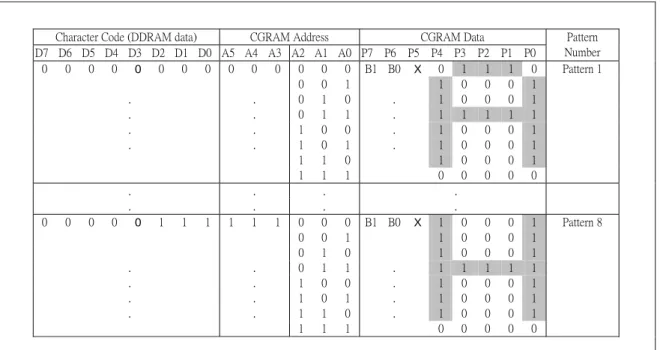
CGRAM has up to 5 × 8 dots 8 characters. By writing font data to CGRAM, user defined character
can be used ( refer to Table 2 ).
5 x8 dots Character Pattern
Table 2. Relationship Between Character Code (DDRAM) and Character Pattern (CGRAM)
Character Code (DDRAM data) CGRAM Address CGRAM Data
D7 D6 D5 D4 D3 D2 D1 D0 A5 A4 A3 A2 A1 A0 P7 P6 P5 P4 P3 P2 P1 P0 Pattern Number 0 0 0 0 0 0 0 0 0 0 0 0 0 0 B1 B0 X 0 1 1 1 0 Pattern 1 0 0 1 1 0 0 0 1 . . 0 1 0 . 1 0 0 0 1 . . 0 1 1 . 1 1 1 1 1 . . 1 0 0 . 1 0 0 0 1 . . 1 0 1 . 1 0 0 0 1 1 1 0 1 0 0 0 1 1 1 1 0 0 0 0 0 . . . . . . . . 0 0 0 0 0 1 1 1 1 1 1 0 0 0 B1 B0 X 1 0 0 0 1 Pattern 8 0 0 1 1 0 0 0 1 0 1 0 1 0 0 0 1 . . 0 1 1 . 1 1 1 1 1 . . 1 0 0 . 1 0 0 0 1 . . 1 0 1 . 1 0 0 0 1 . . 1 1 0 . 1 0 0 0 1 1 1 1 0 0 0 0 0
1. When BE (Blink Enable bit) = "High", blink is controlled by B1 and B0 bit.
In case of 5-dot font width, when B1 = "1", enabled dots of P0-P4 will blink, and when B1 = "0" and B0 = "1", enabled dots in P4 will blink, when B1 = "0" and B0 = "0", blink will not happen.
RW1067
34COM/80SEG DRIVER & CONTROLLER FOR DOT MATRIX LCD
SEGRAM (SEGMENT ICON RAM)
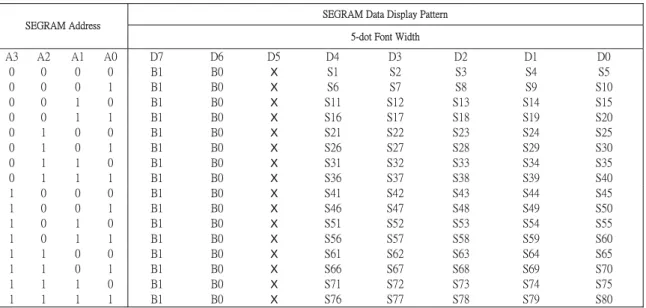
SEGRAM has segment control data and segment pattern data. There are 2 ICON pins act as the COM line to display the icon SEGRAM data. The outputs of these 2 ICON pins are exactly the same. The higher 2-bits of SEGRAM data are blinking control data, and lower 6-bits are pattern data (refer to Table 3 and Figure 4).
Table 3. Relationship between SEGRAM Address and Display Pattern
SEGRAM Data Display Pattern SEGRAM Address
5-dot Font Width
A3 A2 A1 A0 D7 D6 D5 D4 D3 D2 D1 D0 0 0 0 0 B1 B0 X S1 S2 S3 S4 S5 0 0 0 1 B1 B0 X S6 S7 S8 S9 S10 0 0 1 0 B1 B0 X S11 S12 S13 S14 S15 0 0 1 1 B1 B0 X S16 S17 S18 S19 S20 0 1 0 0 B1 B0 X S21 S22 S23 S24 S25 0 1 0 1 B1 B0 X S26 S27 S28 S29 S30 0 1 1 0 B1 B0 X S31 S32 S33 S34 S35 0 1 1 1 B1 B0 X S36 S37 S38 S39 S40 1 0 0 0 B1 B0 X S41 S42 S43 S44 S45 1 0 0 1 B1 B0 X S46 S47 S48 S49 S50 1 0 1 0 B1 B0 X S51 S52 S53 S54 S55 1 0 1 1 B1 B0 X S56 S57 S58 S59 S60 1 1 0 0 B1 B0 X S61 S62 S63 S64 S65 1 1 0 1 B1 B0 X S66 S67 S68 S69 S70 1 1 1 0 B1 B0 X S71 S72 S73 S74 S75 1 1 1 1 B1 B0 X S76 S77 S78 S79 S80
1. B1, B0: Blinking control bit
Control Bit Binking Port
BE B1 B0 5- dot font width
0 X X No blink
1 0 0 No blink
1 0 1 D4
1 1 X D4 - D0
2. S1 - S80: Icon pattern ON/OFF in 5- dot font width 3. " X " : Don't care
RW1067
34COM/80SEG DRIVER & CONTROLLER FOR DOT MATRIX LCD
RW1067
34COM/80SEG DRIVER & CONTROLLER FOR DOT MATRIX LCD
INSTRUCTION DESCRIPTION
OUTLINE
To overcome the speed difference between internal clock of RW1067 and MPU clock, RW1067 performs internal operation by storing control information to IR or DR. The internal operation is determined according to the signal from MPU, composed of read/write and data bus.
Instruction can be divided largely four kinds;
• RW1067 function set instructions (set display methods, set data length, etc.)
• Address set instructions to internal RAM
• Data transfer instructions with internal RAM
• Others
The address of internal RAM is automatically increased or decreased by 1.
NOTE: During internal operation, Busy Flag (DB7) is read high. Busy Flag check must be proceeded the next instruction.
Busy flag check must be proceeded the next instruction.
When an MPU program with Busy Flag (DB7) checking is made, 1/2 Fosc (is necessary) for executing the next instruction by the falling edge of the “E” signal after the Busy Flag (DB7) goes to “Low”.
RW1067
34COM/80SEG DRIVER & CONTROLLER FOR DOT MATRIX LCD
Display Clear
RS R/W DB7 DB6 DB5 DB4 DB3 DB2 DB1 DB0 0 0 0 0 0 0 0 0 0 1
Clear all the display data by writing "20H" (space code) to all DDRAM address, and set DDRAM address to "00H" into AC (address counter). Return cursor to the original status, namely, bring the cursor to the left edge on first line of the display. Make entry mode increment (I/D = "1").
Return Home: (RE = 0)
RS R/W DB7 DB6 DB5 DB4 DB3 DB2 DB1 DB0
0 0 0 0 0 0 0 0 1 X
Return Home is cursor return home instruction. Set DDRAM address to "00H" into the address counter. Return cursor to its original site and return display to its original status, if shifted. Contents of DDRAM does not change.
Power Down Mode Set: (RE = 1)
RS R/W DB7 DB6 DB5 DB4 DB3 DB2 DB1 DB0
0 0 0 0 0 0 0 0 1 PD
Power down mode enable bit set instruction.
PD = “High”, it makes RW1067 suppress current consumption except the current needed for data storage by executing next three functions.
1. Makes the output value of all the COM / SEG ports VSS.
2. Disable voltage converter to remove the current through the divide resistor of power supply. This instruction can be used as power sleep mode.
When PD = “Low”, power down mode becomes disabled.
Entry Mode Set: (RE = 0
)RS R/W DB7 DB6 DB5 DB4 DB3 DB2 DB1 DB0 0 0 0 0 0 0 0 1 I/D S
Set the moving direction of cursor and display.
I/D: Increment/decrement of DDRAM address (cursor or blink)
When I/D = "High", cursor/blink moves to right and DDRAM address is increased by 1. When I/D = "Low", cursor/blink moves to left and DDRAM address is decreased by 1.
CGRAM/SEGRAM operates the same as DDRAM, when read from or write to CGRAM/SEGRAM. When S = "High", after DDRAM write, the display of enabled line by DS1 - DS4 bits in the shift enable instruction is shifted to the right (I/D = "0") or to the left (I/D = "1"). But it will seem as if the cursor does not move. When S = "Low", or DDRAM read, or CGRAM/SEGRAM read/write operation, shift of display like this function is not performed.
RW1067
34COM/80SEG DRIVER & CONTROLLER FOR DOT MATRIX LCD
Entry Mode Set: (RE = 1)
RS R/W DB7 DB6 DB5 DB4 DB3 DB2 DB1 DB0
0 0 0 0 0 0 0 1 1 BID
Set the data shift direction of segment in the application set. BID: Data Shift Direction of Segment
When BID = "Low", segment data shift direction is set to normal order from SEG1 to SEG80. When BID = "High", segment data shift direction is set to reverse from SEG80 to SEG1. By using this instruction, the efficiency of application board area can be raised.
- The BID setting instruction is recommended to be set at the same time level of function set instruction.
- DB1 bit must be set to “1”.
Display ON/OFF Control (RE = 0)
RS R/W DB7 DB6 DB5 DB4 DB3 DB2 DB1 DB0 0 0 0 0 0 0 1 D C B
Control display/cursor/blink ON/OFF 1 bit register. D: Display ON/OFF control bit
When D = "High", entire display is turned on.
When D = "Low", display is turned off, but display data is remained in DDRAM. C: Cursor ON/OFF control bit
When C = "High", cursor is turned on.
When C = "Low", cursor is disappeared in current display, but I/D register remains its data. B: Cursor Blink ON/OFF control bit
When B = "High", cursor blink is on, that performs alternate between all the high data and display character at the cursor position. If fosc has 270kHz frequency, blinking has 370 ms interval.
When B = "Low", blink is off.
Extended Function Set (RE = 1)
RS R/W DB7 DB6 DB5 DB4 DB3 DB2 DB1 DB0
0 0 0 0 0 0 1 0 B/W NW
B/W: Black/ white inversion enable bit
When B/W = "High", black/white inversion at the cursor position is set. In this case C/B bit of display ON/OFF control instruction becomes don't care condition. If fosc has frequency of 270kHz, inversion has 70 ms intervals.
NW: NW =”1”: 4-line display mode, NW: NW =”0”: 2-line display mode.
RW1067
34COM/80SEG DRIVER & CONTROLLER FOR DOT MATRIX LCD
Cursor or Display Shift (RE = 0)
RS R/W DB7 DB6 DB5 DB4 DB3 DB2 DB1 DB0
0 0 0 0 0 1 S/C R/L - -
Without writing or reading of display data, shift right/left cursor position or display. This instruction is used to correct or search display data (refer to Table 4). During 2-line mode display, cursor moves to the 2nd line after 40th digit of 1st line.
When 4-line mode, cursor moves to the next line, only after every 20th digit of the current line. Note that display shift is performed simultaneously in all the line enabled by DS1 - DS4 in the shift enable instruction. When displayed data is shifted repeatedly, each line shifted individually. When display shift is performed, the contents of address counter are not changed.
During low power consumption mode, display shift may not be performed normally.
Table 4. Shift Patterns According to S/C and R/L Bits
S/C R/L Operation
0 0 Shift cursor to the left, address counter is decreased by 1
0 1 Shift cursor to the right, address counter is increased by 1
1 0 Shift all the display to the left, cursor moves according to the display
RW1067
34COM/80SEG DRIVER & CONTROLLER FOR DOT MATRIX LCD
Code Bank Selection
(DC=0)
RS R/W DB7 DB6 DB5 DB4 DB3 DB2 DB1 DB0
0 0 0 0 0 1 x x CB1 CB0
There’s 4 different code bank with each 256 fonts of 5 x 8 bits
CB1 CB0
0 0 code bank 0
0 1 code bank 1
1 0 code bank 2
1 1 code bank 3
When writing to DDRAM for each displaying character the code bank must be properly set.
(DC=1)
RS R/W DB7 DB6 DB5 DB4 DB3 DB2 DB1 DB0
0 0 0 0 0 1 DS4 DS3 DS2 DS1
DS: Display Shift per Line Enable
This instruction selects shifted to be according to each line mode in display shift right/left instruction.
DS1, DS2, DS3 and DS4 indicate each line to be shifted, and each shift is performed individually in each line.
Table 5. Relationship between DS and COM Signal (4 lines)
Enable Bit
Enabled Common Signals during Shift
Operation
DS1 COM1
~
COM8
DS2 COM9
~
COM16
DS3 COM17
~
COM24
DS4 COM25
~
COM32
The parts of display line the
Corresponds to enabled
Common signal can be shifted.
RW1067
34COM/80SEG DRIVER & CONTROLLER FOR DOT MATRIX LCD
Function Set
(RE = 0)
RS R/W DB7 DB6 DB5 DB4 DB3 DB2 DB1 DB0
0 0 0 0 1 IF X RE(0) DC REV
IF : Interface data length control bit
When IF = "High", it means 8-bit bus mode with MPU.
When IF = "Low", it means 4-bit bus mode with MPU. So to speak ,IF is a signal to select 8-bit or 4-bit bus mode.
When 4-bit bus mode, it needs to transfer 4-bit data by two times.
RE : Extended function registers enable bit At this instruction, RE must be "Low". DC : Display shift enable selection bit
When DC = ”High”, enable display shift per line. When DC =”Low”, enable the selection of code bank. REV: Reverse enable bit
When REV = “High”, all the display data are reversed. i.e., all the white dots become black and black dots become white.
When REV =”Low”, the display mode set normal display.
(RE = 1)
RS R/W DB7 DB6 DB5 DB4 DB3 DB2 DB1 DB0
0 0 0 0 1 IF X RE(1) BE 0
IF : Interface data length control bit
When IF = "High", it means 8-bit bus mode with MPU.
When IF = "Low", it means 4-bit bus mode with MPU. So to speak, IF is a signal to select 8-bit or 4-bit bus mode.
When 4-bit bus mode, it needs to transfer 4-bit data by two times. RE: Extended function registers enable bit
When RE = "High", extended function set registers, SEGRAM address set registers, BID bit, DC bits of shift enable instruction and BE bits of function set register can be accessed.
BE: CGRAM/SEGRAM data blink enable bit If BE is "High", It makes user font of CGRAM and segment of SEGRAM blink. The quantity of blink is assigned the highest 2 bit of
RW1067
34COM/80SEG DRIVER & CONTROLLER FOR DOT MATRIX LCD
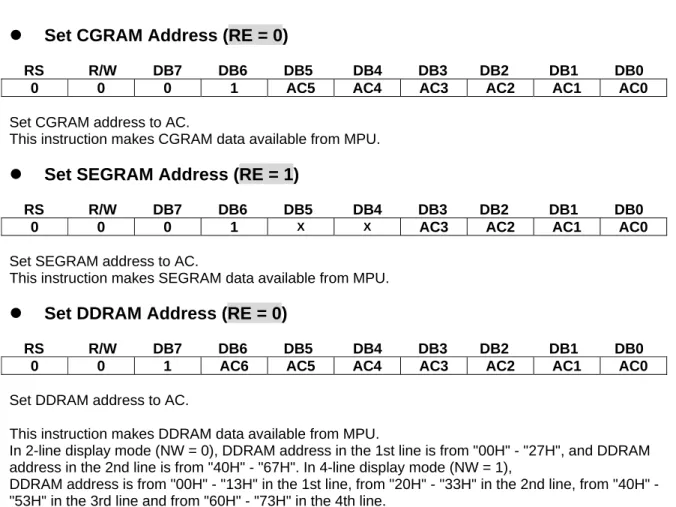
Set CGRAM Address (RE = 0)
RS R/W DB7 DB6 DB5 DB4 DB3 DB2 DB1 DB0
0 0 0 1 AC5 AC4 AC3 AC2 AC1 AC0
Set CGRAM address to AC.
This instruction makes CGRAM data available from MPU.
Set SEGRAM Address (RE = 1)
RS R/W DB7 DB6 DB5 DB4 DB3 DB2 DB1 DB0
0 0 0 1 X X AC3 AC2 AC1 AC0
Set SEGRAM address to AC.
This instruction makes SEGRAM data available from MPU.
Set DDRAM Address (RE = 0)
RS R/W DB7 DB6 DB5 DB4 DB3 DB2 DB1 DB0
0 0 1 AC6 AC5 AC4 AC3 AC2 AC1 AC0
Set DDRAM address to AC.
This instruction makes DDRAM data available from MPU.
In 2-line display mode (NW = 0), DDRAM address in the 1st line is from "00H" - "27H", and DDRAM address in the 2nd line is from "40H" - "67H". In 4-line display mode (NW = 1),
DDRAM address is from "00H" - "13H" in the 1st line, from "20H" - "33H" in the 2nd line, from "40H" - "53H" in the 3rd line and from "60H" - "73H" in the 4th line.
Set data length for 3 line SPI (RE = 1)
RS R/W DB7 DB6 DB5 DB4 DB3 DB2 DB1 DB0
0 0 1 SD6 SD5 SD4 SD3 SD2 SD1 SD0
In 3 line SPI mode, set Data length command indicates the length of data which, are going to be received by RW1067. User should set data length before display data sent. Each data length
instruction maximum can set 80 bytes of data. The table below shows how SD bits set the data length.
Table 6. Set data length according to SD Bits
SD6 SD5 SD4 SD3 SD2 SD1 SD0 Function
0 0 0 0 0 0 0 Followed by 1 data write
0 0 0 0 0 0 1 Followed by 2 data write
0 0 0 0 0 1 0 Followed by 3 data write
0 0 0 0 0 1 1 Followed by 4 data write
: : : : : : : :
RW1067
34COM/80SEG DRIVER & CONTROLLER FOR DOT MATRIX LCD
Read Busy Flag & Address
RS R/W DB7 DB6 DB5 DB4 DB3 DB2 DB1 DB0
0 1 BF AC6 AC5 AC4 AC3 AC2 AC1 AC0
This instruction shows whether RW1067 is in internal operation or not. If the resultant BF is High, it means the internal operation is in progress and you have to wait until BF to be Low, and then the next instruction can be performed. In this instruction you can read also the value of address counter.
Write Data to RAM
RS R/W DB7 DB6 DB5 DB4 DB3 DB2 DB1 DB0 1 0 D7 D6 D5 D4 D3 D2 D1 D0
Write binary 8-bit data to DDRAM/CGRAM/SEGRAM.
The selection of RAM from DDRAM, CGRAM, or SEGRAM, is set by the previous address set instruction:
DDRAM address set, CGRAM address set, SEGRAM address set. RAM set instruction can also determines the AC direction to RAM. After write operation, the address is automatically
increased/decreased by 1, according to the entry mode.
Read Data from RAM
RS R/W DB7 DB6 DB5 DB4 DB3 DB2 DB1 DB0 1 1 D7 D6 D5 D4 D3 D2 D1 D0
Read binary 8-bit data from DDRAM/CGRAM/SEGRAM. The selection of RAM is set by the previous address set instruction. If address set instruction of RAM is not performed before this instruction, the data that read first is invalid, because the direction of AC is not determined. If you read RAM data several times without RAM address set instruction before read operation, you can get correct RAM data from the second, but the first data would be incorrect, because there is no time margin to transfer RAM data. In case of DDRAM read operation, cursor shift instruction plays the same role as DDRAM address set instruction : it also transfer RAM data to output data register. After read operation address counter is automatically increased/decreased by 1 according to the entry mode.
After CGRAM/SEGRAM read operation, display shift may not be executed correctly.
In case of RAM write operation, after this AC is increased/decreased by 1 like read operation. In this time, AC indicates the next address position, but you can read only the previous data by read instruction.
RW1067
34COM/80SEG DRIVER & CONTROLLER FOR DOT MATRIX LCD
INTERFACE WITH MPU
RW1067 can transfer data in bus mode (4-bit or 8-bit) or serial mode with MPU. User can use any type 4 or 8- bit MPU.
In case of 4-bit bus mode, data transfer is performed by two times to transfer 1 byte data.
• When interfacing data length are 4-bit, only 4 ports, from DB4 - DB7, are used as data bus.
At first higher 4-bit (in case of 8-bit bus mode, the contents of DB4 - DB7) are transferred, and then lower 4- bit (in case of 8-bit bus mode, the contents of DB0 - DB3) are transferred. So transfer is performed by two times. Busy Flag outputs "High" after the second transfer are ended.
• When interfacing data length are 8-bit, transfer is performed at a time through 8 ports, from DB0 -
DB7.
RW1067
34COM/80SEG DRIVER & CONTROLLER FOR DOT MATRIX LCD
INTERFACE WITH MPU IN BUS MODE Interface with 8-bit MPU
If 8-bits MPU is used, RW1067 can connect directly with that. In this case, port E, RS, R/W and DB0 to DB7 need to interface each other. Example of timing sequence is shown below.
Figure 5. Example of 8-bit Bus Mode Timing Sequence
Interface with 4-bit MPU
If 4-bit MPU is used, RW1067 can connect directly with this. In this case, port E, RS, R/W and DB4 - DB7 need to interface each other. The transfer is performed by two times. Example of timing sequence is shown below.
RW1067
34COM/80SEG DRIVER & CONTROLLER FOR DOT MATRIX LCD
For serial interface data, bus lines (DB5 to DB7) are used. 4-Pin SPI
If 4-Pin SPI mode is used, CSB (DB5), SID (DB7), SCLK (DB6), and RS are used. They are chip selection; serial input data, serial clock input, and data/instruction section, relatively. The example of timing sequence is shown below.
Example of timing sequence
Note: Following is the master SPI clock mode of MPU.
Idle state for clock is a high level,data transmitted on falling edge of SCLK, and data is hold during low level.
Intel 8051 interface (Serial)
RW1067
34COM/80SEG DRIVER & CONTROLLER FOR DOT MATRIX LCD
For serial interface data, bus lines ( DB5 to DB7 ) are used. 3 – Pin SPI
If 3-Pin SPI mode is used, CSB (DB5), SID (DB7), and SCLK (DB6) are used. they
are chip selection, serial input data, and serial clock input, relatively. 3-Pin SPI
mode does not use RS for data/instruction selection. Data length instruction should
be used to realize data/instruction and data length instruction also indicates length
of data. The example of timing sequence is shown below, data length instruction is
followed by data set.
Example of timing sequence
Note: Following is the master SPI clock mode of MPU.
Idle state for clock is a high level,data transmitted on falling edge of SCLK, and data is hold during low level.
Intel 8051 interface (Serial)
RW1067
34COM/80SEG DRIVER & CONTROLLER FOR DOT MATRIX LCD
INITIALIZING
INITIALIZING BY INTERNAL RESET CIRCUIT
When the power is turned on, RW1067 is initialized automatically by power on reset circuit. During the initialization, the following instructions are executed, and BF (Busy Flag) is kept "High"(busy state) to the end of initialization.
Display Clear Instruction
Write "20H" to all DDRAM
Set Functions Instruction
IF = 1: 8-bit bus mode
RE = 0: Extension register disable BE = 0: CGRAM/SEGRAM blink OFF DC = 0: Code bank selection enable
REV = 0: Normal display (Not reversed display)
Control Display ON/OFF Instruction
D = 0: Display OFF C = 0: Cursor OFF B = 0: Blink OFF
Set Entry Mode Instruction
I/D = 1: Increment by 1 S = 0: No entire display shift
BID = 0: Normal direction segment port
Set Extension Function Instruction
FW = 0: 5-dot font width character display B/W = 0: Normal cursor (8th line)
NW =”1”: 4-line display mode, NW =”0”: 2-line display mode.
Enable Shift Instruction
DS = 0000: Scroll per line disable
Set data length Instruction
SD = 000000
INITIALIZING BY HARDWARE RESET INPUT
When XRESET pin = "Low", RW1067 can be initialized like the case of power on reset. During the power on reset operation, this pin is ignored.
RW1067
34COM/80SEG DRIVER & CONTROLLER FOR DOT MATRIX LCD
INITIALIZING BY INSTRUCTION
8-BIT INTERFACE MODE
Power ON Wait time> 40 ms Function Set RS R/W DB7 DB6 DB5 DB4 DB3 DB2 DB1 DB0 0 Display OFF 0 0 0 0 1 1 X X X X D 1 Display ON 0 Cursor OFF
Wait time> 100 us C 1 Cursor ON
0 Blink OFF
Function Set B 1 Blink ON
RS R/W DB7 DB6 DB5 DB4 DB3 DB2 DB1 DB0 0 Decrement
0 0 0 0 1 1 X X X X I/D 1 Increment
0 Display shift disable
Wait time>100 us S 1 Display shift enable
Display ON/OFF RS R/W DB7 DB6 DB5 DB4 DB3 DB2 DB1 DB0 0 0 0 0 0 0 1 D C B Wait time>100 us Display Clear RS R/W DB7 DB6 DB5 DB4 DB3 DB2 DB1 DB0 0 0 0 0 0 0 0 0 0 1 Wait time> 10 ms Entry Mode Set
RS R/W DB7 DB6 DB5 DB4 DB3 DB2 DB1 DB0
0 0 0 0 0 0 0 1 I/D S
RW1067
34COM/80SEG DRIVER & CONTROLLER FOR DOT MATRIX LCD
4 – BIT INTERFACE MODE
Power ON Wait time> 40ms Function Set RS R/W DB7 DB6 DB5 DB4 0 0 0 0 1 1
Wait time> 100us Function Set
RS R/W DB7 DB6 DB5 DB4 0 Display OFF
0 0 0 0 1 1 D 1 Display ON
0 Cursor OFF
Wait time> 100us C 1 Cursor ON
0 Blink OFF
Function Set B 1 Blink ON
RS R/W DB7 DB6 DB5 DB4 0 Decrement
0 0 0 0 1 1 I/D 1 Increment
0 Display shift disable
Wait time> 100us S 1 Display shift enable
Function Set
RS R/W DB7 DB6 DB5 DB4
0 0 0 0 1 0
Wait time> 100us
(IF= “ 0") Function Set RS R/W DB7 DB6 DB5 DB4 0 0 0 0 1 0 0 0 X 0 X 0 Wait time>100us Display ON/OFF RS R/W DB7 DB6 DB5 DB4 0 0 0 0 0 0 0 0 1 D C B Wait time>100us Display Clear RS R/W DB7 DB6 DB5 DB4 0 0 0 0 0 0 0 0 0 0 0 1 Wait time>10ms Entry Mode Set
RS R/W DB7 DB6 DB5 DB4
0 0 0 0 0 0
RW1067
34COM/80SEG DRIVER & CONTROLLER FOR DOT MATRIX LCD
Serial Interface Mode
Power ON Wait time> 40ms Function Set RS R/W DB7 DB6 DB5 DB4 DB3 DB2 DB1 DB0 0 Display OFF 0 0 0 0 1 1 X X X X D 1 Display ON 0 Cursor OFF
Wait time> 100us C 1 Cursor ON
0 Blink OFF
Display ON/OFF B 1 Blink ON
RS R/W DB7 DB6 DB5 DB4 DB3 DB2 DB1 DB0 0 Decrement
0 0 0 0 0 0 1 D C B I/D 1 Increment
0 Display shift disable
Wait time> 100us S 1 Display shift enable
Display Clear
RS R/W DB7 DB6 DB5 DB4 DB3 DB2 DB1 DB0
0 0 0 0 0 0 0 0 0 1
Wait time> 10ms Entry Mode Set
RS R/W DB7 DB6 DB5 DB4 DB3 DB2 DB1 DB0
0 0 0 0 0 0 0 1 I/D S
RW1067
34COM/80SEG DRIVER & CONTROLLER FOR DOT MATRIX LCD
RB)
RA
(
RB
2
VDD
V0
=
∗
+
RW1067
34COM/80SEG DRIVER & CONTROLLER FOR DOT MATRIX LCD
Table 7. Duty Ratio and Power Supply for LCD Driving
Item Data
Number of lines
2
4
Duty ratio
1/17
1/33
RW1067
34COM/80SEG DRIVER & CONTROLLER FOR DOT MATRIX LCD
Timing Characteristics
Writing data from MPU to RW1067
Reading data from RW1067 to MPU
VIH1 VIL1 tAS tAH tPW tAH tDSW tH tC tr tf Valid data RS E RW DB0-DB7 VIH1 VIL1 tAS tAH tPW tAH tH tC tr tf Valid data RS E RW DB0-DB7 tDDR
RW1067
34COM/80SEG DRIVER & CONTROLLER FOR DOT MATRIX LCD
VOH2 VOL2 tCWH tCST tCWH tCWL tct tDH tSU tDM CL1 CL2 D M tct 2.7V/4.5V 0.2V 0.2V 0.2V trcc tOFF tOFF≧1mS 0.1mS≦trcc≦80mS Notes:
tOFF compensates for the power oscillation period caused by momentary power supply oscillations. Specified at 4.5V for 5V operation,and at 2.7V for 3V operation.
For if 4.5V is not reached during 5V operation,teh internal reset circuit will not operate normally. Interface Timing with External Driver
RW1067
34COM/80SEG DRIVER & CONTROLLER FOR DOT MATRIX LCD
AC Characteristics
In 6800 interface
(TA = 25℃, VCC =2.7V )
Symbol Characteristics
Test
Condition Min.
Typ.
Max.
Unit
Internal Clock Operation
fOSC OSC Frequency R =75KΩ 190 270 350 KHz
External Clock Operation
fEX External Frequency - 125 270 410 KHz
Duty Cycle - 45 50 55 %
TR,TF Rise/Fall Time - - - 0.2 µs
Write Mode (Writing data from MPU to RW1067)
TC Enable Cycle Time
Pin E
(except clear display) 40 - - us
TPW Enable Pulse Width Pin E 40 - - ns
TR,TF Enable Rise/Fall Time Pin E - - 25 ns
TAS Address Setup Time Pins: RS,RW,E 0 - - ns
TAH Address Hold Time Pins: RS,RW,E 10 - - ns
TDSW Data Setup Time Pins: DB0 - DB7 20 - - ns
TH Data Hold Time Pins: DB0 - DB7 10 - - ns
Read Mode (Reading Data from RW1067 to MPU)
TC Enable Cycle Time Pin E 1200 - - ns
TPW Enable Pulse Width Pin E 480 - - ns
TR,TF Enable Rise/Fall Time Pin E - - 25 ns
TAS Address Setup Time Pins: RS,RW,E 0 - - ns
TAH Address Hold Time Pins: RS,RW,E 10 - - ns
TDDR Data Setup Time Pins: DB0 - DB7 - - 320 ns
TH Data Hold Time Pins: DB0 - DB7 10 - - ns
Interface Mode with LCD Driver(RW1060)
TCWH Clock Pulse with High Pins: CL1, CL2 800 - - ns
TCWL Clock Pulse with Low Pins: CL1, CL2 800 - - ns
TCST Clock Setup Time Pins: CL1, CL2 500 - - ns
RW1067
34COM/80SEG DRIVER & CONTROLLER FOR DOT MATRIX LCD
AC Characteristics
In 6800 interface
(TA = 25℃, VCC = 5V)
Symbol Characteristics
Test
Condition Min.
Typ.
Max. Unit
Internal Clock Operation
fOSC OSC Frequency R = 91KΩ 190 270 350 KHz
External Clock Operation
fEX External Frequency - 125 270 410 KHz
Duty Cycle - 45 50 55 %
TR,TF Rise/Fall Time - - - 0.2 µs
Write Mode (Writing data from MPU to RW1067)
TC Enable Cycle Time
Pin E
(except clear display) 40 - - us
TPW Enable Pulse Width Pin E 40 - - ns
TR,TF Enable Rise/Fall Time Pin E - - 25 ns
TAS Address Setup Time Pins: RS,RW,E 0 - - ns
TAH Address Hold Time Pins: RS,RW,E 10 - - ns
TDSW Data Setup Time Pins: DB0 - DB7 20 - - ns
TH Data Hold Time Pins: DB0 - DB7 10 - - ns
Read Mode (Reading Data from RW1067 to MPU)
TC Enable Cycle Time Pin E 1200 - - ns
TPW Enable Pulse Width Pin E 140 - - ns
TR,TF Enable Rise/Fall Time Pin E - - 25 ns
TAS Address Setup Time Pins: RS,RW,E 0 - - ns
TAH Address Hold Time Pins: RS,RW,E 10 - - ns
TDDR Data Setup Time Pins: DB0 - DB7 - - 100 ns
TH Data Hold Time Pins: DB0 - DB7 10 - - ns
Interface Mode with LCD Driver(RW1060)
TCWH Clock Pulse with High Pins: CL1, CL2 800 - - ns
TCWL Clock Pulse with Low Pins: CL1, CL2 800 - - ns
TCST Clock Setup Time Pins: CL1, CL2 500 - - ns
TSU Data Setup Time Pin: D 300 - - ns
TDH Data Hold Time Pin: D 300 - - ns
RW1067
34COM/80SEG DRIVER & CONTROLLER FOR DOT MATRIX LCD
AC Characteristics
In Serial interface
(TA = 25℃, VCC = 2.7V )
Symbol Characteristics
Test
Condition Min.
Typ.
Max.
Unit
Internal Clock Operation
fOSC OSC Frequency R = 75KΩ 190 270 350 KHz
External Clock Operation
fEX External Frequency - 125 270 410 KHz
Duty Cycle - 45 50 55 %
TR,TF Rise/Fall Time - - - 0.2 µs
Write Mode (Writing data from MPU to RW1067)
TC Enable Cycle Time Pin E 2000 - - ns
TPW Enable Pulse Width Pin E 950 - - ns
TR,TF Enable Rise/Fall Time Pin E - - 25 ns
TAS Address Setup Time Pins: RS,E 50 - - ns
TAH Address Hold Time Pins: RS,,E 10 - - ns
TDSW Data Setup Time Pins: DB0 - DB7 10 - - ns
TH Data Hold Time Pins: DB0 - DB7 50 - - ns
Interface Mode with LCD Driver(RW1060)
TCWH Clock Pulse with High Pins: CL1, CL2 800 - - ns
TCWL Clock Pulse with Low Pins: CL1, CL2 800 - - ns
TCST Clock Setup Time Pins: CL1, CL2 500 - - ns
TSU Data Setup Time Pin: D 300 - - ns
TDH Data Hold Time Pin: D 300 - - ns
RW1067
34COM/80SEG DRIVER & CONTROLLER FOR DOT MATRIX LCD
AC Characteristics
In Serial Interface
(TA = 25℃, VCC = 5V)
Symbol Characteristics
Test
Condition Min.
Typ.
Max. Unit
Internal Clock Operation
fOSC OSC Frequency R = 91KΩ 190 270 350 KHz
External Clock Operation
fEX External Frequency - 125 270 410 KHz
Duty Cycle - 45 50 55 %
TR,TF Rise/Fall Time - - - 0.2 µs
Write Mode (Writing data from MPU to RW1067)
TC Enable Cycle Time Pin E 800 - - ns
TPW Enable Pulse Width Pin E 40 - - ns
TR,TF Enable Rise/Fall Time Pin E - - 25 ns
TAS Address Setup Time Pins: RS,E 50 - - ns
TAH Address Hold Time Pins: RS,E 10 - - ns
TDSW Data Setup Time Pins: DB0 - DB7 10 - - ns
TH Data Hold Time Pins: DB0 - DB7 50 - - ns
Interface Mode with LCD Driver(RW1060)
TCWH Clock Pulse with High Pins: CL1, CL2 800 - - ns
TCWL Clock Pulse with Low Pins: CL1, CL2 800 - - ns
TCST Clock Setup Time Pins: CL1, CL2 500 - - ns
TSU Data Setup Time Pin: D 300 - - ns
TDH Data Hold Time Pin: D 300 - - ns
RW1067
34COM/80SEG DRIVER & CONTROLLER FOR DOT MATRIX LCD
Absolute Maximum Ratings
Characteristics Symbol
Value
Power Supply Voltage VCC -0.3 to +5.5
LCD Driver Voltage VLCD Vss+7.0 to Vss-0.3
Input Voltage VIN -0.3 to VCC+0.3
Operating Temperature TA -40oC to + 90oC
Storage Temperature TSTO -55oC to + 125oC
DC Characteristics
( TA = 25℃ , VCC = 2.7 V – 4.5 V )
Symbol Characteristics
Test Condition
Min.
Typ.
Max. Unit
VCC Operating Voltage - 2.7 - 4.5 V
VLCD LCD Voltage V0 - Vss 3.0 - 7.0 V
IDD Power Supply Current
fOSC = 270KHz
VCC=3.0V
- 0.45 0.6 mA
VIH1
Input High Voltage
(Except OSC1) - 0.7Vcc - VCC V
VIL1
Input Low Voltage
(Except OSC1) - - 0.3 - 0.6 V
VIH2
Input High Voltage
(OSC1) - 0.7Vcc - VCC V
VIL2
Input Low Voltage
(OSC1) - - - 0.2Vcc V
VOH1
Output High Voltage
(DB0 - DB7) IOH = -0.1mA
0.75
Vcc - - V
VOL1
Output Low Voltage
(DB0 - DB7) IOL = 0.1mA - - 0.2Vcc V
VOH2
Output High Voltage
(Except DB0 - DB7) IOH = -0.04mA 0.8VCC - VCC V
VOL2
Output Low Voltage
(Except DB0 - DB7) IOL = 0.04mA - - 0.2VCC V
RCOM Common Resistance VLCD = 4V, Id = 0.05mA - 2 20 KΩ
RW1067
34COM/80SEG DRIVER & CONTROLLER FOR DOT MATRIX LCD
DC Characteristics
( TA = 25
℃
, V
CC= 4.5 V - 5.5 V )
Symbol Characteristics
Test Condition
Min.
Typ. Max. Unit
VCC Operating Voltage - 4.5 - 5.5 V
VLCD LCD Voltage V0 - Vss 3.0 - 7.0 V
IDD Power Supply Current
fOSC = 270KHz
VCC=5.0V
- 0.5 0.7 mA
VIH1
Input High Voltage
(Except OSC1) - 2.5 - VCC V
VIL1
Input Low Voltage
(Except OSC1) - -0.3 - 0.6 V
VIH2
Input High Voltage
(OSC1) - VCC-1 - VCC V
VIL2
Input Low Voltage
(OSC1) - - - 1.0 V
VOH1
Output High Voltage
(DB0 - DB7) IOH = -0.1mA 3.9 - VCC V
VOL1
Output Low Voltage
(DB0 - DB7) IOL = 0.1mA - - 0.4 V
VOH2
Output High Voltage
(Except DB0 - DB7) IOH = -0.04mA 0.9VCC - VCC V
VOL2
Output Low Voltage
(Except DB0 - DB7) IOL = 0.04mA - - 0.1VCC V
RCOM Common Resistance VLCD = 4V, Id = 0.05mA - 2 20 KΩ
RSEG Segment Resistance VLCD = 4V, Id = 0.05mA - 2 30 KΩ
ILEAK Input Leakage Current VIN = 0V to VCC -1 - 1 µA
RW1067
34COM/80SEG DRIVER & CONTROLLER FOR DOT MATRIX LCD
RW1067 Application Circuit: (4Line x 20Channels) – RW1060*1
RW1067+RW1060 mode only available in 4-bit interface
RW1067
34COM/80SEG DRIVER & CONTROLLER FOR DOT MATRIX LCD
RW1067 Application Circuit: (2Line x 32Channels) – RW1060*2
( 2Line x 24Channels – RW1060*1 , 2Line x 40Channels – RW1060*3 )
RW1067
34COM/80SEG DRIVER & CONTROLLER FOR DOT MATRIX LCD
RW1067 Application Circuit: (4Line x 40Channels)
RW1067
34COM/80SEG DRIVER & CONTROLLER FOR DOT MATRIX LCD
THE MPU INTERFACE CIRCUIT
The RW1067 Series can be connected to 6800 Series MPUs. Moreover, using the serial interface it is possible to operate the RW1067 series chips with fewer signal lines.
The display area can be enlarged by using multiple RW1067 Series chips. When this is done, the chip select signal can be used to select the individual Ics to access.
I/O PAD Configuration
DB7 DB6 DB5 DB4 DB3~DB0 RS RW E 6800 8 bits Series MPUs Pull-up v Pull-up v Pull-up v Pull-up v Pull-up v Pull-up v Pull-up v No Pull-up v 6800 4 bits Series MPUs Pull-up v Pull-up v Pull-up v Pull-down v Floating Pull-up v Pull-up v No Pull-up v Serial Interface —For 4 SPI (PSB=0) No Pull-up v No Pull-up v No Pull-up v Pull-down Floating Pull-down v Pull-down Pull-up Serial Interface —For 3 SPI (PSB=0) No Pull-up v No Pull-up v No Pull-up v Pull-down Floating Pull-down Pull-down Pull-up
RW1067
34COM/80SEG DRIVER & CONTROLLER FOR DOT MATRIX LCD
(1) 6800 8 bits Series MPUs
(2) 6800 4 bits Series MPUs
RW1067
RW1067
RW1067
34COM/80SEG DRIVER & CONTROLLER FOR DOT MATRIX LCD
(3) Using the Serial Interface—For 4 SPI
(4) Using the Serial Interface—For 3 SPI
RW1067
RW1067
RW1067
34COM/80SEG DRIVER & CONTROLLER FOR DOT MATRIX LCD