Practical
File System
Design
Practical
File System
Design
with the Be File System
Dominic Giampaolo
Be, Inc.®
MORGAN KAUFMANN PUBLISHERS, INC. San Francisco, California
Editor Tim Cox
Director of Production and Manufacturing Yonie Overton
Assistant Production Manager Julie Pabst
Editorial Assistant Sarah Luger
Cover Design Ross Carron Design
Cover Image William Thompson/Photonica
Copyeditor Ken DellaPenta
Proofreader Jennifer McClain
Text Design Side by Side Studios
Illustration Cherie Plumlee
Composition Ed Sznyter, Babel Press
Indexer Ty Koontz
Printer Edwards Brothers
Designations used by companies to distinguish their products are often claimed as trademarks or registered trademarks. In all instances where Morgan Kaufmann Publishers, Inc. is aware of a claim, the product names appear in initial capital or all capital letters. Readers, however, should contact the appropriate companies for more complete information regarding trademarks and registration.
Morgan Kaufmann Publishers, Inc.
Editorial and Sales Office
340 Pine Street, Sixth Floor San Francisco, CA 94104-3205 USA
Telephone 415/392-2665
Facsimile 415/982-2665
Email [email protected] WWW http://www.mkp.com Order toll free 800/745-7323
c 1999 Morgan Kaufmann Publishers, Inc. All rights reserved
Printed in the United States of America
03 02 01 00 99 5 4 3 2 1
No part of this publication may be reproduced, stored in a retrieval system, or transmitted in any form or by any means—electronic, mechanical, photocopying, recording, or otherwise—without the prior written permission of the publisher.
Library of Congress Cataloging-in-Publication Data is available for this book. ISBN 1-55860-497-9
Contents
Preface ix
Chapter 1 Introduction to the BeOS and BFS 1
1.1 History Leading Up to BFS 1
1.2 Design Goals 4
1.3 Design Constraints 5
1.4 Summary 5
Chapter 2 What Is a File System? 7
2.1 The Fundamentals 7
2.2 The Terminology 8
2.3 The Abstractions 9
2.4 Basic File System Operations 20
2.5 Extended File System Operations 28
2.6 Summary 31
Chapter 3 Other File Systems 33
3.1 BSD FFS 33
3.2 Linux ext2 36
3.3 Macintosh HFS 37
3.4 Irix XFS 38
3.5 Windows NT’s NTFS 40
3.6 Summary 44
Chapter 4 The Data Structures of BFS 45
4.1 What Is a Disk? 45
4.2 How to Manage Disk Blocks 46
4.3 Allocation Groups 46
4.4 Block Runs 47
4.5 The Superblock 48
4.6 The I-Node Structure 51
4.7 The Core of an I-Node: The Data Stream 55
4.8 Attributes 59
4.9 Directories 61
4.10 Indexing 62
4.11 Summary 63
Chapter 5 Attributes, Indexing, and Queries 65
5.1 Attributes 65
5.2 Indexing 74
5.3 Queries 90
5.4 Summary 97
Chapter 6 Allocation Policies 99
6.1 Where Do You Put Things on Disk? 99
6.2 What Are Allocation Policies? 99
6.3 Physical Disks 100
6.4 What Can You Lay Out? 102
6.5 Types of Access 103
6.6 Allocation Policies in BFS 104
6.7 Summary 109
Chapter 7 Journaling 111
7.1 The Basics 112
7.2 How Does Journaling Work? 113
7.3 Types of Journaling 115
7.4 What Is Journaled? 115
7.5 Beyond Journaling 116
7.6 What’s the Cost? 117
7.7 The BFS Journaling Implementation 118 7.8 What Are Transactions?—A Deeper Look 124
7.9 Summary 125
Chapter 8 The Disk Block Cache 127
8.1 Background 127
8.2 Organization of a Buffer Cache 128
8.3 Cache Optimizations 132
8.4 I/O and the Cache 133
8.5 Summary 137
Chapter 9 File System Performance 139
9.1 What Is Performance? 139
9.2 What Are the Benchmarks? 140
9.3 Performance Numbers 144
9.4 Performance in BFS 150
C O N T E N T S
vii
Chapter 10 The Vnode Layer 155
10.1 Background 156
10.2 Vnode Layer Concepts 159
10.3 Vnode Layer Support Routines 161
10.4 How It Really Works 162
10.5 The Node Monitor 181
10.6 Live Queries 183
10.7 Summary 184
Chapter 11 User-Level API 185
11.1 The POSIX API and C Extensions 185
11.2 The C++ API 190
11.3 Using the API 198
11.4 Summary 202
Chapter 12 Testing 203
12.1 The Supporting Cast 203
12.2 Examples of Data Structure Verification 204
12.3 Debugging Tools 205
12.4 Data Structure Design for Debugging 206
12.5 Types of Tests 207
12.6 Testing Methodology 211
12.7 Summary 213
Appendix A File System Construction Kit 215
A.1 Introduction 215
A.2 Overview 215
A.3 The Data Structures 216
A.4 The API 217
Bibliography 221
Preface
A
lthough many operating system textbooks offer high-level descriptions of file systems, few go into sufficient detail for an implementor, and none go into details about advanced topics such as journaling. I wrote this book to address that lack of information. This book covers the details of file systems, from low-level to high-level, as well as related topics such as the disk cache, the file system interface to the kernel, and the user-level APIs that use the features of the file system. Reading this book should give you a thorough understanding of how a file system works in general, how the Be File System (BFS) works in particular, and the issues involved in designing and implementing a file system.The Be operating system (BeOS) uses BFS as its native file system. BFS is a modern 64-bit journaled file system. BFS also supports extended file attri-butes (name/value pairs) and can index the extended attriattri-butes, which allows it to offer a query interface for locating files in addition to the normal name-based hierarchical interface. The attribute, indexing, and query features of BFS set it apart from other file systems and make it an interesting example to discuss.
Throughout this book there are discussions of different approaches to solv-ing file system design problems and the benefits and drawbacks of different techniques. These discussions are all based on the problems that arose when implementing BFS. I hope that understanding the problems BFS faced and the changes it underwent will help others avoid mistakes I made, or perhaps spur them on to solve the problems in different or more innovative ways.
Now that I have discussed what this book is about, I will also mention what it is not about. Although there is considerable information about the details of BFS, this book does not contain exhaustive bit-level information about every BFS data structure. I know this will disappoint some people, but
it is the difference between a reference manual and a work that is intended to educate and inform.
My only regret about this book is that I would have liked for there to be more information about other file systems and much more extensive perfor-mance analyses of a wider variety of file systems. However, just like software, a book has to ship, and it can’t stay in development forever.
You do not need to be a file system engineer, a kernel architect, or have a PhD to understand this book. A basic knowledge of the C programming language is assumed but little else. Wherever possible I try to start from first principles to explain the topics involved and build on that knowledge throughout the chapters. You also do not need to be a BeOS developer or even use the BeOS to understand this book. Although familiarity with the BeOS may help, it is not a requirement.
It is my hope that if you would like to improve your knowledge of file sys-tems, learn about how the Be File System works, or implement a file system, you will find this book useful.
Acknowledgments
I’d like to thank everyone that lent a hand during the development of BFS and during the writing of this book. Above all, the BeOS QA team (led by Baron Arnold) is responsible for BFS being where it is today. Thanks, guys! The rest of the folks who helped me out are almost too numerous to mention: my fianc ´ee, Maria, for helping me through many long weekends of writing; Mani Varadarajan, for taking the first crack at making BFS write data to double-indirect blocks; Cyril Meurillon, for being stoic throughout the whole project, as well as for keeping the fsil layer remarkably bug-free; Hiroshi Lockheimer, for keeping me entertained; Mike Mackovitch, for letting me run tests on SGI’s machines; the whole BeOS team, for putting up with all those buggy versions of the file system before the first release; Mark Stone, for approach-ing me about writapproach-ing this book; the people who make the cool music that gets me through the 24-, 48-, and 72-hour programming sessions; and of course Be, Inc., for taking the chance on such a risky project. Thanks!
1
Introduction to the
BeOS and BFS
1.1
History Leading Up to BFS
In late 1990 Jean Louis Gass ´ee founded Be, Inc., to address the shortcomings he saw in operating systems of the time. He perceived that the problem most operating systems shared was that they were weighed down with the baggage of many years of legacy. The cost of this legacy was of course performance: the speed of the underlying hardware was not being fully exploited.
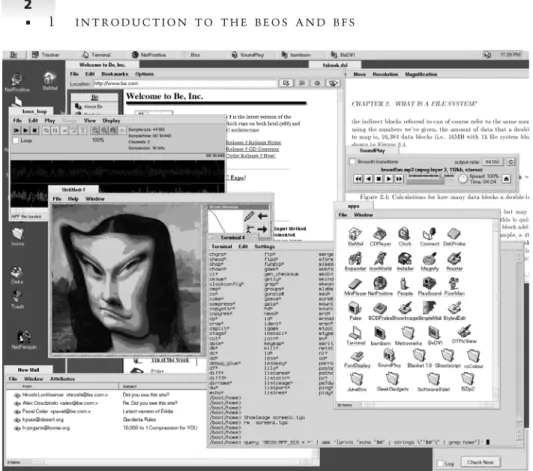
To solve that problem, Be, Inc., began developing, from scratch, the BeOS and the BeBox. The original BeBox used two AT&T Hobbit CPUs and three DSP chips. A variety of plug-in cards for the box provided telephony, MIDI, and audio support. The box was moderately low cost and offered impressive performance for the time (1992). During the same time period, the BeOS evolved into a symmetric multiprocessing (SMP) OS that supported virtual memory, preemptive multitasking, and lightweight threading. User-level servers provided most of the functionality of the system, and the kernel re-mained quite small. The primary interface to the BeOS was through a graph-ical user interface reminiscent of the Macintosh. Figure 1-1 shows the BeOS GUI.
The intent for the Hobbit BeBox was that it would be an information de-vice that would be connected to a network, could answer your phone, and worked well with MIDI and other multimedia devices. In retrospect the orig-inal design was a mix of what we now call a “network computer” (NC) and a set-top box of sorts.
The hardware design of the original BeBox met an unfortunate end when AT&T canceled the Hobbit processor in March 1994. Reworking the design to use more common parts, Be modified the BeBox to use the PowerPC chip, which, at the time (1994), had the most promising future. The redesigned box
Figure 1-1 A BeOS screenshot.
had dual PowerPC 603 chips, a PCI bus, an ISA bus, and a SCSI controller. It used off-the-shelf components and sported a fancy front bezel with dual LED meters displaying the processor activity. It was a geek magnet.
In addition to modifying the BeBox hardware, the BeOS also underwent changes to support the new hardware and to exploit the performance offered by the PowerPC processor. The advent of the PowerPC BeBox brought the BeOS into a realm where it was almost usable as a regular operating system. The original design goals changed slightly, and the BeOS began to grow into a full-fledged desktop operating system. The transformation from the original design goals left the system with a few warts here and there, but nothing that was unmanageable.
The Shift
Be, Inc., announced the BeOS and the BeBox to the world in October 1995, and later that year the BeBox became available to developers. The increased exposure brought the system under very close scrutiny. Several problems
be-1 . be-1 H I S T O R Y L E A D I N G U P T O B F S
3
came apparent. At the time, the BeOS managed extra information about files (e.g., header fields from an email message) in a separate database that existed independently of the underlying hierarchical file system (the old file system, or OFS for short). The original design of the separate database and file system was done partially out of a desire to keep as much code in user space as pos-sible. However, with the database separate from the file system, keeping the two in sync proved problematic. Moreover, moving into the realm of general-purpose computing brought with it the desire to support other file systems (such as ISO-9660, the CD-ROM file system), but there was no provision for that in the original I/O architecture.
In the spring of 1996, Be came to the realization that porting the BeOS to run on other PowerPC machines could greatly increase the number of people able to run the BeOS. The Apple Macintosh Power Mac line of computers were quite similar to the BeBox, and it seemed that a port would help every-one. By August 1996 the BeOS ran on a variety of Power Mac hardware. The system ran very fast and attracted a lot of attention because it was now pos-sible to do an apples-to-apples comparison of the BeOS against the Mac OS on the same hardware. In almost all tests the BeOS won hands down, which of course generated considerable interest in the BeOS.
Running on the Power Mac brought additional issues to light. The need to support HFS (the file system of the Mac OS) became very important, and we found that the POSIX support we offered was getting heavy use, which kept exposing numerous difficulties in keeping the database and file system in sync.
The Solution
Starting in September 1996, Cyril Meurillon and I set about to define a new I/O architecture and file system for BeOS. We knew that the existing split of file system and database would no longer work. We wanted a new, high-performance file system that supported the database functionality the BeOS was known for as well as a mechanism to support multiple file systems. We also took the opportunity to clean out some of the accumulated cruft that had worked its way into the system over the course of the previous five years of development.
The task we had to solve had two very clear components. First there was the higher-level file system and device interface. This half of the project involved defining an API for file systems and device drivers, managing the name space, connecting program requests for files into file descriptors, and managing all the associated state. The second half of the project involved writing a file system that would provide the functionality required by the rest of the BeOS. Cyril, being the primary kernel architect at Be, took on the first portion of the task. The most difficult portion of Cyril’s project involved defining the file system API in such a way that it was as multithreaded as
possible, correct, deadlock-free, and efficient. That task involved many major iterations as we battled over what a file system had to do and what the kernel layer would manage. There is some discussion of this level of the file system in Chapter 10, but it is not the primary focus of this book.
My half of the project involved defining the on-disk data structures, man-aging all the nitty-gritty physical details of the raw disk blocks, and perform-ing the I/O requests made by programs. Because the disk block cache is inti-mately intertwined with the file system (especially a journaled file system), I also took on the task of rewriting the block cache.
1.2
Design Goals
Before any work could begin on the file system, we had to define what our goals were and what features we wanted to support. Some features were not optional, such as the database that the OFS supported. Other features, such as journaling (for added file system integrity and quick boot times), were extremely attractive because they offered several benefits at a presumably small cost. Still other features, such as 64-bit file sizes, were required for the target audiences of the BeOS.
The primary feature that a new Be File System had to support was the database concept of the old Be File System. The OFS supported a notion of recordscontaining namedfields. Records existed in the database for every file in the underlying file system as well. Records could also exist purely in the database. The database had a query interface that could find records matching various criteria about their fields. The OFS also supported live queries— persistent queries that would receive updates as new records entered or left the set of matching records. All these features were mandatory.
There were several motivating factors that prompted us to include journal-ing in BFS. First, journaled file systems do not need a consistency check at boot time. As we will explain later, by their very nature, journaled file sys-tems are always consistent. This has several implications: boot time is very fast because the entire disk does not need checking, and it avoids any prob-lems with forcing potentially naive users to run a file system consistency check program. Next, since the file system needed to support sophisticated indexing data structures for the database functionality, journaling made the task of recovery from failures much simpler. The small development cost to implement journaling sealed our decision to support it.
Our decision to support 64-bit volume and file sizes was simple. The target audiences of the BeOS are people who manipulate large audio, video, and still-image files. It is not uncommon for these files to grow to several gigabytes in size (a mere 2 minutes of uncompressed CCIR-601 video is greater than 232 bytes). Further, with disk sizes regularly in the multigigabyte range today, it is unreasonable to expect users to have to create multiple partitions on a
1 . 3 D E S I G N C O N S T R A I N T S
5
9 GB drive because of file system limits. All these factors pointed to the need for a 64-bit-capable file system.
In addition to the above design goals, we had the long-standing goals of making the system as multithreaded and as efficient as possible, which meant fine-grained locking everywhere and paying close attention to the overhead introduced by the file system. Memory usage was also a big concern. We did not have the luxury of assuming large amounts of memory for buffers because the primary development system for BFS was a BeBox with 8 MB of memory.
1.3
Design Constraints
There were also several design constraints that the project had to contend with. The first and foremost was the lack of engineering resources. The Be engineering staff is quite small, at the time only 13 engineers. Cyril and I had to work alone because everyone else was busy with other projects. We also did not have very much time to complete the project. Be, Inc., tries to have regular software releases, once every four to six months. The initial target was for the project to take six months. The short amount of time to complete the project and the lack of engineering resources meant that there was little time to explore different designs and to experiment with completely untested ideas. In the end it took nine months for the first beta release of BFS. The final version of BFS shipped the following month.
1.4
Summary
This background information provides a canvas upon which we will paint the details of the Be File System. Understanding what the BeOS is and what requirements BFS had to fill should help to make it more clear why certain paths were chosen when there were multiple options available.
2
What Is a File System?
2.1
The Fundamentals
This chapter is an introduction to the concepts of what a file system is, what it manages, and what abstractions it provides to the rest of the operating system. Reading this chapter will provide a thorough grounding in the ter-minology, the concepts, and the standard techniques used to implement file systems.
Most users of computers are roughly familiar with what a file system does, what a file is, what a directory is, and so on. This knowledge is gained from direct experience with computers. Instead of basing our discussion on prior experiences, which will vary from user to user, we will start over again and think about the problem of storing information on a computer, and then move forward from there.
The main purpose of computers is to create, manipulate, store, and retrieve data. A file system provides the machinery to support these tasks. At the highest level a file system is a way to organize, store, retrieve, and manage information on a permanent storage medium such as a disk. File systems manage permanent storage and form an integral part of all operating systems. There are many different approaches to the task of managing permanent storage. At one end of the spectrum are simple file systems that impose enough restrictions to inconvenience users and make using the file system difficult. At the other end of the spectrum are persistent object stores and object-oriented databases that abstract the whole notion of permanent storage so that the user and programmer never even need to be aware of it. The problem of storing, retrieving, and manipulating information on a computer is of a general-enough nature that there are many solutions to the problem.
There is no “correct” way to write a file system. In deciding what type of filing system is appropriate for a particular operating system, we must weigh the needs of the problem with the other constraints of the project. For example, a flash-ROM card as used in some game consoles has little need for an advanced query interface or support for attributes. Reliability of data writes to the medium, however, are critical, and so a file system that sup-ports journaling may be a requirement. Likewise, a file system for a high-end mainframe computer needs extremely fast throughput in many areas but lit-tle in the way of user-friendly features, and so techniques that enable more transactions per second would gain favor over those that make it easier for a user to locate obscure files.
It is important to keep in mind the abstract goal of what a file system must achieve: to store, retrieve, locate, and manipulate information. Keeping the goal stated in general terms frees us to think of alternative implementations and possibilities that might not otherwise occur if we were to only think of a file system as a typical, strictly hierarchical, disk-based structure.
2.2
The Terminology
When discussing file systems there are many terms for referring to certain concepts, and so it is necessary to define how we will refer to the specific concepts that make up a file system. We list the terms from the ground up, each definition building on the previous.
Disk: A permanent storage medium of a certain size. A disk also has a sector or block size, which is the minimum unit that the disk can read or write. The block size of most modern hard disks is 512 bytes.
Block: The smallest unit writable by a disk or file system. Everything a file system does is composed of operations done on blocks. A file system block is always the same size as or larger (in integer multiples) than the disk block size.
Partition: A subset of all the blocks on a disk. A disk can have several partitions.
Volume: The name we give to a collection of blocks on some storage medium (i.e., a disk). That is, a volume may be all of the blocks on a single disk, some portion of the total number of blocks on a disk, or it may even span multiple disks and be all the blocks on several disks. The term “volume” is used to refer to a disk or partition that has been initialized with a file system.
Superblock: The area of a volume where a file system stores its critical volumewide information. A superblock usually contains information such as how large a volume is, the name of a volume, and so on.
2 . 3 T H E A B S T R A C T I O N S
9
Metadata:A general term referring to information that is about something but not directly part of it. For example, the size of a file is very important information about a file, but it is not part of the data in the file.
Journaling: A method of insuring the correctness of file system metadata even in the presence of power failures or unexpected reboots.
I-node: The place where a file system stores all the necessary metadata about a file. The i-node also provides the connection to the contents of the file and any other data associated with the file. The term “i-node” (which we will use in this book) is historical and originated in Unix. An i-node is also known as afile control block(FCB) orfile record.
Extent: A starting block number and a length of successive blocks on a disk. For example an extent might start at block 1000 and continue for 150 blocks. Extents are always contiguous. Extents are also known as block runs.
Attribute: A name (as a text string) and value associated with the name. The value may have a defined type (string, integer, etc.), or it may just be arbitrary data.
2.3
The Abstractions
The two fundamental concepts of any file system are files and directories.
Files
The primary functionality that all file systems must provide is a way to store a named piece of data and to later retrieve that data using the name given to it. We often refer to a named piece of data as afile. A file provides only the most basic level of functionality in a file system.
A file is where a program stores data permanently. In its simplest form a file stores a single piece of information. A piece of information can be a bit of text (e.g., a letter, program source code, etc.), a graphic image, a database, or any collection of bytes a user wishes to store permanently. The size of data stored may range from only a few bytes to the entire capacity of a volume. A file system should be able to hold a large number of files, where “large” ranges from tens of thousands to millions.
The Structure of a File
Given the concept of a file, a file system may impose no structure on the file, or it may enforce a considerable amount of structure on the contents of the file. An unstructured, “raw” file, often referred to as a “stream of bytes,” literally has no structure. The file system simply records the size of the file and allows programs to read the bytes in any order or fashion that they desire.
An unstructured file can be read 1 byte at a time, 17 bytes at a time, or what-ever the programmer needs. Further, the same file may be read differently by different programs; the file system does not care about the alignments of or sizes of the I/O requests it gets. Treating files as unstructured streams is the most common approach that file systems use today.
If a file system chooses to enforce a formal structure on files, it usually does so in the form of records. With the concept of records, a program-mer specifies the size and format of the record, and then all I/O to that file must happen on record boundaries and be a multiple of the record length. Other systems allow programs to create VSAM (virtual sequential access method) and ISAM (indexed sequential access method) files, which are es-sentially databases in a file. These concepts do not usually make their way into general-purpose desktop operating systems. We will not consider struc-tured files in our discussion of file systems. If you are interested in this topic, you may wish to look at the literature about mainframe operating systems such as MVS, CICS, CMS, and VMS.
A file system also must allow the user to name the file in a meaningful way. Retrieval of files (i.e., information) is key to the successful use of a file system. The way in which a file system allows users to name files is one factor in how easy or difficult it is to later find the file. Names of at least 32 characters in length are mandatory for any system that regular users will interact with. Embedded systems or those with little or no user interface may find it economical and/or efficient to limit the length of names.
File Metadata
The name of a file is metadata because it is a piece of information about the file that is not in the stream of bytes that make up the file. There are several other pieces of metadata about a file as well—for example, the owner, security access controls, date of last modification, creation time, and size.
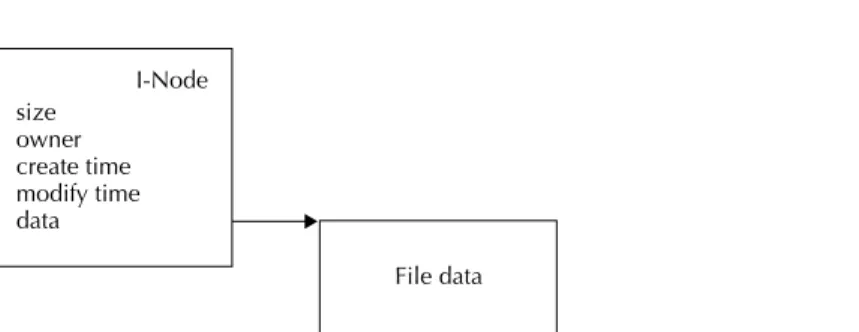
The file system needs a place to store this metadata in addition to storing the file contents. Generally the file system stores file metadata in an i-node. Figure 2-1 diagrams the relationship between an i-node, what it contains, and its data.
The types of information that a file system stores in an i-node vary depend-ing on the file system. Examples of information stored in i-nodes are the last access time of the file, the type, the creator, a version number, and a reference to the directory that contains the file. The choice of what types of metadata information make it into the i-node depends on the needs of the rest of the system.
The Data of a File
The most important information stored in an i-node is the connection to the data in the file (i.e., where it is on disk). An i-node refers to the contents of the file by keeping track of the list of blocks on the disk that belong to this
2 . 3 T H E A B S T R A C T I O N S
11
I-Node size
owner create time modify time data
File data
Figure 2-1 A simplified diagram of an i-node and the data it refers to.
file. A file appears as a continuous stream of bytes at higher levels, but the blocks that contain the file data may not be contiguous on disk. An i-node contains the information the file system uses to map from a logical position in a file (for example, byte offset 11,239) to a physical position on disk.
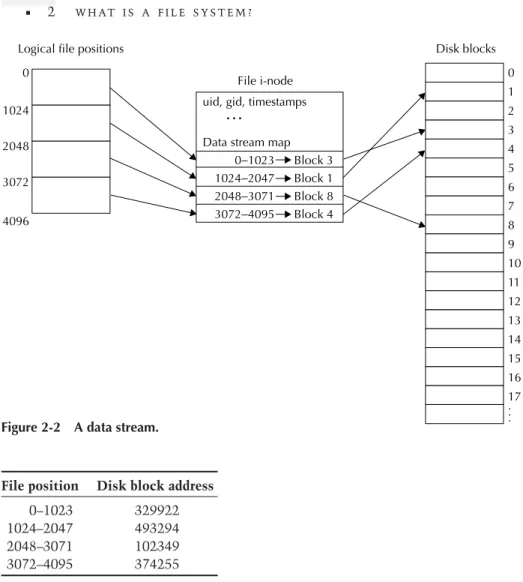
Figure 2-2 helps illustrate (we assume a file system block size of 1024 bytes). If we would like to read from position 4096 of a file, we need to find the fourth block of the file because the file position, 4096, divided by the file system block size, is 4. The i-node contains a list of blocks that make up the file. As we’ll see shortly, the i-node can tell us the disk address of the fourth block of the file. Then the file system must ask the disk to read that block. Finally, having retrieved the data, the file system can pass the data back to the user.
We simplified this example quite a bit, but the basic idea is always the same. Given a request for data at some position in a file, the file system must translate that logical position to a physical disk location, request that block from the disk, and then pass the data back to the user.
When a request is made to read (or write) data that is not on a file system block boundary, the file system must round down the file position to the beginning of a block. Then when the file system copies data to/from the block, it must add in the offset from the start of the block of the original position. For example, if we used the file offset 4732 instead of 4096, we would still need to read the fourth block of the file. But after getting the fourth block, we would use the data at byte offset 636 (4732;4096) within the fourth block.
When a request for I/O spans multiple blocks (such as a read for 8192 bytes), the file system must find the location for many blocks. If the file system has done a good job, the blocks will be contiguous on disk. Requests for contiguous blocks on disk improve the efficiency of doing I/O to disk. The fastest thing a disk drive can do is to read or write large contiguous re-gions of disk blocks, and so file systems always strive to arrange file data as contiguously as possible.
Logical file positions
File i-node uid, gid, timestamps
…
Data stream map 0−1023 Block 3 1024−2047 Block 1 2048−3071 Block 8 3072−4095 Block 4
Disk blocks 0 1 2 3 4 5 6 7 8 9 10 11 12 13 14 15 16 17 .. . 0
1024
2048
3072
4096
Figure 2-2 A data stream.
File position Disk block address
0–1023 329922 1024–2047 493294 2048–3071 102349 3072–4095 374255
Table 2-1 An example of mapping file data with direct blocks.
The Block Map
There are many ways in which an i-node can store references to file data. The simplest method is a list of blocks, one for each of the blocks of the file. For example, if a file was 4096 bytes long, it would require four disk blocks. Using fictitious disk block numbers, the i-node might look like Table 2-1.
Generally an i-node will store between 4 and 16 block references directly in the i-node. Storing a few block addresses directly in the i-node simplifies finding file data since most files tend to weigh in under 8K. Providing enough space in the i-node to map the data in most files simplifies the task of the file system. The trade-off that a file system designer must make is between the size of the i-node and how much data the i-node can map. The size of the
2 . 3 T H E A B S T R A C T I O N S
13
I-Node
Indirect block address
Indirect block Data block address N
Data block address N +1 Data block address N +2 Data block address N +3
File data block File data block File data block File data block
…
…
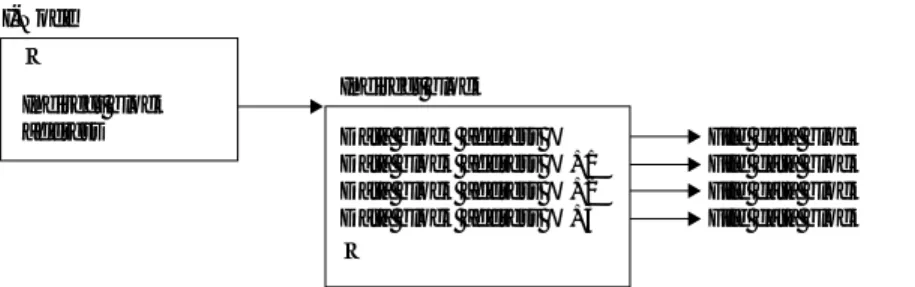
Figure 2-3 Relationship of an i-node and an indirect block.
i-node usually works best when it is an even divisor of the block size, which therefore implies a size that is a power of two.
The i-node can only store a limited number of block addresses, which therefore limits the amount of data the file can contain. Storing all the point-ers to data blocks is not practical for even modest-sized files. To overcome the space constraints for storing block addresses in the i-node, an i-node can useindirect blocks. When using an indirect block, the i-node stores the block address of (i.e., a pointer to) the indirect block instead of the block addresses of the data blocks. The indirect block contains pointers to the blocks that make up the data of the file. Indirect blocks do not contain user data, only pointers to the blocks that do have user data in them. Thus with one disk block address the i-node can access a much larger number of data blocks. Figure 2-3 demonstrates the relationship of an i-node and an indirect block.
The data block addresses contained in the indirect block refer to blocks on the disk that contain file data. An indirect block extends the amount of data that a file can address. The number of data blocks an indirect block can refer to is equal to the file system block size divided by the size of disk block addresses. In a 32-bit file system, disk block addresses are 4 bytes (32 bits); in a 64-bit file system, they are 8 bytes (64 bits). Thus, given a file system block size of 1024 bytes and a block address size of 64 bits, an indirect block can refer to 128 blocks.
Indirect blocks increase the maximum amount of data a file can access but are not enough to allow an i-node to locate the data blocks of a file much more than a few hundred kilobytes in size (if even that much). To allow files of even larger size, file systems apply the indirect block technique a second time, yieldingdouble-indirect blocks.
Double-indirect blocks use the same principle as indirect blocks. The i-node contains the address of the indirect block, and the double-indirect block contains pointers to double-indirect blocks, which in turn contain pointers to the data blocks of the file. The amount of data double-indirect blocks allow an i-node to map is slightly more complicated to calculate. A double-indirect block refers to indirect blocks much as indirect blocks refer to data blocks. The number of indirect blocks a double-indirect block can refer
to is the same as the number of data blocks an indirect block can refer to. That is, the number of block addresses in a double-indirect block is the file system block size divided by the disk block address size. In the example we gave above, a 1024-byte block file system with 8-byte (64-bit) block addresses, a double-indirect block could contain references to 128 indirect blocks. Each of the indirect blocks referred to can, of course, refer to the same number of data blocks. Thus, using the numbers we’ve given, the amount of data that a double-indirect block allows us to map is
128 indirect blocks128 data blocks per indirect block = 16,384 data blocks
that is, 16 MB with 1K file system blocks.
This is a more reasonable amount of data to map but may still not be sufficient. In that casetriple-indirect blocksmay be necessary, but this is quite rare. In many existing systems the block size is usually larger, and the size of a block address smaller, which enables mapping considerably larger amounts of data. For example, a 4096-byte block file system with 4-byte (32-bit) block addresses could map 4 GB of disk space (4096=4 = 1024 block addresses per block; one double-indirect block maps 1024 indirect blocks, which each map 1024 data blocks of 4096 bytes each). The double- (or triple-) indirect blocks generally map the most significant amount of data in a file.
In the list-of-blocks approach, mapping from a file position to a disk block address is simple. The file position is taken as an index into the file block list. Since the amount of space that direct, indirect, double-indirect, and even triple-indirect blocks can map is fixed, the file system always knows exactly where to look to find the address of the data block that corresponds to a file position.
The pseudocode for mapping from a file position that is in the double-indirect range to the address of a data block is shown in Listing 2-1.
Using thedbl_indirect_indexandindirect_indexvalues, the file system can load the appropriate double-indirect and indirect blocks to find the ad-dress of the data block that corresponds to the file position. After loading the data block, theblock_offsetvalue would let us index to the exact byte offset that corresponds to the original file position. If the file position is only in the indirect or direct range of a file, the algorithm is similar but much simpler.
As a concrete example, let us consider a file system that has eight direct blocks, a 1K file system block size, and 4-byte disk addresses. These param-eters imply that an indirect or double-indirect block can map 256 blocks. If we want to locate the data block associated with file position 786769, the pseudocode in Listing 2-1 would look like it does in Listing 2-2.
With the above calculations completed, the file system would retrieve the double-indirect block and use the double-indirect index to get the address of the indirect block. Next the file system would use that address to load the indirect block. Then, using the indirect index, it would get the address of the
2 . 3 T H E A B S T R A C T I O N S
15
blksize = size of the file system block size
dsize = amount of file data mapped by direct blocks indsize = amount of file data mapped by an indirect block
if (filepos >= (dsize + indsize)) { /* double-indirect blocks */ filepos -= (dsize + indsize);
dbl_indirect_index = filepos / indsize;
if (filepos >= indsize) { /* indirect blocks */ filepos -= (dbl_indirect_index * indsize);
indirect_index = filepos / blksize; }
filepos -= (indirect_index * blksize); /* offset in data block */ block_offset = filepos;
}
Listing 2-1 Mapping from a file position to a data block with double-indirect blocks.
blksize = 1024; dsize = 8192; indsize = 256 * 1024; filepos = 786769;
if (filepos >= (dsize+indsize)) { /* 786769 >= (8192+262144) */ filepos -= (dsize+indsize); /* 516433 */
dbl_indirect_index = filepos / indsize; /* 1 */ /* at this point filepos == 516433 */
if (filepos >= indsize) { /* 516433 > 262144 */ filepos -= (dbl_indirect_index * indsize); /* 254289 */
indirect_index = filepos / blksize; /* 248 */ }
/* at this point filepos == 254289 */
filepos -= (indirect_index * blksize); /* 337 */
block_offset = filepos; /* 337 */
}
last block (a data block) to load. After loading the data block, the file system would use the block offset to begin the I/O at the exact position requested.
Extents
Another technique to manage mapping from logical positions in a byte stream to data blocks on disk is to use extent lists. An extent list is similar to the simple block list described previously except that each block address is not just for a single block but rather for a range of blocks. That is, every block address is given as a starting block and a length (expressed as the number of successive blocks following the starting block). The size of an extent is usually larger than a simple block address but is potentially able to map a much larger region of disk space.
For example, if a file system used 8-byte block addresses, an extent might have a length field of 2 bytes, allowing the extent to map up to 65,536 con-tiguous file system blocks. An extent size of 10 bytes is suboptimal, however, because it does not evenly divide any file system block size that is a power of two in size. To maximize the number of extents that can fit in a single block, it is possible to compress the extent. Different approaches exist, but a simple method of compression is to truncate the block address and squeeze in the length field. For example, with 64-bit block addresses, the block address can be shaved down to 48 bits, leaving enough room for a 16-bit length field. The downside to this approach is that it decreases the maximum amount of data that a file system can address. However, if we take into account that a typical block size is 1024 bytes or larger, then we see that in fact the file system will be able to address up to 258bytes of data (or more if the block size is larger). This is because the block address must be multiplied by the block size to calculate a byte offset on the disk. Depending on the needs of the rest of the system, this may be acceptable.
Although extent lists are a more compact way to refer to large amounts of data, they may still require use of indirect or double-indirect blocks. If a file system becomes highly fragmented and each extent can only map a few blocks of data, then the use of indirect and double-indirect blocks becomes a necessity. One disadvantage to using extent lists is that locating a specific file position may require scanning a large number of extents. Because the length of an extent is variable, when locating a specific position the file system must start at the first extent and scan through all of them until it finds the extent that covers the position of interest. In the case of a large file that uses double-indirect blocks, this may be prohibitive. One way to alleviate the problem is to fix the size of extents in the double-indirect range of a file.
File Summary
In this section we discussed the basic concept of a file as a unit of storage for user data. We touched upon the metadata a file system needs to keep track of for a file (the i-node), structured vs. unstructured files, and ways to
2 . 3 T H E A B S T R A C T I O N S
17
name: foo
i-node: 525
name: bar
i-node: 237
name: blah
i-node: 346
Figure 2-4 Example directory entries with a name and i-node number.
store user data (simple lists and extents). The basic abstraction of a “file” is the core of any file system.
Directories
Beyond a single file stored as a stream of bytes, a file system must provide a way to name and organize multiple files. File systems use the termdirectory orfolderto describe a container that organizes files by name. The primary purpose of a directory is to manage a list of files and to connect the name in the directory with the associated file (i.e., i-node).
As we will see, there are several ways to implement a directory, but the basic concept is the same for each. A directory contains a list of names. Associated with each name is a handle that refers to the contents of that name (which may be a file or a directory). Although all file systems differ on exactly what constitutes a file name, a directory needs to store both the name and the i-node number of this file.
The name is the key that the directory searches on when looking for a file, and the i-node number is a reference that allows the file system to access the contents of the file and other metadata about the file. For example, if a directory contains three entries named foo(i-node 525), bar(i-node 237), andblah(i-node 346), then conceptually the contents of the directory can be thought of as in Figure 2-4.
When a user wishes to open a particular file, the file system must search the directory to find the requested name. If the name is not present, the file system can return an error such asName not found. If the file does exist, the file system uses the i-node number to locate the metadata about the file, load that information, and then allow access to the contents of the file.
Storing Directory Entries
There are several techniques a directory may use to maintain the list of names in a directory. The simplest method is to store each name linearly in an array, as in Figure 2-4. Keeping a directory as an unsorted linear list is a popular method of storing directory information despite the obvious
disadvantages. An unsorted list of directory entries becomes inefficient for lookups when there are a large number of names because the search must scan the entire directory. When a directory starts to contain thousands of files, the amount of time it takes to do a lookup can be significant.
Another method of organizing directory entries is to use a sorted data structure suitable for on-disk storage. One such data structure is a B-tree (or its variants, B+tree and B*tree). A B-tree keeps the keys sorted by their name and is efficient at looking up whether a key exists in the directory. B-trees also scale well and are able to deal efficiently with directories that contain many tens of thousands of files.
Directories can also use other data structures, such as hash tables or radix sorting schemes. The primary requirements on a data structure for storing directory entries are that it perform efficient lookups and have reasonable cost for insertions/deletions. This is a common enough problem that there are many readily adaptable solutions. In practice, if the file system does any-thing other than a simple linear list, it is almost always a B-tree keyed on file names.
As previously mentioned, every file system has its own restrictions on file names. The maximum file name length, the set of allowable characters in a file name, and the encoding of the character set are all policy decisions that a file system designer must make. For systems intended for interactive use, the bare minimum for file name length is 32 characters. Many systems allow for file names of up to 255 characters, which is adequate headroom. Anecdotal evidence suggests that file names longer than 150 characters are extremely uncommon.
The set of allowable characters in a file name is also an important consid-eration. Some file systems, such as the CD-ROM file system ISO-9660, allow an extremely restricted set of characters (essentially only alphanumeric char-acters and the underscore). More commonly, the only restriction necessary is that some character must be chosen as a separator for path hierarchies. In Unix this is the forward slash (/), in MS-DOS it is the backslash (\), and un-der the Macintosh OS it is the colon (:). The directory separator can never appear in a file name because if it did, the rest of the operating system would not be able to parse the file name: there would be no way to tell which part of the file name was a directory component and which part was the actual file name.
Finally, the character set encoding chosen by the file system affects how the system deals with internationalization issues that arise with multibyte character languages such as Japanese, Korean, and Chinese. Most Unix sys-tems make no policy decision and simply store the file name as a sequence of non-null bytes. Other systems, such as the Windows NT file system, explic-itly store all file names as 2-byte Unicode characters. HFS on the Macintosh stores only single-byte characters and assumes the Macintosh character set encoding. The BeOS uses UTF-8 character encoding for multibyte characters;
2 . 3 T H E A B S T R A C T I O N S
19
work
file1
school
file2 dir2
funstuff
file3 file4 dir3 file5 file6
readme
Figure 2-5 An example file system hierarchy.
thus, BFS does not have to worry about multibyte characters because UTF-8 encodes multibyte characters as strings of nonnull bytes.
Hierarchies
Storing all files in a single directory is not sufficient except for the small-est of embedded or stand-alone systems. A file system must allow users to organize their files and arrange them in the way they find most natural. The traditional approach is a hierarchical organization. A hierarchy is a familiar concept to most people and adapts readily to the computer world. The sim-plest implementation is to allow an entry in a directory to refer to another directory. By allowing a directory to contain a name that refers to a different directory, it is possible to build hierarchical structures.
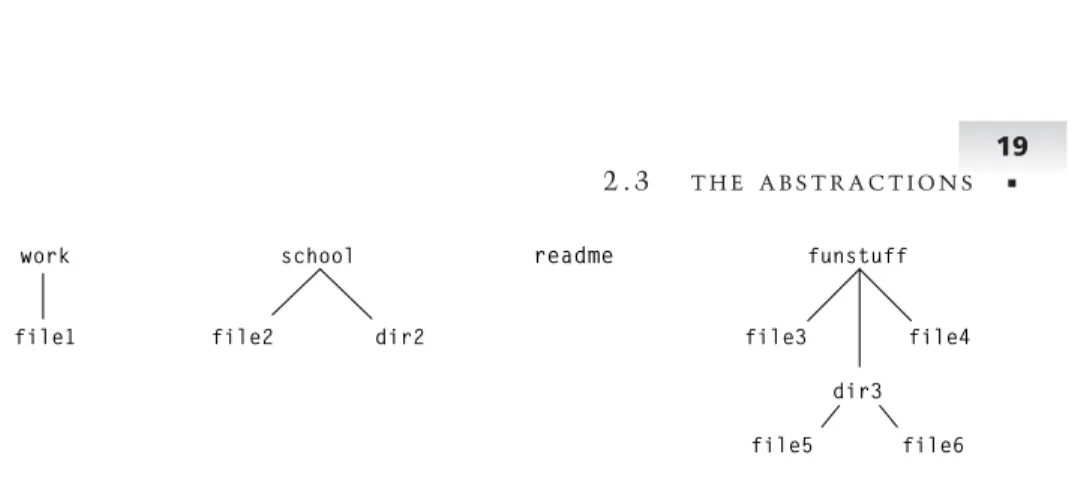
Figure 2-5 shows what a sample hierarchy might look like. In this exam-ple, there are three directories (work, school, andfunstuff) and a single file (readme) at the top level. Each of the directories contain additional files and directories. The directorywork contains a single file (file1). The directory schoolhas a file (file2) and a directory (dir2). The directorydir2is empty in this case. The directoryfunstuffcontains two files (file3andfile4) as well as a directory (dir3) that also contains two files (file5andfile6).
Since a directory may contain other directories, it is possible to build ar-bitrarily complex hierarchies. Implementation details may put limits on the depth of the hierarchy, but in theory there is nothing that limits the size or depth of a directory hierarchy.
Hierarchies are a useful, well-understood abstraction that work well for organizing information. Directory hierarchies tend to remain fixed though and are not generally thought of as malleable. That is, once a user creates a directory hierarchy, they are unlikely to modify the structure significantly over the course of time. Although it is an area of research, alternative ways to view a hierarchy exist. We can think of a hierarchy as merely one repre-sentation of the relationships between a set of files, and even allow programs to modify their view of a hierarchy.
Other Approaches
A more flexible architecture that allows for different views of a set of in-formation allows users to view data based on their current needs, not on how
they organized it previously. For example, a programmer may have several projects, each organized into subdirectories by project name. Inside of each project there will likely be further subdirectories that organize source code, documentation, test cases, and so on. This is a very useful way to organize several projects. However, if there is a need to view all documentation or all source code, the task is somewhat difficult because of the rigidity of the existing directory hierarchy. It is possible to imagine a system that would al-low the user to request all documentation files or all source code, regardless of their location in the hierarchy. This is more than a simple “find file” util-ity that only produces a static list of results. A file system can provide much more support for these sorts of operations, making them into true first-class file system operations.
Directory Summary
This section discussed the concept of a directory as a mechanism for stor-ing multiple files and as a way to organize information into a hierarchy. The contents of a directory may be stored as a simple linear list, B-trees, or even other data structures such as hash tables. We also discussed the potential for more flexible organizations of data other than just fixed hierarchies.
2.4
Basic File System Operations
The two basic abstractions of files and directories form the basis of what a file system can operate on. There are many operations that a file system can perform on files and directories. All file systems must provide some basic level of support. Beyond the most basic file system primitives lie other features, extensions, and more sophisticated operations.
In this discussion of file system operations, we focus on what a file system must implement, not necessarily what the corresponding user-level opera-tions look like. For example, opening a file in the context of a file system requires a reference to a directory and a name, but at the user level all that is needed is a string representing the file name. There is a close correlation be-tween the user-level API of a file system and what a file system implements, but they are not the same.
Initialization
Clearly the first operation a file system must provide is a way to create an empty file system on a given volume. A file system uses the size of the vol-ume to be initialized and any user-specified options to determine the size and placement of its internal data structures. Careful attention to the place-ment of these initial data structures can improve or degrade performance significantly. Experimenting with different locations is useful.
2 . 4 B A S I C F I L E S Y S T E M O P E R AT I O N S
21
Generally the host operating system provides a way to find out the size of a volume expressed in terms of a number of device blocks. This information is then used to calculate the size of various data structures such as the free/used block map (usually a bitmap), the number of i-nodes (if they are preallocated), and the size of the journal area (if there is one). Upon calculating the sizes of these data structures, the file system can then decide where to place them within the volume. The file system places the locations of these structures, along with the size of the volume, the state of the volume (clean or dirty), and other file system global information, into the superblock data structure. File systems generally write the superblock to a known location in the volume.
File system initialization must also create an empty top-level directory. Without a top-level directory there is no container to create anything in when the file system is mounted for normal use. The top-level directory is gener-ally known as theroot directory (or simply root) of a file system. The ex-pression “root directory” comes from the notion of a file system directory hierarchy as an inverted tree, and the top-level directory is the root of this tree. Unless the root directory is always at a fixed location on a volume, the i-node number (or address) of the root directory must also be stored in the superblock.
The task of initializing a file system may be done as a separate user pro-gram, or it may be part of the core file system code. However it is done, initializing a file system simply prepares a volume as an empty container ready to accept the creation of files and directories. Once a file system is initialized it can then be “mounted.”
Mounting
Mounting a file system is the task of accessing a raw device, reading the superblock and other file system metadata, and then preparing the system for access to the volume. Mounting a file system requires some care because the state of the file system being mounted is unknown and may be damaged. The superblock of a file system often contains the state of the file system. If the file system was properly shut down, the superblock will indicate that the volume is clean and needs no consistency check. An improperly shut-down file system should indicate that the volume is dirty and must be checked.
The validation phase for a dirty file system is extremely important. Were a corrupted file system mounted, the corrupted data could potentially cause further damage to user data or even crash the system if it causes the file sys-tem to perform illegal operations. The importance of verifying that a file system is valid before mounting cannot be overstated. The task of verifying and possibly repairing a damaged file system is usually a very complex task. A journaled file system can replay its log to guarantee that the file system is consistent, but it should still verify other data structures before proceed-ing. Because of the complexity of a full file system check, the task is usually
relegated to a separate program, a file system check program. Full verification of a file system can take considerable time, especially when confronted with a multigigabyte volume that contains hundreds of thousands of files. Fortu-nately such lengthy check and repair operations are only necessary when the superblock indicates that the volume is dirty.
Once a file system determines that a given volume is valid, it must then use the on-disk data structures to construct in-memory data structures that will allow it to access the volume. Generally a file system will build an in-ternal version of the superblock along with references to the root directory and the free/used block map structure. Journaled file systems must also load information regarding the log. The in-memory state that a file system main-tains allows the rest of the operating system access to the contents of the volume.
The details of how a file system connects with the rest of the operating sys-tem tend to be very operating syssys-tem specific. Generally speaking, however, the operating system asks a file system to mount a volume at the request of a user or program. The file system is given a handle or reference to a volume and then initiates access to the volume, which allows it to read in and verify file system data structures. When the file system determines that the volume is accessible, it returns to the operating system and hooks in its operations so that the operating system can call on the file system to perform operations that refer to files on the volume.
Unmounting
Corresponding to mounting a file system, there is also an unmount operation. Unmounting a file system involves flushing out to disk all in-memory state associated with the volume. Once all the in-memory data is written to the volume, the volume is said to be “clean.” The last operation of unmounting a disk is to mark the superblock to indicate that a normal shutdown occurred. By marking the superblock in this way, the file system guarantees that to the best of its knowledge the disk is not corrupted, which allows the next mount operation to assume a certain level of sanity. Since a file system not marked clean may potentially be corrupt, it is important that a file system cleanly unmount all volumes. After marking the superblock, the system should not access the volume unless it mounts the volume again.
Creating Files
After mounting a freshly initialized volume, there is nothing on the volume. Thus, the first major operation a file system must support is the ability to create files. There are two basic pieces of information needed to create a file: the directory to create the file in and the name of the file. With these two pieces of information a file system can create an i-node to represent the file and then can add an entry to the directory for the file name/i-node pair.
Ad-2 . 4 B A S I C F I L E S Y S T E M O P E R AT I O N S
23
ditional arguments may specify file access permissions, file modes, or other flags specific to a given file system.
After allocating an i-node for a file, the file system must fill in whatever information is relevant. File systems that store the creation time must record that, and the size of the file must be initialized to zero. The file system must also record ownership and security information in the i-node if that is required.
Creating a file does not reserve storage space for the contents of the file. Space is allocated to hold data when data is written to the file. The cre-ation of a file only allocates the i-node and enters the file into the directory that contains it. It may seem counterintuitive, but creating a file is a simple operation.
Creating Directories
Creating a directory is similar to creating a file, only slightly more complex. Just as with a file, the file system must allocate an i-node to record metadata about the directory as well as enter the name of the directory into its parent directory.
Unlike a file, however, the contents of a directory must be initialized. Ini-tializing a directory may be simple, such as when a directory is stored as a simple list, or it may be more complex, such as when a B-tree is used to store the contents of a directory. A directory must also contain a reference back to its parent directory. The reference back is simply the i-node number of the parent directory. Storing a link to the parent directory makes navigation of the file system hierarchy much simpler. A program may traverse down through a directory hierarchy and at any point ask for the parent directory to work its way back up. If the parent directory were not easily accessible in any given directory, programs would have to maintain state about where they are in the hierarchy—an error-prone duplication of state. Most POSIX-style file systems store a link to the parent directory as the name “..” (dot-dot) in a directory. The name “.” (dot) is always present and refers to the directory itself. These two standardized names allow programs to easily navigate from one location in a hierarchy to another without having to know the full path of their current location.
Creating a directory is the fundamental operation that allows users to build hierarchical structures to represent the organization of their information. A directory must maintain a reference to its parent directory to enable nav-igation of the hierarchy. Directory creation is central to the concept of a hierarchical file system.
Opening Files
Opening existing files is probably the most used operation of a file system. The task of opening a file can be somewhat complex. Opening a file is
composed of two operations. The first operation, lookup, takes a reference to a directory and a name and looks up the name in that directory. Looking up a name involves traversing the directory data structure looking to see if a name exists and, if it does, returning the associated i-node. The efficiency of the lookup operation is important. Many directories have only a few files, and so the choice of data structure may not be as important, but large servers rou-tinely have directories with thousands of entries in them. In those situations the choice of directory data structure may be of critical importance.
Given an i-node number, the second half of an open operation involves verifying that the user can access the file. In systems that have no permission checking, this is a no-op. For systems that care about security, this involves checking permissions to verify that the program wishing to access the file is allowed to do so. If the security check is successful, the file system then allocates an in-memory structure to maintain state about access to the file (such as whether the file was opened read-only, for appending, etc.).
The result of an open operation is a handle that the requesting program can use to make requests for I/O operations on the file. The handle returned by the file system is used by the higher-level portions of the operating sys-tem. The operating system has additional structures that it uses to store this handle. The handle used by a user-level program is related indirectly to the internal handle returned by the open operation. The operating system gener-ally maps a user-level file descriptor through several tables before it reaches the file system handle.
Writing to Files
The write operation of a file system allows programs to store data in files. The arguments needed to write data to a file are a reference to the file, the position in the file to begin writing the data at, a memory buffer, and the length of the data to write. A write to a file is equivalent to asking the file system to copy a chunk of data to a permanent location within the file.
The write operation takes the memory buffer and writes that data to the file at the position specified. If the position given is already at the end of the file, the file needs to grow before the write can take place. Growing the size of a file involves allocating enough disk blocks to hold the data and adding those blocks to the list of blocks “owned” by the file.
Growing a file causes updates to happen to the free/used block list, the file i-node, and any indirect or double-indirect blocks involved in the transaction. Potentially the superblock of the file system may also be modified.
Once there is enough space for the data, the file system must map from the logical position in the file to the disk block address of where the data should be written to. With the physical block address the file system can then write the data to the underlying device, thus making it permanent.
2 . 4 B A S I C F I L E S Y S T E M O P E R AT I O N S
25
After the write completes, the file offset maintained by the kernel is incre-mented by the number of bytes written.
Reading Files
The read operation allows programs to access the contents of a file. The arguments to a read are the same as a write: a handle to refer to the file, a position, a memory buffer, and a length.
A read operation is simpler than a write because a read operation does not modify the disk at all. All a read operation needs to do is to map from the logical position in the file to the corresponding disk address. With the physical disk address in hand, the file system can retrieve the data from the underlying device and place that data into the user’s buffer.
The read operation also increments the file position by the amount of data read.
Deleting Files
Deleting a file is the next logical operation that a file system needs to support. The most common way to delete a file is to pass the name of the file. If the name exists, there are two phases to the deletion of the file. The first phase is to remove the name of the file from the directory it exists in. Removing the name prevents other programs from opening the file after it is deleted. After removing the name, the file is marked for deletion.
The second phase of deleting a file only happens when there are no more programs with open file handles to the file. With no one else referencing the file, it is then possible to release the resources used by the file. It is during this phase that the file system can return the data blocks used by the file to the free block pool and the i-node of the file to the free i-node list.
Splitting file deletion into two phases is necessary because a file may be open for reading or writing when a delete is requested. If the file system were to perform both phases immediately, the next I/O request on the file would be invalid (because the data blocks would no longer belong to the file). Having the delete operation immediately delete a file complicates the semantics of performing I/O to a file. By waiting until the reference count of a file goes to zero before deleting the resources associated with a file, the system can guarantee to user programs that once they open a file it will remain valid for reading and writing until they close the file descriptor.
Another additional benefit of the two-phase approach is that a program can open a temporary file for I/O, immediately delete it, and then continue normal I/O processing. When the program exits and all of its resources are closed, the file will be properly deleted. This frees the program from having to worry about cleanup in the presence of error conditions.
Renaming Files
The rename operation is by far the most complex operation a file system has to support. The arguments needed for a rename operation are the source directory handle, the source file name, the destination directory handle, and the destination file name.
Before the rename operation can take place, a great deal of validation of the arguments must take place. If the file system is at all multithreaded, the entire file system must be locked to prevent other operations from affecting the state of this operation.
The first validation needed is to verify that the source and destination file names are different if the source and destination directory handles are the same. If the source and destination directories are different, then it is acceptable for the source and destination names to be the same.
The next step in validation is to check if the source name refers to a direc-tory. If so, the destination directory cannot be a subdirectory of the source (since that would imply moving a directory into one of its own children). Checking this requires traversing the hierarchy from the destination direc-tory all the way to the root direcdirec-tory, making sure that the source name is not a parent directory of the destination. This operation is the most compli-cated and requires that the entire file system be locked; otherwise, it would be possible for the destination directory to move at the same time that this operation took place. Such race conditions could be disastrous, potentially leaving large branches of the directory hierarchy unattached.
Only if the above complicated set of criteria are met can the rename oper-ation begin. The first step of the rename is to delete the destinoper-ation name if it refers to a file or an empty directory.
The rename operation itself involves deleting the source name from the source directory and then inserting the destination name into the destination directory. Additionally if the source name refers to a directory, the file system must update the reference to the source directory’s parent directory. Failing to do this would lead to a mutated directory hierarchy with unpredictable results when navigating through it.
Reading Metadata
The read metadata operation is a housekeeping function that allows programs to access information about a file. The argument to this function is simply a reference to a file. The information returned varies from system to system but is essentially a copy of some of the fields in the i-node structure (last modification time, owner, security info, etc.). This operation is known as stat()in the POSIX world.