Base Tutorial:
From Newbie to Advocate in a one, two... three!
B
ASE
T
UTORIAL
:
From Newbie to Advocate in a one, two... three!
Step-by-step guide to producing fairly sophisticated
database applications with OpenOffice.org Base,
from initial problem to final product complete with
forms and reports.
Base Tutorial: From Newbie to Advocate in a one, two... three! By Mariano Casanova
Copyright © 2010 Mariano Casanova. All rights reserved. First Edition: August 2010
Second Edition: September 2010
All names of products and companies mentioned in this text are the trademark of their respective owners and are mentioned here with no intention of infringement and for the benefit of those respective owners.
Please note that the author can not provide software support. Please contact the appropriate software developers of Base or HSQL at: www.openoffice.org and www.hsqldb.org or their fantastic fan base and forum experts.
The author has taken every precaution possible to ensure the correctness and appropriateness of the information provided in this text, including the testing of the code supplied. However, due to possible human or mechanical error from the sources, the constant changing and evolution of the software described and known and unknown issues in the code, its functioning and compatibility, the author can assume no responsibility for er-rors or omissions or for damages resulting from the use of the information provided here. The author does not guarantee the accuracy, adequacy or completeness of this information and shall not be liable to any person, legal or natural, with respect to any loss or damage caused or allegedly caused directly or indirectly by the use of such information, including but not limited to, business interruption, loss of profits or loss of data. The information is provided "as is" with no warranties whatso-ever of its appropriateness or fitness for any purpose. You use this information at your own risk.
This digital edition can be distributed under the terms of the Creative Commons Attribution Non-Commercial Share Alike license, as described in:
License, full text: http://creativecommons.org/licenses/by-nc-sa/3.0/legalcode License, summary: http://creativecommons.org/licenses/by-nc-sa/3.0/
You can copy this electronic file and distribute this electronic file with no limitation for all non-commercial use. You can ad-apt, expand or translate this work as long as you: a) Attribute the work by providing the name of the initial author and a link to the original work or, if such link is not available, a reference to the source of your copy of the original work. Your attribu -tion must not suggest that the initial author endorses you or your use of the work. b) Clearly state the nature and scope of your contribution to the work. c) Distribute this work under the same or similar license and ensure that all derivatives will also be non-commercial in nature. You can not use this work or its derivatives for commercial purposes.
To everyone involved in the creation, distribution and documentation of free and open software And in particular to the developers, writers and administrators at OpenOffice.org
FROMNEWBIETOADVOCATEINAONE, TWO... THREE!
Content overview:
Part I: Things you need to know before you create a database with Base.
Where we introduce this tutorial and its scope. We start by analyzing what a database is and describe its different components: Tables, relationships, primary and foreign keys, columns, column attributes, deletion attributes and relationship cardinalities and finally we provide a definition of database and Base database. We later comment on forms and reports and on modeling data and goals of proper design, after which we provide an over-view of UML diagrams to use as a visual vocabulary. We then summarily reover-view phases in database design and the importance of Normal Form. We also review First, Second and Third normal forms and how they aid in class extraction. After this we review the way that Base records attributes and the nature of the variables it uses, analyzing text vari-ables, numeric varivari-ables, date and time variables and object variables and how choosing them properly will affect the performance of a Base application.
Part II: Things you need to do before you code a database with Base.
Where we offer a real case example and, using the elements presented in part I, we start with a problem and end with a database design. We cover class formation, class extrac-tion, the importance of atomization and descriptors. We apply normalization and other tools to decide on data structure and finally come up with a complete UML diagram of our database. We then stress the importance of using auxiliary elements like a Variables Definition List for the aid they provide in coding our application with Base. After this we analyze the problem of duplicity of roles in order to introduce the concept of super-class formation. We then analyze the forms and reports that we will use in conjunction with the design we have produced and describe the kind of features we will want them to have. Now that we understand how to design our tables, its connections, forms and reports, and what do the options that Base offers mean, we are ready to sit down in front of Base and start coding our database.
Part III: Things you need to do while coding a database with Base.
Where we describe how to use Base to create the database it took us so long to design, complete with forms and reports. We star by analyzing the setup and explain how to use SQL commands for the creation of tables and relationships, analyzing the “Create Table” and “Constraint” instructions in detail. We also review how to read their descriptions when consulting the Wiki or other sources. Then we describe in depth how to create forms to populate our tables and how to use radio buttons, sub-forms, list boxes and other widgets to simplify data entry. We later take our time to analyze the “Select” command to produce queries and extract information from our data and finally explain in detail how to produce the reports using both the Report Wizard and the SUN Report Builder.
BASE TUTORIAL
Table of Contents
Introduction:...v
Acknowledgments...vii
Part I: Things you need to know before you create a database with Base. Chapter 1...3
Introduction to databases...3
Anatomy of a database: Tables, attributes and relationships...3
Establishing relationships within tables...7
Cardinality and optionality of a relationship...8
Managing relationships with column and delete options...10
A definition of database and database design...11
Talking about forms and reports...12
Modeling data and goals of proper design...13
Visual vocabulary...14
Phases in database design...16
Chapter 2...19
Getting into normal form...19
First normal form...20
Second normal form...20
Third normal form...21
Aiming for simplicity...23
Chapter 3...25
Recording attributes: Are you my variable?...25
Why is all this information relevant?...30
On logical Names and Physical Names...31
Part II: Things you need to do before you code a database with Base. Chapter 4...35
Let's get real!...35
Case Example: Now we need a problem...35
Possible solution...39
Data Modeling...40
A little bit more: Duplicity of roles and super classes...52
Attributes/Variable definition lists...54
Chapter 5...57
The forms...57
Chapter 6...63
The reports...63
FROMNEWBIETOADVOCATEINAONE, TWO... THREE!
Turn on the computers...68
Part III: Things you need to do while coding a database with Base. Chapter 7...71
Creating tables in Base with SQL...71
General Overview:...71
Creating tables and relationships with SQL commands...72
What SQL window are you, anyway?...82
Chapter 8...85
Producing our forms...85
The Form Wizard...86
Design View and the Properties dialog box...88
Radio Buttons...90
Tab Stops (and Radio Buttons)...92
Forms with Sub Forms...93
Drop Down lists...95
List Boxes with compound fields...97
Default values...100
Entering time and date...100
Forms with two or more sub forms...103
Chapter 9...111
Producing Queries...111
SQL queries with Base...112
Built-in Functions in HSQL...114
Saving and Calling a Query...115
Where?...116
Compound queries...117
Order in the room, please!...118
User defined parameters...118
Querying more than one table at a time...120
Aggregate Functions:...124
Some time functions:...131
Chapter 10...133
Creating reports with Base...133
Our first Report with Base:...135
Steps in designing a report:...141
Creating a report with Report Builder (that is not in tabular form)...141
Analyze the report's requirements and decide on the overall layout...143
Select needed tables and columns...143
Compose query...143
Using the SUN Report Builder...145
SUN Report Builder overview...145
BASE TUTORIAL
Building a report with the SRB...147
Using formulas and functions with SRB...150
Using Formulas...151
Using Functions...154
The Report Navigator...159
Custom made functions...162
Conditional formatting...165
A word of caution:...166
Chapter 11...167
Maintenance of a Database...167
Modifying data structure...167
Modifying forms...168
Defragmenting your Database:...170
Backups:...171
Chapter 12...173
Some final words:...173
FROMNEWBIETOADVOCATEINAONE, TWO... THREE!
Introduction:
Databases are very useful programs that allow us to store information, organize it, re-trieve it and even extract new information from it. OpenOffice.org offers a very powerful database system with Base. But because Base is a powerful and flexible application, you need to be able to make some informed decisions while working with it and this, in turn, requires some preparation.
This tutorial will try to help you better understand the options offered by Base while at-tempting to develop a functional application of a medium level of complexity. To achieve this, the first part of the tutorial will review some important concepts in the design of databases, that is, on how to organize the information that you need to collect. The later part of this tutorial will show you how to implement those decisions while developing an actual application with Base.
Parts I and II of this tutorial cover some fundamental notions for organizing your inform-ation that applies to any attempt to design a database, including Base; although they also describe some elements that are specific to it. Part III is solely focused on Base and the way to implement your decisions with it. However, the three parts are necessary in order to understand how to effectively design database applications with Base.
If you are reading this, chances are that you are a non-expert looking for answers to con-crete questions and with very little time to spare. I hope that by following along these lines you will find concepts and tips that will help you design more useful, flexible and reliable databases. You can be sure that there is a learning curve, but it is not steep. After all, the whole purpose of Base is to make the development process easier. In any event, practice does perfect and mistakes are a problem only if you are planning not to learn from them.
This tutorial cannot cover all aspects of Base. Base has many features like the ability to be a front end for other database systems. We will focus on Base working with its own embedded database engine called HSQL. Even in this narrower topic we cannot cover all of its functionality. The text will attempt to provide elements that could help you build a working database model with which to keep track of resources and processes like cus-tomers, rendition of services and cash flow. However, I hope that this tutorial will provide a foundation from which to continue your exploration of this application.
Please note that this text has been arranged as a tutorial and not as a reference manual. This means that the information here has been organized thinking more on aiding the generation of meaning. I strongly suggest that you make notes in the margins and compile summaries from this text and form with them your own reference manual later.
Base is a great tool at your disposal and, the more you know about it, the more function-ality and flexibility you can get from it. Don't hesitate to read everything you can about Base. Particularly, you will discover that there is a very active and knowledgeable
BASE TUTORIAL
munity at www.ooforum.com, to which I am particularly grateful and where you can find answers to questions, post your own questions if they happen to be unique and maybe even share your own wisdom. Don't hesitate to participate!
I have written this tutorial as a way to say thank you to the open source community in general and the good folks involved with OpenOffice.org in particular. It is a lot of hard work to keep alive the ideals the open source software represents but is also most benefi-cial -and at several levels- for the rest of us. So hey, Thanks!
I hope that you find this tutorial helpful and that you start taking advantage of all the computational power that a database application like Base can provide.
Mariano Casanova
New York, Summer of 2010
FROMNEWBIETOADVOCATEINAONE, TWO... THREE!
Acknowledgments
Many people have helped me compile this text. I am very grateful of Jean Hollis Weber who thought that a tutorial like this was necessary and swiftly connected me to people who could provide relevant information. I am also grateful of Andrew Jensen who very kindly explained to me the different data types used by Base working with HSQL and their different memory requirements. Mr. Jensen also provided an early SQL code for this tutorial, answered all my questions on how it works and also tested the SQL code provided as examples in the tutorial.
I also found great support and very important information at the OO.o Forum -Base on several concrete topics and specific questions I had during the development of this text. In particular I am very appreciative of the help provided by Romke P. Groeneveld who kindly showed me how to use mathematical operators with queries and the casting of variables to other data types.
I also want to thank all the people who sent me words of encouragement and comments about the text or the code so it could be corrected or perfected.
Many people have offered their help proofreading this text and I want to express my grat-itude to all of them, even if different circumstances (including a terrible earthquake) pre-vented us from working together. In particular, I am very appreciative of the patience and unassuming help by Ms. Judy Dimmick and the in-depth comments by Joe Smith.
Finally, many thanks to everyone who thought that this was a worthwhile project and gave me the encouragement to see it through.
Thank you very much!
Part I
Things you need to know before you create a
database with Base.
Contents:
Chapter 1: Introduction to Databases.
Chapter 2: Normal Form.
Chapter
1
Introduction to databases.
A database allows for the semi-permanent storage of data. Semi-permanent means that you can later correct or update the record but, until you do so, it remains just like you left it. Later on you can retrieve that piece of data and use it in a meaningful way. Databases are amazing beasts. I am sure that you know that you can store names and addresses in a database and later generate mailing lists and bulk mail or that you can keep track of your CD collection with them. This is already impressive. But you can do much more than that. Databases can help you identify the weaker links in your production process or rendition of services, they can help you identify where your public comes from and how they discovered you; they can help you keep track of the status of clients' orders and cash-flow and calculate payments for workers and fee per service professionals according to the number of hours worked, project involvement and differential hourly fee; hey! they can even help you learn about yourself. Basically, a database helps you collect and organ-ize data1 and then, if you ask appropriately, discover trends in your data that can help you organize your resources better.
The key concept here is "ask appropriately". To help you achieve this you need to make sure that your data faithfully represents the fact that you need to record, that you can find this data when you needed it and that you can use it with no restrictions or complications. This in turn is largely dependent on the way you design your database. So, the first thing that we are going to do in this tutorial is to describe some practices that allow for better design. We will start by naming the parts and bits that make up our database in order to make communication easier.
In the later part of this tutorial we are going to assemble a database of medium complex-ity with Base. That will be the how-to. But in order to understand the options we will ex-ercise then, we need to review the why behind our actions, which also rests on some con-cepts in database design. Let's get into this right away. Instead of just providing arid definitions, we will work a plausible example to illustrate the concepts.
Anatomy of a database: Tables, attributes and relationships.
Let's start with some general statements that we will then attempt to explain: A database consists of a group of tables that are interrelated. A table records information about ob-jects that have the same characteristics. These characteristics are called attributes and are decided by you depending on the purpose of your database and the information you find necessary to collect and store. One attribute in a table can reference a record in another table, allowing tables to connect information in ways that are very flexible and powerful when you later want to retrieve this information from your database. We will examine
BASE TUTORIAL
this in depth. When we say “database structure” we mean the collection of attributes you have chosen to build your tables with and the way these tables connect with one another. The process of deciding on a database structure is called “data modeling”. The heart of database design, then, consists of forming tables and deciding how to interconnect them. This topic will occupy the rest of part I and part II of this tutorial.
Let's imagine that you have collected over 10.000 books (I know someone who has done this!). Maybe you don't read them all but like to know that you have them, who wrote them, when and things like that. Memory will fail with a big number like this and keeping and consulting a written log can be very cumbersome as well. Enter Base and the help of databases.
A database is a way of storing information that can be easily retrieved later. You can re-trieve a particular record (e. g. Who is the author of “Around the World in 80 days”?) or a summary of information (e. g. list all books by Jules Verne).
The information in a database is organized in tables. We will see later why it makes sense to use many tables in one database instead of just one big table. If you can find an ex-ample where just one table would suffice, then you might find it more straightforward to work it with Calc instead.
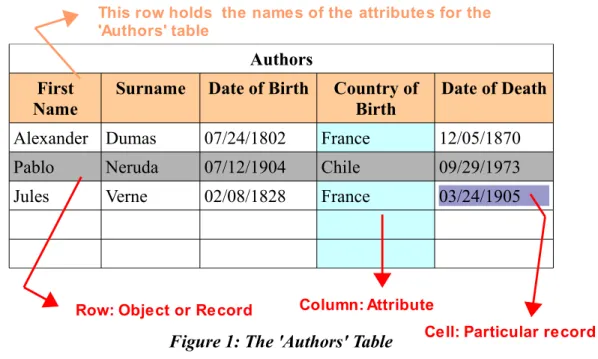
Tables are organized in columns (from top to bottom) and rows (from left to right). The columns represent different attributes that you want to store. For example, you can create the table “Authors” with the columns to store the attributes: First Name, Surname, Date of Birth, Country of Birth and Date of Death. Each row will hold one particular author, like: Jules Verne, Alexander Dumas or Pablo Neruda. Each row is called a 'record'. Each cell -the intersection of a row with an attribute- can also be called a 'record', just to con-fuse you. Rows are said to store “objects” (see figure 1).
Authors First
Name
Surname Date of Birth Country of Birth
Date of Death
Alexander Dumas 07/24/1802 France 12/05/1870
Pablo Neruda 07/12/1904 Chile 09/29/1973
Jules Verne 02/08/1828 France 03/24/1905
Figure 1: The 'Authors' Table
4
Column: Attribute Row: Object or Record
This row holds the names of the attributes for the 'Authors' table
FROMNEWBIETOADVOCATEINAONE, TWO... THREE!
Notice this: some of the authors could not be dead but your table will not become obsol-ete if (or rather when) this happens. This shows that in designing your tables, which in-formation you decide to include and which not, will have an impact on the overall useful-ness of the database. Don't panic just yet, as we will be describing some systematic ways to decide on what data is relevant to collect. Besides, I am counting on your imagination and intelligence to sort this out.
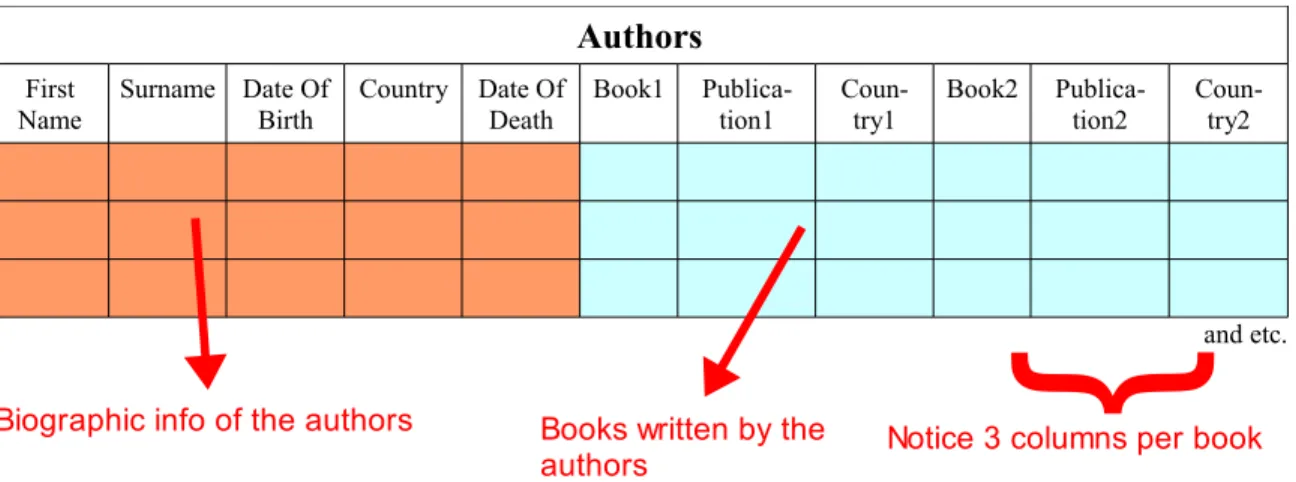
Now that we can collect information about the authors, we want to record the books they wrote as well. Most of us would think about just adding more columns to record the books. For this you would need at least one column for each title assuming that you only record the name of the book. If you also want to record the year of publication and the country of first publication, for example, you would need three columns per title (see fig-ure 2).
Authors First
Name
Surname Date Of Birth
Country Date Of Death
Book1 Publica-tion1
Coun-try1
Book2 Publica-tion2
Coun-try2
and etc.
Figure 2: Unpopulated table for authors and their books
Let's say that each author has four or five titles, except for one that has twenty. You will need to create 20 columns (or 60!) if you want to store your data faithfully, most of which would not be used, wasting computer memory and speed. And what if this author later writes a 21st book? You will need to re-structure your database- adding new columns- and face unforeseen consequences that can come to haunt you later.
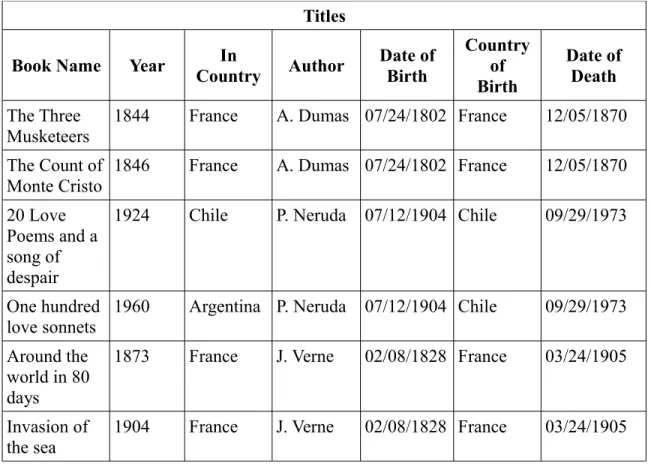
Instead of taking this route we could decide to focus on the books instead and create a “Titles” table, with the attributes we need for each book, and later add the columns for Author's name, surname and the rest. This way it would not matter how many books one author writes and we would not waste space with cells that would never be populated (see figure 3).
5
Biographic info of the authors Books written by the authors
}
BASE TUTORIAL
Titles
Book Name Year CountryIn Author Date of Birth
Country of Birth
Date of Death
The Three
Musketeers 1844 France A. Dumas 07/24/1802 France 12/05/1870
The Count of Monte Cristo
1846 France A. Dumas 07/24/1802 France 12/05/1870
20 Love Poems and a song of despair
1924 Chile P. Neruda 07/12/1904 Chile 09/29/1973
One hundred love sonnets
1960 Argentina P. Neruda 07/12/1904 Chile 09/29/1973
Around the world in 80 days
1873 France J. Verne 02/08/1828 France 03/24/1905
Invasion of the sea
1904 France J. Verne 02/08/1828 France 03/24/1905
Figure 3: A 'Titles' table with author information
Still, this would create new problems: Note that we need to repeat the author's data for every book the author wrote or writes in the future. This complicates maintenance of the data. For example, if one author dies, you need to locate every book she wrote in order to add that data. You also open the door for inconsistencies. What if some books have one date of birth for this author while others have a different day? One (or both dates) is wrong. Now you need to know which one is the correct day and find and modify each wrong record.
Instead of trying to merge both tables into one we will keep them separated, but we will find a way to connect the info in one table to the info in the other table.
This mistake, trying to create one big comprehensive table, is very common and arises because beginners want to make sure that all the relevant data is connected and forget that there are tools that can link them in more flexible and powerful ways.
This is your first lesson in database design: each table needs to cover one topic and one topic only. Creating tables that hold the attributes of both authors and titles is a bad idea. Creating tables that mix employee and department attributes is a bad idea. Creating tables that mix customers and services fields is a bad idea. Instead, you need to create one table for books, one table for authors, one table for employees, one table for departments, one
FROMNEWBIETOADVOCATEINAONE, TWO... THREE!
table for customers, one table for services and so on. If you are taking notes, write this down because I will ask you later.
Establishing relationships within tables.
How exactly do we link the 'Authors' table with the 'Titles' table? How do we make sure that, for example, the object 'Jules Verne' in the 'Authors' tables can reference 'Around the world in 80 days' in the 'Titles' table AND all the other books written by him? To accom-plish this, you need to chose a field in the 'Authors' table that uniquely identifies each re-cord. The chosen field that uniquely identifies each record is called a 'Primary Key'. Now you create an extra column in the 'Titles' table that is going to hold the value of the primary key. This column, that stores the primary key value of the linked table, is said to store a 'Foreign Key'.
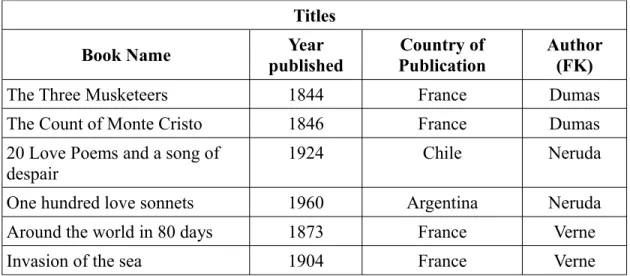
For instance, you could decide that the 'Surname' field in the 'Authors' table will be the primary key. You then create a new column in the 'Titles' table -that you can call 'author' if you like- and write the surname of the author with each book record, correspondingly, in the column that holds the foreign key: Verne, Dumas, Neruda, etc. This 'author' column in the 'Titles' table unequivocally links each book with one author (see figure 4). Base will use that index to link and retrieve the information that you will be asking for later.
Titles
Book Name Year
published
Country of Publication
Author (FK)
The Three Musketeers 1844 France Dumas
The Count of Monte Cristo 1846 France Dumas
20 Love Poems and a song of
despair 1924 Chile Neruda
One hundred love sonnets 1960 Argentina Neruda
Around the world in 80 days 1873 France Verne
Invasion of the sea 1904 France Verne
Figure 4: 'Titles' table linked to the 'Authors' table through the 'Author' foreign key
This way, for example, you could ask your database to list all “Book Name” where “Au-thor” equals “Neruda”. Although you had not explicitly recorded such a list, the database can create it for you. Imagine how useful this is if, instead of six records, you really have ten thousand!
Using a surname as a primary key works fine many times, but has one drawback: what happens if you have two authors with the same surname?
BASE TUTORIAL
One solution is to use more than just one field to form the primary key. In this case it is said that you have a compound primary key. For example, you could use the first name and the surname, together, to form the primary key. This solution is possible and perhaps in many cases the right one. Of course, we can also think of instances where two authors have the same name and surname (like Alexander Dumas, father and son, for example). We could extend the notion of a compound key and work with a combination of three and even four fields to form a unequivocal primary key, but think of all the calculations the computer would have to do just to handle rare exceptions.
To simplify this, Base can automatically generate a unique number for each record in a table. This way each author would have a unique number (Dumas father would have one number, Dumas son would have a different number) that you can record in the column for the foreign key in the 'Titles' table. Instead of writing 'Verne', 'Dumas' 'Neruda', the com-puter will write 003, 004, 005 or something like this. You, as a user of the database, might not even be aware of the existence of these numbers or what numbers they are exactly. The relevant thing, however, is that these automatically generated numbers allow for a unequivocal connection between one object in the 'Authors' table with one or more ob-jects in the 'Titles' table.
At other times, however, you could be using primary keys that are not numbers or primary keys that are compound. Keep this in mind.
Our example uses only one foreign key in the 'Titles' table, but don't be surprised if you find yourself needing to record two or more foreign keys in a table. This is how tables are related!
The primary key is important in more ways than one, and we will check this when we re-view the process of Normalization.
Cardinality and optionality of a relationship.
Notice this: in our example one author will have at least one and possibly many titles. On the other hand, one title can have exactly one author only (let's leave collaborations aside for now. I promise to include them by the end of this section). When you say : “one au-thor, many titles” you are talking about the cardinality of the relationship.
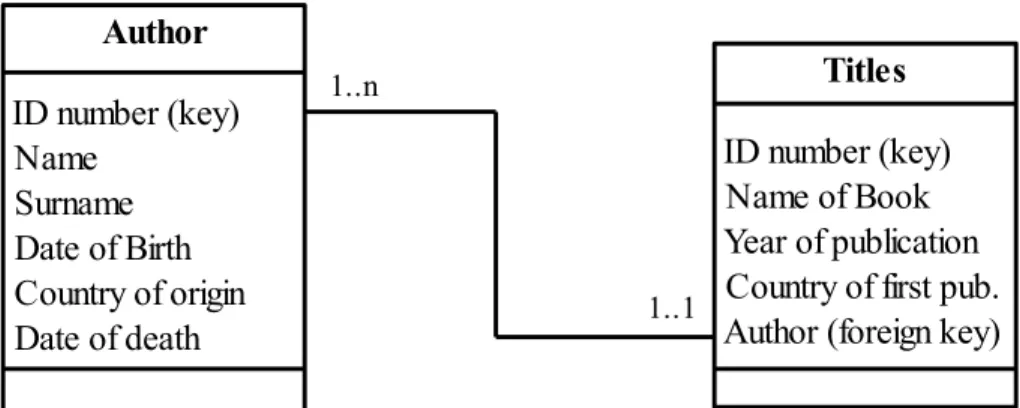
Note again that the relationship is not the same for authors and titles: one author can have many titles, titles have exactly one author. So, when we analyze the relationship from au-thor to title, the cardinals are: 1..n (one to many). When we analyze the relationship from title to author, the cardinals are: 1..1 (one to one). Strictly speaking then, relationships al-ways have two sets of cardinals.
The first number of the set is called “Optionality” and is usually a zero or a one. In the case it is a zero it means that a member of the class has the option to not relate to the second class. For example, if the cardinality from title to author had been 0..1, that would have meant that you can register a book even if you don't know who the author is. Here
FROMNEWBIETOADVOCATEINAONE, TWO... THREE!
you have something extra to think about: whether your database needs, or needs to avoid, objects in one table that are not associated to objects in the other table. Of course, both options are valid and which one you choose depends on the way you define their relation-ships.
The options for cardinality include: ➔ Zero to one (0..1)
➔ Zero to many (0..n) ➔ One to one (1..1) ➔ One to many (1..n) ➔ Many to many(n..m)
Zero to one implies the possibility that an object of the class is associated with none or at most one object of the other class. Zero to many implies the possibility that one object in the first table is associated to no object in the second table, to exactly one or to many. The zero optionality opens the possibility for the existence of an object even if is not associ-ated to other objects in other tables.
One to one cardinality connotes properties of objects in one table that are expanded in the second table. Let's say that some of your books have beautiful illustrations -paintings, engravings, photos, etc- and others don't. You would want to register who was the artist, the name of the art piece and other data. It would be wasteful to include these attributes in the 'Titles' table, because most books would leave these records unpopulated. Notice the Set-subset relationship here. You have a set: books, and a subset:books with illustrations. You record the attributes common to all in the 'Titles' table and then create a new table - “Art info” for example- where you record the extra attributes of the subset. Oh! And of course, the foreign key. Every time you have a set-subset situation a 1..1 cardinality comes in handy. Note that if this cardinality were the same at both sides of the relation-ship (in the direction subset-set) then maybe both classes are really one big class2.
A one to many cardinality implies that one object of the first class can relate to one or more objects of the second class and that an object in the second class can not exist by it-self.
Many to many relationships can not be performed without the use of an intermediate table. For example, one author could write one or more books; at the same time, one book could be written by several authors (in collaboration). In order to keep track of this, you will need a simple table -maybe with only two columns- between the 'Author' and 'Titles' tables that can record all the combinations of book and author. This will change the n..m cardinality to a manageable 1..n or so. Every time you encounter a n..m cardinality, you know that you will be using an intermediate table.
2 Also note that the one optionality precludes having information about illustrations if it is not associated to a book.
BASE TUTORIAL
Managing relationships with column and delete options.
In order to enforce and make tidy the inclusion of primary keys, foreign keys and the car-dinality of the relationships, Base allows you to specify certain options for the columns in your tables. In this tutorial we will consider the following ones:
Key: This option tells Base that this column will hold the primary key of the table. Base will prepare then to see it associated with other tables.
Unique: When you specify this option, Base will make sure that records in this column are not repeated. If, for example, you specify that the 'surname' column be unique, then the second time you try to enter 'Dumas', Base will reject it as an invalid entry. It makes a lot of sense to make sure that a column set to KEY is also set to UNIQUE.
Not null: This option means that records cannot be left with this attribute empty. Base will display an error message if you try to enter a record that leaves a NOT NULL column empty. This forces whomever is using your database to at least have the informa-tion requested in the NOT NULL columns if they want to enter the record. For example, if you set the 'surname' and 'date of birth' as NOT NULL, then a user can not input a new author if he doesn't have at least the surname and the date of birth. Again, it makes sense that Key columns are also set to NOT NULL. This option can also affect cardinalities. If you have decided that your database should be able to accept a book entry even if it is not associated to an author, you can not set the foreign key to NOT NULL. On the other hand, if you will not accept a book entry unless it is associated to an author, the foreign key should be set to NOT NULL in order to enforce this.
Because being able to relate the object in one table to another object in another table is so important, special care must be placed on the subject of deleting records. Think about this: Let's say that there is an author that wrote only one book and you discover that you no longer have that book in your collection. As you update your database and erase that title, what will happen to the 'author' information? Should it be deleted too? Should it be kept as an historical record or in case you find and buy one of his books again?
Actually, both options are valid and you can chose the one that reflects the purpose of your database better. But your application will not know what to do unless you make ex-plicit what your preference is. For this reason, when you are developing your application and defining relationships, Base will need instructions on how to handle the deletion of records and will offer you the following options. This is what they mean:
No action: Base will delete the record you want but will not delete the records associated with it. This way, you can delete the missing book and keep the record of the author that wrote it.
Delete Cascade: With this option, Base will delete the record you are requesting to delete and will also delete all other records that have this record's key as a foreign key. This op-tion is called cascade because it elicits the image of a deleop-tion creating further deleop-tions.
FROMNEWBIETOADVOCATEINAONE, TWO... THREE!
Following the example, if you delete the author, any book associated to him will be de-leted too.
Set Null: With this option, Base will delete the record you are requesting but will not de-lete the other records related to it. Instead it will erase their foreign keys to reflect that they are no longer associated to other objects. Note that this requires that NOT NULL is not a condition of the foreign key column. If you decide to erase the author in the ex-ample, the book record would not be deleted but you would find that it no longer has data for the foreign key, i. e. It would be set to null.
Set Default: When deleting an object, the foreign key column of the associated tables will be populated with a default parameter that you previously specify. This way, instead of just leaving an empty foreign key in the book record, Base could write, for example (and this is completely arbitrary) “000”, which you know means “I have no author info for this book in this database”.
A definition of database and database design.
It took some time, but now that we have described a database and its properties, we are ready to offer a definition of Database and Base Database.
We have seen that database design uses many tables that are all related one way or anoth-er. Each table will only cover one particular topic or unity (authors, titles, places, events, etc.). These topics are called classes. A class is a collection of objects that have the same attributes. In database theory, each class translates to a table.
With that said, we can attempt to define a Relational Database as a collection of objects -organized in classes- and their relationships3.
This definition didn't take long to write but you won't be deceived by this illusory simpli-city. You can appreciate that 'object' has a rather precise meaning and is a central element in the conformation of your classes and that there is a big chunk of knowledge around the concept of relationship, particularly because of its fundamental role in connecting inform-ation.
Database design, then, is about deciding on class structure (which classes to work with and which attributes to record in each) and the structure of connections they establish (which table connects with which and with what cardinality). Of course, you also need a method to add records to your tables. And you need a method to retrieve useful informa-tion -like particular records or summaries- to produce reports. Base offers forms, queries and reports for this. For this reason, when we say a 'Base database', we mean not only the data and their relationships but also the forms, queries and reports to use it.
3 Just to be clear, the name “Relational Database” derives from the use of the word 'relation' which is a way used in mathematics (Set Theory) to say table. In consequence, when we say 'relational database' we mean: 'database that uses tables', which is a distinct feature when we compare this to other database models (e.g. Hierarchical, Network, etc.) and is not an emphasis on our intent to relate -or connect- data.
BASE TUTORIAL
Talking about forms and reports...
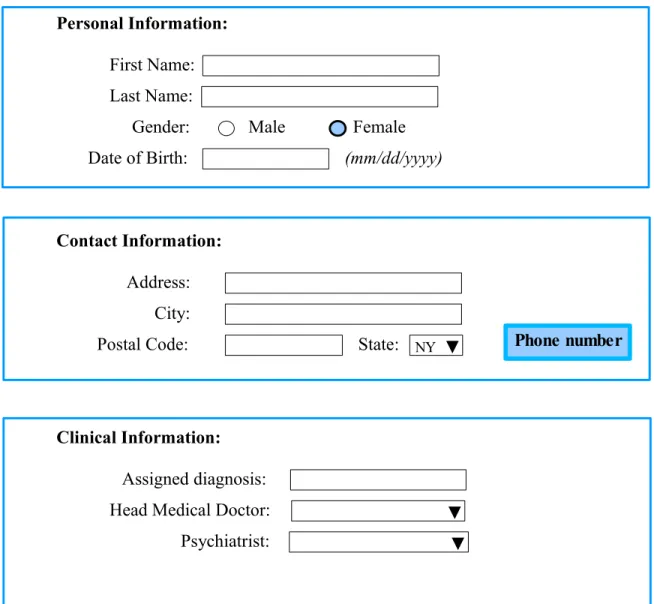
Forms allow you to enter data to populate your tables. With Base, you can build them by using the Form Wizard, which simplifies the task, or in design mode, which gives you maximum flexibility. When building forms you will need to think about what you want them to achieve and this in turn requires that you understand what do the different options offered in building them mean. We will review this more closely in part III. Not surpris-ingly, the time you spend thinking about the design of your forms will be paid back with better performance and efficiency.
Among these considerations, you need to make sure that the user of your form under-stands exactly what she/he is being asked (e.g. To the entry “Sex:” do you input “Male” or “Scarcely”?). It is not uncommon that we use words believing that they have a very precise meaning but later discover that they can be ambiguous. That is because when we use a word, it correlates strongly with an image in our mind, but our readers could have other associations. The context in which they appear can also suggest meanings that were not intended. To avoid traps like these you need to test and test and test your forms, ask-ing friends to read them and give you feedback about what they understand and how they think they should answer. Even if you think that you will be the only one using your forms, you never know when someone will show up to help you with data entry or when someone will ask you for a copy of your application to use it herself.
The other important aspect of forms is that you want to ensure that data entry is uniform, that is, that the same element is entered in the same way every time. In general, Base will consider as different entities two spellings of the same word. Also, if you are not consist-ent with the use of capitals, Base can consider 'Verne' and 'verne', for example, as two dif-ferent objects. This could lead to wrong summaries of data or records impossible to find. Base offers a type of variable that treats words with the same letters as the same word, no matter how you capitalize them. This can be very helpful. However, if you are keeping customer data, you would not want to have them receive mail with their names carelessly treated, as in “Dear Mr. SMith”, so you still need to monitor input.
Base offers several ways to handle this. One of my favorites is the drop-down menu, where you point-and-click your entry. You can also use check lists and circular buttons. What they have in common is that they automatize the entry of data. Base also offers functions with which you standardize data entry, for example, changing all letters to small caps (as in “proCEduRe” to “procedure”). Of course, this means more work while you are developing your form, but Base makes it really easy and it's worth the extra ef-fort.
For data output you have the Reports. They are usually built by queries and you also have the options of either getting help from the Wizard or using the full flexibility of Design Mode. We will also spend time in part III studying this. What I want to point out is that reports need to be easy to read, unambiguous and provide the necessary information. This means that spending some time in their design is also bound to repay you later with added efficiency. For example, I always recommend to include time data in a report so we can be sure about when the information presented was valid.
FROMNEWBIETOADVOCATEINAONE, TWO... THREE!
So get as many people as you can to test your forms and reports. At the same time, test your database design. See if someone can fool your input options or find exceptions that are possible but that your design can't handle. Test, Test, Test. It is easier to make changes at earlier stages than trying to repair a live version.
Modeling data and goals of proper design.
In designing your database, you will need to define the classes that you will be working with (books, authors, etc.) and what relationships within them you need. Then you need to decide on the structure of each table, that is, what attributes you need to record for each class (name, surname, etc. or title, year of publication, etc.) and what properties you will give to the columns (not null, unique, etc.). You can't attempt to collect ALL inform-ation about your classes and you will need to edit your selections according to the pur-pose of your database. You will then need to refine the structure of connections, deciding not only what table connects with which, but also the cardinality and optionality they use, the type of primary keys that you choose and how to treat deletions. These decisions might also influence, or be influenced by, the order in which your forms ask for the in-formation and the reports that will make sense to produce. When you are deciding all this and fine tuning your decisions, it is said that you are modeling your data.
Don't feel dismayed by all this. The subject of database design is vast and complex enough to comprise several years of college education. So it is going to take some time and patience for you to feel comfortable with these concepts and the ways to implement them. But you don't need to be a rocket scientist to become quite proficient at working with Base. The description offered in the previous paragraph is quite a good summary. Read it and translate it to a numbered list and then try to visualize your actions at each step. This is exactly what we will do in part II of the tutorial.
One of the most important aspects in data modeling is defining (also said 'extracting') your classes. We will review two ways for doing this. The first is a consequence of your activities during the different phases of database design, which we will describe shortly. The second is a formal method called Normalization. Normalization is a formal method because it does not analyze the content of your tables (it does not care if the classes are books or authors or if the attributes are names or dates, etc.) but focuses on certain mech-anical connections of the primary key. There are several normal forms and, in this tutori-al, we will review three: first, second and third normal form. In your work you will be do-ing both, content analysis and formal analysis.
There is no one way to design a relational database. Your design will reflect your level of preparation and experience. The techniques we will review here are only tools to help you make better decisions. In general, however, you will want your database to avoid repeat-ing information while still recordrepeat-ing all the data you need; that your database can grow, as your collection of data grows, without a breakdown in functionality, and that your database has some flexibility to handle entries that are not common but possible. Princip-ally, you want your database to provide the information you need and that such informa-tion is valid for the sample from which it was extracted.
BASE TUTORIAL
In order to ensure this, modeling experts talk about Entity Integrity, Referential Integrity and Data Integrity. Entity Integrity means that each row of a table represents only one en-tity in the database. Therefore, each enen-tity can be assigned a unique (and only one) primary key. Referential integrity means that all foreign keys in all tables must be matched by a row in another table (obviously, a primary key). Finally, Data Integrity means that all data in the database correctly represents the fact that it aims to collect. This is achieved basically by minimizing data entry error -you know- misspelling of names, repetition of characters, transposition of numerical digits, wrong or impossible dates and a long etcetera. Throughout, we will be reviewing ways to achieve these goals of proper design.
Visual vocabulary.
Database design is aided by a diagram protocol called UML, acronym for Unified Model-ing Language. UML provides a standardized way to signify components or aspects of the Database. Let's see this:
Classes are often notated this way:
Class Name Class Property 1 Class Property 2 Class Property 3 etc.
Class Method 1 Class Method 2 Class Method 3 etc.
See the examples:
14
Authors
Name Surname Date of Birth Country of Origin
Notice that this class has no
{
methods
Products
Name Description Company Quantity
Produce appropriate re- quest form if quantity is less than 300 units
Class properties correspond to the attributes of your class, which later form the columns in your tables.
FROMNEWBIETOADVOCATEINAONE, TWO... THREE!
The relationships are commonly notated by a line or arrow between the classes:
Because in the design of a database you are mostly concerned with the classes and their relationships, these two elements will suffice for now to describe, think about and com-municate with others the structure we give to our data (That is, the structure of our classes -which attributes we will want to record- and the structure of connections -what table connects with what table and with what cardinality). UML offers other elements but we will not review them here.
You can imagine that, in the process of fleshing out the design of your database, you are prone to spend a lot of time drawing boxes, connecting them with lines, deciding on car-dinalities and deciding which attributes to include in each class. It's funny to notice that this very important phase of database design is best aided by a simple pencil and paper. However, this is very powerful. We have already hinted at the fact that you will be work-ing with several tables and the more thought you invest in the design, the more flexible, reliable and functional it might become. Changes in design now are just a matter of eras-ing a line and draweras-ing a new one or deleteras-ing or adderas-ing attributes instead of tryeras-ing to undo part of your work in front of the computer while trying to retain other decisions at the same time. With the level of abstraction offered by UML, you can focus on deciding the general structure of your database and deal with the details later.
Let me note that Draw offers a flexible set of tools for drawing boxes and connecting them with arrows. Draw can even let you easily adjust the arrows, for example, if you have several boxes and need to surf the connections between them. You can also find oth-er freeware for doing this, like Dia (a GNU license project) that comes with a complete set of UML tools.
Later, when we discuss the database we will work with in part II of this tutorial, you will see how our design decisions are represented in the diagrams, how this simplifies the communication about the design and how this translates into the development of the ap-plication.
A more formal rendition of your design should include the names of your attributes in the corresponding classes and the identification of the primary and foreign keys. The rela-tionships should indicate the cardinalities and the arrows should go from the primary key to the foreign keys (figure 5).
15
BASE TUTORIAL
Phases in database design.
In general, the effort to design a database will start with someone finding a problem in the real world. It can be a dentist trying to organize his clients and lab work or a company trying to keep inventory of on-line sales. This person will need help from someone with knowledge of database design and in implementing it with Base. Let's call the person a 'client' and the expert the 'developer'.
Of course, the client and the developer can be the same person -and if you are reading this, then this is most probably the case. But I make the distinction because a dialog between the client and the developer is always necessary, even if it only takes place in-side someone's head. Usually, the client has a general idea of what he wants and the de-veloper will ask questions in order to be able to translate the need into a well developed database application.
Broadly, the phases of database development can be described in the following way: 1. Presenting problem is identified
2. Possible solution is defined 3. Data modeling
4. Model testing
5. Database running and maintenance
During the first phase, the client tries to explain what his needs are -which are often mul-tiple- and the expert tries to help him narrow it down to the kind of tasks a database can really perform. In the second phase, the expert develops a formal statement of the goals and scope of the database application. This is important because a small change in a goal can produce important changes in the design of the database. Besides you will discover yourself becoming more ambitious with what you want your database to do. If you don't set a line somewhere, you can find yourself making your model progressively more and more complex and never actually develop your application or, worse, have it perform er-ratically as you keep modifying data structure.
16
Author
ID number (key) Name
Surname Date of Birth Country of origin Date of death
Titles
ID number (key) Name of Book Year of publication Country of first pub. Author (foreign key) 1..n
1..1
FROMNEWBIETOADVOCATEINAONE, TWO... THREE!
Now that, as the expert, you have defined the scope and goals of the database, you are in the privileged position to decide which information is relevant and which not. You can make better decisions that can help define classes and attributes, primary keys and rela-tionships with zero or one cardinalities. This is the extraction of classes we earlier identi-fied with content analysis. You can also sketch and consider the forms and reports that your application will need and how they integrate with the design. Of course, you also have to test your logic and grammar by asking friends to find holes in your design and meaning in your reports and forms. These two phases do not have a clear boundary be-cause the testing will impose changes in your design and the new design will need to be tested. Don't mind spending some time here and test, test test!
Now that you feel confident of your database design (class structure and structure of con-nections) and the forms and reports you want to use, it is time to code them with Base. Now you are sitting in front of the computer for the first time since the project started! Of course, if you are in the process of learning then I strongly encourage you to sit and play around with Base, the more the better, so that you can become acquainted with its differ-ent screens, dialog boxes and options. But if you are in the task of designing a database, this is the first time that you really need to interact with the computer.
During maintenance, you test that your database remains consistent and able to handle the growing number of data it receives. Defragmenting your database and making backups that could get you up and running should disaster ensue seems appropriate. Now is when you can also try to introduce the features that you didn't think of before and that can make your application run faster or more efficiently. Of course, these changes need to be per-mitted by the structure of your database. When your structure can no longer accommod-ate the new functionality that you want, then maybe it's time to go for a new design. The more that you, as the expert, question the client and become familiar with the busi-ness process, the better your decisions for class extraction and table structure. Usually, the actors involved in the productive process (customers, providers of service, suppliers, investors, etc.) become classes. Different phases in the production processes (recorded as schedules or logs), places (e.g. the different stores of the chain) and even events (e.g. rendition of services) can also become classes. Some data can be better recorded as tables; some other times you will find that the same data is better recorded as attributes. The difference is set by the purpose (functionality) of the database. Here is where imagin-ation and experience come in very handy. Try out your ideas and see what happens. Read about database design and don't fear to ask other people (especially if they know some-thing about database design!).
The other tool for deciding on class extraction is Normalization, which deserves a chapter of its own.
BASE TUTORIAL
Chapter
2
Getting into normal form.
Normalization is a formal way to ensure that our tables have a good structure, that is, that each table has the appropriate attributes.
Typical problems avoided with proper normalization include:
➔ Unable to create a record without information from a foreign record. ➔ Deleting one record will result in other data being lost.
➔ Data being repeated in other fields (or tables) resulting in possible inconsistent re-cords of data.
Many of these problems have to do with deciding if certain data should be organized by itself -in a table of its own- or as fields in a host table.
Because this is a formal method, we will not deal with the actual content of our tables (which is what we are supposed to do the rest of the time anyway) but will analyze cer-tain mechanical connections of the primary key.
A key concept of normalization is that of 'Functional Dependency'.This concept means that there is one field (the primary key) or more fields (for a compound primary key) of a record that is/are enough to help me identify any other field (attribute) of that record, that is to say that knowing the value of any field depends on knowing the value of the primary key.
Clearly, true primary keys help me identify -or determine- all other attributes in a record (row).
This also means that, if we have a compound key and one of the fields in it turns out to be superfluous or redundant, then this primary key is not a true primary key, it's just a key. Therefore, a primary key has no subset of fields that is also a primary key.
Many times the vastness and complexity of the data in our database obscure this leanness, potentially creating problems like those described above. By analyzing functional de-pendency -at several levels- we can identify if our data structure is compromised or not and avoid those problems. There are several normal forms and in this tutorial we will cover three: first, second and third normal form.
BASE TUTORIAL
First normal form.
According to this rule, a table must not try to keep multiple values for a piece of informa-tion, whether in one field or in multiple columns.
We would have this situation if we tried to include in the 'Authors' table all the books written by them. Let's say that we create a column called 'Books' and then we cram to-gether 'The Count of Monte Cristo', 'The Three Musketeers', 'The Man in the Iron Mask' and etc., all separated by commas, for the record of A. Dumas. Even if we use several columns (Book1, Book2, Book3, etc.) we are still trying to cram multiple values (the name of the different titles) for one type of information (Books written by author).
We already saw other reasons why this is a bad idea. First normal form helps us identify this problem. It also offers a generic solution: If a table is not in first normal form, re-move the multivalued information from the table and create a new table with that inform-ation. Include the primary key of the original table as a foreign key.
In our example, this would result in the creation of the 'Titles' table, with info on the books, and a relationship to the 'Authors' table.
Although not immediately evident, first normal form solves a problem of functional de-pendency, as the authors' primary key would have not helped to identify a particular value for the multivalued field. If I ask you to provide a concrete title for a particular author, you have no way for selecting it.
Thinking in terms of extracting multivalued pieces of information is very simple and completely equivalent to the analysis we did in the earlier chapter with this same ex-ample.
Second normal form
Second normal form requires that a table be in first normal form AND that all fields in the table (that are not primary keys) can be identified only by the primary key and not by a subset of it.
By definition, this problem can arise only when we have a compound primary key to identify a record. To explain this, let's analyze the following table:
Teacher ID Project Name Department Contact Hours
mackormac032 Science Fair Science Dept 344-2713 10
Phillipi72 Soccer coach Athletic Dept 225-5902 18
mackormac032 Art Contest Art Department 639-6798 7
Phillipi72 Science Fair Science Dept 344-2713 15
FROMNEWBIETOADVOCATEINAONE, TWO... THREE!
Is this table in first normal form? Yes, If I tell you the primary key, you can identify unique values for the other fields.
In this case, the primary key is a compound key that requires the Teacher ID and the Pro-ject Name. I need both bits of information to know, for example, how many hours have been devoted by a certain teacher to a certain project.
But it is also true that I only need the Project name if I want to know the involved depart-ment or the contact information. Oops!
So, while I am thinking that Teacher ID and Project Name form the compound primary key, it turns out that a subset of it -the Project Name- is a primary key for certain fields in this table. To solve this, we need to extract the info related to the subset primary key (De-partment and Contact) and form a new table with them, including the subset key they de-pend on (Project Name).
This process is called 'Decomposition'. Decomposing the table of the example we get:
Teacher ID Project Name Hours Project Name Department Contact
and
Note that the original table retains the entire compound key (Teacher ID and Project Name) and the info that functionally depends on it (Hours).
Lets restate this in formal parlance:
A table is in second normal form if it is in first normal form and we need all the fields in the key to determine the value of non-key fields.
If a table is not in second normal form, remove the non-key fields that do not de-pend on the whole of the compound primary key, then create a table with these fields and the part of the primary key they do depend on.
Third normal form
Third normal form requires a table to be in second normal form AND that you can not use regular fields (that is, that are not key fields) to determine other regular fields.
In other words, you need to make sure that only key fields determine non-key fields. To make sense of this, let's analyze to following example:
BASE TUTORIAL
Teacher ID Surname Name Department ID Department Name
fsmith089 Smith Fred 17 Science
mling619 Ling Mei 17 Science
syork233 York Susan 18 History
If each teacher works for only one department, then this table is in first and second nor-mal form. Let us analyze this:
1. If I know the teacher's primary key (the Teacher ID) I can tell you a unique value for all the other fields.
2. The primary key is not compound, so I have no possibility of subset conflicts. However, notice that there is information about the department that is repeated (depart-ment ID and Depart(depart-ment Name) and could become inconsistent (e.g. It seems that the Science Dept. has been assigned the ID number 17. If we later find a record that assigns the number 23 instead, we would have an inconsistency). Further, it is possible to determ-ine the Department Name by knowing the Department ID, which is not a primary key, and vice-versa.
In this case, we remove the regular fields that are dependent on the non-key field (In this case, we remove the Department Name) and create a table with it, in which we also in-clude the field they depend on (the Department ID), left as their primary key.
This way we would have:
Teacher ID Surname Name Department ID
and
Department ID Department Name
In formal parlance we have:
A table is in third normal form if it is in second normal form and we cannot use non-key fields to determine other non-key fields.
If a table is not in third normal form, remove the regular fields that are dependent on the non-key field and create a table with them, including the field they depend on as their primary key.
FROMNEWBIETOADVOCATEINAONE, TWO... THREE!
Aiming for simplicity
An analysis of functional dependency can easily identify decisions in table structure that will create problems sooner or later. Notice that some of the decisions made with Nor-malization had already been implemented with content analysis. This shows that both tools have an area of overlap. This is fine. Normalization can help us simplify structure when we are very in love with the table designs we have done and it hurts us to chop them further. And believe me: simple is better!
However, in the process of designing your database, you will be using both tools: Nor-malization and content analysis i. e., the extraction of classes by understanding the pro-duction processes, the key roles involved, the required reports and the overall purpose of the database.
BASE TUTORIAL
Chapter
3
Recording attributes: Are you my variable?
The data that you will store in your tables will actually be stored as variables in your computer. Computers have different ways of storing data. In general, they trade memory or speed for accuracy: Computations that require more accuracy tend to be slower and use more memory. When you are building your tables with Base, you are asked what kind of variables you want to store and are presented with a drop-down menu of options. The decisions you make will affect the performance of your database. To better understand what these options mean and how they affect the way Base handles your variables, it is necessary to review the way computers handle data.
In general, computers handle numbers and characters differently. Some people are con-fused by the fact that numbers can be treated as characters also. e. g. '7' is a sign that rep-resents the concept of seven. In that sense, it is stored in the same way as the signs '@' or '#' or the letter 'A'. As a character, the sign can not be operated mathematically, just as it would not make sense to calculate the sum of '@' and '#'. Phone numbers are good can-didates for being stored as characters. Of course, any information that uses text is also stored as characters. Addresses need both, numbers and text, but we store them all as characters. Whether they are letters or numbers, when we are only storing the signs (as opposed to the value for a number) we call them 'Alphanumeric characters'.
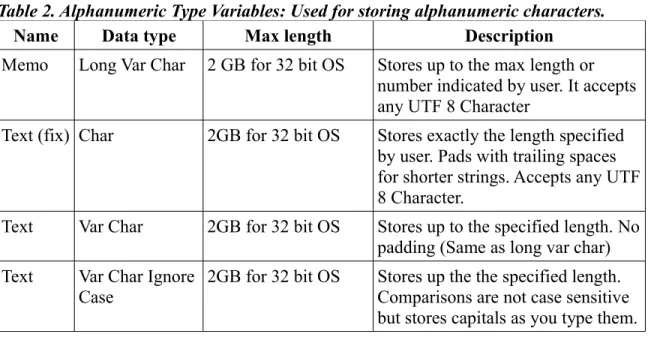
Computers have different ways of storing alphanumeric characters. For example there is the ASCII code, that needs only one byte to store a character. Unfortunately, this limits the number of possible characters that you can use to only 256. Although enough for many applications, it falls short if you want to have access to expanded character sets: Chinese or Arabic characters, accented vowels (diacritics) and things like that. Protocols that allow for lager numbers of characters have been developed, like Unicode, that use more bytes per character.
Base will store alphanumeric characters using UTF-8, which is a code that is compatible with both ASCII and Unicode. Base will use one or more bytes for each character accord-ing to internal calculations. When Base asks you the length for a particular record, e.g. Surname of Author, it is not asking the number of Bytes you want to allocate but for the number of characters you want to receive. How many bytes are actually used is fixed by the software.
This is not the case when you store the value for a number. Different ways of storing numbers will require more or less bytes. Let's see why:
Computers store information in binary form. The unit is called a 'bit' and can have one of two values (thus binary): either zero or one (or On and Off, or 3.5 volts and 5 Volts, or
BASE TUTORIAL
any of two possible states). Bits are organized in larger groups -usually eight bits- to form a Byte.
In this conceptual representation a byte is drawn as a box with eight spaces. Each space can hold a zero or a one:
1 0 0 1 1 0 1 0
Since this is a binary numeral system, each box represents a power of two, in the same way our decimal number system assigns successive powers of ten from right to left:
27 26 25 24 23 22 21 20
Which is to say:
128 64 32 16 8 4 2 1
To represent the number five, you would need to 'activate' or indicate the numbers for four and one (because four plus one is five). So your byte representing five would look like this:
0 0 0 0 0 1 0 1
With a little bit of math you can figure out that you can represent all numbers from 0 to 255 (that is 256 numbers in total) using one byte.
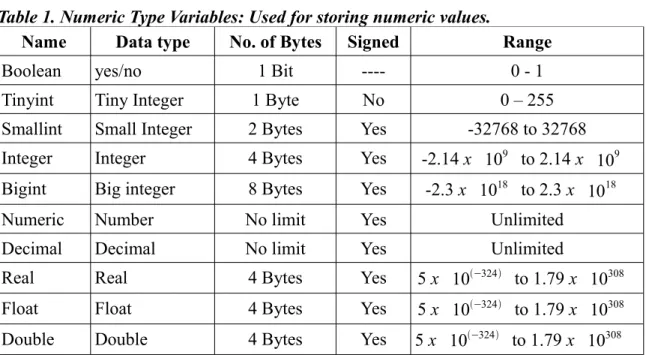
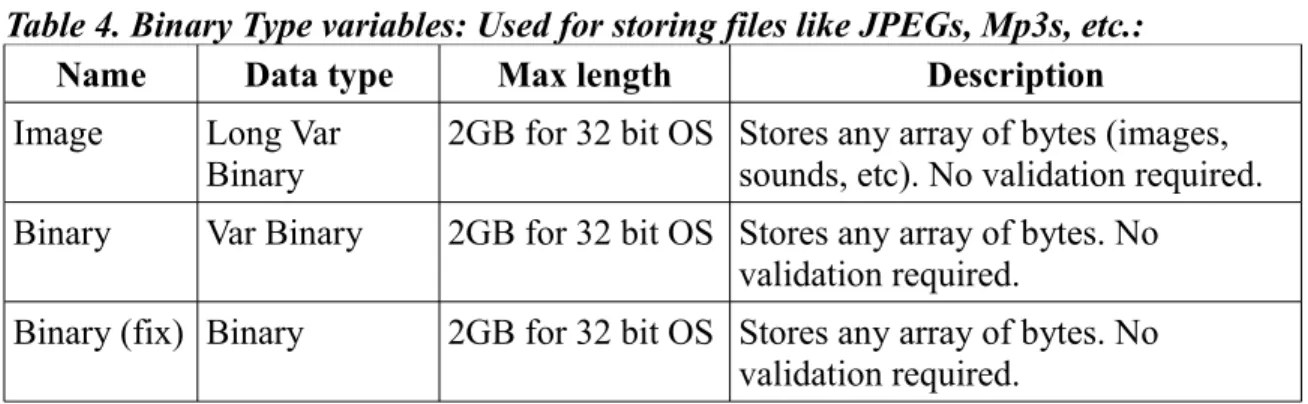
If you need to store numbers bigger than 255 then you need to add extra bytes. Base of-fers different amounts of byte aggregate options to store numbers, depending on how po-tentially big the values that you need to record are. Check the chart below to get and idea. Now, what if you need to store negative numbers, say -7?
The solution for this has been to use the last bit to the left of your byte to represent the sign and use the other seven bits to represent the number. Because the last bit no longer represents the value 128 but instead works as a flag to indicate if the number is positive or negative, we can represent numbers form -128 to 127 with this arrangement4.
This type of bytes are called 'signed' bytes, while the bytes that only store positive num-bers are called 'unsigned bytes'. The chart below indicates which options are signed or unsigned and helps you know the range of values you can store with them.
4 The binary negative numbers are deduced by a technique called two's complement where 10000000= -128 and 10000001= -127... 11111110= -2, 11111111= -1, 00000000=0, 00000001=1, 00000010=2... 011111111=127 and around again. This way the machine can subtract numbers by adding a number with the two's complement of the other number and not have to attempt really complicated alternative ways of subtracting.
26
Byte:
Bit