Microsoft Dynamics
®AX 2012
Selecting the Best
Development Technology for
Your Application
Development Scenario
White Paper
This white paper provides an overview of the common
development patterns, programming models, and development
tool changes in Microsoft Dynamics AX 2012. It provides
guidelines for selecting the best development technology for
your business application development scenario.
Date: January 2011
Author: Chandramouli Venkatesh, Principal Program Manager
Lead
Send suggestions and comments about this document to
[email protected]. Please include the title with your
feedback.
Table of Contents
Introduction ... 3
Development patterns in Microsoft Dynamics AX 2012 ... 3
Programming models in Microsoft Dynamics AX 2012 ... 5
Development framework changes ... 6
Selecting the best development technology ... 12
Development technologies road map ... 15
Introduction
Microsoft Dynamics® AX 2012 provides business application developers with new choices for programming models and developer technologies. This white paper discusses the following topics:
Development patterns in Microsoft Dynamics AX 2012
Programming models available in Microsoft Dynamics AX 2012
Changes to the core development framework in Microsoft Dynamics AX 2012 Selecting the appropriate programming model for your development patterns The Microsoft Dynamics AX development technologies road map
This white paper helps you pick the best programming model for your business application
development scenario. Each programming model has advantages and disadvantages, and in some cases, the models may overlap in functionality. It is important that you choose the right programming model for your scenario because the choices you make initially can simplify the development
experience and improve developer productivity. This can result in faster time to market and better supportability of the resulting business application.
This white paper is intended for anyone involved in developing business applications in the Microsoft Dynamics AX environment. Familiarity with Microsoft® Visual Studio®, the .NET Framework, the MorphX® development environment, and the Business Connector is assumed.
Development patterns in Microsoft Dynamics AX 2012
To choose the appropriate programming model and tools for your business application development, you must first identify the basic development patterns that can be combined to create your
application. Development patterns are the building blocks of any business application, and they fall into the following categories:
Customization Alteration Extension Enhancement Integration
External application module development Custom dedicated applications development Report development
Enterprise Portal Web application development
Although real-life applications rarely fit neatly into a single development pattern, it is possible to identify large parts of an application that fit into one of these development patterns. It is important to understand these pattern categories, because each of the following programming models in Microsoft Dynamics AX is best suited for to one of these development patterns.
The following sections provide definitions and an example of each development pattern.
Customization
Visual Studio projects in a higher layer, such as, for example, the ISV layer or the VAR layer. The unique layering feature of Microsoft Dynamics AX enables the system to synthesize the final application logic to be executed at run-time by aggregating the metadata and code modifications across all the layers. You should be aware that this layer-based customization capability is applicable to all artifacts stored in the Microsoft Dynamics AX model store, including the Visual Studio project artifacts.
Extensions to functionality are achieved by incrementally increasing base functionality by adding to the source code in the business logic of the base application.
Enhancements to the application are achieved by adding new functionality originally unavailable in the base application. Typically, an enhancement is larger in scope than an alteration or extension. An example of customizations would be a scenario in which a new regulation from the government requires the existing sales tax computation business logic to reflect the inclusion of an additional “environmental sustainability tax” component. If the calculation behind this new component is straightforward and simple, you can simply alter the base tax computation logic in a higher layer and directly implement the required source code changes. However, if this tax module has business rules that are more complex, you should consider enhancing the base product with a new tax engine component that implements these requirements.
Integration
Integration is the development pattern that involves enabling existing applications (not written exclusively for Microsoft Dynamics AX) to interact and work with Microsoft Dynamics AX across process boundaries.
An example of integration is when a value added reseller (VAR) integrates with an existing legacy Customer Relationship Management (CRM) system to synchronize the customer list between Microsoft Dynamics AX and the legacy CRM system.
External application module development
The development pattern for application modules that run out-of-process of the AOS server or Microsoft Dynamics AX client processes.
Custom dedicated application development is the development pattern that builds a new, custom external application/client that accesses functionality and data in the Microsoft Dynamics AX system. These applications can span multiple platforms and programming languages.
An example of custom dedicate application development is creating a Windows® Phone 7 application to view open sales orders in Microsoft Dynamics AX.
Report development is the development pattern that creates custom reports and customizes any out of the box reports for the Microsoft Dynamics AX platform.
Enterprise Portal web application development is thedevelopment pattern that creates web applications specifically built on the Microsoft Dynamics AX Enterprise Portal development framework. An example of web application development is creating an Enterprise Portal-based employee self-service page to enter timesheet data.
Programming models in Microsoft Dynamics AX 2012
Much of Microsoft Dynamics AX functionality is contained in X++ classes. The programming models are how you access that functionality. The following programming models are supported in Microsoft Dynamics AX 2012:
X++ development
.NET languages development with weakly typed .NET interop to X++ .NET languages development with strongly typed .NET interop to X++ Services
The following table provides a brief description of each of the programming models and their advantages and disadvantages.
Programming model Advantages Disadvantages
X++ development – The programming model in which the developer directly adds or alters Microsoft Dynamics AX metadata and/or X++ source code. This model provides complete access to all the base functionality
implemented in the lower layers in the system. This is the most commonly used programming model in Microsoft Dynamics AX development.
The most powerful
programming model because it provides complete access to all functionality in the system. Precise and fine-grained
control over the scope of customizations.
Steeper learning curve for .NET developers.
Weakly typed .NET interop to X++ – The Business Connector presents a comprehensive but weakly typed programming model to access all the Microsoft
Dynamics AX metadata and X++ business logic from .NET. This is the only mechanism available for .NET to X++ interop in Microsoft Dynamics AX 2009 and earlier versions. This model continues to be available and supported in Microsoft Dynamics AX 2012.
Opens up Microsoft Dynamics AX development to the .NET community.
Weakly typed programming model abstraction results in most problems being found at run time rather than at design time, which can lead to increased total cost of ownership (TCO).
Strongly typed .NET interop to X++ – In Microsoft Dynamics AX 2012, the Visual Studio Tools provides access to a strongly typed programming model for Microsoft Dynamics AX metadata and X++ business logic. This is achieved through the generation of strongly typed .NET proxies on top of the newest version of the Business Connector.
Adapts Microsoft Dynamics AX development seamlessly into the .NET paradigm.
Strongly typed programming model.
Results in more maintainable code.
Precise and targeted access to the Microsoft Dynamics AX system functionality needed.
Requires redistribution of Business Connector assemblies with the consuming .NET application.
Not firewall friendly due to underlying dependency on Remote procedure call (RPC) protocols.
Programming model Advantages Disadvantages
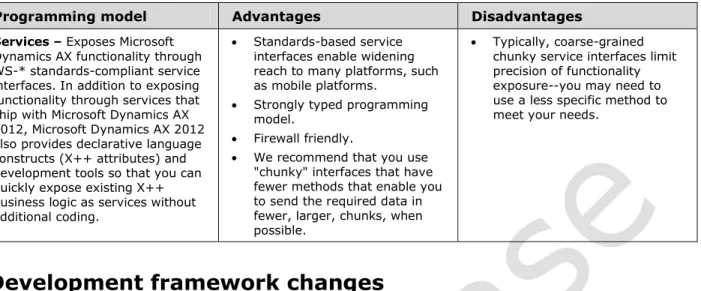
Services – Exposes Microsoft Dynamics AX functionality through WS-* standards-compliant service interfaces. In addition to exposing functionality through services that ship with Microsoft Dynamics AX 2012, Microsoft Dynamics AX 2012 also provides declarative language constructs (X++ attributes) and development tools so that you can quickly expose existing X++ business logic as services without additional coding.
Standards-based service interfaces enable widening reach to many platforms, such as mobile platforms.
Strongly typed programming model.
Firewall friendly.
We recommend that you use "chunky" interfaces that have fewer methods that enable you to send the required data in fewer, larger, chunks, when possible.
Typically, coarse-grained chunky service interfaces limit precision of functionality exposure--you may need to use a less specific method to meet your needs.
Development framework changes
In Microsoft Dynamics AX 2012, major changes have been made to the development framework and key enabling technologies. It is important that you understand these changes, because they directly impact your development experience. You should consider these changes along with the available development patterns and programming models when preparing for application development. The key framework changes in Microsoft Dynamics AX 2012 include the following:
X++ is compiled into Common Intermediate Language (CIL).
There is extensive tooling support in Visual Studio through Visual Studio Tools for Microsoft Dynamics AX.
There is a single repository for .NET and X++ projects. Microsoft Dynamics AX 2012 supports eventing.
Access to external systems from X++ has been simplified.
Richer program abstractions are available in the data layer in Microsoft Dynamics AX 2012.
X++ compiled into Common Intermediate Language (CIL)
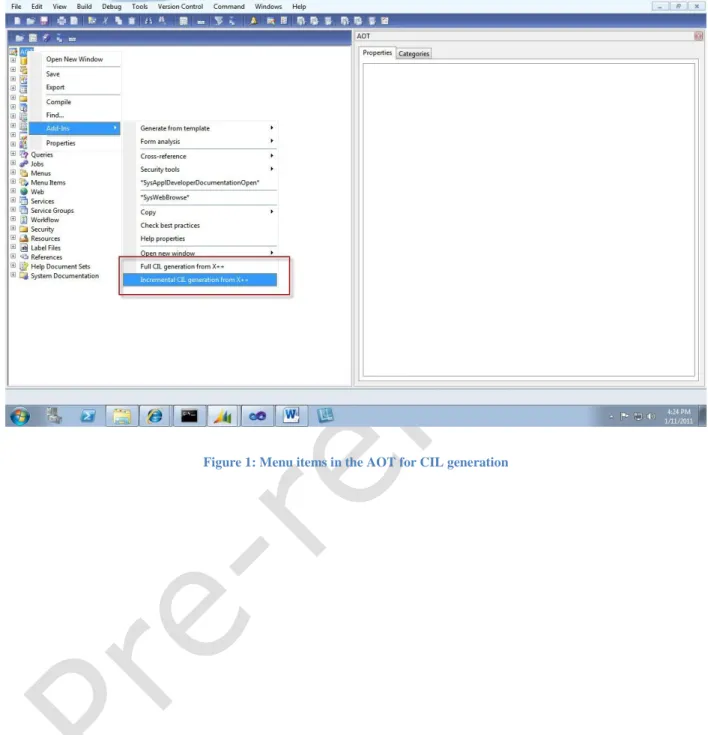
In Microsoft Dynamics AX 2012, all of the X++ source code is compiled into CIL. However, this CIL-compiled X++ is enabled for execution only on the AOS server and only for the following:
Business logic that runs within a service Business logic that runs in batch jobs
Business logic explicitly tagged to run as CIL on the server
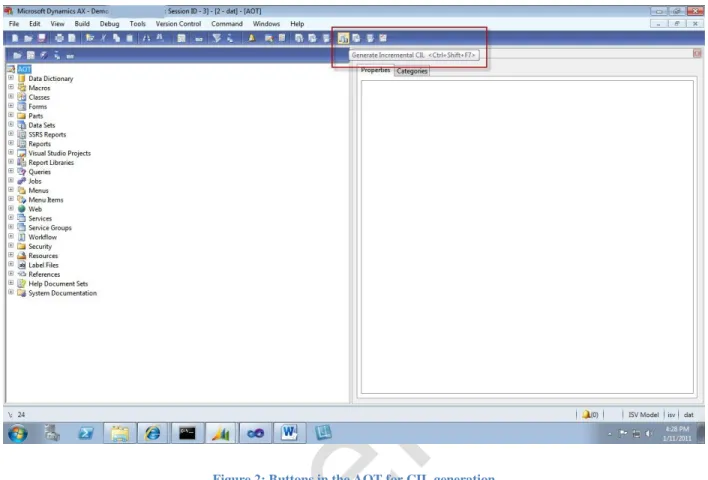
Although this happens transparently, you will see the change when debugging X++ code that runs in services and batch jobs. In Microsoft Dynamics AX 2012, you can use the Visual Studio debugger for debugging X++ running as CIL.
Figure 2: Buttons in the AOT for CIL generation
Visual Studio Tools for Microsoft Dynamics AX
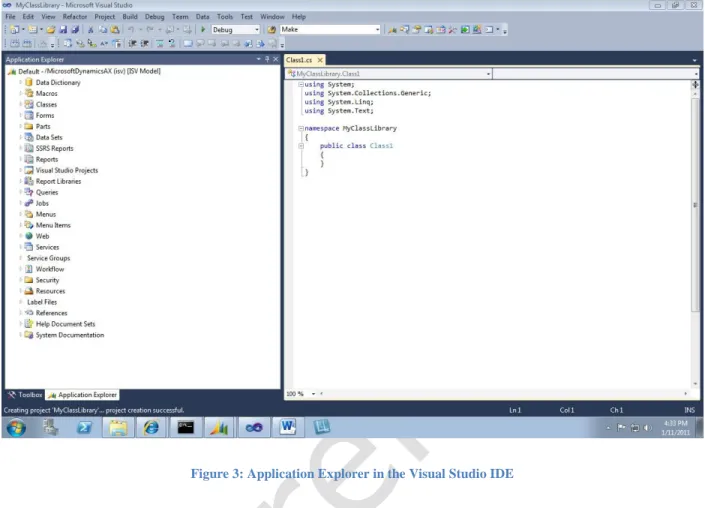
Managed code development in Microsoft Dynamics AX 2012 has extensive tooling support in Visual Studio through Visual Studio Tools. The Application Explorer is exposed in the Visual Studio integrated development environment (IDE); making it possible to reference Microsoft Dynamics AX artifacts such as X++ classes and tables from .NET code by using drag-and-drop functionality (see Figure 3). Additional features provide a more seamless interop experience. For example, tightly integrated build and deploy actions enable automatic deployment of managed code run-time artifacts to the server and client.
Note: In Microsoft Dynamics AX 2012, certain development tasks, such as report development, require Visual Studio as the IDE.
Figure 3: Application Explorer in the Visual Studio IDE
Single repository for .NET and X++ projects
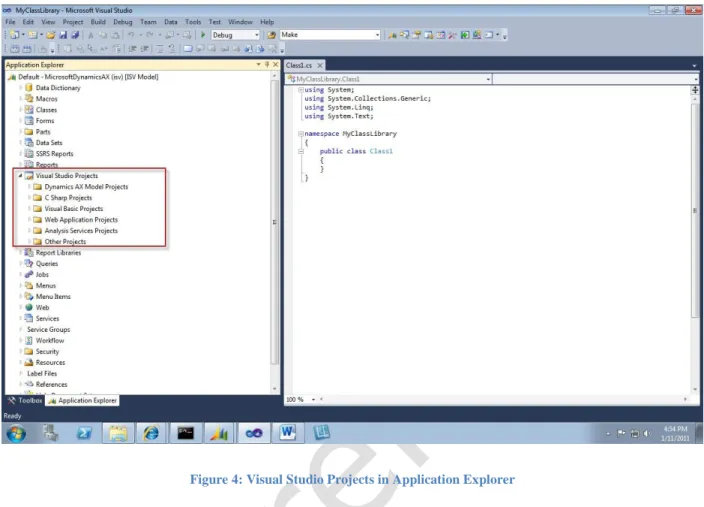
All .NET projects are now stored in and managed out of the same model store that is used for X++ projects (see Figure 4). This means that layer-based source code customization is available for .NET projects in the same way that it is available for X++ code.
Figure 4: Visual Studio Projects in Application Explorer
Eventing
Eventing is a new design pattern for customization that is designed to enable non-intrusive, maintainable customizations. This technology enables you to customize the system without extensively altering source code in the base application.
Eventing enables customization behaviors to be implemented in event handlers (see Figure 5). The event handler code is called in response to an event that is raised in the course of the business logic execution on the system.
There are two types of events:
Coded events are events that are explicitly raised in the system because code was explicitly written to raise the event. The event handlers for such events are simply registered as delegates that are invoked when the coded event is raised.
Automatic events are events that are automatically raised by the system because of some event occurring in the system. Microsoft Dynamics AX 2012 supports two automatic event types: pre and post. Pre and post are predefined events that occur when class methods are called. The pre-event handler is called prior to the execution of the designated method, and the post-event handler is called after the designated method call has ended.
Figure 5: Delegate and its event handler
Simplified access to external systems from X++
External systems that have a .NET interface or a service interface are accessed from X++ by using the X++ Interop to .NET feature. In addition to the ability to add a reference to a .NET assembly (a feature that was introduced in Microsoft Dynamics AX 2009), .NET projects that are managed in the model store are seamlessly accessible to X++ code. It is not necessary to add explicit assembly references or to perform any deployment steps.
Note: You can no longer add a service reference in MorphX in Microsoft Dynamics AX 2012. To access external web services from within X++, you must now first consume the service in a .NET project, and then add that project to Microsoft Dynamics AX. After you have added the project to the Microsoft Dynamics AX model store, you can access the project as any other .NET project from within the X++ code.
Richer programming abstractions
Richer programming abstractions are now available in the data layer in Microsoft Dynamics AX 2012. These high-level abstractions simplify business logic development for many complex, real-world scenarios.
Unit of work
Unit of work is a framework that allows application developers to define a table graph to achieve the following four common operations at the server side without a lot of X++ code:
Automatic ID (primary and foreign key) allocation Insert/Update/Delete sequence
In memory rollback in case of failure during DML at the back end Transaction management
An example of a table graph is a salesorder graph composed of sales, salesline, inventdim tables
Table inheritance
Table inheritance is similar to the concept of object inheritance and polymorphism in object-oriented programming languages. Table inheritance brings end-to-end support to the Microsoft Dynamics AX tables for the following:
Field inheritance Method inheritance Method polymorphism Casting
CUD support for the entire graph of tables in the hierarchy
Selecting the best development technology
Now that we have looked at the application development patterns, the available programming models, and the development framework changes in Microsoft Dynamics AX 2012, we can use this information to consider which programming models work best for each of the development patterns.
Customizations
Customizations often require source code/business logic customizations in addition to metadata changes. You can choose to do business logic customizations in either X++ or in .NET languages. However, we strongly recommend that you decouple your layer-based customizations by using events. If you opt to develop your event handlers in .NET, you should use the strongly typed .NET interop to X++ to gain access to any Microsoft Dynamics AX classes or tables. The weakly typed .NET interop to X++ based on Business Connector is supported only for backward compatibility.
Integrations
Integrations to external systems are best implemented by using the services programming model. Although the weakly typed and strongly typed .NET interop to X++ can be used for the integration development pattern, we do not recommend the use of these technologies for integration. Their firewall unfriendliness together with their dependencies on Business Connector assemblies make these technologies unfit for most integration scenarios.
If the functionality that you need is not available in a service that ships with Microsoft Dynamics AX 2012, you can use the declarative attributes to expose existing X++ classes and methods as a service interface.
Report development
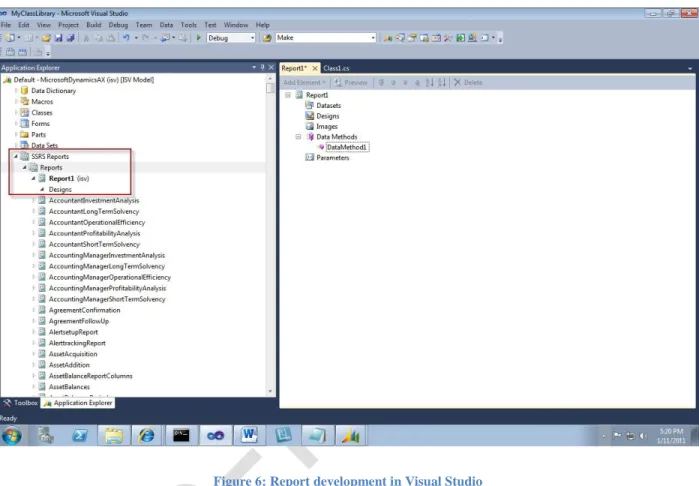
Report development is a common task, and strategic investments have been made in this area to align with Microsoft SQL Server® Reporting Services. Report design tasks are performed in Visual Studio by using the Reporting Services report designer tools (see Figure 6) and in MorphX.
Figure 6: Report development in Visual Studio
When you design a new report or customize an existing report, you should evaluate the best data source types to fetch the required data. The following data source types are supported:
Query
Report Data Provider Data Methods
Query
Query data sources are modeled Microsoft Dynamics AX query artifacts that are created and managed in the Application Object Tree (AOT) using MorphX. They are used to retrieve report data.
Report Data Provider (RDP)
RDP data sources are X++ code artifact that are created and managed in the model store using MorphX. An RDP is used to generate data for reports in those cases where a query is insufficient to
Reporting Services reports for Microsoft Dynamics AX 2012 provides data methods as a mechanism to enable a report developer to combine data from multiple data sources (such as, for example, Microsoft Dynamics AX and an existing legacy ERP system) to be shown in a report.
Code in data methods can only be written in Microsoft Visual C#®. This code executes on the server that is running Reporting Services.
For performance reasons, use methods and interfaces that minimize the number of round trips between Reporting Services and the AOS. We recommend that you ensure that data methods use "chunky" web service interfaces. If such a service does not already exist, then you should use the declarative attributes to expose the required X++ logic as a service. You should not use .NET interop to X++ from within data methods.
Choosing a reporting data source
For report development, your first choice for a report data source type should be a query. Your second choice should be an RDP. Data methods should be used only for cases where the report mashes up data from multiple data sources.
Enterprise Portal application development
Enterprise Portal application development is best done in Visual Studio using the Visual Studio Tools for Microsoft Dynamics AX. The Enterprise Portal applications that ship with Microsoft Dynamics AX rely on the services and the strongly typed .NET interop to X++ programming models to access functionality on the AOS server.
Any UI-specific logic, as before, must be coded in ASP.NET managed code. Access to Microsoft Dynamics AX business logic implemented in X++ should be through services or strongly typed .NET interop to X++.
Enterprise Portal provides several ASP.NET user interface controls for common tasks, including data binding. Several of these controls, such as the list page, Info Parts, and Cues parts can be reused "as is" in Microsoft Dynamics AX 2012 client forms as well.
Summary of choosing a programming model
The following table lists which programming model or models are best used in each development pattern.
Design Pattern Programming Model
Strongly typed .NET
interop to X++ Services Object-oriented development in X++ Customization Use to access functionality
implemented in X++ from .NET. Where appropriate, you should use eventing to decouple customization business logic implemented in .NET.
Not recommended Layer-based X++ source code customization is supported. Where appropriate, you should use eventing to decouple customization business logic
External application development
Use if your Windows application runs only on the AOS server.
Use service interfaces to access Microsoft Dynamics AX in all other cases, including
applications that are not Windows-based.
Not recommended
Report development Not recommended Use service interfaces when implementing data methods as your report data source type.
Use when developing an RDP data source type for your reports
Enterprise Portal application development
Use from Enterprise Portal applications to access business logic that is in X++ classes.
Use services to access Microsoft Dynamics AX functionality, especially if the application is Internet facing.
Not recommended
Development technologies road map
This section discusses the future strategic roadmap of Microsoft Dynamics AX development
technologies and relates how the development technology features in Microsoft Dynamics AX 2012 are steps in that direction. The strategic goals of development in Microsoft Dynamics AX 2012 are as follows:
Continue to innovate and evolve the X++ language to align with and to better leverage the larger Microsoft development ecosystem.
Bring together the best of Microsoft Dynamics AX model-driven development with the best of .NET development.
Open up Microsoft Dynamics AX for application development in other platforms, such as mobile platforms.
As mentioned earlier, the X++ business logic in both services and batch jobs is executed as CIL by the Common Language Runtime (CLR) instead of being interpreted by the X++ interpreter. To support this compilation into CIL, the X++ compiler has been updated to enable the successful compilation of X++ as a fully Common Language Specification (CLS)-compliant language. These changes help position the X++ language to be able to seamlessly leverage improvements in the CLR, such as optimizations for multi-core and parallel execution environments.
For application scenarios that require interop between X++ and .NET, the strongly typed .NET interop to X++ automatically handles all the underlying marshaling and unmarshaling of data types across the X++/.NET boundary, further blurring the line between the two environments. Additionally, X++/.NET interop supports idempotency of objects across the interop boundary, making the development experience more seamless.
Visual Studio Tools for Microsoft Dynamics AX will continue to evolve and enable even more of the development for Microsoft Dynamics AX to be done in the Visual Studio IDE. The unified model store for X++ and .NET projects together with cross-reference support for .NET projects further unifies the .NET and X++ development experience for Microsoft Dynamics AX developers.
Conclusion
This white paper provided an overview of the development patterns, the programming models, and the development framework changes in Microsoft Dynamics AX 2012. It also discussed the
applicability of each of the programming models to the various business application development patterns to help you determine which development technologies to use in your development scenario. Finally, this white paper provided information about the future of the Microsoft Dynamics AX
development technologies. We hope that you will find this information useful in selecting the best development technology for your application development scenario in Microsoft Dynamics AX 2012.
This document supports a preliminary release of a software product that may be changed substantially prior to final commercial release. This document is provided for informational purposes only and Microsoft makes no warranties, either express or implied, in this document. Information in this document, including URL and other Internet Web site references, is subject to change without notice. The entire risk of the use or the results from the use of this document remains with the user. Unless otherwise noted, the companies, organizations, products, domain names, e-mail addresses, logos, people, places, and events depicted in examples herein are fictitious. No association with any real company, organization, product, domain name, e-mail address, logo, person, place, or event is intended or should be inferred. Complying with all applicable copyright laws is the responsibility of the user. Without limiting the rights under copyright, no part of this document may be reproduced, stored in or introduced into a retrieval system, or transmitted in any form or by any means (electronic, mechanical, photocopying, recording, or otherwise), or for any purpose, without the express written permission of Microsoft Corporation.
Microsoft may have patents, patent applications, trademarks, copyrights, or other intellectual property rights covering subject matter in this document. Except as expressly provided in any written license agreement from Microsoft, the furnishing of this document does not give you any license to these patents, trademarks, copyrights, or other intellectual property.
© 2011 Microsoft Corporation. All rights reserved.
Microsoft, the Microsoft Dynamics Logo, Microsoft Dynamics, MorphX, SQL Server, Visual C#, Visual Studio, and Windows are trademarks of the Microsoft group of companies.
All other trademarks are property of their respective owners.
Microsoft Dynamics is a line of integrated, adaptable business management solutions that enables you and your people to make business decisions with greater confidence. Microsoft Dynamics works like and with familiar Microsoft software, automating and streamlining financial, customer relationship and supply chain processes in a way that helps you drive business success.
U.S. and Canada Toll Free 1-888-477-7989 Worldwide +1-701-281-6500