Design of Webmail Website with Built-In
Encryption Facility
Vinay Kumar1, Anil Arora2
1
M. Tech. Scholar,2Assistant Professor Department of Computer Science & Engineering
Gateway Institute of Engineering & Technology (GIET), Sonepat
Abstract— In the fast growing world the information is needed as fast as possible. This can be accomplished by passing the
information quickly. Quick passing of mails is not possible in manual systems, because in manual systems the mails are passed through persons from one department to another. But it takes much time and risk also. This leads the inconsistency of information. So we need a system which is both quick and accurate. This can be achieved by mailing system. Internal mailing system sends the mails spontaneously without requiring the parties to be available at the same instant. Furthermore mails can be sent to more people at the same time. It also leaves a written copy of the sending mails that can be filled away. It is much cheaper than the manual system. The mail can be viewed as just a special case of the file transfer. The main advantage of the mail system is its security feature allowing only registered users to access the system and preventing any hackers, unauthorized users.
Keywords— Web Mail, Quick Mail, Hot Mail, AES
I. INTRODUCTION
The evolution of computers during the last decades has changed the industrialized parts of our world dramatically. While the computer originally was used only as a calculator, it now has evolved to a communications device that links people to each other and to information. The most widespread computer application today used for person-to-person communication is electronic mail (email). Email facilitates communication by its high speed, asynchronousness, and computer processability (Palme 1995a), and provides opportunities to increase productivity, worker satisfaction, and organizational viability (Rice & Bair 1984; Safayeni, Lee & MacGregor 1988). Among Internet users, email is considered as the most important application on the Internet (Katz & Aspden 1997). In Sweden the number of users connected to the Internet has doubled each year for several years (Sunet 1997). This growth involves new groups of users in the email community and this makes email usage and its impact on workplaces important to study. The increase in the number of email users also increases the volume of email messages, both in circulation and stored on the receivers’ computers. When the number of stored messages becomes large, overview of these messages becomes difficult as they no longer can be listed on a screen. These stored messages are for many users difficult to delete as they contain information necessary for their work, or are used as a to-do list (Whittaker & Sidner 1996). For some users, the amount time to handle incoming messages exceeds the available time. These users become over flown and important messages may be lost or forgotten in the flood of other messages (Hiltz & Turoff 1985; Mackay 1988). All this raises needs to reroute, organize, or delete messages. It is important to find solutions for these over flown users without degrading the situation for those that do not have overflow problems. In other words, it is important to study many different types of users’ email handling in order to identify problems for each user group; and for designers to solve these without causing more trouble for the other groups. One group that deserves special attention when it comes to email usage is managers, whose ability to communicate efficiently are considered essential for their organizations (Alexander, Helm & Wilkins 1989; Hessner 1993). Managers have been reported both to use email frequently and to have more difficulties handling email than others (Markus 1994b; Lantz 1996; Whittaker & Sidner 1996).
II.
R
ESEARCH OBJECTIVESin email users’ working environment are described. The studied organizations are one academic research laboratory, one technical company, and one primary medical service organization. The studies are focused on email usage, organization of email messages, novice versus experienced users’ needs, managers’ email usage, and information and communication overflow. This paper fulfills the following objectives for email users.
A. Email Usage
We already know that email is fast, reduces the number of telephone calls, and provides possibilities for automatic documentation. On the other hand, research shows that the lack of social cues may make email unsuitable for certain types of communication. How and why do email users choose between the different types of media (fax, email, phone, meetings, paper mail) that they can use? When is email to prefer and when is it insufficient? What are the differences in usage between email and other media including meetings?
B. Information And Communication Overflow
A large number of incoming email messages may add to the information overflow that many users experience. However, over flown users in the studies by Markus (1994b), Lantz (1996), and Whittaker & Sidner (1996) still used email to handle a large part of the information flow. Are there aspects of the information flow that actually make email an important tool to handle it? Lately, the concept of communication overflow has been suggested to replace the older concept information overflow (Ljungberg 1996). Research on managers establishes that communication is essential for them and that they spend 60-80% of their time communicating. This implies that managers may be exposed to communication overflow to a large extent.
C. Organization Of Email Messages
For many users who store email messages, organization of these messages is essential in order to reduce problems with message overview, orientation, and management. What are the strategies that users develop for organizing email messages? Are some strategies more effective than others? What are the design implications of the users’ problems with organization of email messages? How can the interfaces of email systems be improved in order to simplify for the users to organize their messages in an effective way, according to their own personal choice?
D. Novice Versus Experienced Users’ Needs
Novice users have different needs compared to experienced users and may therefore need other solutions to their problems with email systems. One objective of this thesis is to investigate these differences by following the development from novice to experienced user. Which are the strategies that novice users have chosen, deliberately or instinctively, to handle their email? Is there a natural evolution for the user between these strategies? Do email tools support the users’ development from a novice to an expert when it comes to organization of messages?
E. Providing Security To Email Messages
Data confidentiality, authentication, integrity, non-repudiation, access control, and availability are the most important security services that should be considered in secure applications and systems, but they are not provided in traditional email protocols. Email is vulnerable to both passive and active attacks. Passive threats include release of message contents, and traffic analysis while active threats include modification of message contents, masquerade, replay, and denial-of-service (DoS). Internet email may travel and be stored on networks and computers without the sender's or the recipient's control. During the transit time it is possible that third parties read or even modify the content. Internal mail systems, in which the information never leaves the organizational network, may be more secure, although information technology personnel and others whose function may involve monitoring or managing may be accessing the email of other employees.
Email privacy, without some security precautions, can be compromised because:
Email messages are generally not encrypted.
Email messages have to go through intermediate computers before reaching their destination, meaning it is relatively easy for others to intercept and read messages.
Many Internet Service Providers (ISP) store copies of email messages on their mail servers before they are delivered. The backups of these can remain for up to several months on their server, despite deletion from the mailbox.
cryptography is the ability to send information between participants in a way that prevents others from reading it. A message in its original form is known as plaintext or clear text. The mangled information is known as cipher text. The process for producing cipher text from plaintext is known as encryption. The reverse of encryption is called decryption.
III.WEBMAIL
With web mail, you read or send email through your browser and the web mail interface. Some examples of web mail are: Yahoo! Mail
Gmail Hotmail
The web mail service provided with your web hosting
The web mail service provided with your ISP (Internet Service Provider) account
A. Accessing Web Mail
When you access a web mail account you use your browser.
You will be given a web address to access your web mail. We’ll use Yahoo! mail as an example. The web address to access Yahoo! mail is: https://login.yahoo.com/config/login_verify2?&.src=ym.
Next, you will need to login. This requires your user name and password. Continuing with our example, enter your Yahoo! id and password, then left click, Sign in. If there is an option to remember your login information, avoid this, particularly if you are using a public computer. The login information is saved to a cookie on the machine. The next person who uses the computer will have access to your web based email account if you use the Remember me feature.
Once logged in, you can now read the emails sent to your web based email account and send emails from this email address.
IV.QUICKMAILWEBMAIL
It keeps tracks of mails sent by the user, received mails, incomplete messages that have been saved in drafts. User can change their password if user feels like. It allows users to send attachments which are not restricted to text documents but also images. Quickmail allows users to continuously stay in touch with friends, relatives and other acquaintances wherever they are in the world, as long as there is access to the Internet. One username and password is all you need to unlock your Quickmail account. It is a convenient way of mailing because of its simplicity and ease to use. Quickmail sends the mails spontaneously without requiring both the parties to be available at the same instant of time. With Email service, the internet has proved to be a rapid and productive communication for millions of users as it is faster.
A. Features Of Qmail Web Mail
Our Web Application will help you share your mails, messages in a convenient way. Hereby, our main objective is the customer’s satisfaction considering today’s faster world.
In this busy world we need an efficient and trusted way of communication that is capable of sending mails, documents in a fraction of seconds. We aim to go above and beyond to provide you with great services.
Quickmail MAILING SYSTEM aims at providing a good communication interface for the organization. It can cut down the time of users spend on routine communication tasks.
This application provides facilities like mails, instant messages and allows users to communicate more effectively, and access the resources they need to maximize their day-to-day productivity.
It provides fast and better access to up-to-date information. It also provide feature to encrypt the mail message.
V. IMPLEMENTATION&RESULTS
The quick mail web mail includes following modules in its implementation
A. Home Page
This is the main page of the website containing information and hyperlinks
New user can create account with qmail.com from home page itself by clicking on register link.
B. Registration Page
In this page new user may register him/her to with Quickmail by filling his/her complete information use the services of the website.
the password in case user forgets his/her password.
After filling all the information user gets registered with Qmail and he/she gets the unique userid and password for login to the site.
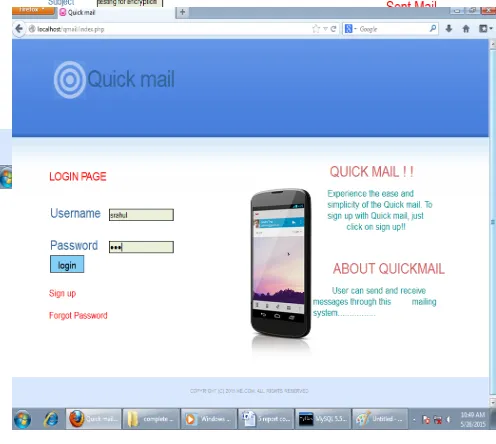
C. Login Page
User can get logged in by providing correct user-id and password.
Based on the login he is linked to the appropriate page. If the user is not given appropriated id and password, he will not be able to log in.
D. Forgot Password Page
When you forget your password the mail security system will ask you to provide your username. After entering in the correct username you will be able to retrieve your forgotten password by answering a security question that you set up when you first opened the account
E. Change Password Page
After sign in to mail user can change his/her password by clicking the change password link, after clicking the change password link new window will open in front of us there we will find Change password button click on that button than system will ask for the current password, new password and confirm password, enter the current password, new password and confirm password in the given box and click to save button.
F. Profile Page
After sign in to mail user can change the setting of his/her profile like: first name, last name, city state, security question/answer etc.
G. MailBox
User can access Mailbox module only after sign in to mail. From this, user can do the following: Sent & Receive mail.
Compose mail using plain as well as encrypt text Read mails.
H. Results
The screen shots of various modules of Quickmail are shown in figures below.
Figure 1: Login for the user with username and password
Figure 2:Inbox Page
[image:6.612.190.430.318.418.2]The user can compose mail by clicking on Compose icon. The compose page will display containing different fields such as To, Subject, Attachment & Message to be sent. The user can encrypt the message by clicking on encrypt check box as shown in figure 3 below.
Figure 3: Compose Page with encryption facility
[image:6.612.192.440.451.673.2]The user can confirm the sent mail by clicking on sent mail icon on the screen. Now the user to whom mail was sent login his/her account by providing user name and password as shown in figure 4 below.
Figure 4:Login Page for user to whom mail was sent
Figure 5:Inbox Page showing list emails
When user click on email the email will open & display the email message. If message was initially encrypted by the sender it automatically gets decrypted by checking on the check box decrypt. It also displays hyperlink text Click to download for downloading any attachment provided with the message as shown in figure 6 below.
Figure 6:Message reading Page
The server database still contains the encrypted copies of messages as shown in figure 7 below.
[image:7.612.205.471.457.709.2]VI.CONCLUSIONS
Mailing Systems provides convenience for sending mails to the other person. Electronic mailing system sends the mails spontaneously without requiring the parties to be available at the same instant. This application can be used by anyone as it is a convenient way of mailing and staying in touch with your friends and family. An Email message takes a few seconds to reach its destination. With email service the internet had proved to be a rapid and productive communication tool for millions of users as it is faster. The user of Mailing System is given a unique login id and must give the correct password. It gives total security for us. Therefore unauthorized users cannot be allowed to see our messages. Even if the user forgets his/her password reminding facility by which the user can retrieve the password and log into the system. The main advantage of the mail system is its security feature allowing only registered users to access the system and preventing any hackers, unauthorized users. Quickmail Mailing System aims at providing a good communication interface to the users. Users must register before using the site, after which they may create a personal profile. Users can communicate with friends and other users of this mailing service through private messages or mails. The website is free to all users. It is much cheaper than the manual system.
REFERENCES
[1] A Comparative Study of The Security Level Among Different Kinds of E-Mail Services – Pilot Study Krešimir Šolić, Krešimir Grgić, Dario Galić Technical
Gazette 17, 4(2010), 489-492
[2] Brownlow, Mark "Email and webmail statistics", Email Marketing Reports, January 2009 [3] Microsoft Outlook. http://office.microsoft.com/enus/ fx010857931033.aspx, 2006. [4] Wikipedia. List of email clients, 2006.
[5] "RFC 5321 – Simple Mail Transfer Protocol". Network Working Group. Retrieved 19 January 2015. [6] "Yahoo style guide". Styleguide.yahoo.com. Retrieved 2014-01-09.
[7] "RFC 821 (rfc821) – Simple Mail Transfer Protocol". Faqs.org. 1971-06-11. Retrieved 2014-01-09. [8] By Om Malik, GigaOm. "Is Email a Curse or a Boon?" September 22, 2010. Retrieved October 11, 2010.
[9] Hardy, Ian R; The Evolution of ARPANET Email; 1996-05-13; History Thesis Paper; University of California at Berkeley [10] "Email History, How Email was Invented, Living Internet". Livinginternet.com. 1996-05-13. Retrieved 2014-01-09. [11] "Hotmail Advertising". Microsoft. Retrieved July 6, 2011.
[12] "Top 10 reasons to use Gmail - 6. Lots of space". Retrieved 15 May 2012.
[13] Bälter O. Keystroke Level Analysis of Email Message Organization. Proc. of CHI 2000, 105-112. [14] Gmail, About Gmail. http://mail.google.com/mail/help /about.html, verified Jan. 11, 2011.
[15] P. Tzerefos, C. Smythe, I. Stergiou and S. Cvetkovic, (1997) “A comparative study of Simple Mail Transfer Protocol (SMTP), Post Office Protocol (POP) and X.400 Electronic Mail Protocols. Proceedings of the 22nd Annual IEEE Conference on Local Computer Networks, pp. 545 – 554.