HEWLETTtfPACKARD
20008: .
TIME SHARED BASIC SYSTEM
OPERATC~R'
S GUIDE
HEWLETT
rt;
PACKARD
Software Publications CUPERTINO DIVISION Cupertino, California
Copy~ht,
1970, by
HEWLETT-PACKARD COMPANY
PREFACE
This OPERATOR
IS GUIDE is the instruc1:ional text for operating the HP 2000B
Time Shared BASIC System.
It is not a userls manual or a reference text for
the BASIC language.
The
OPERATOR'S GUIDEcontains information necessary for
the management and control of the 2000B System.
Operator commands and important concepts are formatted in frames for easy
reading, quick reference, and maximuln usefulness.
The book is divided into
an introduction, eight chapters, and two appendices.
The Introduction presents the softwaJ:e and hardware elements of the 2000B.
Section I describes the responsibili1:ies of the system operator.
The
com-mands controlling user access to the system are covered in Section II, and
the commands that monitor and change user files are discussed in Section III.
Section IV defines the hardware configuration commands; and Section V
de-fines the ROSTER, SLEEP, and STATUS commands.
Logging on and off is
dis-cussed in Section VI.
Section VII
dE~monstrateshow a system library of
public programs can be established.
Section VIII includes all phases of
loading and restarting t..he 2000B sof1:ware.
Appendix A summarizes the
oper-ator command formats, and Appendix B summarizes error messages.
A glossary
and index follow the text.
A comment card is provided at the back of this book for your convenience.
Please use it to let us know of any
E~rrorsor omissions in the
OPERATOR'Scor~TENTS
iii
PREFACE
v
CONTENTS
ix
INTRODUCTION
1-1
SECTION I
SYSTEM OPERATOR'S CONSOLE
1-1 CONSOLE OPERA'rrON 1-2 OPERATOR COMMANDS
2-1
SECTION II
ID COMMANDS
2-1 Use of ID Commands 2-2 NEWID
2-2 Examples of NEWID Commands 2-4 CHANGE
2-4 Examples of CHANGE Commands 2-6 KILLID
2-6 Examples of KILLID Commands 2-7 RESET
2-7 Examples of RESET Commands REPORT
Example of a HEPORT Command
3-1
SECTION III
DISC DIRECTORY COMMANDS
3-1 DIRECTORY
3-2 Examples of DlRECTE>RY 3-3 PURGE
CONTENTS
4-1
SECTION IV
HARDWARE CONFIGURATION COMMANDS
4-2 MAGTAPE
4-3 DISC
4-5 PHONES
4-6 LOCK
4-7 UNLOCK
4-8 FAST
4-8 SLOW
5-1
SECTION V
MISCELLANEOUS SYSTEM COMMANDS
5-1 ROSTER
5-3 SLEEP
5-4 STATUS
6-1
SECTION VI
LOGGING
6-1 OPERATOR CONSOLE MESSAGES
6-1 Examples
6-3 HELLO LIBRARY PROGRAM
7-1
SECTION VII
SYSTEM LIBRARY
7-1 THE PRIVILEGED USER - A~~~
7-1 THE SEMI-PRIVILEGED USERS
7-2 PROTECT
7-2 UNPROTECT
CONTENTS
SECTION VIII
(cont.)
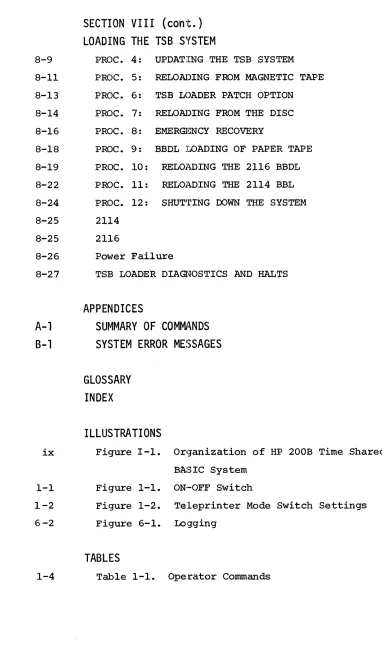
LOADING THE TSB SYSTEM
8-9 PROC. 4: UPDATING THE TSB SYSTEM 8-11 PROC. 5: RELOADING FROM MAGNETIC TAPE 8-13 PROC. 6: TSB LOADER PATCH OPTION 8-14 PROC. 7: RELO~)ING FROM THE DISC 8-16 PROC. 8: EMERGENCY RECOVERY
8-18 PROC. 9: BBDL LOADING OF PAPER TAPE 8-19 PROC. 10: REL01\DING THE 2116 BBDL 8-22 PROC. 11: REL01\DING THE 2114 BBL 8-24 PROC. 12: SHUT~rING DOWN THE SYSTEM 8-25 2114
8-25 2116
8-26 Power Failure
8-27 TSB LOADER DIAQ~OSTICS AND HALTS
APPENDICES
A-1
SUMMARY OF COMMJ\NDS
B-1
SYSTEM ERROR MESSAGES
GLOSSARY
INDEX
ILLUSTRATIONS
ix Figure I-1. Orq-anization of HP 200B Time Shared BASIC System
1-1 Figure 1-1. ON·-OFF Switch
1-2 Figure 1-2. Teleprinter Mode Switch Settings 6 -2 Figure 6-1. Lo9ging
TABLES
[image:8.612.119.501.70.737.2]INTRO[)UCTION
OVERVIEW OF THE TIME SHARED BASIC SYSTEM
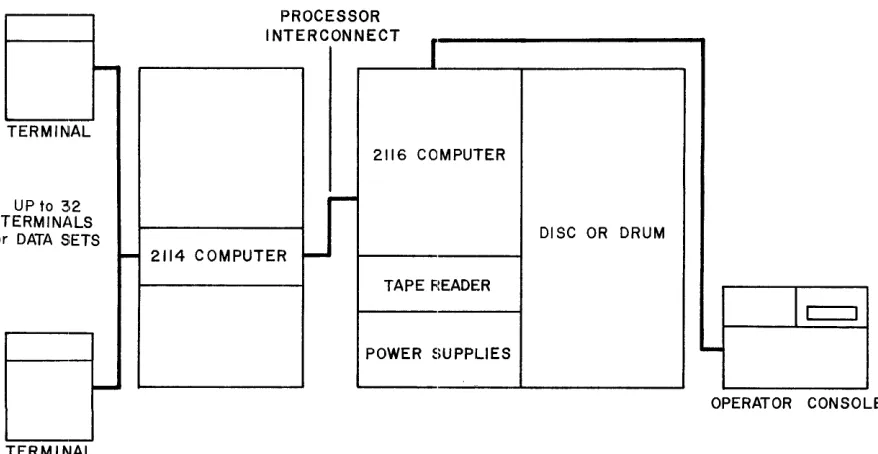
The 2000B Time shared BASIC System consists of an HP 2116B computer, a fixed-head mass storage device, an operator console, a photoreader, an HP 2114B computer with two multiplexors for up to 32 simultaneous users, and a software program to supervise the system. The TSB System can operate with-out attendance, but an operator console is provided for orderly start-up, shut-down, and response to special situations.
Figure I-I diagrams the logical orgmlization of the TSB System (figures are symbolic, not drawn to scale).
E
-
-~
-TERMIN Al
2 lS UP to 3 TERMINA
or DATA S :ETS
E
,-
,-~
,
-TERMINAL
-PR CESSOR 0
INTERCONNECT
I
2116 COMPUTER
-DISC OR DRUM 2114 COMPUTER ~
TAPE FtEADER
Ic=l
POWER SUPPLIES
....
[image:10.612.88.527.404.631.2]INTRODUCTION
THE SYSTEM OPERATOR
~fue operator has commands to modify the hardware configuration on-line, to enter, monitor and remove users of the TSB System, to supervise the mass
storage and hardware status, and indirectly, to establish the System
Li-brary. The TSB System, without attendance, logs users on and off the system,
receives and maintains their active BASIC programs, keeps track of the time
and mass storage used by each user, and maintains a personal library of
BASIC programs for each user.
~EQUIRED
MINIMUM HARDWARE
The Time Shared BASIC System operates on an HP 2116B computer with the
fol-lowing options:
D
16K MemoryD
Power Supply ExtenderD
Direct Memory AccessD
Extended Arithmetic UnitD
Power Fail/Auto RestartD
Memory Parity Checkand an HP 2114B computer with the following options:
II
8K MemoryII
Memory Parity CheckD
Power Fail/Auto RestartIn addition, the following peripheral equipment is required:
INTRODUCTION
D
One Fixed-Head Disc StoragE~ Unit (see "Mass Storage Devices")D
Time Base GeneratorD
Up to 32 teleprinters with modifications for data-setcompatabil-ity
The required hardware is assigned as follows:
2116B
2114B
I/O Channel
10-11 8 12 8 13 8 14-15 8 16 8 10 8 118 12-13 8 14 8 15 8
OPTIONAL EXPANDED CONFIGURATIONS
Contents
ProcE~ssor Interconnect Sys tE~m Console
Photo reader
Firs1: mass storage device
Time Base Generator
Firs1: Multiplexor
Second Multiplexor
Processor Interconnect
Firs·t Disconnect (see Phones)
Second Disconnect (see Phones)
There are three classes of optional 13quipment that can be added to the Time
Shared BASIC System. Each provides a. specific useful capability. Each
class has an operator command that gives the TSB System information about
the option if it is included. (See Section IV.)
Phones
For each disconnect board in the 2114B, up to 16 data sets can be added to
the system in the place of hardwired teleprinters. This allows users to
phone into the TSB System over regula.r phone lines. Using the PHONES
INTRODUCTION
Magnetic Tape Unit
An HP 3030 or 7970 magnetic tape unit can be connected to the TSB System through
t:wo adjacent I/O channels in the 2116B. The TSB System uses the ma'gnetic tape to
dump a copy of itself whenever the operator requests a SLEEP operation.
Mass Storage Devices
The TSB System requires a minimum of 750,000 words of mass storage and is
expandable to 256 tracks. Each track contains between 90 and 128 sectors
(64 sixteen-bit words per sector), depending on the device. The first
physical disc must be in locations 14-15, but subsequent discs may be in
any free pairs of I/O locations.
~~e TSB System treats each 64 tracks as a logical disc unit; a device of
128 tracks is treated logically as two discs of 64 tracks each. The first
64 tracks are called Disc-~. Be sure to check Section IV dealing with the
DISC command; this command notifies the TSB System that a mass storage
de-vice is connected to the computer.
~~he TSB System will accept six different models of mass storage device
three discs and three drums. Although a particular TSB System may mix
discs and drums, they will all be treated logically as disc units.
Through-out this book, any reference to discs also refers to drums. Table I-I
INTRODUCTION
Table I-I. Mass Storage Devices
Device ~ Sectors/Track No. of Tracks
2770A-Ol disc 90 64*
2771A disc 90 64*
2771A-Ol disc 90 128
2773A drum 128 48*
2774A drum 128 96
2775A drum 128 192
Since the drums are 48, 96 and 192 tracks each and the TSB System is designed for discs of 64-track multiples, the operator must lock the missing tracks after entering the drum. (See Section IV.)
SECTION I
SYSTEM
OPERJ1~TOR
'S CONSOLE
The operator communicates with the HI> 2000B Time Shared BASIC System through
an ASR-35 teleprinter.
From this console the operator controls and monitors
user access to the system, modifies or examines the directory of disc usage,
changes the hardware configuration on-line, checks who is using each terminal,
and systematically shuts down the system.
The computers, disc, and
photo-reader reside in a locked cabinet.
CONSOLE OPERATION
,
When the Time Shared BASIC System is loaded into the computer, the operator
checks that the ASR-35 t.eleprinter is set to ON LINE.
See Figure 1-1.
()FF
LOC.
Figure 1-1.
On-Off Switch
Three Mode Switch settings on the teleprinter are used with the Time Shared
BASIC System.
These are the K, T and KT positions.
When set to the K
posi-tion the teleprinter will print only, not punch.
When set to T, the
SYSTEM OPERATOR'S CONSOLE
position is the normal setting; in this position only the LOG ON* and LOG OFF messages are punched. See Figure 1-2.
MODE
Figure 1-2. Teleprinter Mode Switch Settings
If Switch Register bit 0 on the front panel of the computer is in the up position, all input from the console will be ignored by the system. With this feature, if the cabinet door is kept locked, unauthorized person.s can be prevented from tampering with the operation of the Time Shared Basic
System.
OPERATOR COMMANDS
SYSTEM OPERATOR'S CONSOLE
The character + acts as a backspace key. Typing this key causes the computer to delete the previous character. For example, the sequence:
ABC++DE+F
is equivalent to the sequence:
ADF
Either of the characters ALT-MODE or ESCAPE deletes the entire line being typed. When the system senses such a character, i t automatically responds with the character
II \11 ,
followed by a CARRIAGE-RETURN and LINEFEED.All numerical communication with the Time Shared BASIC System is in decimal, except for the I/O select codes necessary for the hardware configuration com-mands. These are always in octal. Disc track numbers are in decimal.
Printed output produced by commands can be terminated by pressing any key. Printing then terminates at the end of the line.
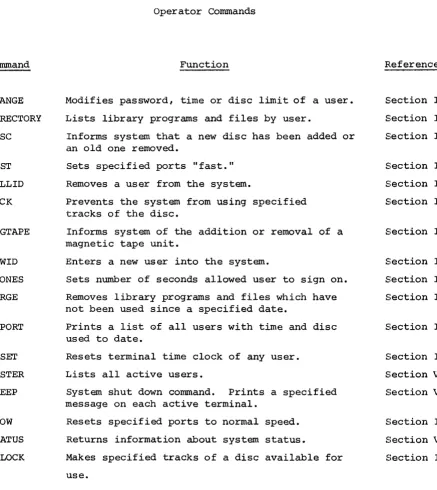
Conunand CHANGE DIRECTORY DISC ~"AST KILLID LOCK MAGTAPE NEWID PHONES PURGE REPORT RESEl' ROSTER SLEEP SLOW STATUS UNLOCK
SYSTEM OPERATOR'S CONSOLE
Table 1-1 Operator Commands
Function
Modifies password, time or disc limit of a user. Lists library programs and files by user.
Informs system that a new disc has been added or an old one removed.
sets specified ports "fast." Removes a user from the system.
Prevents the system from using specified tracks of the disc.
Informs system of the addition or removal of a magnetic tape unit.
Enters a new user into the system.
Sets number of seconds allowed user to sign on. Removes library programs and files which have not been used since a specified date.
Prints a list of all users with time and disc used to date.
Resets terminal time clock of any user. Lists all active users.
System shut down command. Prints a specified message on each active terminal.
Resets specified ports to normal speed. Returns information about system status.
Makes specified tracks of a disc available for use.
Reference
Section II Section III Section IV
Section IV section II Section IV
Section IV
Section II Section IV Section III
Section II
Section II Section V Section V
[image:19.613.91.528.92.581.2]SECTIION
II
10
CO~IMANOS
The Tim.e Shared BASIC System provides five commands for the operator to use to modify or examine the system 10 t~)le. The 10 table contains one entry for each user recognized by the Syst~l, consisting of the following infor-mation:
User's IOcode Password
Total terminal time used to date (in minutes) Maximum terminal time allowed the user
Amount of disc used for library storage (in sectors) Maximum amount of disc storage allowed
The IOcode AOOO is reserved for the system operator. The programs saved by user-AOOO become the publicly accessible library. User-AOOO also has access to special library commands, PROTECT and UNPROTECT. (See Section VII for complete details.)
Use of 10 Commands
The 10 commands control who has access to a particular Time Shared BASIC System and how much of the system's fa.cilities each user is allowed. Each user's history with the system can be traced logically in the 10 commands referencing his ID code. The user is entered into the system and assigned a password with the NEWIO command. Tha"t password can be changed with a CHANGE command if the user finds that unauthorized persons have learned his pass-word and are using his IDcode. The user also uses a CHANGE command to re-quest more disc storage space or terminal time.
1D COMMANDS
NEWID
The NEWID command is used to enter a new user into the system. The command establishes a unique IDcode and password for each user, plus maximum limits on terminal time and disc storage.
NEW1D
-IDcode,password,time,discIDcode - Consists of a letter followed by three decimal digits.
c
password - Consists of 0 to 6 characters other than NULL (@ ),
RUBOUT, ALT-MODE, ESCAPE, COMMA, "+", space, RETURN (Mc), LINEFEED (Jc) or XOFF (Sc). Non-printing char-acters other than these are allowed. Some charactE~rs
can be made into non-printing characters by depressing the CONTROL KEY while striking the character. This allows the user to define a secret password which is never printed out on the teleprinter. Such a combin-ation is symbolized by superscript "C" following the character, for example Zc.
time - Specifies the maximum number of minutes of terminal time
the user is allowed. This number may not exceed 65535.
disc - Specifies the maximum number of disc sectors that the user
is allowed for storage of his library programs and files. This number may not exceed 65535.
10 COMMANDS
c c c
establishes user-Q123 with the actual password BA SI C where the A, I, and C are non-printing characters. (Remember that A, I, and C are actually typed after the B and the S, but with the control key depressed.) User-Q123 is allowed 100 minutes of time and 200 sectors (i.e., 12800 words) of disc storage.
The following diagnostic messages Inay be printed in response to a NEWID command.
Message
ILLEGAL FORMAT
DUPLICATE ENTRY
10 TABLE FULL
Meaning
Indicates that one of the parameters was illegal or missing.
Indicates that the specified IDcode already exists within the system.
1D COMMANDS
CHANGE
The operator may use the CHANGE command to modify any or all of the parameters of a particular ID code.
CHANGE-IDcode,
[password], [time], [disc]The parameters have the same meaning as in the NEWID Command. Those in brackets may be missing, in which case they are not changed. However, ·the commas must be present if they are neces-sary to keep the place of missing items (i.e., trailing commas are not required).
Examples of CHANGE Commands
CHANGE-Q1Z3,BAS1C
c c c
changes the password of user-Q123 from BA SI C to BASIC. The time remains at 100 minutes and the disc storage at 100 sectors.
CHANGE-Q123,,1000
changes the terminal time allotment of user-Q123 from 100 minutes to 1000 minutes. The other parameters remain unchanged.
CHANGE-Q123",500
Message
ILLEGAL FORMAT
NO SUCH ID
ID COMMANDS
Meaning
Indicates that one of the parameters of the CHANGE command was illegal or missing.
Indicates that the specifi~d IDcode could not be changed because i t had not been previously entered into the system via a NEWID command.
Allotment of disc storage via the Ca~NGE or NEWID commands does not actually reserve a particular area of disc for the user at that time, nor does i t guarantee that he will be able to obtain that much when he wants it. The amount: assigned is merely a limit which he is not permitted to exceed. When the user requests storage beyond his allotment, the following message is printed on the user teleprinter:
FILE SPACE FULL
When the user goes over his allotted terminal time, the system makes a note of the fact but does not abort the user. However, the next time that this user attempts to log onto the system, he will get the following message:
ID COMMANDS
KILLID
KILL I
D-IDcodeThe KILLID command gives the operator power to remove a user from the system completely. User-A~~~ may not be killed. Any disc files or library programs assigned to the user are removed and the space is returned to the system. If the specified user is currently logged in at a terminal and executing, he will be forcibly disconnected from the system. If the user is connect-ed via data phone, the system hangs him up. If the user
attempts to log in with his old IDcode, the following messagt: will be printed:
Examples of KILLID Commands
ILLEGAL ACCESS
ID COMMANDS
FlESET
RESET-IDcode,time
The system maintains a clock of total terminal time used for each user. The operator may change the value recorded in the clock with the RESET command. If no time is specified, i t is assumed to be zero. If IDcode equals "ALL", all users are reset.
Examples of RESET Commands
If user Q123 had accumulated 100 minutes of terminal time, the command
RESET-Q123,20
would reset his clock to 20 minutes of terminal time used.
If user S356 had used 157 minutes of terminal time, the command
RESET-S356,0
would reset his clock to zero. Or,
RESET-S356
would accomplish the same thing.
RESET-ALL,2t)
ID COMMANDS
REPORT
The format for a REPORT command is simply the word
REPORT.
ThE~ REPORT command causes a list of users to be printed out giving the total terminal time and disc storage used by each. The ou1:-put is in the following form:IDcode time disc
where time is in minutes and disc is the number of sectors. IDcodes are printed in alphabetic order and in ascending numer-·
ical order when more than one IDcode begins with the same lettE~r.
Example of a REPORT Command
REPORT
ID TIME DISC
AfJfJ0 07851
0fJ112
ID TIME DISC
K456
fJfJfJ23 0fJ232
ID TIME DISC
SECT'ION III
DISC
DIRECTC~RY
COMMANDS
The Disc Directory is a table of all library programs and files, giving the
name, disc location and last date referenced for each.
The Disc Directory
resides on the disc.
One track of di.rectory space is reserved per disc
de-fined logically in the system.
(These tracks might all reside on the same
disc.)
The location and length of the disc directory tracks are given by
the STATUS command.
(See section V.)
The Directory command is initiated by the word
DIRECTORY [-IDcode]
This causes the system to print a list of library programs and
files according to user IDcode.
If the optional IDcode appears,
listing starts at. that point in the directory.
The following
information is li.sted for every program or file.
NAME
DATE
DISC ADR.
LENGTH
"C"
or
"F"
(optional)
the program
nc~e(l to 6 characters)
last date this item was referenced (day of
year/last two digits of year)
locat:Lon of program on disc (disc number/track/
sector) in decimal
length of proqram in decimal words
If
"e"
appears in the last column of the entry,
the entry is a program in semi-compiled form.
If "F" appears, the entry is a file.
If neither,
DIRECTORY COMMANDS
EXAMPLES OF DIRECTORY
Example 1
DIR
ID
NAME
DATE
DISC ADR
LENGTH
A000
B
114/70 0/53/081
2688 F
Bl
114/70 0/54/000
8192 F
B2
114/70 0/55/000
8192 F
CHANGE
104/70 0/47/000
3238
CLASS
104/70 0/53/048
2055
CURRIC
111/70 0/40/024
1055
DAILY
104/70 0/53/000
3018 C
DATE
069/70 0/39/104
0455 C
DEBUG
111/70 0/39/061
0188
DUMP 1
111/70 0/41/002
0791
FDUMP
111/70 0/43/0T7
0393
FLOAD
111/70 0/46/000
0409
F398
1
114/70 0/61/000
8192 F
10
114/70 0/39/010
0064 F
2
114/70 0/62/000
8192 F
3
114/70 0/63/000
8192 F
4
114/70 0/39/009
0064 F
SAM
099/70 0/39/003
0045
SAMl
099/791 0/41/000
0101
TEST
069/70 0/39/002
0044
TESTl
069/70 0/39/000
0102
XXC
099/70 0/42/000
0128 F
Example 2 {assumes same directorl)
DIR-F398
DIRECTORY COMMANDS
Exam~le
3 (different
director~)DIRECTORY
ID
NAME
DATE
DISC ADR
LENGTH
A0(ll0
ABOUT
100/69 0/23/037
0090
F3
072/69 0/23/035
0087
FORGET
100/69 0/23/033
0090
HELLO
100/69 0/23/032
0027
PROGN
072/69 0/23/030
0101
RFET
070/69 0/23/028
09173
RGET
064/69 0/23/027
0027
ROOTS
064/69 0/23/024
0147
TGET
064/69 0/23/023
0050
THAT
072/69 0/23/021
0073
THIS
101/69
0/23/~190090
ZAP
101/69
0/23/~170093
Clll
CCC
072/69 0/23/015
0093
CCCC
072/69
0/23/~130101
E444
ELECT
100/69
0/23/~110127
EPROG
064/69
0/23/~'100032
ERUPT
100/69 0/23/0
108
0104
Q123
QPROG
070/69 0/23/0106
0111
QUICK
072/69
0/23/~040113
Z987
THIS
101/69
0/23/~'020090
Z! !
101/69
0/23/~1000090
PURGE
With the PURGE command, the operator can remove user library programs and files from the system if they have not been used since a specified time; this J:'eleases disc space that would otherwise be unavailable. ThE~ format of the PURGE command is:
where
PURGE-day-of-the-year/year
Examples
PURGE-32/69
DIRECTORY COMMANDS
Removes all programs and files which have not: been
referenced since February 1, 1969. (Programs which
were last used on February 1, will remain in the system.)
If the date given in the PURGE Command has not yet occurred, then the system
prints:
ILLEGAL PARAMETER
Example of PURGE and DIRECTORY Commands
Below, the PURGE command is repeatedly applied to the third Directory
ex-ample (page 3-3) to show how the command works.
PURGE-65/69
DIRECTORY
ID
NAME
DATE
DISC ADR
LENGTH
A000
ABOUT
100/69 0/23/037
0090
F3
072/69 0/23/035
0087
FORGET
100/69 0/23/033
0090
HELLO
110/69 0/23/032
0027
PROGN
072/69 0/23/030
0101
RFET
070/69 0/23/028
0073
THAT
072/69 0/23/021
0073
THIS
101/69 0/23/019
0090
ZAP
101/69 0/23/017
0090
Cl11
CCC
072/69 0/23/015
0093
CCCC
072/69 0/23/013
0101
E444
ELECT
100/69 0/23/011
0127
ERUPT
100/69 0/23/008
0104
Q123
OPROG
070/69 0/23/006
0111
DI RECTORY COMMAN DS
(the current date). HELLO is updated only when a PURGE command is given,
instead of whenever the HELLO program is referenced, thus making i t
im-possible to PURGE the HELLO program. (See Section VI.)
PURGE-75/69
DIRECTORY
ID
NAME
DATE
DISC ADR
LENGTH
A~~~
ABOUT
100/69 0/23/0
137
~090FORGET
100/69
0/23/~1330090
HELLO
110/69
0/23/~1320027
THIS
101/69
0/23/~n9
0090
ZAP
101/69
0/23/~1l70090
E444
ELECT
100/69
0/23/~1l10127
ERUPT
100/69
0/23/~1080104
Z987
THIS
101/69
~/23/~1020090
Z! !
101/69
0/23/~1000090
The programs with date 70/69 (RFET, QPROG) and 72/69 (F3, PROGN, THAT, CCC,
CCCC, QUICK) have been deleted from 1~e system. User-Clll and User-Q123 are
no longer listed in the directory because they have no library.
PURGE-100/69
DIRECTORY
1D
NAME
DATE
DISC J\DR
LENGTH
A0~~
ABOUT
100/69
0/23/~~370090
FORGET
100/69
0/23/!~330090
HELLO
110/69
0/23/~~320027
THIS
101/69
0/23/~~190090
ZAP
101/69
0/23/1~170090
E444
ELECT
100/69
0/23/1~110127
ERUPT
100/69
0/23/1~080104
Z987
THIS
101/69
0/23/1~020090
Z! !
101/69
0/23/1~000090
The PURGE command caused no change in the directory. Programs last used on
DIRECTORY COMMANDS
PURGE-101/69
DIRECTORY
ID
NAME
DATE
DISC ADR
LENGTH
A0~0HELLO
110/69 0/23/032
0027
THIS
101/69 0/23/019
0090
ZAP
101/69 0/23/017
0090
Z987
THIS
101/69 0/23/002
0090
Z! !
101/69 0/23/000
0090
All 100/69 programs have be.en purged, but 101/69 programs still remain.
PURGE-110/69
DIRECTORY
ID
NAME
DATE
DISC ADR
LENGTH
A000
HELLO
110/69 0/23/032
0027
SECirlON IV
HARDWARE CONFI(;URATION COMMANDS
When a. Time Shared BASIC System is first loaded in the computer (Section VIII), the software assumes that the minimum hardware configuration exists. The required channel assignments are listed in the Introduction. They can be expanded on-line without restarting the TSB System from scratch. For example, a magnetic tape! unit can be added or moved from one channel to another, or a supplemental disc storage unit can be added. Only the minimum hardware configuration cannot be altered with hardware configuration commands.
The operator uses variou.s commands to notify the TSB System of hardware changes: MAGTAPE, DISC, PHONES, LOCK and UNLOCK. The TSB System has no means of checking on the validity of the specified I/O channels. If used improperly, these commands can cause TSB System failure; thus, they should only be used with extreme care.
If the operator specifies an incorrect disc I/O channel, the first attempt to write on that disc causes a TSB system failure. If the magnetic tape is
in-troduced incorrectly, the TSB System does not complete the SLEEP operation; instead i t attempts indefinitely to dump onto a non-existent magnetic tape.
The hardware commands are the only TSB exception to decimal numbering. The select codes (I/O channels) used as parameters in these commands are octal
HARDWARE COMMANDS
MAGTAPE
An
HP 3030 or 7970 magnetic tape unit can be added as a hard'ware
option.
Once the TSB System is aware of the magnetic tape,
.acopy of the software is dumped whenever a SLEEP Command is
e:x:e-cuted.
This copy can be reloaded if the TSB System is destroyed
on disc or in core.
The format for the MAGTAPE command is as follows:
MAGTAPE-sc[*]
where
sc
is the high priority (lower numbered) select code in
octal of the magnetic tape unit. A select code of zero tells
the TSB System that the magnetic tape unit has been removed.
*
is included if the magnetic tape interface board is number
HARDWARE COMMANDS
Up to
256tracks of
90or
128sectors each are defined in the
'rSB System.
The
256tracks are allocated into four logical
discs of
64tracks each, numbered 0 through 3.
A physical
disc unit of
128tracks is defi.ned for the TSB System as two
logical discs of
64tracks each;
96(drum) tracks are
de-fined as
64and
32;and
192(drum), as three
64track discs .
. A,
drum of
48tracks must be defined as a disc of
64tracks
1wi th tracks
48through
63locked.
Disc units of less than
384,000
words
(64tracks) are not allowed.
The DISC command informs the TSB System that a new disc has
been added or an old disc removed.
Since Disc-O is always
assumed to reside in I/O channe!ls
148and
158
, only
1through
3 can be disc number parameters in the DISC command.
DISC
commands are also accepted by t:he TSB Loader.
(See Section VIII.)
The format of the DISC command is as follows:
DISC-disc number, select: code, track length
where
disc no.
is a number from
1to 3 indicating the
disc logical number,
select code is an octal number indicating the high
priority I/O channel of the disc, and
track length is a decimal number
(90or
128)in-dicating tile number of sectors per track.
See Table I-l.
If the select code is 0, the specified disc is removed from
the TSB System.
This is
allowE~donly if all tracks on the
disc have previously been
LOCKE~d.A disc is removed this
HARDWARE COMMANDS
For the drum, logical track
nrefers to physical track
4nthrough 4n
+
3.
(For example, logical track 0 is physical tracks 0 to 3; logical track 1
is physical tracks 4 to 7$)
When a disc has more than 64 logical tracks and is used as more than. one
logical disc, the order of entering DISC commands determines the relation
of disc numbers to disc tracks.
Each DISC command assigns the lowest
avail-able block of 64 tracks to the disc number specified in the command.
For
example, the following commands are entered:
D1SC-1,14,90
D1SC-2,16,128
DIS C- 3 , 1 6, 1 28
LOCK-3,32,63
Where channels 14-15 contain a 128 track disc and channels 16-17 contain a
96 track drum, then disc-O refers to tracks 0-63 of the disc, disc-I refers
to tracks 64-127 of the disc, disc-2 refers to tracks 0-63 of the dJrum, and
disc-3 refers to tracks 64-95 of the drum.
If the system contains only a 192 track drum, it is defined as 3 discs of
64 tracks each:
HARDWARE COMMANDS
PH()NES
When one or two disconnect bOcLrds are connected to channels
14-15
8
of the 2114B, the operator uses the PHONES command to
set or change the number of s€!conds allowed the user to log
on through a data set.
PHONES-n
where
nis the number of seconds (255 maximum).
If the
PHONES command is not used, the TSB System allows the user
HARDWARE COMMANDS
LOCK
The LOCK Command allows the operator to make certain disc tracks unavailable to the TSB System. The format of the LOCK Command is as follows:
LOCK-n,
track [ , track]where n is the disc logical'number (0 through 3) and track is a decimal quantity specifying a track on that disc (0 through 63). If only one track is specified,
just that one track will be locked. If two track para-' meters are given, they determine the first and last tracks to be locked.
If a LOCK Command specifies an area containing user programs, these will be lost. If the area contains TSB System tables, the command is rejected. TSB System tables cannot be removed without destroy-ing the TSB System. Track 0 of disc 0 cannot be locked.
The LOCK Command can be used to replace a disc in the TSB Syst:em, by locking all the tracks of the disc. When the new disc is inst:alled, the tracks can be unlocked. The LOCK Command is also used to elim-inate tracks that are bel ieved to be phys ically faul ty.
HARDWARE COMMANDS
UNLOCK
The function of the UNLOCK Conunand is the opposite of the LOCK Conunand. The operation makes the specified tracks available to the TSB System. The format is identical to that for LOCK:
Examples:
Conunand
LOCK-3,5,23
UNLOCK-3,5,10
UNLOCK-3, 11,23
UNLOCK-n,
track. [, track]Action
Lo~ks disc-3 tracks 5 through 23 inclusive.
Unlocks disc-3 tracks 5 through 10 inclusive.
HARDWARE COMMANDS
FAST
The FAST Command tells the system to operate the terminals on the specified ports at 220 baud, 20 characters per second (rather than the normal 10 characters per second). If the command contains a format error, the list of terminal numbers is processed up to the illegal terminal number. The format of the FAST command is:
FAST-terminal number[,terminal number .•.. ]
NOTE:
This command should only be used on ports
with terminals capable of operation
atthis speed.
SLOW
The SLOW Command changes the specified terminals back to 110 baud, 10 characters per second. All terminals begin as SLOW terminals. If the command contains a format error, the list of terminal numbers is processed up to the illegal terminal number. The format of the SLOW Command is:
MISCELLANEOUS SYSTEM COMMANDS
There are three other system commandE: which have not been previously mention;" ed: ROSTER, SLEEP and STATUS.
RO!STER
Up to 32 user terminals (or data sets) are logged on to the TSB System at one tim.e. These terminals are numbered 0 through 31 by the TSB System.. The ROSTER command, allows the operator to know which user IDcode is logsred on at each terminal.
The output from ROSTER is formatted into four lines of eight items each. The first line lists, from left to right, the users logged on to terminals 0 through 7. The second line lists
terminals 8 through 15; the third 16 through 23; and the fourth, 24 through 31. An active terminal is denoted by the user's IDcode; an inactive terminal is denoted by four dots ( . . . . ). The same ID code can be active on more than one terminal.
EXAMPLES
ROSTER
MISCELLANEOUS COMMANDS
ROSTER
8453
8555
Q123 Z999
T7fJ7
T7.08 T709
F913
J325
User B453 is on terminal 1, B555 on terminal 3, Q123 on 5, Z999 on 6 I' A~~~
on 8 and 15, T7~7 on 19, T7~8 on 20, T7J9 on 21, F913 on 24, and J325 on 31. The other terminals are inactive.
ROSTER
MISCELLANEOUS COMMANDS
SLI::EP
The SLEEP conunand is used whenever the Time Shared BASIC System
is to be shut down.
The corranand provides a systematic shut
down procedure that allows easy start-up at a later time.
The format of the SLEEP conunand is:
SLEEP-character string
where character string is a message to be sent to all users.
SLEEP causes the following actions to be taken by the TSB System:
a.
The character string message is sent to all active users.
b.
All users are disconnected from the TSB System.
c.
The entire current TSB System is dumped onto the disc.
d.
The packing routine is run on the library portion of the TSB System.
,e.
If a magnetic tape unit is available, the entire TSB System will be
dumped onto that tape for later reloading.
When complete, the system
prints:
VERIFY?
The operator responds YES to read back and compare the tape, or NO
to bypass verification.
f.
After a successful dump or verify, the message
DONE
is printed and the 2116 halts.
(~he2114 does not halt.)
If the
operator wants another dump, he mounts a new magnetic tape and presses RUN.
If a write error occurs, the messa<ge
TAPE BAD OR TOO SHORT
is printed and the 2116 halts.
Thl3 operator can then mount a new
magnetic tape and press RUN: then 'the en tire magnetic tape dump procedure
is restarted.
(Or, the operator ccm move the load point on the tape.)
Examples of SLEEP Commands
SLE
SLEEP-GOOD BYE. TSB IS SHUT,DOWN FOR REPAIRS.
MISCELLANEOUS COMMANDS
STATUS
The STATUS command gives the operator infonnation about the system hardware and disc storage. STATUS should be used at least oncle a day to record the location of the essential parts of the TSB System.
(For diagnostic purposes in case of TSB System failure, see Section VIII.)
Disc addresses are printed as three decimal numbers, separated by slashes, which specify the disc logical number, the track number, and the sector number. The disc address format is D/TT/SSS. For example, ~/22/~13 means disc ~, track 22, sector 13.
The following infonnation is output by STATUS:
.output Heading Information Supplied
IDT The location of the TSB System IDcode table and the decimal number of words stored there. Each distinct user IDcode recognized by the TSB System requires an eight-word €!ntry in
the IDT. This table is essential to the TSB System.
ADT The location of the available disc table, and the dec:~mal
number of words used. This table is essential to thE~ TSB System. Every two words in the ADT represent a block of a-vailable disc storage.
num-MISCELLANEOUS COMMANDS
Output Heading Information Supplied
DIREC (Cont.) name, of all the library programs which have been
saved by users. Each program requires an
eight-word entry.
SYSTEM
USERS
MAG
DISC
TRACKS
The location of the five disc tracks containing the TSB
system modules. 'These tracks may be regenerated without
loss of information.
The location of the 32 disc tracks allocated to the 32
possible simultaneous users. Output is organized
simil-arly to that of R:JSTER. These tracks are not essential
to the TSB System (i.e., they may be locked during
load-ing if faulty).
The octal I/O channels of the magnetic tape unit. An
entry of 00 indicates the absence of the device.
The octal I/O channels of discs 0 through 3. An entry
of 00 indicates the absence of the disc. The track length
in sectors is recorded for each disc.
Four rows of 64 items each, corresponding to the maximum
possible four discs of 64 tracks each. A zero indicated
the track is available, and a 1 indicates that the track
MISCELLANEOUS COMMANDS
Examp1e:
STATUS
IDT
0/37/000 0120
ADT
0/37/002 0116
DIREC
0/38/000 1352 0/39/000 0000 0/00/000 0000 0/00/000 0000
SYSTEM
0/00/000 0/01/000 0/02/000 0/03/000 0/04/000
USERS
0/05/000 0/06/000 0/07/000 0/08/000 0/09/000 0/10/000 0/11/000 0/12/000
0/13/012 0/14/000 0/15/000 0/16/000 0/17/000 0/18/000 0/19/000 0/20/000
.
0/21/000 0/22/000 0/23/000
~/24/0000/25/000 0/26/015 0/27/000 0/28/000
0/29/000 0/30/000 0/31/000 0/32/000 0/33/000 0/34/000 0/35/000 0/36/000
MAG=
17
DISC=
14-128 14-128 00-000 00-000
TRACKS
o
0000000000000000000000000000000000000000000000000000000000000000
1
000000000000000000000000000000000~1111111111111111111111111111112 111111111111111111111111111111111111111111111111111111111111111'1
SECTION VI
LO(iGING
OPERATOR CONSOLE MESSAGES
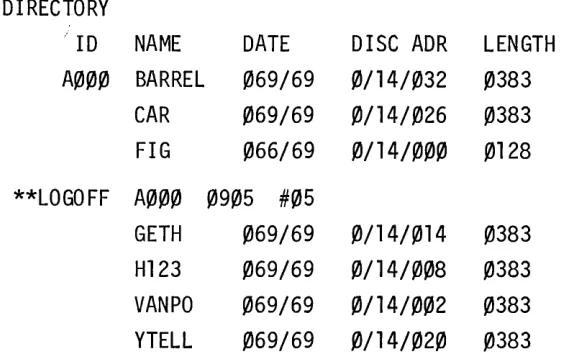
Whenever a user gives a HELLO or BYE Conunand at a tenninal, the System Operator Console will print a messa.ge recording the event. The fonnat is as follows:
where
LOGON,
LOGOFF
**LOGON
IDcode time terminal #or
**LOGOFF
IDcode time terminal #IDcode is the users IDcode.
time is the time (on a 24-hour clock).
terminal # is a decimal number from ~ to 31 identifying the terminal.
**LOGON
**LOGOFF
#05
#05
LOGGING
EXAMPLE:
DIRECTORY
-' ID
NAME
DATE
DISC ADR
LENGTH
A000 BARREL
069/69
0/14/032
0383
CAR
069/69
0/14/026
0383
FIG
066/69
0/14/000
0128
**LOGOFF A000 0905 #05
GETH
069/69
0/14/014
0383
H123
069/69
0/14/008
0383
VANPO
069/69
0/14/002
0383
YTELL
069/69
0/14/020
0383
A user may log on with a HELLO Command when the previous user has not logged off with a BYE Command. In this case the system will automa.tically log off the previous user before logging on the current user.
Figure 6-1 represents the sequence of events occurring when users log on and off two user terminals. Note that user-A~~~ logs on to terminal #14 while user-H9~9 has not logged off.
TERMINAL #14
SYSTEM OPERATOR CONSOLE
TERMINAL #5
**LOGON
8434 0814 #05
HELLO-B434,FRGH
READY
HELLO-H909,JKIL
**LOGON
H909 0818 #14
READY
**LOGOFF 8434 0820
105
BYE
006 MINUTES OF TERMI NAL TIME
HELLO-A000,A
**LOGOFF H909
0824 114
[image:49.613.122.403.116.294.2]LOGGING
HELLO LIBRARY PROGRAM
SECTION VII
SYSTEM LIBRARY
The TSB System Library makes useful BASIC Language programs available to all
users.
Programs in the System Libraxy provide the user with information
about the status of the system, give him training, provide him with
mathe-matical subroutines, or carry out any other useful operations.
Library
pro-grams may be left unprotected, or
th.~ymay be protected.
Anunprotected
pro-gram can be fetched, executed, listed, punched and saved by the general
user.
Protected programs can only
befetched and executed ("run only").
The general user cannot.modify the System Library.
Programs are entered and
removed from the Sys tern Library through a user terminal, not through the
op-erator console.
To make this possible, the TSB System recognizes a special
user IDcode as privileged to modify the System Library.
Consult 2000B:
A Guide
to
Time Shared BASIC(HP 02000-90010) for reference on the 2000B
Time Shared BASIC Language.
THE PRIVILEGED USER -
A~@~The user IDcode
A~~~in the TSB System has a special status:
only programs
saved by
A~~~become part of the System Library and only
A~~~can modify the
System Library.
A~~~might be considered the system operator's IDcode.
A~~~has two special user commands, PROTECT and UNPROTECT, which allow him to make
library programs "run only" and library files inaccessible to other users.
THE SEMI-PRIVILEGED USERS
All users with IDcodes beginning with "A" (e.g.,
AfA~l,Aflfl2) are
semi-privileged users:
they can write on their files even when the files are
SYSTEM LIBRARY
PROTECT
The PROTECT command is a user command, available only from a user terminal and only to user-A~~~. The format is as follows:
PROTECT
-name
where
name
is either a program name or a file name.A protected program can not be listed, punched, or saved by any user except A~~~. A protected program may, however, be fetched and executed by any user. A protected file cannot ble accessed at all by another user. These restrictions, of course, do not apply to user-A~~~.
UNPROTECT
The format of the UNPROTECT corranand is similar to that of thee PROTECT command.
UNPROTECT-name
The program or file specified is made available to all users ..
SECTION VIII
LOADING THE TSB SYSTEM
The software for 2000B Time Shared Basic System includes two TSB System
tapes -- TSB BINARY (PART I) and TSB BINARY (PART II) -- and two short tapes, the 2114 system, and the TSB Loader. TSB Loader loads the TSB System tapes and relocates them on the disc. In addition, the Basic Binary Disc Loader
(BBDL), a protected 64-word program, is always resident in high core. BBDL is used to load absolute punched tape programs (such as the TSB Loader) and disc-resident software systems (such as the TSB System or the Disc Operating System) into core memory.
The TSB Loader is used to generate an initial TSB System on the computer, to update the TSB System software, to reload a dumped TSB System from magnetic tape and to attempt emergency recovery when a TSB System fails.
This section consists of twelve procedures or groups of operating instructions, a discussion of system halts, and a list of TSB Loader halts. The procedures cover:
Procedure 1: Procedure 2: Procedure 3: Procedure 4: Procedure 5: Procedure 6: Procedure 7: Procedure 8: Procedure 9: Procedure 10: Procedure 11: Procedure 12:
Turning on all equipment. Loading the 2114 System.
Generating an Initial TSB System.
Updating the TSB System--retaining user files. Reloading from Magnetic Tape.
TSB Loader Patch Option. Reloading from the Disc. Emergency Recovery.
BBDL loading of paper tape. Reloading the 2116 BBDL. Reloading the 2114 BBL.
LOADING THE TSB SYSTEM
CONVENTIONS USED IN THIS SECTION .
Information printed on the teleprinter by the computer or the opera1:or
appears in the text as
INPUT EXAMPLE
OUTPUT EXAMPLE
except that special, non-printing characters appear in underlined i1:alics
(eg., return).
The contents of registers on the
2114and
2116computers (i.e., swit:ch
registers, memory data registers, etc.) appear as a series of
16binary
digits (bits) organized into octal digits:
0/000/000/000/000/000
t
t
Bit
15Bit 0
o
means the bit is off or down (equal to a binary 0) .
I means the bit is on or up (equal to a binary
1). /000represents an octal digit (e.g.,
/010=
2
8
).
LOADING THE TSB SYSTEM
PROCEDURE 1
TURNING ON ~~LL EQUIPMENT
First, turn on the master' power switch of the system cabinet, then:
1.
2116 Computer:
Press POWER button on front panel.
2.
System console (ASR-35 tele!printer):
Turn LOCAL-OFF-ONLINE switch to ON LINE.
(See Section I.)
3.
2114 Computer:
Open cabinet front panel.
Turn POWER switch to ON.
Check that all mode switc:hes are set to NORMAL.
4.
Tape Reader:
Press POWER button.
Sensing light should go on.
After Loading is
completE~d,tape reader
can be turned off (press POWER).
5.
Disc Memory:
Turn POWER ON.
Wait for status lights to go off.
Open 2116 cabinet door, set switch on disc interface board
down.
6.
Drum Memory:
Turn AC POWER switch to ON.
Turn DC POWER switch to ON.
LOADING THE TSB SYSTEM
Wait for READY light to go off.
Open 2116 cabinet door, set switch on drum interface board down.
7. 3030 Magnetic Tape Unit:
To start unit and mount tape:
a. Open door in the back of the cabinet.
On the floor of the cabinet there are two switches: TRANSPORT POWER AND DATA ELECT. Turn them both to ON.
Close the cabinet door and turn the handle to start the ventilation fans.
b. Slide the front window door down to the bottom.
c. If you want to write on the magnetic tape, check that the magnetic tape contains a write Enable Ring.
d. Slide the magnetic tape reel onto the right hub with the tape unwinding on the right side. Hold 1:he reel on the hub (press down in the middle of the reel, not along the outside, as this may damage the tape) and turn the hub to the right until i t locks.
e. Hold the BRAKES switch down and unwind the tape until i t reaches the floor.
f. Put the tape around the guide so that the dull side is facing up.
g. Thread the tape through the read/write mechanism.
LOADING THE TSB SYSTEM
1. Press AUTO.
m. Check that the Write Enable light is on if the magnetic
tape contains a Write Enable Ring.
8. 7970 Magnetic Tape:
To start unit and mount tape:
a. Open the front door on the unit and set the POWER switch
to ON (up). The POWER switch is in the lower, left-hand
corner.
b. Pullout the quick release latch on the upper reel hub.
c. Slide the source reel onto the upper hub (with the Write
Enable Ring present and facing the back); the tape
should unwind from. the reel on the right.
d. Hold the reel flat against the hub; then flip down the
latch. The reel should be locked in place.
e. Unwind about three feet of tape from the source reel.
Thread this tape according to the tape diagram. Be
sure that the tape always is threaded to the left of the
tape guide posts.
f. Pull the tape across the top of the takeup reel and wind
until taut. Then give the takeup reel another two turns.
g. Close the front door.
h. If the tape is to be written on, check that the Write Enable
light is lit. If i t is not, the Write Enable Ring is
miss-ing from the sourc,e reel; press REWIND and remove th~ source
reel. Insert the 'Write Enable Ring and start over.
i. Press LOAD, ONLINE, and the 0 (zero) switch.
j. When the LOAD light is on, the unit is ready for use by
the computer
CAUTION:: DO NOT OPEN THE DOOR OF THE MAGNETIC TAPE WHILE THE UNIT IS
LOADING THE TSB SYSTEM
PROCEDURE 2
LOADING THE 2114 SYSTEM
If the 2114 System has been loaded already but has been HALTED, restart the 2114 at Step 7. If the power was turned off, the 2114 will restari: when the power is turned on.
1. Turn on all equipment (Procedure 1) and check that t:he 2114 CONSOLE LOCK and LOADER ENABLE switches are set to NORMAL. Halt both machines and press PRESET on the 2116.
2. Load the 2114 tape in the reader.
3. Load the first program on the tape using BBDL (ProcE~dure 9). 4. Set the switch register of the 2116 to 28 and press LOAD
ADDRESS and RUN on the 2116. (0/000/000/000/000/0'0
=
2 8) Press CLEAR REGISTER on 2114.5. Press LOAD and PRESET on the 2114 at the same time. The 2114 tape should be read through the Photoreader and the 2114 should halt. If i t doesn't, reload the 2114 BBL (Procedure 11) •
6. Press HALT on the 2116. The 2114 is now loaded.
7. The 2114 program can now be started by simply pressing RUN on the 2114. However, if the 2114 memory is altered or examined, start the 2114 at 2
8.
8. Press the ESC key on any user terminal that is connected to the 2114 multiplexors. If the teleprinter does not respond with
11\11
and areturn-linefeed
reload the 2114 System (Step 1). 9. Set the CONSOLE LOCK switch inside the door of the 2114 toLOADING THE TSB SYSTEM
PROCEDURE 3
GENERATING AN INITIAL SYSTEM
1. Turn on all equipment (Procedure 1).
2. Load and start the 2114 (Procedure 2).
3. Make sure that the DISC PFDTECT switch on the disc interface board (inside the computer) is off (unprotected). Proper switch setting is down.
4. Load the TSB Loader tape using BBDL (Procedure 9).
5. Set the switch register on the 2116 to 2000 (0/000/010/000/000/000
=
20008).
6. Press LOAD ADDRESS and RUN on the 2116.
7. Place the first system tape (2000B, Part 1) into the photoreader.
8. The computer prints
LIBRARY?
on the teleprinter. TypeNO
retur!!.. on the keyboard.9. The computer prints
SECTORS/TRACK ON DISC 0?
Type in90
or128.
(See Table I-I.)10. The computer prints
DISC tJIODIFICATIONS?
If the 2ll6B contains more than one disc of 64 t~racks, enter DISC commands to define their location, number, and size. (Section IV.) Each command uses a separate line, and the sequence is terminated by typing a singlereturn
orNO
return.
11. The computer prints
GIVE LOCK, UNLOCK, OR LOAD COMMAND
on the teleprinter.LOCK any tracks on the disc that are faulty, (Section IV), then type
LOAD
return.
LOADING THE TSB SYSTEM
13.
The computer reads in the system tape (2000B, Part 1) from the
photoreader, halts with 102077 in the T-Register
(./000/0.0/000/ ••• / •••
=102077
8
), and prints
END OF TAPE.
Place the second system tape (2000B, Part 2) in the phot,oreader
and press RUN.
14.
After reading in the tape, the computer prints
DATE?
Respond with two decimal integers separated by a slash, where the
first is the day of the year, and second is the year of the
century.
For example,
36/7~return.
NOTE:
The operator is responsible for changing the
day and year at the beginning of a new year.
15.
The computer prints
TIME?
Respond with a four-digit decimal integer giving the current hour
and minute on a 24-hour clock.
For example, 1:15 p.m. would be
1315
return.
16.
The computer prints
READY
and will now accept any legal commands
from the operator.
At this point, the photoreader can be
LOADING THE TSS SYSTEM
PROCEDURE 4
UPDATING T.,IE TSB SYSTEM
Retaining user files, reloading the f:ystem from paper tape while saving the user files.
The system must be in the SLEEP condition. Turn on all equipment (Procedure 1). Check the 2114; if not running, use Procedure 2.
1. Load the TSB Loader tape using the BBDL (Procedure 9). 2. Set the Switch Register of the 2116 to 2000
(0/000/010/000/000/000 = 20008). 3. Press LOAD ADDRESS on the 2116.
4. Place the first system taI>e (2000B Part 1) in the photoreader.
5. Press RUN on the 2116.
6. The computers prints
LIBRJ\RY?
on the teleprinter. TypeYES
return
on the keyboard.7. The computer prints
MAGTAPE SELECT CODE?
Type only areturn.
8. The computer prints
GIVE LOCKs UNLOCK, OR LOAD COMMAND
on the teleprinter.LOCK or UNLOCK any tracks (except user library tracks, table tracks, or track zero), d.~sired at this time. (See LOCK Command and UNLOCK Command, section IV.) Then type
LOAD
return.
9. The computer prints
DISC OPERATING SYSTEM PRESENT?
TypeYES
if DOS is presen"t on the disc, otherwiseNO.
10. The computer reads in the system tape (2000B Part 1) from the photoreader, halts with 102077 in the T-Register
(1/000/010/000/111/111