HONEYWELL
.
I
LEVEL
68
INTRODUCTION
LEVEL 68
INTRODUCTION TO PROGRAMMING ON MULTICS
SUBJECT
Introduction to Programming in the Multics Operating System Environment, Intended as a Guide for Applications Programmers
SPECIAL INSTRUCTIONS
This manual presupposes some basic knowledge of the Multics operating
system. This information can be found in the 2-volume set,New
Users'Introduc-tion to M ultics (Order Nos. CH24 and CH25).
This manual supersedes AG90, Revision 2, which was titled Multics
Program-mer's Manual. Together with the 2-volume set, New Users' Introduction to
Multics, it supersedes AL40, Revision 1, which was titled Multics Introductory
Users' Guide. The manual has been extensively revised and does not contain change bars.
SOFTWARE SUPPORTED
Multics Software Release 9.0
ORDER NUMBER
AG90-03 July 1981
PREFACE
The purpose of this manual is to introduce the Multics environment to
applications programmers who have experience on another operating system but are new to Multics.
It is very important that you understand exactly who this manual is for,
and what assumptions this manual makes about its audience, before you begin to
use it.
The intended audience of this manual is applications programmers. It is
assumed that you have programmed on some other system(s) and that you have some
basic knowledge of at least one higher level language (COBOL, FORTRAN, PL/I,
etc.). No attempt is made here to teach you how to program. This manual is
only intended to show you how to do the things--You know how to do on another
system on Multics.
As an applications programmer, you look at an operating system from the
viewpoint of some programming language. This manual does not attempt to discuss
the use of any particular language on Multics, but rather, concerns itself with
those practices which are appropriate no matter which language you use. For
information on speCific languages you should refer to the Language Users'
Guides. The names of these guides are included in the list of useful manuals
for new programmers given at the end of this preface.
This manual assumes that you are registered on Multics, and that you know
how to log in and use a terminal. It also assumes that you have some general
familiarity with the fundamental concepts and facilities of the Multics system.
This information is available in the following publications:
New Users' Introduction to Multics - Part I
New Users' Introduction
to
Multics -Part
TI- - - - -
-Order No. CH24 Order No. CH25
You should feel comfortable with the use of segments, directories, text
editors, access control, commands, and active functions. If you don't, you
should review the manuals listed above, as no review of this material will be
presented here.
The information and specifications in tbiB document are subject to change without notice. This document contains information about Honeywell products 01' IIel'ViceII that may
not be available outside the UDited Statee. c-Jt your Honeywell Marketing Bepreeentatbe.
(£)
Honeywell Information Systems Inc., 1981 File No.: 1L13Section 1 of this manual offers an overview of the Multics operating system
in general terms, to give you some idea of why programming on Multics may be
different from working on other systems.
Section 2 offers a step-by-step approach to the essentials of programming
on Multics. It shows you how to create, compile, execute, revise, and document
your programs in this environment, how to manipulate your segments, and how to
create storage system links. Sample terminal sessions are also included.
Section 3 takes you one step further by showing you the uses of dynamic
linking on Multics.
Section 4 provides you with an introduction to Multics input/output
processing, showing you how to use the terminal for I/O and how to begin using
I/O commands.
Section 5 discusses the use of a Multics debugging tool.
Section 6 discusses the use of a Multics performance measurement tool.
Section 7 explains the Multics absentee facility, which offers capabilities
similar to batch processing on other systems.
Section 8 offers a reference to all of the Multics commands by function,
including a brief description of each command.
The appendixes of this manual contain material which is specific to a
particular language, somewhat advanced, or useful only to certain users.
Appendix A shows you how to use Multics to best advantage in PL/I
programming.
Appendix B offers a step-by-step explanation of a PL/I text editor program. (This is for people who are ready to begin systems programming work.)
Appendix C briefly introduces you to various Multics sUbsystems.
Appendix D shows you how to use the Edm text editor.
The information presented here is a subset of that contained in the primary
Multics reference document, the Multics Programmers' Manual (MPM). The MPM
should be used as a reference to Multics once you have become familiar with the
concepts covered in this introductory guide. The MPH consists of the following
individual manuals:
Reference Guide
Commands and Active Functions
Subroutines
Subsystem Writers' Guide
Peripheral Input/Output
Communications Input/Output
Order
Order
Order
Order
Order
Order
No. AG91
No. AG92
No. AG93
No. AK92
No. AX49
Throughout this manual, references are made to the MPM Reference Guide, the
MPM Commands and Active Functions, the MPM Subroutines~nd the MPM-subSystem
Writers' Guide manuals. For convenience, these references are as follows:
MPM Reference Guide MPM Commands
MPM Subroutines
MPM Subsystem Writers' Guide
Other Multics manuals of interest to new programmers are listed below.
• Languages:
Multics APL
Multics Basic
Multics COBOL Users' Guide
Multics COBOL Reference Manual
Multics FORTRAN Users' Guide
-Multics FORTRAN Reference Manual
Multics PL/I Language Specification
Multics PL/I Reference Manual
• Subsystems:
Multics FAST Subsystem Users' Guide
Multics GCOS Environment Simulator
Multics Graphics System
Logical Inquiry and Update System Reference Manual
Multics Relational Data Store (MRDS)
Reference Manual--- - -
----Multics Report Program Generator Reference Manual
Multics Sort/Merge
WORDPRO Reference Guide
• Micellaneous:
Multics Pocket Guide - Commands and Active Functions
Index to Multics Manuals
---- -- -
---Order No. AK95
Order No. AM82
Order No. AS43
Order No. AS44
Order No. CC70
Order No. AT58
Order No. AG94
Order No. AM83
Order No. AU25
Order No. AN05
Order No. AS40
Order No. AZ49
Order No. AW53
Order No. cc69
Order No. AW32
Order No. AZ98
Order No. AW17
Order No. AN50
The Multics operating system is referred to in this manual as either
"Multics" or "the system". The Emacs, Qedx, Ted, and Edm text editors are
Section
Section 2
Section
3
Section 4
Section 5
Section 6
Section 7
CONTENTS
The Multics Approach • • • •
Segmented Virtual Memory •
Process, Address Space, and Execution
Paint • • • • • • • •
Segments and Addressing
Dynamic Linking • • • • • • • • •
Controlled Sharing And Security Access Control Lists
Administrative Control
Programming on Multics
Designing and Writing Programs Source Segments • • • • • Compiling Programs
Object Segments • • • • • • • •
Executing Programs • • • • • • Some Results of Execution Revising and Documenting Programs Sample Terminal Sessions •
A Note on Examples • • • • • •
Archiving Segments • • • • • • • • • Binding Segments • • • • • • • • • •
Li nks • • • • • • • • • • • • • • •
Dynamic Linking • • • A Naming Convention Search Rules • • • •
A Note on Initiated Segments Uses of Dynamic Linking
Search Paths • • • • • • • • • • •
Input/Output Processing • • • • • • • • • • The Five Basic Steps Of Input/Output • • Using The Terminal For I/O • • • • • • Using Segments As Storage Files
Using I/O Commands And Subroutines •
Card Input and Conversion • • • • •
A Debugging Tool The Stack Probe
A Performance Measurement Tool
Absentee Facility • • • •
Section
8
Appendix A
Appendix B
Appendix C
Appendix D
Index
CONTENTS (cont)
Reference to Commands by Function • • • • Access to the System • • • • • • • • • Storage System, Creating and Editing
Segments • • • • • • • • • • • • • •
Storage System, Segment Manipulation • Storage System, Directory Manipulation Storage System, Access Control • • • • • Storage System, Address Space Control Formatted Output Facilities
Language Translators, Compilers, and
Interpreters • • • • • • • • • • • •
Object Segment Manipulation • • • • •
Debugging and Performance Monitoring
Facilities • • • • • • • •
Input/Output System Control
Command Level Environment • • • •
Communication Among Users Communication with the System Accounting • • • • • • • • • • • • Control of Absentee Computations
Miscellaneous Tools • • • •
Using Multics to Best Advantage •
A Simple Text Editor
Multics Subsystems Data Base Manager Fast • • • • • •
Gcos Environment Simulator Graphics • • • • • • • • • • Logical Inquiry and Update Report Program Generator •
Sort/Merge • • • • •
Wordpro
The Edm Editor • • • • • • • •
Requests • • • • • • • • • • •
Guidelines • • • • • • • • • • • • • •
Request Descriptions • • • • • •
Backup (-) Request • • • • • • • • •
Print Current Line Number (~) Request • •
Comment Mode (,) Request Mode Change (.) Request.
Bottom (b) Request • • • • • •
Delete (d) Request • • • •
Find (f) Request Insert (i) Request
Kill (k) Request • • • •
Locate (1) Request • • • •
Next (n) Request • • • •
Print (p) Request • • Quit (q) Request
Retype (r) Request •
Substitute (s) Request
Top (t) Request • • • • • • • • • • •
Verbose (v) Request • • • • • Write (w) Request • • • • •
Figure 1-1.
Figure 1-2.
Figure 1-3·
Figure 1-4.
Figure 1-5.
Figure
2-1-Figure 2-2.
Figure
3-1-Figure 4-1.
Figure 4-2.
Figure 4-3·
Figure 5-1.
Figure 5-2.
Figure 6-1.
Figure 7-1.
CONTENTS (cont)
ILLUSTRATIONS
Traditional System vs. Multics Virtual Memory . Processes Sharing a Segment . • . .
Two-Dimensional Address Space • . . . • . • • . The Life of a Segment • • . • . • • • . . • • • Resolving a Linkage Fault (Snapping a Link)
Sample Terminal Session #1 . . . •
Sample Terminal Session #2 Initiated Segments
Flow of Data • . • . .
Standard Attachments
Attachments After Execution of file_output
Command • . • . . . " . . .
State of Stack • . . • • . • • • . .
Allocation of Stack Frames . . . . •
Use of profile Command With -list Control
Argument . • . • . • . . . • .
Interactive vs Absentee Usage • • . . • . .
Page
1-3 1-5
1-8
1-9 1-11 2-9 2-10 3-4 4-3 4-6
4-13 5-2 5-4
SECTION 1
THE MULTICS APPROACH
The Multics approach is quite different from that of a traditional batch
operating system. The intent of this section is to show you how Multics is
different, by giving you a general overview of the system's "personality", then
describing in more detail three of its major characteristics: segmented virtual
memory, dynamic linking, and controlled sharing and security. As these
characteristics are discussed, important concepts associated with each will be
introduced and explained. Familiarity with these concepts will help you when
you read later sections of this manual and begin to program on Multics.
Multics is a large, powerful, well-established system, which is constantly being refined, and provides a wide range of commands, languages, and subsystems.
Despite its size and complexity, Multics is easy to learn and use. It has been
designed to serve a wide variety and number of users, all cooperating and sharing
resources. Multics offers its users the following advantages:
• support for online usage: Multics has been designed to support online
processing as well as batch processing. You can accomplish all of
your programming tasks as either an interactive (online) user or an
absentee (batch) user. Applications, debugging tools, data base
management facilities, administrative tools and utilities are all
accessi ble online. In one terminal session, you can write, compile,
execute and debug your program. (See "Sample Terminal Sessions" in
Section 2, and "Probe" in Section 5.)
• consistent user interface: A great deal of thought has gone into
making similar parts of Multics work in similar ways. For example,
common control arguments such as -all and -brief are used with many different commands, and in each case, the control argument performs a
similar function. In addition, all parts of the system have been
designed to work together.
• uniformity of control language: Batch processing on Mul tics is supported
by the absentee facility (described in Section 7). An absentee job is
processed like an interactive terminal session; it's directed by the
same language as that used for interactive jobs. In other words, no
special job control language (JCL) is ever required on Mul tics. The
system commands and routines provide the logical branching, conditional execution, input/output control, and file system specifications necessary to direct any job.
• ease of use: On Multics, users are not asked to give information or
make decisions ahead of time. There are many examples of this. You
don't have to know or specify either a segment's size or its location
to use it. You don't have to make your need for tape drives and
similar resources known in advance. Intelligent defaults mean that
you need not create a correspondence between a file and an I/O name. Dynamic linking (described later in this section) means that you need
not name or prefetch programs you want to execute. You can set up a
tempor~ry working array for your PL/I or FORTRAN program in its own segment, without specifying how much space you need or worrying that
the array will get too big. You will find that this lack of required
SEGMENTED VIRTUAL MEMORY
The most significant difference between the Multics programming environment and that of most other contemporary computer programming systems lies in its
approach to addressing online storage. Most computer systems have two sharply
distinct environments: a resident file storage system in which programs are
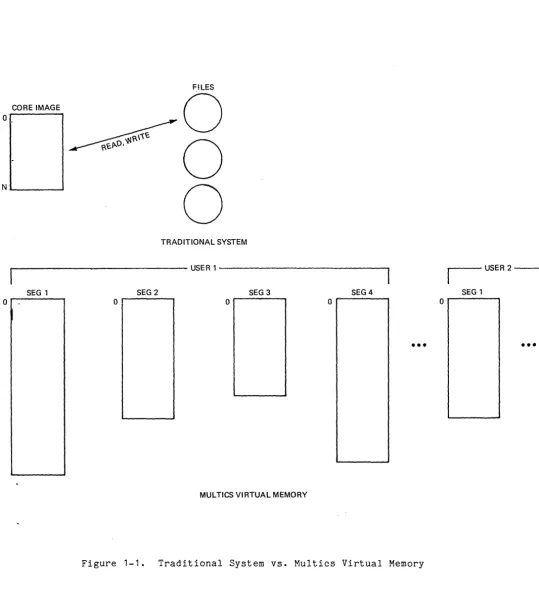
created, and translated programs and data are stored; and an execution environment consisting of a processor and a "core image", which contains the instructions and data for the processor. Supervisor procedures provide subroutines for physically moving copies of programs and data back and forth between the two environments.
In Multics, there is one conceptual memory, which is known as the virtual
memory. The traditional distinction between secondary storage and main memory
has no meaning, because a single infinitely large memory is simulated by the software, with data stored in finite segments which appear to be in memory at
all times. Figure 1-1 illustrates this difference between a traditional system
and the Multics virtual memory.
With the line between the two traditional environments deliberately blurred, program construction on Mul tics is simplified: most programs need only be cognizant
of one environment instead of two. This blending of the two environments is
accomplished by extending the processor/ core image environment. In Mul tics,
your share of the processor is termed a process, and your core image is abstracted
into what is called an address space. In a sense, each segment is a core image,
and your process can have lots of them.
The easiest way to think about the terms process and address space is to imagine your process as a private computer and your address space as a private
memory for your process to work in. (See "Process, Address Space, and Execution
Point" next in this section.)
Another important difference between the Mul tics environment and that of
most other systems is that an address in Multics has two parts: a segment
identifier and a location, or offset, within the segment.
Traditional Address
I
Segment I Offset Multics AddressCORE IMAGE o
N L..;.-. _ _ _ ...
o
o
o
TRADITIONAL SYSTEM
r---USER1---~
SEG 1 SEG2 SEG3 SEG 4
o
o
o
o
•••
MULTICS VIRTUAL MEMORY
Figure 1-1. Traditional System vs. Multics Virtual Memory
r - - - -USER 2 - - - - -... ~ ....
SEG 1
o
[image:12.620.36.576.85.683.2]Process, Address Space, and Execution Point
When you log in to the system, you are allocated system resources in an
environment known as a process. A process consists of a collection of segments
called an address space, over which a single execution point is free to roam
(i.e., to fetch instructions and make data references).
---A process executes programs on your behalf, either directly in response to your instructions or automatically as part of supporting the programs you invoke
directly. The programs executed on your behalf and the data they reference make
up your address space, and that address space combined with the act ion of execut ing those programs make up your process. Your execution point is whatever is executing at any moment.
Space within the virtual memory is dynamically assigned to your aaaress
space. Its contents are a function of the sequence of instructions that are
processed between the time you log in and the time you log out, and thus it
dynamically shrinks and grows as necessary. Your address space is different
from the usual core image in that it is larger and it is segmented. A segment
may be of any size from 0 to 255K, and an address space may have a large number
of segments (typically about 200). Usually, each separately translated program
resides in a different segment; collections of data which are large enough to be
worthy of a separate name are placed in a segment by themselves. The system
assigns attributes (access control and length, for example) to each of these
segments based on their logical use. There is a distinct address space for each
user who is logged in, even though many users may share the very same segments in their address spaces.
Your process is created when you log in, and destroyed when you log out, when you request a new process with the new proc command, or when some kinds of
errors occur. You may view your process as if all system resources are dedicated
to it alone--as if you have a processor all to yourself--when in reality, all resources are being shared among many processes. Not only are there other interactive processes running, there are also absentee processes running as "background" to the interactive ones, and there are various daemon processes running, which are associated with the normal operation of the system and not connected to any
user. All of these processes are continually cooperating and competing for
processor time and main storage resources. The processor is multiplexed between
processes according to rules defined for the system as a whole, with the object of sharing resources in an equitable manner.
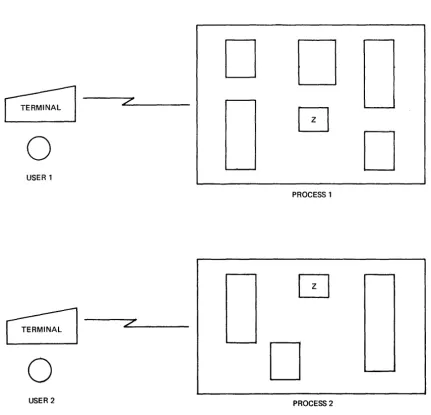
Processes can share with each ether, and this sharing is of two types. First, any references to a segment by more than one process are references to
the same segment. Second, a large part of the address space in all processes is
identical, because the parts of the system shared by all users are given segment numbers (described below) that are the same for all processes. Figure 1-2 illustrates this sharing of segments.
You should remember that each process's virtual memory is private to it. This means that changes made to one process's virtual memory assignments do not
affect those of other processes. In addition, when a segment is being shared,
D
D
~
7'[ ]
0
D
USER 1
PROCESS 1
z
o
D
USER 2 PROCESS 2
[image:14.618.96.528.179.594.2]Segments and Addressing
It's important to understand that a Mul tics segment is not a file. A
segment can be addressed directly, like memory. It doesn't have to be read or
written record by record like a file on other systems. On Multics, everything
is in a segment:
program source code program object code data files
mail boxes work areas
temporary storage exec coms
There are two main reasons why segments are used in Multics. The first is
that they make it possible for all your process's programs and data to be easily
and directly addressable. The second is that they make it possible to protect
and share programs and data by controlling access at the hardware level. (For
more on this, see "Controlled Sharing and Security" later in this section.)
The segment ; ~ often described as the basic unit of storage in Multics
because all locating (addressing) of data in the system is done in terms of
segments. The physical mo~ement of information between main memory and secondary
storage is fully automatic in Multics (it is done by the paging mechanism). The
usual complex combination of file access methods and job control language which you are probably used to is replaced by a simple two-dimensional addressing
scheme. This scheme involves the user-assigned symbolic name of the segment
(its pathname), and the address of the desired item within the segment. Even
relative addresses are usually given in symbolic terms through the data description
facilities of the language you're using. Thus, each segment appears to its user
as independent memory, symbolically located. Segments don't have to be in specific
storage locations. They can be relocated anywhere in memory and grow and shrink
References to any portion of your address space consist of a segment name and a location wi thin the segment; all addresses are interpreted as offsets
within segments. To increase the efficiency of a storage reference, a segment
number becomes associated with a segment name when the segment is initiated
(added to your process's address space). A segment is said to be known to a
process when it has been uniquely associated with a segment number in that
process. The segment number is a temporary alias for the segment name, which is
more easily translated into a storage address by the hardware. When you write:
<symbolic_name> [symbolic_offset]
the hardware uses:
<segment_number> [offset_number]
The association between a segment name and a segment number is retained until
the segment is terminated (removed from your process's address space). If it is
terminated and initiated again, the number will be different. (See the discussion
of initiating and terminating segments in Section 3.) Thus, every address or
pointer is a pair of numbers: the segment number and the offset wi thin the
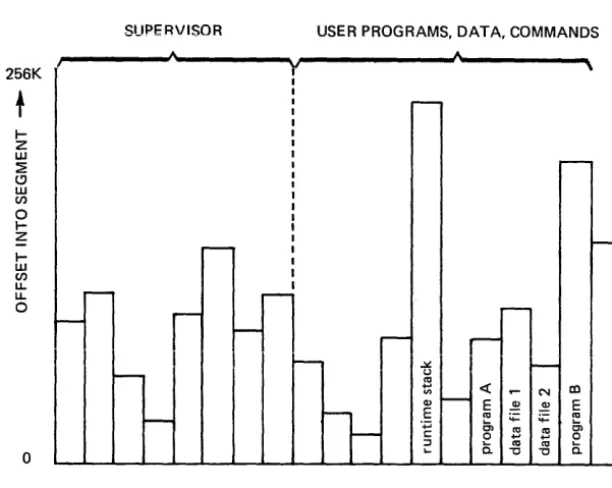
segment. This pair of numbers forming an address represents the coordinate of a
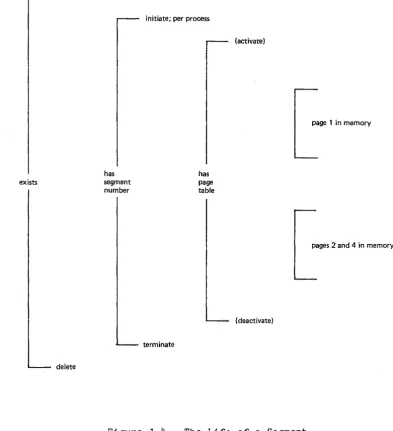
location in the two-dimensional address space. See Figure 1-3 for a graphic
representation of a two-dimensional address space. See Figure 1-4 for an
illustration of the life of a segment.
A program can create a segment by issuing a call to the system specifying
the symbolic name as an argument. Different users can incorporate the same
segment into their programs just by specifying its name. (A program need not
copy a segment to use it.) A program can address any item wi thin a segment
using "segment, 1" where segment is the symbolic name of the segment and 1 is
the location of the desired item within the segment. The ALM (Multics assembly
language) instruction shown below illustrates a symbolic reference to location "x" in segment "data":
Ida data$x
For more information on the Multics virtual memory, see th~ MPM Reference
Guide.
DYNAMIC LINKING
Many programs make .calls to external subroutines or use external variables. On most systems, these external references are resolved during loading or linkage
editing. When the program is loaded into memory, external subroutines are loaded
from libraries or user data sets, and storage is allocated for external variables.
On Multics, external references are resolved when the program~; i.e., the
point at which something is used is the point at which it is found. This means
that a compiled program on Multics is directly executable. Segmentation is what
256K
I-Z
w
~
(!) w
en
o I-Z
I-w en
Ll. Ll.
o
o
SUPERVISOR USER PROGRAMS, DATA, COMMANDS
y
SEGMENTS
co E
E
0')
o
0.
Figure 1-3. Two-Dimensional Address Space
[image:17.624.136.442.323.567.2]Note 1.
Note 2.
create
exists
delete
has segment number
initiate; per process
terminate
has page table
(activate)
I
Lage
1 in memorypages 2 and 4 in memory
(deactivate)
Figure 1-4. The Life of a Segment
Events in parentheses are not user visible.
Segments are automatically divided by the hardware into storage units known as pa ges
4
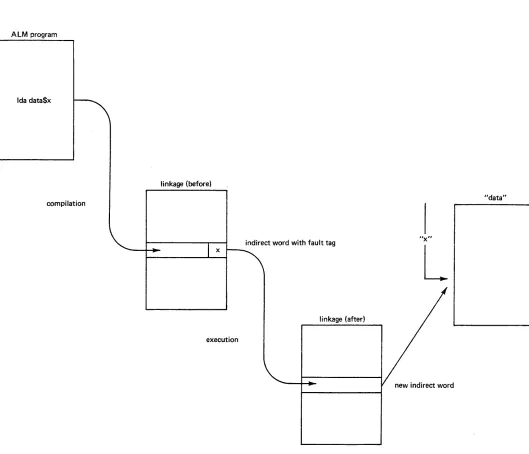
with a fixed size of 1024 words. (One word is equal [image:18.617.110.504.65.496.2]Dynamic linking is accomplished by having the compiler leave in the object code of a compiled program an indirect word with a "fault tag" which, if used in an indirect address reference, causes a linkage fault to the dynamic linker.
The linker inspects the location causing the fa~ and from pOinters found
there, locates the symbolic name of the program being called or the data segment
being referenced. It then locates the appropriate segment, maps it into the
current address space, and replaces the indirect word with a new one containing
the address of the progr~m or data entry point, so that future references will
not cause a linkage fault. When the system comes across an unresolved reference,
it uses what are known as search rules (described in Section 3) to find the
needed segment and establish the necessary link. This process is known as snapping
a link. To see how the linkage fault caused by the ALM instruction mentioned
previously would be resolved, refer to Figure 1-5.
With dynamic linking, you don't pay the cost of resolving references (for example, calls to error routines) unless they are actually needed. If a subroutine is never called, it doesn't even have to exist, and the main program will still
run correctly. An item in the file system has to be in your address space for
you to use it, but it doesn't have to be copied and brought into memory before
execution. The virtual memory guarantees that any item you reference is where
the processor can address it directly.
Dynamic linking simplifies your programming by totally eliminating the loading
step. It also eliminates the need for a complicated job control language for
retrieving, prelinking, and executing programs, and for defining and locating input/output files.
For more information on dynamic linking, see the MPM Reference Guide.
CONTROLLED SHARING AND SECURITY
ALM program
Ida data$x
linkage (before)
compilation "data"
L
linkage (after)
execution
new indirect word
[image:20.612.61.590.135.589.2]Access Control Lists
One way of controlling the sharing and security of information is by using
access control lists. ACLs, as you have already learned in the New Users'
Introduction to Multics, define the access rights for each segment and directory. You can grant permission to use your segments and directories by individual user, by project, by instance (interactive/absentee), or by combinations of these.
You can also grant different access to different users of the same segment. A
good example of using ACLs is a compiler which resides in a segment that can be executed but not written.
For more details on access control, see the MPM Reference Guide.
Administrative Control
Another kind of information control is administrative. Mul tics administration
defines three levels of responsibility: system, project, and user. A system
administrator allocates system resources among the proj ects on his system; a project administrator allocates project resources among the users on his project; a user can manage his own data through storage management and access controls.
Your project administrator can define the environment of the users under
his project. He can give you complete control in creating your own process, or
he can limit the requests and commands available to you. He can determine the
dollar limit that you may incur in a single month (or other period of time), and arrange things so you'll be automatically logged out if you exceed this limit. You won't be able to log in again until the next month begins or the limit is
changed. He can also determine several other items, including whether a user
can preempt others, specify his own directory, or have primary or standby status when logging in.
You yourself also have flexibility in shaping your programming environment
on Mul tics. A good example of this is the special command processor which
allows you to make abbreviations for your frequently used commands (abbrev).
For more information on Multics administrative features, the manuals in the Multics Administrators' Manual (MAM) set:
Project Administrator
Registration and Accounting Administrator System Administrator
refer to one of
SECTION 2
PROGRAMMING ON MULTICS
Programming on Multics is very different from programming on other systems. Many of the constraints and restrictions you may be used to are simply removed.
'The system provides high-level terminal control, data base management, 1/0
interfaces, and data securi ty. There is no need for overlays, chaining or parti tions.
This section explains how to write, compile and execute programs in the
Multics environment. It also offers advice on revising and documenting programs,
manipulating segments, and creating storage system links.
DESIGNING AND WRITING PROGRAMS
Let's say you've been given specifications for a program which will compute
the sum of three numbers. Obviously, this is not a realistic task for a computer,
but it will provide us with a very simple example.
Of course, the first thing you need to do is to develop a design for your program, be i t a flow chart, a functional diagram, a hierarchy, or whatever. Once you have a good design, the next step is to decide which language you will
write your program in. The following programming languages are available on
Multics:
• APL: A terse, powerful language, with strong data manipulation
capabilities.
• BASIC: A simple language for beginners, which can perform string and
arithmetic operations without much difficulty.
• COBOL: A business oriented, high-level, English-like language with many
string and arithmetic capabilities.
• FORTRAN: A high-level, scientific language designed mostly for arithmetic
applications, with very limited character manipulation capabilities.
• PL/I: A very powerful, high-level language that offers almost total
control over the operations of the program, and has many capabilities to manipulate characters and perform arithmetic operations.
(ALM, the assembly language on Multics, is also available, but is not recommended
for general use.) For this program, let's say you choose PL/I. The code for
simple_sum: proc options (main);
1* this program computes the sum of three numbers set in the program,
then prints the answer at the terminal *1
declare
sysprint file,
first no fixed binary
second no fixed binary
-third no - fixed binary
the sum
-
fixed binary1* set the three numbers *1
first no
=
123;second no
=
456;third no
=
789;1* add them up *1
1*
( 17) , 1*
( 17) , 1*
( 17) , 1*
( 17) ; 1*
the the the the the
the sum
=
first no + second no + third_no;1* print the answer *1
terminal output *1
first number *1
second number *1
third number *1
answer *1
put skip list ("The sum of the three numbers is:", the_sum); put skip;
Notice the use of sysprint for the terminal output. For more information on
this, see "Using the Terminal for 1/0" in Section 4.
Source Segments
The next step is to create a segment containing your code. You can input
your code by using anyone of several text editors. Two editors you are already
familiar with are Qedx and Emacs. Detailed information on these edi tors is
available in the Qedx Users' Guide (Order No. CG40) and the Emacs Users' Guide
(Order No. CH27)respective~ Of special interest to programmer5are the
programming language modes available in Emacs. The FORTRAN, PL/I and ALM modes
provide editing environments which facilitate the creation, formatting and debugging of programs written in these languages.
Two more editors will be introduced here. One is Edm. This is the most
basic Multics editor and is described in Appendix D of this manual. The other
is Ted. Ted is a more advanced version of Qedx, which offers many advantages.
These include more flexibility in addressing characters within a line, two types
of input mode, regular and bulk, and more ways of manipulating buffers. Ted is
a programmable editor, which means that you can write character manipulation
programs in the Ted editor language. Other Ted features include sorting and
tabbing capabilities, the ability to translate letters from upper to lower case and vice versa, and the ability to have lines fill and adjust. For more information on Ted, use the help command.
The segment that your source code is stored in is called a source segment. Once your source segment is created, you should give it an entryname which
follows the Multics convention for such names. This convention is to add a dot
suffix to the end of the name indicating which language the program is written
A good name for your program would therefore be:
simple_sum.pI1
Some other examples of program names are:
ran num gen. basic payroll-:-cobol
square_root.fortran
(Remember that upper and lower case characters are not interchangeable on Multics.
Thus, "payroll.cobol" and "Payroll.cobol" are two different names. See the MPM
Reference Guide for more information on naming conventions.)
You will probably find it useful to create several different directories
for yourself, each containing a different sort of segment. For example, you
could have one directory for the final (debugged) versions of your programs, one directory for the programs you are writing or revising, another directory for
test data, etc. If you write programs in several different languages, you could
also have directories for programs in each language. (Remember that your segments
are not physically located in directories any more than you are physically in
the phone book. When a segment is said to be "in" a directory, it means that
the directory contains an entry for the segment.)
COMPILING PROGRAMS
Mul tics provides a compiler for each higher level language it supports. Compilers are system programs which translate source code into obj ect code,
machine level language that is executable by the hardware. The input to a
compiler is a source segment. The output of a compiler is a corresponding
object segment. (This discussion does not apply to APL, which is an interpreted
language. There is no APL compiler and no APL obj ect segment.) Your working
directory is always assumed to be the location of the source segment you want to compile, and the intended location of the object segment you want to create, unless you say otherwise.
To execute a compiler, you invoke it as a command, with a command line which looks like this:
language_name path {-control_arguments}
where language name is the name of the language your program is written in, path is the entry name of your source segment, and {-control arguments} are any of a
number of optional control arguments you can supply to the compiler. Several of
these control arguments instruct the compiler to create a listing segment in
your directory. (No compile listing is produced by default.) This segment has
the same entryname as your source segment, but with a suffix of "list" instead
of "pI1" or whatever. A listing segment contains a line-numbered list of your
source program, plus information that is useful for understanding, debugging, and improving the performance of your program.
The control arguments which produce a listing segment are:
-list
-map
produces a partial source program listing of the compiled program which should contain sufficient information for most online debugging needs.
Another useful control argument is:
-table
generates a full symbol table for use by symbolic debuggers. The symbol
table is part of the symbol section of the object program (discussed later
in this section) and consists of two parts: a statement table that gives
the correspondence between source line numbers and object locations, and a name table that contains information about names actually referenced by the
source program. This control argument usually causes the object segment to
become significantly longer, so when the program is thoroughly debugged, it should be recompiled without -table.
See the MPM Commands under the specific compiler for detailed information on all
of the control arguments and the information they provide. Also see the various
Language Users' Guides.
So, your command line for compiling your program might look like this:
! pl1 simple_sum.pI1 -map
In this and all interactive examples in this manual, an exclamation point
is used to indicate a line that you type at the terminal. You do not type the
exclamation point, nor does Multics type it as a way of prompting you. It is
strictly a typographical convention, to distinguish between typing done by you and typing done by Multics.
In reality, you don't have to type the dot suffix component of your entryname. The compiler assumes that the input is a source segment, and will search your working directory (or whatever directory you're using) for the segment with the
appropriate suffix. Thus:
! pl1 simple_sum.pI1
means exactly the same to the compiler as:
! pl1 simple_sum
If your source code is clean and the compile is successful, an object segment is placed in the directory you're using, with the same entryname as your source segment, but stripped of the language name suffix:
ran num gen. basic payroll:-cobol
square_root.fortran
--->
--->
--->
So, if you execute this command line:
pl1 simple_sum -map
ran num gen payroll-square_root
then you list your working directory, you'll see:
simple sum simple-sum.pI1 simple=sum.list
Your listing segment, simple sum.list, can be printed on your terminal
with the print command, or printed on paper with the dprint command. Since
listing segments take up a large amount of space, the sensible thing to do is to dprint the segment, then delete it:
If there are problems with your source code, the compiler will produce
error messages. The compiler can detect errors according to the definitions of
the language involved. These include typing errors, syntax errors, and semantic
errors. These messages are printed for you at your terminal. The format and
details of error messages vary from compiler to compiler. The following is a
sample PLII error message:
ERROR 158, SEVERITY 2 ONLINE 30
A constant immediately follows the identifier "zilch"
SOURCE: a
=
zilch 4;If your compile is taking a long time, you can issue a QUIT signal and take
a look at your ready message. Since a ready message contains the amount of CPU
time used since the last ready message, if the CPU times on your last two
messages are different, you know your compilation is working. To resume it,
type start. You can also use the progress (pg) command to get information on
how a command's execution is going. To check on your compile of simple sum.pl1
with the -map control argument, you would type:
-! progress pl1 simple_sum -map
The system would periodically type information about the pl1 command's progress
in terms of CPU time, real time, and page faults. (A page fault occurs when a
page of a referenced segment is not in memory.) See the MPM Commands for a
detailed explanation.
Object Segments
As you may remember from the discussion of dynamic linking in Section 1, an
object segment is an executable module. This is quite different from other
systems, where the object module which is the output of the compiler cannot be executed until it has been through some kind of linkage editing to become a load
module. On Multics, there is no such distinction between an object module and a
load module. Thus, there is no need for you to determine in advance the absolute
addresses of programs in memory, or give instructions for linking and calling
programs or loading them. All compiled programs are ready to run.
Most higher level languages supported by Multics compile into Multics standard
object segments. These are divided into several sections. The first section is
called the text section and contains the binary machine instructions that were
translated from the source code and are executed by the processor. The next
section is the definition section, which defines the names and locations of entry points present in the segment, and the names of external entry points used
by the segment. An entry point is a symbolic offset within a segment. (See "A
Naming Convention" in Section
3.)
After the definition section comes the linkagesection, which serves as a template of all virtual addresses for all external
entry points used by the program. It contains per-process information used by
the dynamic linker to resolve these external references. The next section is
the static section, which contains data items to be allocated on a per-process
basis. (This section may be included in the linkage section, and not exist as a
separate section.) Then there is the symbol section, which contains information
on all the variables declared in the program. The symbol section is always
present in the object segment. If -table is specified when the program is
compiled, then a symbol table is included in this section. Some compilers (e.g., p11) support the -brief table control argument, which produces a shorter symbol
section. Finally there1s the object map, which contains the lengths and offsets
for each section of the object segment. Details about the format of object
Where the standards for the source language permit, all obj ect segments produced by Multics are:
• pure: the object segment contains no code that modifies itself during
execution. Information about calls outside the segment is copied into
a special segment, and all modifications are made to the copy. The
same segment can be executed by more than one user. No copies of
object segments are made on a per-user basis; there is one shared
segment in the address space of all who use it. For example, even
when multiple users are simultaneously compiling COBOL programs, only one copy of the COBOL compiler is in use.
• recursive: the object segment can call itself.
• in standard format: the calling protocols for object segments are the
same irrespective of the higher-level language of origin. This means
that a program in one language can call a program in another language. Programs can also access any data or file which can be described by data types supported by the particular language.
EXECUTING PROGRAMS
Now that you have an object segment, you are ready to try executing your
program. To do this, all you have to do is type the name of your program from
command level. The entryname is understood as a command--the system is instructed to find your program and execute it, just as when you type the name of a command (like list), the system is instructed to find the program by that name and
execute it. Source and object segments are both permanent (they don't have to
be copied to a special directory to be saved), so your program can be run over and over until you choose to delete it.
Some Results of Execution
• The program runs to normal termination and you get a ready message,
indicating that execution was successful.
r 10:29 3.0 350
• The program pauses for input from your terminal.
• The program halts because of a breakpoint you've put in it for debugging
purposes.
• The program runs to normal termination, but the output you get is
wrong.
• The program halts because you issue a QUIT signal, and the system
responds with a ready message indicating a new command level:
QUIT
r 10:40 0.1 497 level 2
• The program halts because of an execution error. Examples of such
errors are overflows, underflows, data conversions, and undefined
references. The system prints an error message, then gives you a
ready message indicating a new command level:
Error: Exponent overflow by >udd>ProjA>MacSissle>bad_pgmI143
(line 33)
The new command level means that you are again in a position to invoke
commands. There are some special commands that can be put to appropriate use
here, such as the release, start, program interrupt, or probe commands. The
release command ret urns you to the original command 1 evel--the work you were
doinp at the time of the interrupt is simply discarded. The start command
resumes execut ion where it 1 e ft 0 ff. The program int errupt command ret urns execut ion
to a predetermined point from v;hich to resume execution. For the use of the
probe command see Section 5, "Debugging Tools."
~ultics will provide you with as specific an error message as possible.
One common error that happens to almost everyone at some time or other is the following:
Error: record_quota_overflow condition by <program_name>
This message means that you have run out of storage space in the system. The
best way to fix this situation is to delete unneeded segments and type start. (For descriptions of other common error messages, see Nultics Error Messages:
Primer and Reference Manual, Order No. CH26.)
REVISING AND DOCUMENTING PROGRAMS
If you edit your program and recompile it, you may want to save the old
object segment instead of replacing it with the new one. In the process of
developing and testing new versions of a program, you may in fact end up with
several versions, all of which you want to keep. Here are some ways you can do
it:
• You can move the old object to another directory, using the move command:
! move simple_sum obsolete_p11_obj>simple_sum
• You can copy the faulty source (should you wish to save it as well)
and give a new name to the edited version using the copy and rename commands:
copy simple sum.p11 obsolete p11 source>simple sum.p11
rename simple_sum.p11 new_simple=sum.p11
-• You can change the name of the old object:
You need to be aware of certain dangers involved in renaming segments which are
already known to your process. Renaming a segment doesn't change the association
between the segment name and the segment number. So, if pgma calls pgmb, then
you rename pgmb as badb, create a new pgmb, and run pgma again, when pgma calls
pgmb, it will end up with the old badb instead of the new pgmb. For more
information on the association between segment names and segment numbers, see "A
Note on Initiated Segments" in Section
3.
If you ever get confused as to wnlcn version of your source program is which, you can use the compare ascii (cpa) command, which compares ASCII segments
and prints any differences.
-Remember that final versions of your programs should be correctly formatted
to improve their readability. There are several Multics commands which can help
you do this. For example, the indent (ind) command indents free-form PL/I source
code according to a set of standard conventions. For another example, the
format cobol source (fcs) command converts free-form COBOL source programs to a
fixed format-: These commands also detect and report certain types of syntax
Your final versions should also be well-documented. There are two kinds of
documentation for programs. One is internal, and consists of a step-by-step
description of what the program does. This sort of documentation is best created
by the generous use of comments throughout your code. The other kind of documentation is external, and consists of a more general description of the programs purpose, design, and use. ".jriting info sep;ments is an excellent \-lay of creating this
sort of documentation. (Remember that the information in an info segment is
printed using the help command).
Fin.:.3.11y, all of your source a.nd object segments should have the proper access set, so only the appropriate people can use them.
SAMPLE TERMINAL SESSIONS
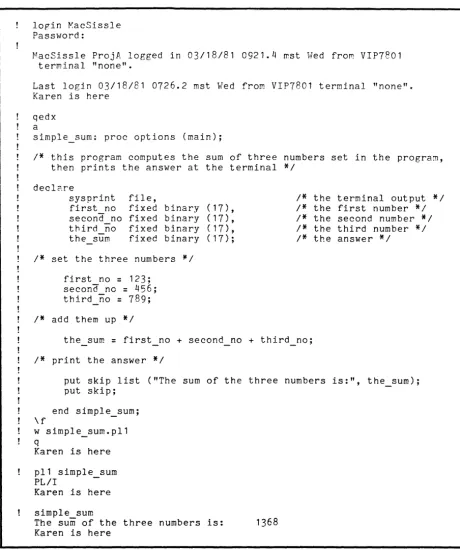
Figure 2-1 displays the interaction -between Multics and the user Karen
f'l:acSissle as she logs in and writes, compiles, and executes the simple sum program. MacSissle uses the Qedx editor to put the program online, the pll command to compile it, and the program name (without the language suffix) to execute it.
Note that MacSissle does not have the usual ready message. She sets her message
to "Karen is here" by using the general ready (gr) command in her start up.ec, the special exec com that runs each time-she logs in. (See the ~~PM Commands for information on the use of general_ready.)
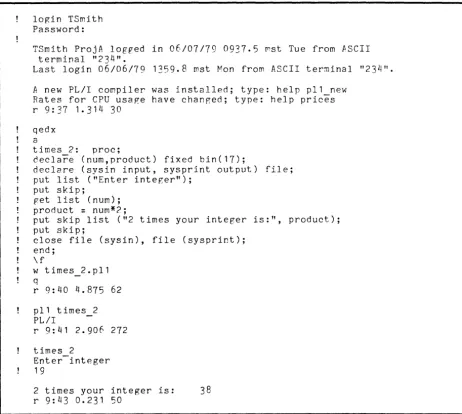
In Figure 2-2, user Tom Smith is shown writing a program called times 2,
which accepts an integer and prints the value of 2 times that integer. SmIth
takes advantage of the terminal for both input to and output from his program.
A Note on Examples
Because ~ultics is written mainly in PLII, you may find that its runtime
environment is somewhat oriented towards the convenience of PLII programmers. Ways to take advantafe of this orientation are presented in Appendix A, "Using
Multics to Best Advantage". However, as mentioned in the preface, this manual
is intended to be useful for all programmers. Although the majority of the
examples are given in PLII, t here is no need to be discouraged if you aren't
familiar with this language. ~ost of the examples are extremely simple. To see
how you could write the same program in either PLII, FORTRA~:, or COBOL, see
Section 4, "Using the Terminal for 110".
ARCHIVING SEGMENTS
Segments in Mul tics are assigned space in increments of pages (4096 characters) • This can be very wasteful if you have many short files stored in the system. The archive (ac) command allows you to combine several segments into a single
segment called an archive. Once in an archive, the individual segments are
called components of the archive segment. Packing segments together in this way
can produce significant savings in storage allocation and cost.
By invoking the archive command with different arguments, you can manipulate
the archive segment in a variety of ways. For example, in addition to creating
lop:in KacSissle Password:
MacSissle ProjA logged in 03/18/81 0921.4 mst Wed from VIP7801
terminal "none".
Last login 03/18/81 0726.2 mst Wed from VIP7801 terminal "none".
Karen is here
qed x a
simple_sum; proc options (main);
1* this program computes the sum of three numbers set in the program,
then prints the answer at the terminal *1
declCl.re
sysprint first no second no third no
the sum
file, fixed fixed fixed fixed
binary (17), binary (17), binary (17), binary (17);
1* the terminal output *1
1* the first number *1
1* set the three numbers *1
first no
=
123;second no
=
456;third_no
=
789;1* add them up *1
1* the second number *1
1* the third number *1
1* the answer *1
the sum
=
first no + second no + third_no;1* print the answer *1
put skip list ("The sum of the three numbers is:", the_sum); put skip;
end simple_sum; \ f
w simple_sum.pl1
q
Karen is here
pl1 simple sum
PL/I
-Karen is here
simple sum
The sum of the three numbers is: 1368
Karen is here
[image:30.623.70.530.42.591.2]login TSmith Password:
TSmith ProjA logped in 06/07/79 0937.5 ~st Tue from ASCII
terminal "234".
Last login 06/06/79 1359.8 mst Mon from ASCII terminal "234".
A new PLII compiler was installed; type: help pl1 new
Rates for CPU usaRe have changed; type: help prices
r 9:37 1.314 30
-qedx a
times 2: proc;
decla~e (n~m,product) fixed bin(17);
declare (sysin input, sysprint output) file; put list ("Enter integer");
put skip;
p-et list (num);
product
=
num*?;put skip list ("2 times your integer is:", product); put skip;
close file (sysin), file (sysprint); end;
\ f
w times 2.p11
-q
r 9:40 4.875 62
pl1 times 2
-PLII
r 9: 41 2.906 272
times 2
-Enter integer 19
2 times your integer is: 38
r 9:43 0.231 50
[image:31.620.78.540.39.453.2]For more information about the archive command and its use, refer to the MPH Corr,manos.
BINDING SEGMENTS
The !':ultics bind (be) command is used to merge several separately compiled object segments into a single executable object segment called a bound segment. The binder is primarily an optimizer, which saves search time and link snapping. It resolves as many external references as it can in order to avoid the necessity
of resolving them at run time. These references are resolved without recourse
to the search rules--the binder looks only in the programs that are being bound.
ane rejects any progra~s in which there are ambiguous external references.
Binding offers the advantages of taking up less storag:e for the object code, decreasinR execution time, and avoiding many linkage faults that would otherwise occur if the bound programs referenced each other frorr separate segments. Those programs that you call frequently and that are interrelated (ie, reference
one another) should be bound to improve program efficiency. The segments must
be archived before they are bound.
For more information about the bind command, refer to the -MPH Commands. Also, the MPM Subsystem Writers' Guide provides information on the structure of bound segments.
LINKS
The word "link" is used for two separate things in Hultics: an intersegment
link and a storage system link. This can be confusing for beginners, but once
you know the system, things are usually clear from their context.
An intersegment link is an interprocedure reference, resolved by the linker.
This kind of link is described in Section
3,
"Dynamic Linking".A storage system link is essentially a "pointer" to a "target". This kind
of link is described here. A storage system link is catalogued in a directory
like a segment, but just gives the pathname of some other place in the directory
hierarchy. The target of such a link is usually a segment, but it can also be a
directory, or even another link. A storage system link enables you to access a
segment located in some other portion of the directory hierarchy without actually making a copy of it, just as if it were catalogued in your own working directory. This is one of the ways in which Hultics facilitates sharing.
Multics allows you to create a link anywhere in the storage system as long as you have the proper access to the directory in which the link is to be
placed. You invoke the link (lk) command to create a link and the unlink (ul)
command to delete a link. (Refer to the HPM Commands.) To see a list of the
linkq you have in your working directory, you can use the list command with the
SECTION 3
DYNAHIC LINKING
As the discussion of dynamic linking in Section 1 indicated, external references on Multics are resolved when a program is
across an unresolved reference, it uses what the necessary segment and establish the link.
explain hoVl the search rules operate, then
dynamic linking.
A NA~ING CONVENTION
executed. 1.-'hen the system comes
are known as search rules to find The purpose of this section is to to show you some of the uses of
Due to a PIlI extension which is local to t-:ultics, the "$" character is
understood when it appears as part of an external name. a$b is interpreted to
mean segment a, entry point b. (Remember that an entry point is a symbolic
offset within the segment. Refer to the discussion of two-dimensional addressing
in Section 1.) Thus, hcs_$initiate, which will be discussed later in this section,
is interpreted to mean segment hcs_, entry point initiate.
SEARCH RULES
Let's suppose that you are writing a new version of the Qedx Text Editor,
and have a segment in your working directory named "qedx". If you type "qedx"
on your terminal, you are instructing Multics to find the program named qedx and
execute it. But which qedx do you want--yours or the system's? To make the
situation a little bit more complicated, let's suppose that one of your coworkers is also writing a new version of Qedx, and has a segment in one of his directories
named "qedx", to which you have access. You might want to run his prograrr
sometimes instead of yours or the system's.
In each case, it's up to Multics to figure out which segment you want. The
way Multics does this is by searching. To understand why Multics searches the
way it does, you first need to know some of the assumptions it works under.
Once you have invoked some program or accessed some data base, r1ul tics
assumes there is a good chance you will do so again. If the item is in your
address space, that cuts down on the system overhead required to make a complete
search for it a second or third time. So Multics keeps track of all the work
you do after you login. It records your movement through the file system,
noting each item it has located for you and putting these items in your address
space. Multics also assumes that any time you use a reference name which you
have already used, you mean the same item you meant the first time. (A reference
name is a name used to identify a segment that has been made known by the user.) The name of the item and the information the system needs to find it are recorded
in a table called the reference name table. Segments in this table are referred