A Methodological Approach to User Evaluation and
Assessment of a Virtual Environment Hangout
Marco Pasin, Antonella Frisiello
Istituto Superiore Mario BoellaTorino, Italy
[email protected], [email protected]
Julie Wall
Queen Mary University of London London, United Kingdom
Steven Poulakos, Aljoscha Smolic
Disney Research ZurichZurich, Switzerland [email protected],
Abstract — Innovation in virtual reality and motion sensing devices is pushing the development of virtual communication platforms towards completely immersive scenarios, which require full user interaction and create complex sensory experiences. This evolution influences user experiences and creates new paradigms for interaction, leading to an increased importance of user evaluation and assessment on new systems interfaces and usability, to validate platform design and development from the users’ point of view. The REVERIE research project aims to develop a virtual environment service for realistic inter-personal interaction. This paper describes the design challenges faced during the development process of user interfaces and the adopted methodological approach to user evaluation and assessment.
Keywords: interactive virtual environments, interface design and assessment, sensors for entertainment, virtual characters.
I. INTRODUCTION
For many people, social networking is a way of life; more and more of our interactions with others are online. Nevertheless, to date online interactions have been a poor substitute for real human interaction. For younger users especially, it is crucial that an online environment allows safe and enjoyable collaborative interaction while bringing together realistic inter-personal communication with enhanced media. In such an environment, users can meet, socialize and share experiences. Furthermore, they can do so using commercial depth-sensing equipment such as the Microsoft Kinect, commonly available web-cams and stereoscopic displays.
Tele-conferencing systems have undergone a significant evolution in quality allowing participants from different locations to experience real-time audio and video communication with a good sense of proximity. However, these systems are often intended for traditional 2D representations, limiting the possibilities for users to participate in a task together. For this reason one of the next challenges in presence is the enhancement to tele-immersion, i.e. enabling participants from different geographically distributed locations to interact with each other in a natural form inside a 3D generated environment.
Early prototypes of tele-immersive environments were developed over the past decade with successful field trials carried out in the USA (funded by the National Science Foundation) between the University of Illinois at Urbana-Champaign, the University of California at Berkeley, and the University of North Carolina at Chapel Hill [1]][2]. Research
results included multi-stream coordination, stream data dissemination, and calibration frameworks for multi-projector displays. A number of challenges still remain open for 3D capture, data transmission, rendering, and human-centered interaction.
Tele-immersion pushes the limits of current computation and networking infrastructures because of the high volume of data that needs to be transmitted, synchronized and reconstructed in real-time between different locations. Although these demanding requirements can limit future adoption and commercialization of this technology for social interaction, current research provides valuable results in specialized 3D capture systems, real-time data transmission, and advanced rendering technologies to overcome these limitations.
A. The REVERIE Research Project
REVERIE (REal and Virtual Engagement in Realistic Immersive Environments) [3] is a large-scale integrated research project supported by the European Union FP7 program. REVERIE aims to tackle challenges of immersive collaborative environments supporting realistic inter-personal communication. REVERIE exploits and develops technologies and tools to enable end-to-end processing and efficient distribution of 3D, immersive and interactive media over the Internet allowing people to collaborate, socialize and share experiences in ways that resemble real life.
REVERIE integrates cutting-edge technologies related to areas as diverse as 3D data acquisition and processing, spatial sound processing, autonomous avatars, real-time stereoscopic rendering, and physical interaction and emotional engagement in virtual worlds. In addition, a number of networking solutions have been developed for network data management, streaming, caching and synchronization ensuring scalability and reliable transmission over heterogeneous communication channels.
and educational locations and “hanging out” together in realistic settings.
B. REVERIE Hangout Scenario
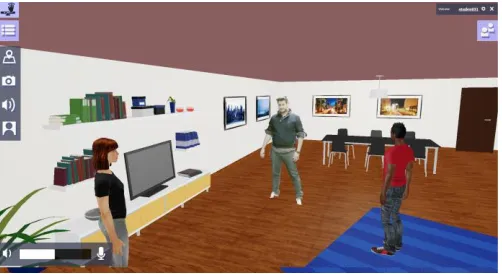
In this paper, we focus on the REVERIE Hangout scenario, which utilizes highly realistic visualizations and aims for the look and feel of real physical presence and interaction, principally for casual conversations and gaming. The user’s terminal is intended to be located in a familiar space, such as a living room, and visualized on an HDTV. Users are reconstructed in two primary ways: as they appear in real-life, which we call a “replicant”, or as a full-body gesture-puppetted avatar in which the movements of the user’s body and limbs in the real world are translated to an avatar in the virtual world. This results in a high quality representation of natural expression and movement, as visualized in Figure 1. The aim is to provide a visual experience similar to Skype [4] or Google+ Hangouts [5], however with each user reconstructed in a common virtual volume.
Microsoft Kinect sensors provide visual capture to produce the replicants, which include both 3D geometry and texture to enable photorealistic user representations. Ideally three or more Kinect devices are used in a circular spatial arrangement around the user to enable a 360° reconstruction. The replicant is captured, reconstructed, transmitted and visualized in real-time to all participants in the hangout [6]. Gesture-based interaction is further utilized to puppet a traditional avatar, navigate the environment, or interact with the Graphical User Interface (GUI). Natural body motion, free of constraints imposed by traditional input devices, enables the expressivity required for immersive social interaction. Audio is rendered with 3D binaural spatialization providing increased immersion [7].
II. DESIGN METHODOLOGY
In the literature, a number of design theories suggest operative models and representations of a positive design process [8] [9] [10] [11]. These theories stress the importance of a multidisciplinary approach, the iteration of evaluation phases and most especially, user involvement. Design knowledge is formed from expanding sources of information, including the end users’ skills, needs, expectations and experiences. The audience is part of the system itself, and should influence the design and
development, as well as its success. This view is the core of the User Centered Approach (UCD), which focuses on the adaptation of technology to humans, including their goals, activities, context as well as perceptual, cognitive and physical characteristics [12].
A good design process is intended to result in clear, intuitive, and efficient user interactions, which simplify the human activity resulting in something usable. The standard definition of usability refers to “the extent to which the product can be used by specified users to achieve specified goals with effectiveness, efficiency, and satisfaction in a specified context of use” [13]. Usability is not a system property, but a set of measurable dimensions describing the interaction between a user and a system in a given context. The main goal is bringing the individual to a state of high engagement. Csikszentmihalyi defines the optimal experience a person can reach performing one activity as ‘flow’ [14] [15], a status that is affected by the co-presence of factors such as clear goals, feedback, sense of control and intrinsic pleasure. A great part of this result depends on the UI, which is a representation of system functionalities suitable for human physical and cognitive characteristics [16]. Valid for 2D UIs, these principles drive also the design of a 3D UI [17].
Not only the user but also the context of use and technology must be considered in the process and the evaluation plan. A number of Human Computer Interaction (HCI) techniques and standards suggest how to implement a traditional process of usability engineering, aiming at defining, measuring, and thereby improving the usability of systems. A number of aspects affect the selection of evaluation techniques, such as time constraints or access to end users for evaluation purposes [18]. The evaluation activities work differently based on the Technology Readiness Level (TRL) of the prototype. The prototype, in fact, is a working model that evolves progressively, converting the design principles into tangible experiences in a context of use [19]. At each stage of the process, the prototype grows in terms of functionalities, interaction features and interface definitions, which further enable proper design and evaluation activities.
III. REVERIEUSER EVALUATION ACTIVITY
The REVERIE prototype and UI evolved during the project assuming different degrees of TRL. At each stage, research goals and assessment activities have been carried out to test both single features and the integrated system behavior. TABLE 1 summarizes the REVERIE project design and evaluation process. Each iteration of the prototype utilized different design goals and user assessment techniques.
[image:2.612.47.298.563.700.2]The early concept of REVERIE, described in usage scenarios, has been used to map out the interaction between a user and system before the system was built [20] [21]. Each scenario specified the system in terms of (1) direct and indirect users, (2) context of use, (3) users’ goals and (4) sequences of actions. The REVERIE scenarios provided a shared vision of the system and an accessible language for the different professional perspectives involved: engineers, software developers, customer representatives, HCI
designers and the users themselves. The REVERIE scenarios represented a reference throughout the design process and user requirements collection.
A. Phase 1- Early User Requirements Collection
User evaluations were conducted before the first prototype to ensure that the focus of design and development agreed with user expectations and requirements. An online survey was administered with 277 respondents. The questionnaire was based on established design theory and practice [22] [23]. Both qualitative and quantitative questions on user-oriented requirements were clustered around the following topics: Avatars (a digital version of you), Scenes (the world around you), Acquisition and Rendering (creating, controlling and presenting your 3D content), and Social Networks (blending with your online world).
At a high level, survey respondents were observed to have a positive bias for avatars to be human-like, realistic, recognizable, having emotions, being customizable and communicative (enabling users to participate together by sharing, voting and commenting). Semi-autonomous avatar control was preferred to ensure that the avatar accurately reflected the user with a manageable level of interaction. Respondents wanted scenes to be more realistic, interactive, customizable, and have narrative value. Smaller scenes containing dozens rather than hundreds of avatars were preferred. Gesture-based, natural human forms of interaction were expected. Respondents reported a bias against wearable sensors, for example. Moreover, the system should be a cross-platform experience supporting a range of devices and display capabilities. Respondents also recommended that REVERIE be integrated into existing social networks.
Responses guided the creation of 61 design recommendations categorized in topics mapping functionalities (i.e. User Authentication Services and Social Networking integration), aspects of interaction (GUI, Audio Functionality), 3D Virtual Scenes, 3D Characters (Avatars), and Specific Virtual Interaction Features.
B. Phase 2- Formative Evalution
An intermediate, formative evaluation was conducted on the first version of the prototype. During development, functionalities and single components were tested under a user perspective, applying informal usability inspections. Qualitative methods are often preferred in this phase with the aim of collecting operational hints and many implementable ideas fostering both design and development. Subjective responses collected during Phase 2 reinforced the relevance of functional components designed into the system. During
discussions, the users made some key common observations: they found the way that their user representations (either avatars or replicants) moved around the room to be natural and responsive; they enjoyed the process of using their own mobility in the real-world to interact and move their virtual avatar; and they had a positive response to the real-time communication with other users.
C. Phase 3 – Final Version of User Requirements
A more formal evaluation activity has been carried out with the second prototype iteration to finalize the user requirements and provide design recommendations improving the user experience of the system. Within the range of usability testing methods usually applied in the virtual environment evaluation [24], we applied the cognitive walkthrough assessment technique [25].
The cognitive walkthrough technique uses an explicitly detailed procedure to simulate users’ problem-solving steps in tasks that they can perform with the system. It can be performed at any time during the development process, from the original mock-ups through to the final release. The procedure comprises a preparatory and analysis phase. During the preparatory phase, experimenters determine the features of the system, interfaces to be used, users, and tasks driving the evaluation. The REVERIE usage scenarios and task analysis provided the basis of the script the experts are asked to follow.
Even if the potential users of video-communication systems represent a massive and heterogeneous target user population, the specific environment of REVERIE requires a certain level of technology confidence. We identified nineteen experts from several fields (e.g. computer science, communication, social science, and education) to participate in the cognitive walkthrough in order to provide different perspectives.
All the experts were introduced to the REVERIE system and the virtual hangout scenario, with a brief on the objectives and test procedures. To help the cognitive walkthrough participants identify themselves as real users, they were each provided a REVERIE user persona, i.e. a replicant or puppeted avatar. Each participant performed a specified sequence of steps to complete the basic tasks within the system. After each task a standardized interview was conducted. Observations of the participants’ interaction with the system were also recorded to determine usage patterns, procedural errors and habits acted out during the cognitive walkthrough.
TABLE 1. DESIGN AND EVALUATION PROCESS IN THE REVERIE PROJECT
Phase Technology Readiness Level Design goal Technique Involved users
1 Narrative scenario Early user requirements collection Online survey Researchers, Online users
2 Prototype REVERIE Version 1 (RV1)
Formative evaluation Informal usability inspection, task analysis Experts and potential users
3 Prototype RV2 Final version of the user requirements Cognitive walkthrough and lab test Experts and potential users
Analysis of the collected data resulted in 74 recommendations clustered in the seven topics proposed in Phase 1, with an additional cluster for gestural interaction. The results have been discussed within the multidisciplinary REVERIE consortium guiding two outcomes: (1) a collection of pragmatic design recommendations, and (2) the final version of the user requirements definitions.
D. Phase 4 – Overall System Evaluation
The last phase utilizes field trial assessment to evaluate the situated user experience of the complete system [26]. The field trials are currently on-going and the system being tested includes the UI resulting from the first three phases of design and user evaluation, as described in the next section. The field trials will allow users to naturally interact by using their own skills and internal motivation ensuring the collected data refers to realistic and reliable behaviours. The Hangout will be evaluated using a standardized usability approach where participants will complete tasks designed to explore the potentials of the REVERIE technologies, i.e. high quality immersion, photo-realism and real-time 3D reconstruction. Qualitative and quantitative data will be collected with the goal of feeding user insights into the final REVERIE system.
IV. RESULT ON UI DESIGN AND DEVELOPMENT
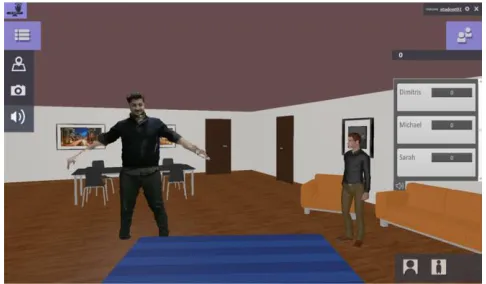
In this Section, we present the REVERIE UI that resulted from user evaluation. REVERIE is visually experienced through two interface components: a Qt-based GUI and OpenGL rendering of the immersive world. Figure 2 provides a visualization of the REVERIE Hangout scenario, presenting the living room environment and default GUI elements, such as the menu options enabling access to additional functionality, e.g. to navigate, share media content and see who is participating in the hangout. The cognitive walkthrough was especially useful to finalize a set of changes on the GUI of the REVERIE system.
The UI design was guided by principles of clarity, simplicity and consistency and based on conventions and patterns already used by many websites and applications. This promotes a familiar interface reducing the effort of interacting with the REVERIE system. Clarity is further reinforced through the use of standard icons. The icons need to be self-explanatory and clear for faster recognition. When clicking on one of the icons in the main menu, a pop-up window appears with a title that clearly corresponds to the icon symbol, further strengthening accessibility for new users. For example, when clicking on the map icon, the opening window is titled, “Navigation Support”. The combined symbols and text strengthen comprehension of the system.
Simplicity is achieved by reducing the number of menus. Three menus are always visible for actions requiring instant access. The menu in the upper-right corner provides access to account information, access to change system parameters and an icon to close the application. The placement of these menu options is also consistent with many web-based applications. The main menu and participants list can be hidden when not needed to increase the screen space, since user interaction usually takes place in the central area of the screen. The participant’s list uses a Module Tabs design pattern [27]. It is divided into tabs to make it easier to access
a specific type of participant-related data. Consistency of style and colors is preserved throughout the entire UI.
The menu icons were improved to resolve ambiguities and clarify the associated functionality. Most of the user recommendations in fact emerged from the adoption of common plain icons, generally accepted to indicate a particular functionality, used with a slightly different semantic association, e.g. a simple pinpoint icon to indicate access to the navigation features, erroneously interpreted as a means to share the user’s current position. The design recommendations provided a set of icons following international standards [28] [29] [30], with the aim of choosing non-ambiguous symbols.
OpenGL rendering was designed to facilitate a familiar environment. A living room environment was recommended for the REVERIE Hangout to reinforce the feeling of immersion in front of an HDTV. Neutral environment shading is applied in the rendering since participants may be captured under a variety of lighting conditions. The icon in the lower right of Figure 2 makes it possible for the user to change their viewpoint by choosing icons corresponding to the first-person or third-person view. Gesture recognition by the Kinect is used within the system in two ways, i. to enable the user to interact with the icons in the GUI, ii. for navigation through the virtual environment. As both of these interaction modalities cannot be active simultaneously, a specific gesture by the user sets the current choice and this is visualized by the coloring of the icon on the top left of the screen (see Figure 2).
V. DESIGN CHALLENGES AND CONCLUSIONS
In this paper, we have introduced the REVERIE Hangout scenario. We provided an overview of our iterative, multi-phase user assessment activities and the clusters of topics we have evaluated. We describe some examples where the user evaluations influenced improvement of the REVERIE UI design. A detailed description of all significant findings is future work to be completed after Phase 4 user evaluations. Below, we provide a few additional high-level observations.
[image:4.612.323.566.54.196.2]We have observed that the technological complexity of a system must be considered when selecting the user population to involve in the design and evaluation of a system like REVERIE. Although virtual environments
created through computer graphics nowadays are quite common, each stage of the REVERIE evaluation process has posed some challenges to the researchers. In Phase 1, for example, we conducted a text-based survey about a system for which the users had no experience and potentially widely differing opinions on system utility. The technological confidence of participants may also significantly influence the quality of design recommendations
From the point of view of the UI, our activities with users have highlighted that the wide variety of applications for online communication has created a set of globally adopted graphics, designs and functionalities that can be interpreted as informal standards. Starting from these, a series of common guidelines and recommendations for developers can be conceived in order to avoid misinterpretations and ease user experience. For example, illustration or animations that have a single interpretation should be preferred over complex content; graphics are most effective when they reinforce a single simple idea or meaning; relationships between objects of the UI should be limited to what the user can currently interact with; buttons and icons are more effective if they provide additional information through a label or tooltip when the user interacts with them. We observed that common usability guidelines and standards valid for 2D environments and interfaces, as described in [30], should be taken into consideration in the development of 3D immersive environments.
Until now, developers have chosen established usability engineering methods for the design and evaluation of virtual environments, since they are able to produce very effective results in terms of user performance and usability [24]. However, growth in the diffusion of such technologies and the increasing experience and familiarity of users with their usage can enable new design and assessment methodologies. For example, usability assessment metrics can be directly integrated into the system being evaluated because that system is already conducting analysis of the user’s physical, emotional or goal-based state. The REVERIE system is well positioned to enable new forms of user testing while providing a rich, immersive experience.
ACKNOWLEDGMENT
The research presented has been realized within the European Project REVERIE, co-funded by the European Community’s Seventh Framework Programme (FP7-ICT-2011-7) under grant agreement n° 287723 [31].
REFERENCES
[1] Teleimmersion Lab, “Introduction | Teleimmersion Lab”, citris-uc.org [Online]. Available: http://tele-immersion.citris-uc.org/ [Accessed: Mar. 07, 2015].
[2] A. Sadagic, H. Towles, L. Holden, K. Daniilidis, and B. Zeleznik, “Tele-immersion portal: towards an ultimate synthesis of computer graphics and computer vision systems”, 4th Annual International Workshop on Presence, May 2001.
[3] REVERIE, “REVERIE Project”, reveriefp7.eu [Online]. Available: http://www.reveriefp7.eu/ [Accessed: Mar. 07, 2015].
[4] Skype, “Skype | Free calls to friends and family”, skype.com [Online]. Available: www.skype.com/en/[Accessed: Mar. 07, 2015]. [5] Google+ Hangouts, “Google+ Hangouts”, google.com [Online].
Available: http://www.google.com/+/learnmore/hangouts/ [Accessed: Mar. 07, 2015].
[6] D. Alexiadis, D. Zarpalas, and P. Daras, “Real-time, full 3-D reconstruction of moving foreground objects from multiple consumer depth cameras”, IEEE Transactions on Multimedia, 15(2): 339-358, 2013.
[7] D.A. Mauro, R. Mekuria, and M. Sanna, “Binaural Spatialization for 3D Immersive Audio Communication in a Virtual World”, Audio Mostly - A Conference on Interaction with Sound, 2013.
[8] D.A. Norman and S.W. Draper, “User centered system design: New perspectives on human-computer interaction”, Hillsdale, NJ: Lawrence Erlbaum Associates Inc., 1986.
[9] J. Rubin, “Conceptual Design: Cornerstone of Usability”, Technical Communication, 43(2): 130-138, 1996.
[10] J.J. Garrett, “The Elements of User Experience”, Berkeley, CA: New Riders Publishing, 2011.
[11] A. Cooper, “About Face: The Essentials of Interaction Design”, Indianapolis, IN: Wiley and sons, 2014.
[12] “Human-centred design processes for interactive systems”, ISO Standard 13407, 1999.
[13] “Ergonomics of Human System Interaction. Part 11 - Guidance on Usability”, ISO Standard 9241-11, 2006-2010.
[14] M. Csikszentmihalyi, "Beyond Boredom and Anxiety", San Francisco, CA: Jossey-Bass, 1975.
[15] M. Csikszentmihalyi, “Finding Flow: The Psychology of Engagement With Everyday Life”, New York, NY: Basic Books, 1998.
[16] D.A. Norman, “The Psychology of everyday things”, New York, NY: Basic Books, 1988.
[17] G. Riva, J. Waterworth, and D. Murray, “Interacting with Presence HCI and the Sense of Presence in Computer-mediated Environments”, Warsaw, Poland: De Gruyter Open, 2014.
[18] UsabilityNet, “UsabilityNet: Methods table”, usabilitynet.org [Online]. Available: http://www.usabilitynet.org/tools/methods.htm [Accessed: Mar. 07, 2015].
[19] J. Mendel, “A Taxonomy of Models Used in the Design Process”, ACM Interactions, 19(1): 81-85, January/February 2012.
[20] J.M. Carroll, “Five Reasons for Scenario-Based Design”, Proceedings of the Thirty-Second Annual Hawaii International Conference on System Sciences, 3:3051, 1999.
[21] K. Go and J.M. Carroll, “The Blind Man and the Elephant: Views of Scenario-based System Design”. ACM Interactions, 11(6):44-53, 2004.
[22] J.W. Creswell, “Research Design: Qualitative, Quantitative, and Mixed Methods Approaches”, Thousand Oaks, CA: Sage, 2009. [23] N.M. Bradburn, S. Sudman, and W. Brian, “Asking Questions: The
Definitive Guide to Questionnaire Design -- For Market Research, Political Polls, and Social and Health Questionnaires”, San Francisco, CA: Jossey-Bass, Revised Edition, 2004.
[24] D. Hix and J.L Gabbard, “Usability Engineering of Virtual Environments.”, in Stanney, K. (Ed.), Handbook of Virtual Environments: Design, Implementation and Applications, 681-699, Mahwah, NJ: Lawrence Erlbaum Associates, 2002.
[25] B. Albert, T. Tulli, and D. Tedesco, “Beyond the Usability Lab”, Burlington, MA: Morgan Kaufmann, 2010.
[26] Y. Rogers, “Interaction Design Gone Wild: Striving for Wild Theory”, Interactions, 18(4): 58-62, 2011.
[27] Module Tabs, “Module Tabs design pattern”, ui-patterns.com [Online]. Available: http://ui-patterns.com/patterns/ModuleTabs/ [Accessed: Mar. 07, 2015].
[28] “Human Factors (HF); User Interfaces; Guidelines For Generic User Interface Elements For Mobile Terminals And Services”, ETSI Standard EG 202 132 V1.1.1, 2004-08.
[29] “Human Factors (HF); Pictograms for point-to-point videotelephony”, ETSI Standard ETS 300 375, 1995.
[30] “Basic principles for graphical symbols for use on equipment - Part 4: Guidelines for the adaptation of graphical symbols for use on screens and displays (icons)”, ISO Standard 80416-4, 2005.