i ASTRONOMY FOR KIDS E-LEARNING SYTEM USING MARKERLESS
AUGMENTED REALITY
By
CHE SAMIHAH BINTI CHE DALIM
This thesis Submitted to the School of Graduate Studies, University Putra Malaysia, in Fulfillment of the Requirement for the Degree of Master of Science
(Multimedia System)
Universiti Putra Malaysia
ii Abstract of thesis presented to the Senate of University Putra Malaysia in fulfillment of the
requirement for the degree of Master of Computer Science
ASTRONOMY FOR KIDS E-LEARNING SYSTEM USING MARKERLESS AUGMENTED REALITY
By
CHE SAMIHAH BINTI CHE DALIM JANUARY 2013
Supervisor: Puteri Suhaiza Binti Sulaiman, PhD
Faculty: Computer Science and Information Technology
iii Abstrak tesis yang dikemukakan kepada Senat Universiti Putra Malaysia sebagai memenuhi keperluan
ijazah Master Sains Komputer
SISTEM E-PEMBELAJARAN ASTRONOMI UNTUK KANAK-KANAK MENGGUNAKAN REALITI BERTAMBAH TANPA PENANDA
Oleh
CHE SAMIHAH BINTI CHE DALIM JANUARI 2013
Penyelia: Puteri Suhaiza Binti Sulaiman, PhD Fakulti: Sains Komputer dan Teknologi Maklumat
viii LIST OF TABLES
Table 1: Interaction Technique……….28
Table 2: Hardware and Software Requirements……….33
Table 3: Q1 and Q2………...39
Table 4: Q3 and Q4………...39
Table 5: Q5 and Q6………...40
Table 6: Q7, Q8 and Q9………40
Table 7: Q10 and Q11………...41
ix LIST OF FIGURES
Figure 1.0: Project Gantt chart………14
Figure 1.2: 3D Modeling………...18
Figure 1.3: Texturing………19
Figure 1.4: Animation………...20
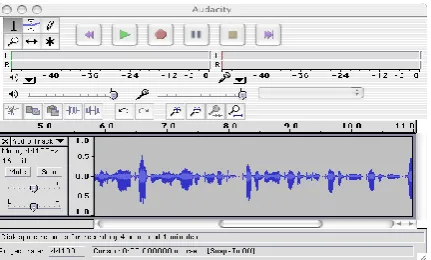
Figure 1.5: Review Recording………..20
Figure 1.6: Sound Recording………....21
Figure 1.7: Create Project in After Effects………..21
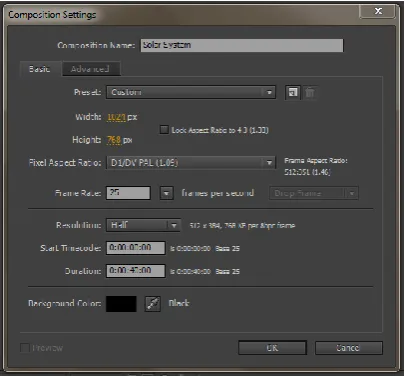
Figure 1.8: Create New Composition in After Effects………....22
Figure 1.9: Import Rendered Sequences……….22
Figure 2.0: Re-time Sequence……….23
Figure 2.1: Set Render Output……….23
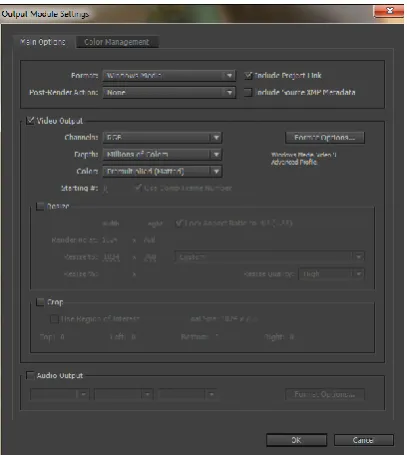
Figure 2.2: Choose Render Output………..24
Figure 2.3: Create Project in Adobe Premiere……….24
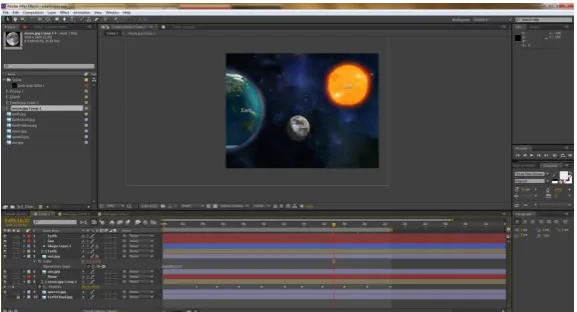
Figure 2.4: Import Materials………....25
Figure 2.5: Lay Video Audio in Timeline………25
Figure 2.6: Export Media………...26
Figure 2.7: Choose Export Setting………26
Figure 2.8: Overview of Solar System Application………...27
Figure 2.9: Tracking Object………..28
Figure 3.0: Tracking Object Process………...29
Figure 3.1: Techniques and Deliverables………...34
Figure 3.2: Expected Final Application……….34
Figure 3.3: Overview of Questions………42
Figure 3.4: Result Q1………...44
Figure 3.5: Result Q2………...45
x
Figure 3.7: Result Q4………..47
Figure 3.8: Result Q5………..48
Figure 3.9: Result Q6………..49
Figure 4.0: Result Q7………..50
Figure 4.1: Result Q8………..51
Figure 4.2: Result Q9………..52
Figure 4.3: Result Q10………...53
Figure 4.4: Result Q11………...54
xi TABLE OF CONTENTS
ABSTRACT………ii
ABSTRAK………..iii
DEDICATION………iv
DECLARATION………...vii
LIST OF TABLES………viii
LIST OF FIGURES………...ix
CHAPTER 1: INTRODUCTION 1.1 Overview………1
1.2 Problem Statement………4
1.3 Project Objective………...5
1.4 Scope of Project………6
1.5 Justification of Project………...6
1.6 Summary………...7
1.7 CHAPTER 2: LITERATURE REVIEW 2.1 Introduction………..8
2.2 Seamless Interaction………9
2.3 Tangible Interface Metaphor………..10
2.4 Transitional Interface……….11
2.5 Conclusion of Literature Review……… .12
CHAPTER 3: METHODOLOGY 3.1 Introduction………13
3.2 Planning………...13
3.2.1 Brainstorming………..13
3.2.2 Finding Research Topic………...13
3.2.3 Preparing Gantt chart………...14
xii
3.3.1 Literature Review………...15
3.3.2 Problem Statement……….15
3.3.3 Project Objectives………..16
3.3.4 Requirements……….16
3.4 Application Design……….17
3.4.1 Hardware and Software Requirements………..32
3.5 Build Prototype………..33
3.6 Implementation………..33
3.7 Testing………37
3.8 Operation………42
CHAPTER 4: RESULTS AND DISCUSSION 4.1 Introduction………...43
4.2 Results and Analysis………..44
CHAPTER 5: CONCLUSION 5.1 Overview………57
5.2 Conclusion……….57
REFERENCES………60
BIBLIOOGRAPHY……….61
APPENDICES Survey Form………62
1 CHAPTER 1
INTRODUCTION
1.1 Overview
The exponential growth of technology has made it imperious for learning to happen rapidly.
The fast developments in internet and multimedia technologies serve as the fundamentals
enablers towards the expansion of learning into a new dimension, which resulted in the
growth of e-learning.
In Malaysia, e-learning is defined as the use of network and multimedia technologies to
improve the quality of learning by enabling access to knowledge and remote resources for the
development of a knowledge society or K-Society. To realize this concept, e-learning has
been applied to many level of education in Malaysia, and has been proven that it increases the
quality of teaching and learning process. Portable dictionary, E-book, Distant / Virtual
Classroom and interactive CD are among the numerous forms of technology applied in today‟s classroom.
Augmented reality is one of the rapid advancement in multimedia technology. Augmented
Reality (AR) is a variation of Virtual Environments (VE), or Virtual Reality as it is
commonly called. VE technologies completely immerse a user inside a synthetic
environment. While immersed, the user cannot see the real world around him. In contrast, AR
allows the user to see the real world, with virtual objects superimposed upon or composited
with the real world. Therefore, AR complements reality, rather than completely replacing it
(Ronald T. Azuma,1997).
Augmented Reality technology has its root began in 1957 when a gentleman named Morton
2
of Virtual Reality. The machines functions as a simulator for one to four people that provides
the illusion of reality using a 3D motion picture with smell, stereo sound, vibrations of the
seat, and wind in the hair to create the illusion. While it was really more an adventure in full
virtual reality, there are clearly elements of AR involved with both the devices in place
between the user and the environment and that fact that the environment itself was itself, the
real world viewed in real time situation, even if recorded.
In 1966, the first attempt in making AR a usable possibility achieved with the invention of
the head-mounted display or HMD, a device which is used in both AR and VR today. The
person responsible for the invention was Professor Ivan Sutherland of Electrical Engineering
at Harvard University. However, during that time, it appears some limitations especially in
the graphical abilities as it was too early in the gauge of computer technology. The HMD
delivered just simple wireframe models of generated environments.
In 1992, Professor Tom Caudell who was at that time working for a project of searching an
easier way to help in the manufacturing and engineering process of the aviation company he
was working with, the Boeing‟s Computer Services, in Seattle, came across some intricate
software that could overlay the positions of where certain cables in the building process were
supposed to go. It facilitated the mechanics as they did not have to try or ask to translate from
what they found described in abstract diagram in manuals.
In the same year, AR technology began to strengthen its existence in this world with the
invention Virtual Fixtures, the first functioning AR system for the US Air Force. The man
behind this creation is LB Rosenberg, and he described fixtures as prompts to help guide the
user in their task.
AR hits the arts world in 1994 as Julie Martin became the responsible person to bring the
3
sounding rather like ITV celeb show, called Dancing in Cyberspace where dancers and
acrobats interacted with virtual object projected into the same physical space as themselves.
Since then, AR technology began to expand its growth tremendously.
There are numerous applications encompasses various field developed by using Augmented
Reality technology. ARToolKit is the pioneer, and one of the much available AR software for
AR application development. ARToolKit allowed video capture tracking of the real world to
combine with the interaction of virtual objects and provided a 3D graphics that could be
overlaid on any operating system platform.
Gaming industry has also deployed many AR applications. The first outdoor mobile AR
video game was developed by Bruce Thomas and his team in the Wearable Computer Lab at
the University of South Australia. The game was named ARQuake, take the integration of
GPS sensors data and the head-mounted display to create the AR environment in the game.
The Augmented Reality technology also come into the world of mobility when smartphone‟s
industry booming. Users of smartphones were introduced to many AR applications such as
Wikitude, which allows Android users to take in the world through their mobile phone
cameras and see augmentations on the screen of points of interest nearby. Other smartphone
developers such as Apple and Samsung soon follow this innovation and many more
interesting AR applications made available to integrate with their products.
In medical field, operation always play the most important role in patient treatment, and as a rule, the process always based on combination of doctor‟s ability and medical instruments.
As computers become more and more portable, powerful and visible, it is possible for
surgeons to present their operation under computer assistance. Augmented Reality is such
computing-based technology that can promote accuracy and safety for surgery. An example
4
Real-time Applications for medical Procedures which can produce the indirect viewing of
both virtual models and the final delivery process for training physician during clinical
practices. It has been known to be efficient and helpful in some medical simulator research
(Chunze Li,2005).
In education, using computer simulations and visualizations is one of the popular approaches
in learning process. It brings together two disparate fields, the traditional sciences and
computer graphics. The ability of Augmented Reality in augmenting the audio-visual
contents related to the education contents may serve as a motivation for the learning process
to be carried out efficiently.
1.2 Problem Statement
In their 2007 book, authors Junco and Mastrodicasa provided the result of their research
study about the personality profiles of Millennials, or commonly known as Generation Y.
They reported that generation Y whom we many define as those who were born between
1983 to early 2000, used technology at higher rates compared to people from other generation. This finding may explains why today‟s kids especially those who are still in
primary school prefer to use digital devices compared to their textbooks. Today‟s students
find it boring to use their textbook except for classroom activities. This is a problem to the
educators as well as the parents because textbooks are the main references for a student as it
represent the actual standard in learning process. This phenomenon can lead to the
5
The other problem with today‟s education process is that the conventional linear teaching
method that is carried out without interactivity will leave lesser experience to the students,
thus lead to a less interest in certain critical subject such as Science. While some subjects can
only be taught without additional educational tools, some might need it to enhance the
understanding towards certain process. In learning process, understanding on certain topics
can be enhanced when students try to relate the new knowledge with the real world
representation, and understand it better if it is done interactively.
1.3 Project Objective
The objective of this project is to consider the potential of Augmented Reality as one of the
multimedia technology in order to help engaging the students and their textbooks. The
objective can be specifically outlined as follows:
1. Enhance textbooks in order to engage a reader in ways that have never been possible
by designing a mentoring system to serve the purpose of self-studying.
2. Provide students with augmented audio-visual contents as the representation of their
textbook contents which they can interact with in real time.
3. Provide how to interact and augment the educational programs contents without the
6 1.4 Scope of Project
The application developed in this project is designed mainly for the students in standard six
of Malaysia public elementary school who are also known as teenagers of generation Y who
was born in year 1983 to early 2000. The contents of the application were constructed based
on their Science for Year-Six textbook. The contents integrate all multimedia elements such
as text, video, sound, animation and images. It covers Unit 6 of the textbook, titled Eclipse
from page 91 of the textbook until page 100. This application is a desktop-based application
its deployment limited to only home desktop player.
1.5 Justification of Project
E-learning has become a common practice in today‟s education, mainly because it offers a
great variety of educational tools and serves as an additional initiative to achieve educational
goals. The main reason e-learning was introduced is to make use of all multimedia
technologies available to be integrated with educational contents in order to provide a more
interactive and interesting way of learning. Interactivity can be achieved in many ways;
however it will always be better if it involves the interaction of both user and application, in
real time, and real world. Augmented Reality is the technology which offers this kind of
possibility.
Augmented Reality has become so vast in scope, expanding from one field to another and
contributes in so many applications development. Its ability in providing fully immersive
7
students of generation Y attracted the most to digital interaction, it serves the best platform to
be used compared to other methods.
1.6 Summary
This rest if the report is organized in the following manner: Chapter 2 provides a brief
literature review of previous work on Augmented Reality, focusing mainly in education field.
Chapter 3 describes the steps involved for the methodology used throughout the development
of this project. Chapter 4 discusses the results and some analysis from the survey carried out.
Chapter 5 concludes the whole project. In this chapter, there is summary of the method,
8 CHAPTER 2
LITERATURE REVIEW
2.1 Introduction
This section briefly discuss on previous works that have been done using Augmented Reality
approach mainly in the field of education.
Augmented Reality defines the ability of overlaying computer graphics onto the real world.
The technology enables users to simultaneously see the real world and the virtual imagery
attached to it. For the past few years, this can only be made possible by using certain
dedicated devices such as head-mounted display or glasses to connect the real world and the
virtual imagery. However, nowadays with the advancement in technology, these two separated world can also be combined by using gestures of one‟s body. As the result, AR
interfaces enhances the real world experience in ways that has never been possible.
Successful single user Augmented Reality interfaces have been developed for computer
aided-instruction [5], manufacturing [4], and medical visualization [2]. These applications
managed to enhance the experience of interaction between a person and the real world in
ways that never been possible before. Bajura et al for instance have developed a medical interface that overlays virtual ultrasound images onto a patient‟s body, allowing doctors to
have “X-Ray” vision in a needle biopsy task.
In printing industry, Freiner has made an innovation to help user to handle their laser printer
efficiently. What he did was using Augmented Reality techniques to allow users see virtual
9
great characteristics of this application were that the user can move around the three
dimensional virtual image and view it from any vantage point, just like a real object.
AR technology has developed extremely significant to the point where it can be applied to a
much broader range of application areas, and education is one of the areas where this
technology could be especially treasured. There are numerous reasons why augmented reality
is said possible to offer a different educational experience, for example, AR supports
seamless or immersive interaction between real and virtual environments, the use of a
tangible interface metaphor for object manipulation as well as the ability to transition
smoothly between reality and virtually.
2.2 Seamless Interaction
Augmented Reality offers the seamless interaction ability. In a classroom situation, students
will understand better if they are in the common workspace. However it still hard to achieve
in computer-based education even if they are side by side because they are working on
separate computers. It is believed that students will perform better if they were gathering
together around a single machine. This is what motivates researchers from across the word to
create an environment which can gather students especially in distance learning. This is
where the idea of using Augmented Reality arises.
A Real-Time Interactive Virtual Classroom is one of the examples of AR system developed
to serve this purpose. The system can handle video, audio, electronic slides, handwritten text
material, and ASCII text. The system allows instructors to control the entire session. Remote
participants can interact with the live class in real-time by being able to ask questions which
are audible and visible to other participants. With this system, remote participants can get an
10
Another example is the work was done by Yuanchun Shi et al in “Smart Remote Classroom”
and [8]. Yuanchun Shi tried to solve the difficulties of creating a virtual classroom that is
insufficient in the support of large-scale user access and cannot accommodate heterogeneous
devices and network access [10]. This work tackles these difficulties by developing a hybrid
application-layer Multicast protocol called TORM and an adaptive Content Delivery Scheme
called AMTM to facilitate a large scale users to access a virtual classroom with different
devices and network conditions at once. They also developed dedicated software called
SameView which take use of the proposed TORM and AMTM technology, which results in
the ability to record all the entire process of a class into a compound multimedia document
for later retrieval of the class.
All of the above technology was then gathered together to develop an augmented classroom
called Smart Classroom where the user interface of the SameView for the teacher are
distributed in and merged with the room space. Thus the teacher can instruct the remote
students just like face-to-face teaching in a conventional classroom.
2.3 Tangible Interface Metaphor
In education, Augmented Reality can also be used to enhance collaborative task. In
Augmented Reality, there is a close relationship between virtual and physical objects. The
physical objects can be enhanced in ways not normally possible such as by providing
dynamic information overlay and physically based interactions. AR applications based on a
perceptible or tangible interface metaphor use physical objects to manipulate virtual
information in an intuitive manner.
A good example of this is the StudierStube project of Schmalsteig,et al [6] and [7]. In
mathematics and geometry, the main advantage of using an AR system is that students
11
with traditional methods like pen and paper. Instead of working with such old methods, it is
better to work directly in 3D space. In this work, user use see-through head mounted display
to collaboratively view 3D models of scientific data superimposed on the real world. As a
result, complex spatial problems may be understood better and faster, as well as spatial
relations. Schmalsteig et al report that users find the interface very natural and conducive to
real world collaboration, because the groupware support can be mostly left to social
protocols.
2.4 Transitional Interfaces
Transitional interfaces in Augmented Reality scope refers to the smooth transition between
realism towards virtuality.
As computers become more pervasive and invisible there is a need for new interfaces that
blur the line between reality and virtual reality and let users easily move between the physical
and digital realm. The best example for this transition is the young children who often
fantasize about being swallowed up into the pages of a fairy tale and becoming part of the
story. The MagicBook perhaps is the best example of application which fits the needs of
these young children. The MagicBook is a mixed reality interface that uses a real book to
seamlessly transport users between reality and virtuality [3]. A vision-based tracking method
is used to overlay virtual models on real book pages, creating an Augmented Reality scene.
When users see an AR scene they are interested in they can fly inside it and experience it as
12 2.5 Conclusion of Literature Review
Although Augmented Reality technology has already in place for years and already achieved its maturity, it‟s potential in education is just beginning to be explored. Contrasting with other
computing technologies, AR deals with seamless collaboration between the real and virtual
worlds, a perceptible interface metaphor and a means for transitioning between real and
virtual world. Both educators and researchers should work hand in hand to ensure that this
13 CHAPTER 3
METHODOLOGY
3.1 Introduction
This chapter will discuss the Prototyping Model which was used throughout the
completion of this project. The stages involved in this model are planning, analysis,
system design, implementation, testing, installation and operation. Each stage consists of
several tasks.
3.2 Planning
This phase defines the project activities and describes how the project will be
accomplished. Planning helps in the estimation of time and resources required, and
provide a framework for review and control. For this project, the planning phase was
divided into 3 sub task:
3.2.1 Brainstorming
During brainstorming, a discussion with project supervisor was carried out. The
discussion issues involved observing everyday scenarios from which we listed out
some problems. After that we gather some ideas to overcome the problems and
construct it in the form of project objectives.
3.2.2 Finding Research Topic
To overcome the problems, a few research topics which are related to the problems
14
were extracted from the list and thorough check was done to them. For this project,
the research topics are in the scope of Augmented Reality fields.
3.2.3 Preparing Gantt Chart
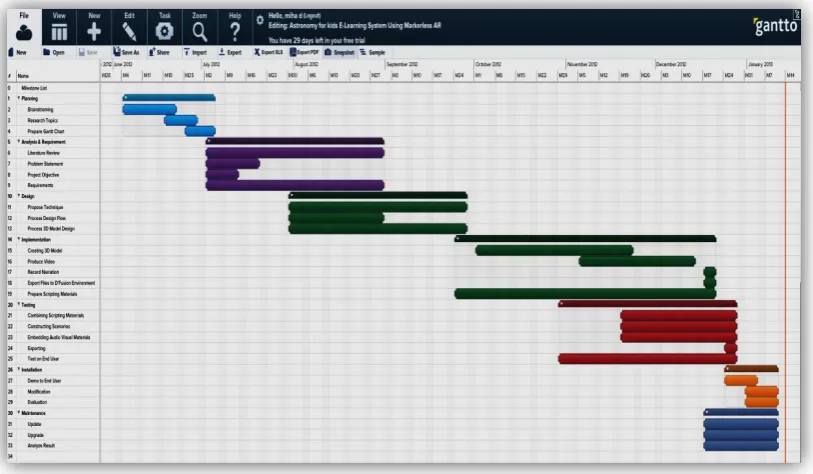
Once the research topics have been identified, a Gantt chart is prepared. The Gantt
chart consists of the tasks involved, the duration to perform the tasks and the
sequencing of these tasks. The Gantt chart serves as the guideline to ensure the
project runs smoothly and following the given dateline. Refer Figure 1.0 for this project‟s Gantt chart.
This project was completed within 16 weeks with planning and requirement
analysis process was carried out earlier during proposal preparation. The Gantt
chart of this project is as shown in Figure 1.0. It includes major activities and task
[image:22.595.119.526.479.716.2]taken for the whole development period
15 3.3Analysis
After identifying all the attributes involved in this project during planning phase,
thorough analysis is done. This involves analyzing on existing techniques used to cater
the scenarios discussed during the brainstorming session and specify the requirements
needed. Analysis phase were constructed by 4 sub tasks:
3.3.1 Literature Review
Literature review is an important process in every research or project
development. It is a continuous process which means that it is done from the
starting point of the project until the completion of the project. In this stage,
review has been made to various existing works which related to Augmented
Reality.
3.3.2 Problem Statement
From the brainstorming session, the problems were then constructed into a
form of statements.
1. Students are lack of motivations to use their textbooks except for classroom activity. It gives a great possibility that they won‟t use it for
self-study.
2. Conventional linear teaching method which is without interactivity leave
lesser experience to students, thus lead to a less interest in certain critical
16 3.3.3 Project Objectives
In order to overcome the problems, some ideas were expressed in the form of
project objectives. The goal or objectives of a project is very important
because it will at the end determine whether the project is a success or a
failure. The objectives of this project are:
1. To enhance textbooks in order to engage a reader in ways that have never
been possible by designing a mentoring system to serve the purpose of
self-studying.
2. To provide students with augmented audio-visual contents as the
representation of their textbook contents which they can interact with in
real time.
3. To provide how to interact and augment the educational program contents
without the use of fiduciary markers.
3.3.4 Requirements
To achieve the objectives of the project, some requirements were identified.
The requirements tell about what the application should cover and what it will
not cover. It defines the scope of the project as follows.
1. The application will be a desktop-based application, which can be run on
both Windows and Mac operating system.
2. The application is designed for year-six students of Malaysia public
elementary school.
3. The contents in the application are from Unit 6: Eclipse, of Science for
17 3.4 Application Design
Application design describes the overall structure of the application in order to make it a
functional application. Generally, for this project, the application was designed by
considering 3 main steps; Propose techniques, contents design flow and interactivity
design flow.
1. Propose Technique
For this project, the design process was divided into 2 main sections:
a. Content creations
b. Interactivity
For content creation, the technique involved were 3D modeling, texturing,
animating using Autodesk Maya 2012, adding effects and video compositing
using Adobe After Effects, sound recording using Audacity and video editing
by using Adobe Premiere.
For the interactivity part, the augmented reality environment is built by using D‟Fusion Studio by Total Immersion. This part is the heart of the project
where the interaction between user and the application was created to achieve
the project objective. Interactivity part includes setting up the camera,
configure it to make the interaction works well and manage all the attributes to
18 2. Contents Creation
The contents for the application were developed using various tools. D‟Fusion
studio takes 3D objects as the contents. 3D modeling is the first step in the
contents creation, followed by texturing and animating.
The steps taken in Autodesk Maya 2012 to create the animation for page 1
(same basic concepts applied to the other 3D contents creation, with slight
changes) are:
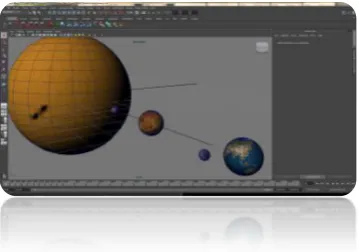
a. 3D Modeling
Create > NURBS > Primitives > Sphere > rename > Scale (depends on
[image:26.595.262.442.347.473.2]the size of the planets) > ENTER > Save
Figure 1.2 3D Modeling
Repeat the steps to create the rest of the planets
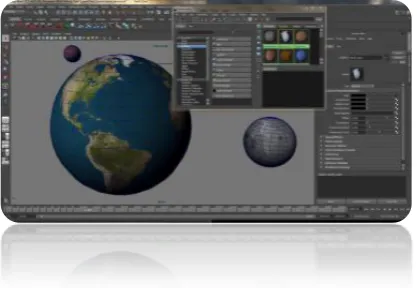
b. Texturing
Window > Rendering Editors > Hypershade > click Lambert icon (8
times to create a total of nine Lambert shading groups in the
Hypershade window) > rename > apply shaders to the planet (select a
planet in the perspective window > right-clicks it’s material > drag
up to highlight Assign Material to Selection > release button to
19
Figure 1.3 Texturing
c. Create Animation
Press F2 (open Animation menu set) > Set animation length using
Range slider (enter 1 in Scene Start Frame and 240 in Scene End
Frame) > click Animation Preference icon > Setting (set Time to
NTSC 30fps).
Animate the Mercury,repeat by the rest:
Select Mercury, and press E to activate the Rotate tool. Press F to
focus on Mercury in the perspective view, or zoom in on it
manually.
Make sure current frame is frame 1 of the animation range by
clicking and dragging the Scrub bar to place it at the desired frame. For Mercury, set initial keyframe for the Y-axis rotation. Click the
Rotate Y‟s attribute name in the Channel Box to select it. In Main
Menu bar, choose Animate > set key
Using the Scrub bar, go to frame 240.Grab the rotation manipulator
handle by the Y-axis and turn it clockwise a few times. Release the
20
Choose Animate > set key with the Rotate Y attribute still selected
in the Channel Box.
Scrub Time Slider to play back animation.
[image:28.595.256.462.181.321.2] Save
Figure 1.4 Animation
d. Sound Recording in Audacity
Open Audacity folder and click on the icon
Start by clicking the record button (red circle) and begin speaking
Once finish, click the stop button (yellow square).
To review the recording, click the play button (green triangle)
[image:28.595.254.470.558.688.2]21
Click OK when format box appears
[image:29.595.259.460.124.264.2] Save
Figure 1.6: Sound Recording
e. Basic video compositing using Adobe After Effects Create a new project (File > New >New Project)
Figure 1.7: Create Project in After Effects
Create a new Composition, set the comp resolution to 1024x768
[image:29.595.259.462.395.583.2]22
Figure 1.8: Create New Composition in After Effects
Import rendered image sequences from Maya (File > Import > File)
[image:30.595.216.505.349.505.2]23
Place the sequence on the timeline, re-time the sequence to make it
[image:31.595.258.463.127.297.2]in sync with audio.
Figure 2.0: Re-time Sequence
Set render for output (Composition > Add to Render Queue )
[image:31.595.190.554.394.461.2]24
Choose render output format (Output Module : Custom:Windows
Media, Codec: Windows Media Video 9 Advanced Profile, Bitrate
[image:32.595.259.463.153.381.2]mode : Constant, Maximum Bitrate : 10000, Image Quality : 100)
Figure 2.2: Choose Render Output
f. Video Editing using Adobe Premier
Create New Project (File > New >Project)
[image:32.595.258.463.506.685.2]60
REFERENCES
[1] Sang Hwa Lee, Junyeong Choi, Jong-11 Park, “Interactive E-Learning System Using Pattern Recognition and Augmented Reality”, IEEE Trans. On Consumer Electronics, Vol.55, no.2, May 2009.
[2] Bajura, M., Fuchs, H., Ohbuchi, R. “Merging Virtual Objects with the Real World: Seeing Ultrasound Imagery Within the Patient.” In Proceedings of SIGGRAPH ‟92, New York: ACM Press, pp.203-210 (1992)
[3] Billinghurst, M., Kato, H., Poupyrev, I., “The MagicBook-moving seamlessly between reality and virtuality.” IEEE Computer Graphics and Applications 21 (3), 6-8.
[4] Caudell, T.P., and Mizell, D.W. “Augmented Realty: an application of heads-up display technology to manual manufacturing processes.” In Proceedings of the Twenty-Fifth Hawaii International Conference on Systems Science, Kauai, Hawaii, 7th – 10th Jan.Vol.2,pp.659-669.(1992)
[5] Feiner, S., MacIntyre, B., and Seligmann, D. “Knowledge-Based Augmented Reality” in Communications of the ACM, Vol. 36(7), pp.53-62.(1993)
[6] Hannes Kaufmann, Dieter Schmalstieg, “Mathematics and Geometry Education with Collaborative Augmented Reality”, Interactive Media System Groups, Vienna University of Technology, 2003.
[7] Patrick Maier, Gudrun Klinker et al, “Augmented Reality for teaching spatial relations”, Conference of the International Journal of Arts & Sciences (Toronto 2009)
[8] Radu Dondera, Chun Jia, Voicu Popescu et al, “Virtual Classroom Extension for Effective Distance Education”, Purdue University, 2008
[9] S. G. Deshpande and J.-N. Hwang, “A Real-Time Interactive Virtual Classroom Multimedia Distance Learning Systems,” IEEE Trans.Multimedia, vol. 3, no. 4, pp. 432-444, Dec. 2001.
[10] Y. Shi, W. Xie, and G. Xu, “Smart remote classroom: Creating a revolutionary real-time interactive distance learning,” Proc. Int‟l Conf. Web-Based Learning, LNCS 2436, 2002.