Citation:
Schreuders, ZC and Shaw, T and Mac Muireadhaigh, A and Staniforth, P (2018) Hackerbot: Attacker Chatbots for Randomised and Interactive Security Labs, Using SecGen and oVirt. In: 2018 USENIX Workshop on Advances in Security Education, 13 August 2018 - 13 August 2018, Baltimore, MD, USA.
Link to Leeds Beckett Repository record:
http://eprints.leedsbeckett.ac.uk/5027/
Document Version:
Conference or Workshop Item
Creative Commons: Attribution 4.0
The aim of the Leeds Beckett Repository is to provide open access to our research, as required by funder policies and permitted by publishers and copyright law.
The Leeds Beckett repository holds a wide range of publications, each of which has been checked for copyright and the relevant embargo period has been applied by the Research Services team.
We operate on a standard take-down policy. If you are the author or publisher of an output and you would like it removed from the repository, please contact us and we will investigate on a case-by-case basis.
Hackerbot: Attacker Chatbots for Randomised and Interactive Security Labs,
Using SecGen and oVirt
Z. Cliffe Schreuders, Thomas Shaw, Aimée Mac Muireadhaigh, Paul Staniforth, Leeds Beckett University
Abstract
Capture the flag (CTF) has been applied with success in cybersecurity education, and works particularly well when learning offensive techniques. However, defensive security and incident response do not always naturally fit the existing approaches to CTF. We present Hackerbot, a unique approach for teaching computer security: students interact with a malicious attacker chatbot, who challenges them to complete a variety of security tasks, including defensive and investigatory challenges. Challenges are randomised using SecGen, and deployed onto an oVirt infrastructure.
Evaluation data included system performance, mixed methods questionnaires (including the Instructional Materials Motivation Survey (IMMS) and the System Usability Scale (SUS)), and group interviews/focus groups. Results were encouraging, finding the approach convenient, engaging, fun, and interactive; while significantly decreasing the manual marking workload for staff. The cloud infrastructure deployment using SecGen/oVirt was a success, generating VMs with randomised challenges, and enabling students to work from home.
1. Introduction
Computer security education benefits from hands-on interactive learning activities. Capture the flag (CTF) has been applied with success in education [1]–[4], and works particularly well when learning offensive techniques. However, defensive security and incident response do not always naturally fit the existing approaches to CTF. Defensive and investigative tasks can be effective when they are interactive, where there is a separate actor (such as a red team) working against the learners [5]. Our aim was to create a new approach via automation and interactive immersion that supports defensive and investigative cybersecurity scenarios, enabling students to work at their own pace with an interactive adversary.
We developed a free and open source software (FOSS)1
interactive chatbot, Hackerbot, which can be configured to attack VMs; presenting a variety of security challenges, rewarding correct solutions with flags. We deployed an oVirt infrastructure to host the VMs, and leveraged the SecGen framework [6] to generate lab 1 Hackerbot is incorporated into the SecGen project, available at https://github.com/cliffe/SecGen
sheets, provision VMs, and provide randomisation between students.
2. Related Literature
Capture the flag (CTF) is a type of cyber security game which involves collecting flags by solving security challenges. CTF events give professionals, students, and enthusiasts an opportunity to test their security skills in competition. CTFs emerged out of the DEFCON hacker conference [7] and remain common activities at cybersecurity conferences and online [8]. Some events target students with the goal of encouraging interest in the field: for example, PicoCTF is an annual high school competition [9], and CSAW CTF is an annual competition for students in Higher Education (HE) [10].
Applications of CTF scenarios have demonstrated pedagogical utility when used within HE. Challenges have been adapted and used successfully in CTF-style lab exercises [1], [2], [11], in class competitions [12] and extra-curricular activities [4], [13].
Prior work on the Security Scenario Generator (SecGen) framework aimed to solve issues present when using static CTF challenges in assessment situations [6], [14]. Hacking challenge scenarios are expensive and time consuming to create [15]. CTF challenges should not typically be reused in assessment situations, such as university assignments, competitions or job recruitment, as solutions and discussion of the challenges are commonly found online. SecGen generates random challenge content and unique flags per participant, which enables the reusability of a scenario within the same class of students whilst limiting the potential for collusion [6], [14].
Gondree et al. [16] note the benefits of using automated adversaries in computer security games. When compared with human competitors, automated adversaries can have increased availability, can be arbitrarily sophisticated and can be adapted to the level of difficulty required based on the level of competition or educational context.
3. Aims
and scenarios that could be used for learning and assessment purposes. Furthermore, we aimed to deploy the lab challenges into a cloud-based infrastructure to support distance access to the lab environment. Finally, an underlying goal was to create an enjoyable and usable experience for students, encouraging motivation to engage in the course.
4. Methods
A design science research approach was applied, by designing a solution, followed by implementation and it’s evaluation. Implementation included development of a significant private cloud-based infrastructure, software development (including chatbots and websites), vulnerable systems and security challenges, and lab sheets.
After the semester was complete, and all grades returned, students were asked to complete a survey, and participate in a semi-structured group interview. The survey included questions related to the lab infrastructure, Hackerbot, flag-based chatbot assessment structure and engagement, and any further suggestions, and positive and negative comments. The Instructional Materials Motivation Survey (IMMS) was used to measure student engagement and motivation (based on the ARCS model of motivation: Attention, Relevance, Confidence, and Satisfaction) [17], and the System Usability Scale (SUS) [18] was used to measure usability. The IMMS survey is made up of 36 Likert scale questions, which are used to calculate a score for student motivation. The SUS has 10 Likert scale questions, and produces a non-linear usability score out of 100. Both of these survey tools are well established and extensively validated in the literature. Qualitative feedback received via the survey was analysed using thematic analysis. Each comment was coded and then grouped into themes.
5. SecGen/oVirt Security Labs
5.1. oVirt Security Labs infrastructure
A pilot study was conducted to gather student feedback regarding the interface and capabilities of oVirt for the purpose of cybersecurity education [19]. Based on this pilot study we concluded that oVirt is a feasible platform on which to build a lab environment for teaching computer security.
Consequently, we developed an oVirt infrastructure consisting of: a virtual data centre with 1 cluster and 3 hosts running oVirt node 4.1 (HPEProliant DL360 Gen 9 servers, with 2 sockets, 12 core, 2 threads per core to give 48 Logical CPUs in each; 288GB of memory; 2x10Gb and 4x1Gb network sockets plus a 1Gb iLO connection); 3 storage domains hosted on a NFS cluster (with a Data Domain; ISO Domain and Export Domain); the students VM networks used the 1Gb network connected to an isolated switch; the storage,
management, migration, and display networks used a 10Gb network.
Students accessed VMs via the oVirt user portal. Students were granted permissions to create VMs using the many templates and ISOs we provided. VMs that students own could be started, stopped, snapshots created, and could be configured onto various logical networks. From the user portal, console files could be downloaded, which granted graphical/console access to VMs via SPICE/VNC.
5.2. Accessing oVirt infrastructure remotely
The user portal was available from university labs, and was available remotely via VPN and RDP access. This enabled students to access VMs from home.
RDP access was added during the semester due to problems many students experienced with VPN connections dropping. Accessing the infrastructure via RDP involved logging into the RDP server, which displayed the VMs on the remote desktop (via SPICE/VNC), which was in turn displayed to students over the RDP protocol connection. As a consequence, students did not require any oVirt/SPICE/VNC specific software installed.
[image:3.612.326.527.369.515.2]5.3. Provisioning SecGen into an oVirt infrastructure
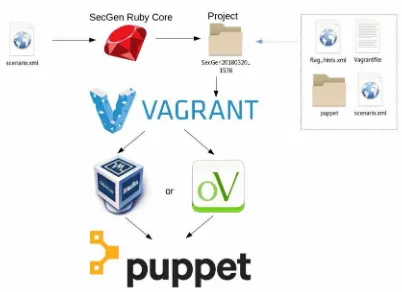
Figure 1: SecGen creates a project, then Vagrant creates VMs using VirtualBox or oVirt, and provisions via Puppet
to create the VMs and deploy Puppet to provision software and configuration changes.
5.4. Batch SecGen processing
To enable us to provision VMs for entire classes of students, we created a new service to run on a server to provision from2. The batch_secgen.rb program runs
as a systemd service, using multiple threads to continuously process a queue of SecGen tasks. The queue can be added to on the basis of a list of prefixes to use for the VMs, such as a list of all the student IDs for students in a class. SecGen was extended to support specifying IP address ranges. Static IP address ranges are generated for each scenario, and tracked to prevent collisions between scenarios. (A future enhancement will be to optionally separate students further via logical networks.)
We also developed a set of scripts to assign SecGen generated VMs to matching oVirt student accounts, automatically create snapshots, and do some additional oVirt network configuration.
Each week throughout the module we deployed VMs using SecGen, which created for each student a set of VMs with randomised challenges and lab sheets. Each week involved 2 to 5 VMs. In total 32 VMs were created for each of the 77 students enrolled on the module; for a total of 2,464 VMs (plus testing and backup copies created).
6. Hackerbot
6.1. Introducing Hackerbot
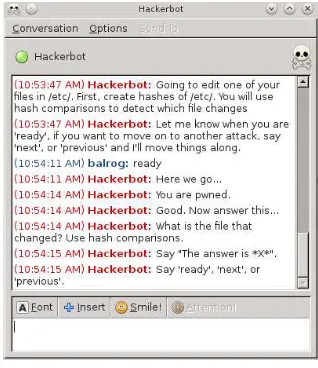
Here we present Hackerbot, which was designed to achieve the aims related to interactivity, and support for defensive and investigative exercises. Hackerbot is an IRC chatbot, which through instant messaging (IM) interaction, presents challenges to students, typically by attacking/compromising the student’s VMs, and challenging the student to defend, investigate, or restore the VMs in exchange for CTF flags.
For each lab, each student has a desktop VM, which includes a client used to chat with the bot. Pidgin was chosen as the client, since it presents a familiar IM interface to users (rather than a more traditional IRC-focused interface). When the desktop VM starts, Firefox also starts displaying the student’s lab sheet, which includes login details for their VMs.
A “hackerbot_server” VM also runs, serving up HTML lab worksheets (which SecGen generates), and hosting the Hackerbot (whose configuration is also generated by SecGen). Most of the weekly topics involved at least one other server or desktop system, which the Hackerbot attacked or interacted with.
[image:4.612.347.506.71.255.2]2 batch_secgen.rb can be accessed here: https://github.com/cliffe/SecGen/tree/master/lib/batch
Figure 2: Hackerbot student interaction via Pidgin
6.2. Design of challenges
The lab exercises were adapted from previous iterations of our Incident Response and Investigation module (as described in [20], where we noted the previously demanding marking workload). Our previous approach already had a lab focused assessment, with some guided work followed by open-ended problem-based learning challenges, where students submitted writeups and screenshots of completed tasks.
Our approach was to design the exercises so that each topic lab sheet introduced students to the concepts, provided some step-by-step walk through, then indicated that they should interact with Hackerbot to be presented with a challenge, which puts these skills into practice. This involved creating Hackerbot challenges directly related to the concepts, skills, and tools covered by the guided exercises, adapting existing challenges and replacing many of the less directly related problem-based learning tasks. This approach was designed to further improve students’ confidence in the covered topics: putting more of what they learned into practice more often. It was also possible for students to choose to skip sections of the lab sheets, and focus on the challenges, if they preferred.
6.3. Specification and generation of lab sheets
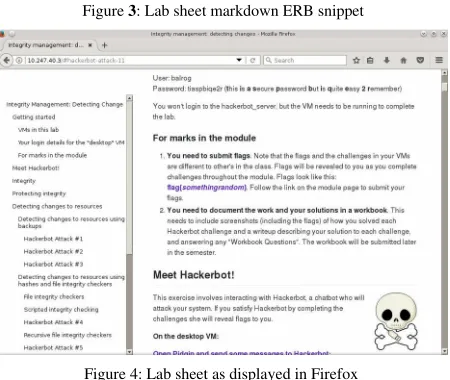
The challenges and labsheets are randomised for each student by SecGen. Each topic has a corresponding SecGen “hackerbot_config” generator. These generators produce a JSON output with the XML configuration for the hackerbot (described in the next section), and also the HTML lab sheet.
# Integrity Management: Detecting Changes ## Getting started
### VMs in this lab
==Start these VMs== (if you haven't already): - hackerbot_server (leave it running, you don't log into this)
- desktop
### Your login details for the "desktop" VM
User: <%= $main_user %>
[image:5.612.73.298.235.425.2]Password: tiaspbiqe2r (**t**his **i**s **a** **s**ecure **p**assword **b**ut **i**s **q**uite **e**asy **2** **r**emember)
Figure 3: Lab sheet markdown ERB snippet
Figure 4: Lab sheet as displayed in Firefox
A separate “hackerbot” SecGen utility module provisions VMs with the Hackerbot server software, and the configurations and lab sheets from the generators. Apache is installed to host the generated lab sheets, and lab sheets are styled via CSS.
A SecGen scenario for each topic specifies all the systems, vulnerabilities, and content required. Figure 5 shows an extract of a scenario file specifying the Kali Linux-based Hackerbot server.
6.4. Hackerbot configuration and interaction
Hackerbot leverages the Cinch framework to provide IRC functionality [21], and Programr [22], to provide an Artificial Intelligence Markup Language (AIML) based chatbot interaction (as used by the seminal Alicebot) [23].
The behavior of the Hackerbot depends on its configuration, and throughout the course a fairly linear approach was taken: the Hackerbot first greets the user, setting the scene, then presents the user with the first challenge. Typically the Hackerbot will give instructions to the student, asking them to let her know when they are ready. Often this involves a warning that the Hackerbot is about to take some action, such as
hacking into one of the student’s servers, and what the student needs to accomplish, such as preventing, monitoring, or recovering from the attack. The Hackerbot will perform any pre-shell commands (such as running a port scan), followed by an attempt to gain shell on a system (for example, by launching a Metasploit exploit, or by SSHing to a system), followed by running any post-exploitation commands, such as creating, modifying, or deleting files from the compromised server. The standard IO output and errors from the attack commands are matched against to resolve the action taken by the Hackerbot: triggering a response message, and progressing to the next challenge or presenting a question for the student to answer. Typically a correct solution was rewarded by a message containing a flag that the student could submit for marks. The Hackerbot can also list all the attacks, and be instructed to skip to specific tasks (in response to “list” and “goto 9”).
<system>
<system_name>hb_server</system_name> <base distro="Kali" name="MSF"/>
<service type="ircd"/>
<utility module_path=".*metasploit_framework"/> <utility module_path=".*nmap"/>
<utility module_path=".*handy_cli_tools"/> <service type="httpd"/>
<utility module_path=".*hackerbot"> <input into="hackerbot_configs">
<generator module_path=".*integrity_protection"> <input into="accounts">
<datastore>accounts</datastore> </input>
<input into="root_password"> <datastore>desktop_root_password </datastore>
</input> </generator> </input> </utility>
<network type="private_network" > <input into="IP_address">
<datastore access="1">IP_addresses</datastore> </input>
</network>
<build type="cleanup"> <input into="root_password">
<generator type="strong_password_generator"/> </input>
</build> </system>
<attack>
<% $rand_port = rand(65535) %>
<pre_shell>nmap -p <%= $rand_port %>
{{chat_ip_address}} > /dev/null; echo $? </pre_shell> <get_shell>false</get_shell>
<post_command>false</post_command>
<prompt>Monitor the network traffic, and look out for attempts to scan your desktop VM. You need to identify what port the connection attempt is to.</prompt> <condition>
<output_matches>0</output_matches>
<message>Hope you found the port number.</message> <trigger_quiz />
</condition> <condition>
<output_matches>1</output_matches> <message>:( Failed to scan </message> </condition>
<quiz>
<question>Now after the attack, what port number was scanned?</question>
<answer>^<%= $rand_port %>$</answer> <correct_answer_response>
:) <%= $flags.pop %> </correct_answer_response> <trigger_next_attack /> </quiz>
</attack>
Figure 6: Simple Hackerbot network monitoring challenge
<attack>
<get_shell>msfconsole -x "use
exploit/unix/misc/distcc_exec; set RHOST <%= $web_server_ip %>; exploit"</get_shell> <post_command>whoami > /dev/null; echo "<%=
$flags.pop %>" > /dev/null; echo 'Find the flag! (in the network traffic)'</post_command>
<prompt>Your webserver is about to be
scanned/attacked. Use Tcpdump and/or Wireshark to view the behaviour of the attacker. There is a flag to be found over the wire. </prompt>
<condition>
<output_matches>Find the flag</output_matches> <message>Hope you caught that.</message> <trigger_next_attack />
</condition> <condition>
<output_matches>1</output_matches>
<message>:( Failed to contact the web server (<%= $web_server_ip %>)</message>
</condition> <else_condition>
<message>:( Something was not right...</message> </else_condition>
</attack>
Figure 7: Launching a Metasploit exploit
The Hackerbot service has an XML based configuration, which specifies:
● The directory to read AIML chatbot rules for responses to general chat
● Messages to use in response to specific Hackerbot functionality
● Attack pre-shell, shell, and post-exploitation actions, and subsequent behavior
The following snippets demonstrate the flexibility of the approach. Figure 6 demonstrates a very simple network monitoring challenge. Note that every student is generated a different answer and flag. Figure 7, illustrates launching a Metasploit exploit against a vulnerable server, and sending a flag across the network as part of it’s post-exploitation actions.
Challenges developed ranged from protecting files from change, integrity management hash techniques for monitoring for changes, creating and using differential and incremental backups, live and offline analysis of a compromised server, network monitoring, and writing IDS Snort rules for detecting attacks and exfiltration. In total, eight Hackerbot labs and two tests were created.
7. Assessment structure and scoring front end
The course was assessed entirely based on the challenges presented by Hackerbot (with one exception, the first week’s group task on risk assessment).
30% flag submissions for labs: Each lab was marked automatically based on flag submissions, which were due two weeks after the scheduled lab.
50% scheduled closed book tests: Two timed tests (worth 20% and 30%) where each student was presented with a randomised selection of challenges adapted from the challenges in the labs.
20% Lab book with detailed write-ups: Students submitted a detailed technical description of each challenge and their solution, with screenshots illustrating how the challenges were completed. Every lab task with flags submitted for marks was required to be included in their write-up submission.
Flags were submitted via a Google form, which fed into a Google spreadsheet, which automatically marked submissions in terms of individual flags for each topic. The marking spreadsheet ensured that each flag was submitted by the matching student (and to the correct topic), and applied late penalties per flag (5% per day, for a maximum of 10 days late).
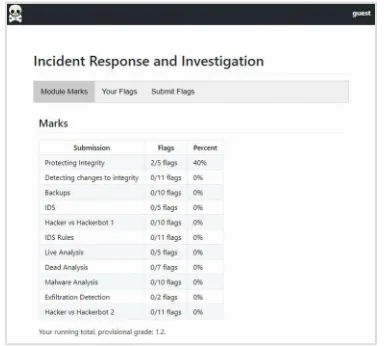
that students only had access to their own marks. As illustrated in Figure 8, MyFlags included a tab displaying overall marks, a tab to view every flag they had submitted and detailed information including whether the flag was accepted and marks applied, and a submission tab. MyFlags loaded results by accessing CSV shares of the marking spreadsheet. The CSV data was cached so that MyFlags could load quickly, while the cache was updated in the background from the Google spreadsheet.
Figure 8: MyFlags, a BasicLTI PHP flag submission frontend for Google Form/Sheet scoring
8. Results
8.1. Evaluation methods
This section presents the results of the evaluation of oVirt, Hackerbot, MyFlags, and the student experience. Data gathered included system performance, technical issues, mixed methods questionnaires, and group interviews/focus groups.
In total, the survey had a sample size of n=34 students. This was followed by a group interview to capture any qualitative data not captured via the survey. Due to sample size, when presenting agreement percentages, we have grouped 1 or 2 as representing disagreement, and 4 or 5 as agreement, on the 5 point Likert scale.
8.2. oVirt system performance
As described in Section 5.4, 77 students had access to at a minimum 32 VMs each. By the end of the semester over 3,000 VMs had been created. We did not limit the number of VMs each student could have running concurrently, and often students left VMs running when not in use. It was not uncommon for over 600 VMs to be running at a time.
System performance of the infrastructure dealt with this load without performance issues. As of writing, the current 4,261 VMs on our oVirt infrastructure have consumed 4.1 TB of storage. CPU usage has reached a maximum of 33% with 400% over allocation. The
maximum memory used was 48%.
8.3. oVirt perceptions of suitability and convenience
oVirt was compared to the infrastructure used in previous security modules using Likert scale questions (from 1 “strongly disagree” to 5 “strongly agree”) and also open ended comments. Our approach in previous security modules was via an in-house solution; the Image Management System (IMS), which enables students to save and restore full HDD states (with various OSs) to a server across lab PCs. A server hosts a collection of VMs (such as Windows, various Linux systems, Kali Linux, and Metasploitable), which students can subsequently download.
The response to “IMS: this infrastructure gives me the freedom to experiment and learn security concepts” was 78.1% in agreement (agree and strongly agree). Asked the same question in relation to the oVirt infrastructure 87.1% were in agreement. A paired-samples t-test was conducted to compare the perceived freedom and utility of IMS and oVirt. There was no significant difference in the freedom to experiment and learn security concepts scores for IMS (M=4.0, SD=0.9) and oVirt (M=4.2, SD=0.9) conditions; t(60)=1.41, p = 0.17. 43.8% agreed that IMS was convenient and accessible; in contrast 75.0% agreed that oVirt was convenient and accessible. A paired-samples t-test was conducted to compare the perceived convenience of IMS and oVirt. There was a significant difference in the convenience and accessibility scores for IMS (M=3.3, SD=1.3) and oVirt (M=3.9, SD=1.2); t(62)=2.52, p = 0.01.
8.4. Remote access responsiveness
Of the 34 responses, 73.5% of students had worked on oVirt from home. 24 accessed oVirt via the VPN, and 6 used RDP after that was added as an option. The perceptions of responsiveness of methods of accessing were, on a scale of 1 - 5 rated as, M=3.9 for access on campus; M=2.7 via the VPN, and M=3.2 via RDP.
noted or hinted at in comments (n=7), described later in Section 8.8.
When asked for an overall impression of using the oVirt system (positives and negatives), comments were mostly positive, with differences from the comparison with IMS including the theme that oVirt was easy to use (n=6). It was noted that working from home was slow via the VPN (n=6). Feature requests were also common (n=9), described in Section 8.9.
8.5. Hackerbot student experience
The response to “Hackerbot increased my enjoyment of this class” was 76.5% in agreement (agree and strongly agree), 20.6% neutral, and 2.9% disagreed, (M=4.2, SD=0.9). When asked whether they “enjoyed having conversations with Hackerbot”, answers were more spread: 58.8% were in agreement, 23.5% neutral, 17.6% disagreed, M=3.6, SD=1.4. 88.2% agreed that they “enjoyed the live interaction practicing security concepts with Hackerbot” (M=4.4, SD=0.9).
Qualitative feedback on Hackerbot was generally positive. From the thematic analysis the most common theme was that students found it fun and enjoyable to learn via the Hackerbot (n=11). For example, as one student put it: “Using the Hackerbot was very enjoyable and interesting. It allowed a human element to the module and maximised engagement with the tasks and made the module easier to understand, fun and memorable. The first few weeks saw many glitches in the system and took a while to understand how it works, however student feedback was taken seriously and implemented to improve the system [on] a continuous basis.”
Another related theme was that the approach was interesting and unique (n=6). The instant feedback, compared to waiting on manual marking, was also was also noted (n=4). There were some comments related to feature requests (n=2) and technical issues (n=6), described in Sections 8.8 and 8.9.
Qualitative feedback on MyFlags included the most common theme that it was good to have reassurance that flags had been received, and to track progress (n=13). However, the site was slow to update (n=12), and there were feature requests (n=7).
8.6. Assessment structure and engagement
79.4% agreed (as above, agree and strongly agree) that they “prefer the structure for grades in this class.” 91.2% “enjoyed having separate VMs pre-created for each lab exercise”. 9.1% “found that having different (randomised) lab sheets from classmates was confusing.” 79.4% agreed that “the structure of the assessment made me: complete more of the allocated lab work.” 50.0% agreed it made them turn up to class more often. 70.6% agreed they “enjoyed the assessment tasks in this module”. 79.4% agreed feedback given in
this module helped them know how they were performing; and 45.5% found feedback helpfully timely and fast (33.3% were neutral).
The Instructional Material Motivational Survey (IMMS) total score mean for the module was 133.66 (M=133.66, SD=25.20, N=34). Cronbach's Alpha for the 36 item scale (with negatively worded questions inverted) was 0.95, indicating the scale was highly reliable.
The system usability scale (SUS) score for Hackerbot, was a mean of 75.75 out of a possible maximum of 100 (M=75.75, SD=16.37). Cronbach's Alpha for the 10 item scale (with negatively worded questions inverted) was 0.87, indicating the scale was highly reliable.
Overall qualitative feedback for the module included suggestions, the most common being that students should be able to reset their own VMs (n=7). Students could request VM resets via email, which occasionally took some time. Students also noted that there were some classes where VMs were not available in time for class (this occurred a few times, due to errors provisioning VMs (since resolved), and due dates were adjusted accordingly) (n=5).
The most common positive comment for the module overall was around the interactive challenges, which provided practical experience (n=6), followed by finding the module fun (n=5), engaging (n=4), and interesting (n=4). The most common negative comment in the overall feedback was that oVirt can be slow to access at home, with some technical issues (n=7).
8.7. Group interview
During the group interviews, many of the same topics were raised, with these these additional points:
● The difficulty of challenges was appropriate ● Having the freedom to work from home changed
the way they worked on the module
● They liked having weekly submissions, and the ability to easily track their progress
● “The best module I’ve done in the three years”, having learned a lot and now could confidently use Linux
8.8. Technical issues
Technical issues encountered included:
● Remote access via VPN often dropped connections (leading to the introduction of RDP as an alternative)
(for example, if they didn’t backup files correctly before they told Hackerbot they were ready for an attack).
● Copy and paste between VMs sometimes stopped working
● A few challenges had problems, and students were told to skip 4 challenges (which were not marked) and issued corrections for some others ● Mouse scroll and resolution changing didn’t
work in some VMs
● MyFlags was slow to sync flag submissions (and before caching was added, it was slow to load)
8.9. Feature requests
Feature requests from students included:
● The ability for students to control the snapshots on their VMs (students did not have this permission on the VMs generated)
● Improved tracking of flags: notifications of incorrectly submitted flags; clearer error messages for incorrect flags; automatic submission of flags (rather than being given the flags by Hackerbot)
● More hints from Hackerbot after failed attempts (Hackerbot does include hints in its replies but this could be improved)
9. Discussion
Hackerbot presents a unique approach to teaching cybersecurity, which we contend meets the aims presented in Section 3. On a practical level, our developed oVirt infrastructure, SecGen server, and Hackerbot labs were successfully designed, implemented, and deployed; although not without some minor technical challenges. This new approach to marking overcame the practical issues we faced in terms of the marking workload in our previous iterations of the course [20]. Although development took far longer than marking would have, much of this time will not have to be re-invested for future delivery of the course.
The cloud infrastructure deployment using SecGen/oVirt was a success, generating VMs for students and enabling them to work from home. Results showed that students perceptions of both IMS (local VMs), and oVirt (virtual desktop infrastructure) were positive in terms of facilitating study of cybersecurity. However, the cloud-based remotely available oVirt infrastructure was significantly more convenient for students (despite speed and drop out issues with VPN access). Students appreciated the speed with which they could get started on work, enjoyed the freedom of movement it afforded, and appreciated having their VMs prepared for them on a weekly basis.
The attacker chatbot approach enabled us to turn defensive and incident investigation tasks into interactive CTF scenarios. The challenges were successfully randomised by leveraging SecGen; although the degree of randomisation in a few of the challenges was limited somewhat by weekly deadlines to publish the labs and challenges to students. Students didn’t find the randomisation of labs confusing. Most students enjoyed the approach to learning, finding it fun and engaging, and appreciated the interactive nature of tasks. The assessment structure was prefered by many students.
The levels of student motivation was positive; however, motivation scores (M=133.66, SD=25.20, N=34) were lower than the results we achieved in our previous gamification study (M=152.32, SD=18.13, N=12) [20]. Although these are separate students with a small sample size, this may indicate there would be benefits to bringing back elements of gamification, such as XP, visual indicators of leveling-up, and class ranks. The usability of Hackerbot was acceptable (M=75.75, SD=16.37). Bangor et al. [24, p. 592] presents guidance on interpreting SUS results, and state that “products which are at least passable have scores above 70”. Many of the technical issues identified have already been addressed with code and configuration updates. We had not granted access to students to control VM snapshots to avoid the potential for cheating, since oVirt also ties disk management/access to the same permission. However, this is only an issue when the VM stores flags, and so we now take the approach that we grant more privileges to students for their VMs, except for hackerbot servers.
10. Future work
Our plans for future work include further development of labs and challenges, including new types of challenges. There is also the potential to further explore opportunities in storytelling and narrative (for example, [2]), by expanding the bot framework with non-linear storytelling, including the use of multiple bots. We are building a new portal which will replace the MyFlags interface, and provide a new front end for SecGen, enabling dynamic generation of labs and CTF competitions.
11. Conclusions
References
[1] D. A. Cook, T. J. Beckman, K. G. Thomas, and W. G. Thompson, ‘Measuring motivational characteristics of courses: applying Keller’s instructional materials motivation survey to a web-based course’, Acad Med, vol. 84, no. 11, pp. 1505–1509, Nov. 2009.
[2] J. Brooke, ‘SUS-A quick and dirty usability scale’,
Usability evaluation in industry, vol. 189, p. 194, 1996.
[3] T. Chothia and C. Novakovic, ‘An Offline Capture The Flag-Style Virtual Machine and an Assessment of Its Value for Cybersecurity Education’, in 2015 USENIX Summit on Gaming, Games, and Gamification in Security Education (3GSE 15), Washington, D.C., 2015.
[4] T. Chothia, S. Holdcroft, A.-I. Radu, and R. J. Thomas, ‘Jail, Hero or Drug Lord? Turning a Cyber Security Course Into an 11 Week Choose Your Own Adventure Story’, in 2017 USENIX Workshop on Advances in Security Education (ASE 17), Vancouver, BC, 2017.
[5] W. Feng, ‘A Scaffolded, Metamorphic CTF for Reverse Engineering’, in 2015 USENIX Summit on Gaming, Games, and Gamification in Security Education (3GSE 15), Washington, D.C., 2015. [6] A. Mansurov, ‘A CTF-Based Approach in
Information Security Education: An Extracurricular Activity in Teaching Students at Altai State University, Russia’, Modern Applied Science, vol. 10, no. 11, p. 159, Aug. 2016. [7] NCCDC, ‘Collegiate Cyber Defense Competition
(CCDC)’. [Online]. Available: http://www.nationalccdc.org/index.php/competitio n/about-ccdc. [Accessed: 06-May-2018].
[8] Z. C. Schreuders, T. Shaw, M. Shan-A-Khuda, G. Ravichandran, J. Keighley, and M. Ordean, ‘Security Scenario Generator (SecGen): A Framework for Generating Randomly Vulnerable Rich-scenario VMs for Learning Computer Security and Hosting CTF Events’, in 2017 USENIX Workshop on Advances in Security Education (ASE 17), Vancouver, BC, 2017. [9] DEF CON Communications, Inc., ‘DEF CON
Hacking Conference - Capture the Flag Archive’.
[Online]. Available:
https://www.defcon.org/html/links/dc-ctf.html. [Accessed: 05-May-2018].
[10] ‘CTFtime.org / All about CTF (Capture The Flag)’. [Online]. Available: https://ctftime.org/. [Accessed: 05-May-2018].
[11] P. Chapman, J. Burket, and D. Brumley,
‘PicoCTF: A Game-Based Computer Security Competition for High School Students’, in 2014 USENIX Summit on Gaming, Games, and Gamification in Security Education (3GSE 14), San Diego, CA, 2014.
[12] K. Chung and J. Cohen, ‘Learning Obstacles in the Capture The Flag Model’, in 2014 USENIX Summit on Gaming, Games, and Gamification in Security Education (3GSE 14), San Diego, CA, 2014.
[13] M. Carlisle, M. Chiaramonte, and D. Caswell, ‘Using CTFs for an Undergraduate Cyber Education’, in 2015 USENIX Summit on Gaming, Games, and Gamification in Security Education (3GSE 15), Washington, D.C., 2015.
[14] J. Mirkovic and P. A. H. Peterson, ‘Class Capture-the-Flag Exercises’, in 2014 USENIX Summit on Gaming, Games, and Gamification in Security Education (3GSE 14), San Diego, CA, 2014. [15] A. R. Schrock, ‘Education in Disguise: Culture of
a Hacker and Maker Space’, InterActions: UCLA Journal of Education and Information Studies, vol. 10, no. 1, 2014.
[16] Z. C. Schreuders and L. Ardern, ‘Generating randomised virtualised scenarios for ethical hacking and computer security education: SecGen implementation and deployment’, in 1st UK Workshop on Cybersecurity Training & Education (VIBRANT 2015), Liverpool, UK.
[17] P. Hulin et al., ‘AutoCTF: Creating Diverse Pwnables via Automated Bug Injection’, in 11th USENIX Workshop on Offensive Technologies (WOOT 17), Vancouver, BC, 2017.
[18] M. Gondree, Z. N. J. Peterson, and P. Pusey, ‘Talking about Talking about Cybersecurity Games’, ;login:, vol. 41, no. 1, 2016.
[19] Z. C. Schreuders and E. Butterfield, ‘Gamification for Teaching and Learning Computer Security in Higher Education’, in 2016 USENIX Workshop on Advances in Security Education (ASE 16), Austin, TX, 2016.
[20] Z. C. Schreuders, E. Butterfield, and P. Staniforth, ‘An open cloud-based virtual lab environment for computer security education: A pilot study evaluation of oVirt’, in The first UK Workshop on Cybersecurity Training & Education (Vibrant Workshop 2015), Liverpool, UK, 2015.
[21] ‘cinch: The IRC Bot Building Framework’.
[Online]. Available:
https://github.com/cinchrb/cinch. [Accessed: 05-May-2018].
AIML as an updated rubygem’. [Online]. Available:
https://github.com/robertjwhitney/programr. [Accessed: 05-May-2018].
[23] R. S. Wallace, ‘The anatomy of ALICE’, in
Parsing the Turing Test, Springer, 2009, pp. 181– 210.