© 2018 IJSRST | Volume 4 | Issue6 |Print ISSN: 2395-6011 | Online ISSN: 2395-602X
National Conference on Smart Computation and Technology in Conjunction with The Smart City Convergence 2018
Cross Platform Application Using Electron Js
Manish Kumar Suthar*, Sandeep Tuli
Department of Computer Engineering, PIET Jaipur, Rajasthan, India
ABSTRACT
Electron is a framework for cross-platform desktop applications using Chromium and Node-Web kit. Electron is a JavaScript framework from GitHub, to build powerful cross platform desktop applications with HTML/JS/CSS. On top of electron, imagine applications developed with existing JavaScript ecosystem and building desktop apps - the outcome will be amazing. It’s easy to build cross-platform apps using HTML, CSS, and JavaScript.
Keywords: framework; app; GitHub; ecosystem; Cross platform desktop; Imagine
I.
INTRODUCTION
Electron is basically a runtime server base platform that allows you to develop desktop applications using HTML, CSS, and JavaScript.[2] It is an open source framework developed by GitHub. Electron is generally called atom cell. it built for atom editor to handle chromium to Node-Webkit event loop integration and developed native API. Electron js application is works with combining the chromium content framework and NW JS node together in a single processing framework. A variant of Node-Webkit runtime that is focused on desktop native application instead of web servers for different type of operating system. So using electron js we are able to create native desktop application. Electron js create a dynamic process for running the dynamic build application for native creation.
Electron really simple here by combining both frameworks together in a single shell. It's not a complex framework at all. You don't have to learn a lot of conventions in order to start application development with Electron. It's very easy to structure an application using Electron as there is no complex tooling required to set it up. Electron always keeps up to date with chromium and node versions. The
chromium used inside Electron is always two weeks behind the latest stable chromium version. It typically includes the latest version of the node and v8 engine. Own strengths and disadvantages will be laid down in this paper.
II.
PROBLEM STATEMENTS
A. Development of Application which is work as “cross-platform application”?
[1]"Native" cross-platform apps: Native cross-platform apps are created when you use APIs that are provided by the Apple or Android SDK, but implement them in other programming languages that aren’t supported by the operating system vendor.
[2] Native HTML5 cross-platform apps have never gained wide of processing network and compiling because this approach to development results in performance issues when an app’s UI is rich in components.
B. Why need to development of cross-platform apps for product owners and developers?
[2] One team and one product for two platforms: - Product owners who want a cross-platform application need only one team of developers that are trained in one set of technologies.
C. How modern cross-platform apps good for the end user?
[1] Designing Uniqueness:- Feature of cross-platform development tools providing developers/ designers to create the unique user experience that app users appreciate.
[2] Best for Original: - Quicker development provides product owners with an opportunity to collect user feedback and to secure a patent and a spot in the market.
[3] Greater reach and easier marketing: - cross-platform apps are more useful for many business owners because they provide a wider reach: by creating one application you can use all platforms.
III.
DETAILED CONTENT
A. HISTORY
Node-Webkit as a in history desktop applications starts in 2011 with Roger Wang, the developer of Node Webkit. Roger Wang started the node-webkit project naming a simple Node-Webkit module that can create a browser window using Web Kit - the browser engine used by Safari and chromium. Advantage of the node-webkit module is that we can use Node-Webkit APIs inside the webpage and create a native application which is use to renderer the process by child process of system.it is implemented in Node-webkit library which is show all browser data so in history it is not appropriate model for development. After some-time, Roger improved the node-weskit by replacing Web Kit with the chromium embedded framework (CEF).
B. DEVELOPMENT
Title Development of a hello world application using Electron:- Node-Webkit is installed or not by cmd window and enter the command node -v // it is use to check node version in system
Installing Node-Webkit :-The easy way to install Node-Webkit is using installer. Follow the instruction www.nodejs.org to download executable file for your operating system. There are a couple of other ways to install Node-Webkit.
Mac
brew install node Linux
In linux base system the installation of nodejs is assential process of using terminal window so
(http://nodesource.com )
curl sL https://deb.nodesource.com/setup_6.x | sudo -E bash sudo apt-get install -y nodejs
Installing Electron[1]
Electron is working by npm module so before installation of electron module to have to install the npm. To install npm electron use following command:
npm install -g electron to install globally electron you can use the command with –g with electron: Globally process of system is include the programming to overall system. It is just system to include full processing system.: Locally - local modules can be installed with the same command, but without the -g flag. The modules will be installed into the current directory. Its scope is limited to the current directory.
C. INTERNAL WORKING OF ELECTRON
Electron include the feature of node js, chromium and google V8 engine. Node Js is able to facility to development of web API and Google V8 engine is process the web API. For better understanding let is look into how the chrome browser works.[4]
Figure 1. Process Handling by electron JS
Architecture of Electron JS
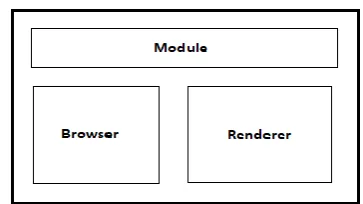
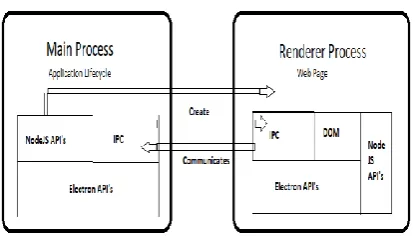
Multi-process architecture of chromium because Electron uses a simplified version of chromium's multi process architecture. Modern operating systems are robust because they put an application into different processes that are separated by each other. [5]A crash in one application does not have any impact on another application and it will not affect the integrity of the operating system. In a similar way, Google Chrome uses separate process for each tab to protect overall bugs and glitches from the rendering engine. It also restricts access from each rendering process to others and to the rest of the system. So basically the Chrome browser runs two types of processes. The main process runs the UI and plugin process and tab specific processes which renders the web page. The following figure shows how the multi process architecture works in Electron. The main process can start multiple renderer processes with different URLs loaded into it.
Browser: This is responsible for business logic and data access. It works on its own process called main process. It creates the browser window and corresponding modules to render the web pages.
Renderer - This is responsible for rendering each web page. Each web page renders on its own thread. Modules that bridge browser and renderer and control application life cycle
Figure 2. Internal Architecture of electron js
The Main process providing a web page by creating a Browser-Window object for compression of module. Each Browser-Window runs the web page in its own separate renderer process.
Main Process: The main process is responsible for responding to applications life cycle events, starting and quitting the application. it provides the Node-Webkit execution context inside the renderer process, which allows you the lower level operating system interactions from your web pages rendered in the Electron shell.
Renderer Process: The renderer process is responsible for loading the web pages to display the graphical user interface. Each process can load and execute additional JavaScript files in the same process. Each renderer process is isolated and each process cares only about the page running in it.
Figure 3. Interposes communication in electron js
D. DESCRIPTION
Process: -
Step 1: Create the basic file of electron App
package.json main.js index.html
If package.json is according process of npm module so automatically the generation of system:
npm init
Package.json file is content the module of system that is used in program if we want to shift our project so no need to copy the npm module we just have to clone that module form GitHub. So [package.json file contain the dependencies.
package.json
{ "name" : "your-app", "version”: "0.1.0", "main" : "main.js" }
Step 2: [3]Main.js page is controller the main process of application is file is running into the system and controlling the process of renderer process. Main process is able to create multiple renderer process itself.
const electron = require('electron') // Module to control application life. const app = electron.app
// Module to create native browser window.
const BrowserWindow = electron.BrowserWindow
// Keep a global reference of the window object, if you don't, the window will
// be closed automatically when the JavaScript object is garbage collected.
let mainWindow
function createWindow () { // Create the browser window.
mainWindow = new BrowserWindow({width: 800, height: 600})
// and load the index.html of the app.
mainWindow.loadURL(`file://${__dirname}/index.ht ml`)
// Open the DevTools.
mainWindow.webContents.openDevTools() // Emitted when the window is closed. mainWindow.on('closed', function () {
// Dereference the window object, usually you would store windows
// in an array if your app supports multi windows, this is the time
// when you should delete the corresponding element.
mainWindow = null })
}
// This method will be called when Electron has finished
// initialization and is ready to create browser windows.
// Some APIs can only be used after this event occurs. app.on('ready', createWindow)
// Quit when all windows are closed. app.on('window-all-closed', function () {
// On OS X it is common for applications and their menu bar
// to stay active until the user quits explicitly with Cmd + Q
if (process.platform !== 'darwin') { app.quit()
})
app.on('activate', function () {
// On OS X it's common to re-create a window in the app when the
// dock icon is clicked and there are no other windows open.
if (mainWindow === null) { createWindow()
} })
// In this file you can include the rest of your app's specific main process
// code. You can also put them in separate files and require them here. [6]
Step 3: Index.html
Index.html page is viewer page on that file we are design the webpage and making the system process to viewer itself. Html page itself is web technology like angular, css and JavaScript page application also collectively information setup.
<!DOCTYPE html> <html>
<head>
<meta charset="UTF-8">
<title>Electron Hello World!</title> </head>
<body>
<h1>Electron Hello World!</h1>
We are using node
<script>document.write(process.versions.node)</script >,
Chromium
<script>document.write(process.versions.chrome)</scr ipt>,
and Electron
<script>document.write(process.versions.electron)</sc ript>.
</body> </html>
Step 4: Execution of application in debugging mode is using command that is development process in which we can create new window to show the process. Electron.
IV.
CONCLUSION
Although Electron is good new technology and a lot of improvements and infrastructural tools are still to come. It is allows building quite good desktop applications and community is doing great progress on providing setup and development in the best and easy and interesting. To build cross platform application electron help to providing capability to improving desktop application.
V.
REFERENCES
[1] electronjs.org
[2] Building Cross-Platform Desktop Applications with Electron - Muhammed Jasim.
[3] https://scotch.io/tutorials/
[4] https://medium.com/developers-writing/building-
a-desktop-application-with-electron-204203eeb658
[5] https://www.christianengvall.se/electron-packager-tutorial/