COMPUTER AIDED LINE BALANCING
Dr. E. V. Ramana
Professor, Department of Mechanical Engineering,
VNR Vignana Jyothi Institute of Engineering &Technology, Hyderabad, India [email protected]
Abstract: The goal of line balancing is to distribute the work as evenly as possible among the workstations satisfying precedence constraints and not exceeding cycle time restricted by production rate of assembly line. In the current work, GUI based software using Visual Basic is developed to implement Largest Candidate Rule and Computer Method of Sequencing Operations for Assembly Lines (COMSOAL) method to minimize the time taken for line balancing and computation of balance delay. The proposed software is able to reduce the line balancing time by computerizing the procedure adopted by Largest Candidate Rule and COMSOAL method in the assignment of work elements to workstations. Keywords: Line Balancing, Largest Candidate Rule, COMSOAL, Balance Delay
1. Introduction
Line balancing is commonly used in automobile assembly lines to assign the work elements as evenly as possible to workstations in order to reduce the manpower requirements and assembly cost. The algorithms such as Largest Candidate Rule, Kilbridge and Wester and Ranked Positional Weights methods are available in addition to computerized techniques such as COMSOAL (Computer Method of Sequencing Operations for Assembly Lines for line balancing) and CALB (Computer Aided Line Balancing) for balancing of assembly lines [1]. New approaches are emerging to solve complex line balancing problems. Ant algorithms are implemented for time and space constraint assembly line balancing problem [2]. Multi-objective assembly line balancing problems are solved by using simulated annealing [3]. Genetic Algorithm approach has been adopted to solve mixed model assembly line balancing problems [4].
Software has been developed using Visual Basic to computerize Largest Candidate Rule and implement Computer Method of Sequencing Operations for Assembly Lines (COMSOAL) method to minimize the time taken for line balancing and balance delay. It provides the Graphic User Interface (GUI) to enable user to easily enter work elements, constraints and work element times. It can also perform data validation and prompt the user by messages in case of missing / zero values etc.
2. Largest Candidate Rule
The following start up screen will be displayed as shown in Fig.1 to enable the user to select Largest Candidate Rule / COMSOAL technique by ticking appropriate check box adjacent to largest candidate rule/ COMSOAL method. If the user press OK button without choosing one of the techniques, user is prompted with a message as shown in Fig.2. The user will not be permitted to select both the techniques at the same time, and a message will popup as displayed in Fig.3 in case both the techniques are chosen.
Fig.1 Start up screen
ISSN (Print) : 2278–9510
Fig.2 Message to select one technique
Fig.3 Message to select one technique
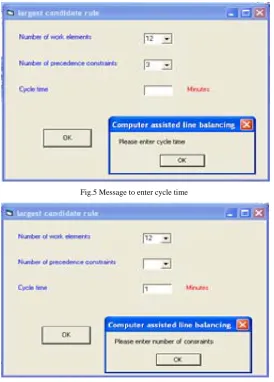
Next button will be enabled when the user press OK button after selecting Largest Candidate Rule. The Next button can be pressed to navigate to the Largest Candidate Rule screen. User can enter number of work elements and precedence constraints, and cycle time in minutes. The data entered shall be committed by pressing OK button. If any data is not furnished by user the appropriate messages will popup as shown in Fig.4 to Fig.6.
Fig.4 Message to enter number of elements
ISSN (Print) : 2278–9510
Fig.5 Message to enter cycle time
Fig.6. Message to enter number of constraints
The user should select precedence constraints less than number of work elements. If this condition is violated, user will be prompted with a message to enter data again. Fig.7 shows the screen after entering the number of work elements and constraints, and cycle time for Largest Candidate Rule for a typical example as given in Table 1.
Table 1 Element description, element time and precedence constraint data [1]
No. Work Element Description Element Time (min) Must be Preceded by 1 Place frame in workholder and clamp 0.2 -
2 Assemble plug, grommet to power cord 0.4 -
3 Assemble brackets to frame 0.7 1
4 Wire power cord to motor 0.1 1,2
5 Wire power cord to switch 0.3 2
6 Assemble mechanism plate to bracket 0.11 3
7 Assemble blade to bracket 0.32 3
8 Assemble motor to brackets 0.6 3,4
9 Align blade and attach to motor 0.27 6,7,8 10 Assemble switch to motor bracket 0.38 5,8
11 Attach cover, inspect and test 0.5 9,10
12 Place in tote pan for packing 0.12 11
ISSN (Print) : 2278–9510
Fig.7 Screen after entering number of work elements, constraints and cycle time
Element time, constraints and element description for the chosen number of elements can be entered in the screen shown in Fig.8 for the example chosen. User should enter zero value(s) for precedence constraints of the elements, where all constraints are not present. OK button can be pressed to navigate to the next screen, which shows Work elements that are assigned to workstations as presented in Fig.9. Main button on this screen can be used to navigate to the start up screen to continue with another problem. Reset button on this screen enables both check boxes to choose any one technique for the next problem. EXIT button help to exit from the application.
Fig.8 Screen after data entry for largest candidate rule
Fig.9 Work elements assigned to workstations
ISSN (Print) : 2278–9510
3. Computer Method of Sequencing Operations for Assembly Lines (COMSOAL)
The procedure adopted in this method is to iterate through a sequence of alternative solutions through randomly assigning the elements to the work stations in each solution. The current solution is compared with the previous best solution, if it is better than the previous best solution it replaces the previous best otherwise discarded. It seems to attract more attention than other computerized line balancing methods [1]. User can choose COMSOAL method by ticking check box adjacent to this method as shown in Fig.10. The procedure adopted to enter values for number of elements and precedence constraints and cycle time is same as discussed in Largest Candidate Rule. If the user enters negative value for cycle time a message will popup prompting the user to enter positive value as shown in Fig.11.
Fig.10 Screen after selection of COMSOAL method
Fig.11 Message to enter positive value for cycle time
Fig.12 displays the screen after entering values for number of elements and precedence constraints and cycle time. The procedure to enter data related to number of elements and precedence constraints, and cycle time is as same as Largest Candidate Rule. Fig.13 shows the screen after completing data entry for COMSOAL method. The work elements assigned to workstations and balance delay are computed and presented in Fig.14.
Fig.12 Screen after entering number of elements & constraints and cycle time
ISSN (Print) : 2278–9510
Fig.13 Screen after data entry for COMSOAL method
Fig.14 Work elements assigned to workstations by COMSOAL method
Conclusions
Software tool has been developed to computerize the procedure adopted in Largest Candidate Rule and COMSOAL method to minimize the time taken for line balancing and computation of balance delay. It provides interactive graphic user interface and data validation wherever necessary. The work elements that are assigned to work stations by both the techniques will be displayed by the software after completion of the computation. The balance delay of COMSOAL method is 13.04% which is comparatively less than 20% achieved by largest candidate rule in the example chosen. It results in significant improvement in the utilization of assembly workstations and manpower and minimizes the time for line balancing. This work can be extended by specifying the acceptable time frame by user to limit number of iterations in COMSOAL method in order to improve balance efficiency.
References:
[1] Mikell P.Groover, Automation, Production Systems and Computer Integrated Manufacturing, Pearson Education (Singapore) Pvt. Ltd, Indian Branch, Second Edition, ISBN 81-7808-511-9, 2003, pp 523-557.
[2] Bautista, Joaquín, and Jordi Pereira. "Ant algorithms for a time and space constrained assembly line balancing problem." European journal of operational research 177.3 (2007): 2016-2032. 1
[3] McMullen, Patrick R., and G. V. Frazier. "Using simulated annealing to solve a multiobjective assembly line balancing problem with parallel workstations." International Journal of Production Research 36.10 (1998): 2717-2741. 2
[4] Simaria, Ana Sofia, and Pedro M. Vilarinho. "A genetic algorithm based approach to the mixed-model assembly line balancing problem of type II." Computers & Industrial Engineering 47.4 (2004): 391-407. 3
ISSN (Print) : 2278–9510