1
How Usable Are the Learning Management Systems?
The Users Have their Say
M.M. Althobaiti1,*, P.Mayhew1
1School of Computing Science, University of East Anglia, UK
Abstract
E-learning is an innovative way of learning that is both symbolic and derivative of ‘the information age.’ When used as part of the learning process, it provides users with greater flexibility in terms of time and location. For an E-learning application to be considered effective, it should provide its users with a certain standard of usability; otherwise, the learning process is likely to become cumbersome and frustrating for the learner. Focusing on this dilemma, this paper aims to assess the usability of the Jusur Learning Management System (LMS) that is used in higher education in Saudi Arabia. Nine factors have been incorporated into a survey to evaluate the system: content, learning and support, visual design, navigation, accessibility, interactivity, self-assessment, learnability, and motivation. The results show that E-learners who use the Jusur LMS tend to find that Jusur is a usable and desirable application in terms of its users’ experiences and perspectives.
Keywords: HCI, Usability, LMS, E-learning, Jusur
Received on 30 November 2015, accepted on 13 May 2016, published on 15 June 2016
Copyright © 2016 M.M. Althobaiti and P. Mayhew, licensed to EAI. This is an open access article distributed under the terms of the Creative Commons Attribution licence (http://creativecommons.org/licenses/by/3.0/), which permits unlimited use, distribution and reproduction in any medium so long as the original work is properly cited.
doi: 10.4108/eai.15-6-2016.151449
*Corresponding author. Email:[email protected]
1. Introduction
The emergence of computers and their associated technologies is responsible for revolutionising the way the world operates today. Powered by these tools, the technological revolution has resulted in greater ease of communication—and the effect of this on human life cannot be understated. This effect has been further enhanced by the ability of many individuals to acquire powerful computers and gain access to high-speed Internet services. The confluence of these factors is becoming increasingly pronounced and has consequently simplified access to information and knowledge. In education, this revolution has been translated into communication modes that provide
opportunities for people to access quality learning without having to “go to school” in the literal sense. E-learning applications give people access to education from their homes and workplaces. Many such applications exist; while some provide users with an enjoyable and informative experience, others inflict stress and boredom while seemingly failing to educate them at all. If the field of E-learning applications is to develop further, it is necessary to achieve a better understanding of what makes an E-learning application positive or negative for the learner. An integral step in gaining this understanding is undertaking a quantitative and qualitative assessment of the effectiveness of E-learning applications. According to [1], Learning
EAI Endorsed Transactions on
e-Learning 04 - 06 2016|Volume3|Issue11|e4
EAI
European Alliance2
Management Systems (LMS) provide tools that can be used to manage teaching and learning activities and to integrate learning services in order to facilitate the procedures of both teaching and learning. The tools provided by LMS usually include: course-management tools for handling the provision of course content; tools for the management of online groups; communication aids; tools for collecting assignments; virtual classrooms; and tools that allow for learner assessments and course evaluations. The LMS software used in the Kingdom of Saudi Arabia is known as Jusur [17]. It was developed and is operated by the National Centre of E-learning and Distance Learning for use by universities within the Kingdom. The Jusur system is the subject of the assessment performed in this study, which seeks to determine Jusur’s usability. For that evaluation, a certain set of factors has been selected to investigate users’ experiences with the system and to assess the level of its usability. Motivation to learn has been selected as one of the factors in order to determine the extent to which users are motivated to learn through the use of the Jusur system.
This study is organised as follows. In the following section, we will review studies and methods that are relevant to the assessment of the usability of E-learning systems. Next, the methodology utilised in this research will be presented, followed by findings and results. Finally, this paper will end with a summary of the research.
2. Related Research
2.1. Usability
Usability is an easy-to-understand concept, but its practical, high-level application to a website can be more difficult to gauge. The definition of usability in [18] encapsulates five components: learnability, efficiency, memorability, general accuracy, and user satisfaction. The relevant literature makes it clear that usability reflects, and always connects with, ‘ease of use.’ Ease of use is one of the main goals of Human–Computer Interaction (HCI), which in turn involves the
study of the interactions between users and technology [8]. Nevertheless, usability is a measure of more than simple ease of use; it refers to consumers’ subjective experiences upon using an application. Usability also captures more measurable aspects, such as whether users, in using the application, are actually able to accomplish that which they set out to achieve. In E-learning applications, this second aspect is especially relevant. It is possible to assess how much an individual has learned through the use of an E-learning application, and this assessment reveals information regarding the effectiveness and efficiency of the application.
2.2. E-learning
E-learning is the process of learning through the use of software and via electronic media, such as the Internet, satellite broadcasts, and traditional computer-supported learning [12]. When using an E-learning application, the end user can have a positive experience; this can, in turn, be good for the business of the company that is presenting that application. However, certain flaws in E-learning applications have been identified in [10], and such flaws can result in a negative end-user experience. For instance, when an E-learning application is used for training purposes, it often tends to ignore objectives and to focus instead on technological aspects; as a result, it does not always provide the user with the learning that the training had promised. Research conducted vis-à-vis the usability of E-learning applications for disabled learners has found that many applications lack appropriate accessibility tools for those who require assistive technologies [13]. In [19], the authors evaluated the effect of individual preferences and differences; they found that an individual’s E-learning experience can be dominated by his or her disability, prior E-learning experience, and preconceived notions regarding the use of computers as learning tools. Therefore, learners with disabilities might have experiences with E-learning that differ completely from those of individuals without disabilities, even within similar environments.
EAI Endorsed Transactions on
e-Learning 04 - 06 2016|Volume3|Issue11|e4
EAI
European Alliance3 2.3.Learning Management System (LMS)
Central to the management of any e-learning program is the choice of an appropriate “system to store, manage, maintain, and track the modifications made to content resources”—i.e., an LMS [9]. The term “Learning Management System (LMS)” refers to collections of e-learning applications that are used, often in an integrated manner, to provide an infrastructure platform for managing and delivering learning content. The applications that comprise these LMSs provide suites of software tools that perform a number of functions related to the running of an e-learning program, including the deployment, management, tracking, and reporting of interactions among instructors, learners, and content [7]. LMSs are useful tools in ensuring the delivery of “the right course to the right students, at the right time, [and] in the right format” [9].
The growth in the use of LMSs has made them a focus of interest, study, and investigation. For example, a study by Weaver and colleagues in [25] of the WebCT LMS in Monash University in Australia investigates the use of the university’s system by academic staff and students in their learning, and it studies its quality. The results obtained from that study’s survey indicate that students reported a positive impression with the system, while staff opinions reflected their stress with respect to certain technical and administrative issues. With reference to usability, the author in [16] conducted evaluative research of the usability of the Moodle LMS, using usability testing and questionnaire. Regarding the Jusur LMS, a study was conducted by the author in [27] to evaluate the students’ and instructors’ levels of satisfaction in utilising Jusur as an e-learning system in a particular course; the results thereof suggested that Jusur was a good e-learning system and that the participants in the study were likely to use it in future courses. In [2] the authors conducted a study of online discussion in blended courses at Saudi universities and the use of Jusur, offer several recommendations, including the provision of user-friendly LMS features; they also report the need for future research that focuses on the criteria used to assess LMSs. In [3] the author
listed several aspects of limitation in Jusur LMS, including the system supports only Arabic and English languages, the system is slow and the discussion forum does not show different page numbers and it only shows the first and last page numbers. However, in the same article the author replied to one of the comments in his article that he will publish an article focusing on the advantages of Jusur LMS.
2.4. Assessing the usability of e-learning applications
With specific reference to E-learning applications, the meaning of the term usability can vary. For example, the aesthetics of an application must be considered; a poorly laid-out application can lead to confusion on the part of the user. The authors in [24] performed a multi-method usability assessment using questionnaires, guided interviews, eye-tracking, and the annotation of multimodal behaviour. This complex approach revealed interesting information that other methodologies had failed to identify, such as software problems. The authors in [14] derived an evaluation methodology called e-Learning Systematic Evaluation (eLSE), which combines inspection tools with user-testing. Their technique, called Abstract Tasks (ATs), has been validated by their results, which show the benefits of using AT inspection techniques and illustrate why they are effective tools. Many groups have relied solely on the use of questionnaires to assess usability such as the study in [11]. However, as the authors in [5] point out, the unique nature of e-learning applications requires different methods of usability assessment.
2.5. The Use of Questionnaires in Usability Assessment
Questionnaires and other survey instruments (e.g., interviews) are tools that are commonly used to obtain data regarding people’s perceptions. Questionnaires have a proven track record in the assessment of interactive applications. They have been applied to the assessment of E-learning applications [11] and are considered highly appropriate for this purpose because they are
EAI Endorsed Transactions on
e-Learning 04 - 06 2016|Volume3|Issue11|e4
EAI
European Alliance4
inexpensive and easy to use [26]. Existing questionnaire methods relating to the usability of E-learning applications cover several areas. For example, the researchers in [22] divided their questioning into three categories: general interface usability criteria, website-specific criteria for educational websites, and learner-centred instructional design that is grounded in learning theory and aims to provide effective learning. Additionally, the author in [6] used a questionnaire approach to assess ten areas: general system performance, software installation, manuals and online help, online tutorials, multimedia quality, information presentation, navigation, terminology and error messages, learnability, and overall system evaluation. The authors in [26] developed a questionnaire that covered several areas and included ‘motivation to learn’ as a new attribute by which one could assess the usability of an E-learning application.
2.6. Motivation to Learn in Usability Assessment
The study in [26] is not the only work to make use of the ‘motivation to learn’ attribute in undertaking a usability assessment. The researchers in [20] also did so while defining the usability of E-learning applications in the following terms: “usability = usable + learnable + useful + motivating.” The author in [21] lists “Web feature and motivation,” along with six other categories of motivation-study issues, with regard to web-based learning. In [15], the author assesses usability while using the usability testing method and focusing on user motivation.
With regard to the impact of usability on learners, the authors in [23] comment that the “User interface to instructional multimedia is strategically important,” stating that “if it is poorly designed, students will not be intrinsically motivated to make use of the product or to learn with it. Interfaces that motivate learners are realistic, easy-to-use, challenging and engaging”. In assessing usability others in [4] introduced a heuristic evaluation for child e-learning applications (HECE) and considered motivation to learn, along with other usability measurements.
All theses studies elucidate and reaffirm the relationship between motivation to learn and usability.
2.7. The Target E-learning System
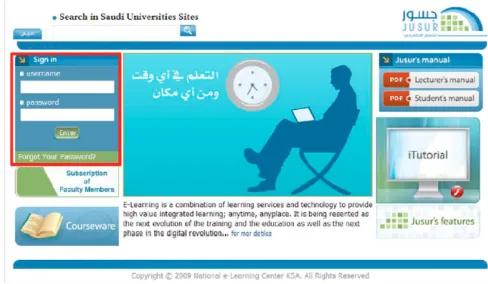
The target E-learning system assessed in this study is the Jusur LMS. The Ministry of Higher Education of Saudi Arabia owns the system, and the National Centre of E-learning and Distance Learning manages it. It is built upon the Learning Management System of the Open Malaysian University, with new features and tools added to match university needs in Saudi Arabia [17]. The system was developed using the LAMP open-source package, which uses a LINUX operating system, PHP language, a MySQL 5.0 database, and an Apache server. Jusur LMS allows its users (university students enrolled and studying in Saudi Arabia) to register, record, and manage their personal data, schedule their courses and course structures, and view the corresponding content as selected and uploaded by the faculty. It also allows teachers and assessors to make appropriate materials available to students and produce reports on these. Communication is facilitated among students through ‘chats’ and ‘discussions’, which are supported and encouraged by the application. Virtual classrooms allow teachers to give lessons remotely via voice and video [17]. Figure 1 shows the home page for the Jusur LMS.
Figure 1. Jusur Home Page
3. Methodology
As stated above, the broad aim of this study is to evaluate the usability of the Jusur LMS from a
EAI Endorsed Transactions on
e-Learning 04 - 06 2016|Volume3|Issue11|e4
EAI
European Alliance5
user perspective using the measures that have been suggested by [26], which integrate the attribute of ‘motivation to learn’ with the existing criteria of web usability and design instructiveness. Therefore, a web-based survey consisting of 11 sections was created. The aim of the first section was to collect demographic information about the respondents, such as gender, length of computer utilisation, and length of Jusur LMS utilisation. The next nine sections covered the usability of the Jusur LMS, including content, learning and support, visual design, navigation, accessibility, interactivity, self-assessment, learnability, and motivation; the questions in these sections were phrased as positive statements, and the respondents were required to indicate the extent to which they agreed with each statement using a five-point Likert scale from one (strongly agree) to five (strongly disagree). The last section in the survey included two open-ended questions asking respondents what they liked and disliked about the system.
4. Results Analysis and Discussion
4.1. Respondents’ Profile
This section presents the results and analysis
of the collected responses to the questionnaire. The response rate to the questionnaire was high in terms of the researchers’ expectations, with 808 learners who use the Jusur system completing the questionnaire. According to the collected data, 299 respondents (37%) were male, while 509 (63%) were female. Most learners had used computers for more than three years (84%), 9% had used computers between one and three years, while 7% had used computers for less than a year. From this, it can be assumed that levels of IT literacy and ability of the respondents are quite high. Hence, it would not be expected any of the identified problems with the e-learning application system to stem from a lack of knowledge on the part of the users as a whole; however, this could possibly be the case with the less experienced user groups. Although the discrepancy of ability among the users in the sample is relevant, some of the qualitative problems discussed later probably
stem from the inexperience of certain users in the sample rather than from the e-learning system intrinsically. The results showed that the sample is not just familiar with IT but also familiar with Jusur as a system, since 45% of the sample has used Jusur for at least one year. Most participants did not use any other e-learning system (66%), while 34% of learners used other e-learning systems. For most participants in the sample, the lack of comparisons between the e-learning system in question and other systems means that they will analyse the system impartially (i.e., without comparisons that may skew the findings on account of their bias).
4.2. Overall Assessment for the Jusur LMS
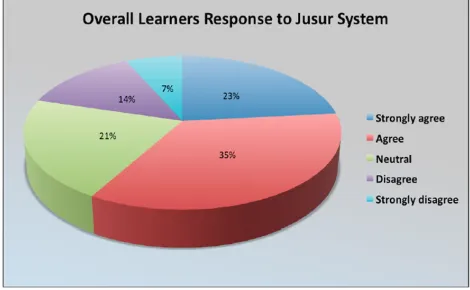
Figure 2 shows the learners’ overall response to the usability of the system based on learners’ rating to each factor. When asked about the usability of the system, over half of the learners (58%) responded positively. In contrast, only 21% of the sample responded negatively. This result shows the strength of the system, given the extent of overall user satisfaction. For additional clarification, Figure 3 shows the learners’ ratings for each usability factor. It appears that most of the students tended to agree with each statement regarding the usability factors. Interestingly, most learners provided positive ratings for the first four factors (i.e., content, learning and support, visual design, and navigation), thus indicating the strong usability of the system in terms of these attributes. The overall rating of the system will be discussed further in the following sections.
Figure 2. Overall response
EAI Endorsed Transactions on
e-Learning 04 - 06 2016|Volume3|Issue11|e4
EAI
European Alliance6
Figure 3. Overall response with factors
Figure 4. Average ratings for Jusur by gender
Average Ratings Based on Gender
An analysis has been performed for the data according to gender due to the expectation of significant differences in the results, especially for the motivation attribute. However, the results for each usability attribute measured in the questionnaire are similar regardless of gender (see Figure 4). For example, the average for males in the content factor was 3.9 and for females, the average was 4.1 out of 5: both of these were consider as quite high ratings. The accessibility and the motivation to learn through Jusur LMS were lower in comparison with other usability factors. Generally, the results for each usability attribute measured in the questionnaire are similar regardless of gender. Additionally, the results for each statement are similar in terms of gender; the difference between the averages is approximately 0.1.
Overall Impression, Likes, Dislikes
In the last section of the survey, the questions were designed to elicit more subjective information. There were two questions: the first asked what learners disliked about the system, while the second asked what they liked about it. The learners provided often detailed answers to these questions, thereby offering insight into the usability issues and the weaknesses and strengths of the system. The following two sub-sections will present the different issues and positive points regarding the Jusur system, as collected via the responses to these questions.
Number and Nature of Problems Identified
In terms of analysing the qualitative data, a code-based analysis was designed to classify the answers. Regarding the first question, which
EAI Endorsed Transactions on
e-Learning 04 - 06 2016|Volume3|Issue11|e4
EAI
European Alliance7
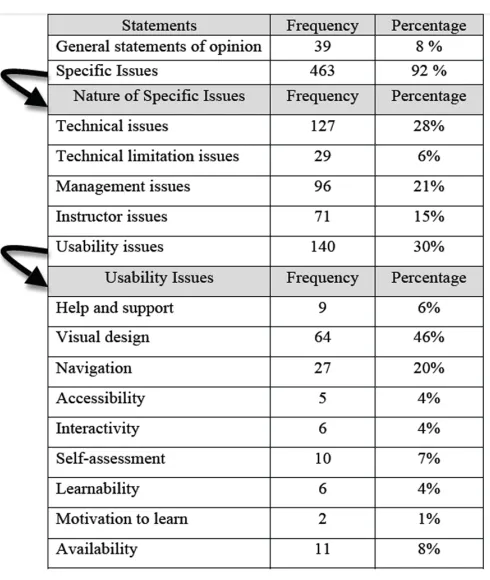
asked learners what they disliked about the system, there were 502 statements submitted by 479 learners. Table 1 shows the different classifications of answers regarding the first question.
Some of the statements (8%) were classified as general statements of opinion, such as “complicated system” and “boring system.” The majority of the statements (92%), however, reflected a mixture of different issues that were classified into five categories, as illustrated in Table 1. The taxonomy for these categories was based upon the researchers’ understanding of the statements’ core meanings and the type of the issues. While other researchers may have different taxonomies, this will not affect the totality and nature of the problems. As can be seen, 28% of the problems identified were technical issues, including connection interruptions and difficulty with logging onto the system. The most significant problem cited in this category was that the E-learning application was considered slow. This is obviously a serious potential problem for an E-learning application system. Past research concurs that this is a major barrier to the relevance and success of any E-learning application. Technical limitation issues accounted for 6% (n = 29) of the total issues cited. To illustrate, 13 users noted that notifications and synchronisation between the E-learning application and their mobile devices/e-mail were issues. This observation is notable because it shows that social media is expected to overlap with IT and E-learning today, especially among student users. The most frequently cited issue (n = 39) was that the registration procedure for the system was considered complicated. The students could not register automatically and receive benefits from all the features of the system directly. Rather, the learners were required to get permission from their instructors or support staff members in order to be added to view the content for a specific course. The instructor issues that were cited were related to the learners’ instructors and their utilisation of the system. Specifically, some students (n = 22) mentioned that most of their instructors did not use the system, while others argued that their instructors were lacking the
appropriate technical background. Instructor issues were raised by 15% of the sample, and thus were quite commonly raised issues. The usability issues identified in the open-ended questions were further analysed. They were divided into nine categories, as shown in Table 1. There were 140 statements submitted by the learners. It appears that the greatest number of problems cited was with the visual design. In summary, the findings suggest that the system has some usability problems, the most significant of which are related to the file upload and the forums features, which can be considered to be visual design problems.
Table 1. Classification of issues
Number and Nature of Positive Points Identified
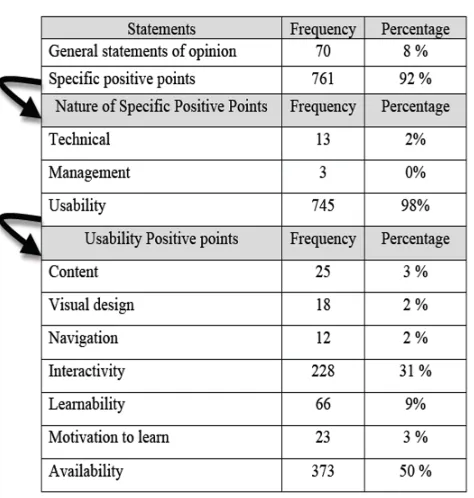
When asked what they liked about the Jusur LMS, users expressed their satisfaction with the system, which indicates that the system has a wealth of positive points. The total number of statements submitted was 831 by 588 learners. A few of these (8%) were general statements of opinion, such as “successful system” and “it is the system that can help users,” while 92% of the statements referred
EAI Endorsed Transactions on
e-Learning 04 - 06 2016|Volume3|Issue11|e4
EAI
European Alliance8
to other aspects (see Table2). Table 2 shows that the most significant positive aspect of the system was its usability, with 745 statements reflecting the users’ positive impressions of the system.
Table 2. Classification of positive points
This usability aspect is further classified into seven categories, as shown in Table 2. It appears that half of respondents (n = 373) liked the availability of the features in this particular E-learning system. These features include submitting coursework, viewing marks, voting, participating in surveys, completing online exams
and online mock exams, accessing
announcements, and participating in discussion forums and virtual classrooms. In addition, a significant number of students (n = 228) indicated that the system has features that encourage interactivity with their classmates and instructors (e.g., through group discussions and projects). The findings also show that learners (n = 23) believe that the system motivates their learning. These findings reinforce the importance of motivation and learnability as attributes to measure the usability of an E-learning application. These findings, along with the others, suggest one main conclusion: that most students (n = 588) like the system, as reflected by their opinions regarding the features they most liked about the system.
5. Conclusion
This paper has presented an evaluation for the usability of the Jusur LMS used in Saudi Arabia. The findings were based on a questionnaire that was designed to evaluate specific factors, including ‘motivation to learn,’ in order to discover the strengths and weaknesses related to the usability of this LMS, as well as to investigate the importance of any learning management system to motivate its users to learn. We presented detailed findings based on data collected from 808 learners who responded to the survey. From a statistical standpoint, the data gathered found that the Jusur LMS is viewed as a usable system from a user perspective. In this study, the research
process concentrated on eliciting
phenomenological data to assess what is problematic and what is good about the system from the reflexive view of its users. From the findings obtained, the system can be seen to be a usable and desirable example of an E-learning application from a student user perspective. However, some problems in the system were also identified, and these need to be considered by the system’s providers. Finally, the results from this study affirmed that the questionnaire suggested by [17] was able to successfully determine the extent to which users are ‘motivated to learn’ by this particular E-learning system.
References
[1] Albarrak, A. I., Aboalsamh, H. A. and Abouzahra, M. (2010). Evaluating Learning Management Systems for University Medical Education, IEEE International Conference on Education and Management Technology (ICEMT 2010), Cairo: Egypt, 2-4 November 2010.
[2] Alebaikan, R. and Troudi, S. (2010). Online discussion in blended courses at Saudi universities. Procedia-Social and Behavioral Sciences, 2(2):507–514.
[3] Alsalloum, O. (2009). Aspects of limitation in Jusur system. Riyadh newspaper.Available on line at:http://www.alriyadh.com/2009/08/09/article450962.html [4] Alsumait, A. and Al-Osaimi, A. (2009). Usability heuristics
evaluation for child e-learning applications. In Proceedings of the 11th International Conference on Information Integration and Web-based Applications & Services, pages 425–430. ACM.
[5] Adebesin, T., De Villiers, M., and Ssemugabi, S. (2009). Usability testing of elearning: an approach incorporating co-discovery and think-aloud. Proceedings of the 2009 Annual Conference of the Southern African Computer Lecturers’ Association. 6–15. ACM.
EAI Endorsed Transactions on
e-Learning 04 - 06 2016|Volume3|Issue11|e4
EAI
European Alliance9 [6] Avouris, N. (1999). Educational Software Evaluation
Guidelines. Technical Report, Working Group on Educational Software Evaluation Procedure.
[7] Baker, H. (2007). Employee Training. Scottsdale: Global Media.
[8] Battleson, B. Booth, A. and Weintrop, J. (2001). Usability testing of an academic library web site: a case study. The Journal of Academic Librarianship, 27(3):188–198.
[9] Brandon, W. R. and Brandon, B. (2008). Best of the learning guild's learning solutions: top articles from the e-magazine's first five years, New Jersey: John Wiley and Sons. [10] Brodsky, M. (2003). Four blended learning blunders and how to avoid them. Learning Circuits, [electronic version]
available at:
http://www.astd.org/LC/2003/1103_brodsky.htm.
[11] Chang, Y. (2002). Assessing the Usability of MOA Interface Designs. World Conference on E-Learning in Corporation, Government, Health, & Higher Education. Montreal: Canada. [12] De Villiers, M. (2007). An Action Research Approach to the Design, Development and Evaluation of an Interactive E-Learning Tutorial in a Cognitive Domain. Journal of Information Technology Education, 6, pp.455–479.
[13] JISC. (2007). Joint information systems committee in their own words: exploring the learners’ perspective on e-learning. York: JISC[online] Available at: http://www.jisc.ac.uk/media/documents/programmes/elearnin gpedagogy/iowfinal.pdf
[14] Lanzilotti, R. Ardito, C. Costabile, M. and De Angeli, A. (2006). eLSE methodology: a systematic approach to the e-learning systems evaluation. Subscription Prices and Ordering Information, 42.
[15] Liebel, G. (2006). Focusing on user motivation by usability testing with goals and tasks [Electronic Version]. from http://usability.about.com/od/usabilitytestingtips/qt/
utgoals.htm
[16] Melton, J. (2006). The LMS Moodle: A usability evaluation. Prefectural University of Kumamoto, v(21). Citeseer. [17] NCeLD. (2011). Jusur system for learning management
system. The National Centre for E-learning and Distance Learning. (Received via email from NCeLD)
[18] Nielsen, J. (1996). Usability metrics: Tracking interface improvements. IEEE software,13(6)
[19] Sharpe, R. Benfield, G. Roberts, G. and Francis, R. (2006). The undergraduate experience of blended e-learning: a review of UK literature and practice undertaken for the Higher Education Academy. Citeseer.
[20] Shilwant, S., and Haggarty, A. (2005). Usability testing for e-learning [Electronic Version].Chief Learning Officer. Retrieved 01-07-2011, from http://www.clomedia.com/content/templates/
clo_article.asp?articleid=1049
[21] Song, S. H. (2000). Research issues of motivation in Web-based instruction. Quarterly Review of Distance Education, 1(3), 225-229.
[22] Ssemugabi, S. and de Villiers, R. (2007). A comparative study of two usability evaluation methods using a web-based e-learning application. Proceedings of the 2007 annual research conference of the South African institute of computer scientists and information technologists on IT research in developing countries, pp.132–142. ACM. [23] Stoney, S. and Wild, M. (1998). Motivation and interface
design: maximizing learning opportunities. Journal of Computer Assisted Learning, 14, 40-50.
[24] Vervenne, M. Bormann, M. and Kerres, M. (2006). A Multi-method Usability Approach to Evaluating E-Learning Applications–A Case Study. Conference paper
USABconf/usab/2006
db/conf/usab/usab2006.html#VervenneBK06,pp145-154. [25] Weaver, D., Spratt, C., and Nair, C. S. (2008). Academic and
Student Use of a Learning Management System: Implications for Quality. Australasian Journal of Educational Technology, 24(1), 30-41.
[26] Zaharias, P. and Poylymenakou, A. (2009). Developing a Usability Evaluation Method for e-Learning Applications: Beyond Functional Usability. International Journal of Human-Computer Interaction, 25, 75 - 98.
[27] Zouhair, J. (2010). Utilizing Jusur in an information systems course. International Journal of Education and Development using ICT, 6(4). Available at: http://ijedict.dec.uwi.edu/viewarticle.php?id=1138.
EAI Endorsed Transactions on
e-Learning 04 - 06 2016|Volume3|Issue11|e4