Modified Virtual Air Guitar: A Concept Realized using
Image Processing Techniques
J. R. Santiago
1, S. J. Samuel
2,* and R. Sawn
21Department of Electrical Engineering, Santa Clara University, Santa Clara, California, USA 2Department of Computer Engineering, Xavier Institute of Engineering, Mahim, Mumbai, India
Abstract
Even amidst the hustle and bustle of busy lives, numerous people dream of playing a musical instrument. Unfortunately, many may never get a chance to touch one. But this doesn’t stop them from ‘air drumming’ or playing ‘air guitar’ passionately while listening to their favorite tunes. To encourage this passion for music, especially in the absence of a real instrument, we introduce to you the Virtual Air Guitar. This application allows one to showcase their guitar skills, regardless of their knowledge of playing a real guitar. It uses color tracking to detect inputs and a sound module incorporating the Karplus Strong algorithm to generate musical notes as an output. As a result, a simple webcam and brightly colored gloves are required to use the application. This application has enormous potential as a base for interactive guitar games, teaching music, and of course, to compose guitar based songs.
Keywords: Virtual Air Guitar (VAG), Image Processing, Color Tracking, Karplus Strong Algorithm (KSA). Received on 02 December 2014, accepted on 23 December 2014, published on 12 March 2015
Copyright © 2015 Santiago et al., licensed to ICST. This is an open access article distributed under the terms of the Creative Commons Attribution licence (http://creativecommons.org/licenses/by/3.0/), which permits unlimited use, distribution and reproduction in any medium so long as the original work is properly cited.
doi: 10.4108/casa.2.3.e2
1. Introduction
The yearning to create original music or to recreate tunes we love, is a fairly common and extremely powerful one. Most people would jump at the opportunity to play a song on a guitar, if only they knew how to play, or if they had access to a guitar. Using a computer application to provide a similar, virtual experience loses all its appeal if the user has to provide inputs using the traditional mouse and keyboard. The act of pushing keys on the keyboard does not have the feel of playing an actual guitar, and is far removed from the rewarding experiences that musical instruments provide.
A better alternative, made possible by advances in image processing, is using visual inputs and moving your hands in the same way one would if playing a real instrument. Color detection, and the subsequent tracking of that color can be used to monitor the locations of the player’s hands. The player would need to wear gloves, and the gloves would need to be appropriately colored to stand out from the background and the rest of the player’s body. Even wrapping a ribbon around one's hands would work. The best part about this approach is that many people already love to play ‘air guitar’ which makes
the associated appeal universal. We have simply built upon joy of pretending to play, and made it possible to receive musical output, like you would from a real guitar.
2. Related work
Lucas S. Figueiredo et al. have presented an open-source framework for developing guitar-based games using gesture interaction. [1] The goal of this work was to develop a robust platform capable of providing seamless real time interaction, intuitive playability and coherent sound output. Each part of the proposed architecture was detailed and a case study was performed to understand the ease with which it could be used. Tests were performed in order to validate the proposed platform. The results proved to be successful: all tested subjects could reach the objective of playing a simple song during a small amount of time and they were satisfied with the experience.
Matti Karjalainen et al. explain the framework of guitar based games and the working of the Virtual Air Guitar by using a pair of gloves, webcam and an additional foot pedal to change the sounds while playing. [2] However, it is not always possible to have an additional pedal, as including it would impose several obstacles upon the marketing of this concept. To overcome this, we have a created a prototype of the Virtual Air Guitar which does not include any extra parts and works only on a webcam and colored gloves. The proposed plan is to include gesture touch controls on the screen to change the sound, which replaces the need for an extra pedal. This is planned in the next phase.
Steven Gelineck et al. describe how an immersive and interactive application is created by implementing physical models of a flute and a drum with the capability of changing dimensions in real-time. [4] A flute-like controller is able to measure how hard a person blows into the instrument and lets the user control different tones using buttons connected to a sensor box. A mallet is tracked using color tracking in order to measure the time and the intensity of the mallet hitting the virtual drum. Virtual models of both instruments are also developed and implemented in 3D stereo using Virtools. The virtual flute is experienced as an extension of the physical instrument using a magnetic system which maps the movements of the user to the position and rotation of the virtual flute. The virtual drum is experienced as hovering in the air ready for the mallet to hit it. Both instruments are capable of changing size and shape to match the sound synthesis models. To further immerse the user, visual feedback of the sound is produced. The
Jyri Pakarinen et al. modify the work done by Matti Karjalainen et al. by extending their energy-compensated time-varying digital waveguide model of a guitar to generate sounds using a slide tube touching the lunch. [2][3] This model requires an external slide tube and a reflecting ring, which we eliminated in our model. The camera recognizes the equipment, and records the plucking and pulling-off motions and the distance between the hands. Sounds are then produced, using this recorded information as an input. The output of this Virtual Slide Guitar can also be modified using features that allow the user to tune the instrument, change the simulated slide tube material, tweak the contact-sound module, balance between static and dynamic components, and select an output effect.
3. Working methodology and
implementation
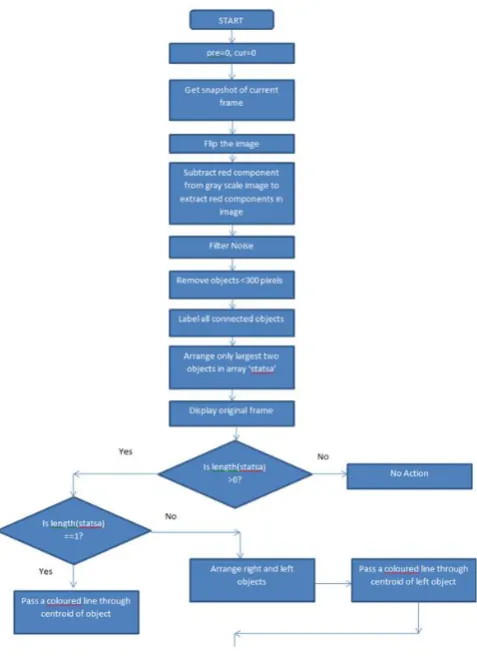
3.1. Image Processing Module
the centroid of the left hand. This line represents the fretboard of a guitar. The line is further divided into a number of guitar frets depending on the song to be played. For the purpose of this paper, we have selected the classic rock song ‘Smoke on the Water’; only four notes are required to play the song. Hence, the line is divided into four frets, represented using four different colors in the figure. The four notes with their respective frequencies have been presented in Table 1.
This is the body text with indent. This is the body text with indent. This is the body text with indent. This is the body text with indent. This is the body text with indent. This is the body text with indent. This is the body text with indent. This is the body text with indent. This is the body text with indent. This is the body text with indent. This is the body text with indent.
Table 1. Notes used in the song ‘Smoke on the Water’
Note Color Frequency
A2 Yellow 110.0 Hz
C3 Blue 130.8 Hz
D3 Green 146.8 Hz
Eb3 Red 155.6 Hz
These frequencies are given as inputs to the sound module, which generates the waveform and plays the resulting sound when the following events occur:
When the right hand is above the colored line, no sound is played. However, when the right hand crosses the line from top to bottom i.e. when the centroid of the right hand crosses the line, a sound is played. This sound depends on which colored segment of the line the centroid of the right hand is passed through (see Figure 2).
Figure 2. Project Output
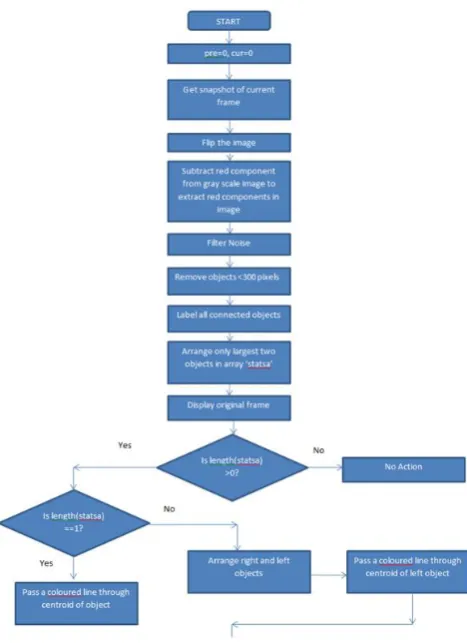
Figure 3. Project Flowchart - Part two
3.2. Sound Module
The sound module uses the Karplus Strong Algorithm and discrete time filters to achieve realistic guitar tones as outputs, which are generated based on the input frequency given. [5] For example, if the input frequency given is 110.0 Hz, then the ‘A2’ note is generated at run time by the module. This is the major modification from the paper “An open-source framework for air guitar games,” where the notes are already recorded in a WAV file beforehand and played. [1] The advantage is that there is no need to store many sound files and the required sound can be generated without the need of independently recorded sounds. This is immensely helpful if we need to generate different tones for the same note. Different tones can be created using a combination of distortion, delay, reverb, compressor, flanger and other effects.
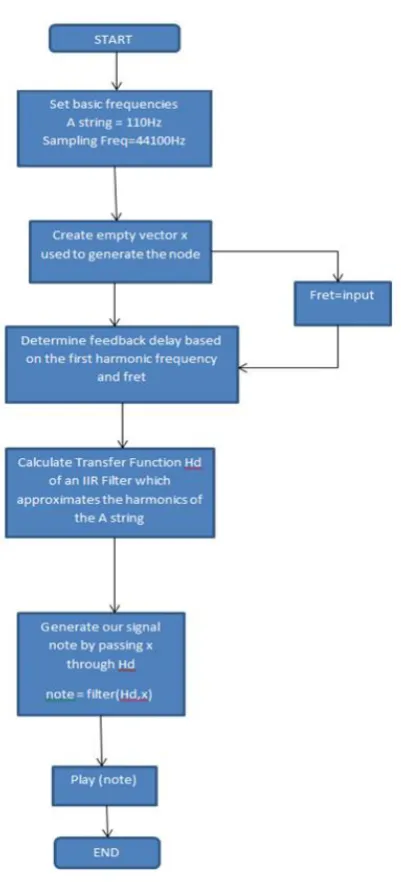
The sound module works as follows (see Figure 4). We begin by setting the basic frequency i.e. of the ‘A2’ note at 110 Hz. This is the basic frequency which we will use to generate the other notes using the Twelve-Tone Musical Scale (see Table 2.).
In Table 2, the Unison interval is the ‘C’ note. However, in our project we set the Unison interval as ‘A’ (technically ‘A2’). The Unison interval has semitone number 0. Thus, ‘A’ note has a semitone 0, ‘A#/Bb’ note has a semitone 1, ‘B’ note has a semitone 2 and so on in that sequence. Now, based on the Unison interval (i.e. ‘A’ note), we can calculate the first harmonic frequencies (see Figure 5) of the remaining notes given in Table 1 using the formula:
[required first harmonic frequency] =
[frequency of Unison interval] * [equal temperament corresponding to the required frequency’s semitone]
For example, if we need to recreate the ‘C3’ note i.e. the third semitone from ‘A2’ note, we will use the above formula as follows:
[first harmonic frequency of C3] =
[frequency of A2]* [equal temperament corresponding to semitone 3]
Viz. [First harmonic frequency of C3] = 110*1.189 Hz
Viz. [First harmonic frequency of C3] = 130.79 Hz
Figure 3. Project Flowchart – Sound Module
Similarly, we can calculate the first harmonic frequency of the other notes using the Twelve-Tone Musical Scale. When a guitar string is plucked or strummed, it produces a sound wave with peaks in the frequency domain that are equally spaced. These are called the harmonics and they give each note a full sound. We generate sound waves containing these harmonics with discrete-time filter objects.
Table 2. Twelve Tone Musical Scale
No. of Semitones
Interval Name
Notes Equal
Temperament
0 Unison C 20/12=1.000
1 Semitone C#/Db 21/12=1.059
2 Whole tone D 22/12=1.122
3 Minor third D#/Eb 23/12=1.189
4 Major third E 24/12=1.260
5 Perfect
fourth
F 25/12=1.335
6 Tritone F#/Gb 26/12=1.414
7 Perfect fifth G 27/12=1.498
8 Minor sixth G#/Ab 28/12=1.587
9 Major sixth A 29/12=1.682
10 Minor
seventh
A#/Bb 210/12=1.782
11 Major
seventh
B 211/12=1.888
12 Octave C 212/12=2.000
The feedback delay is calculated using the first harmonic frequency. Then the transfer function of the IIR filter, whose poles approximate the harmonics of the given note, is calculated using the feedback delay. This filter is then used to generate the final signal which contain the harmonics of the given note. This signal can then be generated using any inbuilt sound player that recognizes such signals. This is how a signal can be generated using a discrete time filter.
4. Performance evaluation and efficiency
We have evaluated the performance of the application based on tests which measure latency. MATLAB has an inbuilt profiler which gives the time required for an individual function to execute.
Latency was calculated as the time taken for the program to provide an output in the form of sound after a particular note was played i.e. when the centroid of the right hand crosses the rendered guitar string.
The application was tested on an Intel Core i5-3337U clocked at 1.8Ghz (Up to 2.5Ghz with Turbo Boost technology), 4GB of RAM equipped with an NVidia GEFORCE 710M GPU. The latency measured was between 0.5s and 1.5s which compromises real time experience slightly. Higher response times can be potentially be achieved with a better computing system comprising of a high end CPU, RAM and GPU.
Since this application is an initial prototype built on MATLAB (building the application in OpenCV would provide better response times), the immersive experience was decreased due to this slight latency. However, the appeal was preserved. Users were very curious and interested in how a guitar works.
5. Future work/scope
The Virtual Air Guitar is a project, an application that can be built upon almost endlessly, depending upon what purpose the application shall serve.
There are many aspects of it that can be improved upon and new ones that can be added, making it the perfect interactive controller-free game, or with more refinement, even a tool for educating people about the guitar, when a real, physical instrument isn't available. For example, more frets can be added to allow it to produce a wider range of notes. Options can be added that allow you to manipulate the tone and pitch, and process the sound output to produce special effects like distortion, and echo. The application can also be modified to detect any color that the user selects, instead of only being able to use red.
Apart from the addition of such features, the efficiency of the application can be improved so that it can run well, and in a responsive manner even on a PC having a low hardware configuration. This is due to the fact that our application is developed using minimal graphics.
of recreational activity. The objective of the game could be to play the notes displayed on screen, in the correct sequence and with correct timing. Depending upon how accurately the player can play the tune, they win points and clear levels, which get progressively tougher.
As mentioned before, our MATLAB simulation suffers from slight latency while generating the note using the Karplus Strong Algorithm when the centroid of the hand crosses the line. This is because MATLAB contains a lot of inbuilt functions which are invoked repeatedly during runtime, introducing restrictions upon real time playability. Thus, plans to convert this project into OpenCV language for future iterations are currently in progress.
Another disadvantage of color detection is the detection of color to an extent to which it can hinder playability. For example, detecting red color in this project imposes certain restrictions. One cannot use this project while having a red background, and the person must not wear red clothing either, as the algorithm will select these red objects as the largest red components, rather than the users’ gloved hands. To overcome these problems, we plan to include gesture recognition mechanisms in future iteration.
One of the more noteworthy proposed modifications, is adding gesture based on-screen controls which open up interactive menus which the user can use to change various features. For example, a user can change tones of his virtual guitar by simply moving his hand to the top right corner of the screen where a plethora of sound options like delay, reverb, phaser, flanger and wah can open up onto the screen. The user can then change the settings as needed. He can move his hand to the top left corner and select from a wide variety of predefined songs to learn from and the songs’ tutorials can be fed into this application. Each area on the screen can be assigned different functionalities depending on usage. The possibilities are endless and await future exploration.
References
[1] Cavalcanti, A.S., Figueiredo, L.S., Kelner, J., Teichrieb, V., and Teixeira, J.M.X.N. 2009. An open-source framework for air guitar games. In Proceedings of the 8th Annual Brazilian Symposium on Games and Digital Entertainment (Rio de Janeiro, Brazil, October 08 - 10,
2009), IEEE, 74-82. DOI=
http://dx.doi.org/10.1109/SBGAMES.2009.17.
[3] Pakarinen, J., Puputti, T., and Välimäki, V. 2008. Virtual Slide Guitar. Computer Music Journal. 32, 3 (August. 2008), MIT Press Cambridge, MA, USA, 42-54. DOI= http://dx.doi.org/10.1145/964696.964697.
[4] Bottcher, N., Gelineck, S., Martinussen, L., and Serafin, S. 2005. Virtual Reality Instruments capable of changing Dimensions in Real-time. Enactive 2005. Aalborg University, Copenhagen, Denmark.
[5] Karplus, K., and Strong, A. 1983. Digital Synthesis of Plucked-String and Drum Timbres. Computer Music Journal. 7, 2 (Summer. 1983), MIT Press Cambridge, MA, USA, 43-55. DOI= http://dx.doi.org/10.2307%2F3680062.
[6] Jaffe, D.A., and Smith, J.O. 1983. Extensions of the Karplus-Strong Plucked-String Algorithm. Computer Music Journal. 7, 2 (Summer. 1983), MIT Press
Cambridge, MA, USA, 56-69. DOI=
http://dx.doi.org/10.2307%2F3680063.
[7] Anand, A.B. 2010. Tracking red color objects using Matlab. Amrita School of Engineering, Bangalore, India. [8] Virtual Air Guitar website: http://airguitar.tml.hut.fi/. [9] Virtual Air Guitar Co.: http://www.virtualairguitar.com.
[10] Twelve-Tone Musical Scale: