CHAPTER 1
INTRODUCTION TO
COMPUTER SYSTEM
• This chapter will cover the following topics:
– Computer Hardware and Information Technology Infrastructure
• The Computer System
• How Computers Represent Data • The CPU and Primary Storage
• Microprocessors and Processing Power
• Multiple Processors and Parallel Processing
– Storage Input, and Output Technology
• Secondary Storage Technology • Input and Output Devices
– Categories of Computers and Computer Systems – Computer Software
Computer Hardware and Information
Technology Infrastructure
• Components of IT infrastructure consist of
software, data, and networks – require
computer hardware for their storage or
operation.
The Computer System
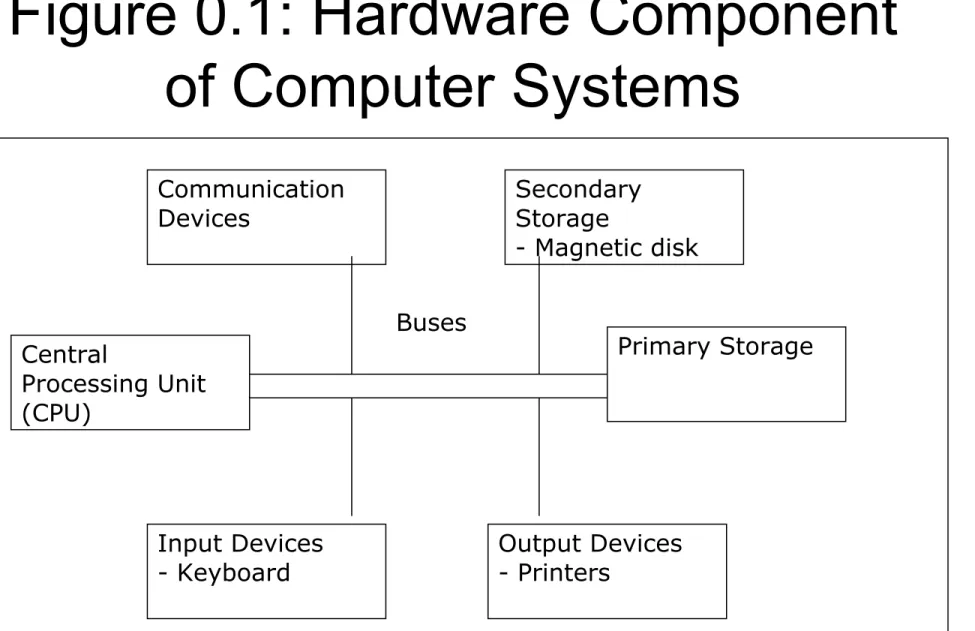
• Computer system consists of (see Figure
0.1):
– central processing unit (CPU)
– primary storage
– secondary storage
– input devices
– output devices
Figure 0.1: Hardware Component
of Computer Systems
Communication Devices Secondary Storage - Magnetic disk Central Processing Unit (CPU) Primary Storage Input Devices - Keyboard Output Devices - Printers BusesThe System Unit
• What are common components inside the
system unit?
Memory
Adapter cards
▪ Sound card ▪ Video cardPorts
Drive bays
Power supply
power supply ports drive bays processor memory sound card video cardProcessor
The System Unit
• What is the
motherboard
?
Main circuit
board in system
unit
Contains adapter
cards, processor
chips, and
memory chips
Also called
system board
• The CPU
– manipulates raw data into more useful form
and controls the other parts of the computer
system.
• Primary storage
– temporarily stores data and program
instructions during processing.
• Secondary storage
– devices store data and programs when they
are not being used in processing.
• Input devices
– convert data and instructions into electronic
form for input into the computer.
• Output devices
– convert electronic data produced by the
computer system and display them in a form
that people can understand.
• Communication devices
– provide connections between the computer
and communications networks.
• Buses
– are circuitry paths for transmitting data and
signals among the parts of the computer
system.
How Computers Represent Data
• All symbols, pictures or words must be reduced
to a string of binary digits.
• A binary digit is called a bit and represents either
a 0 or a 1.
• These are the only digits in the binary or base 2,
number system used by computers.
• A string of eight bits used to store one number or
character in a computer system is called a byte
(see Figure 0.2).
One byte for character A
01000001
The computer representation in ASCII for the
name Alice is
01000001
A
01001100
L
01001001
I
01000011
C
01000101
E
• To represent the numbers 0 through 9 and
the letters a through z and A through Z,
computer designers have created coding
systems consisting of several hundred
standard codes.
• In one code, for instance, the binary
• Two common coding systems are Extended
Binary Coded Decimal Interchange Code
(EBCDIC) and American Standard Code for
Information Interchange (ASCII). See Table 0.1.
• EBCDIC represents every number, alphabetic
character, or special character with eight bits,
used primarily in IBM and other mainframe
computers.
• ASCII was originally designed as a seven-bit
• ASCII is used in data transmission, PCs
and some larger computers.
• The computers store a picture by creating
a grid overlay of the picture.
• Each single point in this grid, or matrix is
called a pixel (picture element) and
Data Representation
• How is a letter converted to binary form
and back?
Step 1.
The user presses the capital letter D
(shift+D key) on the keyboard.
Step 2.
An electronic signal for the capital letter D is sent to the system unit.
Step 3.
The signal for the capital letter D
is converted to its ASCII binary code (01000100) and is stored in memory for processing.
Step 4.
After processing, the binary code for the capital letter D is converted to an image, and displayed on the output device.
The CPU and Primary Storage
• The CPU is the part of the computer
system where the manipulation of
symbols, numbers, and letters occurs, and
it controls the other parts of the computer
system.
Processor Control Unit Arithmetic Logic Unit (ALU) Arithmetic Logic Unit (ALU)
Processor
• What is the
central processing unit
(CPU)
?
Input Devices Storage Devices Output DevicesInterprets and carries out basic instructions that
operate a computer Memo ry Data Informatio n Instructions Data Information Instructions Data Information Control Unit
▪ Control unit directs and coordinates operations in computer
▪ Arithmetic logic unit
(ALU) performs
arithmetic, comparison, and logical operations
Processor
Control Unit
Memory
ALU
Processor
• What is a machine cycle?
Step 1. Fetch
Obtain program instruction or data item from memory
Step 2. Decode Translate instruction into commands Step 4. Store
Write result to memory
Step 3. Execute
Carry out command
The CPU and Primary Storage
Control Bus Address Bus
Data Bus
Central Processing Unit (CPU)
Arithmetic Logic Unit (ALU) 22 + 11 = 33 Control Unit Primary Storage I 8 # U
• Three kinds of busses linked between the CPU,
primary storage and the other devices in the
computer system:
– Data bus
• Pass information in bi-directional.
– Address bus
• Transmits signals for locating a given address in primary storage, indicating where data should be placed.
– Control bus
• Transmits signal specifying whether to read or write data to or from primary storage address, input device or output
• The characteristics of the CPU and
primary storage are very important in
determining a computer’s speed and
capabilities
The Arithmetic-Logic Unit and
Control Unit
• An arithmetic logic unit (ALU) and
control unit is one of the core
components of all central processing units.
• The ALU performs the computer’s
principal logical and arithmetic operations.
• It adds, subtracts, multiples, and divides,
determining whether a number is positive,
negative, or zero.
• ALU must be able to determine when one
quantity is greater than or less than another and
when two quantities are equal.
• The control unit coordinates and controls the
other parts of the computer system.
• It reads a stored program, one instruction at a
time and directs other components of the
computer system to perform the program’s
required tasks.
Processor
• Which processor should you select?
The faster the processor, the more expensive the computer
Celeron Itanium or Xeon Pentium family 1.3 GHz and up 3.0 GHz and up 2.4 GHz to 3.0 GHz Up to 2.4 GHz 2.2 GHz and up
Primary Storage
• Primary storage is a category of computer storage,
often called main memory. • Has three functions:
– Stores all or part of the program that is being executed. – Stores the operating system programs that manage the
operation of the computer.
– Holds data that the program is using.
• Data and program are placed in primary storage before processing, between processing steps and after
processing has ended prior to being returned to secondary storage or released as output.
Memory
• How is memory measured?
Term Abbreviation Approximate Size
Kilobyte KB or K
1 thousand bytes
Megabyte
MB
1 million bytes
Gigabyte GB
1 billion bytes
Terabyte TB
1 trillion bytes
• Modern primary storage devices include:
– Random access memory (RAM)
• is used for short-term storage of data or program instructions. RAM is volatile. Its contents will be lost when the computer’s electric supply is disrupted by a power outage or when the computer turned off.
– Read-only memory (ROM)
• can only be read from. It cannot be written to. ROM chips come from the manufacturer with programs already burned in, or stored. ROM is used in general-purpose computers to store important or frequently used programs, such as
computing routine for calculating the square roots of numbers.
Memory
• What is random access memory (
RAM
)
?
The more RAM a computer has, the faster it responds Also called main memory or primary storage Most RAM is volatile, it is lost when computer’s power is turned off
Memory chips that can be read from and written
Memory
•How do program instructions transfer in and out of
RAM?
Step 1. When you start the computer, certainoperating system files are loaded into RAM from the hard disk. The operating system displays the user interface on the screen.
Operating system instructions Web browser instructions Word processing program instructions Operating system interface Web browser window Word processing program window RAM RAM W e b b r o w s e r p r o g r a m i n s t r u c t i o n s a r e r e m o v e d f r o m R A M W e b b r o w s e r w i n d o w i s n o l o n g e r d i s p l a y e d o n d e s k t o p
Step 2. When you start a Web browser, the program’s instructions are loaded into RAM from the hard disk. The Web browser window is
displayed on the screen.
Step 3. When you start a word processing program, the program’s instructions are loaded into RAM from the hard disk. The word
processing program, along with the Web Browser and certain operating system instructions are in RAM. The word processing program window is displayed on the screen.
Step 4. When you quit a program, such as the Web browser, its program instructions are
removed from RAM. The Web browser is no longer displayed on the screen.
Must be re-energiz ed constantly Do not have to be re-energiz ed as often as DRAM Most common type Faster and more reliable than DRAM chips
Memory
• What are two basic types of RAM chips?
S
t
a
t
i
c
R
A
M
(
S
R
A
M
)
Dynamic
RAM
(DRAM)
• Newer Type: Magnetoresistive RAM
(MRAM)
Memory
• What is
read-only memory (ROM)
?
Memory chips that store permanent data
and instructions
Nonvolatile memory, it is not lost when computer’s
power is turned off Three types: Firmware— Manufactured with permanently written data, instructions, or information EEPROM ( e lectrically e rasable p rogrammable r ead-o nly m emory)— Type of PROM containing microcode programmer can erase PROM ( p rogrammable r ead-o nly m emory)— Blank ROM
chip onto which a programmer
Storage, Input, and Output
Technology
• Storage, input and output devices are
called peripheral devices because they are
outside the main computer system unit.
Secondary Storage Technology
•
Secondary storage is used for relatively
long term storage of data outside the
CPU.
•
Secondary storage is nonvolatile and
retains data even when the computer is
turned off.
•
The most technologies are magnetic
Storage
• What is
storage
?
– Holds data, instructions, and information for future use
Storage medium
is physical material used for storage
▪ Also called secondary storage
Storage Medium (floppy disks, Zip disks,
hard disks, CDs)
Storage
• How does volatility compare?
Nonvolatile
Storage medium is nonvolatile—contents retained
when power is off
Contents retained Contents available to user Memory (most RAM) (chips on motherboard) Screen Display ON OFF Volatile Display disappears Data and instructions available to user Display appears
Data and instructions erased
Memory is volatile—holds data and instructions
temporarily
Magnetic disk
• There are two kinds of magnetic disk:
– floppy disks – hard disks
• Magnetic Disks permit direct access to individual
records so that data stored on the disk can be
directly accessed regardless of the order in
which the data were originally recorded.
• Disk storage is often referred to as a direct
access storage device (DASD).
Magnetic Disks
• What is a
floppy
disk
?
– Portable, inexpensive storage medium (also called diskette)
Thin, circular, flexible film enclosed in 3.5” wide plastic shell
shutter shell
liner
magnetic coating
flexible thin film metal hub
• What is a
floppy disk
drive
?
– Also called secondary
storage
• One floppy drive, named drive A
– Device that reads from and
writes to floppy disk
Magnetic Disks
• What is a
hard
disk
?
hard disk installed in system unit
– High-capacity storage
– Consists of several
inflexible, circular
platters that store
items electronically
– Components
enclosed in airtight,
sealed case for
Magnetic Disks
•What are tracks and
sectors?
Track
is narrow recording band
that forms full circle on disk Sector stores up to 512 bytes of data
Magnetic Disks
• How does a hard disk work?
Step 1.
Circuit board controls movement of head actuator and a small motor.
Step 2.
Small motor spins platters while
computer is running.
Step 3.
When software requests a disk access, read/write heads determine current or new location of data.
Step 4.
Head actuator positions read/write head arms over correct location on platters to read or write data.
Optical Disk
• Also called compact disks or laser optical
disks, used laser technology to store data
at densities many times greater than those
of magnetic disks.
• The most common optical disk system
used with PCs called CD-ROM (compact
disk read only memory).
Push the same button to close the tray.
Optical Discs
• What are optical
discs?
Most PCs include an optical disc drive
Flat, round, portable metal discs made of metal, plastic, and lacquer
Can be read only or read/write
Insert the disc, label side up.
Push the button to slide out the tray.
Optical Discs
•How does a laser read data on an optical disc?
laser diode laser diode prism prism light-sensing diode light-sensing diode 0 1
lens pit land lens
disc label Step 1. Laser diode shines a light beam toward disc. Step 2. If light strikes a pit, it scatters. If light strikes a land, it is reflected back toward diode. Step 3. Reflected light is deflected to a light-sensing diode, which sends digital signals of 1 to computer. Absence of reflected light is read as digital signal of 0.
Optical Discs
• How is data stored on an optical disc?
Typically stored in single track Track divided into evenly sized sectors that store items single track spirals to edge of disc disc sectors
• WORM (write once/read memory) or CD-R
(compact disk-recordable) optical disk systems
allow users to record data only once on an
optical disk.
• New CD-RW (CD-Rewritable) technology has
been developed to allow users to create
rewritable optical disks.
• Digital-video disks (DVDs) also called digital
versatile disks are optical disks the same size as
CD-ROMs but of even higher capacity (minimum
of 4.7 gigabytes of data).
Optical Discs
• What is a
CD-ROM
?
Compact disc read-only memory
Cannot erase or modify contents Typically holds 650 MB to 1 GB
Optical Discs
• What are
CD-Rs
and
CD-RWs
?
Must have
CD recorder
or CD-R drive
Cannot erase disc’s contents
CD-R (compact disc-recordable) —cdisc you can write on once
CD-RW (compact disc-rewritable) —ceerasable disc you can write on
multiple times
Must have CD-RW software
Optical Discs
•What is a
DVD-ROM
(digital
versatile disc-ROM or digital
video disc-ROM)?
High capacity disc capable of storing 4.7 GB to 17 GB
Must have DVD-ROM drive or
DVD player to read DVD-ROM Stores databases, music,
Optical Discs
• How does a DVD-ROM store data?
Two layers of pits are used, lower layer is semitransparent so laser can read through Some are double-sided
Blu-Ray discs currently have a storage capacity of up to 27 GB
Magnetic Tape
• Magnetic tape is an older storage technology
that still used for secondary storage of large
volumes of information.
• The principle advantages
– its inexpensiveness, its relative stability and its ability to store very large quantities of information.
• The disadvantages
– its sequentially stored data and its relative slowness compared to the speed of secondary storage media.
Tape
• What is
tape
?
– Magnetically coated plastic ribbon
capable of storing large amounts
of data at low cost
PC Cards
• What is a
PC Card
?
Adds capabilities to computer
Credit-card-sized device commonly used in notebook computers
Input and Output Devices
• Input devices
– Input devices gather data and convert them into electronic form for use by the computer.
– Keyboard
• The principal method of data entry for entering text and numerical data into a computer
– Pointing Devices
• A computer mouse is handheld device with point-and-click
capabilities that is usually connected to the computer by a cable.
• Touch screens allows users to enter limited amounts of data
by touching the surface of a sensitized video display monitor with finger or a pointer.
• Source Data Automation
– Captures data in computer-readable form at the time and place they are created.
– Optical Character Recognition (OCR) devices
translate specially designed mark, characters, and codes into digital form.
– Magnetic ink character recognition (MICR)
technology is used primarily in check processing for the banking industry, which the bottom of typical
check contains characters identifying the bank, checking account, and check number that are preprinted using a special magnetic ink.
– A MICR reader translates these characters into digital
form for the computer.
– Handwriting-recognition devices such as pen-based
tablets, notebooks, and notepad are promising new input technologies.
– These pen-based input devices convert the motion made by an electronic stylus pressing on a
touch-sensitive tablet screen into digital form.
– Digital scanners translate image such as pictures or
documents into digital form.
– Voice input devices convert spoken words into digital
form for processing by the computer.
– Sensors are devices collect data directly from the
What Is Input?
• What is
input
?
Input device
is any hardware component that
allows users to enter data and instructions
What Is Input?
• What are the two types of
input?
▪ Unprocessed text, numbers, images, audio, and video
Instructions
▪ Programs
▪ Commands
▪ User responses
The Keyboard
• How is the
keyboard
divided?
Typing area
Numeric keypad
Function keys, special
keys that issue
Pointing Devices
• What is a
mouse
?
Pointing device that fits under palm of hand
▪ Pointing device controls movement of pointer, also called mouse pointer
Mechanical mouse
has rubber or metal
ball on underside
mouse buttons wheel button mouse pad ballOther Pointing Devices
• What is a
trackball
?
Stationary pointing device
with a ball on its top or side
To move pointer, rotate ball
with thumb, fingers, or palm
of hand
Other Pointing Devices
•What are a
touchpad
and a
pointing stick
?
Touchpad
is small, flat,
rectangular pointing device
sensitive to pressure and motion
Pointing stick
is pointing device
shaped like pencil eraser
positioned between keys on
keyboard
Other Pointing Devices
• What are a
joystick
and a
wheel
?
Joystick
is vertical
lever mounted
on a base
Wheel
is
steering-wheel-type
input device
▪ Pedal simulates car brakes and acceleratorOther Pointing Devices
• What is a
light pen
?
Handheld input device
that can detect light
▪ Press light pen against screen surface and then press button on pen
Other Pointing Devices
• What is a
touch
screen
?
Touch areas of screen with
finger
Keyboard and Pointing Devices
• What is a
stylus
and a
digital pen
?
Looks like a ballpoint pen, but uses pressure to write
text and draw lines
Voice Input
• How does
voice recognition
work?
Step 2. An analog-to-digital converter (ADC) translates
sound waves into digital measurements computer can
process. Measurements include pitch, volume, silences, and phonemes. Phonemes are sound units such as aw and guh.
10010111010110101100001101
Step 3. Software compares
spoken measurements with those in its database to find a match or list of possible matches.
Matches
Step 4. To narrow a list down, software presents user
with a list of choices or uses a natural language component to predict most likely match. User may correct any
selection made by software.
Natural Language Engine
Voice Input
•What is a MIDI (musical instrument
digital interface
)?
External device, such as electronic piano
keyboard, to input music and sound
Digital Cameras
• How does a digital camera work?
Step 1. Point to the image to
photograph and take picture. Light passes into the lens of the camera.
Step 2. Image is focused on a
chip called a charge-coupled
device (CCD).
Step 3. CCD generates an analog
signal that represents the image.
Step 4. Analog signal is converted
to digital signal by
analog-to-digital converter (ADC).
Step 5. Digital signal processor
(DSP) adjusts quality of image and usually stores digital image on miniature mobile storage media in the camera.
Step 6. Images are transferred to a
computer’s hard disk by plugging one end of the cable into a camera and the other end into a computer; or images are copied to hard disk from storage media used in the camera.
Step 7. Using software
supplied with the camera, images are viewed on screen, incorporated into documents, edited, and printed.
Digital Cameras
• What is
resolution
?
Sharpness and clarity of image
The higher the resolution, the better the image
quality, but the more expensive the camera
Pixel (picture element)
is single point in
electronic image
▪ Greater the number of pixels, the better the image quality
Video Input
• What is
video input
?
Process of entering full-motion images
into computer
Video capture card is
adapter card that converts
analog video signal into
digital signal that
computer can use
Digital video (DV)
camera
records video as
Video Input
• What are a
PC video camera
and a
Web
cam
?
PC video camera
c—
cDV camera used to capture video
and still images, and to make
video telephone calls on Internet
▪ Also called PC camera
Web cam
c—
cvideo camera
whose output displays on
a Web page
Scanners and Reading Devices
• What is a
scanner
?
Light-sensing device that
reads printed text and
graphics
▪ Used for image processing, converting paper documents into electronic images
Drum Flatbed
Pen or Handheld
Scanners and Reading Devices
•How does a
flatbed
scanner
work?
Step 2. Bright light moves underneath
scanned document.
Step 3. Image of the document is
reflected into a series of mirrors.
Step 1. Document to be scanned is
placed face down on the glass window.
Step 6. Users can print image,
e-mail it, include it in a document, or place it on a Web page.
Step 4. Light is converted to analog electrical current that is converted to
digital signal by an analog-to-digital converter (ADC).
Step 5. Digital information is sent to
memory in the computer to be used by illustration, desktop publishing, or other software; or it is stored on disk.
Scanners and Reading Devices
• What is an optical reader?
▪ Optical character recognition
(OCR) reads characters in
OCR font
▪ Optical mark recognition
(OMR) reads hand-drawn pencil
marks, such as small circles
Device that uses light source to read characters, marks,
and codes and then converts them into digital data
Scanners and Reading Devices
• What is a
bar code reader
?
What is a
magnetic-ink character recognition
(MICR) reader
?
Scanners and Reading Devices
Can read text printed with magnetized ink
Banking industry almost exclusively uses MICR
for check processing
Biometric Input
• What is biometrics?
Authenticates person’s identity
by verifying personal
characteristic
▪ Fingerprint scanner captures curves and indentations of
fingerprint
▪ Hand geometry system measures shape and size of person’s hand
Biometric Input
• What are examples of biometric technology?
Voice verification system compares live
speech with stored voice pattern
Signature verification system recognizes
shape of signature
Iris recognition system reads
patterns in blood vessels in back
of eye
▪ Biometric data is sometimes stored
on smart card, which stores
personal data on microprocessor embedded in card
• Output Devices
– Display data after they have been processed.
– Cathode Ray Tube (CRT)
• The most popular form of information output.
• It works much like a television picture tube, with an electronic gun shooting a beam of electrons to
illuminate the pixels on the screen.
– Printers
• Produce a printed hard copy of information output. • Include impact printers ( dot-matrix printer), and
non-impact printers (laser, inkjet, and thermal transfer printers).
– Plotters
• To created high-quality graphics documents with multicolored pens to draw computer output.
• Slower than printers but are useful for outputting large-size charts, maps or drawing.
– Voice output devices
• Converts digital output data into intelligible speech.
– Speakers
• To deliver an audio output such as music, that is connected to the computer.
What is Output?
• What is
output
?
p. 300 Fig. 6-1 Next
Data that has been processed into a useful form,
▪ Output device is any hardware component that can convey information to user
Display Devices
• What is a
display
device
?
p. 302
Output device that visually conveys information
▪ Information on display device sometimes called soft copy
Monitor
houses display device as separate
CRT Monitors
• What is a
CRT monitor
?
Contains cathode-ray
tube (CRT)
Screen coated with tiny
dots of phosphor material
▪ Each dot consists of a red, blue, and green phosphor
Common sizes are 15, 17,
19, 21, and 22 inches
▪ Viewable size is diagonal measurement of actual viewing area
CRT Monitors
•How does video travel from the processor to a CRT
monitor?
Step 1. The processor sends digital video data to the video card.
Step 2. The video card’s digital-to-analog converter (DAC) converts the digital video data to an analog signal.
Step 3. The analog signal is sent through a cable to the CRT monitor. Step 4. The CRT monitor separates the analog signal into red, green, and blue signals.
Step 5. Electron guns fire the three color signals to the front of the CRT.
Step 6. An image is
displayed on the screen when the electrons hit phosphor dots on the back of the screen.
Video card (also called a graphics card) converts digital
Printers
• What is a
printer
?
Output device that
produces text and
graphics on paper
Result is hard copy, or
printout
Two orientations: portrait
and landscape
portrait
Speakers and Headsets
• What is an
audio output device
?
Computer component that produces music, speech, or
other sounds
Speakers and Headsets
• What is
voice output
?
Computer talks to you through speakers on computer
Internet telephony allows you to have conversation
over Web
Categories of Computers and
Computer Systems
• Computers are classified into two:
– A special-purpose computer – A general-purpose computer
• Special-Purpose Computers
– Is a computer designed for a particular function, executing the same stored set of instructions whenever requested.
– For example
• microwave ovens • washing machine
Categories of Computers and
Computer Systems
Next
Personal Computers (desktop)
Mobile Computers and Mobile Devices Game Consoles Servers Mainframes Supercomputers Embedded Computers
•
General-Purpose Computers
– Is a computer that can be used for solving many different types of problems.
– Available in many sizes and a wide range of capabilities.
– Can be classified as follows:
• 1. Microcomputers a. Laptop computers
b. Desktop computers
c. Workstations
• 2. Minicomputers • 3. Mainframe computers • 4. SupercomputersMicrocomputers
• Sometimes referred to as a personal computer (PC), is one that can be placed on a desktop or carried from room to room.
• The smallest microcomputers are known as laptop computers or notebook computers.
• Desktop computers are compact microcomputer
systems that fit on a desk and are designed for use by individuals.
• A workstation is the largest type of microcomputer and is generally used in scientific and engineering
Minicomputers
•
More powerful and more expensive than
microcomputers.
•
Are smaller and cheaper compared to
mainframes.
•
Also can be server, which is used for
managing internal company networks or Web
sites.
•
Server computers are specifically optimized to
support a computer network enabling users to
share files, software, peripheral devices (such
as printers), or other network resources.
Mainframe Computer
•
The largest computer, a powerhouse
with massive memory and e extremely
rapid processing power.
•
It is used for very large business,
scientific or military application where a
computer must handle massive amounts
of data or many complicated processes.
Supercomputer
•
Is highly sophisticated and powerful
computer that is used for tasks requiring
extremely rapid and complex calculations
with hundreds of thousands of variable
factors.
•
Used in many areas of scientific
research, weather prediction, aircraft
design, nuclear weapon and so on.
Computer Software
•
Application Software
–
Refers to programs that are developed to
solve some specific problems.
–
There are two types of application software:
– application program to solve special classes of problems
– Application programs that you can write to solve your own problems.
–
Examples of application software:
– word processing – database programs – spreadsheets
•
System Software
–
Refers to programs that make the computer
usable and accessible to the developers and
programmers of applications software.
–
Examples of system software:
– Operating systems – Language translator – Linker
– Loader
Programming Languages
•
Programming Language is an agreed upon
format of symbols that allow a programmer to
instruct a computer to perform certain
predefined tasks.
•
Provide features to support the data
processing activities, which include declaring
variables, evaluating numeric expressions,
assigning values to variables, reading and
writing data to devices, looping and making
decisions.
• a. Machine Languages
– Is the natural language of a computer.
– Does not need to translate and is ready for immediate execution.
– Machine language instruction is a binary string of 0s and 1s.
• 010 1 1000 0001 0000 1100 0000 0001 0000
– Are machine-dependent - each computer type has its own machine language.
– Programs written in machine languages are not
portable because programs written in for one type of computer cannot be run on another type
• Assembly Languages
– Consists of English-like abbreviations. – Easier to understand.
• L 1, GROSSPAY • S 1, TAX
• ST 1, NETPAY
– Program written in assembly languages cannot be directly processed by a computer.
– Must use language translators, called assemblers, to convert them to machine code.
– Disadvantages:
• In general, each assembly language instruction corresponds to one machine language instruction. Therefore, the programs written in them are lengthy.
– Because of variations in assembly languages, programs written using them are not portable.
•
High-Level languages
– Instructions are quite English-like, and a single instruction can be written to correspond to many operations at the machine level.
– For example, the assembly language program can be written in high-level languages as follows:
• Netpay = gross pay – tax
– Are easier to learn than machine or assembly languages.
– Have to be converted to machine languages before they can be executed using compilers, system
software that translates a source program into an almost executable object program
• For example:
– COBOL – developed in the 1960s for business transactions.
– FORTRAN – developed for mathematic calculations. – Pascal - is a structured high-level language.
– C – is designed to support only procedure-oriented programming. Popular language for developing
system applications such as operating system and compilers.
– Java – is an object-oriented language.
– C++ - is extension of C programming language that support object oriented programming and