
Experimental evaluation of a multi-modal user interface for
a robotic service
DI NUOVO, Alessandro <http://orcid.org/0000-0003-2677-2650>, WANG,
Ning, BROZ, Frank, BELPAEME, Tony, JONES, Ray and CANGELOSI,
Angelo
Available from Sheffield Hallam University Research Archive (SHURA) at:
http://shura.shu.ac.uk/13375/
This document is the author deposited version. You are advised to consult the
publisher's version if you wish to cite from it.
Published version
DI NUOVO, Alessandro, WANG, Ning, BROZ, Frank, BELPAEME, Tony, JONES,
Ray and CANGELOSI, Angelo (2016). Experimental evaluation of a multi-modal user
interface for a robotic service. In: ALBOUL, Lyuba, DAMIEN, Dana and AITKEN,
Jonathan M., (eds.) Towards autonomous robotic systems, 17th Annual Conference,
TAROS 2016, Sheffield, UK, June 26--July 1, 2016, Proceedings. Lecture Notes in
Computer Science. Lecture Notes in Artificial Intelligence (9716). Springer
International Publishing, 87-98.
Copyright and re-use policy
See
http://shura.shu.ac.uk/information.html
Sheffield Hallam University Research Archive
interface for a robotic service
Alessandro Di Nuovoa, Ning Wangb, Frank Brozc, Tony Belpaemeb, Ray Jonesd, and Angelo Cangelosib
aDepartment of Computing, Sheffield Hallam University, UK b
Centre for Robotics and Neural Systems, Plymouth University, UK
cSchool of Mathematical and Computer Sciences, Heriot-Watt University, UK d
School of Nursing and Midwifery, Plymouth University, UK
Abstract. This paper reports the experimental evaluation of a Multi-Modal User Interface (MMUI) designed to enhance the user experience in terms of service usability and to increase acceptability of assistive robot systems by elderly users. The MMUI system offers users two main modalities to send commands: they are a GUI, usually running on the tablet attached to the robot, and a SUI, with a wearable microphone on the user. The study involved fifteen participants, aged between 70 and 89 years old, who were invited to interact with a robotic platform customized for providing every-day care and services to the elderly. The experimental task for the participants was to order a meal from three different menus using any interaction modality they liked. Quantitative and qualitative data analyses demonstrate a positive evaluation by users and show that the multi-modal means of interaction can help to make elderly-robot interaction more flexible and natural.
Keywords: Human-robot interaction and interfaces; Service robotics; Socially Assistive Robotics.
1
Introduction
Recent technological developments have made Socially Assistive Robotic (SAR) platforms a realistic option for providing services and care to our ageing popula-tion [22]. As an example they are able to provide assistance inside the apartment or serving in shared facilities of the building or accompanying people outdoors [11].
recent interfaces for SAR are presented and discussed in [19], that present five experimental projects focused on a single platform that was operating inside the user’s home. The majority of them use a wheel drive platform with a fixed touch screen as the main Graphic User Interface (GUI). The limitation of the fixed touch screen is that a short distance is needed to interact with the robot. In the KSERA project the GUI is projected on a wall with a pico projector [20]. This solution has the advantage to provide a bigger screen and to allow interaction from a distance, but the main drawback is that a suitable surface is always required. Speech and gesture interfaces may help human-robot interaction when a GUI is not available, but there are services that require the use of a graphic interface (e.g. shopping, video calling, food ordering, etc...).
In this area multi-modal interaction has developed considerably in the past fifteen years [15], thanks to the wide availability of devices and sensors that can support this approach. Multi-Modal User Interfaces (MMUI) convincingly mimic social interaction between a human and robot by means of speech, gestures or other modalities, that may be preferred over unimodal interfaces by elderly users [16]. Multimodal interfaces have been demonstrated to offer better flexibility and reliability than other human/machine interaction means [14]. However, it is clear that further research in this area is needed to prove the added value and soundness for care provision [5]. Particular emphasis should be given to the types and quality of feedback that the robot interface provides in order to make the system more intuitive for elderly users [9] and how often this feedback is given [8].
In this paper, we present the user evaluation of a MMUI, which was designed to enhance the user experience in terms of usability and to increase acceptabil-ity of assistive robot systems by elderly users [13] as part of the activities of the EU FP7 Robot-Era project. The MMUI is described in Section 2.1, which gives detail of the graphic and the speech user interfaces. The description of the robotic platform and of the service tested is in Section 2.2. Participants, setting and instruments used for the evaluation are presented in Section 2.3. The ex-perimental results are discussed in Section 3. Finally, our conclusion is given in Section 4.
2
Material and Methods
2.1 Multi-modal Interface for Elderly-Robot Interaction
The MMUI system offers users two main modalities to send commands: they are a GUI, usually running on the tablet attached to the robot, and a SUI, with a wearable microphone on the user. Two main modules implement the MMUI: the
Web Interface System that includes the graphic user interface (GUI) and the text-to-speech (TTS) software; theDialog Manager that implements the Speech User Interface (SUI) with the Automatic Speech Recognition (ASR) software. The MMUI software is also responsible for providing feedback to users via the same modalities that they use to command the robot. This was implemented by making both robotic platforms and web graphic interface able to produce sounds, including speech. As visual feedback the tablet can show specific text messages (e.g. yes/no buttons for confirmation) and robots can also change colour of their LEDs (e.g. they change colour when the robot is waiting for the user action).
The web-based Graphic User Interface (GUI) The scientific literature in-cludes many contributions that provide guidelines and design recommendations about web and tablet interfaces for the elderly. Web design guidelines to address the web experiences of older users can be found in [25, 3], while a survey on touch-based mobile phone interface for the elderly can be found in [2]. In our implementation we used a tablet because it has been found that elderly users are very receptive to these devices [24].
The GUI uses web technology to support the widest range of devices that can be connected to the system network. A main menu index page allows the user to navigate between the different service pages that compose the GUI. There are additional web pages, not accessible by the user, that are available from the web server to allow testing and to support other actors of the Robot-Era system (grocer, caregiver, etc...). A settings page, that is not accessible from the main page, is also present to modify the language, items in the shopping page and to switch test site apartment map. Pages are implemented with HTML5 and Javascript so that they can ideally be available on any browser running on any device. On the web server side, there are scripts that do the reasoning and communicate via the PEIS middleware with the other sensors and modules that compose the ambient intelligence.
interface aims to maximize the integration with the host device, in order to give the impression that it can be a real product and, moreover, to provide people that have previous knowledge of the device with the basic commands that they already know.
More details and a preliminary evaluation of the Robot-Era user interfaces can be found in [13].
The Speech User Interaction (SUI) module, Multi-language support and feedback Two significantly different versions of the SUI were implemented during the Robot-Era project. First, a basic speech recognition system was imple-mented to simply allow the user to call the robot and order the robotic services by using easy spoken commands. The first version was designed to be simple in order to perform a first test with elderly participants and, then, decide to increase the complexity if that was successful. Indeed, after the success of the general experimentation and the positive user feedback, a more complex dialogue manager and a refined speech recognition system were implemented for the final version that was tested in the focused study.
Both versions shared a TTS module implemented as a ROS module on robots. The AcapelaVoice As A Service(VAAS) is used for TTS. This is a web service that receives any text with voice parameters and responds with an audio file containing the speech. The Acapela web service is a module integrated into the web interface and on the robot platforms. Acapela web VAAS was preferred because of its easy integration with the web architecture of the interface. Voices were selected based on an informal survey of native speakers among the choices available for each language (many options for English but only a couple for each other language). The domestic robot has a female voice, as requested by the elderly in preliminary study, while condominium and outdoor have male voices to distinguish them and their service roles from the domestic robot.
Speech recognition is implemented using the Nuance SDK and is based on a set of restricted grammars. Nuance was preferred because it supports all the languages used in our experimentation (Italian, Swedish and English, which was used also for debugging and demonstration). The program runs as a single-threaded application whose flow is controlled by the audio input stream. Audio events trigger callbacks to handle the processing of sound input. The recognition grammars are loaded dynamically to change what input the system islistening for based on the context and stage of the verbal interaction.
The speech recognition is done out-of-the-box, i.e. there was no training session. Users begin verbal interaction with the robot by calling the robot by name using their wearable microphone. The robot’s name is defined as awake-up
a service request interaction, the user may request any service. The following interaction will be determined by which service was selected. After the user has called the robot, the dialogue proceeds in a system-initiative manner. The speech interface is designed to produce short, simple, command-oriented dialogues with the user. In the case of services which require complex or extended user input, (such as creating a shopping list or entering an appointment for a reminder), the SUI directs the user to use the GUI for input and hands the interaction over to the GUI. This design choice was made to avoid the need for numerous confirmation or error-recovery dialogues which could frustrate the user in the event of low speech recognition accuracy.
Considering that using context aware models can help improve recognition accuracy and system efficacy, the original speech interaction architecture was upgraded by incorporating a more flexible and efficient dialogue flow control mechanism, as well as a more powerful dialogue manager. The dialogue man-ager was based on the open-source Olympus dialogue management architecture. The Ravenclaw dialogue manager, part of Olympus, simplifies the authoring of complex dialogues, has general support handling speech recognition errors, and can be extended to support multi-modal input and output [6]. The main task in achieving a context-dependent spoken dialogue system was to design dialogue task specifications according to user expectations and service requirements. We did this by following three steps: User expectation exploitation; Service-specific grammar design; Context-aware grammar flow switch.
More details and a preliminary evaluation of the SUI can be found in [23].
2.2 Robotic platform and description of the service: the Food Delivery service
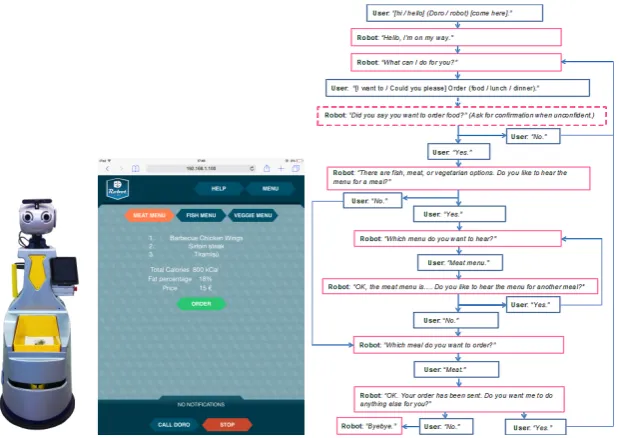
The robotic platform used in our experiments is shown in Figure 1. It is a customized G5 platform produced within the Robot-Era project. The appearance of the platforms was also studied with elderly and specifically designed for the project [10]. The robot is equipped with a tablet that is mounted on a magnetic frame that can be detached at will. A wearable microphone was provided to the users and used as input for the speech user interface. The microphone was placed on the user near the neck in order to maximize the quality of the speech recording.
The MMUI is designed to allow the user to browse three different options: meat, fish and vegetarian (veggie). Each option has 3 courses and the total calories are shown. A price is also shown to be more realistic. The user can also use the SUI to navigate among the menus and read the items aloud. After deciding which option they prefer, users can select it using the SUI or press the
Fig. 1.(Left) The customized robotic platform used in our experiment. (Center) The food delivery page on the GUI. (Right) Dialogue flow (SUI) for the food delivery service.
2.3 User Recruitment, Setting and Evaluation Instruments
To evaluate the SUI and GUI we developed a specific use case and we carried out a series of HRI experiments at Plymouth University. To recruit participants we held a workshop at a sheltered housing facility for the accommodation of retired people in Plymouth, United Kingdom. During the workshop, we intro-duced the latest elderly-tailored user interface developed under the Robot-Era Project and gave demonstrations of the interaction capabilities of an humanoid robotic platform. Around 30 residents in the apartment building attended the workshop. At the end of the workshop, the attendants were invited to participate in the follow-up study on elderly-robot interaction at Plymouth University. A total of 15 subjects (3 males, 12 females, all native British English speakers) from Wesley Court have participated in the experiments. Participants’ age was in the range 70-89, average 80.53, they were all well educated, with higher or further education degrees, including 4 engineers. Almost all use (6) or know how to use (8) a computer, majority (10) never used a smartphone but Eight regularly use a tablet and Three know how to use it.
45 minutes. During the experiments, in addition to questionnaires and open-question interview opinions, frontal and profile video recordings were collected. Participants always filled all the questionnaires on their own with no conversation to avoid influencing them.
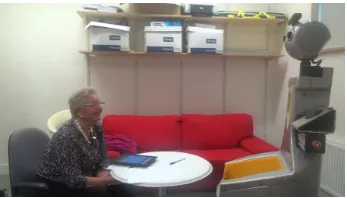
Fig. 2.Focused experiment in a controlled setting. The elderly participant is sitting in front of the robot, while the tablet is detached and placed on the table easy accessible by the user.
Participants completed the System Usability Scale (SUS). This is a reliable, lightweight usability scale that can be used for global assessments of technolog-ical systems usability. SUS was developed by Brooke in 1996 [7], it is a simple, ten-item, five point attitude Likert scale giving a global view of subjective assess-ments of usability. SUS yields a single score on a scale of 0-100, this is obtained converting the range of possible values from 0 to 100 instead of from 10 to 50. The SUS has been widely used in the evaluation of a range of systems. Bangor, Kortum and Miller [4] have used the scale extensively over a ten-year period and have produced normative data that allow SUS ratings to be positioned relative to other systems. According to them, products which are at least passable have SUS scores above 70, with better products scoring in the high 70s to upper 80s. Truly superior products score better than 90.
In addition to the standard instrument, an ad-hoc questionnaire was admin-istered to evaluate some aspects of the human robot interaction for each service. The ad-hoc questionnaire has three constructs (HRI, GUI, SUI) and it has been presented in [13]. Participants could indicate their level of agreement to the statements on a five point Likert scale including verbal anchors: totally disagree (1) disagree (2) neither agree nor disagree (3) agree (4) totally agree (5). Here we refer to GUI, SUI and HRI as the final score obtained by averaging all the corresponding scores for each service experienced by the participant.
3
Experimental Results and Discussion
This section presents the analyses of the data gathered from the experiments with elderly participants. Descriptive statistics reported are: Average (Avg), Median (Med), and Standard Deviation (Stdev).
Table 1 presents descriptive statistics of the scores of the usability question-naires (ad-hoc and SUS) given by participants of the experiment. For all the dimensions considered the results are positive, showing a good usability and acceptability of the MMUI for the service tested.
Table 1.Usability analysis and comparison. Descriptive statistics reported are: Aver-age (Avg), Median (Med), and Standard Deviation (Stdev).
avg med stdev HRI 3.99 4 0.58 GUI 4.13 4 0.45 SUI 3.90 4 0.65 SUS 80.67 80 9.04
To further analyse the results we observed and annotated the video of the experiment in order to identify the participants’ gaze direction. Three different directions were evaluated: the robot, the tablet, other objects in the room (in-cluding the researcher). Results of the video analysis are reported in Figure 3 for all the fifteen participants to the focused experiment. From the gaze analysis, we see that almost all (14 out of 15) participants demonstrated to focus their at-tention on the technological devices. In particular, 12 participants (80%) spent the majority of the time (> 50%) looking at the robot, while just two (13%) participants preferred to look at the tablet. From the discussion with them, we know that it is a personal preference not influenced by their physical conditions or previous experience. Indeed, ones never used a tablet before, while ones was using it often, and none of them has hearing loss. One participant never looked at the tablet because her physical condition, indeed she has a severe visual im-pairment and she didn’t have her magnifying glasses during the experiment. However, she enjoyed to speak with the robot and she scored 5 (fully agree) to the question “I’m confident that I can use only speech (no tablet) to complete the food delivery service”.
Fig. 3.Participants’ gaze direction during the entire experiment. The graph presents the average percentage of time spent by participants looking at: the robot, the tablet, other objects in the room (including the researcher). Confidence interval bars are also shown.
Furthermore, to better analyse the behaviour of participants, we identified the following 3 steps related to the dialogue phases:
1. Waking up-Which meal (to hear?). The participant calls the robot, which then asks “how can I help?” and starts the Food delivery service. Then, the robot offers to read aloud the items of the three available menus. The user can ask to read menus one by one or all of them together.
2. Reading menu. The robot reads the menu(s) aloud. Note that when the robot is reading a menu, the system will automatically show the items on the tablet screen.
3. Ordering-Ending The participant selects and confirms the meal to order among the three available choices. The robot asks if it can do anything else, but the participant closes the interaction by saying “no”. The robot closes the interaction with a “Goodbye”.
The breakdown of the activities during the three steps is reported in Figure 4, where it is shown the proportion (percentage) of the time spent by the robot and user interacting and waiting each other.
Figure 4[Left] presents the average percentage of the total experimental time spent by participants looking at the tablet, broken down for each step of the experiment. It can be easily seen that participants prefer to read the menu items on the tablet while the robot is reading them aloud. Indeed, 12 participants out of 15, i.e. 80%, looked at the tablet for more than 50% of the time in theReading menustep of the experiment. This is a clear advantage of the multi-modality of the interface that allows elderly users to select the modality they like to interact with the robot according to the different situations.
partici-pants scored at least 4, with an average score of 4.14, “I like the idea of using speech and tablet together to complete the food delivery service”.
Fig. 4.[Right] Breakdown of the activities during each step of the experiment. User waiting indicates the time spent by the user thinking (e.g. what to answer). Robot waiting indicates the time needed by software system to elaborate (e.g. speech recog-nition). [Left] Average percentages of the time spent by participants looking at the tablet during each step of the experiment.
As final remark, all the participants indicated that they enjoyed the experi-ence during the experiments with the robot and many offered their availability for further studies.
4
Conclusion
This paper presented the experimental evaluation of a software interface designed to enhance the user experience in terms of service usability and to increase acceptability of an assistive robot system by elderly users. The system offered two main modalities to interact with the robot: a GUI on a tablet detachable from the robot, and a SUI, which decoded speech commands recorded via wearable microphone on the user. Fifteen participants, aged between 70 and 89 years old, were invited to interact with a robotic platform using any modality they liked. The task was to order a meal among three different set menus.
experiment. Indeed, all participants liked the idea of using speech and tablet together to complete the service.
All the participants indicated that they enjoyed the experience during the experiments with the robot and many offered their availability for further studies. Finally, we can conclude that multi-modality can add value to the entire system and be a further step towards more usable and widely accepted robot as companions in the every-day elderly care.
References
1. Robot-Era project: Implementation and integration of advanced robotic sys-tems and intelligent environments in real scenarios for the ageing population, www.robot-era.eu, FP7 - ICT - Challenge 5: ICT for Health, Ageing Well, In-clusion and Governance. Grant agreement number 288899
2. Al-Razgan, M., Al-Khalifa, H., Al-Shahrani, M., AlAjmi, H.: Touch-based mobile phone interface guidelines and design recommendations for elderly people: A survey of the literature. In: Huang, T., Zeng, Z., Li, C., Leung, C. (eds.) Neural Infor-mation Processing, Lecture Notes in Computer Science, vol. 7666, pp. 568–574. Springer Berlin Heidelberg (2012)
3. Arch, A., Abou-Zahra, S., Henry, S.L.: Older users online: WAI guidelines address the web experiences of older users. User Experience Magazine 8(1), 18–19, 29 (2009) 4. Bangor, A., Kortum, P.T., Miller, J.T.: An empirical evaluation of the system usability scale. International Journal of Human-Computer Interaction 24(6), 574– 594 (2008)
5. Bemelmans, R., Gelderblom, G.J., Jonker, P., de Witte, L.: Socially assistive robots in elderly care: A systematic review into effects and effectiveness. Journal of the American Medical Directors Association 13(2), 114–120 (2012)
6. Bohus, D., Rudnicky, A.I.: The ravenclaw dialog management framework: Archi-tecture and systems. Computer Speech & Language 23(3), 332–361 (2009) 7. Brooke, J.: Sus-a quick and dirty usability scale. Usability evaluation in industry
189, 194 (1996)
8. Broz, F., Di Nuovo, A., Belpaeme, T., Cangelosi, A.: Talking about task progress: Towards integrating task planning and dialog for assistive robotic services. Pala-dyn, Journal of Behavioral Robotics 6(1) (2015)
9. Broz, F., Nuovo, A.D., Belpaeme, T., Cangelosi, A.: Multimodal robot feedback for eldercare. In: Workshop on Robot Feedback in Human-Robot Interaction: How to Make a Robot Readable for a Human Interaction Partner at Ro-MAN 2012 (2012) 10. Casiddu, N., Cavallo, F., Divano, A., Mannari, I., Micheli, E., Porfirione, C., Zallio, M., Aquilano, M., Dario, P.: Robot interface design of domestic and condominium robot for ageing population. In: ForITAAL (October 2013)
11. Cavallo, F., Limosani, R., Manzi, A., Bonaccorsi, M., Esposito, R., Rocco, M., Pecora, F., Teti, G., Saffiotti, A., Dario, P.: Development of a socially believable multi-robot solution from town to home. Cognitive Computation 6(4), 954–967 (2014)
12. Consortium, W.W.W.: Web accessibility for older users, http://www.w3.org/TR/wai-age-literature/
14. Dumas, B., Lalanne, D., Oviatt, S.: Multimodal interfaces: A survey of principles, models and frameworks. In: Human Machine Interaction, pp. 3–26. Springer (2009) 15. Jaimes, A., Sebe, N.: Multimodal human–computer interaction: A survey.
Com-puter vision and image understanding 108(1), 116–134 (2007)
16. Jian, C., Shi, H., Schafmeister, F., Rachuy, C., Sasse, N., Schmidt, H., Hoemberg, V., Steinbchel, N.: Touch and speech: Multimodal interaction for elderly persons. In: Gabriel, J., Schier, J., Huffel, S., Conchon, E., Correia, C., Fred, A., Gamboa, H. (eds.) Biomedical Engineering Systems and Technologies, Communications in Computer and Information Science, vol. 357, pp. 385–400. Springer Berlin Heidel-berg (2013)
17. Kline, P.: The handbook of psychological testing (2nd ed.). Routledge, London, UK (2000)
18. Kristoffersson, A., Coradeschi, S., Loutfi, A.: A review of mobile robotic telepres-ence. Advances in Human-Computer Interaction 2013, 3 (2013)
19. Mayer, P., Beck, C., Panek, P.: Examples of multimodal user interfaces for socially assistive robots in ambient assisted living environments. In: Cognitive Infocommu-nications (CogInfoCom), 2012 IEEE 3rd International Conference on. pp. 401–406. IEEE (2012)
20. Panek, P., Edelmayer, G., Mayer, P., Beck, C., Rauhala, M.: User acceptance of a mobile led projector on a socially assistive robot. In: Wichert, R., Eberhardt, B. (eds.) Ambient Assisted Living, pp. 77–91. Advanced Technologies and Societal Change, Springer Berlin Heidelberg (2012)
21. Petzold, M., Barbabella, F., Bobeth, J., Kern, D., Mayer, C., Morandell, M.: To-wards an ambient assisted living user interaction taxonomy. In: CHI’13 Extended Abstracts on Human Factors in Computing Systems. pp. 49–54. ACM (2013) 22. Tapus, A., Maja, M., Scassellatti, B.: The grand challenges in socially assistive
robotics. IEEE Robotics and Automation Magazine 14(1) (2007)
23. Wang, N., Broz, F., Di Nuovo, A., Belpaeme, T., Cangelosi, A.: A user-centric design of service robots speech interface for the elderly. In: Proceedings of the International Conference on Non-Linear Speech Processing, NOLISP 2015 (2015) 24. Werner, F., Werner, K., Oberzaucher, J.: Tablets for seniors an evaluation of
a current model (ipad). In: Wichert, R., Eberhardt, B. (eds.) Ambient Assisted Living, pp. 177–184. Advanced Technologies and Societal Change, Springer Berlin Heidelberg (2012)

![Fig. 4. [Right] Breakdown of the activities during each step of the experiment. Userwaiting indicates the time spent by the user thinking (e.g](https://thumb-us.123doks.com/thumbv2/123dok_us/713985.575204/11.595.151.467.161.304/right-breakdown-activities-experiment-userwaiting-indicates-spent-thinking.webp)
