Windows NT Attacks for the Evaluation of Intrusion Detection
Systems*
by
Jonathan Korba
Submitted to the Department of Electrical Engineering and Computer Science in partial fulfillment of the requirements for the degrees of
Bachelor of Science in Computer Science and Engineering
and Master of Engineering in Electrical Engineering and Computer Science
at the
MASSACHUSETTS INSTITUTE OF TECHNOLOGY
June 2000
Jonathan Korba, MM. All rights reserved.
The author hereby grants to MIT permission to reproduce and distribute publicly paper and electronic copies of this thesis document in whole or in part, and to grant others the
right to do so.
Author.………... Department of Electrical Engineering and Computer Science,
May 22, 2000
Certified by……… Richard Lippmann Senior Scientist, MIT Lincoln Laboratory Thesis Supervisor
Accepted by………... Arthur C. Smith Chairman, Department Committee on Graduate Theses
*This work was sponsored by the Department of Defense Advanced Research Projects Agency under Air Force Contract F19628-95-C-002. Opinions, interpretations, conclusions, and
Windows NT Attacks for the Evaluation of Intrusion Detection
Systems
by Jonathan Korba
Submitted to the Department of Electrical Engineering and Computer Science
May 22, 2000
In Partial Fulfillment of the Requirements for the Degree of Bachelor of Science in Computer Science and Engineering
and Master of Engineering in Electrical Engineering and Computer Science
Abstract
The 1999 DARPA Off-Line Intrusion Detection Evaluation provided a standard corpus for evaluating intrusion detection systems. It improved on the 1998 evaluation by providing training data containing no attacks to train anomaly detection systems, scoring systems on attack identification in addition to attack detection, simplifying scoring and verification procedures, providing a written security policy, and performing more detailed analysis of missed detections and false alarms. It also introduced more stealthy attacks, insider attacks, and attacks against the Windows NT operating system.
The focus of this thesis is the integration of Windows NT systems, background traffic, and attacks into the 1999 evaluation. Three Windows NT systems were added to the original test bed network: a victim machine, an outside attacker machine, and an insider attacker machine. The victim machine is a server with 92 user accounts, telnet, FTP, email, and web services, and security auditing. UNIX scripts from the 1998 evaluation were modified to create Windows NT background traffic. In addition, web traffic originating from the server was automated by developing a Javascript program called AutoBrowser.
A realistic and relatively comprehensive set of 12 Windows NT attacks was developed for the 1999 evaluation. The set includes denial-of-service attacks, remote-to-local attacks, user-to-root attacks, probe attacks, insider attacks, console-based attacks, a man-in-the-middle attack, and an attack using macro code in a Microsoft application. Signatures in network traffic and Windows NT host data were analyzed for each attack. A PERL program called NTAD (ntaudit-detect.pl) was developed to evaluate the detectability of the Windows NT attacks in audit log data. NTAD successfully used the attack signatures to detect attack instances in Windows NT audit logs collected during the evaluation.
Thesis Supervisor: Richard Lippmann
Acknowledgments
I would like to thank my thesis advisor, Richard Lippmann, for supporting my thesis
efforts and sharing his knowledge. I would like to thank David Fried and Raj Basu for
taking the time to revise and edit my thesis. I would also like to thank Rich, Dave, Raj,
Robert Cunningham, Joshua Haines, Kristopher Kendall, Seth Webster, Jesse Rabek,
Kumar Das, and the rest of the intrusion detection group for always being friendly, fun,
and helpful. Finally, I thank my parents, whose constant love and support give me
Contents
Chapter 1 Introduction
8
1.1 DARPA Intrusion Detection System Eva luations ... 8
1.2 The 1998 Evaluation... 9
1.3 Windows NT Attacks for the 1999 DARPA Evaluation... 11
1.4 Outline of the Thesis ... 11
Chapter 2 Background
13
2.1 The 1998 Evaluation Test Bed Network ... 132.2 Traffic Generation... 15
2.3 Input Data for Intrusion Detection Systems ... 15
Chapter 3 Windows NT in the 1999 Test Bed Network
17
3.1 Machines... 173.2 Configurations and Software ... 18
3.2.1 Services and Applications ... 18
3.2.2 User and Group Accounts... 20
3.2.3 Security Auditing ... 22
3.3 Background Traffic ... 24
3.3.1 General Background Traffic ... 24
3.3.2 AutoBrowser Web Traffic ... 25
3.4 Windows NT Input Data for Intrusion Detection Systems ... 28
3.4.1 Long Listings of Directory Trees... 28
3.4.2 Logfiles Directory Dump ... 29
3.4.3 Config Directory Dump ... 30
Chapter 4 DevelopingWindows NT Attacks
31
4.1 Attack Research and Development ... 314.2 Determining Attack Signatures ... 32
4.3 Extended Auditing... 34
5.1 Overview of an Attack Taxonomy ... 36
5.2 Windows NT Attack Set... 39
Chapter 6 Denial-of-Service Attacks
40
6.1 CrashIIS R-b-Deny(Administrative) ... 406.2 DoSNuke R-b-Deny(Administrative)... 44
Chapter 7 Remote-to-User Attacks
47
7.1 Framespoofer R-m-Alter(Data) ... 477.2 Netbus R-s-U ... 51
7.3 Netcat R-s-U ... 56
7.4 PPMacro R-s-U ... 60
Chapter 8 User-to-Root Attacks
63
8.1 AnyPW U-b-S ... 638.2 CaseSen U-b-S... 66
8.3 NTFSDOS U-b-S... 70
8.4 SecHole U-b-S... 72
8.5 Yaga U-b-S... 75
Chapter 9 Probes
79
9.1 NTInfoScan R-a-Probe(Services/Known Vulnerabilities)... 79Chapter 10 Detectability of Attacks
83
10.1 Motivation and Goal... 8310.2 Testing Audit Log Signatures... 84
Chapter 11 Results and Future Work
88
11.1 Windows NT Results of the 1999 Evaluation ... 8811.2 Windows NT Suggestions for Future Evaluations ... 91
11.2.1 Hardware and Software... 91
11.2.2 Distributed Host Data... 92
11.2.3 Traffic Automation ... 92
11.2.4 The Attack Set... 93
Appendix A Source Code for NTAD (ntaudit-detect.pl)
94
List of Figures
2-1 Conceptual View of the Original 1998 Evaluation Test Bed ...13
2-2 Detailed Diagram of the 1998 Evaluation Test Bed Network Topology ...14
3-1 Detailed Diagram of the 1999 Evaluation Test Bed Network Topology with Underlined Text Indicating Machines that did not Exist in the 1998 Evaluation... 17 3-2 IIS Settings for the Windows NT Victim Server...19
3-3 User Groups for the Windows NT Victim Server...21
3-4 System Auditing Settings in the Windows NT User Manager ...23
3-5 Graph of AutoBrowser Activity in One Day of the 1999 Evaluation...27
3-6 AutoBrowser Activity Recorded in a Text Box...28
3-7 Portion of a Long Directory Listing of a Windows NT Disk ...29
3-8 Sample Log File Produced by Windows NT Web Server Accesses...30
5-1 Summary of Possible Types of Actions ...38
5-2 Windows NT Attacks Developed for the 1999 DARPA Intrusion Detection Evaluation... 39 6-1 CrashIIS Malformed ‘GET’ Request Revealed in Session Transcript ...42
6-2 Dr. Watson Program Launches when IIS Crashes ...43
6-3 A Portion of the Information in the Dr. Watson Log File after IIS Crashes ...43
6-4 A DoSNuke Signature in Network Traffic ...45
7-1 Javascript Email for the Framespoofer Attack ...49
7-2 The NetBus Client GUI ...52
7-3 Strings Revealed in Network Traffic After a NetBus Attack ...54
7-4 Audit Records Show Registry Key Write Access by the Netbus Process...55
7-5 NetCat Transcript Differs from Normal Telnet Session...58
7-6 Audit Record Shows Modification of the “Run” Registry Key...59
7-7 Audit Records Show Secret File Access by the PowerPoint Program...62
8-3 Net.exe Program Launches when IIS Crashes in a Yaga Attack ...77
8-4 Audit Record Shows Modification of the “AeDebug” Registry Key...78
9-1 Transcripts of FTP and HTTP Connections from an NTInfoScan Attack ...81
9-2 One Access of the Security Account Manager by an NTInfoScan Attack...82
9-3 IIS Log Entries Recorded During a NTInfoScan Attack...83
10-1 Function in NTAD Detects CrashIIS Attacks in an Audit Log. ...85
10-2 Detection Results of the ntaudit-detect.pl Script (NTAD) for the New 1999
Windows NT Attacks. ... 87
11-1 Detections Results for Probe and Denial-of-Service Attacks with a Maximum
Chapter 1
Introduction
1.1 DARPA Intrusion Detection System Evaluations
Widespread use of networked computers has made computer security a serious issue.
Every networked computer, to varying degrees, is vulnerable to malicious computer
attacks that can result in a range of security violations, such as, unauthorized user access
to a system or the disruption of system services. Traditionally, computer security
approaches have focused on preventing such attacks from occurring through the use of
firewalls and security policies. However, for most systems, complete attack prevention is
not realistically attainable due to system complexity, configuration and administration
errors, and abuse by authorized users. For this reason, attack detection has been an
important aspect of recent computer security efforts [27].
Systems designed to detect computer attacks are called intrusion detection
systems. They monitor computers and networks for attacks that are inevitable, despite
security precautions. If an attack is discovered, intrusion detection systems can alert an
administrator, defend against the attack, or provide forensic information that may help
prevent future attacks. Intrusion detection systems are not all equal in capabilities or
addition, it may have a different level of detection accuracy or a different false alarm rate
than other systems. Results from intrusion detection system evaluations allow users to
make informed decisions on what system to use, and are extremely important for guiding
research. The importance of evaluating intrusion detection systems has prompted the
development of the DARPA Off-Line Intrusion Detection Evaluations. A primary goal
of these evaluations is to generate standard evaluation corpora that can be used off-line
by many sites to evaluate a wide variety of intrusion detection systems.
1.2 The 1998 Evaluation
The 1998 DARPA off-line intrusion detection evaluation was the first annual evaluation
under DARPA ITO and Air Force Research Laboratory sponsorships. It produced the
first standard corpus for evaluating computer intrusion detection systems. Six different
intrusion detection systems were evaluated. Seven weeks of training data with labeled
attacks were produced for system development, followed by two weeks of test data with
unlabeled attacks used for a blind evaluation.
A test bed of computers used to produce the data emulated 100’s of users
interacting on 1000’s of hosts. Along with realistic background traffic, there were over
300 instances of 38 different attacks against three UNIX victim machines (SunOS,
Solaris, and Linux operating systems). The test data included novel attacks created
specifically for the evaluation, recent new attacks, and attacks in the training data.
Details of the 1998 evaluation can be found in [10], [11], and [13].
The results of the evaluation were analyzed by plotting attack detection rates
intrusion detection systems were able to detect the attacks used in the training data
attacks with high accuracy (63% to 93%) and few false alarms (10 per day). However,
systems did not perform well with new and novel attacks. The top three systems missed
all of the novel attacks and approximately half of the new attacks. An analysis of the
results revealed that participating systems could reliably detect known attacks if the
systems were tuned using those attacks from the training data. However, many systems
did not reliably detect dangerous new attacks, especially when the attack mechanism or
TCP/IP service differed from attacks used for system training [13].
The 1998 evaluation was successful in providing an unbiased, realistic, and
comprehensive evaluation of a diverse set of intrusion detection systems. More than 80
sites have downloaded all or part of the 1998 corpus from the MIT Lincoln Laboratory
web site [11]. This indicates the extensive interest in obtaining training and test corpora
for the development and evaluation of intrusion detection systems. Those who
participated in the 1998 evaluation made several suggestions for improvements. These
suggestions included, providing training data containing no attacks to train anomaly
detection systems, scoring systems on attack identification in addition to attack detection,
simplifying scoring and verification procedures, providing a written security policy, and
performing more detailed analysis of attack misses and false alarms. Almost all of the
suggestions were incorporated in the 1999 evaluation. In addition, the 1999 attack set
was extended to include more stealthy attacks [6], insider attacks, and attacks against the
Windows NT operating system. The 1998 data set only contained attacks against Sun,
1.3 Windows NT Attacks for the 1999 DARPA Evaluation
This thesis describes the development and analysis of attacks against the Windows NT
operating system for the 1999 DARPA evaluation. It is important that intrusion detection
systems are capable of detecting attacks against the Windows NT operating system
because of its growing importance in government and commercial environments. For
this reason, it was decided that the 1999 evaluation should test intrusion detection
systems with both UNIX and Windows NT attacks. This decision required several
modifications to the 1998 test bed, including the addition of Windows NT computers,
background traffic representing a Windows NT environment, and most importantly,
attacks against the Windows NT operating system.
1.4 Outline of the Thesis
This thesis is organized as follows. Chapter 2 provides background information about the
1998 evaluation test bed network, traffic generation, and input data for intrusion detection
systems. Chapter 3 details how the test bed was modified to integrate Windows NT
machines, how the machines were configured, and the type of Windows NT traffic
generated in the test bed.
Chapter 4 describes how Windows NT attacks were developed and analyzed for
the 1999 evaluation. Chapter 5 defines the final set of Windows NT attacks. It also gives
an overview of an attack taxonomy that guided the selection of the attacks. Chapters 6
through 9 classify and document each Windows NT attack used in the 1999 evaluation.
and cleanup in the test bed network. There is also a description of how each attack may
be detected in network traffic and audit logs.
Chapter 10 discusses post-evaluation work performed with Windows NT audit
logs. Audit logs from the evaluation were analyzed to test the host-based detectability of
Windows NT attacks, and test the validity of predicted audit log attack signatures. The
goal of the analysis was to make it easier for developers to extend existing systems to
detect Windows NT attacks.
Finally, Chapter 11 summarizes the results of 1999 DARPA Intrusion Detection
Evaluation with regards to the Windows NT attack set. Suggestions are presented for
Chapter 2
Background
2.1 The 1998 Evaluation Test Bed Network
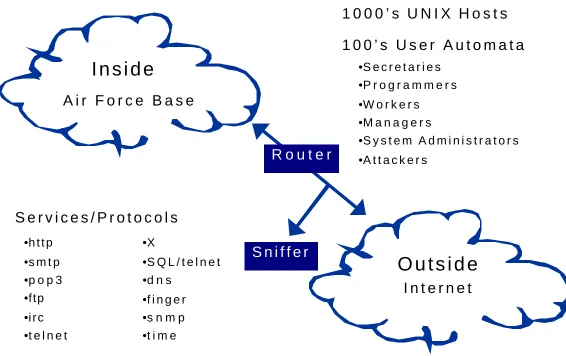
A conceptual view of the original test bed network used in the 1998 DARPA Intrusion
Detection Evaluation is shown in Figure 2-1. This test bed generates traffic similar to
that seen between a small Air Force Base network and the Internet. Custom software
emulates 100’s of users using UNIX applications and common network services. The
network traffic produced by these users includes sending and receiving email, using FTP
to send and receive files, accessing other computers via telnet sessions, sending and
O u t s i d e
I n t e r n e t A i r F o r c e B a s e
•h t t p
•s m t p •p o p 3 •ftp •i r c •t e l n e t
•X
•S Q L / t e l n e t •d n s
•f i n g e r •s n m p •t i m e
S e r v i c e s / P r o t o c o l s
I n s i d e
R o u t e r
1 0 0 0 ’ s U N I X H o s t s
S n i f f e r
•S e c r e t a r i e s •P r o g r a m m e r s •W o r k e r s •M a n a g e r s
•S y s t e m A d m i n i s t r a t o r s
•A t t a c k e r s
[image:13.612.171.454.383.561.2]1 0 0 ’ s U s e r A u t o m a t a
receiving IRC messages, and browsing web pages. Custom software also makes it
possible for a small number of physical hosts to appear as if they are 1000’s of hosts with
different IP addresses. In this original 1998 test bed, all of the hosts are UNIX machines
and all attacks originate from outside of the Air Force Base. A sniffer positioned outside
of the base collects all network traffic originating from the Internet, including all of the
attacks.
Figure 2-2 shows a more detailed view of the test bed network. The Air Force
Base network contains four machines that are the victims of the attacks. The operating
systems of the machines are SunOS 4.1.4, Solaris 2.5.1, Linux 4.2 and Linux 5.0. The
Linux 5.0 victim has the ability to dynamically change IP addresses. The remaining
computer in the inside network is a traffic generator which emulates all other inside IP
addresses.
The outside network, representing the rest of the Internet, contains two Linux
machines for launching manual attacks that cannot be easily automated. The remaining
three machines are a traffic generator, a sniffer, and a web server. The traffic generator
emulates hundreds of outside workstations. It generates background traffic originating
INSIDE CISCO OUTSIDE
SOLARIS SUNOS VICTIMS INSIDE TRAFFIC GENERATOR LINUX VICTIM WITH DYNAMIC IP OUTSIDE TRAFFIC GENERATOR ATTACKERS LINUX SCAN GENERATOR LINUX ATTACK GENERATOR HUB HUB
HUB
[image:14.612.130.482.307.465.2]HUB ALL EXTERNAL WEB SITES CISCO HUB CISCO ROUTER ETHERNET HUB LINUX SOLARIS SNIFFER
outside of the Air Force Base network and launches all automated attacks. The sniffer
records all network traffic destined for the Air Force Base, including all of the attacks.
The external web server mimics thousands of Internet web sites. The inside and outside
traffic generators and the outside web server are equipped with modified operating
systems which allow them to emulate “virtual” machines with different IP addresses [10].
2.2 Traffic Generation
Custom software automates most of the background traffic and attack traffic in the test
bed. The software was designed to provide automatic, reproducible, and robust traffic
generation. To achieve these design goals, the Expect scripting language was chosen, as
suggested in [28]. It allows the creation of sessions that emulate users typing at computer
keyboards.
The Expect traffic generator automatically launches specially formatted “exs”
scripts for each attack instance [10]. If an error occurs when generating or collecting the
traffic, the same “exs” scripts can be easily rerun. The “exs” scripts are also used to
automate most of the background traffic and attack traffic for the test bed. Sessions that
cannot be automated using “exs” scripts are manually executed. Examples of such
manual traffic include traffic created by GUI interaction, such as X Windows.
2.3 Input Data for Intrusion Detection Systems
There are many sources of information that an intrusion detection system can utilize for
attack detection. Some systems, called network-based intrusion detection systems, rely
intrusion detection systems, use data gathered from and specific to an individual host
computer. There are some systems that utilize both sources of information.
The 1998 DARPA evaluation collected the information necessary to satisfy the
inputs for all of the participating intrusion detection systems. A program called tcpdump
[12], running on the Solaris sniffer, recorded the network traffic in the test bed. In
addition, the participants were provided with various types of host data. Sun Basic
Security Module (BSM) audit data was collected from the Solaris victim machine and
nightly file dumps were provided from all three UNIX victim machines. After all of the
data was collected from the test bed for the 1998 evaluation, it was written to CD-ROMs
Chapter 3
Windows NT in the 1999 Test Bed Network
Many steps were necessary to integrate Windows NT into the 1999 evaluation. Machines
were connected to the inside and outside networks and configured for the test bed,
Windows NT services and applications were installed, and host security auditing was
configured. Figure 3-1 shows the updated 1999 test bed network. Machines that were
not present in the 1998 test bed are labeled with underlined text. New machines
unrelated to Windows NT include a Linux machine for insider attack generation and an
insider sniffer to collect traffic generated by insider attacks.
3.1 Machines
Three Windows NT machines were added to the test bed. One Windows NT victim
INSIDE OUTSIDE
SOLARIS SNIFFER
CISCO
SOLARIS LINUX SUNOS
VICTIMS OUTSIDE TRAFFIC GENERATOR OUTSIDE ATTACKERS LINUX SCAN GENERATOR LINUX ATTACK GENERATOR HUB HUB
[image:17.612.133.474.403.568.2]ALL EXTERNAL WEB SITES INSIDE TRAFFIC GENERATOR HUB LINUX ATTACKER WINDOWS NT ATTACKER INSIDE ATTACKERS WINDOWS NT HUB WINDOWS NT ATTACKER INSIDE SOLARIS SNIFFER
machines: an inside attacker and an outside attacker. All attacks, including Windows NT
attacks, originate from one of the dedicated Windows NT or Linux attack machines. This
convention makes it possible to separately sniff and collect network traffic specific to
each attack. The collected network attack sniffer data can be used to verify the success of
attacks and for analysis of attack signatures.
3.2 Configurations and Software
Windows NT Domain Server 4.0 (Build 1381) is installed on the Windows NT victim
machine. It is the primary domain server (PDS) for the Eyrie Air Force Base Windows
NT network. The inside Windows NT attacker machine is setup with Windows NT
Workstation 4.0, as a workstation in the victim machine’s domain. The outside Windows
NT attacker is a stand-alone workstation also setup with Windows NT Workstation 4.0.
All of the Windows NT machines’ operating systems include installations of Service
Pack 1. No additional Service Packs were installed.
3.2.1 Services and Applications
Several services are installed on the Windows NT victim machine. Included in the
operating system is IIS (Internet Information Server) version 2.0, which provides FTP,
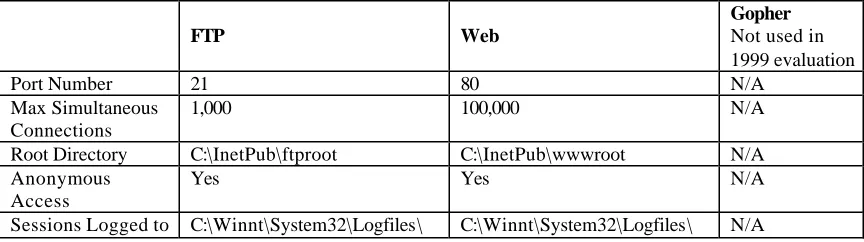
Gopher, and web services. Figure 3-2 presents the IIS settings for the 1999 evaluation.
The FTP and web services allow anonymous connections and all connections are logged.
To ensure that normal background traffic connections do not overload the services, the
maximum number of simultaneous connections for each service is set at a level high
The Resource Kit for Windows NT 4.0 is installed, separate from the operating
system. It includes various utilities and services, one of which is a mail server, called
MailSrv, used in the evaluation. The MailSrv program has a bug that can cause SMTP
connections to hang and eventually consume 100 percent of the available CPU cycles on
a Windows NT machine [23]. Unfortunately, the bug was not discovered in the
evaluation until several days of the evaluation had already been completed. The more
reliable Microsoft Exchange Mail Server could not be used because it requires Service
Pack 3. To remedy the situation for the 1999 evaluation, MailSrv was stopped and
restarted whenever the machine’s CPU utilization reached 100%. This happened about
once or twice a day.
In addition to MailSrv, the Resource Kit includes the following UNIX commands,
which are interpreted by the operating system, via the Windows NT POSIX subsystem:
The Resource Kit also provides a telnet service, telnetd.exe. However, the program is a
beta version [16]. When it was tested in the evaluation test bed, it was very unreliable
FTP Web
Gopher
Not used in 1999 evaluation
Port Number 21 80 N/A
Max Simultaneous Connections
1,000 100,000 N/A
Root Directory C:\InetPub\ftproot C:\InetPub\wwwroot N/A
Anonymous Access
Yes Yes N/A
[image:19.612.96.528.72.193.2]Sessions Logged to C:\Winnt\System32\Logfiles\ C:\Winnt\System32\Logfiles\ N/A
Figure 3-2: IIS Settings for the Windows NT Victim Server.
• cat
• chmod
• chown
• cp
• mkdir • mv • rm • rmdir • find
• grep • ln • ls
reliable telnet capabilities, Ataman TCP Remote Logon Service (version 2.4) is installed
[1] on the Windows NT victim machine.
The common software applications, Netscape 4.0.8 and Microsoft Office 97, are
installed on all of the Windows NT machines in the evaluation. In addition, some
Windows NT attacks developed for the 1999 evaluation required additional common
software programs to be installed so that the attacks could be properly executed in the test
bed environment. Such software programs include a compression utility, WinZip 7.0
[43], and a utility to gather web server statistics, Wusage 6.0 [2].
3.2.2 User and Group Accounts
The Windows NT victim machine stores 92 user accounts in its user account database.
Of those 92, 89 accounts are normal users. Their accounts never expire and their
passwords never expire. Their privileges allow telnet access and FTP access to the
system, but do not allow local logins. Each user can remotely access the machine via
telnet any day of the week, at any time. The remaining three of the 92 user accounts are
the following, and exist by default:
• Administrator: This root account allows remote and local logins and full control
of system software.
• Guest: This default account, setup by the operating system, allows limited
anonymous access to system resources.
• IUSR_<machine name>: This default account, setup by IIS, provides web access
for anonymous Internet users.
Windows NT also supports group accounts. All members of a group account inherit the
victim machine, a brief description of each group, and the users who are group members
[34].
Group Description Users
Account Operators Members can administer
domain user and group accounts
Administrator
Administrators Members can fully
administer the computer/domain
Administrator
Backup Operators Members can bypass file
security to back up files
Administrator
Domain Admins Designated administrators
of the domain
Administrator
Domain Guests Users granted guest access
to the domain
Administrator, Guest
Domain Users All domain users All users
EAFB_Users Ordinary users of the Air
Force Base network
All users except for Guest
Guests Users granted guest access
to the computer/domain
All users
Print Operators Designated administrators
of domain printers
Administrator
Secret Users granted access to Air
Force secret files in d:\home\secret
Administrator and four ordinary users chosen at random
Replicator Supports file replication in a
domain
Administrator
Server Operators Designated administrators
of domain servers
Administrator
[image:21.612.93.530.123.527.2]Users Ordinary users All users except for Guest
3.2.3 Security Auditing
The Windows NT event logging service maintains three event logs: a system log, an
application log, and a security log. The system log primarily records device failures and
I/O errors, and the starting and stopping of services. The application log records
application defined messages, such as failure to allocate memory or failure to access a
system object. The security log is the repository for all Windows NT security audit
information. Windows NT security auditing is built-in to the event logging service and
satisfies the requirements for the C2 security evaluation class [17]. These requirements
are:
• The system has the ability to record all security-related events that occur on the
system in the form of audit records.
• The system provides a way for the audit records to be reviewed by the system
administrators.
• The auditing software and logs must be protected by the operating system from
unauthorized access and modification, and access must be limited to authorized
system administrators.
• A mechanism must exist that allows the selection of security events to be audited.
• The system must be able to audit individual users.
The Windows NT User Manager audit policy window, shown in Figure 3-4, is used to
select which types of security events are audited. Full auditing for all user accounts is
enabled in the Windows NT victim machine’s User Manager for the 1999 evaluation. In
Registry key,
HKEY_LOCAL_MACHINE\System\CurrentControlSet\Control\Lsa\AuditBase-Objects:
Name: AuditBaseObjects
Type: REG_DWORD
Value: 1
Everything is viewed as an object by the Windows NT operating system (files, drives,
memory, etc.) By enabling base object auditing, low-level activities, such as memory
requests by a process, are recorded by the logging service. However, to audit access of
specific files, printer use, and Registry access, settings must be adjusted in the Windows
NT Explorer, Control Panels, and Registry Editor. These aspects of Windows NT
auditing were not selected for the 1999 evaluation.
Log settings are adjusted to allow very large log files, approximately 200
[image:23.612.171.446.370.570.2]megabytes. This ensures that the log files do not fill up and begin to overwrite earlier log
entries. In addition, it is specified that audit logs should not be automatically cleared.
Only the Administrator account has the ability to manually clear the audit logs.
It is important to note that Windows NT auditing is different and may not be as
powerful as the Basic Security Module (BSM) auditing used by the Solaris victim
machines in the 1998 and 1999 evaluations [35]. For example, BSM records all system
calls and their arguments; Windows NT auditing does not. Therefore, developers who
wish to extend their UNIX host-based intrusion detection systems to detect Windows NT
attacks may not be able to reuse their detection strategies. Attack detection that relies on
tracing system calls or analyzing their arguments cannot be implemented using Windows
NT auditing.
3.3 Background Traffic
3.3.1 General Background Traffic
Most of the Windows NT background traffic is created using the regenerator software
developed in the 1998 evaluation for UNIX machines [10]. “Exs” scripts are used to
automatically emulate telnet, FTP, and web, and email connections to the Windows NT
victim machine. These scripts are modified versions of the “exs” scripts used for UNIX
connections in the 1998 evaluation. The telnet scripts are modified to include a set of
Windows NT commands: dir, del, net, etc. In addition, the Windows NT POSIX
subsystem accepts and translates basic UNIX commands during telnet sessions (Section
3.2.1 lists these commands).
The mail scripts are modified to properly close mail connections to the Windows
NT Resource Kit MailSrv program. The reason for the modifications is a bug in the
(carriage return, period, carriage return), used by the original “exs” scripts to terminate a
SMTP connection. As a result, the connections remain open and eventually take up
100% of the CPU cycles of the Windows NT victim machine. Most of the new “exs”
scripts are modified so that they close SMTP connections with the key combination,
[CR][LF].[CR][LF] (carriage return, line feed, period, carriage return, line feed). These
modified scripts properly close SMTP connection to MailSrv. However, not all mail
scripts were properly modified, so once or twice a day during the 1999 evaluation,
MailSrv consumed 100% of the CPU cycles with hung SMTP connections, and needed to
be restarted.
No special modifications are necessary for the FTP and web scripts. Some
background traffic actions, such as creating Microsoft Office documents and opening
email attachments, are performed manually because they cannot be easily automated with
“exs” scripts.
3.3.2 AutoBrowser Web Traffic
Web browsing from the Windows NT victim machine is automated via a Javascript
program, called AutoBrowser, written for the 1999 evaluation. This script emulates
browsing activity by a human user. The AutoBrowser source code includes a list of 4140
web URLs extracted from the web server in the outside test bed network. The
AutoBrowser program is in the Startup Group of the Windows NT victim machine so that
it automatically executes at the beginning of each day of the evaluation, via the Netscape
web browser. The program emulates human-user web browsing by alternating periods of
idle time and browsing time. There is more idle time during the beginning and end of the
program randomly visits URLs in the list. The frequency at which pages are visited also
depends on the time of day. Pages are browsed with greater frequency during the middle
of the day than they are during the beginning and end of the day.
All time delays between user actions are determined by an exponential
distribution, computed in Javascript using the following function:
delay = -round(mean * ln(rand[0,1]))).
Studies have shown that this function roughly approximates the delay between TCP
connections initiated by a human-user [26]. When the function is used to calculate the
delay between page visits while browsing, the mean is set to 30 seconds. When the
function is used to calculate the lengths of idle times between browsing sessions, the
mean depends on the time of day. The mean is set to one hour for most of the day, except
for the middle of the afternoon (11AM – 1PM), when the mean is set to 30 minutes, and
after 4PM, when the mean is set to 2 hours. In addition, the maximum number of pages
visited during a browsing session varies throughout the day, as shown in the following
table:
Time of Day 8AM-
9AM
9AM- 11AM
11AM-1PM
1PM-3PM
3PM-4PM 4PM-
Maximum # of Pages Visited per Browsing Session
8 15 30 15 8 3
The graph in Figure 3-5 plots the web connections initiated by the AutoBrowser
during week five, day one, of the 1999 evaluation. The x-axis (time of day) is divided
into five-minute blocks. The height of each bar in the y-axis represents the number of
AutoBrowser visits more pages during the middle of the day then during the beginning or
end of the day.
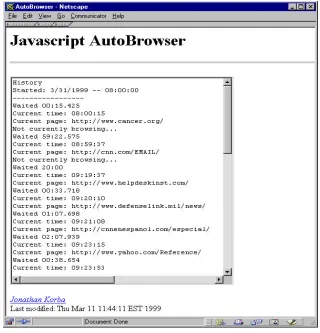
To monitor web connections from the Windows NT victim machine during the
evaluation, program activity is displayed in a browser window text box. The browser
window containing the text box is separate from the window loading the browsed pages.
Information in the text box includes durations of idle times and the URLs and access
times of web page visits. An example of AutoBrowser activity recorded in the text box is
[image:27.612.94.512.74.328.2]shown in Figure 3-6.
Figure 3-5: Graph of AutoBrowser Activity in One Day of the 1999 Evaluation.
AutoBrowser Web Activity in One Day of the 1999 Evaluation
0 10 20 30 40 50 60
8:00 10:00 12:00 14:00 16:00 18:00
Time of Day
Number of Web Connections per 5
3.4 Windows NT Input Data for Intrusion Detection Systems
The 1999 evaluation provided long listings of directory trees and full dumps of two
directories, C:\WINNT\system32\LogFiles and C:\WINNT\system32\config, from the
Windows NT victim machine. These files are posted at http://ideval.mit.edu/1999_index.html
[11] for download by participants of the evaluation. The following sections give more
details about the types of information contained in the data.
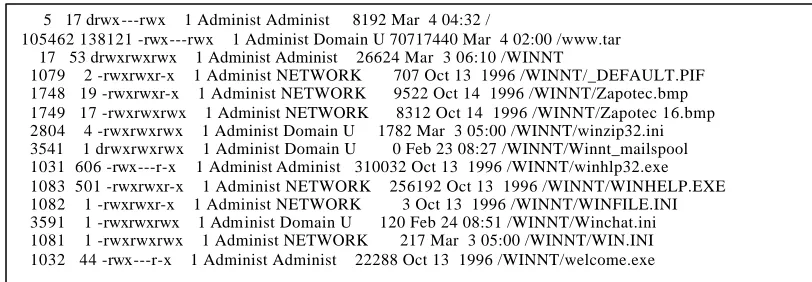
3.4.1 Long Listings of Directory Trees
Long listings of directory trees were collected at the end of each day of the evaluation.
[image:28.612.150.470.80.413.2]They were created with the Resource Kit POSIX command, "C:\ntreskit\posix\find / -ls\",
which lists all files on the hard drive with the following information (in order from left to
right):
• File index number
• File size in 512-byte blocks
• Permissions
• Number of hard links
• Owner name
• Group name
• Size in bytes
• Modification timestamp
[image:29.612.105.511.412.553.2]• Filename
Figure 3-7 shows a small portion of a directory listing.
3.4.2 Logfiles Directory Dump
All of the files located in C:\WINNT\system32\LogFiles were collected and distributed
for each day of the evaluation. This directory contains a log file for each day that records
all access to the IIS (i.e. web server and FTP connections). The filenames are in the 5 17 drwx---rwx 1 Administ Administ 8192 Mar 4 04:32 /
105462 138121 -rwx---rwx 1 Administ Domain U 70717440 Mar 4 02:00 /www.tar 17 53 drwxrwxrwx 1 Administ Administ 26624 Mar 3 06:10 /WINNT
1079 2 -rwxrwxr-x 1 Administ NETWORK 707 Oct 13 1996 /WINNT/_DEFAULT.PIF 1748 19 -rwxrwxr-x 1 Administ NETWORK 9522 Oct 14 1996 /WINNT/Zapotec.bmp 1749 17 -rwxrwxrwx 1 Administ NETWORK 8312 Oct 14 1996 /WINNT/Zapotec 16.bmp 2804 4 -rwxrwxrwx 1 Administ Domain U 1782 Mar 3 05:00 /WINNT/winzip32.ini 3541 1 drwxrwxrwx 1 Administ Domain U 0 Feb 23 08:27 /WINNT/Winnt_mailspool 1031 606 -rwx---r-x 1 Administ Administ 310032 Oct 13 1996 /WINNT/winhlp32.exe 1083 501 -rwxrwxr-x 1 Administ NETWORK 256192 Oct 13 1996 /WINNT/WINHELP.EXE 1082 1 -rwxrwxr-x 1 Administ NETWORK 3 Oct 13 1996 /WINNT/WINFILE.INI 3591 1 -rwxrwxrwx 1 Administ Domain U 120 Feb 24 08:51 /WINNT/Winchat.ini 1081 1 -rwxrwxrwx 1 Administ NETWORK 217 Mar 3 05:00 /WINNT/WIN.INI 1032 44 -rwx---r-x 1 Administ Administ 22288 Oct 13 1996 /WINNT/welcome.exe
format, inYYMMDD.log, based on the date when they were created. A sample log file
is shown in Figure 3-8. Each line in the file contains the following information from left
to right: client IP address, client username, date, time, service, host server name, server IP
address, elapsed time in seconds, bytes received, bytes sent, service status code,
Windows NT status code, name of operation, target of operation.
3.4.3 Config Directory Dump
All of the files located in C:\WINNT\system32\config were collected and distributed for
each day of the evaluation. This directory includes the file that stores the user database
(SAM – Security Accounts Manager), files containing Windows NT Registry data
(default, system, software, security), and the Windows NT event logs (AppEvent.Evt,
SecEvent.Evt, SysEvent.Evt). The SAM file and Registry files are collected by executing
the Resource Kit backup program, C:\ntreskit\regback.exe.
The SAM file contains an encrypted list of all user accounts and passwords. The
Registry data files can be viewed by executing the Windows NT Registry editor,
regedt32.exe, and opening the files with the “Load Hive” menu command. The Windows
NT event logs can be viewed by using the Windows NT Event Viewer.
172.16.112.105, -, 3/31/99, 9:06:50, W3SVC, HUME, 172.16.112.100, 214188, 278, 18652, 200, 0, GET, /html/index.html 172.16.112.105, -, 3/31/99, 9:07:29, W3SVC, HUME, 172.16.112.100, 16704, 325, 11853, 200, 0, GET, /icons/worldmap.jpg 172.16.112.105, -, 3/31/99, 9:07:29, W3SVC, HUME, 172.16.112.100, 16844, 280, 1276, 200, 0, GET, /html/welcome.html 172.16.112.105, -, 3/31/99, 9:07:44, W3SVC, HUME, 172.16.112.100, 11703, 324, 622, 200, 0, GET, /html/ban.html 172.16.112.105, -, 3/31/99, 9:07:46, W3SVC, HUME, 172.16.112.100, 1484, 332, 111, 404, 2, GET, /html/assignments.html 172.16.112.105, -, 3/31/99, 9:08:06, W3SVC, HUME, 172.16.112.100, 125, 328, 445, 200, 0, GET, /html/trouble.html 172.16.112.105, -, 3/31/99, 9:08:09, W3SVC, HUME, 172.16.112.100, 3140, 278, 18652, 200, 0, GET, /html/index.html 172.16.112.105, -, 3/31/99, 9:08:10, W3SVC, HUME, 172.16.112.100, 1016, 325, 636, 200, 0, GET, /html/code.html
Chapter 4
Developing Windows NT Attacks
Several stages of work were involved for each Windows NT attack included in the 1999
evaluation. Each attack required development, analysis, and documentation. The process
sometimes required modifications to the test bed environment, such as adding new
software or creating new background traffic. The following list outlines the steps that
were taken in developing Windows NT attacks for the evaluation:
1) Research or invent the attack.
2) Modify the attack to work in the test bed.
3) Analyze attack signatures in Windows NT audit logs and in network data.
4) Attempt to make the attack stealthy.
5) If necessary, design background traffic to make attack traffic seem less anomalous.
6) Automate the execution of the attack or define a procedure for manual execution.
7) Define a procedure to verify attack success.
8) Define a procedure to cleanup after the attack.
9) Document the attack.
4.1 Attack Research and Development
Many of the Windows NT attacks were obtained from public sources on the Internet.
Web sites maintained by organizations, such as NTBugtraq [24], CERT [5],
NTSecurity.net [22], ISS [9], Rootshell [29], Whitehats.com [41], and Insecure.org [8],
NT operating system. They also archive information about older attacks. Sometimes,
they provide source code that exploits known vulnerabilities and also instructions on how
to execute attacks. However, even with instructions and source code, it frequently took a
significant amount of work to get an attack to function properly for the evaluation. In
addition, not all of the Windows NT attacks in the 1999 evaluation were derived from the
Internet sources. Some of the attacks were developed specifically for the evaluation in
order to test intrusion detection system performance with never-before-seen attacks.
After each attack for the evaluation was researched and downloaded from the
Internet, or invented based on known Windows NT vulnerabilities, it was deployed in the
test bed to ensure that it could successfully and reliably execute in the test bed
environment. Some attacks required new software to be installed in the test bed. For
example, the Netcat attack sent a WinZip self-extracting executable as an email
attachment to the victim. In order to make it possible for the victim to unzip the file,
WinZip 7.0 was installed on the Windows NT victim machine [43].
4.2 Determining Attack Signatures
Once the attack could successfully and reliably execute in the test bed environment, steps
were taken to make the attack less detectable. Network traffic and Windows NT audit
logs were collected and analyzed to determine what detectable signatures were left by the
attack.
Tcpdump [12] was used to filter network traffic collected by the sniffer machines.
address, and port number. Packet filtering made it easy to isolate the traffic created by
each attack instance for analysis.
Net Tracker [40] also proved to be a useful program for analyzing attack
signatures in network traffic. Net Tracker takes, as input, a tcpdump file and reassembles
the data into transcripts. The transcripts are ASCII text records of what occurred during
each TCP session.
To determine host-based attack signatures, Windows NT audit logs were
analyzed. No filtering software was available for audit logs so the following procedure
was defined to isolate the events that were logged for each attack:
1) Make sure no background traffic is running in the test bed.
2) Clear all of the audit logs on the Windows NT victim machine.
3) Launch the attack.
4) Save the audit logs.
By using this procedure, most of the events in the saved audit logs were logged as a result
of the attack.
Once the signatures were defined for an attack, attempts were made to make the
attack less obvious. The source code and method of execution of some attacks were
modified to make the attack more stealthy. For example, the original probe attack,
NTInfoscan (downloaded from the Internet), established an anonymous FTP connection
to the victim machine with the password “[email protected].” Any intrusion
detection system searching for this string will detect all NTInfoScan attacks launched
using the original executable. In an effort to make the attack less detectable, the
executable was modified to provide an inconspicuous anonymous FTP password,
make some attack actions seem less anomalous. For example, traffic generated by the
AutoBrowser program masks attacks that require the victim to access web pages.
If possible, the attack was embedded in Expect and “exs” scripts so it could
automatically execute in the test bed. Console attacks and attacks requiring web
browsing or the opening of email attachments could not be automated. The next step was
to clearly define a procedure for verifying that the attack was successful. Verification
usually involves inspecting the network traffic for attack signatures.
Some of the attacks require cleanup actions before another instance of the attack
can occur. Attackers and/or victim administrators can perform cleanup actions. An
attacker cleans up after an attack to make detection more difficult, while an administrator
cleans up to repair and re-secure the victim machine. Cleanup actions include erasing
attack files, killing a process, restarting a service, or rebooting the victim machine. A
powerful cleanup action that may be performed by an attacker is deleting or altering audit
log data that resulted from the attack. However, as specified in the design of the 1999
evaluation, audit logs were never altered or deleted during the evaluation days. Finally,
documentation was drafted to include all of the above-mentioned characteristics and
procedures for each attack.
4.3 Extended Auditing
As stated in Section 3.2.3, full system auditing and base object auditing were enabled in
the 1999 evaluation, but individual files and Registry keys were not audited. A Windows
NT system with a different auditing policy may yield different attack signatures in the
security log, or none at all. It would be useful to know all possible audit log attack
evaluation was completed. Each Windows NT attack was launched against the Windows
NT victim machine with maximum auditing enabled (i.e. audit settings used in the 1999
evaluation plus auditing of all files and Registry keys). The data generated in the
experiment was used to document, for each attack, an audit log attack signature that was
as complete as possible.
Chapters six through nine of this thesis document the attacks used in the 1999
evaluation. For each attack there is a section called “Host Data for the 1999 Evaluation”
that details ways in which the attack may be detected in host data generated and
distributed in the evaluation. If the file and Registry auditing experiment yielded
additional signatures for an attack, these signatures are noted in a separate section, called
“Extended Host Data.” This section also includes any attack signatures that may occur in
other types of host data that were not provided in the 1999 evaluation, such as log files
Chapter 5
Assembling a Windows NT Attack Set
The Windows NT attacks in the 1999 evaluation were chosen such that, collectively, they
form a realistic and relatively comprehensive set of Windows NT attacks. An attack
taxonomy, originally presented in [39] and used in the 1998 evaluation [10], provided a
methodology for classifying Windows NT attacks. The selection of Windows NT attacks
for the 1999 evaluation was guided in part by the taxonomy. In addition, the attacks were
selected so as to include both network and console based attacks, a man-in-the-middle
attack, and an attack using code in a Microsoft application macro.
5.1 Overview of an Attack Taxonomy
For a given attack, the user begins with a specific level of privileges and either executes a
method of transition to obtain privileges at higher level, and/or performs some action.
The taxonomy provides a way to classify attacks by defining a set of privilege levels,
possible methods of transition, and a set of actions. One-character strings are used to
represent the privilege levels, methods of transition, and actions. A classification is
assigned to each attack by assembling the one-character strings to form multi-character
Possible levels of privilege include remote network access (R), user access (U),
root or super-user access (S), and physical access to the host (P). A set of possible
methods of transition between levels of privilege is listed below. Each method is also
represented by a one-character string.
m) Masquerading: In some cases it is possible to fool a system into giving access by
misrepresenting oneself. Examples of masquerading include using a stolen
username/password or sending a TCP packet with a forged source address.
a) Abuse of Feature: There are legitimate actions that one can perform, or is even
expected to perform, that when taken to the extreme can lead to system failure.
Example include filling up a disk partition with user files or starting hundreds of
telnet connections to a host to fill its process table.
b) Implementation Bug: A bug in a trusted program might allow an attack to proceed.
Specific examples include buffer overflows and race conditions.
c) System Misconfiguration: An attacker can exploit errors in security policy
configuration that allows the attacker to operate at a higher level of privilege than
intended.
s)Social Engine ering: An attacker may be able to coerce a human operator of a
computer system into giving the attacker access.
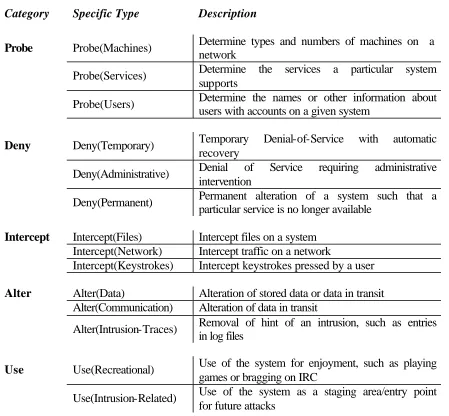
A set of possible actions that an attacker can perform is shown in Figure 5-1.
The following classifications of example attacks demonstrate the application of
the taxonomy. If a user with remote network access (R), exploits a bug in the web server
“R-b-Deny(Temporary).” If a user with an local account (U), runs a program to decrypt the
password file (Use), the classification is “U-Use(Intrusion).” If a user with remote
network access (R) obtains root access (S) by tricking another user (s), and then uses the
new privileges to modify files (Alter), the classification is “U-s-S-Alter(Files).”
Category Specific Type Description
Probe Probe(Machines) Determine types and numbers of machines on a network
Probe(Services) Determine the services a particular system
supports
Probe(Users) Determine the names or other information about
users with accounts on a given system
Deny Deny(Temporary) Temporary Denial-of-Service with automatic recovery
Deny(Administrative) Denial of Service requiring administrative intervention
Deny(Permanent) Permanent alteration of a system such that a
particular service is no longer available
Intercept Intercept(Files) Intercept files on a system Intercept(Network) Intercept traffic on a network
Intercept(Keystrokes) Intercept keystrokes pressed by a user
Alter Alter(Data) Alteration of stored data or data in transit Alter(Communication) Alteration of data in transit
Alter(Intrusion-Traces) Removal of hint of an intrusion, such as entries in log files
Use Use(Recreational) Use of the system for enjoyment, such as playing
games or bragging on IRC
[image:38.612.93.542.69.485.2]Use(Intrusion-Related) Use of the system as a staging area/entry point for future attacks
5.2 Windows NT Attack Set
Figure 5-2 lists the 12 Windows NT attacks developed for the 1999 DARPA Intrusion
Detection Evaluation. The four attack categories represent groupings of the possible
attack types listed in the taxonomy. These four groups are: Denial-of-Service
Deny), Remote-to-User U), local-User-to-Super-user (U-?-S), and Probes
(R-?-Probe). The following four chapters present a description of each attack category and
document the individual Windows NT attacks in each category. The documentation
includes descriptions of the attacks, procedures for executing, verifying, and cleaning up
after the attack, and attack signatures detectable in network traffic and Windows NT host
data.
Attack Category Attack Name
Denial-Of-Service (R-Deny)
CrashIIS DoSNuke
Remote-to-User (Remote to Local) (R-?-U,S)
Framespoofer Netbus NetCat PPMacro
User-to-Super-user (User-to-Root) (U,P-?-S)
AnyPW CaseSen NTFSDOS SecHole Yaga Probes
(R-Probe)
[image:39.612.94.512.415.644.2]NTInfoScan
Chapter 6
Denial-of-Service Attacks
A denial-of-service attack prevents users from accessing the resources or services of a
victim machine or network of machines. An attacker can accomplish a denial-of-service
through a range of destructive actions, such as, disabling a network service, consuming
large amounts of network bandwidth or CPU cycles, or completely crashing a machine.
Common methods used in denial-of-service attacks include sending a specially
constructed packet to a port on a victim machine, or using many packets to sustain high
utilization of network or computer resources. Some of the denial-of-service attacks used
in the 1998 evaluation were also used to attack the Windows NT victim in the 1999
evaluation, namely, Neptune and Smurf. These attacks are fully documented in [10]. In
addition, two denial-of-service attacks, CrashIIS and DoSNuke, were developed to
specifically target the Windows NT victim machine in the 1999 evaluation. CrashIIS
disables the Windows NT web server and DoSNuke crashes a Windows NT victim
machine. The following sections describe both attacks in detail.
6.1 CrashIIS
R-b-Deny(Administrative)
Description
CrashIIS is a denial-of-service attack against the Windows NT IIS web server. The
machine. Due to a bug in IIS, the command "GET ../.." crashes the web server and
sometimes crashes the FTP and Gopher daemons as well, because they are part of IIS
[22].
Test Bed Details
Execution: The attack is fully automated by wrapping an “exs” script around the Expect
script, crashiis.exp. From an inside or outside UNIX attacker machine, crashiis.exp
telnets to port 80 on the Windows NT victim and sends the command "GET ../..".
Running "crashiis.exp <victim IP>" will crash the victim's web server (and possibly the
FTP and Gopher servers as well).
Verification: After the attack has successfully completed, the IIS web server on the
victim will be terminated. This can be verified on the victim machine by observing that
the process, inetinfo.exe, is not longer in the Task Manager processes list. Attack success
can be verified from a remote machine by typing the command "telnet <victim IP> 80" (it
should no longer connect) or by using a browser to access a page on the victim web
server (it should not load the page).
Cleanup: An administrator must manually restart the victim's web server via the
Microsoft Internet Service Manager. Usually the FTP and Gopher services need to be
restarted as well.
Detection
Network traffic: The malformed GET command string, “GET ../..” can be detected in
network traffic. However, the collected traffic must be processed first, because pieces of
the text string may have been sent in separate TCP packets due to the telnet protocol or
a dump file generated by the tcpdump program. It reassembles the network traffic, and
outputs the results in individual transcript files for each TCP connection. The attack
occurred if a transcript file reveals the malformed GET command sent from an attacker
machine to port 80 of the victim machine, as shown in Figure 6-1. The first line in the
transcript specifies the source and destination of the connection. The victim IP address
and port number in the figure are shown in boldface text. The second line indicates the
date and time when the connection began with a SYN packet. The third line reveals the
malformed GET request and the fourth line indicates the end of the connection. The
fourth line of the connection would have ended with a letter “F” if the connection closed
with a FIN packet. However, the connection ends abnormally because IIS crashes. Net
Tracker never detects a FIN packet, so it labels the end of the transcript with the letter
“C,” which stands for “Continued.”
All queries to the web server will fail until the administrator of the victim
machine restarts the service. These failed connections can be used to detect the effects of
the attack.
Host Data from the 1999 Evaluation: When the IIS service is turned on, a process
called inetinfo.exe is created and recorded in the security log. When IIS crashes, the
default debugger for application errors, Dr. Watson, is launched and recorded in the
security log. The CrashIIS attack can be detected in the security log by matching the 202.72.1.77:8756=>172.16.112.100:80 (Attack machine to port 80 of victim machine)
04/05/1999 22:36:11 S (Start of connection – SYN packet)
GET ../.. (Malformed GET command)
04/05/1999 22:36:18 C (End of connection – no FIN packet)
Creator Process ID number of the drwtsn32.exe process (Dr. Watson) with the Process ID
number of inetinfo.exe (IIS) as shown in Figure 6-2.
Extended Host Data: When a CrashIIS attack occurs, the Dr. Watson log file,
C:\WINNT\user.dmp, on the Windows NT victim machine (not provided in the 1999
evaluation) will reveal that the IIS crashed. The log file will indicate that an error
occurred in an application called “exe\inetinfo.dbg.” Figure 6-3 shows a portion of a Dr.
Watson log file after a CrashIIS attack, with the application name in boldface. The log
entry also notes the date and time and the type of error that occurred.
Dr. Watson Launches IIS
[image:43.612.116.499.129.371.2]Launches
Figure 6-2: Dr. Watson Program Launches when IIS Crashes. 11:48:05 AM
A new process has been created:
New Process ID: 2154725408
Image File Name: inetinfo.exe Creator Process ID: 2156091328 User Name: SYSTEM
Domain: NT AUTHORITY Logon ID: (0x0,0x3E7)
6:36:02 PM
A new process has been created: New Process ID: 2195757248 Image File Name: drwtsn32.exe
Creator Process ID: 2154725408
User Name: SYSTEM
Domain: NT AUTHORITY Logon ID: (0x0,0x3E7)
Microsoft (R) Windows NT (TM) Version 4.00 DrWtsn32
Copyright (C) 1985-1996 Microsoft Corp. All rights reserved.
Application exception occurred:
App: exe\inetinfo.dbg (pid=161)
When: 3/31/1999 @ 18:36:9.906
Exception number: c0000005 (access violation)
[image:43.612.112.508.581.669.2]6.2 DoSNuke
R-b-Deny(Administrative)
Description
DoSNuke is a Denial-of-Service attack that sends Out Of Band data (MSG_OOB) to port
139 (NetBIOS), crashing the Windows NT victim machine. A NetBIOS connection is
established, followed by a series of packets sent with the MSG_OOB flag set. Due to a
bug in the operating system, Windows NT with Service Pack 1 panics and the result is
the “blue screen of death.” Windows NT 4.0 with Service Pack 4 or greater is not
vulnerable to the attack [21] [19].
Test Bed Details
Execution: The attack is prepared for execution on a Windows NT machine by opening
the PERL script, dosnuke.pl, for editing, and setting the time of day to launch the attack.
Then dosnuke.pl is executed or a shortcut to it is placed in the Windows NT Startup
group for automated execution. The script takes no arguments (always targets the IP
address of the Windows NT victim machine). Dosnuke.pl launches dosnuke.exe, which
establishes a NetBIOS connection to the victim machine, and then sends five packets
with the MSG_OOB flag set. Only one packet is necessary to crash the victim machine,
but five are sent in case packets are lost.
Verification: After successful completion of the attack, the victim machine will crash
and display a “bluescreen of death.” The success of the attack can be remotely verified
by pinging the IP address of the victim machine. If the ping times out, then the attack
succeeded.
Detection
Network traffic: Figure 6-4 shows the network traffic created by the attack, displayed by
the tcpdump program. A three-way handshake, between the attacker machine and the
victim machine, establishes the TCP connection to the NetBIOS port of the victim (port
139). The packets following the handshake are marked with the TCP "urg" because TCP
marks Out of Band packets as urgent. The attack can be detected by searching the
network data for a NetBIOS handshake followed by a series of NetBIOS packets with the
"urg" flag. The bold line in Figure 6-4 indicates the packet that crashes the machine. The
following packet contains the data that could not fit in the first packet. The rest of the
“urg” packets are packets resent by the TCP protocol because no acknowledgement is
received from the victim machine (the victim machine is disabled). Tcpdump can be
used to search for “urg” packets by executing the command:
“tcpdump –nr <network traffic dump file> ‘tcp[13] & 1 != 0’”
The original attack downloaded from the Internet, transmitted the string “Hey, I
can't help getting these nasty VXD errors!” to the victim. The attack was modified to
send a blank string instead. Other versions of the attack may still send the string, which
can be used in detecting the attack.
Figure 6-4: A DoSNuke Signature in Network Traffic.
12:00:07.074895 172.16.115.234.1216 > 172.16.112.100.139: S 11502299:11502299(0) win 8192 <mss 1460> (DF) 12:00:07.074895 172.16.112.100.139 > 172.16.115.234.1216: S 11131218:11131218(0) ack 11502300 win 8760 <mss 1460> (DF) 12:00:07.074895 172.16.115.234.1216 > 172.16.112.100.139: . ack 1 win 8760 (DF)
12:00:07.074895 172.16.115.234.1216 > 172.16.112.100.139: P 1:50(49) ack 1 win 8760 urg 49 (DF) 12:00:07.074895 172.16.115.234.1216 > 172.16.112.100.139: FP 50:246(196) ack 1 win 8760 urg 196 (DF) 12:00:10.054895 172.16.115.234.1216 > 172.16.112.100.139: FP 1:246(245) ack 1 win 8760 urg 245 (DF) 12:00:16.064895 172.16.115.234.1216 > 172.16.112.100.139: FP 1:246(245) ack 1 win 8760 urg 245 (DF) 12:00:28.074895 172.16.115.234.1216 > 172.16.112.100.139: FP 1:246(245) ack 1 win 8760 urg 245 (DF) 12:00:52.114895 172.16.115.234.1216 > 172.16.112.100.139: FP 1:246(245) ack 1 win 8760 urg 245 (DF)
12:01:40.184895 172.16.115.234.1216 > 172.16.112.100.139: FP 1:246(245) ack 1 win 8760 urg 245 (DF) OOB Packets
Host Data from the 1999 Evaluation: The victim's security audit log will indicate a
hard reboot after the system is restarted by an administrator. The reboot will be a hard
reboot (turning the machine off and then back on again) and not a soft reboot
(CTRL-ALT-DEL), because a bluescreen system crash cannot be soft rebooted. A soft reboot
audit signature is a “SeShutdownPrivilege” Privilege Use Event followed by an event
stating, “Windows NT is starting up.” A hard reboot audit signature can be detected
because it does not include the “SeShutdownPrivilege” event.
A hard reboot can be used to detect but not identify the DoSNuke attack, because
other attacks may also result in hard reboots (NTFSDOS, AnyPW, etc.). In addition, a
Chapter 7
Remote-to-User Attacks
A remote-to-user attack results in an attacker on a remote host obtaining unauthorized
access to another computer system. An attacker who does not have an account can gain
local access to the victim computer by sending packets over the network from a remote
computer. The attacker may exploit a vulnerability in the victim computer or network, or
use social engineering to trick an authorized user into opening a backdoor.
One remote-to-user attack, Dictionary [10], developed in the 1998 evaluation was
used to attack the Windows NT victim machine in the 1999 evaluation. In addition, four
Windows NT new remote-to-user attacks were developed for the 1999 evaluation:
Framespoofer, NetBus, NetCat, and PPMacro. Framespoofer exploits a bug in the
Netscape browser. NetBus and NetCat use trojan programs to establish back doors on the
victim system. PPMacro inserts malicious macro code in a PowerPoint presentation.
The following sections give detailed descriptions of the four attacks.
7.1 Framespoofer
R-m-Alter(Data)
Description
The Framespoofer attack is a type of man-in-the-middle attack. It tricks the victim user
The attacker presents false information in the “spoofed” frame, in an attempt to
manipulate the victim user’s actions.
In the version of the attack used in the 1999 evaluation, the attacker sends a
forged email, directing the victim to a web page that displays security procedures for Air
Force Base computer networks. The page resides on a computer controlled by the
attacker and contains what looks like a link to a page with security procedures specific to
the local Eyrie Air Force Base. When the victim user clicks on the “link,” it runs a
Javascript function, which brings up the trusted web site and then inserts a malicious web
page, with misleading information, into the main frame. The URL displayed in the
browser remains unchanged. The misleading information for this version of the attack
instructs the victim to disable the local intrusion detection system on specific days.
Versions of Netscape after version 4.0.8 are not vulnerable to this attack [42].
Test Bed Details
Execution: Sending the email is automated by wrapping an “exs” script around a PERL
script, sendmail.pl, written for the evaluation. Sendmail.pl takes as an argument a
preformatted mail message. From a UNIX attacker, the command “sendmail.pl mail.txt
ted, where mail.txt is a Javascript email message with
instructions for the victim. The mail can also be sent manually from a Windows NT
attacker machine. A template of the Javascript mail message is shown in Figure 7-1. The