Adaptive Presentation Supporting
Focus and Context
Theophanis Tsandilas Department of Computer Science
University of Toronto Toronto, Canada [email protected]
m.c. schraefel
Department of Electronics and Computer Science
University of Southampton Southampton, UK mc at ecs.soton.ac.uk
Abstract
This paper focuses on how content adaptation is provided in adaptive and adaptable hypermedia systems. Questions that we investigate are: How focus and context can be supported by content-adaptation techniques? Are there any techniques that can be easily generalized to adapt the content of generic Web pages without requiring much effort from the author of the pages? How different adaptation techniques should be compared? We propose a new technique of adaptive presentation of Web content, which derives from fisheye views. This technique applies adaptation by modifying the scale of the visual elements in Web pages. We present an adaptable Web application that applies the technique to a set of real-world pages. We also identify existing adaptation techniques that relate to the proposed technique and examine their strengths and weaknesses. Finally, we present and discuss the results of a pilot study which compared our fisheye technique against stretchtext adaptation. The results indicate that our technique is promising while they give valuable feedback about future work.
1. Introduction
Decreasing the cognitive overload caused by the presence of information which is irrelevant to the goals of Web users has been a main goal of Adaptive hypermedia (AH) systems. Following Brusilovsky’s taxonomy [4], we can distinguish between two types of adaptation techniques employed by AH systems to support this goal: adaptive-presentation techniques and link-adaptation techniques. While link adaptation aims at providing navigational support to hypertext users, the goal of adaptive presentation is to adapt the content of the pages according to the users' goals, knowledge, language or other user characteristics.
In this paper, we present a new technique of adaptive presentation which is based on the use of multiple levels of zooming to adapt the content of a typical Web page. This technique is influenced by existing focus+context approaches for information visualization, in particular, fisheye views. We view content adaptation as a process of moving the focus within a page rather than hiding or changing parts of the page. Context is always visible and can be easily brought into focus by the user. This approach balances the trade-off between overloading the users with less relevant information and preventing them from having the control of the content in a page. Adapting the level of zooming of visual elements in a page can be considered as a new technique of canned text adaptation [4]. We demonstrate a Web application which integrates the technique into an adaptable, user-determined [14, 15] interaction model.
techniques. We also present the results of a pilot study which comparedstretchtext, which is a well-studied adaptation technique, against our technique. Finally, we discuss the implications of the results for future work.
2. Focus, Context and Fisheye Views
Supporting context and focus has been the goal of several techniques in the community of Human Computer Interaction. Most techniques are based on fisheye views [5], which provide both local detail and global context in a single display. Fisheye views have been applied to visualize information in several domains. Furnas [5] applied fisheye views to program code, tree structures and calendars. Fisheye techniques were used by Sarkar and Brown [12] to support viewing and browsing graphs. Bederson [1] applied fisheye zooming to pull-down menus with the goal to reduce the cognitive load caused by long lists of choices. Greenberg et al. [6] introduced fisheye views to support group awareness when multiple people work within a single window. The technique that we propose in this paper is highly inspired by their groupware fisheye text viewer.
Techniques based on fisheye views have also been applied to hypertext applications [7, 10]. These techniques provide fisheye views of collections of Web pages or hypertext networks rather than fisheye views of the content within pages. On the other hand, Bederson et al. [2] developed theMulti-Scale Markup Language (MSML), a markup language implemented using the HTML<Meta>tag to enable multiple levels of zooming within a single Web page. Their goal, however, was to produce interactive Web pages which can be in and zoomed-out rather than adapt the content of the pages according to user goals or interests. Finally, Tsandilas and schraefel [14] applied zooming to visualize hyperlinks. According to this work, hyperlinks that relate to user goals are presented with large fonts, whereas irrelevant hyperlinks are presented with small fonts. Font sizes are continuously changed as the user specifies interests by means of interactive manipulators.
Fisheye-view techniques define a Degree of Interest (DOI)function which specifies how the elements of the visualization are presented. The actual definition of the DOI function is application depended. Different approaches use different techniques to visualize information with respect to the DOI function. Noik [10] classifies fisheye-view approaches into two main categories:filtering anddistortingfisheye views. Approaches that belong to the first category use thresholds to constraint the display of information to relevant or interesting elements. Approaches that belong to the second category, on the other hand, apply geometrical distortion to the visualization. This is usually performed by altering the positions and the sizes of the visualized elements, for example, elements of interest are zoomed in, whereas irrelevant elements are zoomed out. Fisheye-view techniques usually assume that there is a single focal point, and the value of the DOI function decreases with distance to this point. However, several fisheye approaches [6, 12] support multiple focal points at the same time.
3. Applying Zooming to Adapt the Presentation of Web Pages
In this section, we present how content adaptation can be achieved by varying the level of zooming of the visual elements in individual Web pages.
3.1 Expressing the Degree of Interest (DOI)
assume that the user model captures the user’s current interests. More specifically, we consider a finite set of information topics T = {t1,…,tn} and represent the user model as a vector I(i1,…,in), where ii is a value that represents relevance between ti and the current interests of the user. Each Web page is considered as a collection of individual segments sj, which can be paragraphs, sections or other page parts. The content of each segment is represented by a vectorVj(wj1,…,wjn), wherewjiis a value that represents relevance betweenti
andsj. These values can be either assigned by a human, for example, the author of the page or automatically derived by using information retrieval techniques. For example, they can be calculated as the cosine [11] between the feature vector that represents the segment and the feature vector that represents the information topic [14]. In the rest of the paper, we assume that Vj is known for all the segments sjin a page.
Based on the above discussion, we define the degree of interest DOI as the function:
According to this definition, DOI(sj) grows as the user's interests become relevant to the content ofsj. This definition of the DOI function differentiates from the original conception of fisheye views. Proximity is not measured in terms of geometrical distance, but it refers to the semantic distance between the content of the different segments in the page. Furthermore, the focal point is determined by the focus of the user’s interests rather than the user’s current focus of attention. Finally, it is clear that multiple focal points are supported as multiple segments in a page may be relevant to the user's interests.
3.2 Visualization
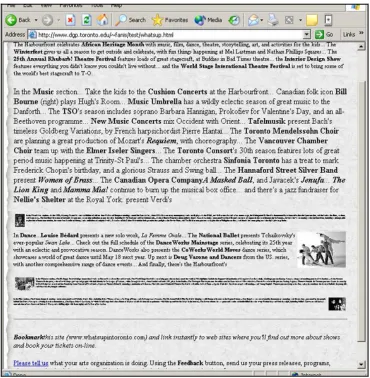
Fig. 1. Adapting the size of the text and images in a Web page
Although the technique changes the size of the various visual elements, other features of the page’s layout are preserved. The reader of the page gets direct feedback about the quantity and the structure of the material within the minimized paragraphs. In other words, while only the most relevant parts of the page are on focus, contextual information about the content, quantity, and layout of less relevant or irrelevant parts of the page is provided. Another advantage of the technique is that multiple degrees of relevance can be represented, as the sizes of the elements can be assigned a wide range of values. It can represent multiple variations of relevance between the content of the segments of the page and the user’s interests and also capture the uncertainty of the adaptation algorithm about the interests of the user. However, dual representations can also apply by distinguishing between two only sizes for each element type. Such an approach could be considered as a filtering fisheye technique, since a threshold value of DOI is used to determine the size of the page elements. Its main advantage is that it provides clarity requiring the user to distinguish between only two different states of adaptation.
3.3 Prototype implementation
paragraph and image in the pages was associated with a vector of values, where each such value specified the relevance between the element and a particular topic. This was achieved by assigning a unique identifier to the each element in the page and adding JavaScript statements to define the associated vector of relevance values. Additional JavaScript code was implemented in separate files to provide functionality for dynamic adaptation of the different elements.
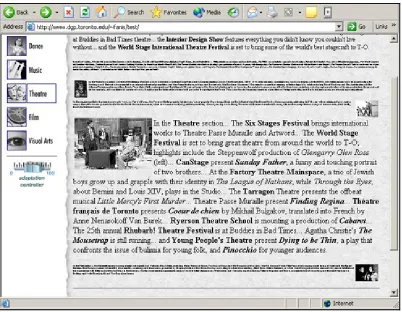
Fig. 2. Paragraphs related to theatre are on focus
Figure 2 presents a view of a page when the topic theatre is on focus. As shown in the figure, pages are presented in the right frame of the browser’s window, while the left frame is used to control the adaptation. Five icons at the left frame correspond to different topics. The user can change the focus of the browsing session by clicking on a different icon. This change is reflected to the presentation of the page in the right frame, where the size of the page's elements is adapted based on their relevance with the selected topic. In order to achieve smooth transitions between the consequent views of a page, we employ animation which is performed by gradually changing the sizes of the elements in the page. As the user navigates between different pages the information about the current focus is preserved and new pages are adapted accordingly.
layout information as whole pages do. Furthermore, the above approaches provide mechanisms that allow users to easily bring pages into focus. The easiest solution to the above problem is to constraint the minimum value of the font sizes so that the text is always readable. As different people have different visual abilities and in order to balance between illegibility of text and cognitive overload caused by extra information brought to the user’s attention, we decided to add a slider in the left frame of the pages as Figure 2 demonstrates. The slider was implemented in Flash MX. By moving the slider, the user can adjust the sensitivity of the adaptation and modify the minimum size of the text fonts. When the slider moves to zero, no adaptation is performed. The slider allows the user to control the adaptation process and adjust it according to his/her current goals.
Another technique that we use to handle the illegibility problem is the use of glosses that are activated when the user moves the mouse over paragraphs with small font sizes. A gloss provides hints about the content of the paragraph, such as a list of the most relevant topics. Glosses have been used by other systems to provide information about hyperlinks [16] or hidden text within pages [13].
Finally, we provide a mechanism that allows fluid transitions of individual paragraphs form context to focus. More precisely, by double-clicking on a paragraph that is out of focus, the user can zoom in the text of the paragraph together with its containing images. Animation is used to smoothly change the zooming level. If the user double-clicks again, the paragraph is zoomed-out to its initial size. This mechanism can be considered as a local rather than a global change of focus. The global adaptation of the page is not affected when a paragraph is double-clicked. In other words, temporary changes in the user’s attention are not translated into switches of the user’s current interests.
In summary, users specify the focus of their browsing tasks by selecting a topic of interest, which determines the adaptation of the viewed pages. By hovering the mouse over minimized paragraphs, they can get fast feedback about the content of the paragraphs. By double-clicking on them, they can maximize them and read the content in detail. If they decide to switch the focus of the adaptation, they can click on a different topic and change the view of the page. Finally, they can control the degree of the adaptation by manipulating the slider. This interaction model gives powerful control to the user and at the same time, provides smooth transitions between the different views of the page. Since adaptation is not automatic but is directly controlled by the user, the prototype can be considered as an adaptable rather than an adaptive system. However, the generalization of the approach to automatic adaptation is straightforward.
4. Related Techniques of Content Adaptation
The techniques that best support both focus and context and highly relate to our technique are stretchtext and dimming. Stretchtext enables users to expand and collapse additional text within a page. MetaDoc [3] was the first system that employed stretchtext as an adaptation technique. It provided different views of hypertext documents for users with different expertise. PUSH [8] also used stretchtext to adapt the content of hypertext documents to different information tasks. The advantage of the above approaches is that although text that is judged as irrelevant or redundant is hidden, the user can open it by clicking on a link or a representative icon. The amount of context that is provided by this approach depends on the ability of the link anchor or the icon to inform the user about the content of the hidden fragment. Compared to our technique, the main disadvantages of stretchtext are: (1) it does not provide any feedback about the quantity and layout of the hidden information; (2) support of context depends on the selection of a representative text or icon for the adaptable fragment, which is a procedure that needs special design considerations from the author of the page; and (3) it can visualize only two states of adaptation, i.e., fragments are either visible or hidden.
Dimming was introduced by Hothi et al. [9]. According to this approach, parts of the document containing information that is out of the user's focus are shaded instead of being hidden or zoomed-out. Information in context, in this case, is rich and directly accessible. Multiple states of relevance could also be represented by applying multiple levels of shading. The main drawback of dimming is that it does not reduce the size of the adapted page. Also, although shaded, irrelevant information can easily gain the attention of the users disrupting them from their main task.
5. Pilot Study
The most common approach of evaluating an adaptive system is to compare it against its non-adaptive version. This approach was adopted by the evaluations of both MetaDoc [3] and PUSH [8]. Although these evaluations showed that the adaptive versions of the systems improved the users' performance in several information tasks, they did not explain whether the employed adaptation technique, i.e., stretchtext, was better than other adaptation techniques. The question that arises is whether other adaptation techniques would have similar or better results if used by the same systems. It is not clear whether it was the particular adaptation technique or it was the efficiency of the adaptation mechanism that resulted in the observed improvements in the users' performance.
Comparing two adaptation techniques is not an easy task. Different adaptation techniques have been designed for different domains and different tasks. They cannot easily be separated by the system in which they have been used. However, as our goal is to identify techniques the use of which can be easily extended to generic Web pages and common browsing tasks, we conducted a preliminary study which compared two different adaptation techniques: the zooming technique that we presented in Section 3, and a stretchtext-like technique.
5.1 The techniques
The stretchtext version was based on the same implementation. The font size of paragraphs in context was set to zero. However, each paragraph had a representative title or introductory sentence whose font size was not adapted. The interaction model was exactly the same for both cases. Depending on the technique, the user could double-click on the body of the minimized paragraph or the paragraph's title to zoom in or expand, respectively, the paragraph. By following a similar procedure, the user could minimize or collapse the paragraph. Animation was used in both cases to smooth these transitions. Figure 3 shows two versions of the same page corresponding to the two different techniques that we tested.
(a) Applying the zooming technique (b) Applying the stretchtext technique Fig. 3. Zooming and stretchtext adaptation applied to the same page
5.2 Design of the study
The pilot study was conducted in the Digital Graphics Project (DGP) laboratory in the University of Toronto. All the sessions were performed on the same machine with a 18-inches flat monitor. We used Internet Explorer v6.0 and 1280x1024 pixels as screen resolution. Times New Roman was used as text font, with size set to 18px for in-focus text, and 10px for out-of-focus text in the case of the zooming technique. This resulted in page layouts like the ones presented in Figure 3. User actions were captured using JavaScript. JavaScript code posted the captured user actions together with time stamps to a servlet running locally, which saved the data into a log file.
pieces of information within P3 that satisfied a particular condition. In the first case, 2 out of the 3 answers were in paragraphs displayed in focus, while one answer was in a paragraph that was in context. In the second case, 3 out of the 5 answers were in paragraphs displayed in focus, while 2 answers were in paragraphs that were in context. The page adaptation was fixed for each task and was based on a small set of topics such as music, dance, theatre and cinema. The subjects were not given any information about the adaptation mechanism.
The subjects could answer a question by selecting with the mouse the relevant piece of information and clicking on the "select" button in the left frame of the browser's window. They were told that they should give answers as precisely as possible. They were not allowed to use any search facility of the browser. The study was designed considering only one independent variable, the adaptation technique. Dependent variables that we considered were the number of correct answers, the number of double-clicks on paragraphs, and the mean time that the subjects spent for each answer. The subjects were split into two different groups. The tasks to which the two techniques were applied were switched between the two groups. All the subjects tried both techniques in similar tasks. In order to eliminate the learning factor, the sequence of the tasks was different for each subject in a group. Before the beginning of the main session, the subjects were trained to locate and gather information using the two techniques on a fourth page taken from the same Web site. The time spent for training was about 10 minutes, while the time spent for the main session varied from 30 to 40 minutes. At the end of the experiment, the subjects were asked to fill in a questionnaire which allowed them to rate the two techniques and give us additional feedback.
5.3 Quantitative results
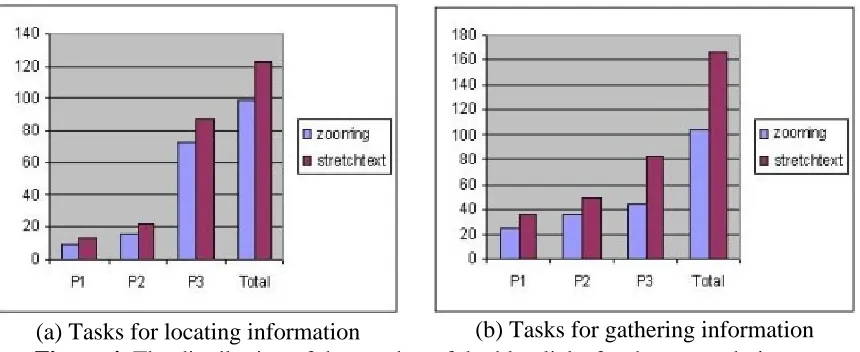
Figure 4 presents the distribution of double-clicks for the two approaches. As shown in the figure, the number of double-clicks was greater for both types of tasks and for all the three pages when stretchtext was used. This result was expectable since when the zooming technique was applied, the subjects could read the text without having to maximize it. However, the results show that although the text in the out-of-focus paragraphs was readable, the subjects used the zooming mechanism rather frequently. The logged user actions also showed that almost always and for both techniques, a double-click maximizing a paragraph was followed by a double-click minimizing the paragraph. Exception to this rule was the behaviour of one subject who preferred to maximize a small number of paragraphs without minimizing them after.
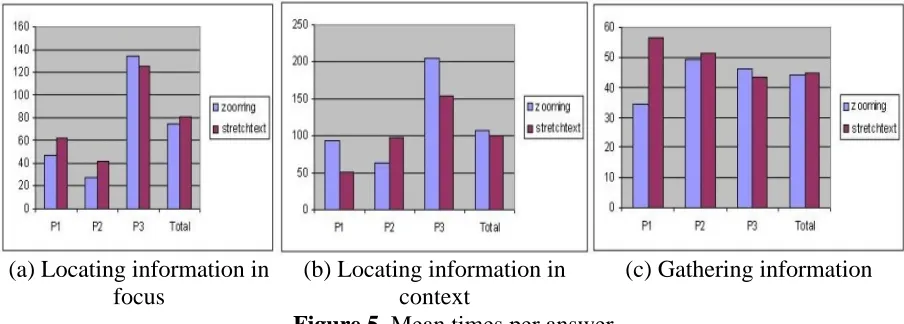
[image:9.595.87.517.551.727.2]The analysis of the answers that the users gave did not lead to any conclusion in favour of one technique or the other. All but four answers, which were equally distributed between the two techniques, were correct. Also, one gathering task was misunderstood by a user, so the corresponding data was not included in the analysis. Figure 5 presents the mean times that the subjects spent before giving an answer. We show again how the times were distributed among the three pages. Figure 5a shows the mean times spent for answers that involved locating information that was in focus, Figure 5b shows the mean times for answers that involved locating information that was in context, and Figure 5c shows the mean times for answers that were part of information gathering tasks. The results show that there were no differences in the total mean times for the two techniques. In contrast to our expectations, the zooming approach did not perform better in tasks that involved locating information in context. We think that the reason for this result is the cost that is associated with reading small font sizes, which was not quantified by our experiment. It seems that expanding or zooming in a paragraph can accelerate the reading process. Another observation that we can make is that stretchtext performed better on the large page, whereas the zooming technique performed generally better on the two smaller pages. One possible explanation for this is that zoomed-out paragraphs occupy significantly larger space than simple paragraph titles. This results in greater scrolling times within pages. This phenomenon became intense in the case of the large page reducing the performance of the zooming technique.
(a) Locating information in focus
(b) Locating information in context
[image:10.595.71.523.331.493.2](c) Gathering information
Figure 5. Mean times per answer
5.4 Preferences
page adaptation did not always facilitate the tasks that the subjects had to perform. Finally, 4 subjects rated higher the zooming technique over the stretchtext technique.
We should note that one subject rated the zooming technique low in all the questions. He commented that in contrast to the zooming technique, the stretching technique provided summarization and abstraction which facilitated his browsing tasks. He also disliked the way zooming was implemented. He said that as text became larger, the number of lines and the position of the words in the resized paragraphs changed and this made him loose the flow of information. Another comment that we received was that the small fonts were not easily readable. Sometimes the subjects had to move closer to the screen to read the text. Careful selection of the fonts could reduce this problem, but variations in the visual abilities of different people should also be considered.
6. Conclusions and Future Work
In this paper, we introduced a new technique based on fisheye views for adapting the presentation of content in Web pages. We stressed the need of supporting both focus and context when adapting the presentation of a page's content. We argued that the proposed technique can balance the trade-off between information overload and lack of context. We conducted a pilot study to compare the technique against stretchtext-based adaptation. The small number of subjects that participated in the study does not allow us to make general claims about the efficiency or usefulness of our technique against stretchtext. The study, however, indicated that the fisheye technique seems promising. We should mention that although both techniques that we compared performed almost equally in terms of the time that the subjects spent to complete their tasks, the authoring of the stretchtext pages required additional effort. We had to manually select appropriate sentences in the paragraphs as representative titles. The structure and content of the Web site on which we based our experiments facilitated this task, but this might not be the case if the technique was applied to other pages. Our study did not evaluate how the expressiveness of the paragraph titles could affect the performance of stretchtext adaptation. It also revealed issues that were not taken into consideration from the beginning. In a future evaluation, we have to consider variables such as the size of the pages, and the size and legibility of the fonts. We also plan to evaluate navigation between pages in addition to navigation within pages. Finally, it would be interesting to examine how the two compared techniques could be integrated. Representative titles could be combined with zoomed-out page fragments. This approach could provide both summarization and feedback about the layout and the size of the adapted fragments.
Our evaluation differentiated from other evaluations of AH systems which usually measure the performance of the adaptive system against its non-adaptive version. We believe that comparing an AH system against its non-adaptive version does not clearly evaluate the performance of the adaptation technique, since the results depend on the efficiency of the underlying adaptation algorithm. A future goal, however, is to study how different adaptation techniques affect the threshold over which an adaptive system starts performing worse than its non-adaptive version.
Acknowledgments
References
1. Bederson, B. B. Fisheye menus. 13th Annual ACM Symposium on User Interface Software and Technology, UIST, San Diego, California, United States, ACM Press, 2000.
2. Bederson, B. B., J.D. Hollan, J. Stewart, D. Rogers, A. Druin, and D. Vick. A zooming web browser. In SPIE Multimedia Computing and Networking (Proceedings of the SPIE, San Jose, CA, January, 1996), volume 2667, pages 260--271, 1996.
3. Boyle, C. and Encarnacion, A. O. MetaDoc: An Adaptive Hypertext Reading System, User Modeling and User-Adapted Interaction, Vol.4, No.1, pp.1-19, 1994.
4. Brusilovsky, P. Adaptive hypermedia. User Modeling and User Adapted Interaction, Ten Year Anniversary Issue (Alfred Kobsa, ed.) 11 (1/2), 87-110, 2001.
5. Furnas, G. W. Generalized Fisheye Views. CHI '86, Boston, Massachusetts, USA, ACM Press, 1986.
6. Greenberg, S., C. Gutwin and A. Cockburn. Using Distortion-Oriented Displays to Support Workspace Awareness. People and Computers XI (Proceedings of HCI '96), Springer-Verlag, 1996.
7. Holmquist, L.E. The Zoom Browser: Showing Simultaneous Detail and Overview in Large Documents. In Human IT vol. 2 no.3, ITH, 1998.
8. Hook, K. Evaluating the utility and usability of an adaptive hypermedia system. In: J. Moore, E. Edmonds and A. Puerta (eds.) Proceedings of 1997 International Conference on Intelligent User Interfaces, Orlando, Florida, January 7-9, 1997, ACM, pp. 179-186, 1997.
9. Hothi, J. and Hall, W. and Sly, T. A Study Comparing the Use of Shaded Text and Adaptive Navigational Support in Adaptive Hypermedia. Lecture Notes in Computer Science 1892:335-342, 2000.
10.Noik, E. G. Exploring large hyperdocuments: fisheye views of nested networks. Proceedings of the 5th ACM Conference on Hypertext, Seattle, Washington, United States, ACM Press, 1993.
11.Salton, G. Developments in automatic text retrieval. Science 253: 974-979. 1991. 12.Sarkar, M. and M. H. Brown. Graphical Fisheye Views of Graphs. CHI '92
Conference, Monterey, CA United States, ACM Press, 1992.
13.schraefel, m.c. ConTexts: Adaptable Hypermedia. Adaptive Hypermedia and Adaptive Web-Based Systems International Conference, AH 2000, Trento, Italy, 2000.
14.Tsandilas T. and m.c. schraefel. User-Controlled Link Adaptation. To appear in the 14th ACM Conference on Hypertext and Hypermedia, Nottingham, UK, 2003.
15.Wadge, Wm. and m.c. schraefel. A Complementary Approach for Adaptive and Adaptable Hypermedia: Intensional Hypertext. Third Workshop on Adaptive Hypermedia, August 15, 2001. Aarhus, Denmark.