SAS
Certification Prep Guide
Advanced
Programming for SAS
®SAS®Certification Prep Guide: Advanced Programming for SAS®9, Fourth Edition Copyright © 2014, SAS Institute Inc., Cary, NC, USA
978-1-62959-354-8 (Hardcopy) 978-1-62959-358-6 (EPUB) 978-1-62959-359-3 (MOBI) 978-1-62959-357-9 (PDF)
All rights reserved. Produced in the United States of America.
For a hard-copy book: No part of this publication may be reproduced, stored in a retrieval system, or transmitted, in any form or by any means, electronic, mechanical, photocopying, or otherwise, without the prior written permission of the publisher, SAS Institute Inc.
For a web download or e-book: Your use of this publication shall be governed by the terms established by the vendor at the time you acquire this publication.
The scanning, uploading, and distribution of this book via the Internet or any other means without the permission of the publisher is illegal and punishable by law. Please purchase only authorized electronic editions and do not participate in or encourage electronic piracy of copyrighted materials. Your support of others’ rights is appreciated.
U.S. Government License Rights; Restricted Rights: The Software and its documentation is commercial computer software developed at private expense and is provided with RESTRICTED RIGHTS to the United States Government. Use, duplication or disclosure of the Software by the United States Government is subject to the license terms of this Agreement pursuant to, as applicable, FAR 12.212, DFAR 227.7202-1(a), DFAR 227.7202-3(a) and DFAR 227.7202-4 and, to the extent required under U.S. federal law, the minimum restricted rights as set out in FAR 52.227-19 (DEC 2007). If FAR 52.227-19 is applicable, this provision serves as notice under clause (c) thereof and no other notice is required to be affixed to the Software or documentation. The Government's rights in Software and documentation shall be only those set forth in this Agreement. SAS Institute Inc., SAS Campus Drive, Cary, North Carolina 27513-2414.
December 2014
SAS provides a complete selection of books and electronic products to help customers use SAS® software to its fullest potential. For more information about our offerings, visit sas.com/store/books or call 1-800-727-0025.
SAS® and all other SAS Institute Inc. product or service names are registered trademarks or trademarks of SAS Institute Inc. in the USA and other countries. ® indicates USA registration.
About This Book . . . xiii
PART 1
SQL Processing with SAS
1 Chapter 1 • Performing Queries Using PROC SQL . . . 3Overview . . . 4
PROC SQL Basics . . . 4
Writing a PROC SQL Step . . . 6
Selecting Columns . . . 8
Specifying the Table . . . 10
Specifying Subsetting Criteria . . . 11
Ordering Rows . . . 11
Querying Multiple Tables . . . 13
Summarizing Groups of Data . . . 17
Creating Output Tables . . . 19
Additional Features . . . 20
Summary . . . 20
Quiz . . . 22
Chapter 2 • Performing Advanced Queries Using PROC SQL . . . 25
Overview . . . 26
Viewing SELECT Statement Syntax . . . 27
Displaying All Columns . . . 28
Limiting the Number of Rows Displayed . . . 29
Eliminating Duplicate Rows from Output . . . 31
Subsetting Rows By Using Conditional Operators . . . 32
Subsetting Rows By Using Calculated Values . . . 40
Enhancing Query Output . . . 42
Summarizing and Grouping Data . . . 48
Subsetting Data By Using Subqueries . . . 61
Subsetting Data By Using Noncorrelated Subqueries . . . 63
Subsetting Data By Using Correlated Subqueries . . . 69
Validating Query Syntax . . . 71
Additional Features . . . 72
Summary . . . 73
Quiz . . . 76
Chapter 3 • Combining Tables Horizontally Using PROC SQL . . . 81
Overview . . . 82
Understanding Joins . . . 82
Generating a Cartesian Product . . . 83
Using Inner Joins . . . 85
Using Outer Joins . . . 93
Creating an Inner Join with Outer Join-Style Syntax . . . 100
Comparing SQL Joins and DATA Step Match-Merges . . . 100
Using In-Line Views . . . 105
Summary . . . 116
Quiz . . . 118
Chapter 4 • Combining Tables Vertically Using PROC SQL . . . 125
Overview . . . 126
Understanding Set Operations . . . 127
Using the EXCEPT Set Operator . . . 132
Using the INTERSECT Set Operator . . . 139
Using the UNION Set Operator . . . 144
Using the OUTER UNION Set Operator . . . 151
Comparing Outer Unions and Other SAS Techniques . . . 156
Summary . . . 157
Quiz . . . 159
Chapter 5 • Creating and Managing Tables Using PROC SQL . . . 165
Overview . . . 167
Understanding Methods of Creating Tables . . . 168
Creating an Empty Table By Defining Columns . . . 168
Displaying the Structure of a Table . . . 173
Creating an Empty Table That Is like Another Table . . . 174
Creating a Table from a Query Result . . . 177
Inserting Rows of Data into a Table . . . 180
Creating a Table That Has Integrity Constraints . . . 187
Handling Errors in Row Insertions . . . 193
Displaying Integrity Constraints for a Table . . . 197
Updating Values in Existing Table Rows . . . 198
Deleting Rows in a Table . . . 207
Altering Columns in a Table . . . 209
Dropping Tables . . . 216
Summary . . . 216
Quiz . . . 221
Chapter 6 • Creating and Managing Indexes Using PROC SQL . . . 225
Overview . . . 226
Understanding Indexes . . . 227
Deciding Whether to Create an Index . . . 229
Creating an Index . . . 231
Displaying Index Specifications . . . 233
Managing Index Usage . . . 235
Dropping Indexes . . . 239
Summary . . . 240
Quiz . . . 242
Chapter 7 • Creating and Managing Views Using PROC SQL . . . 247
Overview . . . 248
Creating and Using PROC SQL Views . . . 248
Displaying the Definition for a PROC SQL View . . . 251
Managing PROC SQL Views . . . 252
Updating PROC SQL Views . . . 255
Dropping PROC SQL Views . . . 257
Summary . . . 258
Quiz . . . 260
Chapter 8 • Managing Processing Using PROC SQL . . . 263
Overview . . . 264
Controlling Execution . . . 265
Controlling Output . . . 267
Testing and Evaluating Performance . . . 271
Resetting Options . . . 273
Using Dictionary Tables . . . 275
Additional Features . . . 279
Summary . . . 279
Quiz . . . 281
PART 2
SAS Macro Language
285 Chapter 9 • Introducing Macro Variables . . . 287Overview . . . 288
Basic Concepts . . . 289
Using Automatic Macro Variables . . . 291
Using User-Defined Macro Variables . . . 293
Processing Macro Variables . . . 296
Displaying Macro Variable Values in the SAS Log . . . 299
Using Macro Functions to Mask Special Characters . . . 302
Using Macro Functions to Manipulate Character Strings . . . 306
Using SAS Functions with Macro Variables . . . 314
Combining Macro Variable References with Text . . . 316
Summary . . . 320
Quiz . . . 323
Chapter 10 • Processing Macro Variables at Execution Time . . . 327
Overview . . . 328
Creating a Macro Variable during DATA Step Execution . . . 329
Creating Multiple Macro Variables during DATA Step Execution . . . 343
Referencing Macro Variables Indirectly . . . 346
Obtaining Macro Variable Values during DATA Step Execution . . . 352
Creating Macro Variables during PROC SQL Step Execution . . . 354
Working with PROC SQL Views . . . 361
Using Macro Variables in SCL Programs . . . 362
Summary . . . 364
Quiz . . . 367
Chapter 11 • Creating and Using Macro Programs . . . 371
Overview . . . 372
Basic Concepts . . . 373
Developing and Debugging Macros . . . 378
Using Macro Parameters . . . 381
Understanding Symbol Tables . . . 387
Processing Statements Conditionally . . . 396
Processing Statements Iteratively . . . 407
Using Arithmetic and Logical Expressions . . . 411
Summary . . . 414
Quiz . . . 417
Chapter 12 • Storing Macro Programs . . . 421
Overview . . . 422
Understanding Session-Compiled Macros . . . 422
Storing Macro Definitions in External Files . . . 423
Using the Autocall Facility . . . 429
Using Stored Compiled Macros . . . 433
Summary . . . 439
Quiz . . . 441
PART 3
Advanced SAS Programming Techniques
445 Chapter 13 • Creating Indexes . . . 447Overview . . . 448
Using Indexes . . . 448
Creating Indexes in the DATA Step . . . 449
Managing Indexes with PROC DATASETS . . . 452
Managing Indexes with PROC SQL . . . 454
Documenting and Maintaining Indexes . . . 455
Summary . . . 461
Quiz . . . 462
Chapter 14 • Combining Data Vertically . . . 465
Overview . . . 466
Using a FILENAME Statement . . . 466
Using the FILEVAR= Option . . . 469
Appending SAS Data Sets . . . 477
Additional Features . . . 485
Summary . . . 486
Quiz . . . 488
Chapter 15 • Combining Data Horizontally . . . 495
Overview . . . 496
Reviewing Terminology . . . 497
Working with Lookup Values Outside of SAS Data Sets . . . 500
Combining Data with the DATA Step Match-Merge . . . 502
Using PROC SQL to Join Data . . . 506
Comparing DATA Step Match-Merges and PROC SQL Joins . . . 507
Combining Summary Data and Detail Data . . . 516
Using an Index to Combine Data . . . 521
Using a Transaction Data Set . . . 525
Summary . . . 528
Quiz . . . 532
Chapter 16 • Using Lookup Tables to Match Data . . . 537
Overview . . . 538
Using Multidimensional Arrays . . . 538
Populating an Array from a SAS Data Set . . . 542
Using PROC TRANSPOSE . . . 548
Merging the Transposed Data Set . . . 553
Using Hash Objects as Lookup Tables . . . 558
Summary . . . 570
Quiz . . . 573
Chapter 17 • Formatting Data . . . 579
Overview . . . 580
Creating Custom Formats Using the VALUE Statement . . . 580
Creating Custom Formats Using the PICTURE Statement . . . 583
Using Custom Formats . . . 591
Creating Formats from SAS Data Sets . . . 594
Creating SAS Data Sets from Custom Formats . . . 598
Summary . . . 601
Quiz . . . 603
Chapter 18 • Modifying SAS Data Sets and Tracking Changes . . . 607
Overview . . . 608
Using the MODIFY Statement . . . 609
Modifying All Observations in a SAS Data Set . . . 610
Modifying Observations Using a Transaction Data Set . . . 611
Modifying Observations Located by an Index . . . 614
Controlling the Update Process . . . 618
Understanding Integrity Constraints . . . 620
Placing Integrity Constraints on a Data Set . . . 622
Documenting Integrity Constraints . . . 626
Removing Integrity Constraints . . . 627
Understanding Audit Trails . . . 628
Initiating and Reading Audit Trails . . . 629
Controlling Data in the Audit Trail . . . 631
Controlling the Audit Trail . . . 634
Understanding Generation Data Sets . . . 636
Initiating Generation Data Sets . . . 637
Processing Generation Data Sets . . . 638
Summary . . . 641
Quiz . . . 644
PART 4
Optimizing SAS Programs
649 Chapter 19 • Introduction to Efficient SAS Programming . . . 651Overview . . . 651
Overview of Computing Resources . . . 652
Assessing Efficiency Needs at Your Site . . . 652
Understanding Efficiency Trade-offs . . . 654
Using SAS System Options to Track Resources . . . 655
Using Benchmarks to Compare Techniques . . . 656
Summary . . . 658
Chapter 20 • Controlling Memory Usage . . . 659
Overview . . . 659
Controlling Page Size and the Number of Buffers . . . 660
Using the SASFILE Statement . . . 666
Additional Features . . . 671
Summary . . . 672
Quiz . . . 673
Chapter 21 • Controlling Data Storage Space . . . 675
Overview . . . 676
Reducing Data Storage Space for Character Variables . . . 677
Reducing Data Storage Space for Numeric Variables . . . 677
Compressing Data Files . . . 685
Using SAS DATA Step Views to Conserve Data Storage Space . . . 696
Summary . . . 703
Chapter 22 • Using Best Practices . . . 707
Overview . . . 708
Executing Only Necessary Statements . . . 708
Eliminating Unnecessary Passes through the Data . . . 721
Reading and Writing Only Essential Data . . . 725
Storing Data in SAS Data Sets . . . 735
Avoiding Unnecessary Procedure Invocation . . . 737
Summary . . . 740
Quiz . . . 742
Chapter 23 • Querying Data Efficiently . . . 745
Overview . . . 747
Using an Index for Efficient WHERE Processing . . . 747
Identifying Available Indexes . . . 750
Identifying Conditions That Can Be Optimized . . . 754
Estimating the Number of Observations . . . 756
Comparing Probable Resource Usage . . . 759
Deciding Whether to Create an Index . . . 761
Comparing Procedures That Produce Detail Reports . . . 765
Comparing Tools for Summarizing Data . . . 767
Summary . . . 784
Quiz . . . 787
Chapter 24 • Creating Functions with PROC FCMP . . . 789
Overview . . . 789
Using PROC FCMP . . . 789
About PROC FCMP . . . 790
PROC FCMP Statement . . . 791
FUNCTION Statement . . . 791
RETURN Statement . . . 791
Using the Newly Defined Function . . . 791
Using PROC FCMP to Create a Subroutine . . . 792
Quiz . . . 793
PART 5
Quiz Answer Keys
795 Appendix 1 • Quiz Answer Keys . . . 797Chapter 1: Performing Queries Using PROC SQL . . . 798
Chapter 2: Performing Advanced Queries Using PROC SQL . . . 799
Chapter 3: Combining Tables Horizontally Using PROC SQL . . . 800
Chapter 4: Combining Tables Vertically Using PROC SQL . . . 801
Chapter 5: Creating and Managing Tables Using PROC SQL . . . 802
Chapter 6: Creating and Managing Indexes Using PROC SQL . . . 803
Chapter 7: Creating and Managing Views Using PROC SQL . . . 804
Chapter 8: Managing Processing Using PROC SQL . . . 806
Chapter 9: Introducing Macro Variables . . . 807
Chapter 10: Processing Macro Variables at Execution Time . . . 808
Chapter 11: Creating and Using Macro Programs . . . 809
Chapter 12: Storing Macro Programs . . . 811
Chapter 13: Creating Indexes . . . 812
Chapter 14: Combining Data Vertically . . . 813
Chapter 15: Combining Data Horizontally . . . 814
Chapter 16: Using Lookup Tables to Match Data . . . 816
Chapter 18: Modifying SAS Data Sets and Tracking Changes . . . 818
Chapter 19: Introduction to Efficient SAS Programming . . . 819
Chapter 20: Controlling Memory Usage . . . 819
Chapter 21: Controlling Data Storage Space . . . 820
Chapter 22: Using Best Practices . . . 820
Chapter 23: Querying Data Efficiently . . . 821
Chapter 24: Creating Functions with PROC FCMP . . . 822
About This Book
Audience
The SAS Certification Prep Guide: Advanced Programming for SAS®9, Fourth Edition is
for new or experienced SAS programmers who want to prepare for the SAS Advanced Programming for SAS 9 exam.
Requirements and Details
Purpose and Content
This guide helps prepare you to take the SAS Advanced Programming for SAS 9 exam. New or experienced SAS users will find this guide to be an invaluable resource that covers the objectives tested on the exam.
Major topics include SQL processing with SAS and the SAS macro language, advanced SAS programming techniques, and optimizing SAS programs. You will also become familiar with the enhancements and new functionality that are available in SAS®9.
The book includes quizzes that test your understanding of material in each chapter. Quiz solutions are included at the end of the book.
To find updates to this guide, visit the SAS Training and Books website at http:// support.sas.com/publishing/cert.
Note: Exam objectives are subject to change. See the current exam objectives at http:// support.sas.com/certify.
Prerequisites
Candidates must earn the SAS Certified Base Programmer for SAS 9 credential before taking the SAS Advanced Programming for SAS 9 exam. The SAS Certification Prep Guide: Base Programming for SAS®9 covers the objectives tested on the SAS Base
Programming for SAS 9 exam, including importing and exporting raw data files; creating and modifying SAS data sets; and identifying and correcting data, syntax, and programming logic errors.
To see if you have the necessary prerequisite Base SAS programming knowledge, visit
How to Create Practice Data
SAS Windowing Environment
To set up practice data in SAS, select HelpðLearning SAS Programming from the main SAS menu. When the SAS Online Training Sample Data window appears, click
OK to create sample data.
SAS Studio and SAS University Edition
If you are using SAS Studio or SAS University Edition, you might not have Write access to the Sasuser directory where the sample data is stored.
To determine whether the Sasuser folder is Read only, submit the following code:
proc options option=rsasuser; run;
If the result from the PROC OPTIONS code is NORSASUSER, the Sasuser folder is writable, and you can take the following steps to set up practice data in SAS Studio: 1. Copy the sample data program into a new Code window in SAS Studio. You can
access the sample data at http://support.sas.com/publishing/cert/sampdata.txt. 2. Click Run.
If the result from the PROC OPTIONS code is RSASUSER, the Sasuser folder is Read only, and you must redirect the Sasuser folder by using the LIBNAME statement. To set up practice data:
1. In the Folders pane, select My Folders. Then, right-click and select NewðFolder. 2. In the Name box, type a folder name. In our examples, we use the name certprep.
Click Save.
3. Redirect your SASUSER library to the new folder as follows:
If you are using SAS University Edition, submit a LIBNAME statement by copying the following code into the Code tab:
libname sasuser "/folders/myfolders/certprep";
Note: You must use the filename of the new directory. In our examples, we use the name certprep. If you use another filename, substitute the name that you created for certprep.
If you are using SAS Studio, do the following:
a. Right-click the new folder that you created and select Properties. b. Copy the path in the Location field.
c. Enter the following code, replacing location field with the path that you copied from the Location field.
libname sasuser "location field";
d. Click Run.
f. Copy the sample data program into a new Code window in SAS Studio. You can access the sample data at http://support.sas.com/publishing/cert/sampdata.txt. g. Click Run.
Now that you have the sample data stored in a permanent directory, reissue the LIBNAME statement whenever you want to use the data.
SAS Enterprise Guide
To download the sample data: 1. Start SAS Enterprise Guide.
2. In the Welcome to SAS Enterprise window, select New Project. 3. Select FileðNewðProgram.
4. Depending on your network configuration, you might not have Write access to the Sasuser directory where the sample data is stored. To determine the status of the Sasuser directory, submit the following code:
proc options option=rsasuser; run;
5. If the result from the PROC OPTIONS code is RSASUSER, you must redirect the Sasuser folder by creating a new folder. From your server area, open the Files folder, right-click on a drive or folder, and select New Folder. Enter the new folder name.
Note: If the result from the PROC OPTIONS code is NORSASUSER, the Sasuser folder is writable, and you do not have to redirect the Sasuser folder. Therefore, you can skip this step and the next one.
6. Submit the following code in a Code window:
libname sasuser "/folders/myfolders/certprep";
Note: You must use the filename of the new folder. In our examples, we use the name certprep. If you use another filename, substitute the folder name that you created for certprep.
7. Copy the sample data program into the Program window and then run the program. You can access the sample data at http://support.sas.com/publishing/cert/
sampdata.txt.
8. Because you will not need to use these shortcuts, you can delete the Program item and all the shortcuts from the project. This action will not delete the data that you created. To delete the item from the project, right-click Program and select Delete. 9. In the Confirmation window, click Yes.
Exams
The SAS Certification Practice Exam: Advanced Programming for SAS 9 helps you prepare for the SAS Advanced Programming for SAS 9 exam. This practice exam tests the same knowledge and skills as the official certification exam. You can access this exam under the SAS Certification category at https://support.sas.com/edu/
schedules.html?id=449. There is a fee for this practice exam.
Additional Resources
The following resources can help you as you learn SAS programming.
From SAS Software
Help For SAS®9, select HelpðSAS Help and
Documentation
SAS Enterprise Guide, select HelpðSAS Enterprise Guide Help
Documentation For SAS®9, select HelpðSAS Help and
Documentation
SAS Studio, select
On the Web
Bookstore http://support.sas.com/publishing/
Training http://support.sas.com/training/
Documentation (including SAS Enterprise Guide)
http://support.sas.com/documentation/
Certification http://support.sas.com/certify/
SAS Global Academic Program http://support.sas.com/learn/ap
SAS OnDemand http://support.sas.com/ondemand/
Knowledge Base http://support.sas.com/resources/
Support http://support.sas.com/techsup/
Learning Center http://support.sas.com/learn/
Community http://support.sas.com/community/
Syntax Conventions
PROC SQL;
SELECTcolumn-1<,...column-n>
FROMtable-1|view-1<,...table-n|view-n> <WHERE expression>
<GROUP BY column-1<, ... column-n>> <ORDER BY column-1<,... column-n>>;
PROC SQL
invokes the SQL procedure. SELECT
specifies the column(s) to be selected. FROM
specifies the table(s) to be queried. WHERE
subsets the data based on a condition. GROUP BY
classifies the data into groups based on the specified column(s). ORDER BY
sorts the rows that the query returns by the value(s) of the specified column(s).
Here are details.
SELECT, FROM, WHERE, GROUP BY, and ORDER BY are in uppercase because they must be spelled as shown.
column-1, table-1, view-1, and expression
are in italics because each represents a value that you supply. <,...column-n>
is enclosed in angle brackets because it is optional syntax.
table-1 and view-1
Part 1
SQL Processing with SAS
Chapter 1
Performing Queries Using PROC SQL . . . 3
Chapter 2
Performing Advanced Queries Using PROC SQL . . . 25
Chapter 3
Combining Tables Horizontally Using PROC SQL . . . 81
Chapter 4
Combining Tables Vertically Using PROC SQL . . . 125
Chapter 5
Creating and Managing Tables Using PROC SQL . . . 165
Chapter 6
Creating and Managing Indexes Using PROC SQL . . . 225
Chapter 7
Creating and Managing Views Using PROC SQL . . . 247
Chapter 8
Chapter 1
Performing Queries Using PROC
SQL
Overview . . . 4
Introduction . . . 4
PROC SQL Basics . . . 4
Overview . . . 4
How PROC SQL Is Unique . . . 5
Writing a PROC SQL Step . . . 6
Overview . . . 6
The SELECT Statement . . . 7
Selecting Columns . . . 8
Overview . . . 8
Creating New Columns . . . 9
Specifying the Table . . . 10
Specifying Subsetting Criteria . . . 11
Ordering Rows . . . 11
Overview . . . 11
Ordering by Multiple Columns . . . 12
Querying Multiple Tables . . . 13
Overview . . . 13
Specifying Columns That Appear in Multiple Tables . . . 14
Specifying Multiple Table Names . . . 15
Specifying a Join Condition . . . 15
Ordering Rows . . . 16
Summarizing Groups of Data . . . 17
Example . . . 17
Summary Functions . . . 18
Creating Output Tables . . . 19
Overview . . . 19
Example . . . 19
Additional Features . . . 20
Summary . . . 20
Text Summary . . . 20
Sample Programs . . . 22
Points to Remember . . . 22
Overview
Introduction
Sometimes you need quick answers to questions about your data. You might want to query (retrieve data from) a single SAS data set or a combination of data sets to do the following:
• examine relationships between data values • view a subset of your data
• compute values quickly.
The SQL procedure (PROC SQL) provides an easy, flexible way to query and combine your data. This chapter shows you how to create a basic query using one or more tables (data sets). You learn how to create a new table from your query.
PROC SQL Basics
Overview
PROC SQL is the SAS implementation of Structured Query Language (SQL), which is a standardized language that is widely used to retrieve and update data in tables and in views that are based on those tables.
The following chart shows terms used in data processing, SAS, and SQL that are synonymous. The SQL terms are used in this chapter. A SAS data set (or SAS data file) can be a table or a view.
Data Processing SAS SQL
file SAS data file table
record observation row
PROC SQL can often be used as an alternative to other SAS procedures or the DATA step. You can use PROC SQL to do the following:
• retrieve data from and manipulate SAS tables • add or modify data values in a table
• add, modify, or drop columns in a table • create tables and views
• join multiple tables (whether they contain columns with the same name) • generate reports.
Like other SAS procedures, PROC SQL also enables you to combine data from two or more different types of data sources and present them as a single table. For example, you can combine data from two different types of external databases, or you can combine data from an external database and a SAS data set.
How PROC SQL Is Unique
PROC SQL differs from most other SAS procedures in several ways:
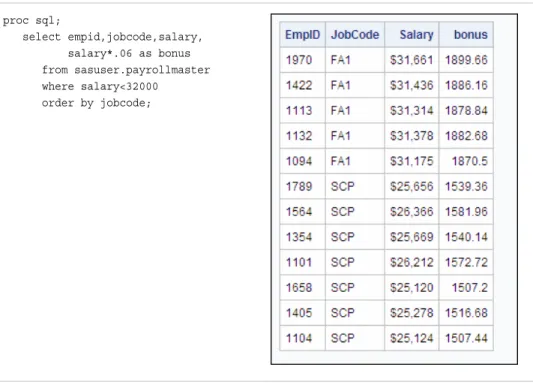
• Unlike other PROC statements, many statements in PROC SQL include clauses. For example, the following PROC SQL step contains two statements: the PROC SQL statement and the SELECT statement. The SELECT statement contains several clauses: SELECT, FROM, WHERE, and ORDER BY.
proc sql;
select empid,jobcode,salary, salary*.06 as bonus from sasuser.payrollmaster where salary<32000
order by jobcode;
Table 1.1 SAS Log
1884 proc sql;
1885 select empid,jobcode,salary, 1886 salary*.06 as bonus 1887 from sasuser.payrollmaster 1888 where salary<32000
1889 order by jobcode; 1890 run;
NOTE: PROC SQL statements are executed immediately; The RUN statement has no effect.
• Unlike many other SAS procedures, PROC SQL continues to run after you submit a step. To end the procedure, you must submit another PROC step, a DATA step, or a QUIT statement, as shown:
proc sql;
select empid,jobcode,salary, salary*.06 as bonus from sasuser.payrollmaster where salary<32000
order by jobcode; quit;
When you submit a PROC SQL step without ending it, the status bar displays the message:
PROC SQL running
Note: As a precaution, SAS Enterprise Guide automatically adds a QUIT statement to your code when you submit it to SAS. However, you should get in the habit of adding the QUIT statement to your code.
Writing a PROC SQL Step
Overview
General form, basic PROC SQL step to perform a query:
PROC SQL;
SELECTcolumn-1<,...column-n>
FROMtable-1|view-1<,...table-n|view-n> <WHERE expression>
<GROUP BY column-1<, ... column-n>> <ORDER BY column-1<,... column-n>>;
Here is an explanation of the syntax: PROC SQL
invokes the SQL procedure SELECT
specifies the column(s) to be selected FROM
specifies the table(s) to be queried WHERE
subsets the data based on one or more conditions GROUP BY
classifies the data into groups based on the specified column(s) ORDER BY
sorts the rows that the query returns by the value(s) of the specified column(s).
CAUTION:
Unlike other SAS procedures the order of clauses with a SELECT statement in PROC SQL is important. Clauses must appear in the order shown above.
Note: A query can also include a HAVING clause, which is introduced at the end of this chapter. To learn more about the HAVING clause, see Chapter 2, “Performing Advanced Queries Using PROC SQL,” on page 26.
The SELECT Statement
The SELECT statement, which follows the PROC SQL statement, retrieves and displays data. It consists of clauses that begin with a keyword, and is followed by one or more components. The SELECT statement in the following sample code contains four clauses: the required clauses SELECT and FROM, and the optional clauses WHERE and
ORDER BY. The end of the statement is indicated by a semicolon.
proc sql;
|-select empid,jobcode,salary, | salary*.06 as bonus |----from sasuser.payrollmaster |----where salary<32000
|----order by jobcode;
Note: A PROC SQL step that contains one or more SELECT statements is referred to as a PROC SQL query. The SELECT statement is only one of several statements that can be used with PROC SQL.
proc sql;
select empid,jobcode,salary, salary*.06 as bonus from sasuser.payrollmaster where salary<32000
order by jobcode;
A PROC SQL query produces a result set that can be output as a report, a table, or a PROC SQL view.
Type of Output PROC SQL Statement
report SELECT
table CREATE TABLE
PROC SQL view CREATE VIEW
Note: The CREATE TABLE statement is introduced later in this chapter. You can learn about creating tables in Chapter 5, “Creating and Managing Tables Using PROC SQL,” on page 167. You can learn more about PROC SQL views in Chapter 7, “Creating and Managing Views Using PROC SQL,” on page 248.
You learn more about the SELECT statement in the following sections.
Selecting Columns
Overview
The following SELECT clause specifies the columns EmpID, JobCode, Salary, and
bonus. The columns EmpID, JobCode, and Salary are existing columns. The column named bonus is a new column.
proc sql;
select empid,jobcode,salary, salary*.06 as bonus from sasuser.payrollmaster where salary<32000
order by jobcode;
Creating New Columns
You can create new columns that contain either text or a calculation. New columns appear in output, along with any existing columns that are selected. Keep in mind that new columns exist only for the duration of the query, unless a table or a view is created. To create a new column, include any valid SAS expression in the SELECT clause list of columns. You can assign a column alias, a name, to a new column by using the keyword AS followed by the name that you would like to use.
Note: A column alias must follow the rules for SAS names.
In the sample PROC SQL query, shown below, an expression is used to calculate the new column: the values of Salary are multiplied by .06. The keyword AS is used to assign the column alias bonus to the new column.
proc sql;
select empid,jobcode,salary, salary*.06 as bonus from sasuser.payrollmaster where salary<32000
order by jobcode;
A column alias is useful because it enables you to reference the column elsewhere in the query.
Note: You can learn more about referencing a calculated column from other clauses in
Chapter 2, “Performing Advanced Queries Using PROC SQL,” on page 26. Also, the column alias appears as a column heading in the output.
In the SELECT clause, you can specify a label for an existing column or a new column. If both a label alias and a column alias are specified for a new column, the label is displayed as the column heading in the output1. If only a column alias is specified, it is
important that you specify the column alias exactly as you want it to appear in the output.
Note: You can learn about creating new columns that contain text and about specifying labels for columns in Chapter 2, “Performing Advanced Queries Using PROC SQL,” on page 26.
Specifying the Table
After writing the SELECT clause, you specify the table to be queried in the FROM clause. Enter the keyword FROM, followed by the name of the table, as shown:
proc sql;
select empid,jobcode,salary, salary*.06 as bonus from sasuser.payrollmaster where salary<32000
order by jobcode;
The PROC SQL step above queries the permanent SAS table Payrollmaster, which is stored in a SAS library to which the libref Sasuser has been assigned.
Specifying Subsetting Criteria
To subset data based on a condition, use a WHERE clause in the SELECT statement. As in the WHERE statement and the WHERE command used in other SAS procedures, the expression in the WHERE clause can be any valid SQL expression. In the WHERE clause, you can specify any column(s) from the underlying table(s). The columns specified in the WHERE clause do not have to be specified in the SELECT clause. In the following PROC SQL query, the WHERE clause selects rows in which the value of the column Salary is less than 32,000. The output is also shown.
proc sql;
select empid,jobcode,salary, salary*.06 as bonus from sasuser.payrollmaster where salary<32000
order by jobcode;
Ordering Rows
Overview
The order of rows in the output of a PROC SQL query cannot be guaranteed, unless you specify a sort order. To sort rows by the values of specific columns, you can use the ORDER BY clause in the SELECT statement. Specify the keywords ORDER BY, followed by one or more column names separated by commas.
In the following PROC SQL query, the ORDER BY clause sorts rows by values of the column JobCode:
select empid,jobcode,salary, salary*.06 as bonus from sasuser.payrollmaster where salary<32000
order by jobcode;
Note: In this example, the ORDER BY clause is the last clause in the SELECT statement, so the ORDER BY clause ends with a semicolon.
In the output of the sample query, shown below, the rows are sorted by the values of JobCode. By default, the ORDER BY clause sorts rows in ascending order.
To sort rows in descending order, specify the keyword DESC following the column name. For example, the preceding ORDER BY clause could be modified as follows:
order by jobcode desc;
In the ORDER BY clause, you can alternatively reference a column by the column's position in the SELECT clause list rather than by name. Use an integer to indicate the column's position. The ORDER BY clause in the preceding PROC SQL query has been modified, below, to specify the column JobCode by the column's position in the SELECT clause list (2) rather than by name:
proc sql;
select empid,jobcode,salary, salary*.06 as bonus from sasuser.payrollmaster where salary<32000
order by 2;
Ordering by Multiple Columns
proc sql;
select empid,jobcode,salary, salary*.06 as bonus from sasuser.payrollmaster where salary<32000
order by jobcode,empid;
The rows are sorted first by JobCode and then by EmpID, as shown in the following output.
Note: You can mix the two types of column references, names and numbers, in the ORDER BY clause. For example, the preceding ORDER BY clause could be rewritten as follows:
order by 2,empid;
You can also reference column aliases in the ORDER BY clause. Here is an example:
order by 2, empid, bonus;
Querying Multiple Tables
Overview
In SQL terminology, combining tables horizontally is called joining tables. Joins do not alter the original tables.
Suppose you want to create a report that displays the following information for
employees of a company: employee identification number, last name, original salary, and new salary. There is no single table that contains all of these columns, so you must join the two tables Sasuser.Salcomps and Sasuser.Newsals. In your query, you want to select four columns, two from the first table and two from the second table. You also need to ensure that the rows that you join belong to the same employee. To check this, you want to match employee identification numbers for rows that you merge and to select only the rows that match.
This type of join is known as an inner join. An inner join returns a result set for all of the rows in a table that have one or more matching rows in another table.
Note: For more information about PROC SQL joins, see Chapter 3, “Combining Tables Horizontally Using PROC SQL,” on page 82.
You can write a PROC SQL step to combine tables. To join two tables for a query, you can use a PROC SQL step such as the one below. This step uses the SELECT statement to join data from the tables Salcomps and Newsals. Both of these tables are stored in a SAS library to which the libref Sasuser has been assigned.
proc sql;
select salcomps.empid,lastname, newsals.salary,newsalary
from sasuser.salcomps,sasuser.newsals where salcomps.empid=newsals.empid order by lastname;
We examine each clause of this PROC SQL step.
Specifying Columns That Appear in Multiple Tables
When you join two or more tables, list the columns that you want to select from both tables in the SELECT clause. Separate all column names with commas.
If the tables that you are querying contain same-named columns and you want to list one of these columns in the SELECT clause, you must specify a table name as a prefix for that column. Specifying a table-name prefix with a column that only exists in one table is syntactically acceptable.
Note: Prefixing a table name to a column name is called qualifying the column name. The following PROC SQL step joins the two tables Sasuser.Salcomps and
where to read the column EmpID, the SELECT clause specifies the table name Salcomps as a prefix for Empid. The Newsals prefix for Salary is not required, but it is correct syntax and it identifies the source table for this column.
proc sql;
select salcomps.empid,lastname, newsals.salary,newsalary
from sasuser.salcomps,sasuser.newsals where salcomps.empid=newsals.empid
order by lastname;
Specifying Multiple Table Names
When you join multiple tables in a PROC SQL query, you specify each table name in the FROM clause, as shown below:
proc sql;
select salcomps.empid,lastname, newsals.salary,newsalary
from sasuser.salcomps,sasuser.newsals where salcomps.empid=newsals.empid order by lastname;
As in the SELECT clause, you separate names in the FROM clause (in this case, table names) with commas.
Specifying a Join Condition
As in a query on a single table, the WHERE clause in the SELECT statement selects rows from two or more tables, based on a condition. When you join multiple tables, ensure that the WHERE clause specifies columns with data whose values match. If none of the values match, then zero rows are returned. Also, the columns in the join condition must be of the same type. The SQL procedure does not attempt to convert data types. In the following example, the WHERE clause selects only rows in which the value for EmpID in Sasuser.Salcomps matches the value for EmpID in Sasuser.Newsals. Qualified column names must be used in the WHERE clause to specify each of the two EmpID columns.
proc sql;
select salcomps.empid,lastname, newsals.salary,newsalary
from sasuser.salcomps,sasuser.newsals where salcomps.empid=newsals.empid order by lastname;
Note: In the table Sasuser.Newsals, the Salary column has the label Employee Salary, as shown in this output.
CAUTION:
If you join tables that do not contain one or more columns with tables that do not have matching data values, several unexpected results might occur. Either you might produce a large amount of data or you might produce all possible row combinations.
Ordering Rows
proc sql;
select salcomps.empid,lastname, newsals.salary,newsalary
from sasuser.salcomps,sasuser.newsals where salcomps.empid=newsals.empid order by lastname;
Summarizing Groups of Data
We can use PROC SQL steps to create detail reports. But you might also want to summarize data in groups. To group data for summarizing, you can use the GROUP BY clause. The GROUP BY clause is used in queries that include one or more summary functions. Summary functions produce a statistical summary for each group that is defined in the GROUP BY clause.
Example
The following example demonstrates the GROUP BY clause and summary functions. Suppose you want to determine the total number of miles traveled by frequent-flyer program members in each of three membership classes (Gold, Silver, and Bronze). Frequent-flyer program information is stored in the table Sasuser.Frequentflyers. To summarize your data, you can submit the following PROC SQL step:
proc sql;
select membertype,
sum(milestraveled) as TotalMiles from sasuser.frequentflyers
group by membertype;
In this case, the SUM function totals the values of the MilesTraveled column to create the TotalMiles column. The GROUP BY clause groups the data by the values of MemberType.
As in the ORDER BY clause, in the GROUP BY clause that you specify the keywords GROUP BY, followed by one or more column names separated by commas.
Note: If you specify a GROUP BY clause in a query that does not contain a summary function, your clause is changed to an ORDER BY clause, and a message to that effect is written to the SAS log.
Summary Functions
To summarize data, you can use the following summary functions with PROC SQL. Notice that some functions have more than one name to accommodate both SAS and SQL conventions. Where multiple names are listed, the first name is the SQL name.
AVG,MEAN mean or average of values
COUNT, FREQ, N number of nonmissing values
CSS corrected sum of squares
CV coefficient of variation (percent)
MAX largest value
MIN smallest value
NMISS number of missing values
PRT probability of a greater absolute value of student's t
RANGE range of values
STD standard deviation
STDERR standard error of the mean
SUM sum of values
T student's t value for testing the hypothesis that the population mean is zero
USS uncorrected sum of squares
Creating Output Tables
Overview
To create a new table from the results of a query, use a CREATE TABLE statement that includes the keyword AS and the clauses that are used in a PROC SQL query: SELECT, FROM, and any optional clauses, such as ORDER BY. The CREATE TABLE statement stores your query results in a table instead of displaying the results as a report.
General form, basic PROC SQL step for creating a table from a query result:
PROC SQL;
CREATE TABLEtable-nameAS SELECTcolumn-1<,...column-n>
FROMtable-1|view-1<,...table-n|view-n> <WHERE expression>
<GROUP BY column-1<,... column-n>> <ORDER BY column-1<,... column-n>>;
Here is an explanation of the syntax:
table-name
specifies the name of the table to be created.
Note: A query can also include a HAVING clause, which is introduced at the end of this chapter. To learn more about the HAVING clause, see Chapter 2, “Performing Advanced Queries Using PROC SQL,” on page 26.
Note: The CREATE TABLE statement does not generate output. To view the contents of the table, use a SELECT statement as described in “The SELECT Statement” on page 7.
Example
Suppose that after determining the total miles traveled for each frequent-flyer
membership class in the Sasuser.Frequentflyers table, you want to store this information in the temporary table Work.Miles. To do so, you can submit the following PROC SQL step:
proc sql;
create table work.miles as select membertype,
sum(milestraveled) as TotalMiles from sasuser.frequentflyers
group by membertype;
Table 1.2 SAS Log
NOTE: Table WORK.MILES created, with three rows and two columns.
T I P In this example, you are instructed to save the data to a temporary table that is deleted at the end of the SAS session. To save the table permanently in the Sasuser library, use the libref Sasuser instead of the libref Work in the CREATE TABLE clause.
Additional Features
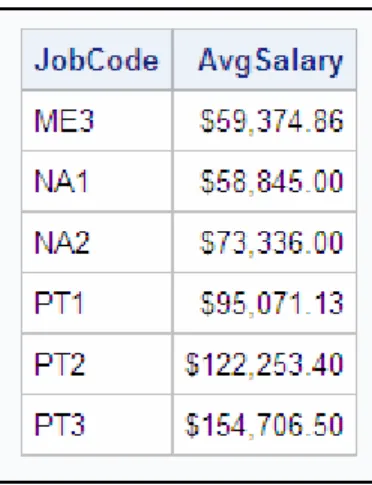
To further refine a PROC SQL query that contains a GROUP BY clause, you can use a HAVING clause. A HAVING clause works with the GROUP BY clause to restrict the groups that are displayed in the output, based on one or more specified conditions. For example, the following PROC SQL query groups the output rows by JobCode. The HAVING clause uses the summary function AVG to specify that only the groups that have an average salary that is greater than 40,000 is displayed in the output.
proc sql;
select jobcode,avg(salary) as Avg from sasuser.payrollmaster group by jobcode
having Avg>40000 order by jobcode;
Note: You can learn more about the use of the HAVING clause in Chapter 2, “Performing Advanced Queries Using PROC SQL,” on page 26.
Summary
Text Summary
PROC SQL Basics
PROC SQL uses statements that are written in Structured Query Language (SQL), which is a standardized language that is widely used to retrieve and update data in tables and in views that are based on those tables. When you want to examine relationships between data values, subset your data, or compute values, the SQL procedure provides an easy, flexible way to analyze your data.
PROC SQL differs from most other SAS procedures in several ways:
• Many statements in PROC SQL, such as the SELECT statement, include clauses. • The PROC SQL step does not require a RUN statement.
Writing a PROC SQL Step
Before creating a query, you must assign a libref to the SAS library in which the table to be used is stored. Then you submit a PROC SQL step. You use the PROC SQL
statement to invoke the SQL procedure.
Selecting Columns
To specify which column(s) to display in a query, you write a SELECT clause as the first clause in the SELECT statement. In the SELECT clause, you can specify existing columns and create new columns that contain either text or a calculation.
Specifying Tables
You specify the tables to be queried in the FROM clause.
Specifying Subsetting Criteria
To subset data based on a condition, write a WHERE clause that contains an expression.
Ordering Rows
The order of rows in the output of a PROC SQL query cannot be guaranteed, unless you specify a sort order. To sort rows by the values of specific columns, use the ORDER BY clause.
Querying Multiple Tables
You can use a PROC SQL step to query data that is stored in two or more tables. In SQL terminology, this is called joining tables. Follow these steps to join multiple tables: 1. Specify column names from one or both tables in the SELECT clause and, if you are
selecting a column that has the same name in multiple tables, prefix the table name to that column name.
2. Specify each table name in the FROM clause.
3. Use the WHERE clause to select rows from two or more tables, based on a condition.
4. Use the ORDER BY clause to sort rows that are retrieved from two or more tables by the values of the selected column(s).
Summarizing Groups of Data
You can use a GROUP BY clause in your PROC SQL step to summarize data in groups. The GROUP BY clause is used in queries that include one or more summary functions. Summary functions produce a statistical summary for each group that is defined in the GROUP BY clause.
Creating Output Tables
To create a new table from the results of your query, you can use the CREATE TABLE statement in your PROC SQL step. This statement enables you to store your results in a table instead of displaying the query results as a report.
Additional Features
Sample Programs
Querying a Table
proc sql;
select empid,jobcode,salary, salary*.06 as bonus from sasuser.payrollmaster where salary<32000
order by jobcode; quit;
Summarizing Groups of Data
proc sql;
select membertype,
sum(milestraveled) as TotalMiles from sasuser.frequentflyers
group by membertype; quit;
Creating a Table from the Results of a Query on Two Tables
proc sql;
create table work.miles as
select salcomps.empid,lastname, newsals.salary,newsalary from sasuser.salcomps,sasuser.newsals where salcomps.empid=newsals.empid order by 2;
quit;
Points to Remember
• Do not use a RUN statement with the SQL procedure.
• Do not end a clause with a semicolon unless it is the last clause in the statement. • When you join multiple tables, be sure to specify columns that have matching data
values in the WHERE clause.
• To end the SQL procedure, you can submit another PROC step, a DATA step, or a QUIT statement.
Quiz
Select the best answer for each question. After completing the quiz, check your answers using the answer key in the appendix.
1. Which of the clauses in the PROC SQL program below is written incorrectly?
proc sql;
where sqfeet ge 800;
a. SELECT b. FROM c. WHERE d. both a and c
2. How many statements does the program below contain?
proc sql;
select grapes,oranges,
grapes + oranges as sumsales from sales.produce
order by sumsales;
a. two b. three c. four d. five
3. Complete the following PROC SQL query to select the columns Address and SqFeet from the table List.Size and to select Price from the table List.Price. (Only the Address column appears in both tables.)
proc sql; _____________
where size.address = price.address; from list.size,list.price;
a. select address,sqfeet,price
b. select size.address,sqfeet,price
c. select price.address,sqfeet,price
d. either b or c
4. Which of the clauses below correctly sorts rows by the values of the columns Price and SqFeet?
a. order price, sqfeet
b. order by price,sqfeet
c. sort by price sqfeet
d. sort price sqfeet
5. Which clause below specifies that the two tables Produce and Hardware be queried? Both tables are located in a library to which the libref Sales has been assigned. a. select sales.produce sales.hardware
b. from sales.produce sales.hardware
c. from sales.produce,sales.hardware
d. where sales.produce, sales.hardware
6. Complete the SELECT clause below to create a new column named Profit by subtracting the values of the column Cost from those of the column Price.
a. Profit=price-cost
b. price-cost as Profit
c. profit=price-cost
d. Profit as price-cost
7. What happens if you use a GROUP BY clause in a PROC SQL step without a summary function?
a. The step does not execute.
b. The first numeric column is summed by default.
c. The GROUP BY clause is changed to an ORDER BY clause. d. The step executes but does not group or sort data.
8. If you specify a CREATE TABLE statement in your PROC SQL step, a. the results of the query are displayed, and a new table is created.
b. a new table is created, but it does not contain any summarization that was specified in the PROC SQL step.
c. a new table is created, but no report is displayed.
d. results are grouped by the value of the summarized column.
9. Which statement is true regarding the use of the PROC SQL step to query data that is stored in two or more tables?
a. When you join multiple tables, the tables must contain a common column. b. You must specify the table from which you want each column to be read. c. The tables that are being joined must be from the same type of data source. d. If two tables that are being joined contain a same-named column, then you must
specify the table from which you want the column to be read. 10. Which clause in the following program is incorrect?
proc sql;
select sex,mean(weight) as avgweight from company.employees company.health where employees.id=health.id
group by sex;
Chapter 2
Performing Advanced Queries
Using PROC SQL
Overview . . . 26
Introduction . . . 26 Viewing SELECT Statement Syntax . . . 27
Displaying All Columns . . . 28
Using SELECT * . . . 28
Using the FEEDBACK Option . . . 29 Limiting the Number of Rows Displayed . . . 29
Overview . . . 29
Example . . . 30 Eliminating Duplicate Rows from Output . . . 31
Example . . . 31 Subsetting Rows By Using Conditional Operators . . . 32
Overview . . . 32
Using Operators in PROC SQL . . . 33
Using the BETWEEN-AND Operator to Select within a Range of Values . . . 34
Using the CONTAINS or Question Mark (?) Operator to Select a String . . . 34
Example . . . 35
Using the IN Operator to Select Values from a List . . . 35
Using the IS MISSING or IS NULL Operator to Select Missing Values . . . 36
Example . . . 36
Using the LIKE Operator to Select a Pattern . . . 37
Specifying a Pattern . . . 38
Example . . . 38
Using the Sounds-Like (=*) Operator to Select a Spelling Variation . . . 39 Subsetting Rows By Using Calculated Values . . . 40
Understanding How PROC SQL Processes Calculated Columns . . . 40
Using the Keyword CALCULATED . . . 40 Enhancing Query Output . . . 42
Overview . . . 42
Specifying Column Formats and Labels . . . 43
Specifying Titles and Footnotes . . . 44
Adding a Character Constant to Output . . . 45 Summarizing and Grouping Data . . . 48
Overview . . . 48
Number of Arguments and Summary Function Processing . . . 48
Groups and Summary Function Processing . . . 49
Using a Summary Function with a Single Argument (Column) . . . 50
Using a Summary Function with Multiple Arguments (Columns) . . . 51
Using a Summary Function without a GROUP BY Clause . . . 51
Using a Summary Function with Columns outside of the Function . . . 52
Using a Summary Function with a GROUP BY Clause . . . 54
Counting Values By Using the COUNT Summary Function . . . 55
Counting All Rows . . . 55
Counting All Non-Missing Values in a Column . . . 56
Counting All Unique Values in a Column . . . 57
Selecting Groups By Using the HAVING Clause . . . 58
Understanding Data Remerging . . . 60
Example . . . 61 Subsetting Data By Using Subqueries . . . 61
Introducing Subqueries . . . 61
Types of Subqueries . . . 62 Subsetting Data By Using Noncorrelated Subqueries . . . 63
Using Single-Value Noncorrelated Subqueries . . . 63
Using Multiple-Value Noncorrelated Subqueries . . . 64
Example . . . 64
Using Comparisons with Subqueries . . . 65
Using the ANY Operator . . . 66
Example . . . 66
Using the ALL Operator . . . 68
Example . . . 68 Subsetting Data By Using Correlated Subqueries . . . 69
Overview . . . 69
Example . . . 69
Using the EXISTS and NOT EXISTS Conditional Operators . . . 70
Example: Correlated Subquery with NOT EXISTS . . . 70 Validating Query Syntax . . . 71
Overview . . . 71
Using the NOEXEC Option . . . 71
Using the VALIDATE Keyword . . . 72 Additional Features . . . 72
Summary . . . 73
Text Summary . . . 73
Sample Programs . . . 75
Points to Remember . . . 76 Quiz . . . 76
Overview
Introduction
The SELECT statement is the primary tool of PROC SQL. Using the SELECT statement, you can identify, manipulate, and retrieve columns of data from one or more tables and views.
chapter presents a variety of useful query techniques, such as the use of subqueries to subset data.
The PROC SQL query shown below illustrates some of the new query techniques:
proc sql outobs=20;
title 'Job Groups with Average Salary'; title2 '> Company Average';
select jobcode,
avg(salary) as AvgSalary format=dollar11.2, count(*) as Count
from sasuser.payrollmaster group by jobcode
having avg(salary) > (select avg(salary)
from sasuser.payrollmaster) order by avgsalary desc;
Viewing SELECT Statement Syntax
General form, SELECT statement:
SELECTcolumn-1<, ... column-n>
FROMtable-1 | view-1<, ... table-n | view-n> <WHERE expression>
<GROUP BY column-1<, ... column-n>> <HAVING expression>
<ORDER BY column-1<, ... column-n>>;
Here is an explanation of the syntax: SELECT
specifies the column(s) that appear in the output FROM
specifies the table(s) or view(s) to be queried WHERE
uses an expression to subset or restrict the data based on one or more condition(s) GROUP BY
classifies the data into groups based on the specified column(s) HAVING
uses an expression to subset or restrict groups of data based on group condition(s) ORDER BY
sorts the rows that the query returns by the value(s) of the specified column(s).
Note: The clauses in a PROC SQL SELECT statement must be specified in the order shown.
You should be familiar with all of the SELECT statement clauses except for the HAVING clause. The use of the HAVING clause is presented later in this chapter. Now, we look at some ways that you can limit and subset the number of columns that are displayed in query output.
Displaying All Columns
You already know how to select specific columns for output by listing them in the SELECT statement. However, for some tasks, you find it useful to display all columns of a table concurrently. For example, before you create a complex query, you might want to see the contents of the table that you are working with.
Using SELECT *
To display all columns in the order in which they are stored in a table, use an asterisk (*) in the SELECT clause. All rows are displayed, by default, unless you limit or subset them.
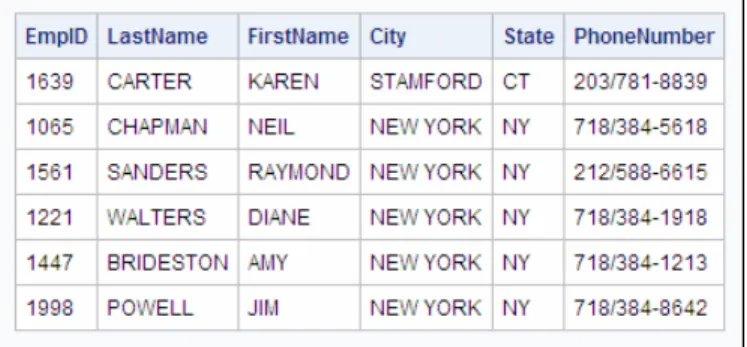
The following SELECT step displays all columns and rows in the table
Sasuser.Staffchanges, which lists all employees in a company who have had changes in their employment status.
proc sql; select *
As shown in the output, the table contains six columns and six rows.
Using the FEEDBACK Option
When you specify SELECT *, you can also use the FEEDBACK option in the PROC SQL statement, which writes the expanded list of columns to the SAS log. For example, the PROC SQL query shown below contains the FEEDBACK option:
proc sql feedback; select *
from sasuser.staffchanges;
This query produces the following feedback in the SAS log.
Table 2.1 SAS Log
202 proc sql feedback; 203 select *
204 from sasuser.staffchanges; NOTE: Statement transforms to:
select STAFFCHANGES.EmpID,
STAFFCHANGES.LastName, STAFFCHANGES.FirstName, STAFFCHANGES.City, STAFFCHANGES.State,
STAFFCHANGES.PhoneNumber
from SASUSER.STAFFCHANGES
The FEEDBACK option is a debugging tool that lets you see exactly what is being submitted to the SQL processor. The resulting message in the SAS log not only expands asterisks (*) into column lists, but it also resolves macro variables and places
parentheses around expressions to show their order of evaluation.
Limiting the Number of Rows Displayed
Overview
General form, PROC SQL statement with OUTOBS= option:
PROC SQL OUTOBS=n;
Here is an explanation of the syntax:
n
specifies the number of rows.
Note: The OUTOBS= option restricts the rows that are displayed, but not the rows that are read. To restrict the number of rows that PROC SQL takes as input from any single source, use the INOBS= option. For more information about the INOBS= option, see Chapter 8, “Managing Processing Using PROC SQL,” on page 264.
Example
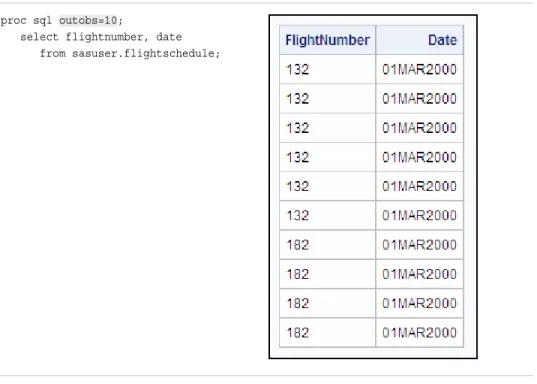
Suppose you want to quickly review the types of values that are stored in a table, without printing out all the rows. The following PROC SQL query selects data from the table Sasuser.Flightschedule, which contains more than 200 rows. To print only the first 10 rows of output, you add the OUTOBS= option to the PROC SQL statement.
proc sql outobs=10;
select flightnumber, date from sasuser.flightschedule;
When you limit the number of rows that are displayed, a message similar to the following appears in the SAS log.
Table 2.2 SAS Log
WARNING: Statement terminated early due to OUTOBS=10 option.
Note: The OUTOBS= and INOBS= options affect tables that are created by using the CREATE TABLE statement and your report output.
Eliminating Duplicate Rows from Output
In some situations, you might want to display only the unique values or combinations of values in the column(s) listed in the SELECT clause. You can eliminate duplicate rows from your query results by using the keyword DISTINCT in the SELECT clause. The DISTINCT keyword applies to all columns, and only those columns, that are listed in the SELECT clause. We see how this works in the following example.
Example
Suppose you want to display a list of the unique flight numbers and destinations of all international flights that are flown during the month.
The following SELECT statement in PROC SQL selects the columns FlightNumber and Destination in the table Sasuser.Internationalflights:
proc sql outobs=12;
select flightnumber, destination from sasuser.internationalflights;
Here is the output.
proc sql;
select distinct flightnumber, destination from sasuser.internationalflights order by 1;
With duplicate values removed, the output contains many fewer rows, so the OUTOBS= option has been removed from the PROC SQL statement. Also, to sort the output by FlightNumber (column 1 in the SELECT clause list), the ORDER BY clause has been added.
Here is the output from the modified program.
There are no duplicate rows in the output. There are seven unique FlightNumber-Destination value pairs in this table.
Subsetting Rows By Using Conditional Operators
Overview
In the WHERE clause of a PROC SQL query, you can specify any valid SAS expression to subset or restrict the data that is displayed in output. The expression might contain any of various types of operators, such as the following.
Type of Operator Example
comparison where membertype='GOLD'
logical where visits<=3 or status='new'
concatenation where name=trim(last) ||', '||first
Using Operators in PROC SQL
Comparison, logical, and concatenation operators are used in PROC SQL as they are used in other SAS procedures. For example, the following WHERE clause contains • the logical operator AND, which joins multiple conditions
• two comparison operators: an equal sign (=) and a greater than symbol (>).
proc sql;
select ffid, name, state, pointsused from sasuser.frequentflyers
where membertype='GOLD' and pointsused>0 order by pointsused;
In PROC SQL queries, you can also use the following conditional operators. All of these operators except for ANY, ALL, and EXISTS, can also be used in other SAS procedures.
Conditional Operator Tests for ... Example
BETWEEN-AND values that occur within an inclusive range
where salary between 70000 and 80000
CONTAINS or ? values that contain a specified string
where name contains 'ER' where name ? 'ER'
IN values that match one
of a list of values
where code in ('PT' , 'NA', 'FA')
IS MISSING or IS NULL missing values where dateofbirth is missing where dateofbirth is null
LIKE (with %, _) values that match a specified pattern
where address like '% P%PLACE'
=* values that sound like a specified value
where lastname=* 'Smith'
ANY values that meet a
specified condition with respect to any one of the values returned by a subquery
where dateofbirth < any (select dateofbirth
from sasuser.payrollmaster where jobcode='FA3')
ALL values that meet a
specified condition with respect to all the values returned by a subquery
where dateofbirth < all (select dateofbirth
from sasuser.payrollmaster where jobcode='FA3')
EXISTS the existence of values returned by a subquery
where exists (select *
from sasuser.flightschedule where fa.empid=
T I P To create a negative condition, you can precede any of these conditional operators, except for ANY and ALL, with the NOT operator.
Most of these conditional operators, and their uses, are covered in the next several sections. ANY, ALL, and EXISTS are discussed later in the chapter.
Using the BETWEEN-AND Operator to Select within a Range of Values
To select rows based on a range of numeric or character values, you use the BETWEEN-AND operator in the WHERE clause. The BETWEEN-BETWEEN-AND operator is inclusive, so the values that you specify as limits for the range of values are included in the query results, in addition to any values that occur between the limits.
General form, BETWEEN-AND operator:
BETWEENvalue-1ANDvalue-2
Here is an explanation of the syntax:
value-1
is the value at the one end of the range
value-2
is the value at the other end of the range.
Note: When specifying the limits for the range of values, it is not necessary to specify the smaller value first.
Here are several examples of WHERE clauses that contain the BETWEEN-AND operator. The last example shows the use of the NOT operator with the BETWEEN-AND operator.
Example Returns rows in which...
where date between '01mar2000'd and '07mar2000'd
In this example, the values are specified as date constants.
the value of Date is 01mar2000,
07mar2000, or any date value in between
where salary between 70000 and 80000
the value of Salary is 70000, 80000, or any numeric value in between
where salary not between 70000 and 80000
the value of Salary is not between or equal to 70000 and 80000
Using the CONTAINS or Question Mark (?) Operator to Select a String
General form, CONTAINS operator:
sql-expressionCONTAINSsql-expression sql-expression?sql-expression
Here is an explanation of the syntax:
sql-expression
is a character column, string (character constant), or expression. A string is a sequence of characters to be matched that must be enclosed in quotation marks.
Note: PROC SQL retrieves a row for output no matter where the string (or second sql-expression) occurs within the column's (or first sql-expression's) values. Matching is case sensitive when making comparisons.
Note: The CONTAINS or question mark (?) operator is not part of the ANSI standard; it is a SAS enhancement.
Example
Th