Chapter 25
Compatibility With Visual BASIC
The language structures in OpenOffice.org BASIC are very similar to those used in Visual BASIC. The methods used for accessing the underlying documents, however, are vastly different and have essentially no compatibility with each other. Entire books have been written dealing with the differences between Visual BASIC 6 (VB6), VisualBASIC.NET (VB.NET), and Visual BASIC for Applications (VBA). This chapter is only an overview of issues concerning compatibility between the OpenOffice.org BASIC and Visual BASIC. I use VBA, VB6 and VB.NET to refer to the specific versions and VB to generically refer to either or both versions.
To convert VB macros that do not access the underlying documents, my first step is to bring them into OOo and fix the syntax errors. The second step is to remove the errors introduced due to differences in behavior. Thorough testing is required to avoid subtle problems. Significant code changes are required to convert the sections that access the underlying document structures.
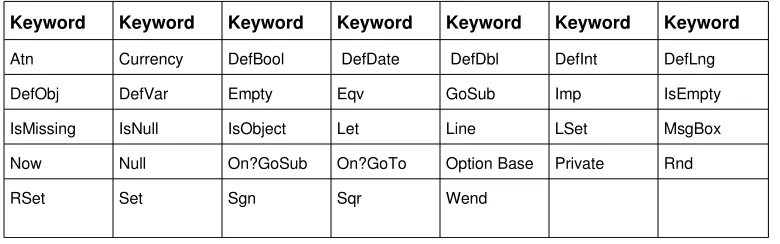
[image:1.612.124.514.439.561.2]VBA is the variant used by Microsoft Office. VB.NET was released after VBA so it is possible that a later version of VBA will follow in the direction of VB.NET. Some of the keywords supported by OOo BASIC and deprecated when moving from VB6 and VBA to VB.NET are in Table 1.
Table 1. OOo BASIC Keywords deprecated when moving to VB to VB.NET.
Keyword Keyword Keyword Keyword Keyword Keyword Keyword
Atn Currency DefBool DefDate DefDbl DefInt DefLng DefObj DefVar Empty Eqv GoSub Imp IsEmpty IsMissing IsNull IsObject Let Line LSet MsgBox Now Null On?GoSub On?GoTo Option Base Private Rnd
RSet Set Sgn Sqr Wend
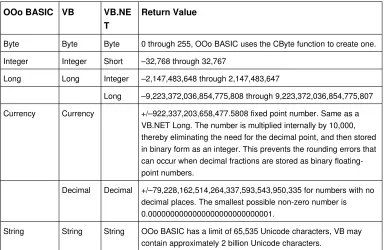
Table 2. VB.NET uses different names for some numerical functions.
OOo BASIC VB VB.NE T
Return Value
Byte Byte Byte 0 through 255, OOo BASIC uses the CByte function to create one. Integer Integer Short –32,768 through 32,767
Long Long Integer –2,147,483,648 through 2,147,483,647
Long –9,223,372,036,854,775,808 through 9,223,372,036,854,775,807 Currency Currency +/–922,337,203,658,477.5808 fixed point number. Same as a
VB.NET Long. The number is multiplied internally by 10,000, thereby eliminating the need for the decimal point, and then stored in binary form as an integer. This prevents the rounding errors that can occur when decimal fractions are stored as binary floating point numbers.
Decimal Decimal +/–79,228,162,514,264,337,593,543,950,335 for numbers with no decimal places. The smallest possible nonzero number is 0.0000000000000000000000000001.
String String String OOo BASIC has a limit of 65,535 Unicode characters, VB may contain approximately 2 billion Unicode characters.
Variables
• VB.NET does not support Variant variables so variables with no declared type default to type Object. Other VB versions are compatible with OOo BASIC.
• VB.NET replaced the Currency data type with the Decimal data type. Other VB versions are compatible with OOo BASIC.
• VB.NET does not support the keywords DefBool, DefDate, DefDbl, DefInt, DefLng,
DefObj, and DefVar. Other VB versions are compatible with OOo BASIC.
• VB.NET does not support the keywords Set and Let.
• Although OOo BASIC supports the syntax for fixed length strings (Dim s As String * 100), they are still variable length strings. All VB versions support fixed length strings.
• OOo BASIC strings are limited are limited to 65,535 Unicode characters. In VB, variable length strings may contain approximately 2 billion Unicode characters. Loss of data is a very real problem in OOo BASIC compared to VB.
Arrays
• VB.NET deprecated Option Base. Other VB are not totally compatible with OOo BASIC.
• VBA and VB6 support Option Base but but, unlike OOo BASIC, they do not change the upper bound of an array, only the lower bound.
• VB only supports ReDim Preserve when changing the index size on the last dimension. OOo BASIC supports changing any dimension of a multi–dimension array.
• VB only supports ReDim to change the dimension of an array whose dimensions are not
explicitly declared. OOo BASIC is more flexible.
Subroutine and Function Constructs
• VB allows a Sub or Function to be preceded by optional scoping keywords such as Public;
OOo BASIC does not.
• VB supports the optional keyword ByRef. This keyword is not supported by OOo BASIC. Passing parameters by reference is the default behavior so the keyword is redundant.
• VB supports the keyword ParamArray, OOo BASIC does not.
• VB supports default parameters, OOo BASIC does not.
• VB.NET does not support the function IsMissing; a method of declaring default parameters is used instead. Other VB versions are compatible with OOo BASIC.
Operators
• VB.NET does not support the EQV or IMP operators. Other VB versions are compatible with OOo BASIC.
• VB.NET supports extra operators such as Like, AndAlso, and OrElse.
• VB supports an Option Compare statement that controls how strings are compared. This is not compatible with OOo BASIC. Use the StrComp function instead.
• VB.NET follows standard mathematical convention and gives exponentiation a higher precedence than negation. For example, 2^2 = 4 in VB and 4 in OOo BASIC.
Flow Control
• VB supports a For Each ... Next Loop construct not supported by OOo BASIC.
• VB.NET doe not support the keyword GoSub.
• VB.NET does not support the On GoTo and On GoSub statements.
Error Handling
• VB uses an Err object to obtain error information. OOo BASIC uses three functions Err, Error, and Erl.
• Some versions of VB support On Error GoTo 1, which functions the same as On Error GoTo 0.
• Some versions of VB require that all error handlers use a unique name, OOo BASIC does not require this.
• OOo BASIC does not allow an On Error commands outside of a subroutine or function.
Subroutines and Functions
Numerical Subroutines and Functions
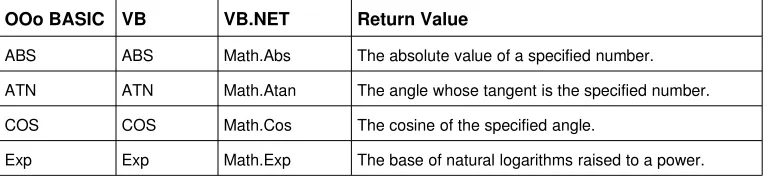
[image:4.612.105.494.504.593.2]Although VB remains largely compatible with OOo BASIC, VB.NET changed the names and methods to access some of the common functions (see Table 3).
Table 3. VB.NET uses different names for some numerical functions.
OOo BASIC VB VB.NET Return Value
ABS ABS Math.Abs The absolute value of a specified number. ATN ATN Math.Atan The angle whose tangent is the specified number. COS COS Math.Cos The cosine of the specified angle.
OOo BASIC VB VB.NET Return Value
Log Log Math.Log The logarithm of a number. In VB.NET this method can be overloaded to return either the natural (base e) logarithm or the logarithm of a specified base. not supported Round Math.Round Value containing the number nearest the specified
value.
Sgn Sgn Math.Sign Integer value indicating the sign of a number. SIN SIN Math.Sin The sine of an angle.
Sqr Sqr Math.Sqrt The square root of a number.
TAN TAN Math.Tan The tangent of an angle.
##Compatibility Icon
• VB contains more functions, such as CCur to convert to the Currency type.
• There are differences in the whole number types. For example, although CInt returns an Integer in both languages, an integer in VB.NET is equivalent to an OOo BASIC Long.
• The rounding rules are different in VB, numbers are rounded to the nearest even number when the decimal point is exactly .5; this is called IEEE rounding.
##Compatibility icon
In VB Date$ and Time$ return a string and value but Date and Time return numerical based types suitable for mathematical operations. OOo Basic supports all four functions, but they all return a string.
The Date and Time functions are documented to set the system date and time. This is not currently supported.
##Compatibility Icon
and propagate null values. In OOo Basic, they are the same; they both return strings and they both generate a runtime error with a null input value.
##Compatibility Icon
In VB, LSet allows you to overlay data from one user–defined type with data from another. This takes all the bytes from one data structure and overlays them on top of another, ignoring the underlying structure. In OOo BASIC, LSet only manipulates strings.
##Compatibility Icon
[image:6.612.107.486.317.383.2]VB supports all of OOo BASIC format specifiers, and more.
Table 3. OOo BASIC Keywords deprecated when moving to VB to VB.NET.
Keyword Keyword Keyword Keyword Keyword Keyword Keyword
IsEmpty IsNull IsObject Line LSet MsgBox
Now RSet Wend