Reference Guide
The information in this publication is subject to change without notice. Force Computers, GmbH reserves the right to make changes without notice to this, or any of its products, to improve reliability, performance, or design.
Force Computers, GmbH shall not be liable for technical or editorial errors or omissions contained herein, nor for indirect, special, incidental, or consequential damages resulting from the furnishing, performance, or use of this material. This information is pro-vided “as is” and Force Computers, GmbH expressly disclaims any and all warranties, express, implied, statutory, or otherwise, including without limitation, any express, statutory, or implied warranty of merchantability, fitness for a particular purpose, or non-infringement.
This publication contains information protected by copyright. This publication shall not be reproduced, transmitted, or stored in a retrieval system, nor its contents used for any purpose, without the prior written consent of Force Computers, GmbH.
Force Computers, GmbH assumes no responsibility for the use of any circuitry other than circuitry that is part of a product of Force Computers, GmbH. Force Computers, GmbH does not convey to the purchaser of the product described herein any license under the patent rights of Force Computers, GmbH nor the rights of others.
Copyright 2001 by Force Computers, GmbH. All rights reserved. The Force logo is a trademark of Force Computers, GmbH.
IEEE is a registered trademark of the Institute for Electrical and Electronics Engineers, Inc.
PICMG, CompactPCI, and the CompactPCI logo are registered trademarks and the PICMG logo is a trademark of the PCI Indus-trial Computer Manufacturer’s Group.
MS-DOS, Windows95, Windows98, Windows2000 and Windows NT are registered trademarks and the logos are a trademark of the Microsoft Corporation.
Intel and Pentium are registered trademarks and the Intel logo is a trademark of the Intel Corporation.
is provided via SMART, our SolutionsPLUS customer support program that provides current technical and services information.
Headquarters
The Americas
Europe
Asia
Force Computers Inc.
5799 Fontanoso Way San Jose, CA 95138-1015 U.S.A.
Tel.: +1 (408) 369-6000 Fax: +1 (408) 371-3382 Email: [email protected]
Force Computers GmbH
Prof.-Messerschmitt-Str. 1 D-85579 Neubiberg/München Germany
Tel.: +49 (89) 608 14-0 Fax: +49 (89) 609 77 93 Email: [email protected]
Force Computers Japan KK
Shiba Daimon MF Building 4F 2-1-16 Shiba Daimon
Minato-ku, Tokyo 105-0012 Japan Tel.: +81 (03) 3437 3948
Table of Contents
1. GENERAL INFORMATION...1
1.1. The FLXibus...2
1.2. The Floppy Interface ...2
1.3. The SCSI Interface ...3
1.4. The LAN Interface...4
1.5. EAGLE FLASH EPROM...4
1.6. Diagram of EAGLE-01C with Switches SW1 and SW2 ...5
1.7. Default Settings of Switches SW1 and SW2...6
2. HARDWARE DESCRIPTION ...7
2.1. Address Map of the EAGLE-01C ...7
2.2. Floppy Interface...7
2.2.1. Floppy Disk Controller 37C65 ... 8
2.2.1.1. Address Map of the 37C65 ... 8
2.2.1.2. The FDC Interrupt ... 9
2.2.1.3. Summary of the 37C65... 9
2.2.2. The LCA ... 9
2.2.2.1. LCA Data Transfers... 10
2.2.2.2. LCA DMA Control Lines... 11
2.2.2.3. LCA DMA Control Register ... 12
2.2.3. Floppy Buffer Memory... 12
2.2.3.1. Summary of the Floppy Buffer Memory ... 13
2.2.4. The Floppy Disk Bus ... 13
2.2.4.1. The Floppy Drive Signals on VMEbus P2 Connector ... 16
2.3. SCSI Interface...17
2.3.1. SCSI Controller MB87034 ... 17
2.3.1.1. Address Map of the MB87034 Registers ... 18
2.3.1.2. The SCSI CPU Interface... 19
2.3.1.3. The SCSI DMA Interface ... 19
2.3.1.4. SCSI DMA Control Register ... 20
2.4. The LAN Interface...29
2.4.1. LAN Controller for Ethernet (LANCE) AM79C90 ... 30
2.4.1.1. Address Map of the LANCE Registers ... 31
2.4.1.2. The LANCE Interrupt... 32
2.4.1.3. Summary of the LANCE ... 32
2.4.2. The Am7992B Serial Interface Adapter (SIA)... 33
2.4.2.1. The Am7992B Transmitter... 34
2.4.2.2. The Am7992B Receiver ... 35
2.4.3. Ethernet Signals ... 36
2.4.3.1. Ethernet on the 15-Pin Female D-Sub Connector ... 38
2.4.4. LAN Buffer Memory... 39
2.4.4.1. Summary of the LAN RAM ... 39
2.5. The EAGLE FLASH EPROM ...40
2.5.1. Summary of the EAGLE FLASH EPROM ... 40
2.6. The SYS68K/IOBP-1 ...41
3. ORDERING INFORMATION ...47
4. HISTORY OF MANUAL REVISIONS ...47
[image:6.595.121.507.83.356.2]List of Figures
Figure 1. Block Diagram of the EAGLE-01C ... 1
Figure 2. Diagram of EAGLE-01C with SW1 and SW2 ... 5
Figure 3. Default Setting of Dip Switch Array SW1 ... 6
Figure 4. Default Setting of Dip Switch Array SW2 ... 6
Figure 5. SCSI I.D. Bits ... 22
Figure 6. Sample SCSI Configurations... 23
Figure 7. Diagram of EAGLE-01C with TERMPWR Fuse F1 ... 27
Figure 8. Manchester II Code Transmitter Encoding ... 34
Figure 9. Decoding with the Manchester Decoder ... 35
Figure 10. Diagram of EAGLE-01C with Fuse F2 ... 37
List of Tables
Table 1. Address Map of the EAGLE-01C ... 7
Table 2. Register Layout of the 37C65... 8
Table 3. Address Map for Generating TC ... 11
Table 4. LCA DMA Control Register Layout ... 12
Table 5. Description of LCA DMA Control Register Bits ... 12
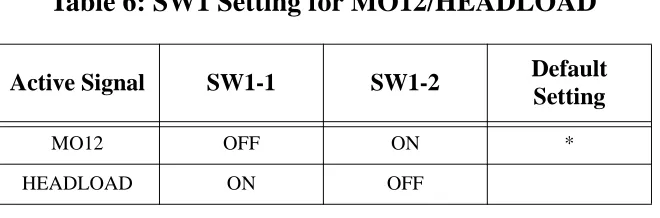
Table 6. SW1 Setting for MO12/HEADLOAD ... 13
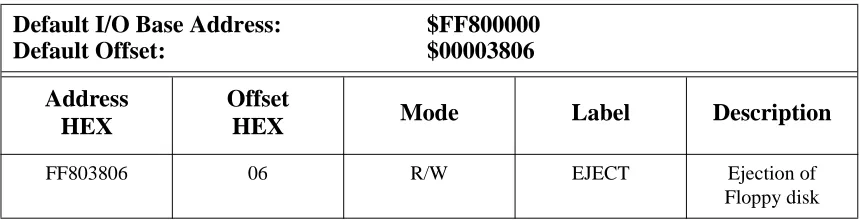
Table 7. Address Map for Generating EJECT... 14
Table 8. SW1 Setting for HEADLOAD/EJECT ... 14
Table 9. SW1 Setting for DRIVE TYPE ... 15
Table 10. SW1 Setting for PRECOMPENSATION VALUE ... 15
Table 11. SWI Setting for DISK CHANGE ENABLE ... 15
Table 12. Pin Assignment for Floppy Drive Signals on VMEbus P2 ... 16
Table 13. MB87034 Register Layout ... 18
Table 14. SCSI DMA Control Register ... 20
Table 15. SCSI DMA Direction Bit ... 20
Table 16. SW2 Setting for SCSI Termination ... 25
Table 17. Pin Assignment for SCSIbus Signals on VMEbus P2... 28
Table 18. LANCE Register Layout ... 31
Table 19. Pin Assignment of the 15-Pin Female D-Sub Connector ... 38
Table 20. SW1 Setting for FLASH EPROMs ... 40
Table 21. SYS68K/IOBP-1 P1 Pin Assignment... 41
Table 22. SYS68K/IOBP-1 P2 Pin Assignment... 43
Table 23. SYS68K/IOBP-1 P3 Pin Assignment... 44
Table 24. SYS68K/IOBP-1 P4 Pin Assignment... 45
Table 25. Ordering Information... 47
Table 26. History of Manual Revisions ... 47
1.
GENERAL INFORMATION
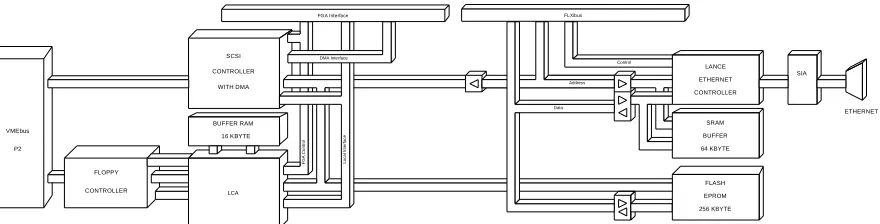
[image:11.595.79.519.328.440.2]The EAGLE-01C is an I/O module which contains a Floppy Disk Interface, a SCSI Interface, a LAN Interface and FLASH EPROMs. The EAGLE-01C is connected to the base board via three module connectors. One module connector connects to the 64 user-defined signals of the VMEbus P2 Connector via the base board to the module and is called the EAGLE I/O Connector. The remaining two module connectors contain the FLXibus (FORCE Local eXpansion interface bus) and are called EAGLE FLXibus Connectors. On the EAGLE-01C, these two module connectors also contain the 8-bit Local Interface and the 8-bit DMA Interface of the gate array FGA-002.
FIGURE 1.
Block Diagram of the EAGLE-01C
1.1
The FLXibus
The FLXibus (FORCE Local eXpansion interface bus) is an interface which allows the connection between an EAGLE module and a base board. The FLXibus is a 32-bit interface with non-multiplexed data and address lines. The FLXibus is fully compatible to the 68020 bus timing. The dynamic bus sizing mechanism of the 68020 is fully supported. The bus activities use the asynchronous protocol so that all 68020 compatible devices can be connected to the FLXibus. An EAGLE module is connected with the base board via three connectors. The EAGLE FLXibus Connectors hold the signals of the FLXibus. The EAGLE I/O Connector holds the I/O signals which are routed to the VMEbus P2 of the base board.
1.2
The Floppy Interface
The Floppy Interface on the EAGLE-01C is built with the 37C65 Floppy Disk Controller. A 16 Kbyte Buffer Memory and a DMA Controller allow read and write of a sector without any decrease in CPU or main (shared) RAM performance. This configuration is installed for maximum performance and real-time capability of the system. The Floppy Interface allows the control of two floppy drives. The Floppy Interface supports 3 1/2”, 5 1/4” and 8" floppy drives. Interrupts of the 37C65 are fully supported. The I/O signals of the Floppy Interface are provided on the VMEbus P2 Connector of the base board via the EAGLE I/O Connector. The floppy drives can be connected to the VMEbus P2 Connector via the backpanel SYS68K/ IOBP-1.
The DMA Controller is built in an LCA (logic cell array) which is a field programmable gate array. The LCA manages the data transfer between the CPU, the 16 Kbyte Buffer Memory and the Floppy Disk Controller. (Please see “Block Diagram of the EAGLE-01C” on page 1.)
The LCA manages the following accesses:
• CPU to Floppy Disk Controller.
• CPU to 16 Kbyte Buffer Memory.
• Floppy Disk Controller to 16 Kbyte Buffer Memory via the DMA controller built in
1.3
The SCSI Interface
On the EAGLE-01C the MB87034 SCSI Controller is installed for direct interface to SCSI Winchester disks, optical drives, tape streamers and other SCSI compatible devices with a data transfer rate of up to 4 Mbyte/s. Interrupts of the MB87034 are fully supported. The I/O signals of the SCSI interface are provided on the VMEbus P2 Connector of the base board via the EAGLE I/O Connector. The mass memory devices can be connected to the VMEbus P2 Connector via the backpanel SYS68K/IOBP-1.
The MB87034 is directly connected to the 8-bit Local Interface and the 8-bit DMA Interface of the FGA-002 via the EAGLE FLXibus connectors.
The 8-bit Local Interface of the FGA-002 is used to access the registers of the MB87034. Parity is generated by the internal MB87034 parity generator when writing to the registers.
The 8-bit DMA Interface is used to transfer data between the DMA channel of the MB87034 and the DMA Controller of the FGA-002. Parity is generated by an external parity generator when writing to the DMA channel of the MB87034.
The DMA Controller of the FGA-002 contains a 32-byte FIFO. The DMA channel of the FGA-002 contains an additional 8 byte FIFO. This allows data transfer via the DMA Interface of the FGA-002 with a data rate of 4 Mbyte/s.
1.4
The LAN Interface
The LAN Interface on the EAGLE-01C is built with the Local Area Network Controller for Ethernet (LANCE) AM79C90, the Serial Interface Adapter (SIA) AM7992B and a 64 Kbyte Buffer Memory. Interrupts of the AM79C90 are fully supported. The LAN Interface is Ethernet and IEEE 802.3 10 BASE 5 Type A compatible. The I/O signals of the LAN Interface are provided on the D-Sub Connector on the front panel.
The memory buffer is a shared memory allowing access from both the AM79C90 and the local CPU. The 64 Kbyte Buffer Memory stores the incoming and outgoing data packets. An incoming data packet is transferred to the Buffer Memory by the LAN Controller. The presence of data in the Buffer Memory is indicated to the CPU by an interrupt. The CPU can then read the data packet from the Buffer Memory. An outgoing data packet is transferred to the Buffer Memory by the CPU. The LAN Controller then transfers the data packet to the network and indicates the completion of the transfer by an interrupt to the CPU.
The advantage of this architecture is that the CPU and the Ethernet Controller can operate in parallel which guarantees the full real-time capability in a LAN environment and the maximum performance of the system.
1.5
EAGLE FLASH EPROM
On the EAGLE-01C, 256 Kbytes of FLASH EPROM are installed. The FLASH EPROM area is 8-bit wide and contains information about the EAGLE-01C for the base board. This information is read by the base board to identify the EAGLE-01C after a reset. The FLASH EPROM area also contains the low level software drivers for the I/O devices of the EAGLE-01C.
1.6
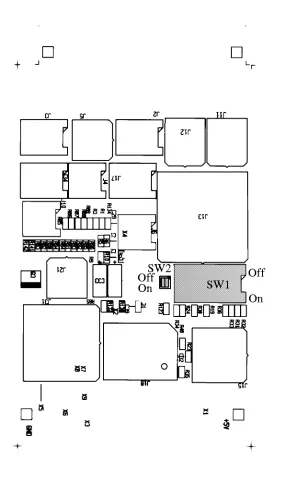
Diagram of EAGLE-01C with Switches SW1 and SW2
[image:15.595.155.463.192.679.2]The following figure shows a diagram of the EAGLE-01C. The figures on the next page show the default settings of switches SW1 and SW2.
1.7
Default Settings of Switches SW1 and SW2
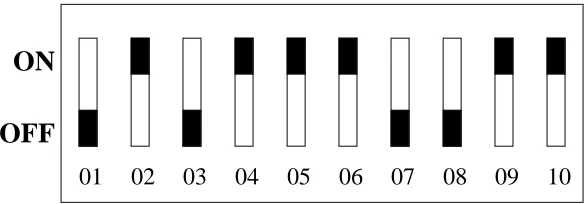
FIGURE 3.
Default Setting of Dip Switch Array SW1
FIGURE 4.
Default Setting of Dip Switch Array SW2
01 02 03 04 05 06 07 08 09 10
ON
OFF
01 02
ON
2.
HARDWARE DESCRIPTION
2.1
Address Map of the EAGLE-01C
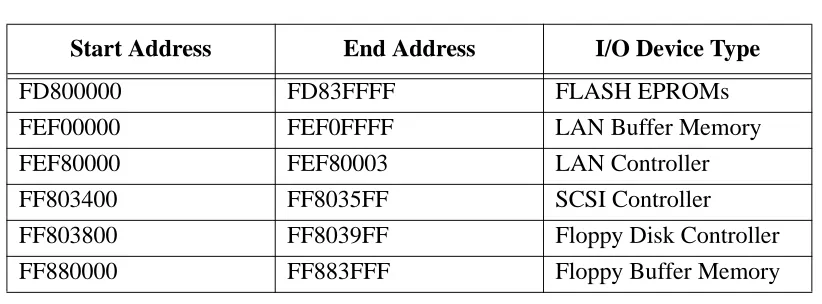
The following table shows the address map of the EAGLE-01C. It contains the access addresses of all I/O devices and memory devices of the EAGLE-01C.
2.2
Floppy Interface
[image:17.595.93.504.213.365.2]The Floppy Interface on the EAGLE-01C is built with the Floppy Disk Controller 37C65, a 16 Kbyte SRAM Buffer Memory, and an LCA (logic cell array), which is a programmable gate array. The Floppy Interface is byte-wide and is connected to the CPU on the base board via the EAGLE FLXibus Connectors. This LCA contains a data manager which manages the data transfer between the CPU, the 16 Kbyte Buffer Memory and the Floppy Disk Controller. (See “Block Diagram of the EAGLE-01C” on page 1.) The Floppy Interface allows the control of two floppy drives. The Floppy Interface supports 3 1/2", 5 1/4" and 8" floppy drives. Single, double and high density floppies are supported. The I/O signals of the Floppy Interface are provided on the VMEbus P2 Connector of the base board via the EAGLE I/O Connector. The floppy drives can be connected to the VMEbus P2 Connector via the backpanel SYS68K/ IOBP-1. (See “The SYS68K/IOBP-1” on page 41.)
Table 1: Address Map of the EAGLE-01C
Start Address End Address I/O Device Type
FD800000 FD83FFFF FLASH EPROMs
FEF00000 FEF0FFFF LAN Buffer Memory
FEF80000 FEF80003 LAN Controller
FF803400 FF8035FF SCSI Controller
FF803800 FF8039FF Floppy Disk Controller
2.2.1
Floppy Disk Controller 37C65
The Floppy Disk Controller 37C65 is an LSI device used to interface floppy drives to a CPU bus. The chip integrates the formatter/controller, data separation, write precompensation, data rate selection and clock generation. The chip also contains the drivers and receivers for the Floppy Disk bus so that no additional buffers are necessary.
Features of the Floppy Disk Controller
• IBM PC AT compatible format (single, double, and high density)
• Data transfer in DMA or non-DMA mode
• Direct floppy disk drive interface
• Internal address mark detection circuitry
• 128, 256, 512, 1024, 2048 or 4096 bytes sector length
• Multisector and multitrack transfer capability
• Automatic write precompensation
2.2.1.1
Address Map of the 37C65
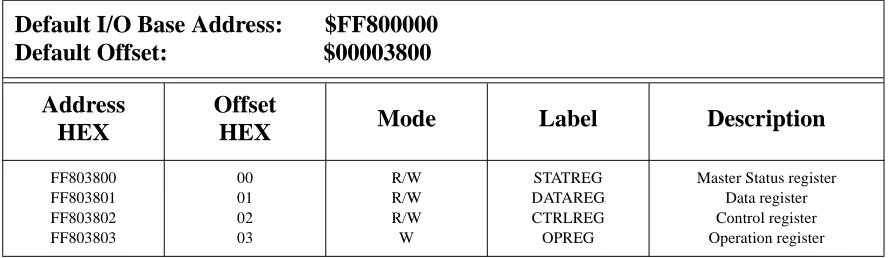
[image:18.595.76.522.546.675.2]The registers of the 37C65 are accessible via the 8-bit Local Interface of the FGA-002. The following table shows the register layout of the 37C65. Additional information is provided in the 37C65 Data Sheet, a copy of which can be found in “OTHER SOURCES OF INFORMATION” on page 48.
Table 2: Register Layout of the 37C65
Default I/O Base Address: $FF800000 Default Offset: $00003800
Address HEX
Offset
HEX Mode Label Description
FF803800 FF803801 FF803802 FF803803 00 01 02 03 R/W R/W R/W W STATREG DATAREG CTRLREG OPREG
2.2.1.2
The FDC Interrupt
The interrupt of the FDC is programmable in the FGA-002 Gate Array. It is connected to the Interrupt Request Channel #1 of the FGA-002 Gate Array. For detailed information please refer to the FGA-002 User’s Manual.
2.2.1.3
Summary of the 37C65
Device 37C65
Access Address $FF803800
Port Width Byte
Interrupt Request Level Software programmable FGA-002 Interrupt Request Channel Local IRQ #1
2.2.2
The LCA
The LCA on the EAGLE-01C manages the data transfer between the CPU via the Local I/O Interface of the FGA-002, the Buffer Memory, and the Floppy Disk Controller. (See “Block Diagram of the EAGLE-01C” on page 1.) The LCA controls the Buffer Memory and the Floppy Disk Controller.
Three paths for data transfers are possible:
(1) CPU <==> Floppy Disk Controller
The CPU can read from or write to the Floppy Disk Controller via the LCA (non-DMA mode).
(2) CPU <==> Buffer Memory
2.2.2.1
LCA Data Transfers
The CPU accesses the Floppy Disk Controller via the FGA-002 for initializing, for writing the floppy commands and for reading the status information of the Floppy Disk Controller. When the Floppy Disk Controller is initialized and it has received a floppy command (e.g. read/write a sector/track command), the Floppy Disk Controller starts transferring the floppy data bytes. The Floppy Disk Controller can be initialized in DMA mode and in non-DMA mode.
The data transfer of floppy data is described as follows:
Non-DMA Mode
In non-DMA mode floppy data is transferred by the CPU. The Floppy Disk Controller generates an interrupt to the CPU when it has received a data byte from the floppy drive or when it wants to send a data byte to the floppy drive. The CPU must then transfer the data byte to or from the Floppy Disk Controller within a certain amount of time so that no data will be lost. For each byte which has to be transferred the Floppy Disk Controller will generate an interrupt.
DMA Mode
In DMA mode floppy data is transferred with the help of the DMA controller inside the LCA. The Floppy Disk Controller generates a DMA request to the LCA when it has received a data byte from the floppy drive (DMA READ) or when it wants to send a data byte to the floppy drive (DMA WRITE). After each DMA request the LCA generates a DMA acknowledge to the Floppy Disk Controller. The LCA contains a DMA Control Register. One bit holds the information for the LCA about the direction of the DMA transfer (DMA READ or DMA WRITE). It has to be set to the right value before a DMA transfer is started. (See “LCA DMA Control Register” on page 12.)
In a DMA READ operation the LCA transfers byte for byte of the floppy data (e.g. a sector or a track) from the Floppy Disk Controller into the Buffer Memory. When the transfer is complete the Floppy Disk Controller generates an interrupt to the CPU to indicate that the buffer memory is filled with the floppy data and that the Buffer Memory can be read by the CPU.
2.2.2.2
LCA DMA Control Lines
The LCA automatically generates the DMA control lines for the Floppy Disk Controller.
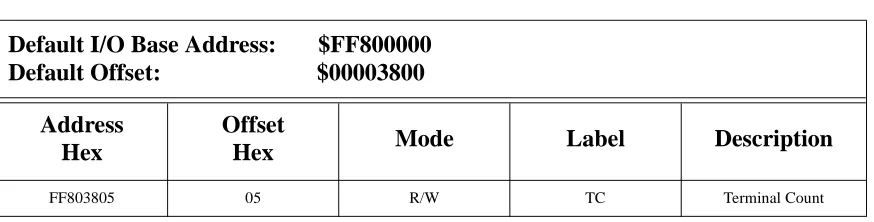
[image:21.595.82.519.281.392.2]A DMA control line called TC (Terminal Count) exists on the Floppy Disk Controller. TC is used to stop a data transfer between the Floppy Disk Controller and the Floppy Drive. This is done by accessing a dedicated address (read or write access). This address is shown in the table below. TC will become active during the access and inactive after the access. Additional information is provided in the FDC Data Sheet, a copy of which may be found in “OTHER SOURCES OF INFORMATION” on page 48.
Table 3: Address Map for Generating TC
Default I/O Base Address: $FF800000 Default Offset: $00003800
Address Hex
Offset
Hex Mode Label Description
2.2.2.3
LCA DMA Control Register
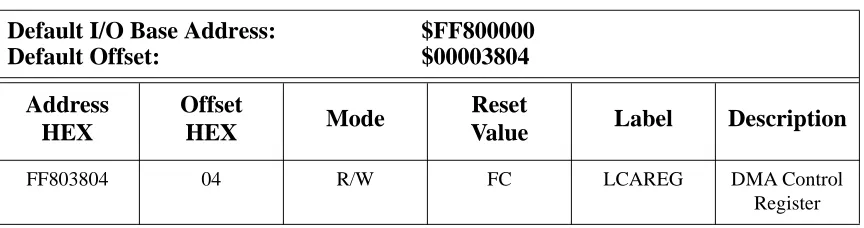
The LCA contains a register which controls the DMA transfer between Floppy Controller and the Buffer Memory. Register bit 0 controls the direction of the DMA transfer and must be set to the right value before a DMA transfer is started. The register bit 0 can be read back. Register bit 1 indicates whether a DMA transfer is in progress or not. It can only be read and will not be affected by a write access.
2.2.3
Floppy Buffer Memory
[image:22.595.79.520.190.510.2]The Floppy Interface of the EAGLE-01C holds a 16 Kbyte Buffer Memory. The Buffer Memory can be accessed by the CPU and by the Floppy Disk Controller via the LCA. (See the chapter “LCA Data Transfers” on page 10.) The Floppy Buffer Memory is accessed by the CPU via the 8-bit Local I/O Interface of the FGA-002 in the address range $FF880000 to $FF883FFF. When the Floppy Buffer Memory is accessed by the Floppy Disk Controller, the LCA generates the address for the Buffer Memory. The address is set to zero at the beginning of a DMA transfer and is counted upwards by the LCA during the DMA transfer.
Table 4: LCA DMA Control Register Layout
Default I/O Base Address: $FF800000
Default Offset: $00003804
Address HEX
Offset
HEX Mode
Reset
Value Label Description
FF803804 04 R/W FC LCAREG DMA Control
[image:22.595.84.516.232.346.2]Register
Table 5: Description of LCA DMA Control Register Bits
Bit Value Mode Description
0 1
0
R/W Buffer Memory to Floppy Disk Controller (DMA WRITE) Floppy Disk Controller to Buffer Memory (DMA READ)
1 1
0
2.2.3.1
Summary of the Floppy Buffer Memory
Device 32K * 8 SRAM
Addressable Space 16 Kbytes
Access Address $FF880000 to $FF883FFF
Port Width Byte
2.2.4
The Floppy Disk Bus
The floppy disk bus is an SA450 type drive interface. The floppy drive signals are provided directly from the Floppy Disk Controller with no additional buffers. Some of the floppy drive signals can be changed via switch 1 to switch 8 of the dip switch array SW1. The switches must be changed for the different types of floppy drives which are used. Switch 9 is used for the LCA configuration mode and must not be changed by the user. Switch 10 is used for the write protection of the FLASH EPROMs and is described in the chapter “The EAGLE FLASH EPROM” on page 40. The default setting of the dip switch array SW1 is shown in “Default Setting of Dip Switch Array SW1” on page 6 and the location of SW1 is shown in the “Diagram of EAGLE-01C with SW1 and SW2” on page 5.
The following floppy disk signals can be changed via the dip switch array SW1:
MO12/HEADLOAD
The motor on signals MO1/DS3 and MO2/DS4 of the Floppy Disk Controller are open collector lines. They are tied together and have the signal name MO12. Via switch 1 and switch 2 either MO12 or HEADLOAD can be connected to the MOTOR ON signal of the floppy drive. So both signals can be used to start the motor of the floppy drive.
[image:23.595.136.466.579.688.2]CAUTION: The switches must not be both opened or both closed at the same time.
HEADLOAD/EJECT
There are special 3 1/2" drives which need an eject pulse to eject the floppy out of the drive. The eject signal must be connected to the pin which normally holds the HEADLOAD signal. Via switch SW1-3 and switch SW1-4 either HEADLOAD or EJECT can be connected to the floppy drive.
The EJECT signal can be generated by accessing (read or write) a dedicated address. EJECT is active during the read or write cycle to this address and automatically becomes inactive after two microseconds.
CAUTION: The switches must not be both opened or both closed at the same time.
Table 7: Address Map for Generating EJECT
Default I/O Base Address: $FF800000
Default Offset: $00003806
Address HEX
Offset
HEX Mode Label Description
FF803806 06 R/W EJECT Ejection of
[image:24.595.83.513.288.398.2]Floppy disk
Table 8: SW1 Setting for HEADLOAD/EJECT
Active Signal SW1-3 SW1-4 Default
Setting
HEADLOAD OFF ON *
DRIVE TYPE
The DRIVE TYPE (DRV) signal is used to indicate to the Floppy Disk Controller whether a floppy drive with a two-spindle motor or a one-spindle motor is used.
CAUTION: Take care that a switch setting with one switch opened and the other one closed is never used.
PRECOMPENSATION VALUE
The PRECOMPENSATION VALUE (PCVAL) signal is used to select the write precompensation time of the Floppy Disk Controller. The time is selected via SW1-7.
DISK CHANGE ENABLE
The DISK CHANGE ENABLE (DCHGEN) signal is used to enable the DCHG input status at pin 40 of the Floppy Disk Controller. DCHG is the door lock signal of the floppy drive and indicates whether the door of the floppy drive is open or not.
Table 9: SW1 Setting for DRIVE TYPE
Drive Type SW1-5 SW1-6 Default Setting
One-Spindle Motor OFF OFF
Two-Spindle Motor ON ON *
Table 10: SW1 Setting for PRECOMPENSATION VALUE
Precompensation Time SW1-7 Default Setting
125 ns OFF *
[image:25.595.94.506.228.299.2]2.2.4.1
The Floppy Drive Signals on VMEbus P2 Connector
[image:26.595.140.457.251.487.2]The floppy drive signals are available on the EAGLE I/O Connector which is connected to row C of the VMEbus P2 Connector. The pin assignment for the floppy disk signals is shown in the table below. The floppy drives can be connected to the VMEbus P2 Connector via the backpanel SYS68K/IOBP-1. (Please see also the chapter “The SYS68K/IOBP-1” on page 41.)
Table 12: Pin Assignment for Floppy Drive Signals on VMEbus P2
Pin Number Signal Mnemonic
C1 C2 C3 C4 C5 C6 C7 C8 C9 C!0 C11 C12 C13 C14 C15 C16 C17 RWC/RPM HEADLOAD/EJECT
2.3
SCSI Interface
The SCSI Interface on the EAGLE-01C is built with the SCSI Controller MB87034. The SCSI Interface is installed for direct interface to SCSI Winchester disks, optical drives, tape streamers and other SCSI compatible devices with a data transfer rate of up to 5 Mbyte/s. The I/O signals of the SCSI interface are provided on the VMEbus P2 Connector of the base board via the EAGLE I/O Connector. The SCSI devices can be connected to the VMEbus P2 Connector via the backpanel 1. (Please see the chapter “The SYS68K/IOBP-1” on page 41.)
2.3.1
SCSI Controller MB87034
The SCSI Controller MB87034 is a CMOS LSI chip designed to control a SCSI Interface. The MB87034 can serve as either an INITIATOR or TARGET for the SCSIbus. The Controller contains an 8 byte FIFO data buffer register and a 28-bit transfer byte counter. The Controller has two independent 8-bit buses for the DMA transfer and non-DMA transfer.
Features of the MB87034 SCSI Controller
• Full support for SCSI control
• Serves as either initiator or target device
• Eight byte data buffer register incorporated
• Transfer byte counter (28-bit)
• Independent control and data transfer bus
• Asynchronous data transfer speed of 2 Mbytes/sec
2.3.1.1
Address Map of the MB87034 Registers
[image:28.595.92.504.219.663.2]The registers of the MB87034 are accessible via the 8-bit Local Interface of the FGA-002. The following table shows the register layout of the MB87034. Additional information is provided in the MB87034 Data Sheet, a copy of which may be found in “OTHER SOURCES OF INFORMATION” on page 48 .
Table 13: MB87034 Register Layout
Default I/O Base Address: $FF800000 Default Offset: $00003400
Address Hex
Offset
Hex Read/Write Label Description
FF803400 00 R/W BDID BUS DEVICE ID
FF803401 01 R/W SCTL SPC CONTROL
FF803402 02 R/W SCMD COMMAND
FF803403 03 R/W TMOD TRANSFER MODE
FF803404 04 R INTS INTERRUPT SENSE
W RESET INTERRUPT
FF803405 05 R PSNS PHASE SENSE
W SDGC SPC DIAGNOSTIC CONTROL
FF803406 06 R SSTS SPC STATUS
FF803407 07 R SERR SPC ERROR STATUS
FF803408 08 R/W PCTL PHASE CONTROL
FF803409 09 R MBC MODIFIED BYTE COUNTER
W EXTENDED TRANSFER COUNT
FF80340A 0A R DREG DATA REGISTER
FF80340B 0B R TEMP TEMPORARY REGISTER
FF80340C 0C R TCH TRANSFER COUNT HIGH
FF80340D 0D R TCM TRANSFER COUNT MIDDLE
FF80340E 0E R TCL TRANSFER COUNT LOW
2.3.1.2
The SCSI CPU Interface
The 8-bit Local Interface of the FGA-002 is used to access the registers of the MB87034. Parity is generated by the internal MB87034 parity generator when writing to the registers
2.3.1.3
The SCSI DMA Interface
The 8-bit DMA channel of the SCSI Controller is directly connected to the installed DMA Controller of the FGA-002 allowing data transfers with a maximum speed of 4 Mbyte/s. Parity is generated by an external parity generator when writing to the DMA channel of the MB87034.
The DMA Controller of the FGA-002 contains a 32-byte FIFO. The DMA channel of the FGA-002 contains an additional 8 byte FIFO. This allows data transfer via the DMA Interface of the FGA-002 with a data rate of 4 Mbyte/s.
2.3.1.4
SCSI DMA Control Register
The control signal HIN indicates to the MB87034 the direction of the DMA transfer (DMA READ or DMA WRITE). The HIN signal can be set to "0" or "1" by writing to a dedicated address and can also be read back. The address is shown in the following table. The second table shows the function of the register bit.
2.3.1.5
The MB87034 Interrupt
The interrupt of the MB87034 is programmable in the FGA-002 Gate Array. It is connected to the Interrupt Request Channel #7 of the FGA-002 Gate Array. For detailed information, please refer to the FGA-002 User’s Manual.
2.3.1.6
Summary of the MB87034
Device MB87034
Access Address $FF803400
Port Width Byte
Interrupt Request Level Software programmable
FGA-002 Interrupt Request Channel Local IRQ #7
Table 14: SCSI DMA Control Register
Default I/O Base Address: $FF800000 Default Offset: $00002C00
Address HEX Offset HEX Mode Description
FF802C00 00 R/W SCSI DMA Control Register
Table 15: SCSI DMA Direction Bit
Bit Value Description
2.3.2
SCSIbus
2.3.2.1
SCSIbus Configuration
Communication on the SCSIbus is only allowed between two SCSI devices at any given time. There is a maximum of eight SCSI devices. Each SCSI device has a SCSI I.D. bit assigned as shown in “SCSI I.D. Bits” on page 22. When two SCSI devices communicate on the SCSIbus, one acts as an initiator and the other acts as a target. A SCSI device usually has a fixed role as an initiator or target, but some devices may be able to assume either role.
FIGURE 5.
SCSI I.D. Bits
Up to eight devices can be supported on the SCSIbus. They can be any combination of initiators and targets. Certain SCSIbus functions are assigned to the target. The initiator may arbitrate for the SCSIbus and select a particular target. The target may request the transfer of COMMAND, DATA, STATUS, or other information and reselect an initiator for the purpose of continuing an operation. Information transfers on the data bus are asynchronous and follow a defined REQ/ACK handshake protocol. One byte of information may be transferred with each handshake. An option is defined for synchronous data transfer.
DB(7) DB(6) DB(5) DB(4) DB(3) DB(2) DB(1) DB(0) DATA BUS
SCSI I.D. = 7
SCSI I.D. = 6
SCSI I.D. = 5
SCSI I.D. = 4
SCSI I.D. = 3
SCSI I.D. = 2
SCSI I.D. = 1
FIGURE 6.
Sample SCSI Configurations
Controller Controller COMPUTER HO S T AD AP T E RSINGLE INITIATOR, SINGLE TARGET
Controller COMPUTER HO S T AD AP T E R Controller
SINGLE INITIATOR, MULTIPLE TARGET
2.3.2.2
SCSIbus Signals
All SCSIbus signals are available on the EAGLE I/O Connector which is routed to the VMEbus P2 Connector. There are a total of 18 signals. Nine are used for control, and nine are used for data (data signals include the parity signal option).
These signals are described as follows:
ACK (ACKNOWLEDGE) A signal driven by an initiator to
indicate an acknowledgment for a REQ/ ACK data transfer handshake.
ATN (ATTENTION) A signal driven by an initiator to
indicate the ATTENTION condition.
BSY (BUSY) An "OR-tied" signal that indicates that
the bus is being used.
C/D (CONTROL/DATA) A signal driven by a target that indicates
whether CONTROL or DATA information is on the data bus. True indicates CONTROL.
DB(7-0,P) (DATA BUS) Eight data bit signals, plus a parity bit
signal which together form a data bus. DB(7) is the most significant bit, and has the highest priority during the ARBITRATION phase. Bit number, significance, and priority decrease downward to DB(0). A data bit is defined as one when the signal value is true, and is defined as zero when the signal value is false.
I/O (INPUT/OUTPUT) A signal driven by a target that controls
the direction of data movement on the data bus with respect to an initiator. True indicates input to the initiator. This signal is also used to distinguish between SELECTION and RESELECTION phases.
REQ (REQUEST) A signal driven by a target to indicate a request for a REQ/ACK data transfer handshake.
RST (RESET) An "OR-tied" signal that indicates the
RESET condition.
SEL (SELECT) A signal used by an initiator to select a
target or by a target to reselect an initiator.
Data parity DB(P) is odd. The use of parity is a system option (i.e., a system configured so that all SCSI devices on a bus generate parity and have parity detection enabled, or all SCSI devices have parity detection disabled or not implemented). Parity is not valid during the ARBITRATION phase.
2.3.2.3
SCSIbus Signal Termination
Each SCSIbus signal is terminated at the physical start and the physical end of the SCSIbus. Therefore, an actively terminating device is installed on the EAGLE-01C which can be enabled or disabled via dip switch SW2. For the position of SW2 on the EAGLE-01, please see “Diagram of EAGLE-01C with SW1 and SW2” on page 5. The table below outlines the switch settings for SCSI termination.
Table 16: SW2 Setting for SCSI Termination
SCSI Termination SW2-1 Default Setting
Enabled ON *
2.3.2.4
SCSIbus Termination Resistor Power (TERMPWR)
Any SCSI device must be able to provide the power supply (TERMPWR) for the SCSI termination resistors of the SCSIbus to fulfill the SCSI Specification. On the EAGLE-01C TERMPWR is provided on the SCSIbus via a protection diode to avoid backflow of the current into the EAGLE-01C. In addition, TERMPWR is protected by a 1 Amp fuse, which is socketed and can therefore be easily exchanged. The socket for the 1 Amp fuse F1 is located on the bottom side of the EAGLE-01C. The EAGLE-01C has to be removed from the base board when exchanging the fuse F1.
2.3.2.5
The SCSIbus Signals on VMEbus P2 Connector
The SCSIbus signals are available on the EAGLE I/O Connector, which is routed to the VMEbus P2 Connector. The pin assignment for SCSI devices is shown below. The SCSI devices can be connected to the VMEbus P2 Connector via the backpanel SYS68K/IOBP-1. (Please see the chapter “The SYS68K/IOBP-1” on page 41.)
Table 17: Pin Assignment for SCSIbus Signals on VMEbus P2
Pin Number Signal Mnemonic
A01 DB0
A02 DB1
A03 DB2
A04 DB3
A05 DB4
A06 DB5
A07 DB6
A08 DB7
A09 DBP
A13 TERMPWR
A16 ATN
A18 BSY
A19 ACK
A20 RST
A21 MSG
A22 SEL
A23 C/D
A24 REQ
2.4
The LAN Interface
The LAN Interface on the EAGLE-01C is built with the Local Area Network Controller for Ethernet (LANCE) AM79C90, the Serial Interface Adapter (SIA) AM7992B and a 64 Kbyte Buffer Memory. Interrupts of the AM79C90 are fully supported. The LAN Interface is Ethernet and IEEE 802.3 10 BASE 5 Type A compatible. The I/O signals of the LAN Interface are provided on the D-Sub Connector on the front panel.
Features of the LAN Interface
• Compatibility to IEEE 802.3 10 BASE 5 Type A and Ethernet
• Data rate of 10 Mbit per second
• DMA capability
• Interrupt generation
• 64 Kbyte SRAM Buffer Memory
The memory buffer is a shared memory allowing access from both the AM79C90 and the local CPU. The 64 Kbyte buffer memory stores the incoming and outgoing data packets. An incoming data packet is transferred to the Buffer Memory by the LAN Controller. The presence of data in the Buffer Memory is indicated to the CPU by an interrupt. The CPU can then read the data packet from the Buffer Memory. An outgoing data packet is transferred to the Buffer Memory by the CPU. The LAN Controller then transfers the data packet to the network and indicates the completion of the transfer by an interrupt to the CPU.
2.4.1
LAN Controller for Ethernet (LANCE) AM79C90
The LANCE is a 68-pin VLSI device which provides many functions for the connection of a microprocessor to the Ethernet.
Features of the LAN Controller
• Compatible with Ethernet and IEEE 802.3 10 BASE 5 Type A
• On-chip DMA and buffer management
• 48 byte transmit FIFO and 64 byte receive FIFO
• 24-bit wide linear addressing
• Network and packed error reporting
• Back-to-back packet reception with as little as 0.5 µs interframe spacing
• Diagnostic routines
• Low power consumption
In the transmitting mode the LANCE transfers data from the Buffer Memory to an internal FIFO called SILO. The serial output of the SILO is connected with the AM7992 SIA, where the data is sent to the Ethernet cable. In the receiving mode the SIA transfers the received data from the Ethernet cable to the serial SILO input and the LANCE transfers the data to the Buffer Memory.
2.4.1.1
Address Map of the LANCE Registers
[image:41.595.78.517.240.433.2]The LANCE contains one Register Address Pointer (RAP) and four status control registers (CSR0, CSR1, CSR2, CSR3). To read or write to CSR1, CSR2, and CSR3 the LANCE must be stopped by setting the stop bit in CSR0. Therefore, CSR0 and RAP can be accessed at anytime the LANCE is in the slave mode. To read or write to a CSR the number of the CSR must be written to the RAP first.
Table 18: LANCE Register Layout
I/O Address: $FEF8 0000 Default Offset: $0000 0000
Address HEX
Offset
HEX Reset Value Label Description
FEF80002 02 0000 RAP Register Address Pointer
FEF80000 00 0004 CSR0 Control and Status Register 0
FEF80000 00 N/A CSR1 Control and Status Register 1
FEF80000 00 N/A CSR2 Control and Status Register 2
FEF80000 00 N/A CSR3 Control and Status Register 3
2.4.1.2
The LANCE Interrupt
The interrupt of the LANCE is programmable in the FGA-002 Gate Array. It is connected to the Interrupt Request Channel #6 of the FGA-002 Gate Array. For detailed information, please refer to the FGA-002 User’s Manual.
2.4.1.3
Summary of the LANCE
Device AM79C90
Access Address $FEF80000
Access Mode Word Only
Interrupt Request Level Programmable
2.4.2
The Am7992B Serial Interface Adapter (SIA)
The Am7992B Serial Interface Adapter (SIA) is a Manchester Encoder/Decoder compatible with IEEE-802.3 10 BASE 5 TYPE A, Cheapernet, and Ethernet specifications.
Features of the Am 7992B SIA
• Compatible with Ethernet/Cheapernet/IEEE-802.3 10 BASE 5 TYPE A specifications
• Crystal controlled Manchester Encoder
• Manchester Decoder acquired clock and data within four bit times with an accuracy of
+/-3 ns
• Guaranteed carrier and collision detection squelch threshold limits
• -Carrier/collision detected for inputs greater than -275 mV
• -No carrier/collision for inputs less than -175 mV
• Input signal conditioning reject transient noise
• -Transients <10 ns for collision detector inputs
• -Transients <20 ns for carrier detector inputs
• Receiver decodes Manchester data with worst case +/-19 ns of clock jitter (at 10 MHz)
• TTL compatible host interface
2.4.2.1
The Am7992B Transmitter
[image:44.595.132.474.238.479.2]The transmitter encodes data coming from the LANCE into a Manchester II Code (see below). The output signal is sent to a buffer on the CPU board. An oscillator provides the 20 MHz clock signal for the LANCE. For further details, please refer to the Am7992B Data Sheet found in “OTHER SOURCES OF INFORMATION” on page 48.
FIGURE 8.
Manchester II Code Transmitter Encoding
MANCHESTER
ENCODER
OSC TX
TENA
TCLK
+/-2.4.2.2
The Am7992B Receiver
[image:45.595.102.480.248.436.2]The receiver signals the LANCE that there is a message to receive. It decodes the Manchester encoded data stream and sends the data to the LANCE (see next figure). For further information, please refer to the Am7992B Data Sheet in “OTHER SOURCES OF INFORMATION” on page 48.
FIGURE 9.
Decoding with the Manchester Decoder
RX
RCLK
RENA
RE
CE
IV
E
+
/-MANCHESTER DECODER
CARRIER DETECT
DATA RECEIVER
NOISE REJECT
2.4.3
Ethernet Signals
The I/O signals of the LAN Interface are provided on the 15-pin female D-Sub Connector on the front panel. On the D-Sub Connector the following Ethernet signals are available:
Transmit+ / Transmit- (differential line output)
This line pair is intended to operate into terminated transmission lines.
Receive+ / Receive- (differential line input)
This pair of internally biased line receivers consists of a carrier detect receiver and a data recovery receiver.
Collision+ / Collision- (differential line input)
This pair of internally biased line receivers has offset threshold and noise filtering.
2.4.3.1
Ethernet on the 15-Pin Female D-Sub Connector
The Ethernet signals are available on the 15-pin female D-Sub Connector on the front panel. The pinout of the D-Sub Connector is shown in “Pinout of the 15-Pin Female D-Sub Connector” on page 39 and the pin assignment is shown in the next table.
Table 19: Pin Assignment of the 15-Pin Female D-Sub Connector
Pin Number Signal Mnemonic
1 GND 2 Collision+ 3 Transmit+ 4 GND 5 Receive+ 6 GND 7 N.C. 8 GND 9
Collision-10
Transmit-11 N.C.
12
Receive-13 +12V
14 GND
FIGURE 11.
Pinout of the 15-Pin Female D-Sub Connector
2.4.4
LAN Buffer Memory
The LAN Buffer Memory is accessible via address $FEF00000 to $FEF0FFFF and the port width is 16 bits (word). The LAN Buffer Memory consists of two 32K * 8-bit SRAMs. These devices can be accessed by the CPU and the LANCE as long as the CPU or LANCE has bus mastership. With this dedicated memory, it is not necessary to stop the CPU while the LANCE is bus master. This assures that the real-time capability of the CPU board is guaranteed.
2.4.4.1
Summary of the LAN RAM
Devices 2 * 32K * 8-bit SRAM
1
2
3
4
5
6
7
8
9
10
11
12
13
14
2.5
The EAGLE FLASH EPROM
The EAGLE-01C holds 256 Kbytes FLASH EPROM. Two 128 Kbyte FLASH EPROM devices are installed on the EAGLE-01C. The address range for the FLASH EPROMs reaches from $FD800000 to $FD83FFFF. Two 128 Kbyte devices are installed by default. For programming the FLASH EPROMs a special programming algorithm is needed. For detailed information about programming the FLASH EPROMs, see “OTHER SOURCES OF INFORMATION” on page 48. The FLASH EPROMs can be write protected by the opening of switch 10 of the dip switch array SW1. When the FLASH EPROMs must be programmed the switch 10 of the dip switch array SW1 has to be closed.
The location diagram of the dip switch array SW1 is shown in “Diagram of EAGLE-01C with SW1 and SW2” on page 5.
2.5.1
Summary of the EAGLE FLASH EPROM
Devices 2 * 128K * 8
Access Address $FD800000 to $FD83FFFF
Capacity 256 Kbytes
Port Width Byte
Table 20: SW1 Setting for FLASH EPROMs
Write protection of
FLASH EPROMs SW1-10 Default Setting
YES OFF
2.6
The SYS68K/IOBP-1
[image:51.595.75.523.280.725.2]There is a back-panel SYS68K/IOBP-1 available from Force Computers. This board can be plugged into the VMEbus P2 Connector of a VMEbus board which carries the EAGLE-01C. The backpanel contains the connectors (P1)...(P4). The connector (P1) is plugged on the backside of the VMEbus P2 Connector. Note that the pins of connector (P1) are numbered in the other direction than the pins of VMEbus P2 Connector. The backpanel also contains the 50-pin male SCSIbus Connector (P2), the 34-pin male Floppy Drive Connector (P3), and the 64-pin male connector (P4). The connector (P4) contains all signals of row A and row C of the VMEbus P2 Connector. The pinout of the connectors (P1)...(P4) is shown in the following tables.
Table 21: SYS68K/IOBP-1 P1 Pin Assignment
Pin No. P1
Pin No. VMEbus
P2
Row A Signal Mnemonic
Row B Signal
Mnemonic Row C Signal Mnemonic
32 1 DB 0 --- RWC/RPM
31 2 DB 1 GND HEADLOAD/EJECT
30 3 DB 2 --- DRIVE SELECT 2
29 4 DB 3 --- INDEX
28 5 DB 4 --- DRIVE SELECT 1
27 6 DB 5 --- DRIVE SELECT 2
26 7 DB 6 --- DRIVE SELECT 1
25 8 DB 7 --- MOTOR ON/HEADLOAD
24 9 DB P --- DIRECTION IN
23 10 GND --- STEP
22 11 GND --- WRITE DATA
21 12 GND GND WRITE GATE
NOTE:The table above shows the pinout of the 96-pin female connector which performs the
connection to the VMEbus P2 Connector. If the module SYS68K/IOBP-1 is plugged in, Pin 32a of P1 connects to Pin 1a of the VMEbus P2 Connector.
13 20 RST --- GND
12 21 MSG --- N.C.
11 22 SEL GND GND
10 23 C/D --- GND
9 24 REQ --- N.C.
8 25 I/O --- N.C.
7 26 N.C. --- N.C.
6 27 GND --- N.C.
5 28 N.C. --- N.C.
4 29 N.C. --- N.C.
3 30 N.C. --- N.C.
2 31 N.C. GND N.C.
[image:52.595.76.522.83.404.2]1 32 N.C. --- N.C.
Table 21: SYS68K/IOBP-1 P1 Pin Assignment (cont.)
Pin No. P1
Pin No. VMEbus
P2
Row A Signal Mnemonic
Row B Signal
Table 22: SYS68K/IOBP-1 P2 Pin Assignment
Pin No. Signal
Mnemonic
Connected to VMEbus
P2 Pin
Pin No. Signal
Mnemonic
2 DB 0 A01 1 GND
4 DB 1 A02 3 GND
6 DB 2 A03 5 GND
8 DB 3 A04 7 GND
10 DB 4 A05 9 GND
12 DB 5 A06 11 GND
14 DB 6 A07 13 GND
16 DB 7 A08 15 GND
18 DB P A09 17 GND
20 GND --- 19 GND
22 GND --- 21 GND
24 GND --- 23 GND
26 TERMPWR A13 25 N.C.
28 GND --- 27 GND
30 GND --- 29 GND
32 ATN A16 31 GND
34 GND --- 33 GND
36 BSY A18 35 GND
38 ACK A19 37 GND
40 RST A20 39 GND
42 MSG A21 41 GND
Table 23: SYS68K/IOBP-1 P3 Pin Assignment
Pin No. Signal Mnemonic
Connected to VMEbus
P2 Pin
Pin No. Signal
Mnemonic
2 RWC/RPM C01 1 GND
4 HEADLOAD/EJECT C02 3 GND
6 DRIVE SELECT 2 C03 5 GND
8 INDEX C04 7 GND
10 DRIVE SELECT 1 C05 9 GND
12 DRIVE SELECT 2 C06 11 GND
14 DRIVE SELECT 1 C07 13 GND
16 MOTOR ON/HEADLOAD C08 15 GND
18 DIRECTION IN C09 17 GND
20 STEP C10 19 GND
22 WRITE DATA C11 21 GND
24 WRITE GATE C12 23 GND
26 TRACK 000 C13 25 GND
28 WRITE PROTECT C14 27 GND
30 READ DATA C15 29 GND
32 HEAD SELECT C16 31 GND
Table 24: SYS68K/IOBP-1 P4 Pin Assignment
Pin No. Row a Signal Mnemonic Row c Signal Mnemonic
1 DB 0 RWC/RPM
2 DB 1 HEADLOAD/EJECT
3 DB 2 DRIVE SELECT 2
4 DB 3 INDEX
5 DB 4 DRIVE SELECT 1
6 DB 5 DRIVE SELECT 2
7 DB 6 DRIVE SELECT 1
8 DB 7 MOTOR ON/HEADLOAD
9 DB P DIRECTION IN
10 GND STEP
11 GND WRITE DATA
12 GND WRITE GATE
13 TERMPWR TRACK 000
14 GND WRITE PROTECT
15 GND READ DATA
16 ATN HEAD SELECT
17 GND DISK CHANGE
18 BSY N.C.
19 ACK GND
20 RST GND
21 MSG N.C.
22 SEL GND
23 C/D GND
31 RESERVED RESERVED
[image:56.595.111.487.91.176.2]32 RESERVED RESERVED
Table 24: SYS68K/IOBP-1 P4 Pin Assignment (cont.)
3.
ORDERING INFORMATION
[image:57.595.69.532.50.538.2]4.
HISTORY OF MANUAL REVISIONS
Table 25: Ordering Information
Name of Product Description
SYS68K/EAGLE-01C SYS68K/EAGLE-01C/UM
EAGLE Module for the CPU Board User’s Manual for the EAGLE-01C
Table 26: History of Manual Revisions
Edition No. Description Date of Last
Change
0 First Print FEB/04/1991
1 Default Switch Setting in Figure 2-2 was changed AUG/16/1991 2 Default Jumper Settings in Tables 101, 2-10, 2-11 and 2-21 were changed.
Default Switch Setting in Figure 1-4 was changed.
JUNE/16/1992
3 Manual updated for PCB Revision 2.0 of the EAGLE-01C board. JUNE/01/1994 4 The SCSI Protocol Controller MB87033B has been replaced by the MB87034PF. MAR/14/1996
5 Editorial Changes DEC/03/1996
[image:57.595.80.518.343.532.2]5.
OTHER SOURCES OF INFORMATION
For further information on components refer to the information listed in the table below.
Table 27: OTHER SOURCES OF INFORMATION
Company www. Document
Advanced Micro Devices amd.com LAN Controller AM79C90 FLASH EPROM 28F010 FUJITSU fujitsu.com SCSI Controller - MB87034
Product: Serial No.:
Date Of Purchase: Originator:
Company: Point Of Contact:
Tel.: Ext.:
Address:
Present Date:
Affected Product:
❏Hardware ❏ Software ❏Systems
Affected Documentation:
❏Hardware ❏Software ❏Systems
Error Description: