!∀##∃∀%&∃∀
∋()#∗++,,−+∀∃ +
The Alternative Library
Timothy Collinson and
Alison Williams
The authors
Timothy Collinsonis Information Librarian (Technology) and
Alison Williamsis Information Librarian (Management), both at the Southampton Institute, Southampton, UK.
Keywords
Worldwide Web, User interfaces, Design, Navigation, Creative thinking
Abstract
Much time and effort has been devoted to designing and developing library Web sites that are easy to navigate by both new students and experienced researchers. In a review of the Southampton Institute Library it was decided that in addition to updating the existing homepage an alternative would be offered. Drawing on theory relating to user interface design, learning styles and creative thinking, an Alternative Library navigation system was added to the more traditional library homepage. The aim was to provide students with a different way to explore and discover the wide range of information resources available by taking a less formal approach to navigation based on the metaphor of physical space and playful exploration.
Electronic access
The Emerald Research Register for this journal is available at
www.emeraldinsight.com/researchregister
The current issue and full text archive of this journal is available at
www.emeraldinsight.com/0001-253X.htm
Academic library Web sites have developed considerably in the last few years since the Internet became generally available via JANET (Charnigo, 2002). Early pages could be very basic and often used basic tools to develop them (sometimes just plain text editors coding raw HTML by hand). Today software packages might be used to produce the HTML, and the databases required to keep track of all the pages, and design teams may even be brought in to enhance the look and feel of a library’s site. Southampton Institute’s homepage (www.solent.ac.uk) and the Institute’s library Web site (www.solent.ac.uk/library/) have been no exception, and half a decade of steady evolution has taken place.
Generally, such pages have taken a traditional and formal approach to presenting information (alhough the word “traditional” is used advisedly with reference to a field that is less than ten years old!). Library catalogues have been at the forefront of what is on offer; help guides and sometimes virtual tours have often been included, the pages of which were popular in the early days and are now often replaced by automatically generated pages using the catalogue to store the data; and, of course, more recently access to databases on the Internet or via CD-ROM has been provided for both on campus and off campus use.
Southampton Institute was established in 1984 following mergers between Southampton College of Art, Southampton College of Technology and the College of Nautical Studies at Warsash, and was incorporated as an independent higher education institution in 1989. Today it is the largest general college of higher education in the UK, with almost 11,000 full-time equivalent students.
The Mountbatten Library has a floor space of 4,520 square metres and study accommodation for almost 1,000 library users. The facilities reflect the differing needs of its users, including bookable private study carrels for researchers, large separate areas for silent study and for group work, and an assistive technology area. It combines significant and growing collections of print and multimedia materials with an advanced electronic library, which offers access to e-books (collection established in October 2001), e-journals and information databases, both on and off campus. The library management system operating is the CSC Danish DDE Libra system, for which the library is the UK reference site.
Aslib Proceedings: New Information Perspectives Volume 56 · Number 3 · 2004 · pp. 137-143
qEmerald Group Publishing Limited · ISSN 0001-253X DOI 10.1108/00012530410539322
Library Web site policy has as its overall aim that the Web site should be user-focused:
. providing the information and services required by students and staff at Southampton Institute;
. catering for a range of IT literacy and information-seeking styles (e.g. searching, browsing);
. widely accessible;
. engaging (i.e. consistent, clear, easy to use, interesting); and
. constantly evolving and evaluated.
Guided by a desire to assist users (and especially new users) in a user-friendly manner, sites have been developed to be as student-centred as possible. However, they are often hierarchical and structured by library staff in a logical manner that may not be immediately useful – or even
transparent – to the casual user. Students may come with little formal training in information skills and almost certainly no knowledge of library theory. This can make the library’s Web site as intimidating or difficult to navigate as some physical buildings.
As academic library Web pages become more and more virtual libraries with the increasing ability to access electronic information, it is vital to examine how library users relate to the virtual space they must negotiate to find the information they require. Library catalogues are only the first step on the way to extracting that information. Electronic databases, electronic journals and electronic books, not to mention the vast wealth of the Internet itself, mean that the physical buildings the library inhabits become less important. Distance learners, part-time students and busy lives – all these contribute to students being less and less able or willing to visit the physical library.
Rationale
With this in mind it is important to ensure that users can find their way around our virtual spaces. At Southampton Institute we have explored the possibilities of an “Alternative Library”. Our homepage is very much in the traditional mould. Following a formal review of the library homepage, attempts were made to generate an improved design. The authors also developed an alternative that would work alongside and in addition to the standard homepage. This would not be promoted, but left open for discovery by those with an inclination to explore. Thus, a direct link from the homepage gives users the opportunity to locate the resources they may want in a slightly different and much less formal manner.
It should be noted at this point that the resources located via the Alternative Library are the same as those found the traditional way. For example, the link to the library catalogue takes users to the same place the standard homepage does; and the online leaflets are the same pages whether users find them via the homepage or the Alternative Library. However, the route to finding the information is very different. It is perhaps also worth noting that, as is usual with all the Institute Library’s pages, the Alternative Library does not open in a new window (Nielsen, 1999). We wish to encourage exploration, and denying the use of the “Back” button and irritating users (who could open additional windows if they chose to) does not strike us as contributing positively to this.
After a creative thinking course (Whitaker and Mahon, 2000) the authors were struck by the possibilities that an imaginative approach might allow. However, we were also aware that such an approach might be considered unconventional. Simmons (2000, p. 233), advocating a more creative use of language in business, writes:
It raises a question like “Is it too fanciful?” People equate poetry (and perhaps storytelling too) with qualities that they don’t comfortably associate with business fundamentals – imagination, passion, intellect, playfulness.
Higher education institutions share many qualities with businesses, and so designing the Alternative Library using the approach of Simmons was appropriate in order to involve users in a story, engage their intellect, and allow for playfulness.
Instead of simply presenting organised links, an informal text-based approach is taken, which encourages the user to explore the virtual space in the same way they might explore a physical building. This encourages serendipity and hopefully motivates users to go that little bit further than they may have done otherwise. Moving away from plain text to including graphics or photographs or moving entirely over to a three-dimensional virtual space was considered, but has not as yet been implemented due to technological and resource constraints.
Inspired in part by multiple object oriented (MOOs) and computer adventure games, and in part by research into learning styles and the psychology of user interface design, the idea was to recreate a virtual library that feels (virtually) as though it is a real space that has been visited. Based on the actual physical library, with one minor enhancement, it also prepares students or staff to have an idea of what might be encountered should they actually come to the physical space. Ford (2000) examined the differences between learning styles in terms of user interface design, and noted that “holists like to use concept maps, serialists
The Alternative Library Timothy Collinson and Alison Williams
prefer keyword indices”. Tennant (1999) noted that a guiding principle of user interface design is to “...support multiple users and multiple purposes. One truism concerning user interface design is that there is no single user”.
The Alternative Library was devised as an alternative rather than a replacement for the existing interface in order to cater for different learning styles and different user groups. A key text in its development was that of Mandel (1997), who recommended the use of real-world metaphors to reduce the need for users to learn new navigation techniques. This was the thinking behind the use of the metaphor of physical space. Mandel also pointed out the significant differences between adults’ and children’s mental models, with children being very much more motivated by an environment that rewards playful exploration. We are serving an audience that is likely to be at varying stages on a continuum, from new students still retaining some playful exploratory mental models through to mature adults with less inclination to explore. As our main Web site is geared towards the mature adult, and to the serialist, the Alternative Library is geared more towards the other end of the continuum in terms of its overall structure and navigation, and by the addition of certain non-essential and not entirely serious elements, although the core material included is identical.
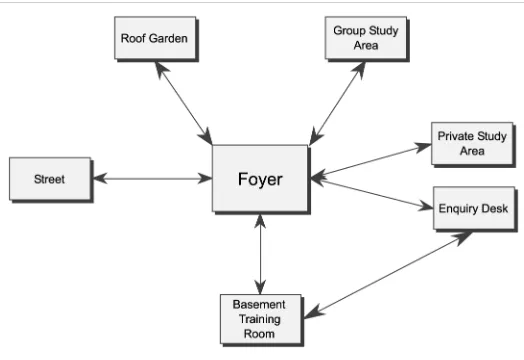
The physical library was described topologically accurately, but in a much simplified form, with all of the main spaces accounted for: foyer, private study area, enquiry desk, training room, basement, and the one enhancement – a roof garden. Originally, the directions north, south, west and east were used, mapping the real space to the virtual space with genuine directions. However, it was felt early on that this would be of no help to virtual visitors and of very limited use to those who then visited the physical space. Compared to complex adventure games or MOOs, the Alternative Library has been kept very
straightforward so that such directions should not be necessary. We did not expect users to have to generate their own maps of the route they had traversed, as might be necessary in an adventure game. Although it is possible to move around the space in a non-linear fashion (e.g. straight from the training room to the enquiry desk, which is not possible in the physical library), there are no rooms that are not directly accessible from the Foyer (i.e. the Alternative Library’s homepage). Figure 1 shows the Foyer, its resources and its exits.
Before describing any rooms in particular, two points should be noted: a loans desk is absent from the Alternative Library. This was deliberate, and was not meant as a slight on the loans team who
are, after all, a critical part of the physical library. After some deliberation it was felt that the point of the Alternative Library was to demonstrate the virtual, electronic nature of many of the library’s resources, for which there is no need for loans in the normal sense[1]. The Roof Garden, which does not exist in the physical library, was added partly out of a sense of wish fulfilment, but mainly because it gave the opportunity to show that the library was not merely about information but provides a community space as well. Originally it was envisaged that this might be developed into a space that could be used as a chat room where users could interact with library staff in a friendly and informal manner. For various reasons it was not possible to implement this. Instead, it has remained as a place where one of the designers of the Alternative Library can have a virtual presence and where it has been possible to put one of the more talked about “easter eggs”.
Easter eggs
Throughout the Alternative Library a few extras have been added, i.e. the “certain non-essential and not entirely serious elements” mentioned above. Some software and some PDAs have easter eggs added to their programming where secret key combinations reveal hidden images, animations, or pieces of text. In the Alternative Library these are not hidden, but are signalled with links that are not in bold, as links to the main resources are. Although they might merely be considered a bit of fun, they serve a useful purpose in encouraging users to explore further, adding to the atmosphere of the virtual library, and allowing the display of non-essential library items or library staff ’s creative output. Such finds are described in the relevant rooms below.
Room layout
Figure 2 shows a diagrammatic layout of the rooms and their connections.
The rooms
The Foyer
The Foyer is, in effect, the homepage of the Alternative Library. As with all of the rooms (or pages), it is divided into four columns. It was felt that by developing each of the pages with the same
visual layout it would make it easier for users to find their way around.
Additionally the Foyer contains a noticeboard, which allows the display of opening hours, FAQs and the library news page. A link to a map of the library is about to be implemented. The
noticeboard allows the addition and removal of items fairly easily in a defined place if so desired.
The main items available in the Foyer are the library tour via a tour guide, the library catalogue, and a guide to special services. There is one easter egg on this page, which is the text of the plaque unveiled at the library opening in 1994[2].
The Training Room
This space replicates the actual library training room, which is used for anything from student inductions to the library, through workshops, to (small) lectures. Staff training also takes place here. In the virtual space we can promulgate the online training services we offer such as On Track (information skills), UseIT@SI (electronic information sources), the online versions of the printed leaflets the library produces, and a pointer to various external online training sources that are available. There is also a link to the library catalogue, which for obvious reasons can be found in nearly every room in the Alternative Library. Future development could include linking this through to the Institute’s virtual learning Figure 2Diagrammatic layout of rooms and connections
Figure 1Screenshot of Alternative Library Foyer The Alternative Library Timothy Collinson and Alison Williams
environment (VLE) to hold actual (online) training sessions in a computer-mediated communication (CMC) environment.
The Enquiry Desk
In some respects this is a forerunner to our desire to run an electronic enquiry desk. Electronic enquiries are indeed already handled via e-mail, but some consideration is being given to adding a more immediate service using some form of chat facility (such as Microsoft Messenger).
Unfortunately it has not yet been possible to include this feature to provide direct contact with a real live person. We believe it would add an element of “presence”, which Lombard and Ditton (1997) identify as a key element in making the virtual environment seem more real, and therefore more attractive. As of now there is a link to the electronic enquiry desk form which students find useful, a list of subject specialist library staff, the ever-present leaflets, and the FAQs. A pointer to the training on offer is marked with a set of footprints, there is the usual link to the library catalogue, and there is an easter egg on this page consisting of a clock on the wall pointing to a set of world time zone clocks[3].
The Private Study Area
This represents several areas in the physical library, all amalgamated into one space in the Alternative Library for the sake of convenience. Here the main information resources can be found:
. subject guides – developed by the information librarians as resource guides in a variety of subject areas;
. databases – with some 200 databases of one sort or another, this really is the tip of a very large iceberg;
. past exam papers – nearly all examination papers sat at the Institute are now served up electronically in HTML or portable
document format (PDF);
. passwords – obviously an “on campus” only page providing students with database passwords;
. A-Z list of journals – all journals can be found in the library catalogue, but this is an additional means of locating what is available; . other libraries – links to other local libraries,
such as Southampton Central (public) Library and the nearby Southampton University Library; and
. Internet search engines – links to various main search engines, recognizing that the library cannot hold everything students require.
As usual, the library catalogue can be found here, and there is one easter egg in the form of some signage.
The Basement
In the physical library this is a group study area, photocopy centre and reserve stack. In the Alternative Library the group study area becomes a place to promulgate the use of mailing lists where groups of people can work together, share ideas, ask questions of other experts (or like-minded people), and so on. There is a link to information regarding the copy centre, a noticeboard links to an external service selling used books, and, of course, there is a library catalogue as well.
To The Street
This allows us to recognise the world outside the Mountbatten Library with links to the Institute’s homepage, the city of Southampton, other local libraries, local information, and once again to Internet search engines. One easter egg resides here in the form of a seasonal haiku giving something of the flavour of the real world in the vicinity of the physical library entrance.
The Roof Garden
Finally, this is the one enhancement to the physical library. Indeed, it could be regarded as an easter egg in itself. After the Foyer, this is also the most visited and commented-on feature of the
Alternative Library. In every month after the first introduction, over a quarter of all visitors have visited the Roof Garden, often over 50 per cent and without exception it has been the most visited section of the Alternative Library. There are the occasional requests from users of the physical library wanting to know where the Roof Garden is, though most seem to accept it for the imaginary space that it is. As noted above, it was hoped that this might be developed into a forum where students, Institute staff and library staff could meet informally. However, it has not yet been possible to implement this. In the mean time there is one external link as well as the infamous doughnut machine. Ironically, in terms of engendering a sense of “place” in the Alternative Library, this area has proved one of the most effective. The Web site usage statistics show that the doughnut machine sometimes receives more hits than the Roof Garden itself. In this sense it can truly be considered a “sticky” site in the way that Foraker Design (2002) talk about:
Evolving alternatives
Naturally, libraries need to develop and grow, and the library of Southampton Institute is no exception. Given that we have argued earlier that it “prepares students or staff to have an idea of what might be encountered should they actually come to the physical space”, as the physical library has changed, the Alternative Library has mirrored such development. Major stock and shelving moves, together with the relocation of service points made, for example, the description of the basement no longer accurate. The previous contents of the basement now reside on the second floor, so the entire area has been redescribed to reflect reality. This resulted in a perceived loss of verticality as, although there were still three floors, there was no opportunity to go “down” from the Foyer. As this marginally reduced the descriptive atmosphere of the Alternative Library, the Training Room was finally “moved” to the Basement, which better reflected reality[4]. Figure 3 shows the revised layout of the rooms and their connections.
Future developments
The Alternative Library has certainly been an interesting project to work on. A very small group has been largely responsible for creating (two subject specialists with deeply appreciated assistance on the IT side) and maintaining it. It should be noted that it has been designed so that it does not require a great deal of maintenance and by pointing at library resources that are maintained by other members of staff, this has largely been achieved.
Web site statistics show that the Alternative Library received an average of 200 visitors a month
and over the period September 2000 (when the Alternative Library first went live) until December 2003, over 7,400 visitors had at least been through the Foyer. Figure 4 shows the monthly visitor numbers for that period (no statistics are available for July, August and September 2001).
As yet, no formal studies have been conducted to establish who is using the Alternative Library, why they use it, whether they are merely “exploring” and never revisit, or whether it is useful or not. Anecdotal evidence suggests that students who do come across it enjoy the different approach that it takes. A placement student described it as “cool” (Begley, 2002). A user survey would be an obvious next step in considering how to develop the site.
Further developments have been considered. It would be fairly easy to create day and night by using JavaScript and serving up different text depending on time of access, or even suggesting weather conditions offered randomly or depending on the season (which could be loosely determined by date). This would contribute to the feeling of a real place being visited that changed on
subsequent visits. As mentioned above, the Alternative Library could very obviously be moved into three-dimensional space using some form of VRML (virtual reality modelling language) platform. However, the technical requirements of doing this, as well as staff time and other resource implications, have precluded the pursuit of this.
Another area that we would be interested in seeing explored further is the psychological aspect of developing negotiable virtual spaces, for example the issue of perceived directionality, or the sense of “upness”.
The Alternative Library has been perceived as rather radical in some quarters, but our contention is that it is barely radical at all, and could certainly be made more so. It is to be hoped that others developing library Web spaces along these lines might be encouraged to go further still, and to show that “alternative” can be just as useful and perhaps more user-friendly than more mainstream design.
Figure 3Revised diagrammatic layout of rooms and connections
Figure 4Number of hits on the Foyer of the Alternative Library The Alternative Library
Timothy Collinson and Alison Williams
Notes
1 NetLibrary’s peculiar way of “loaning” e-books notwithstanding.
2 There was no equivalent official opening of the Alternative Library.
3 Which proves surprisingly useful when communicating with someone in another time zone.
4 Originally, the Training Room had not been placed in the Basement in an effort to reduce complexity.
References
Begley, L. (2002), Informal training session, 19 June. Charnigo, L. (2002),Librarian as Web Designer, University of
Alabama, Tuscaloosa, available at: www.slis.ua.edu/ lcharni3/Webrarians/mypaper.html (accessed 10 July, 2002).
Foraker Design (2002),Usability for the Web, Foraker Design, New York, available at: www.foraker.com/usability.html (accessed 10 July, 2002).
Ford, N. (2000), “Cognitive styles and virtual environments”, Journal of the American Society for Information Science, Vol. 51 No. 6, pp. 543-57.
Lombard, M. and Ditton, T. (1997), “At the heart of it all: the concept of presence”,Journal of Computer-mediated Communication, Vol. 3 No. 2, available at:
www.ascusc.org/jcmc/vol3/issue2/lombard.html (accessed 10 July, 2002).
Mandel, T. (1997),The Element of User Interface Design, Wiley, Chichester.
Nielsen, J. (1999), “The top ten new mistakes of Web design”, available at: www.useit.com/alertbox/990530.html (accessed 10 July, 2002).
Simmons, J. (2000),We, Me, Them and It, Texere, New York, NY. Tennant, R. (1999), “User interface design: some guiding
principles”,Library Journal, Vol. 124 No. 17, pp. 28-9. Whitaker, C. and Mahon, N. (2000),Creative Thinking and