1
INTERNATIONAL JOURNAL OF ADVANCES IN ENGINEERING RESEARCH
A MODERN LOCATION BASED SERVICES IN
ANDROID
Sathiyavathi.R #1, Vimali.J.S #2, Sasikumar.M #3
#
IT Department, Sathyabama University, Chennai, India
1 [email protected] 2 [email protected] 3 [email protected]
ABSTRACT
Many advantages offered by Location based Services to the mobile users to retrieve the information about their current location and exercise that data to get more useful information near to their location. Android platform is discovered recently for smart mobile phone platform launched by Google, which provides reinforce to mobile map and location based service. Traditionally, the development of mobile map and location applications is complex and difficult, Android is open source, providing an easy-to-use development kit containing flexible map display and control functions. This paper proposes implemented of Location based Services on Android based smart phones to change the profile and also to Launch other applications automatically in a predefined location through Global Positioning System(GPS) which includes the Localize Intelligence Algorithm.
Keywords— Location based services, Global Positioning System (GPS).
INTRODUCTION
2
INTERNATIONAL JOURNAL OF ADVANCES IN ENGINEERING RESEARCH Fig 1.Android Architecture
A. Application Framework
Application Framework, written in Java language. It is a toolkit that all applications use, ones which come with mobile device like Contacts or SMS box, or applications written by Google and any Android developer. It has several components .The Activity Manager manages the life circle of the applications and provides a common navigation back stack for applications, which are running in different processes. The Package Manager keeps track of the applications, which are installed in the device. The Windows Manager is Java programming language abstraction on the top of lower level services that are provided by the Surface Manager. The Telephony Manager contains of a set of API necessary for calling applications. Content Providers was built for Android to share a data with other applications, for instance, the contacts of people in the address book can be used in other applications too. The Resource Manager is used to store localized strings, bitmaps, file descriptions and other external parts of the application. The View System generates a set of buttons and lists used in UI. Other components like Notification manager is used to customize display alerts and other functions.
B. Android Runtime
3
INTERNATIONAL JOURNAL OF ADVANCES IN ENGINEERING RESEARCH Fig 2. Conversion from .java to .dex file
As the result, it is possible to have multiple instances of Dalvik virtual machine running on the single device at the same time. The Core libraries are written in Java language and contains of the collection classes, the utilities, IO and other tools.
C. Linux kernal
Android Architecture is based on Linux 2.6 kernel. It helps to manage security, memory management, process management, network stack and other important issues. Therefore, the user should bring Linux in his mobile device as the main operating system and install all the drivers required in order to run it. Android provides the support for the Qualcomm MSM7K chipset family. For instance, the current kernel tree supports Qualcomm MSM 7200A chipsets, but in the second half of 2008 we should see mobile devices with stable version Qualcomm MSM 7200, which includes major features: WCDMA/HSUPA and EGPRS network support Bluetooth 1.2 and Wi-Fi support Digital audio support for mp3 and other formats and Support for Linux and other third-party operating systems.
LOCATING METHODS
A. Control Plane Locating
Sometimes referred to as positioning, with control plane locating the service provider gets the location based on the radio signal delay of the closest cell-phone towers (for phones without GPS features) which can be quite slow as it uses the 'voice control' channel. In the UK, networks do not use trilateration; LBS services use a single base station, with a 'radius' of inaccuracy, to determine a phone's location. This technique was the basis of the E-911 mandate and is still used to locate cell phones as a safety measure. Newer phones and PDAs typically have an integrated A-GPS chip.
In order to provide a successful LBS technology the following factors must be met: Coordinates accuracy requirements that are determined by the relevant service, Minimal impact on network and equipment.
B. Gsm Localisation
4
INTERNATIONAL JOURNAL OF ADVANCES IN ENGINEERING RESEARCH various means of multilateration of the signal from cell sites serving a mobile phone. The geographical position of the device is found out through various techniques like time difference of arrival (TDOA) or Enhanced Observed Time Difference (E-OTD).
IMPLEMENTATION
Location application will get the task input from user and will listen for location changes. The new co-ordinates are passed to service routine written for handling task. Following are the benefits of task application.
Manage Location
Application Settings Service Invocation
Finding the current location Location based Notification Launch Other Application
A. Manage Location
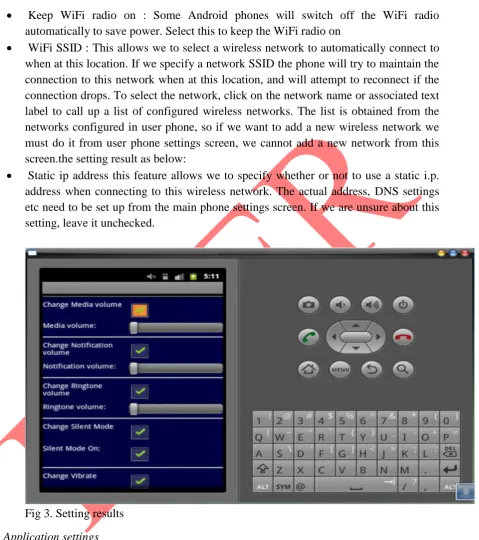
Below is a list of the various settings that can be applied for a location (or set as the "Default settings" when we are not near a saved location). Note that the app will only change a setting if we have enabled the "Change [setting]" checkbox, i.e. if we want to change the vibrate setting, we need to make sure "Change vibrate" is checked on, then set the "Vibrate on:" checkbox to the setting we require.
Lat/Long: The latitude/longitude for the location. This is filled in automatically when we save a location, but we can change it if we wish. If we click on the "lat/long" text it will call up Google Maps where we can select any location by doing a 'long press' on the map.
Distance Threshold (Meters): This defines how close we need to be to a saved location in order for the app to activate the location's preferences. If user GPS is usually switched off and we are obtaining location from the network, we probably need to make this at least 500 meters. If we find that the app is constantly switching between a location profile and the "default settings", try increasing this setting. If we are using Google Maps to view/select the location the distance threshold will be displayed in a blue circle.
Notification Volume: The speaker volume for notifications, e.g. when new email arrives. Drag the slider to adjust the volume. Ringtone Volume: The speaker volume for incoming calls. Drag the slider to adjust the volume.
5
INTERNATIONAL JOURNAL OF ADVANCES IN ENGINEERING RESEARCH
Keep WiFi radio on : Some Android phones will switch off the WiFi radio automatically to save power. Select this to keep the WiFi radio on
WiFi SSID : This allows we to select a wireless network to automatically connect to when at this location. If we specify a network SSID the phone will try to maintain the connection to this network when at this location, and will attempt to reconnect if the connection drops. To select the network, click on the network name or associated text label to call up a list of configured wireless networks. The list is obtained from the networks configured in user phone, so if we want to add a new wireless network we must do it from user phone settings screen, we cannot add a new network from this screen.the setting result as below:
Static ip address this feature allows we to specify whether or not to use a static i.p. address when connecting to this wireless network. The actual address, DNS settings etc need to be set up from the main phone settings screen. If we are unsure about this setting, leave it unchecked.
Fig 3. Setting results
B. Application settings
To access the app's general settings, press the Android "menu" button from the main screen and select "App settings". This allows we to set the program's configuration options, as defined below:
6
INTERNATIONAL JOURNAL OF ADVANCES IN ENGINEERING RESEARCH
Get location from Network: This tells the app to request location updates from the cell wireless networks. Note that we must have enabled "Use wireless networks" in the phone's "Location and security" settings menu for this setting to work.
Scan Interval (secs): This tells the app how often to check for changes in location. The lower we set this value, the more quickly the app will switch to the correct settings, but it is likely to use up more of user battery. The recommended minimum setting for GPS is 60 seconds. Warn if location providers disabled.
Accuracy Threshold (meters): user phone may sometimes receive a location update that is considerably inaccurate (e.g. if we have the GPS switched off and are in a rural area) which could cause the app to apply the incorrect profile. This setting allows us to set an "accuracy threshold" which can tell the app to ignore wildly inaccurate readings. For example, if we set this value to 500 meters and user phone gets a location that is only accurate to within 600 meters, we can choose to ignore this reading and not apply the profile settings. The next option defines the options we have available when an inaccurate reading is taken. If threshold exceeded, The available options are ,
Apply inaccurate updates anyway
Apply the usual rules for working out the nearest location (this may cause the wrong location settings to be applied
Ignore inaccurate updates
Ignore the inaccurate location update, and do not apply the usual rules for working out the nearest location. This means that the phone will continue to have the same settings as when the last accurate location update arrived. This is the recommended setting. Apply default settings
Apply the "Default settings" that are normally applied when we are not near any saved locations
The purpose of location-based services is to find the physical location of the device. Access to the location-based services is handled by the Location Manager system Service.
C. Location Based Notifiaction
7
INTERNATIONAL JOURNAL OF ADVANCES IN ENGINEERING RESEARCH
CONCLUSION
An android application designed to configure the mobile based on location of user is simple but efficient for many. This project is based on Location Based Services which is booming technology in the mobile industry. This paper thus helps the mobile phone to be more smarter than ever by using the LBS. It identifies the location based on the GPS and provide the services based on the user configuration for the first time. It also helps us to notify and send messages when we reach a particular location.
ACKONOWLEDGEMENT
I thank Sathyabama University for their support in publishing this work.
REFERENCES
[1] C. Haseman, Android Essentials, PDF Electronic Book, 2008. Available from: http://androidos.cc/dev/index.php
[2] Xianhua Shu, Zhenjun Du, Rong Chen,” Research on Mobile Location Service Design Based on Android”,China,2009 IEEE International Conference.
[3] Rick Rogers, John Lombardo, Zigurd Mednieks, and Blake Meike, OReilly’s: “Android .Application.Development”.May.2009.
[4] Tongyu Zhu, Chen Wang, Guannan Jia, Jian Huang, State Key Laboratory of Software Development Environment, “Toward Context-Aware Location Based Services”, 2010 International Conference on Electronics and Information Engineering (ICEIE 2010).
[5] Ahmad Haris Abdul Halim, Maizatul Akmar Ismail and Sri Devi Ravana, “Integration between Location Based Service (LBS) and Online Analytical Processing (OLAP): Semantic Approach”, Journal of Information Systems, Research & Practices, Vol.1(1).
[6] Android developers [Online].Available from: URL:http://developer.android.com
[7] BURNS, J. “Developing Secure Mobile Applications for Android.”iSEC Partners, October 2008.