30
Technology in the Accounting Classroom: Practitioner Expectations and Educator Practices
Amber Gray, CPA, MSA
Assistant Professor Department of AccountingAdrian College 110 S. Madison Street
Adrian, MI 49221 Email: [email protected] Phone: 1-517-265-5161 ext. 4046
United States
Stacey Todaro, PhD
Associate Professor Department of PsychologyAdrian College 110 S. Madison Street
Adrian, MI 49221 Email: [email protected] Phone: 1-517-265-5161 ext. 3946
United States
ABSTRACT:
Technology plays an increasing role in the accountant’s function. However, continuing advances in technology and the evolving needs of the profession may pose a challenge to future accountants, as the skills desired by the profession and the skills taught in the classroom may not necessarily coordinate. Educators often must adapt their coursework to keep curriculum current and relevant. Experiential or active learning techniques may be useful in the classroom to help bridge the gap between the technology demands of the profession and the skills taught in the classroom. The purpose of this study is two-fold. First, this study asks practitioners to indicate the importance they would attach to students having prior exposure to selected technology applications. The practitioners were also asked to indicate the importance they would attach to various Microsoft Excel features. Second, this study asks educators to specify the methods of classroom coverage of various technologies. Results of practitioner and educator responses are discussed.
KEYWORDS: Accounting Education, Microsoft Excel, Experiential Learning, Technology
1. INTRODUCTION:
Technology plays an ever-increasing role in the accountant’s function. Albrecht and Sack (2001) point to technology as one of three major developments that have altered the business environment for accountants, alongside globalization and investor power. The increasing role of technology in the accountant’s function is highlighted in the AICPA Core Competency Framework (CCF), which defines the skills based competencies needed by all students entering the accounting profession. According to the CCF, “technology is pervasive in the accounting profession. Individuals entering the accounting profession must acquire the necessary skills to use technology tools effectively and efficiently. These technology tools can be used both to develop and apply other functional competencies.” (AICPA, 2015).
31
management accountants to obtain information technology skills from their education. Brewer et al. (2014) agree that the accounting profession may be facing a “competency crisis” as the gap between the skills needed by the profession and the skills taught in the classroom widens. As technological developments occur at a rapid pace, it can even be difficult for practitioners to keep knowledge of these technologies current (McKee et al., 2003).
Much research calls for accounting education to add additional experiential learning to curricula to further prepare students for success in the workplace and be active contributors (Hodge et al., 2014). Clark and White (2010) contend, “A quality university business education must include an experiential learning component”. This is certainly true for technology in accounting education. While conventional teaching methods are necessary, students should also gain practical work experience (Albrecht & Sack, 2001). Experiential learning can expose students to technology in a context that allows them to relate the technological tool to uses in current business processes.
As accounting educators have limited time and resources to devote to curriculum development, it is important for educators to know where to prioritize their efforts with respect to technology. This is especially true since educators often have to create assignments and supplementary materials for themselves, requiring extensive time and effort (Borkowski et al., 2007).
The purpose of this study is two-fold. First, this study asks respondents to consider preparing college students for entry level professional accounting positions and indicate the importance they attach to the student having prior exposure to selected technologies. Specifically, the survey was sent to accounting practitioners and accounting educators throughout the U.S. and looks at two categories of technology exposure. The first is a general technology category focusing on applications, such as Microsoft Excel, ERP systems, tax software and CAAT software. Additionally, as spreadsheet skills are widely used in business applications, an additional question was tailored towards perceptions of importance of a variety of Microsoft Excel features. Second, this study looks at educators’ methods for teaching these technologies by asking educators to specify the mechanisms used to expose students to these applications, such as discussion, demonstration, and or experiential or active learning.
2. LITERATURE REVIEW:
2.1 Integration of foundational technology competencies across accounting curriculum:
As pointed out by the CCF, there is a need for integration of foundational technology competencies across the accounting curriculum. Unfortunately, Brewer et al. (2014) argue that as accountants have evolved to become integrated thinkers capable of enterprise performance management, accounting education has not done enough to embrace that evolution. Brewer et al. (2014) conclude that accounting educators should include foundational competencies, such as proficiency with spreadsheets, within the curricula. Lawson et al. (2015) note that foundational competencies are those that leverage technology and use basic quantitative methods for data analysis. Integration of these foundational technological competencies should occur throughout the accounting curriculum.
32
relation to a successful career in accounting and concluded that the results “call for major changes to the management accounting curriculum”. Ahadiat notes that there is a consensus among management accountants that accounting graduates need to be educated to use accounting software programs, including spreadsheet programs.
Students preparing for a career in public accounting must also possess the fundamental technology skills. In order to ascertain the skills and professional knowledge required of new auditors, Uyar and Gungormus (2011) surveyed external auditors in Turkey and found that courses in Microsoft Office programs were rated as the second most necessary over all other accounting knowledge courses, with the exception of auditing.
In addition to career focused research on fundamental technology competencies, some narrowing has been done to include specific technological resources and their importance in accounting, such as: word processing, spreadsheets, email, electronic working papers, databases, flowcharting, groupware, tax return software, small business accounting software, ERP systems, and internet tools. Bailey et al. (2014) designed a finance course for an AACSB accredited business school at the request of the finance and accounting departments and noted that the advisory board supported the integration of Bloomberg, EDGAR, Yahoo Finance and Excel into the finance curriculum and noted, “The ability to utilize Excel is as important as the ability to read”.
When describing an SAP model course delivery approach implemented in China, Hayden and Holmes (2014) state that SAP is “an excellent learning platform as it provides knowledge of the type of automated business processing done with enterprise software in general” and that “today’s students, managers, and other business employees need to become familiar with this type of software to be more effective in their jobs”. Singh et al. (2014) present a teaching model using database macros in Microsoft Access to teach accounting concepts such as exception reporting, validity control, and automation. The authors point out that possessing advanced database skills will enable students to better implement auditing, control, and validation concepts in the workplace.
Belfo and Trigo (2013) identified future technology challenges for accountants, including web and internet services, mobile devices, cloud computing, environmental scanning, business intelligence, enterprise application integration, business process management, computer assisted auditing tools and techniques, and big data. As the accounting industry struggles to keep up with the changing technological landscape, educators must also adapt and update curricula.
While there are many accounting technologies that educators can evaluate for incorporation into the curriculum, the most common is spreadsheet usage. Borkowski et al. (2007) reference a 2000 study by the American Accounting Association, AICPA, IMA and the then-Big 5 accounting firms in which it was determined that the most highly rated skill for new hires in accounting is spreadsheet software proficiency. Hess (2005) notes that utilizing spreadsheet modeling to teach accounting and finance provides the mutual benefits of bringing “mathematically demanding theories” to life and providing students with relevant skills for entry level analytical positions. Hess concludes, “Business school graduates are expected to possess a fundamental knowledge of spreadsheets because these programs enable users to conduct financial analysis in an efficient and sophisticated manner”. Furthermore, Chan et al. (2000) report a high usage of spreadsheets among working individuals, and that there is a very high percentage of errors. These authors provide strategies for auditing spreadsheet models and conclude that not only do errors lead to wrong decisions, but that those errors are also often difficult to detect. Students that are taught to utilize spreadsheets in the classroom will be better prepared to not only work with spreadsheets and potentially reduce errors, but also to audit spreadsheets to find and correct errors.
33
management accountants, inquiring about the respondents’ personal frequency of usage of specific Excel features, in addition to their expectations of Excel proficiency levels of new college graduates and expected usage of each feature. The survey results showed that respondents expected a higher level of expertise from new hires than the corresponding frequency of their own usage for a given Excel topic.
A recent study by Ragland and Ramachandran (2014) surveyed public accountants and accounting students on their perceptions about the importance of Microsoft Excel skills. They found that public accounting new hires and supervisors consider the following Excel features to be the most important: basic functions, formatting functions, filter and sort data function. Notably, this study also found that while both groups believe Excel is important in public accounting; new hires believe they are only “moderately proficient in Excel”.
McKee and Greenstein (2003) surveyed accounting practitioners and found that many respondents did not perceive themselves to be knowledgeable in current information technologies and discovered that for a majority of the technologies surveyed, respondents favored learning the technology prior to starting employment.
According to Elrod et. al (2015), a midsized regional CPA firm in Texas noted that they are generally surprised at the lack of Excel skills among students in their intern classes. They have commented that “an Excel certification requirement in Intermediate Accounting would be a positive way to set students apart when they apply for jobs”.
2.2 Experiential or Active Learning in Accounting Education
As the literature above indicates, technological competencies, including spreadsheet usage, are foundational and highly relevant for new hires. Multiple studies indicated that new hires did not feel proficient in Excel and that practicing accountants believe there is a lack of Excel skill proficiency among new hires. Accordingly, educators may need to assess teaching methods to determine the best way to teach this functional competency. Research suggests that active learning may be part of the solution.
According to Kolb (1976), the Experiential Learning Model is comprised of a four-stage cycle where immediate concrete experience is the basis for observation and reflection. Kolb contends that in order for a learner to be effective, that learner needs four different abilities: concrete experience (feeling), reflective observation (watching), abstract conceptualization(thinking), and active experimentation (doing).Kolb identifies four dominant learning types as those that respond best to a combination of the four different abilities. Those dominant types include: Accommodators (those that learn best through feeling and doing), Divergers (feeling and watching), Assimilators (thinking and watching), and Convergers (thinking and doing). Utilization of experiential or active learning with accounting technologies will assist educators in providing these opportunities.
As business students were found to have much diversity in Kolb’s dominant learning types (Loo, 2002), adding experiential or active learning to accounting curricula should enable educators to reach a higher proportion of students, as traditional classroom lectures may not be enough to reach those that learn best through practical application and those that learn best by doing.
34
“a desire for professors to provide more hands-on and practical applications of the accounting content covered in their courses”. Hodge et al. (2014) contend that a business education that includes experiential components utilizing technology will allow students to “deepen their knowledge of technology as they take on managerial challenges”.
Albrecht and Sack (2000) contend that accounting education needs to move away from a lecture based format and toward approaches that convey critical knowledge, skills, and abilities. Stanley and Marsden (2012) echo this sentiment in their paper on problem based learning in the accounting education, where they conclude that a problem based capstone unit at the Queensland University of Technology provided students with an improved ability to apply principles to new situations and deal with unstructured problems and/or problems based on incomplete information.
Hess (2005) contends that using spreadsheet based modeling for teaching accounting courses “does not only provide a means of enhancing understanding and retention but it is also bound to improve employability of students as they become more adept in their use of analysis tools widely used in today’s work environment”. Bailey et al. (2014) share a similar contention when they state, “By teaching students to use workplace technologies most effectively, we can better prepare them to work, communicate, and interact in the 21st century”.
3. RESEARCH METHOD RESULTS:
Two studies were conducted. The first study (hereafter referred to as “Study 1”) was conducted to determine on which technology resources practitioners place the highest importance. The second study (hereafter referred to as “Study 2”) was conducted to determine the methods of instruction being used to teach those same technology resources in class.
3.1 STUDY-1
3.1.1 Research Methodology:
A survey was conducted to ascertain the level of importance practitioners place on new hires having prior exposure to selected technologies used in the accounting field, as well as selected Microsoft Excel features. Accounting practitioners were drawn from a number of sources, including: a Midwest state CPA society newsletter announcement, IMA online membership boards, and a purchased list of U.S. CPA emails. Respondents were asked to complete an online survey. The survey was open from November 30, 2014 to January 15, 2015. The survey resulted in 131 practitioner responses. The response rate on the purchased list of U.S. CPA emails was 6.1%. The response rates on the CPA newsletter announcement and IMA membership boards were less than 0.5%.
3.1.2 Survey:
The survey consisted of two sections. The first section included demographic questions. Practitioners were asked to identify the following items: primary area of employment, current position, classification of employer, and years of total work experience, state employed in, and any certifications held. The second section of the survey asked the following questions (hereafter referred to as ‘Question 1’ and ‘Question 2’):
35
The “technology experiences” listed were chosen based on the previous literature review and included: Microsoft Excel, Microsoft Word, Microsoft PowerPoint, Microsoft Access, basic accounting software packages, ERP systems, tax preparation software, CAAT software, EDGAR database, the online FASB codification, and Bloomberg terminals.
Question 2: When considering preparing college students for an entry level professional accounting position, please indicate the importance that you would attach to the student having exposure to the following Excel features.
The 20 Excel features chosen for this survey were selected from a combination of the Ragland and Ramachandran (2014) and Bradford et al.(2014) studies, as well as the judgment and experience of the surveyor. The Excel features surveyed were: basic cell formatting, print formatting, conditional formatting, keyboard shortcuts, basic formulas, absolute and relative cell referencing, managing worksheets, linking workbooks together, data filter and sort, importing data into Excel, copying Excel data and pasting into other applications, conditions in formulas, VLOOKUP and HLOOKUP, rounding, functions to manipulate text, basic charts, basic statistical functions, basic financial functions, pivot tables, and macros.
For both Question 1 and Question 2, respondents were asked to respond using a Likert type scale: 1- not at all important, 2-somewhat important, 3-important, 4-very important, and 5- absolutely critical.
3.1.3 Demographic Statistics:
Of the 131 practitioner respondents, two respondents did not answer the demographic questions. Thus, the number of valid responses was 129. Of those 129 responses, 38.0% identified as managerial/corporate accountants, 34.1% identified as tax professionals, 22.5% identified as auditors, and 5.4% identified as advisory professionals. Additionally, of the129 practitioner responses, 51.2% identified as partner/director/ executive level,24% identified as manager level,14.0% identified as senior/supervisor level,10.1% identified as staff/analyst level, and 0.8% (1 response) identified as unemployed. In terms of employer classification, 44.9% of respondents work for a small/local firm or company, 27.6% work for a midsize/regional firm or company, 14.2% work for a large/national firm or company, and 13.4% work for a global/Big 4 firms or company. The practitioners averaged 23 years of work experience (SD = 10.95). Practitioners responded from 33 U.S. states. Although multiple certifications were noted, by far the highest frequency was the CPA designation, as 89 practitioners identified as being CPAs.
3.1.4 Results and Discussion:
Analysis 1a: The Importance of Technology Experiences
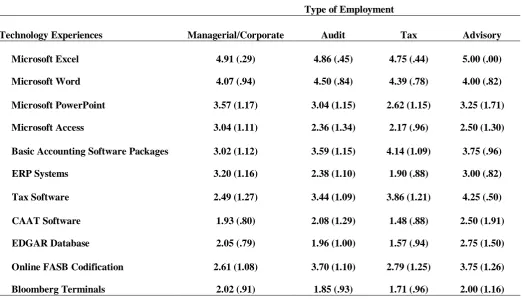
We conducted several one way ANOVAs to examine if there were significant mean differences in the importance ratings for each technology resource as a function of practitioner employment, in order to help educators determine which technology applications to emphasize in different course subjects. The independent variable was practitioner position (managerial/corporate accounting, tax, and audit, advisory) and the dependent variable was importance ratings. The level of significance for each ANOVA was set at α = 0.05 and effect sizes were measured using ηp2 (eta squared). Post-hoc tests were conducted using Tukey’s HSD and the level of significance for these tests was set at α = 0.05. Table 1 contains the means and standard deviations. Results revealed significant mean differences for several of the technology resources, including Microsoft PowerPoint, Microsoft Access, basic accounting software, ERP systems, tax software, CAAT software, EDGAR database, and online FASB codification.
36
was significantly higher for managerial/corporate accountants as compared to tax accountants. This is not surprising, as one would expect managerial accountants to use this skill for meeting presentations more often than their tax counterparts.
Table 1
Importance Ratings for Technology Resource as a Function of Practitioner Employment.
Microsoft Access also yielded significant differences, F (3, 115) = 4.95, p < 0.01, ηp2 = 0.11. The importance ratings for this technology resource were much higher for managerial/corporate accountants as compared to both audit and tax accountants. No other mean differences were significant (all p’s > 0.78). Again, this is not surprising due the job duties and functions of these practitioners.
Similar results emerged for ERP systems, such as SAP, F (3, 113) = 11.65, p < 0.01, ηp2 = 0.24. Managerial/corporate accountants placed greater emphasis on this technology resource as compared to both audit and tax accountants. No other differences were significant (all p’s > 0.19).
With respect to basic accounting software packages, such as QuickBooks, the only significant difference was between managerial/corporate accountants and tax accountants, F (3, 116) = 4.75, p < 0.01, ηp2 = 0.16. Tax accountants placed greater importance on this technology resource.
The average importance rating for tax software also yielded significant findings, F (3, 115) =11.02, p < 0.01, ηp2 = 0.23. The nature of this effect revealed that the average importance rating for this technology resource was significantly higher for audit, tax, and advisory accountants, as compared to managerial/corporate accountants. No other differences were significant (all p’s > 0.48). The importance ratings for Online FASB codification was also significant, F (3, 114) = 5.99, p < 0.01, ηp2 = 0.14. The nature of this effect revealed that the average importance rating for this technology resource was higher for auditors, as compared to both managerial/corporate accountants and tax accountants. No other differences were significant (all p’s > 0.23).
Type of Employment
Technology Experiences Managerial/Corporate Audit Tax Advisory
Microsoft Excel 4.91 (.29) 4.86 (.45) 4.75 (.44) 5.00 (.00)
Microsoft Word 4.07 (.94) 4.50 (.84) 4.39 (.78) 4.00 (.82)
Microsoft PowerPoint 3.57 (1.17) 3.04 (1.15) 2.62 (1.15) 3.25 (1.71)
Microsoft Access 3.04 (1.11) 2.36 (1.34) 2.17 (.96) 2.50 (1.30)
Basic Accounting Software Packages 3.02 (1.12) 3.59 (1.15) 4.14 (1.09) 3.75 (.96)
ERP Systems 3.20 (1.16) 2.38 (1.10) 1.90 (.88) 3.00 (.82)
Tax Software 2.49 (1.27) 3.44 (1.09) 3.86 (1.21) 4.25 (.50)
CAAT Software 1.93 (.80) 2.08 (1.29) 1.48 (.88) 2.50 (1.91)
EDGAR Database 2.05 (.79) 1.96 (1.00) 1.57 (.94) 2.75 (1.50)
Online FASB Codification 2.61 (1.08) 3.70 (1.10) 2.79 (1.25) 3.75 (1.26)
37
Finally, there were no significant differences in importance ratings between the various practitioners for the following technology resources: Microsoft Excel, Microsoft Word, and Bloomberg Terminals (all p’s > 0.13).
Interestingly, CAAT software was rated a 2.08 importance level by auditors, indicating that it is only “somewhat important” for students to learn this skill in school. This rating was lower than that given by advisory practitioners of 2.5. As such, incorporating this application into an audit course may not be as important as other skills, such as Excel and Quickbooks.
It is important to note, however, that across all four practitioner categories; Microsoft Excel was rated higher than all other technology resources. This indicates that whichever subject matter is being taught, incorporation of Microsoft Excel into the curriculum would be beneficial to students. Therefore, we conducted a follow-up analysis to examine whether there were differences in the importance ratings for specific Microsoft Excel features as a function of practitioner position.
Analysis 1b: The Importance of Microsoft Excel Specific Features
Several one way ANOVAs were conducted. Practitioner type served as the independent variable and mean importance rating was the dependent variable. The level of significance for each ANOVA was set at α =0.05 and effect sizes were measured using ηp2. Post-hoc tests were conducted using Tukey’s HSD and the level of significance for these tests was set at α = 0.05.
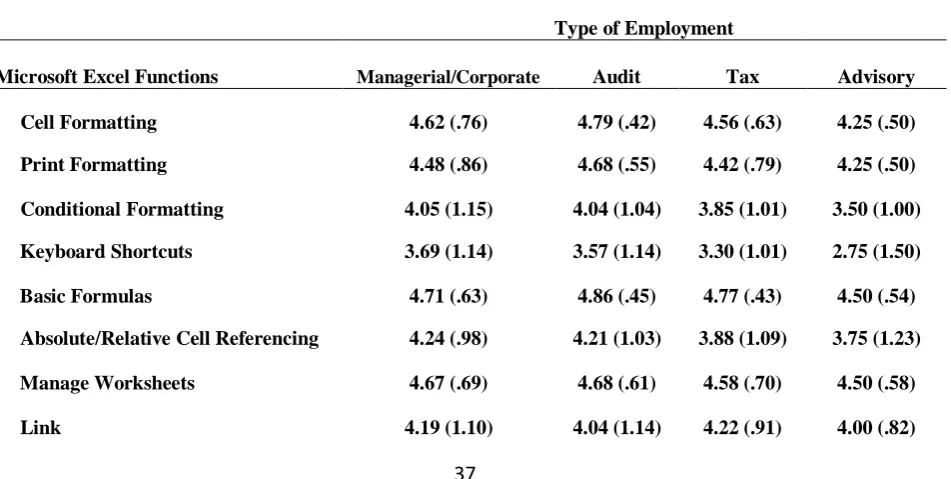
Table 2 contains the means and standard deviations. The analyses revealed significant mean differences for two of the 20 Microsoft Excel specific features: VLOOKUPHLOOKUP (F (3, 111) = 9.12, p < 0.01, ηp2 = 0.20) and pivot tables (F (3, 112) = 6.59, p < 0.01, ηp2 = 0.15). With respect to VLOOKUP/HLOOKUP, post hoc tests revealed that the importance rating for managerial/corporate accountants was significantly higher than tax accountants. A similar pattern of mean differences emerged for pivot tables. Managerial/corporate accounts placed greater emphasis on this feature as compared to tax accountants. Finally, it is worth noting that the omnibus F for the rounding function was approaching significance, F (3, 112) = 2.63, p = 0.054, ηp2 = 0.07. The pattern of mean differences indicated that the ratings for managerial/corporate accountants was higher as compared to tax accountants (p = 0.078).
Table 2
The Importance of Microsoft Excel Specific Features as a Function of Practitioner Employment.
Type of Employment
Microsoft Excel Functions Managerial/Corporate Audit Tax Advisory
Cell Formatting 4.62 (.76) 4.79 (.42) 4.56 (.63) 4.25 (.50)
Print Formatting 4.48 (.86) 4.68 (.55) 4.42 (.79) 4.25 (.50)
Conditional Formatting 4.05 (1.15) 4.04 (1.04) 3.85 (1.01) 3.50 (1.00)
Keyboard Shortcuts 3.69 (1.14) 3.57 (1.14) 3.30 (1.01) 2.75 (1.50)
Basic Formulas 4.71 (.63) 4.86 (.45) 4.77 (.43) 4.50 (.54)
Absolute/Relative Cell Referencing 4.24 (.98) 4.21 (1.03) 3.88 (1.09) 3.75 (1.23)
Manage Worksheets 4.67 (.69) 4.68 (.61) 4.58 (.70) 4.50 (.58)
38
Import Data 4.21 (1.09) 4.46 (.64) 4.23 (1.04) 4.67 (.58)
Transfer Excel to Word 4.07 (1.09) 4.46 (.64) 4.21 (.84) 4.50 (.58)
Conditions Formulas 4.33 (.98) 4.39 (.79) 4.05 (.99) 4.00 (1.41)
VLOOKUPHLOOKUP 4.31 (.92) 3.89 (1.03) 3.12 (1.14) 4.00 (1.41)
Rounding 4.19 (1.07) 4.21 (.92) 3.64 (1.08) 4.25 (.98)
Manipulate Text 3.81 (1.19) 3.82 (1.09) 3.56 (1.14) 4.00 (.82)
Charts 3.95 (1.10) 3.46 (1.07) 3.70 (1.08) 4.00 (.82)
Statistical Functions 3.71 (1.18) 3.54 (1.04) 3.26 (1.01) 3.50 (.58)
Financial Functions 3.76 (1.34) 3.43 (.88) 3.21 (1.22) 3.50 (.58)
Pivot Tables 4.07 (1.09) 3.46 (1.14) 3.07 (1.07) 4.25 (.50)
Macros 3.29 (1.04) 2.75 (1.14) 2.93 (1.18) 3.50 (.58)
Note: Standard deviations are in parentheses.
In sum, practitioners rated Microsoft Excel to be more important than the other technology resources. Although there were minimal differences across practitioners’ importance ratings for specific Microsoft Excel features, all practitioners rated the following features to be at least “very important”: cell formatting, print formatting, basic formulas, manage worksheets, and filter/sort/subtotal. Thus, incorporating these skills in the accounting classroom, in any course subject matter, is paramount. In Study 2, we sought to examine how educators implement Microsoft Excel and its various features in the accounting classroom.
3.2 STUDY- 2
3.2.1 Research Methodology:
A survey was conducted to ascertain the teaching methods used in the classroom regarding selected technologies. Accounting educators were drawn from an online published list of accounting faculty in the U.S. Respondents were asked to complete an online survey. The survey was open from November 30, 2014 to January 15, 2015. The survey resulted in 411 educator responses. The response rate was 7.9%.
3.2.2 Survey:
The survey consisted of two sections. The first section included demographic questions. Educators were asked to identify the following items: current position, classification of current teaching institution, years of work experience in practice, years of work experience in education, state employed in, any certifications held, and primary courses of instruction. The second section of the survey asked the following question (hereafter referred to as ‘Question 3’):
Question 3: Please indicate your discussion, demonstration, experiential learning, and assessment of the following technology resources in the accounting courses in which you instruct (check all that apply).
39
International Journal of Business and Applied Social Science Vol.2, No.1, January, 2016
For purposes of this question, educators were given the following definitions:
Discussion-Instructor introduces the topic and/or provides description of how this resource is used in business.
Demonstration-Instructor utilizes and/or demonstrates this resource in the classroom.
Experiential learning-Instructor requires students to utilize this resource in the classroom and/or for out of class assignments.
Assessment of conceptual knowledge- Instructor provides assignments and/or examinations to assess student understanding of terms and concepts.
Assessment of utilization proficiency-Instructor provides assignments and/or examinations to ascertain student proficiency in utilizing this resource.
3.2.3 Demographic Statistics:
Of the 411 educator responses, four respondents did not answer the demographic questions. Thus, the number f valid responses war 407. Regarding instructional role, 53.6% identified as full time bachelors level instructors, 37.6% identified as full time graduate level instructors, 4.9% identified as part time/adjunct instructors, 3.2% identified as full time associate/certificate program instructors, and0.7% (3 responses) identified as unemployed. Regarding institution type, 96.1% teach at 4 year institutions whereas the remaining3.9% teach at associates colleges. The educators averaged 12.4 years of accounting practitioner experience (SD = 12.11) and 18.8 years of educational work experience (SD = 10.46). Educators responded from 40 U.S. states. The highest frequency of certifications noted was the CPA designation, as 299 educators identified as being CPAs.
3.2.4 Results and Discussion:
Table 3 contains each technology resource and the percentage of educators who indicated classroom implementation methods: N/A, none, discussion, demonstration, experiential learning, assessment of conceptual knowledge, and/or assessment of utilization proficiency. Our analyses focus solely on Microsoft Excel because both practitioners and educators rated this technology resource as more critical than the other technology resources. However, it is important to note that for all applications surveyed outside of Microsoft Excel, Word, and PowerPoint, the most commonly checked item was “none”, meaning that educators, in large part, are not incorporating a variety of technology applications into the classroom.
Table 3
Proportion of Teaching Method Utilization by Technology Resource
Teaching Method
Technology Resources N/A None Discussion Demonstration
Experiential Learning
Assessment of Conceptual Knowledge
Assessment of Utilization Proficiency
Microsoft Excel 5.65% 10.45% 24.86% 35.03% 59.89% 19.21% 31.36%
Microsoft Word 10.47% 23.84% 8.43% 12.21% 45.93% 9.30% 14.53%
Microsoft PowerPoint 12.87% 26.95% 10.18% 24.55% 29.34% 7.19% 9.88%
Online FASB codification 17.37% 32.93% 23.05% 20.06% 26.95% 14.67% 15.57%
40
Analysis 2a: Implementing Microsoft Excel in the Accounting Classroom:
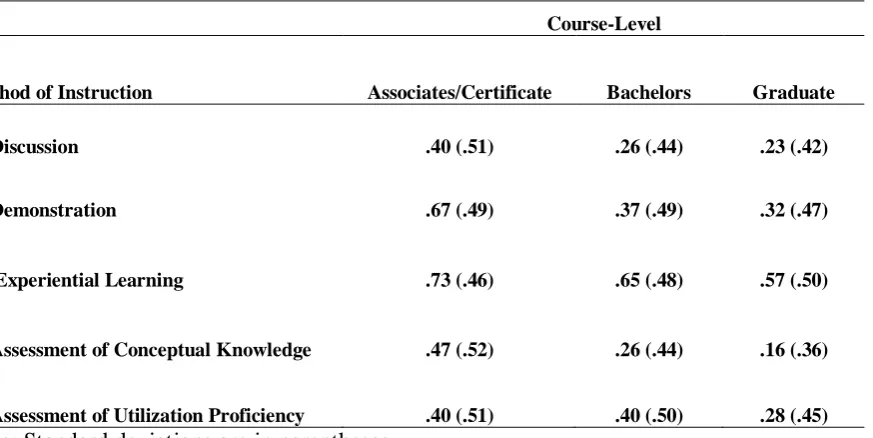
Table 4 shows the means and standard deviations for the methods of instruction used to teach Microsoft Excel, shown by course level (certificate, bachelors, graduate), in order to ascertain where educators may or may not be meeting the needs of the profession in regard to the important placed on students gaining Excel experience prior to the start of employment. It is important to note that for these analyses, we only included data from educators who rated Microsoft Excel as important, very important, or absolutely critical (n = 353).
Table 4
Proportion of Educators Implementing Microsoft Excel in the Accounting Classroom
Course-Level
Method of Instruction Associates/Certificate Bachelors Graduate
Discussion .40 (.51) .26 (.44) .23 (.42)
Demonstration .67 (.49) .37 (.49) .32 (.47)
Experiential Learning .73 (.46) .65 (.48) .57 (.50)
Assessment of Conceptual Knowledge .47 (.52) .26 (.44) .16 (.36)
Assessment of Utilization Proficiency .40 (.51) .40 (.50) .28 (.45)
Note: Standard deviations are in parentheses.
Several one-way ANOVAs were conducted to determine whether the methods of instruction varied as a function of course level. The level of significance for each ANOVA was set at α = 0.05 and effect sizes were measured using ηp2. Post-hoc tests were conducted using Tukey’s HSD and the level of significance for these tests was set at α = 0.05. The analyses revealed significant effects for Demonstration and Assessment of Conceptual Knowledge, F (2, 350) = 3.95, p < 0.05, ηp2 = 0.02 and F (2, 350) = 5.95, p < 0.01, ηp2 = 0.03, respectively. Post hoc analyses revealed that instructors teaching associate/certificate level courses utilized and/or demonstration Microsoft Excel in the classroom more so than instructors who primarily teach graduate level courses. With respect to Assessment of Conceptual Knowledge, the post hoc test showed a similar pattern of mean differences, such that instructors teaching associate/certificate level courses provided assignments and/or examinations to assess student understanding of terms and concepts, as compared to those who teach graduate level courses. No other mean differences were significant (all p’s > 0.14).
It is interesting to note that educators teaching in associate and certificate programs implement all teaching methods to a greater degree than both bachelor’s level and graduate level educators.Specifically, experiential learning was utilized by 73% of associate/certificate program educators as compared to 65% and 57% of
Tax software 32.81% 44.79% 11.04% 8.83% 14.51% 5.99% 9.46%
Microsoft Access 26.69% 52.41% 9.32% 11.25% 12.54% 9.32% 11.25%
ERP systems 28.06% 46.77% 18.39% 6.13% 6.77% 7.10% 6.13%
CAAT software 33.88% 52.44% 6.19% 3.58% 5.21% 3.26% 5.86%
41
bachelors and graduate educators, respectively. Understandably, this may indicate that associate/certificate programs are focusing their efforts more on “how” to perform tasks and less on “why” that you would expect in a graduate program.
Regardless, coverage of Microsoft Excel in Experiential learning was the most widely implemented mode of instruction. This is important considering that Microsoft Excel is a practical tool and not a theoretical construct. This indicates that a majority accounting educators are attempting to meet the expectations of practitioners regarding new hires possessing Microsoft Excel skills.
Analysis 2b: Implementing Microsoft Excel Based on Educators’ Prior Work History
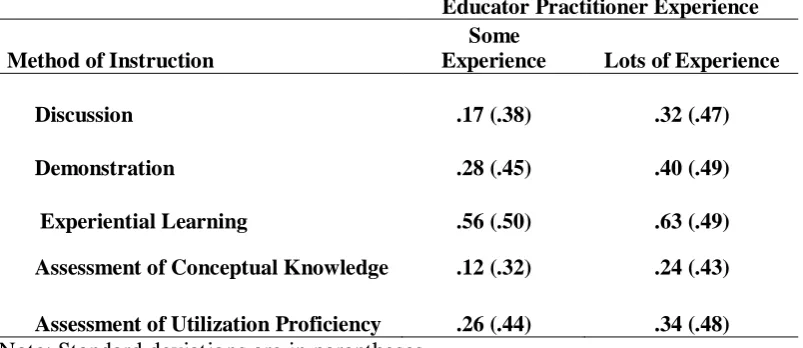
In order to examine if an educator’s prior work history as a practitioner influenced the method of instruction used to teach Microsoft Excel, a median-split was conducted on the number of years educators spent in accounting practice. This resulted in two separate groups: some practitioner experience (M = 3.94, SD = 1.84, n = 137) vs. lots of practitioner experience (M = 22.23, SD = 10.56, n = 161). As with analysis 2a, only those educators who rated Microsoft Excel as important, very important, or absolutely critical were included in the analyses. We conducted several independent-samples t-tests to determine whether any differences were significant.
Table 5 contains the means and standard deviations of the percent of educators that utilize various methods of instruction, by level of educators’ practitioner experience. The results revealed significant mean differences for Discussion, Demonstration, and Assessment of Conceptual Knowledge. Not surprisingly, the pattern of mean differences suggests that educators with more practitioner experience were more likely to include Discussion (t (296) = 3.11, p < 0.01), Demonstration (t (296) = 2.05, p < 0.05), and Assessment of Conceptual Knowledge (t (296) = 2.69, p < 0.01) in their teaching practices as compared to educators with some work experience. No other mean differences were significant (p’s > 0.11).
Table 5
Educators Implementation Practices as a Function of Prior Work History.
Educator Practitioner Experience
Method of Instruction
Some
Experience Lots of Experience
Discussion .17 (.38) .32 (.47)
Demonstration .28 (.45) .40 (.49)
Experiential Learning .56 (.50) .63 (.49)
Assessment of Conceptual Knowledge .12 (.32) .24 (.43)
Assessment of Utilization Proficiency .26 (.44) .34 (.48) Note: Standard deviations are in parentheses.
4. CONCLUSION:
42 prepare students for the work force.
As indicated in the literature review, technology is a fundamental competency. Of the various technology applications used in the accounting profession, spreadsheet proficiency was deemed highly important. However, new hires have stated they do not feel proficient in Excel and accounting practitioners have agreed that new hires seem to be lacking the necessary Excel skills. One method of improving the Excel skills of students may be to incorporate active or experiential learning components into the classroom in order to reach a larger portion of students.
The results from this study found that of the various technology applications, practitioners placed the greatest importance on Microsoft Excel across all functional areas: managerial, audit, tax, and advisory. This indicates that, whatever the subject matter in an accounting course, inclusion of Excel into the curriculum is important. In addition, Microsoft Excel specific features, such as cell formatting, print formatting, basic formulas, managing worksheets, and filter/sort/subtotal was all rated near critical. Educators can use this information to prioritize their course planning efforts by ensuring that Excel is brought into each course. Additionally, educators teaching managerial/cost accounting, auditing, or tax can also prioritize their planning efforts for other technology applications based on the practitioner importance ratings in each employment category to better align the curriculum to the demands of that particular constituency.
Microsoft Excel was utilized most frequently in the classroom of the technologies listed, which shows congruency among practitioner demands and educator practices. Most importantly, most of the educators surveyed reported utilizing experiential learning techniques more so than any other method. This is important because active learning has been shown to lead to long-term retention and transfer (Phillips & Trainor, 2014). Moreover, millennials have expressed a desire for engaging learning environments (Phillips & Trainor, 2014). However, those teaching associate/certificate programs were more likely to include Microsoft Excel in their teaching methods than their counterparts in bachelors or graduate programs, indicating that students finishing four year programs or graduate programs may not be as Excel savvy as their counterparts graduating from two year programs. Additionally, instructors with more practical experience reported higher levels of incorporating Microsoft Excel into the coursework, perhaps indicating the need for training and continuing education among those educators with less practical experience. Additionally, there is a lack of incorporation of other technology applications into the curriculum, such as basic accounting software packages and tax software, which were rated at least important by practitioners.
This research contributes to accounting education literature by providing a basis for understanding the practitioner demands regarding new hires having classroom exposure to various technology applications. The survey promotes the continuing dialog needed between accounting educators and practitioners. The results provide individual educators and college departments with a basis for evaluating their teaching curriculum and classroom resources to determine whether they are meeting the needs of the profession where technology applications are concerned. Additionally, this study provides support for the need for advanced Excel problems and case studies in accounting textbooks, as well as classroom access to various accounting software packages and tax software. This study has certain limitations. One of which is that this study only focused on a sample of technologies available to accountants and is by no means an exhaustive list. Many new and emerging technologies were excluded from this study. Additionally, many of the technologies surveyed were Microsoft specific. Respondents utilizing non Microsoft products were unable to specify substitute programs they might be using. Also, the definition provided for experiential learning is a loose definition intended to cover a variety of topics.
43
advanced Excel problems, and case studies that utilize experiential learning with technology should be performed in an effort to further identify areas for continued improvement.
References:
Ahadiat, N. (2008). In search of practice-based topics for management accounting education. Management Accounting Quarterly, 9(4), 42-54.
Albrecht, W. S., & Sack, R. J. (2000). Accounting education: Charting the course through a perilous future (Vol. 16). Sarasota, FL: American Accounting Association.
Albrecht, W. S., & Sack, R. J. (2001). The perilous future of accounting education. The CPA Journal, 71(3), 16-23.
Bailey, B. A., Dennick-Ream, Z., & Flanegin, F. R. (2014). Creating an AACSB technology class for finance majors utilizing Bloomberg, EDGAR, Yahoo Finance, and Microsoft Excel. ASBBS E - Journal, 10(1), 74-82.
Belfo, F., Trigo, A. (2013). Accounting information systems: tradition and future directions. Procedia Technology, 9, 536-546.
Borkowski, S. C., Bukics, R. M. L., & Welsh, M. J. (2007). Technology generation upgrades: Are educators and employers on the same page? Pennsylvania CPA Journal, 78(3), 22-27.
Bradbard, D. A., Alvis, C., & Morris, R. (2014). Spreadsheet usage by management accountants: An exploratory study. Journal of Accounting Education, 32(4), 24.
Brewer, P. C., Sorensen, James E, C.P.A., C.G.M.A., & Stout, D. E. (2014). The future of accounting education: Addressing the competency crisis. Strategic Finance, 96(2), 29-37.
Chan, H. C., Ying, C., & Peh, C. B. (2000). Strategies and visualization tools for enhancing user auditing of spreadsheet models. Information and Software Technology, 42(15), 1037-1043.
Clark, J., & White, G. W. (2010). Experiential learning: A definitive edge in the job market. American Journal of Business Education, 3(2), 115-118.
Dombrowski, R. F., Smith, K. J., & Wood, B. G. (2013). Bridging the education-practice divide: The Salisbury University auditing internship program. Journal of Accounting Education, 31(1), 84.
Elrod, H., Pittman, K., Norris, J.T., & Tiggeman, T. (2015). Excel Training & the Technology Student Learning Outcome. Academy of Educational Leadership Journal, 19(2), 43-49.
Hayen, R. L., & Holmes, M. C. (2014). SAP enterprise software learning experience in China. Paper presented at the ASBBS Annual Conference, 21(1) 373-388.
Hess, K. (2005). Spreadsheet-based modeling for teaching finance and accounting courses. Rochester: Social Science Research Network. http://dx.doi.org/10.2139/ssrn.378680
44
Kavanagh, M. H., & Drennan, L. (2008). What skills and attributes does an accounting graduate need? Evidence from student perceptions and employer expectations. Accounting and Finance, 48(2), 279.
Kolb, D. A. (1976). Management and the learning process. California Management Review (Pre-1986), 18(000003), 21.
Lawson, R.A., Blocher, E., Brewer, P.C., Morris, J.T., Sorensen, J.E., Stocks, K.D., Stout, D.E., & Wouters, M.J.F. (2015). Thoughts on Competency Integration in Accounting Education. Issues in Accounting Education. (Pre-publication)
Loo, R. (2002). A meta-analytic examination of Kolb’s learning style preferences among business majors. Journal of Education for Business, 77(5), 252-256.
Maher, M. W. (2000). Management accounting education at the millennium. Issues in Accounting Education, 15(2), 335-346.
McKee, T. E., & Greenstein, M. (2003). Keeping up with information technology. The CPA Journal, 73(7), 54.
Phillips, C. R., & Trainor, J. E. (2014). Millennial students and the flipped classroom. Journal of Business and Educational Leadership, 5(1), 102-112.
Ragland, L., & Ramachandran, U. (2014). Towards an understanding of excel functional skills needed for a career in public accounting: Perceptions from public accountants and accounting students. Journal of Accounting Education, 32(2), 113.
Singh, A., Mangalaraj, G., & Taneja, A. (2014). Addressing business needs: A creative module for teaching data macros in an accounting information systems course. Journal of Accounting Education, 32(1), 61.
Spraakman, G. (2011). Crisis in management accounting curricula: The unclear role of information systems and information technology. Rochester: Social Science Research Network.
http://dx.doi.org/10.2139/ssrn.1740142
Stanley, T., & Marsden, S. (2012). Problem-based learning: Does accounting education need it? Journal of Accounting Education, 30(3-4), 267.