A Comparative Study for Performance
Measurement of Selected Security Tools
Mr. Bhaskar.V. Patil, Bharati Vidyapeeth University,
Yashwantrao Mohite institute of Management, Karad [M.S.], INDIA Dr. Prof. Milind. J. Joshi,
Shivaji University Kolhapur, Kolhapur [M.S.], INDIA Mr. Hanmant. N. Renushe,
Bharati Vidyapeeth University,
Yashwantrao Mohite institute of Management, Karad [M.S.], INDIA
Abstract— Today’s enterprise networks are distributed to different geographical locations and applications are more centrally located, this technological enhancement offers new flexible opportunities also measure security threats poses in the networks. These threats can external or Internal, external threats divided as hacking, virus attack, Tro-jans, worms etc. These threats can be minimized using number of network security tools and antivirus software, but all are not equally compatible for each type of attack hence the study is undertaken.
This research paper highlights the performance of antivirus software using the number of parameters such as installation time, size, memory utilised, boot time, user interface launch time and full system scan time etc.
Keywords — Network, Antivirus, virus, security threats, hacking, internet security, Total Security, System
scan.
1. Introduction
Today enterprise networks are distributed to different geographical locations and applications are more cen-trally located. Every company’s data is most valuable asset and must be treated as such. With the ever growing num-ber of malicious threats; such as Viruses, Spyware and Hackers, it has become mandatory to protect yourself against them.
In order to prevent such data looses many organisation came forward and designed network security tools and antivirus packages. Antivirus packages are mainly used to prevent and remove the viruses, Trojans, worms etc, where as firewalls are used to monitor incoming and outgoing connections.
Computers are used extensively to process the data and to provide information for decision making there-fore it is necessary to control its use. Due to organisational cost of data loss, cost of incorrect decision making, and value of computer software hardware organisations suffer a major loss therefore the integrity of data and information must be maintained.
Antivirus packages are mainly used to safeguard. There are number of venders providing antivirus pack-ages which are differ in various features such as installation time, size, memory utilized, boot time, user interface launch time and full system scan time etc.
2. Virus and Antivirus Overview
A computer virus is self replicating program containing code that explicitly copies itself and that can infects other program by modifying then or their environment [1]. Harmful program code refers to any part of Programme
code, which adds any sort of functionality against the specification. [2] A virus is a program which is able to replicate
with little or no user intervention, and the replicated program(s) are able to replicate further. [6] Malicious software or
its payload.
Harmful Programme code can be divided in to Boot Sector Virus, Trojan Horses, File Infecting Virus, Micro Virus, Malicious Toolkits Computer Worms, Spyware, Joke program and logic bombs, computer viruses, Droppers, Injector and Germs.
Boot Sector Virus: Boot sector viruses infect the Master Boot Sector of hard drives or floppy drives and infect other machines only when the machine boots up from an infected floppy disk. Boot Sector viruses were the first success-ful viruses created and can infect a machine regardless of what Operating Systems runs on it
File Infecting Virus: Program viruses infect executable programs, such as EXE or COM, by attaching themselves to them. The virus executes and infects other executables when its host file is executed. To infect an EXE file, a vi-rus has to modify the EXE Header and the Relocation Pointer Table.
Micro Virus: These viruses are written in macro languages and infect files that make use of the particular language. A macro is a series of steps that could otherwise be typed, selected, or configured, but is stored in a single location so they can be automated. Some programs are nothing than hundreds of macros build around vendors' applications. Macro languages are used to allow more sophisticated macro development and environment control, like manipulat-ing and creatmanipulat-ing files, changmanipulat-ing menu settmanipulat-ings, and much more. Macro languages are so easy to use that virus writers can learn to write their first virus in a couple of days. [9]
Spyware: Spyware is the name given to the class of software that is surreptitiously installed on a computer, moni-tors user activity, and reports back to a third party on that activity. [10]
Logic Bombs: Logic Bombs are rarely stand-alone programs. Most often, they are a piece of code embedded in a larger program, it initiates on a specific action.
Trojan Horses: A Trojan horse is a program, which performs something useful; while in the same time intentionally performs, unknowingly to the user, some kind of destructive function.
Droppers: A dropperis a special kind of Trojan horse, the payload of which is to install a virus on the system under attack. The installation is performed on one or several infect able objects on the targeted system.
Injectors: An injectoris a program very similar to a dropper, except that it installs a virus not on a program but in memory.
Germs: A germis a program produced by assembling or compiling the original source code of a virus or of an in-fected program.
Worms: Programs which are able to replicate themselves as stand-alone programs and which do not depend on the existence of a host program are called computer worms. [3]
Directory Virus: A directory virus functions by infecting the directory of your computer. A directory is simply a larger file that contains information about other files and sub-directories within it. The general information consists of the file or directory name, the starting cluster, attributes, date and time and so forth. When a file is accessed, it scans the directory entry in search of the corresponding directory.
Hacker: Computer hacking refers to gaining unauthorized access to, and hence some measure of control over, a computer facility, and most countries now have specific legislation in place to deter those who might wish to prac-tice this art and science. However, in pracprac-tice, hackers generally have a particular target in mind, so their unautho-rized access leads to further acts, which national law might also define as criminal activities. These can be summa-rized under the headings of unauthosumma-rized: Obtaining of confidential Information, Alteration or deletion of data and Code, Degradation or cessation of Services, Use of computer resources. [12]
Organization need to provide security skeleton to prevent the data didding due to malicious code. In order to provide the security the organizations go through the security audit and most of the organization chose the internet security software as well as design their personal firewall and antivirus.
"Antivirus" is protective software designed to defend your computer against malicious software. Malicious software or Malware includes: viruses, Trojans, keyloggers, hijackers, diallers, and other code that vandalizes or steals your computer contents. Anyone who does a lot of downloading, or accesses diskettes from the outside world on a regular basis should develop an antivirus strategy.
Antivirus software is equipped with features that not only check your files in your system, but also check your in-coming and out-going e-mail attachments for viruses and other malicious programs[10]. The most important weapon in your antivirus is a clean, write-protected bootable system diskette. Booting from a clean write-protected diskette is the only way to start up your system without any viruses in memory. An effective defense against viruses is a clean backup of your hard drive. Many antivirus packages will attempt to disinfect infected programs for you so that the virus is no longer in your system.
as additional functions to provide greater Internet protection. These features may include protection against phish-ing, root kit detection, firewalls and scanning of web pages and HTTP data. Total Security: products provide data migration and backup features on top of all security features common to IS products. [4]
3 Performance Measurements of Security Tools
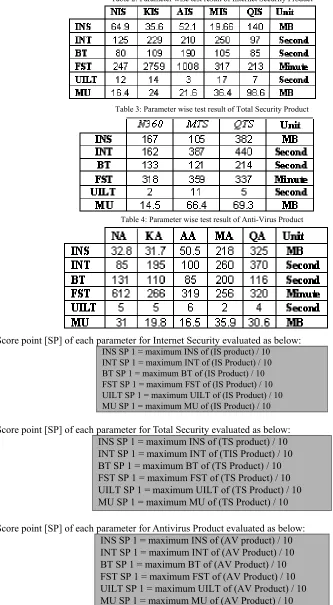
In order to measure the performance of IS, AV, and TS products we have taken five products for each catego-ry and few parameters for each categocatego-ry which are shown as below.
IS Product:
o Norton Internet Security 2010 [NIS] - Symantec Corporation. o Kaspersky Internet Security 2010 [KIS] - Kaspersky Lab. o AVG Internet Security 9.0-[AIS] AVG Technologies. o McAfee Internet Security 2010- [MIS] McAfee Inc.
o Quick Heal Internet Security 2010- [QIS] Quick Heal Technologies. TS Products:
o Norton 360 V4- [N360] Symantec Corporation. o Kaspersky Total Security 2010- [KTS] Kaspersky Lab.
o Quick Heal Total Security 2010- [QTS] Quick Heal Technologies. AV Products:
o Norton Antivirus 2010-[NA] Symantec Corporation. o Kapersky Antivirus 2010-[KA] Kaspersky Lab. o AVG Antivirus 9.0-AVG [AA] Technologies. o McAfee Antivirus 2010- [MA] McAfee Inc.
o Quick Heal Antivirus 2010- [QA] Quick Heal Technologies.
Test Environment:
Above three category product are tested on a computer with the configuration as:
Pentium P-IV Core2Duo Processor, 256 MB RAM, Windows XP SP2 Operating System with applications such as MS-OFFICE 2003, MS-visual Studio 6.0, Tally 9, Oracle 8 etc. An image of above OS and applications created with ghost software and fresh copy is installed to test the each category security tool. For the test, parameters used are:
1. INstallation Size. [INS] 2. INstallation Time. [INT] 3. Boot Time. [BT] 4. Full Scan Time. [FST]
5. User Interface Launch Time. [UILT] 6. Memory Utilization. [MU]
Installation Size: The total installed size of the product Installation Time: The time required installing the tool.
Boot time: The time taken for the machine to boot. Shorter boot times indicate that the application has less impact on the normal operation of the machine.
Scan Speed: The amount of time required to scan a typical set of clean files. 593 MB memory used for scanning. User Interface Launch Speed: The time taken to start the User Interface of the product was measured.
Memory Utilization: The amount of RAM used by the product was measured while the machine and product were in an idle state, running in the background. All processes used by the application were identified and the total RAM usage calculated.
The performance of the product measured separately using each parameter and finally overall performance has been measured using score sheet the score points for each parameters are shown in table 1.
Table 2: Parameter wise test result of Internet Security Product
Table 3: Parameter wise test result of Total Security Product
Table 4: Parameter wise test result of Anti-Virus Product
The Score point [SP] of each parameter for Internet Security evaluated as below:
INS SP 1 = maximum INS of (IS product) / 10 INT SP 1 = maximum INT of (IS Product) / 10 BT SP 1 = maximum BT of (IS Product) / 10 FST SP 1 = maximum FST of (IS Product) / 10 UILT SP 1 = maximum UILT of (IS Product) / 10 MU SP 1 = maximum MU of (IS Product) / 10
The Score point [SP] of each parameter for Total Security evaluated as below: INS SP 1 = maximum INS of (TS product) / 10 INT SP 1 = maximum INT of (TIS Product) / 10 BT SP 1 = maximum BT of (TS Product) / 10 FST SP 1 = maximum FST of (TS Product) / 10 UILT SP 1 = maximum UILT of (TS Product) / 10 MU SP 1 = maximum MU of (TS Product) / 10 The Score point [SP] of each parameter for Antivirus Product evaluated as below:
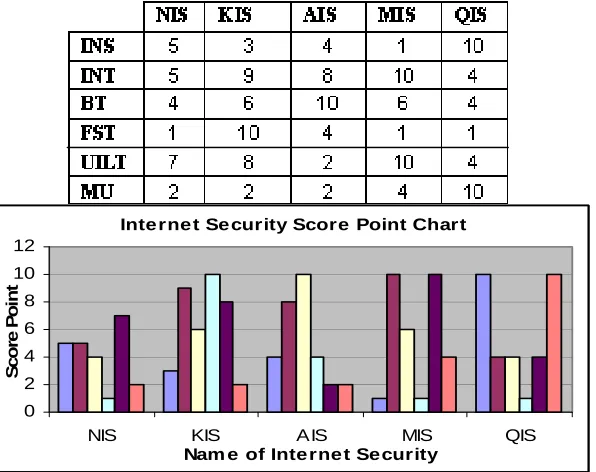
Table 5: The conversion of tested figures into score point of the Internet Security Product
Chart 1: Parameter wise Rating of the Internet Security Product
Table 6: The conversion of tested figures into score point of the Total Security Product
Chart 2: Parameter wise Rating of the Total Security Product
Table 7: The conversion of tested figures into score point of the Anti-Virus Product Inte rne t Se curity Score Point Chart
0 2 4 6 8 10 12
NIS KIS AIS MIS QIS
Nam e of Inte rne t Security
Sc
o
re
P
o
in
t
Total Se cur ity Scor e Point Char t
0 2 4 6 8 10 12
N360 MTS QTS
Nam e of Total Se cur ity
S
co
re
P
oi
n
Chart 3: Parameter wise Rating of the Anti-Virus Product
The Total score point of each category is calculated as below Total Score [TS] =sum of score point of each parameter
6
TSP = ∑ SP n=1
Therefore score point of Internet Security of each product is as below
6
TSIS = ∑ SIS n=1
TSIS = SINS+SINT+SBT+SFST+SUILT+SMU
Hence the Score Point of Norton Internet Security is,
Norton Internet Security TS
IS= SINS+SINT+SBT+SFST+SUILT+SMU = 5+5+4+1+7+2
= 24
Similarly, Total Score of each product is calculated. Accordingly the following table shows the total score point of each product.
In order to calculate the rating Score Point of the product has subtracted from 100 as, Product Performance = 100 - Total Score Point
Therefore,
Norton Internet Security Performance = 100 - 24 = 76
From the above calculation the total score point and Performance of each category is as below,
Table 8: The Total Score Point and Performance of the Internet Security Product
Table 9: The Total Score Point and Performance of the Total Security Product
Table 10: The Total Score Point and Performance of the Anti-Virus Product
0 2 4 6 8 10 12
AV KV NV MV QV
Nam e of Antivir us
Sc
ro
in
g
Po
in
Chart 4: Comparison of Performance of all security tools
4 CONCLUSIONS
A comparative study of selected security tools was conducted on the basis of six parameters in order to explore their effectiveness and efficiency. The security tools selected were divided into three categories such as Total Se-curity, Internet Security and Anti-virus Product. Each security tool was installed on a computer with Windows XP SP2 operating system, and then tested with the parameters and observations have been registered. The observations are with different units and they need to be converted into Score Point, a unique scale. After that a comparison of performance of each tool is studied using likert-scale method. From the findings of the study, it is observed that four out of thirteen tools belongs to Good Category and remaining nine security tools falls within Very good Category, which has been shown in following table.
From the above Chat 4 shows that NIS, N360, NV are performs well against all selected security tools. 5 ACKNOWLEDGMENTS
The researchers are grateful to the authors, writers, and editors of the books and articles, which have been re-ferred for preparing the presented research paper. It is the duty of researcher to remember their parents whose blessings are always with them.
6 REFERENCES
[1]. Dr. Solomon's Virus Encyclopedia, 1995, ISBN 1897661002
[2]. Dr. Klaus Brunnstein 1999, from Antivirus to Antimalware Software and Beyond, http://csrc.nist.gov/nissc/1999/proceeding/papers /p12.pdf
[3]. University of Tampere Dissertation 2002 By. M Helenius acta.uta.fi/pdf/951-44-5394-8.pdf
[4]. Paul Royal, Mitch Halpin, David Dagon, Robert Edmonds, and Wenke Lee. PolyUnpack: Automating the Hidden-Code Extraction of Un-pack-Executing Malware. In The 22th Annual Computer Security Applications Conference (ACSAC 2006), Miami Beach, FL, December 2006.
[5]. David Wren, Michael Fryer, Antivirus & Internet Security Performance Benchmarking 06/06/08 [6]. Rainer Link, Prof. Hannelore Frank, August, 2003, Server-based Virus-protection On Unix/Linux [7]. Evgenios Konstantinou, Dr. Stephen Wolthusen, 2008, Metamorphic Virus: Analysis and Detection
[8]. Peter Szor, The Art of Computer Virus Research and Defense. Addison Wesley Professional, 1 edition, February 2005.
[9]. Thomas F. and Andrew Urbaczewski, Spyware: The ghostIn the machine. Communications of the Association for Information Systems, 14:291{306, 2004.
[10]. Felix Uribe, Protecting your Personal Computer against Hackers and Malicious Codes [11]. Bob Kanish, by “An Overview of Computer Viruses and Antivirus Software” [12] N. Nagarajan, The basics of protecting against computer hacking
Performance of Security Tools
0 20 40 60 80
NIS KIS AIS MIS QIS N360 MTS QTS AV KV NV MV QV Security Tools
Sc
o