Americas Headquarters
Cisco Systems, Inc.170 West Tasman Drive San Jose, CA 95134-1706 USA http://www.cisco.com Tel: 408 526-4000 800 553-NETS (6387) Fax: 408 527-0883
NOTWITHSTANDING ANY OTHER WARRANTY HEREIN, ALL DOCUMENT FILES AND SOFTWARE OF THESE SUPPLIERS ARE PROVIDED“AS IS" WITH ALL FAULTS. CISCO AND THE ABOVE-NAMED SUPPLIERS DISCLAIM ALL WARRANTIES, EXPRESSED OR IMPLIED, INCLUDING, WITHOUT LIMITATION, THOSE OF
MERCHANTABILITY, FITNESS FOR A PARTICULAR PURPOSE AND NONINFRINGEMENT OR ARISING FROM A COURSE OF DEALING, USAGE, OR TRADE PRACTICE.
IN NO EVENT SHALL CISCO OR ITS SUPPLIERS BE LIABLE FOR ANY INDIRECT, SPECIAL, CONSEQUENTIAL, OR INCIDENTAL DAMAGES, INCLUDING, WITHOUT LIMITATION, LOST PROFITS OR LOSS OR DAMAGE TO DATA ARISING OUT OF THE USE OR INABILITY TO USE THIS MANUAL, EVEN IF CISCO OR ITS SUPPLIERS HAVE BEEN ADVISED OF THE POSSIBILITY OF SUCH DAMAGES.
Any Internet Protocol (IP) addresses and phone numbers used in this document are not intended to be actual addresses and phone numbers. Any examples, command display output, network topology diagrams, and other figures included in the document are shown for illustrative purposes only. Any use of actual IP addresses or phone numbers in illustrative content is unintentional and coincidental.
Cisco and the Cisco logo are trademarks or registered trademarks of Cisco and/or its affiliates in the U.S. and other countries. To view a list of Cisco trademarks, go to this URL:http:// www.cisco.com/go/trademarks. Third-party trademarks mentioned are the property of their respective owners. The use of the word partner does not imply a partnership relationship between Cisco and any other company. (1110R)
C H A P T E R 1 About Unified CCX 1
Overview 1
Unified CCX Components 2
New Features 2
Packaging and Licensing Scheme 5
Inbound Voice 6
IVR Ports 9
Inbound Voice Packaged Components 10
Automatic Call Distribution 10
Interactive Voice Response 12
Computer Telephony Integration 18
Cisco Unified Intelligence Center 20
Cisco Desktop Services 20
Cisco Agent Desktop Features 20
IP Phone Agent Features 28
Cisco Supervisor Desktop Features 30
Unified CCX Outbound Preview Dialer 34
Web Chat 37
Web Chat Packaged Components 37
Web Chat Contact Allocation and Distribution 38
Quality Management and Compliance Recording 41
Workforce Management 42
C H A P T E R 2 Deployment Models 45
Unified CCX General Rules for Design 47
Network Requirements 50
Delay 50
Bandwidth 51
Quality of Service 53
Deployment Considerations 53
Other Design Considerations 54
Multiple Cisco Unified CCX Clusters Integrated with a Single Cisco Unified Communications Manager Cluster 55
Other Deployment Models 56
C H A P T E R 3 Features 57
Desktops 57
Cisco Finesse 57
Cisco Agent Desktop 62
Inbound Voice 64
Codec Support 64
Unified CCX Outbound Dialer 64
High Level Components 65
Functional Description 66
Outbound Preview 66
Outbound IVR 66
High Availability for Outbound Dialer 67
Scalability 67
Call Flow Description 68
Direct Preview Mode 68
IVR Mode 69
Deployment Guidelines 70
Home Agent with Extend and Connect 70
Deployment Guidelines 74
Remote Agent Over Broadband 75
Reporting 80
Unified Intelligence Center 80
Unified Intelligence Center Historical reports 80
Unified Intelligence Center Live Data reports 82
Finesse Reports 83 Wallboards 84 Configuration APIs 84 Security 84 Caller ID Support 85 E.164 Support 85 C H A P T E R 4 Design Considerations 87
Principal Design Considerations for Call Center Sizing 88
Preliminary Information Requirements 89
Terminology 90
Effect of Performance Criteria on Unified CCX Server 91
Effect of Performance Criteria 91
Impact of Performance Criteria on the Unified CM Servers 91
Estimating Bandwidth Consumption 92
Remote Agent Traffic Profile 92
Silent Monitoring Bandwidth Usage 93
Silent Monitoring Requesters 93
Silent Monitoring Providers 94
IP Call Bandwidth Usage 95
Bandwidth Available for Monitoring and Recording 97
Bandwidth Requirements for VoIP Monitor Service 99
CAD Desktop Applications Bandwidth Usage 100
Cisco Agent Desktop Bandwidth Usage 101
Cisco Supervisor Desktop Bandwidth Usage 102
Cisco Desktop Administrator Bandwidth Usage 103
Web Chat Feature 103
Security 104
Corporate Data Access 104
QoS Considerations for CAD Software 106
CAC and RSVP 107
Bandwidth Security and QoS Considerations for Unified Intelligence Center 109
Server Capacities and Limits 109
IPv6 Support 113
Citrix Terminal Services Support for Cisco Agent Desktop 113
Unified CCX Software Compatibility 114
Cisco Unified CCX Disk Space Usage 114
Design Considerations for SPAN-Based Services 114
Deployment Guidelines for Agent Phones that Support G.722 or iLBC 116
A P P E N D I X A Unified CCX Failover 119
Automatic Call Distribution (ACD) 119
Interactive Voice Response 119
Unified CCX Outbound Preview Dialer 120
Engine Redundancy 120
When WAN Link Between Data Centers is Down—Island Mode 120
When the Master Engine is Down 121
When WAN Link and One of the Engines is Down 121
Extend and Connect Failover 121
Cisco Finesse Failover 122
Cisco Unified Intelligence Center 123
Live Data Gadgets Failover in Cisco Unified Contact Center Express 124
Web Chat for Agent and Supervisor 124
A P P E N D I X B References 125
About Unified CCX
• Overview, page 1
• Unified CCX Components, page 2
• New Features, page 2
• Packaging and Licensing Scheme, page 5
Overview
Cisco Unified Contact Center Express provides a secure, highly available, and easy to deploy customer interaction management solution for up to 400 agents. This integrated“contact center in a box”is intended for both formal and informal contact centers.
Unified CCX provides options to address multiple contact center functional areas such as: •Inbound voice
•Outbound campaign •Agent email •Inbound web chat
Other components included are: •Web-based reports
•Social Miner user licenses for social forum activity monitoring and follow-up
The Social Miner server license is not included. Note
•Cisco desktops
◦Web-based Finesse desktops
specification-based third-party virtual servers with the supported deployment models. For more information, see theVirtualization DocWikilocated here:
http://docwiki.cisco.com/wiki/Virtualization_for_Cisco_Unified_Contact_Center_Express
Unified CCX Components
The following diagram depicts the components of Unified CCX:
Figure 1: Unified CCX Components
New Features
Cisco Finesse
Cisco Finesse is the next generation browser-based agent and supervisor desktop for Unified CCX. Finesse is an alternative to Cisco Agent Desktop, Cisco Supervisor Desktop, and Cisco Desktop Administrator. Finesse is available with Enhanced and Premium license packages and provides typical inbound voice contact center functionality. It supports Unified Communications Manager-based silent monitoring and workflow-based recording with MediaSense and Work Force Optimization (WFO).
Note •MediaSense and WFO require additional licenses and hardware. •Use only Cisco Unified IP Phones that support Built-in-Bridge.
Finesse is deactivated by default. To activate, see theCisco Unified Contact Center Express Operations Guide, located athttp://www.cisco.com/en/US/products/sw/custcosw/ps1846/prod_maintenance_guides_list.html.
Do not run Cisco Finesse and Cisco Agent Desktop or Cisco Supervisor Desktop together. Deactivate Finesse when you want to use Cisco Agent Desktop or Cisco Supervisor Desktop.
Attention
For more details, see theCisco Finesse Agent and Supervisor Desktop User Guide for Cisco Unified Contact Center Express, located athttp://www.cisco.com/en/US/products/sw/custcosw/ps1846/products_user_guide_ list.html.
For comparison of Cisco Agent Desktop or Cisco Supervisor Desktop with Finesse desktops, seehttp:// www.cisco.com/en/US/partner/products/ps11324/prod_white_papers_list.html.
Live Data Reports
Live Data reports access current data to display information about the current state of the contact center. You can access the reports using Unified Intelligence Center and Cisco Finesse.
The team that accesses Live Data reports has a maximum limit of 20 agents. Note
The following Live Data reports are available in Unified CCX:
Available reports Description
Report categories
Agent CSQ Statistics Report Agents can track own performance.
Agent
Agent State Log Report
Agent Statistics Report
Agent Team Summary Report
Team State Report Supervisors can monitor the team
performance. Supervisor
Team Summary Report
Voice CSQ Agent Detail Report
Unified CCX Administration Guide, located athttp://www.cisco.com/en/US/products/sw/custcosw/ps1846/ products_installation_and_configuration_guides_list.html.
Unified CCX Home Agent
Extend and Connect allows Unified CCX agents to work from a remote location using devices such as public switched telephone network (PSTN) phones and private branch exchange (PBX) devices. Agents are configured with a Computer Telephone Interface (CTI) remote device (instead of a physical phone) and the agent’s PC has Jabber installed in Extend mode. The agents can set their phone device as the agent phone through the Jabber interface.
To reduce media setup time and enhance caller experience, a persistent connection call is placed to the agent's phone device, which the agent should not disconnect. Routed calls are delivered to the agent seamlessly over the persistent call, and the agent hears a notification when the call comes in.
The home agent feature is supported from Cisco Unified Communications Manager Release10.0(1). Also, deploy Cisco Unified Presence Server (CUPS) Release10.0(1) for Jabber to function. For more information, see theCisco Unified Contact Center Express Design Guide, located athttp://www.cisco.com/en/US/products/ sw/custcosw/ps1846/products_implementation_design_guides_list.htmland theSoftware and Hardware Compatibility Guide for Cisco Unified CCX and Cisco Unified IP IVR, located at:http://docwiki.cisco.com/ wiki/Compatibility_Matrix_for_Unified_CCX.
Routed calls are delivered to the agent seamlessly over the persistent call, and it can be configured so that the agent hears notifications when the persistent connection call is established, as well as a separate notification as each customer care call is delivered to the agent.
Perform all call control operations from the desktop (Cisco Agent Desktop or Finesse desktop). Note
Unified Contact Center Express Configuration API
Unified CCX supports the following REST APIs in this release: •Provisioning of:
•Call Control Group
•Grammar , prompt, and documents •Trigger
•Recording Configuration—Configures the recording server.
•Cisco Finesse desktop and configuration APIs—See theCisco Web Services Developer Guide, located athttp://developer.cisco.com/web/finesse/docs.
E.164 Support
E.164 is supported for agent extensions, route point directory numbers, editor steps and phone book dialing. Organizations can integrate their numbering plan across the enterprise using E.164. For more information on
Note •E.164 is supported only with Finesse.
•E.164 does not support outbound campaigns and dialing lists.
Caller ID Support
Caller ID feature displays the caller's number instead of the CTI port number on the agent's IP phone. Caller ID (CLID) is disabled by default. To enable CLID using a CLI command, see theCisco Unified Contact Center Express Operations Guide, located athttp://www.cisco.com/en/US/products/sw/custcosw/ps1846/ prod_maintenance_guides_list.html.
Note •CLID is not supported with Jabber.
•When the CLID screen pops up on the phone screen, theAnswerkey is hidden below the CLID screen. You see two soft keys:UpdateandExit. PressExitto see theAnswerkey.
Make REST Call Step in Unified CCX Editor
Make REST call is the new scripting step that is added to Unified CCX Editor. This step invokes a REST API within Unified CCX or any external REST API.
For more information, see theCisco Unified Contact Center Express Editor Step Reference Guide, located at:http://www.cisco.com/en/US/products/sw/custcosw/ps1846/products_programming_reference_guides_ list.html.
SSL HTTPS Connection
The certificates uploaded using the Cisco Unified OS Administration interface to the Tomcat trust store are available to secure all HTTP connections made during script execution. The following can be secured:
•Document steps •VoiceXML script
•Custom java code that provides web services
For more information, see theCisco Unified Communications Operating System Administration Guide for Cisco Unified CCX and Cisco Unified IP IVR, located athttp://www.cisco.com/en/US/products/sw/custcosw/ ps1846/products_installation_and_configuration_guides_list.html.
Hostname Change
Hostname change is supported from Unified CCX Release 10.0(1).
Packaging and Licensing Scheme
for each type of Unified CCX customer contact interaction management at the following URL:
http://www.cisco.com/en/US/partner/products/sw/custcosw/ps1846/index.html
Unified CCX deployments must have all product components and optional features of the same package type. Mixing components or options from different packages is not supported.
Licensing for Cisco Unified Contact Center Express
The licensing for Cisco Unified Contact Center Express varies for each feature. Licenses are either concurrent or named-user licenses. All packaging depends on the number of users with the exception of the Inbound Voice High Availability server software option.
Concurrent licensing example: Customer has three shifts each of 100 users for a total of 300 unique users. In this case, the customer needs to purchase 100 licenses.
Named-user licensing example: Customer has three shifts of 100 users for a total of 300 unique users. In this case, the customer needs to purchase 300 licenses.
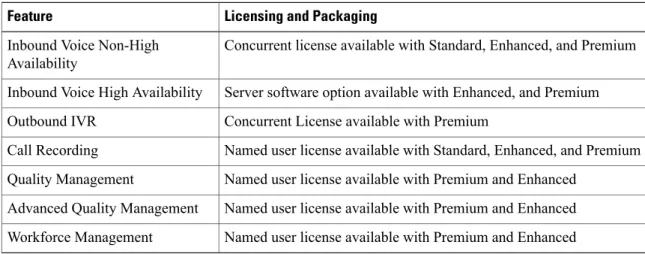
Table 1: Cisco Unified Contact Center Express Licensing and Packaging
Licensing and Packaging Feature
Concurrent license available with Standard, Enhanced, and Premium Inbound Voice Non-High
Availability
Server software option available with Enhanced, and Premium Inbound Voice High Availability
Concurrent License available with Premium Outbound IVR
Named user license available with Standard, Enhanced, and Premium Call Recording
Named user license available with Premium and Enhanced Quality Management
Named user license available with Premium and Enhanced Advanced Quality Management
Named user license available with Premium and Enhanced Workforce Management
Inbound Voice
Cisco Unified CCX Standard, Enhanced, and Premium each provide varying levels of inbound voice ACD, IVR, CTI, agent and supervisor desktops, desktop administration, real-time and historical reporting, and web-based administration features.
Each user license is for a concurrent user. For example, a contact center with three shifts of 100 agents and supervisors requires 100 concurrent user licenses. Each shift of 100 users would reuse these licenses during their shifts.
Table 2: Inbound Voice Licensed Components Standard Enhanced Premium License Yes Yes Yes
Concurrent inbound voice seat with IPPA
Each concurrent inbound voice user (agent or supervisor) requires a concurrent seat license. Each quantity one seat license provides Quantity one Cisco IP Phone Agent (IPPA)
No On-demand recording not available in Standard. Note Yes On-demand recording available only in Enhanced and Premium. Note Yes On-demand recording available only in Enhanced and Premium. Note
Concurrent inbound voice seat with CAD
Each concurrent inbound voice user (agent or supervisor) requires a concurrent seat license. Each quantity one seat license provides:
•Quantity one Cisco Agent Desktop (CAD)
•Quantity one Cisco Supervisor Desktop (CSD)
•Quantity one Cisco Desktop Administrator (CDA)
•Quantity one on-demand recording client (CAD and CSD)
Not available Yes
Yes
Concurrent inbound voice seat with Finesse
Each concurrent inbound voice user (agent or supervisor) requires a concurrent seat license.
Not available Not available
Yes
Advanced IVR port
Not available Yes
Yes
High Availability (HA) option
HA provides licensing for mirrored, warm standby server software.
Table 3: Inbound Voice Features
Standard Enhanced
Premium Feature
Cisco Voice Operating System
Cisco Voice Operating System
Cisco Voice Operating System
Operating system(s) supported
Not available High-availability cluster
over the WAN with automatic failover. High-availability cluster
over the WAN with automatic failover Inbound voice redundancy support 1 1 1 Maximum number of ACD lines per agent
3 3
3 Maximum number of secondary lines with CAD (with support for historical reporting)
0 0
0 Maximum number of secondary lines with Finesse Included Included Included Call conferencing Included Included Included Agent inter-dialing support Included Included Included Direct-outward-dialing (DOD) support
Inbound Voice Seats
2000 2000 2000 Maximum number of configurable inbound agents supported 400 400 400 Maximum number of
active inbound agents supported 42 42 42 Maximum number of inbound supervisor positions supported Concurrent user Concurrent user Concurrent user Inbound seat license type
Integrated ACD Features with Server Software
Included Included
Included Custom scripting with
Cisco Unified Contact Center Express Drag and Drop Editor
150 150
150 Maximum number of
Standard Enhanced Premium Feature Included Included Included Automatic Number Identification (ANI) support Included Included Included Dialed Number Identification Service (DNIS) support Included Included Included Route on Skill Included Included Included Route on Skill competency Included Included Included Conditional routing (time
of day, day of week, and custom variables)
Included Included
Included Overflow, interflow, and
intraflow routing
Not available Not available
Included Custom routing based on
data from database access (for example, data-directed priority routing) Not available Included Included Dynamic priority queuing
150 150
150 Maximum number of
definable skills groups
50 50
50 Maximum number of skills per agent
Unlimited Unlimited Unlimited Maximum number of routing programs Integrated Recording Not available Included Included On-demand agent
recording with CAD
Not available Included
Included On-demand supervisor
recording with CAD
Not available Included
Included Workflow based
recording with Cisco Finesse
IVR Ports
Communications Sizing Tool to determine the maximum number of Basic IVR ports that are supported on a per-configuration basis.
•Advanced IVR ports licensing—Advanced IVR ports are licensed on a per-inbound voice seat basis and are available only with the Premium package. Each inbound voice seat provides two Advanced IVR port licenses. For example, a 100-seat inbound voice deployment provides 200 Advanced IVR port licenses. Advanced IVR port licenses counts are checked at run-time. In the example given here, the 201stsimultaneously active request for an Advanced IVR port to handle an incoming call would be denied. Deployments that require additional advanced IVR ports need to purchase add-on Unified CCX Premium seats. Each Premium seat provides two advanced IVR ports.
The maximum number of IVR ports is limited by the maximum number supported for a given OVA profile.
Note
Inbound Voice Packaged Components
The following sections describe the primary components that are provided with inbound voice. These sections provide high-level descriptions of the features and functions provided for these components. For more specific information, see the Cisco Unified CCX user documentation.
Automatic Call Distribution
The following table describes the Automatic Call Distribution (ACD) features that are available in each Unified CCX package.
Table 4: ACD Features Available in Each Unified CCX Package
Standard Enhanced Premium Feature Included. Included. Included.
Conditional Routing. Unified CCX supports routing based on caller input to menus, real-time queue statistics, time of day, day of week, ANI, dialed number, and processing of data from XML text files.
Included. Included.
Included.
Agent Selection. Unified CCX supports the longest available, linear, most handled contacts, the shortest average handle time, and circular agent selection algorithms. With Basic ACD functionality, agents are associated with one resource group only.
Included. Included.
Included.
Customizable Queuing Announcements.Unified CCX supports the playing of customizable queuing announcements based on the skill group that the call is being queued to, including announcements related to position in queue and expected delay.
Standard Enhanced Premium Feature Included. Included. Included.
Re-route on Ring No Answer. If the selected agent does not answer within the allowed time limit, the caller retains the position in queue. Any screen pop data is also preserved.
Included. Included.
Included.
Call Recording (CAD). The Unified CCX server can record input from callers. This capability can be used to allow call center staff to remotely record new announcements or prompts.
Included. Included.
Included.
Data driven routing for HTML and XML data sources. The ability to use data obtained from HTML or XML documents to make routing decisions. XML document processing can also be used as a data store to access system-wide static data, such as a list of holidays, hours of operation, or a short list of hot customer accounts.
Included. Included.
Included.
Agent Skill and Competency-Based Routing. Agents can be configured with up to 50 skills, each with up to 10 different competency levels. Contact Service Queues (also known as skill groups) can be configured as requiring up to 50 skills, each with up to 10 minimum skill competency levels. The Unified CCX routing logic then matches the caller and contact requirements with agent skills to find the optimum match using one of the following agent selection criteria:
•Longest available, most handled contacts, or shortest average handle time
•Most skilled, most skilled by weight, or most skilled by order
•Least skilled, least skilled by weight, or least skilled by order Not available. Optional with HA license. Optional with HA license.
High Availability Failover. With HA failure of the active server can be detected and the ACD subsystem can automatically fail over from the active to the standby server.
Included. Included.
Included.
Dynamic Re-skilling by Administrator or Supervisor. Changes to CSQ skills and competencies and agent skills and competencies are applied immediately.
Not available. Included.
Included.
Prioritized Queuing. Up to 10 levels of customer contacts can be prioritized based on call or customer data, and calls may be moved within or among queues under workflow control using priority information.
Not available. Included.
Included.
Agent Routing. Unified CCX routing applications can select a specific agent if that agent is in Ready state. (Queuing on a per agent basis is not supported.)
Not available. Not available.
Included.
Data-driven routing based on JDBC database sources via SQL. The ability to use data obtained from an JDBC compatible database via a SQL query to make routing decisions.
Not available. Included.
Included.
Wrap-Up and Work Modes. After call completion, an agent can be configured to be automatically placed into Work state, on a per CSQ basis. The agent can also choose to enter work state if that option is provided by the agent desktop administrator. A wrap-up timer is also configurable on a per CSQ basis.
Not available. Included.
Included.
Wrap-Up Codes. Agents may select administratively defined wrap up codes.
Interactive Voice Response
The following table describes the Interactive Voice Response (IVR) features that are available in each Unified CCX package.
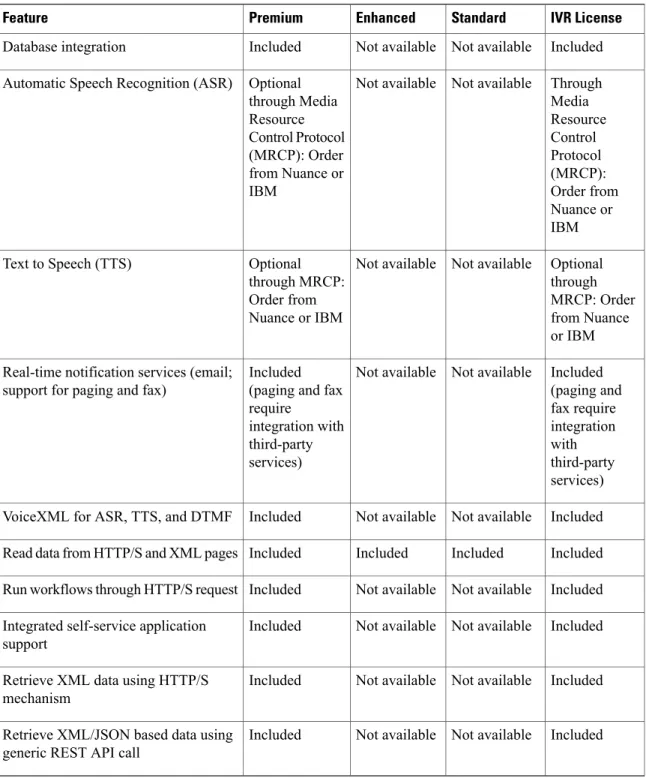
Table 5: IVR Features Available in Each Unified CCX Package IVR License Standard Enhanced Premium Feature Included Included Included Not available
Basic Prompt and Collect IVR. Basic IVR ports provide a queue point, custom messaging and prompting, caller input collection, and processing via DTMF decoding. Decoded DTMF input may be used for both routing and screen pop purposes. Basic call controls such as terminate, transfer, and place call are also supported as part of the basic IVR functionality.
Basic IVR port and Advanced IVR port cannot be mixed in the same configuration. Advanced IVR port includes all features available in Basic IVR port. Note Optional with HA license Not available Optional with HA license Optional with HA license
High Availability Failover. With HA, failure of the active server can be detected and the IVR subsystem can automatically fail over from the active to the standby server. All IVR functions will be restored on the standby server.
All calls in queue and calls receiving IVR call treatment will be lost. Calls already transferred to the agent will be preserved.
Included Not available
Not available Included
Advanced IVR Port Database Integration. The Unified CCX server can interoperate with any
JDBC-compliant database. Databases tested and supported by Cisco are listed inCisco Unified CCX Software and Hardware Compatibility Guide, which is available at:
http://docwiki.cisco.com/wiki/ Compatibility_Matrix_for_Unified_ CCX.
Data retrieved from databases can be used with the conditional routing capabilities to provide customer profile-based routing and queuing. Database integration also provides the ability to offer complete self-service applications to callers. Database views are not supported using the Unified CCX Editor database steps, but database views can be accessed using Voice XML or Java logic modules.
Included Not available
Not available Included
Advanced IVR Ports HTTP Triggers (the web analog to Unified CM Telephony) to invoke and run a workflow. HTTP triggers enable a Unified CCX to receive a customer contact request through an HTTP request. This approach allows web users to be offered service through a“click to talk to an agent”button. Information collected using the web (a customer call back number, account number, shopping cart content, and so on) can be passed to the Unified CCX script to allow customer profile-based routing and a data-rich window. These contacts can be prioritized and routed using the same methods available to normal inbound voice callers.
IVR License Standard Enhanced Premium Feature Included Not available Not available Included
Advanced IVR Port SMTP outbound mail subsystem that may be used at run time under workflow control to send an email message. Third-party paging or fax products that accept an incoming email message to invoke a page or fax service may use this subsystem to provide real-time paging and fax responses in addition to email responses.
Included Not available
Not available Included
Advanced IVR Port Voice XML 2.0 Support. Unified CCX supports executing application logic developed with the Voice XML (VXML) standard. VXML is required for certain complex grammar ASR and TTS interactions and is optional for a DTMF or simple ASR or TTS voice interaction service. VXML allows organizations to reuse application logic from other applications, such as a transaction server to a mainframe database.
Note 1 Unified CCX uses MRCP v1 for communicating with third-party ASR-TTS servers.
2 The supported ASR-TTS servers include Nuance, Scansoft, and IBM WVS.
Included Not available
Not available Included
Advanced IVR Port Java Support. The Unified CCX server can support the defined logic using Java. Java support allows the reuse of logic from the existing web and Java applications.
Optional with purchase of compatible ASR product from Nuance or IBM. Not available Not available Optional with purchase of compatible ASR product from Nuance or IBM.
Advanced IVR Port Automatic Speech Recognition via MRCP. ASR provides the ability to use natural human speech to replace DTMF keypad presses as a way to interact with IVR applications.
Optional with purchase of compatible TTS product from Nuance or IBM. Not available Not available Optional with purchase of compatible TTS product from Nuance or IBM.
Advanced IVR Port Text to Speech via MRCP. TTS provides the ability to use flat text files as input to a
computer-generated speech engine. TTS can replace prerecorded human speech in IVR applications.
Not applicable Not available
Not available Included
Advanced IVR Port Remote Silent Monitoring. Provides a mechanism for silent monitoring of calls using an IP phone or a PSTN phone. This form of silent monitoring does not require a CSD application to be running but does require a seat license for any supervisor engaged in remote silent monitoring. Remote silent monitoring also does not require any data network connectivity and is ideally suited for management of outsourced customers of a call center service provider. The agent is unaware of being monitored using remote silent monitoring.
This operation is not supported in Finesse deployments. Note
General IVR Features
Included through Cisco Unified Communications Manager Music on Hold server or .wav file Included through Cisco Unified Communications Manager Music on Hold server or .wav file Included through Cisco Unified Communications Manager Music on Hold server or .wav file Included through Cisco Unified Communications Manager Music on Hold server or .wav file Play messages to callers: Music on hold
Included through .wav file Included through .wav file Included through .wav file Included through .wav file
Play messages to callers: Prompts
Included and fully customizable Included and fully customizable Included and fully customizable Included and fully customizable Play messages to callers: Combine
prompts, music, and messages
Included Included
Included Included
Capture and process caller DTMF input
Included Included and
Included and Included and
IVR License Standard Enhanced Premium Feature Included Not available Not available Included Database integration Through Media Resource Control Protocol (MRCP): Order from Nuance or IBM Not available Not available Optional through Media Resource Control Protocol (MRCP): Order from Nuance or IBM
Automatic Speech Recognition (ASR)
Optional through MRCP: Order from Nuance or IBM Not available Not available Optional through MRCP: Order from Nuance or IBM Text to Speech (TTS) Included (paging and fax require integration with third-party services) Not available Not available Included
(paging and fax require
integration with third-party services) Real-time notification services (email;
support for paging and fax)
Included Not available
Not available Included
VoiceXML for ASR, TTS, and DTMF
Included Included
Included Included
Read data from HTTP/S and XML pages
Included Not available
Not available Included
Run workflows through HTTP/S request
Included Not available
Not available Included
Integrated self-service application support
Included Not available
Not available Included
Retrieve XML data using HTTP/S mechanism
Included Not available
Not available Included
Retrieve XML/JSON based data using generic REST API call
Table 6: Outbound IVR Features Available in Each Unified CCX Package
Standard Enhanced
Premium Feature
Not available Not available
IVR Outbound Dialer is deployed co-loaded on the same virtual machine (VM) as the inbound voice server. CPA is performed on the compatible external voice gateway.
Hardware configuration
Outbound IVR Ports
Not available Not available
150 Maximum number of
Outbound IVR ports supported
Not available Not available
Concurrent Outbound IVR Port
license type
Outbound IVR Features
Not available Not available 15 Maximum number of active outbound campaigns Not available Not available 10,000 Maximum number of
active contacts per outbound campaign
Not available Not available
Included Ability to automatically
detect voice answer, answering machine, fax/modem, busy and invalid numbers
Administration
Not available Not available
Included Ability for administrator
to create and configure campaigns
Not available Not available
Included Ability for administrator
to create non-North American area code to time-zone mappings
The summary overview of system maximums for inbound and outbound voice in the tables are for reference only.
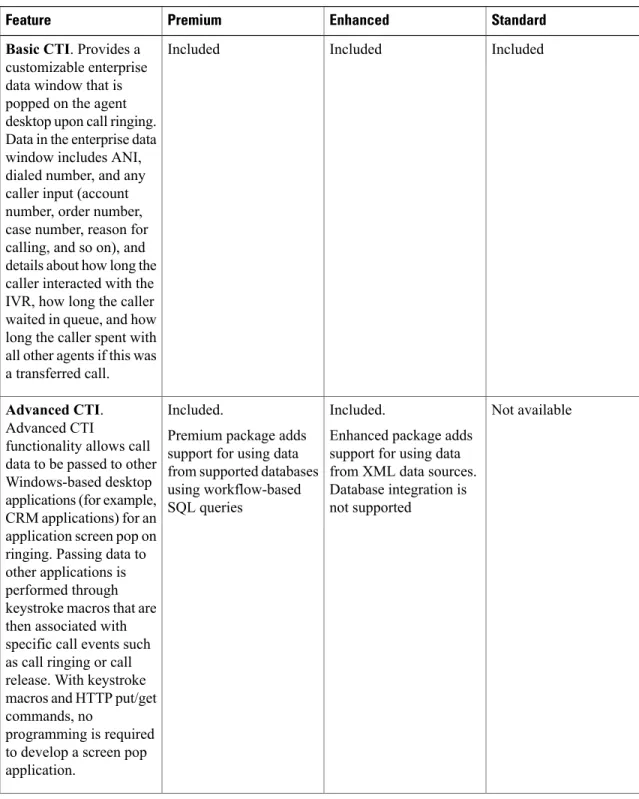
(for example, using a database access prior to popping to the agent, or to use in making routing decisions). CTI may also include the ability to invoke a third-party application and to pass data to that application as part of the agent screen pop.
The following table lists the CTI features that are available in each Cisco Unified CCX package.
Table 7: CTI Features Available in each Cisco Unified CCX Package
Standard Enhanced Premium Feature Included Included Included
Basic CTI. Provides a customizable enterprise data window that is popped on the agent desktop upon call ringing. Data in the enterprise data window includes ANI, dialed number, and any caller input (account number, order number, case number, reason for calling, and so on), and details about how long the caller interacted with the IVR, how long the caller waited in queue, and how long the caller spent with all other agents if this was a transferred call.
Not available Included.
Enhanced package adds support for using data from XML data sources. Database integration is not supported
Included.
Premium package adds support for using data from supported databases using workflow-based SQL queries
Advanced CTI. Advanced CTI
functionality allows call data to be passed to other Windows-based desktop applications (for example, CRM applications) for an application screen pop on ringing. Passing data to other applications is performed through keystroke macros that are then associated with specific call events such as call ringing or call release. With keystroke macros and HTTP put/get commands, no
programming is required to develop a screen pop application.
Not available Included
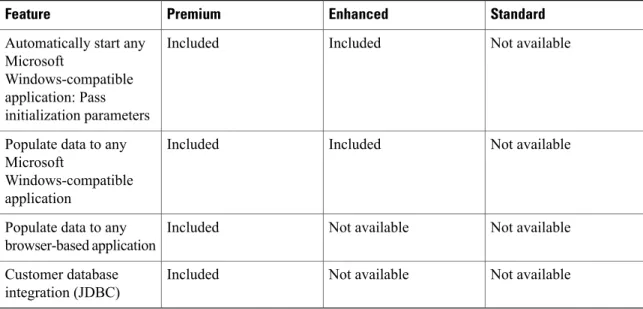
Included Automatically start any
Microsoft Windows-compatible application: Pass initialization parameters Not available Included Included Populate data to any
Microsoft Windows-compatible application Not available Not available Included Populate data to any
browser-based application Not available Not available Included Customer database integration (JDBC)
Cisco Unified Intelligence Center
Cisco Unified Intelligence Center is the web-based reporting platform that is packaged as part of the Cisco Unified CCX.
The Unified Intelligence Center packaged types that are available with Unified CCX packages are listed here:
Standard Enhanced Premium Contact Channel Unified Intelligence Center Standard Unified Intelligence Center Standard Unified Intelligence Center Standard Unified Intelligence Center
Package Type
Cisco Desktop Services
Cisco Desktop Services provide Cisco Agent Desktop (CAD) and IP Phone Agent (IPPA) for agent use, and Cisco Supervisor Desktop (CSD) for supervisor use.
Cisco Agent Desktop Features
The following table describes the Cisco Agent Desktop features that are available in each Unified CCX package.
Table 8: Cisco Agent Desktop Features Available in Each Unified CCX Package
Enhanced Premium
Feature
Included Included
Agent State Control. From the agent desktop, agents log in, log out, and make themselves ready and not ready.
Enhanced Premium
Feature
Included Included
Call Control. From the agent desktop, agents answer, release, hold, retrieve, conference, and transfer calls. (Call control can also be performed from a Cisco Unified IP Phone.)
For example, to answer a call, the agent can simply pick up the phone handset. The Unified CCX software ensures that the current call state for the phone and CAD application are kept in synch.
Call control initiated from the agent desktop is available only with Unified CCX which has Unified CM.
Note
Included Included
Dynamic Regrouping. Change of agent association with a resource group is applied immediately.
Included Included
Real-Time Statistics. Agents have access to real-time statistics for themselves and the queues to which they are associated. For example, from the agent desktop application, agents can see how many calls they have handled today and how many calls are currently in queue for their team.
Included Included
Integrated Text Messaging. Agents can interact with their supervisor and other agents through text chat.
Included Included
Reason Codes. Agents can be configured to enter reason codes for Not Ready and Logout.
Included Included
Basic CTI. Agent desktops provide an enterprise data window that is popped upon call ringing.
Included Included
Telephony Support. CAD can be deployed with select Cisco Unified IP Phone models, as described in Cisco Unified CCX Software and Hardware Compatibility Guideat
http://docwiki.cisco.com/wiki/ Compatibility_Matrix_for_ Unified_CCX. However, there are different features available on different phones.
CAD also supports the agent using the Cisco IP Communicator softphone application running on the same workstation with CAD. An agent ACD (Unified CCX) extension cannot be shared across multiple devices. It is valid only with a single line.
You can set the agent ACD extension for Call Forward No Answer (to voicemail or any other endpoint) as long as the value for the Ring No Answer timer on that device (or in Cisco Unified Communications Manager if the default is chosen) is less than the value for the Select Resource Timeout in the Select Resource step of the script.
Unified CCX monitors and reports on activities for the first four extensions on a phone, including non-ACD lines.
Agents are associated with a specific Cisco Unified Communications Manager extension (directory number).
Enhanced Premium
Feature
Included Included
Hot Desking. Hot desking allows agents to log in using CAD and any Cisco Unified IP Phone that is registered with the same Cisco Unified Communications Manager cluster. Agents using CAD and Cisco IP Communicator can also use Extension Mobility. This capability allows multiple agents to use the same phone, but only one at a time. For example, different agents on different shifts may use the same workstation and phone. Extension Mobility brings a user-specific phone profile (including configured extensions for that user) to the phone being logged in from. After logging in to Cisco Unified Communications Manager with Extension Mobility, agents can log in to Unified CCX using CAD.
Included Included
Auto Update. When the CAD starts up, it checks to see whether a new version of the CAD program is available and automatically performs an update on the agent workstation. This auto update feature can be disabled if required.
Included Included
Desktop Workflows. A wizard-based interface allowing desktop events (such as ringing or going off hook) to have associated rules and rule actions that are invoked when the rule is met for that event.
Included Included
Application Integration -Macros. CAD can be configured using desktop workflows to allow call data to be passed to other desktop applications (for example, CRM applications) for an
application window. Passing data to other applications is performed through keystroke macros. No programming is required to develop a screen pop. Application integration can also be done upon call release to pop open a wrap-up application on the agent
workstation.
Not available Included
Application Integration - HTTP. CAD can be configured using desktop workflows to allow call data to be passed to other desktop applications (for example, CRM applications) for an application window. Passing data to other applications is performed through HTTP put/get commands that are then associated with specific call events such as call ringing. No programming is required to develop a screen pop. Application integration can also be done upon call release to pop open a wrap-up application on the agent
workstation.
Included Included
Workflow Buttons. CAD can be configured to have predefined workflow buttons that execute specified programs and keystrokes. Workflow buttons help agents complete repetitive tasks quickly.
Enhanced Premium
Feature
Included Included
On-Demand Call Recording. CAD can be configured to allow clicking a single button to start and stop call recording. The call recording contains only the portion of the call that occurs after the Start Record button is clicked. There are limits to how many simultaneous call recording sessions can be performed.
Included Included
Work Flow Initiated Call Recording. CAD can be configured to automatically start recording on calls that meet conditions defined in the
application script and voice contact work flow. Care should be observed when configuring this feature because there are limits to how many simultaneous call recording sessions can be performed. CAD-based recording is not intended to be used in place of a compliance recording solution.
Optional with HA license. Optional with HA license.
Automatic Failover. Upon failure of the active Unified CCX server, CAD will automatically log agents back in on the standby server, and the agent will be placed into a Not Ready state. Upon failure of the active Unified CCX server, active calls on agents phones will survive. However, the call duration and other information that is associated with the call in the historical reporting database may be affected. Historical reports generated for time periods in which a failover occurred will have missing or incorrect data. It will be
discernable from the report that a failover occurred.
Included Included
Wrap-Up Codes. The wrap-up code selection is available only when the agent is in the Work state.
Not available Included
Agent Email. This feature is tightly integrated into the agent desktop, with controls built into the toolbar and display. It queues and routes email messages to staffed and skilled agents, helps the agent to respond easily, and provides a collection of real-time and historical reports that help measure email performance accurately.
Included Included
Presence. When integrated with Cisco IM and Presence, agents and supervisors can view the presence state of subject matter experts on CAD and chat with them.
Not available Optional with Workforce
Management user license
Workforce Management. Workforce Management is a workforce scheduling solution in which the supervisor or any contact center manager can schedule their agents based on forecasted call volume and agent expertise, availability, and other factors. Agents have an interface for that portion of the Workforce Management application that applies to them.
Not available Included
Outbound Preview Dialer. CAD includes buttons to control an agent response to an outbound contact offering by the system. If the agent clicks the Accept button, the system places the outbound call to the customer from the agent phone.
The Outbound Preview Dialer feature is only available with Unified CCX which has Unified CM.
Note
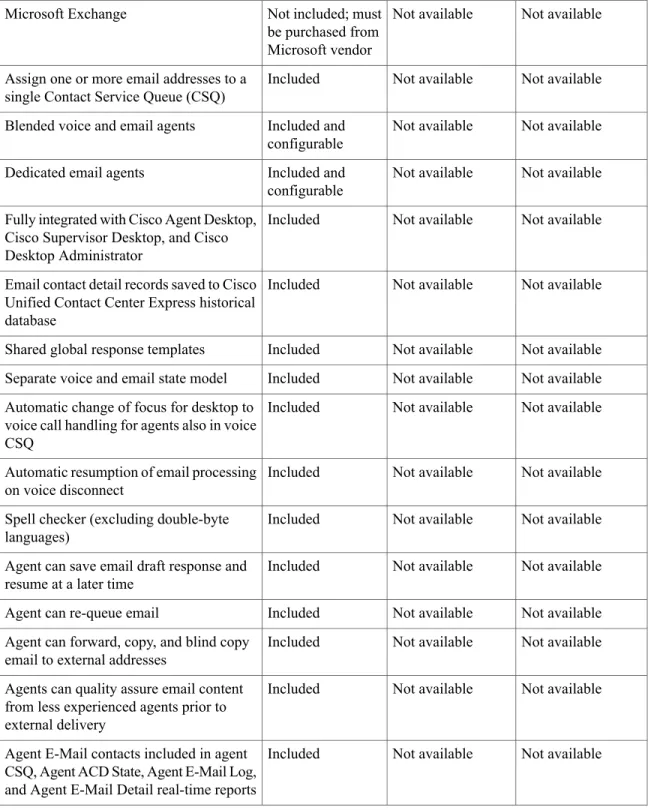
The following table describes the Agent Email features available with Unified CCX Premium licenses on Cisco Agent Desktop.
Table 9: Agent Email Features Available in Each Unified CCX Package
Standard Enhanced
Premium Feature
Integrated Agent Email General System Features with Cisco Unified Contact Center Express Cisco Agent Desktop
Not available Not available
Not included; must be purchased from Microsoft vendor Microsoft Exchange Not available Not available Included Assign one or more email addresses to a
single Contact Service Queue (CSQ)
Not available Not available
Included and configurable Blended voice and email agents
Not available Not available
Included and configurable Dedicated email agents
Not available Not available
Included Fully integrated with Cisco Agent Desktop,
Cisco Supervisor Desktop, and Cisco Desktop Administrator
Not available Not available
Included Email contact detail records saved to Cisco
Unified Contact Center Express historical database
Not available Not available
Included Shared global response templates
Not available Not available
Included Separate voice and email state model
Not available Not available
Included Automatic change of focus for desktop to
voice call handling for agents also in voice CSQ
Not available Not available
Included Automatic resumption of email processing
on voice disconnect
Not available Not available
Included Spell checker (excluding double-byte
languages)
Not available Not available
Included Agent can save email draft response and
resume at a later time
Not available Not available
Included Agent can re-queue email
Not available Not available
Included Agent can forward, copy, and blind copy
email to external addresses
Not available Not available
Included Agents can quality assure email content
from less experienced agents prior to external delivery
Not available Not available
Included Agent E-Mail contacts included in agent
CSQ, Agent ACD State, Agent E-Mail Log, and Agent E-Mail Detail real-time reports
Integrated Agent Email for Supervisors with Cisco Unified Contact Center Express Seat License
Not available Not available
Included Supervisor real-time reporting for Agent
Email volume by CSQ and for agent detail email volume by CSQ
IP Phone Agent Features
The following table describes the IP Phone Agent (IPPA) features that are available in each Cisco Unified CCX package.
IPPA is not supported with Cisco Finesse. Note
Table 10: IPPA Features Available in Each Cisco Unified CCX Package
Standard Enhanced Premium Feature Included Included Included
Agent State Control. From the IPPA XML application, agents log in, log out, and make themselves ready or not ready.
Included Included
Included
Call Control. The Cisco Unified IP Phone provides call control.
Included Included Included Dynamic Regrouping. Change of agent association with a resource group is applied immediately.
Included Included
Included
Real-Time Statistics. Agents have access to real-time statistics for themselves and the queues to which they are associated.
Included Included
Included
Reason Codes. Agents can be configured to enter reason codes for Not Ready and Logout.
Standard Enhanced Premium Feature Included Included Included
Basic CTI. IPPA allows for call data to be popped onto the IP Phone display upon call ringing.
Included Included
Included
Telephony Support. IPPA can be run from any phone that supports an XML client.
Included Included
Included
Hot Desking. Hot desking allows agents to log in using any Cisco Unified IP Phone that is registered with the same Cisco Unified
Communications Manager cluster. Agents using Cisco IP
Communicator can also use Extension Mobility. This capability allows multiple agents to use the same phone, but only one at a time. For example, different agents on different shifts may use the same workstation and phone.
Extension Mobility brings a user-specific phone profile (including configured extensions for that user) to the phone being logged in from. After logging in to Cisco Unified Communications Manager with Extension Mobility, agents can log in to Cisco Unified CCX using CAD.
Not available Included
Included
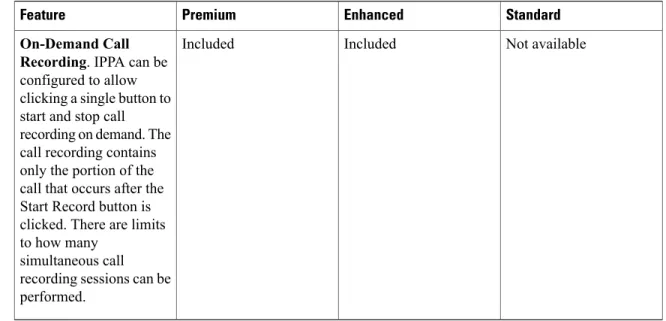
On-Demand Call Recording. IPPA can be configured to allow clicking a single button to start and stop call recording on demand. The call recording contains only the portion of the call that occurs after the Start Record button is clicked. There are limits to how many
simultaneous call recording sessions can be performed.
Cisco Supervisor Desktop Features
The following table lists the Cisco Supervisor Desktop features that are available in each Cisco Unified CCX package.
Table 11: Cisco Supervisor Desktop Features Available in Each Cisco Unified CCX Package
Standard Enhanced Premium Feature Included Included Included
View / Change Agent State. Supervisor desktops allow supervisors to view the current state of all agents that are part of that supervisor's team. The supervisor desktop also allows supervisors to change an agent state (Ready, Not Ready, Logout).
Standard Enhanced Premium Feature Included Included Included
Real-Time Agent and Skill Statistics. Supervisors can view statistics for all agents and queues that are associated with their team. See theCisco Supervisor Desktop User's Guidefor more details about statistics available through the CSD application. Included Included Included Integrated Text Messaging. Supervisors can send text messages to one or more agents.
Included Included
Included
Marquee Messages. Supervisors can send a scrolling marquee (broadcast) message to all agents on their team.
Not available Included
Included
Silent Monitoring. CSD allows a supervisor to silently monitor agent calls. It can be configured whether the agents are aware or unaware that they are being monitored.
Not available Included
Included
Barge-in. CSD allows a supervisor to barge in on an agent call. The Barge-in feature brings the supervisor, the agent, and the caller into a three-way conference. This feature requires the supervisor to have the CAD application open and to be logged in as an agent. The agent is aware when the supervisor barges in. Barge-in is supported for agents using CAD with IP Communicator, CAD with IP Phone, or IPPA.
Not available Included
Included
Intercept. CSD allows a supervisor to intercept an agent call. The intercept feature transfers the call to the supervisor. This feature requires the supervisor to have the CAD application open and to be logged in as an agent. As the call releases from the agent desktop and phone, the agent is aware when an intercept occurs. The agent is then available to take another call. Intercept is
supported for agents using CAD with IP Communicator, CAD with IP Phone, or IPPA.
Standard Enhanced Premium Feature Not available Included Included
On-Demand Agent Call Recording. CSD allows a supervisor to
dynamically start and stop recording agent calls on demand. A call recording only contains the portion of the call that occurs after the Start Record button is clicked. There are limits to how many simultaneous call recording sessions can be performed.
Not available Included
Included
Call Recording Playback and Exports. The CSD Record Viewer application allows a supervisor to play back calls that were recorded within the last 7 days. Supervisors can sort the recorded call list by agent, DN, or date/time. Within Record Viewer,
supervisors can tag selected recordings for a 30-day extended
archiving, and supervisors can save selected recordings as a .wav format in a specified folder for permanent archiving.
Not available Included
Included
Automatic Failover and Re-login. Upon Cisco Unified CCX Engine failover, the CSD automatically failsover to the standby Cisco Unified CCX Engine so the supervisor does not have to log in again.
Unified CCX Outbound Preview Dialer
The Unified CCX Outbound Preview Dialer provides campaign-based outbound preview dialer support. Each inbound Premium seat provides one outbound seat. This implies that if you have 100 inbound seats, you can have up to 100 agents logged in and up to 100 agents handling outbound calls at the same time.
The following table lists the Outbound Preview Dialer availability in each Unified CCX package.
Table 12: Outbound Preview Dialer Availability for Each Unified CCX Package
Standard Enhanced Premium License Not available Not available Included Outbound User
The following table describes the Outbound Preview Dialer features that are available in each Unified CCX package.
Table 13: Outbound Preview Dialer Features Available in Each Unified CCX Package
Standard Enhanced
Premium Feature
General System Features with Server Software
These features are the same as for inbound voice with the exception of redundancy. Note
Not available Not available
Deploys and executes co-loaded on the same virtual machine or bare metal server as the inbound voice server. Hardware configuration
Outbound Voice Seats
Not available Not available
Unlimited (no software limitations) Maximum number of configurable outbound agents supported Not available Not available 100 Maximum number of
active outbound agents supported Not available Not available 42 Maximum number of outbound supervisor positions supported Not available Not available Concurrent user Outbound license type
Outbound Preview Dialer Features
Not available Not available
15 Maximum number of active outbound
Standard Enhanced Premium Feature Not available Not available 10 Maximum number of CSQs per outbound campaign Not available Not available 10,000 Maximum number of
active contacts per outbound campaign
Integrated CTI and Screen Pop Features with Cisco Unified Contact Center Express Seat License
Not available Not available
Included Populates customer's
name, account number, and phone number dialed
Not available Not available
Using CAD task button Start any Microsoft
Windows-compatible application
Not available Not available
Using CAD task button Send information to any
Microsoft
Windows-compatible application
Integrated PC-Based Agent Desktop Features with Cisco Unified Contact Center Express Seat License
Not available Not available
Included Ability for agent to
initiate on-demand recording
Not available Not available
Included Ability for supervisor to
use Silent Monitor, Barge-In, and Intercept
Not available Not available
Included Ability for agent to
accept, reject, or skip outbound contact. Agent can reclassify call to any one of many call results, such as Busy, Fax and Answering Machine.
Not available Not available
Included Ability for agent to mark
a contact as "Do not call" for a particular campaign
Integrated IP Phone-Based Agent Desktop Features with Cisco Unified Contact Center Express Seat License
Not available Not available
Included VoiceXML for ASR,
TTS, and DTMF
Integrated PC-Based Supervisor Desktop Features with Cisco Unified Contact Center Express Seat License
Not available Not available
Included View agent activity in
real time
Not available Not available
Included Support for Cisco IP
Communicator: No Cisco IP Phone required for agent phone
Not available Not available
Included Coaching: Provide agent
guidance through chat
Not available Not available
Included Silent Monitor: Listen in
on an agent's call
Not available Not available
Included Ability for supervisor to
use Silent Monitor remotely from any phone through a dial-in IVR session Not available Not available Included Barge-In: Join in on an agent's conversation Not available Not available Included Intercept: Take a call
from an agent
Not available Not available
Included Record: Capture and
archive call audio
Integrated Historical Reporting with Cisco Unified Contact Center Express Seat License
Not available Not available Included Preview Outbound Campaign Summary report Not available Not available Included Preview Outbound Agent
Detail Performance report
Administration
Not available Not available
Included Campaign Management:
Administrators can create and configure campaigns. They can specify a daily time range during which outbound calls are made and a set of CSQ to specify whose agents make the outbound calls, They can also specify and import a list of customer
Standard Enhanced Premium Feature Not available Not available Included Area Code Management:
Administrators can add mappings from area-code to time zone for
non-North American locations. This information is used to determine the customer contact current time before placing an outbound call.
Not available Not available
Included Ability for administrator
to mark "Do not call" contacts as "Do not call" across all campaigns.
Web Chat
Unified CCX Premium provides the facility for end users to initiate a chat session with the agent, from a website, typically the public website of the organization using Unified CCX and Cisco Agent Desktop on a stand-alone browser. Unified CCX provides separate agent and supervisor web application, real-time, and historical reports for Chat.
The availability of Inbound Web Chat functionality for various Unified CCX packages is provided here:
Standard Enhanced Premium Contact Channel Not available Not available Included Inbound Web Chat
Web Chat Packaged Components
Agent Web Chat Application
The agent web chat application is a browser based agent desktop that can be accessed from the Cisco Agent Desktop integrated browser or a standalone browser. Agents use this interface to log in to Unified CCX chat facility and make themselves ready to accept chat requests.
All inbound chat requests, when routed to the agent, show up in this agent desktop, and the agent can accept it or let it time out. After the agent accepts the chat request, the agent can chat with the end user on a separate chat reply widget that gets loaded on the agent desktop.
Supervisor Web Chat Application
The supervisor web chat application is the interface that chat supervisors use to view the Chat CSQ details and agent chat summary report for their teams. This web application is accessed from the Cisco Supervisor Desktop integrated browser or a standalone browser.
Unified CCX provides chat-specific real-time reports and historical reports which can be accessed using the respective clients.
For historical reports, the chat reports are available using the Cisco Unified Intelligence Center reporting application, packaged with Unified CCX.
For supervisors, real-time reports on the Chat CSQs and the chat-specific team summary report are available in the Chat supervisor desktop web application.
Web Chat Contact Allocation and Distribution
The following table describes the Web Chat contact allocation and distribution features that are available in each Unified CCX package.
Table 14: Web Chat Contact Allocation and Distribution Features Available in Each Unified CCX Package
Standard Enhanced Premium Feature Not available Not available Included
Conditional routing.Routing based on a problem statement chosen by the customer.
Not available Not available
Included
Agent selection.The longest available and most skilled agent selection algorithm.
Not available Not available
Included
Customizable queuing messages.Customizable contact waiting message.
Not available Not available
Included
Auto chat reject.If no agent is available, Web Chat rejects the chat request.
Not available Not available
Included
Chat timeouts.Session timeouts for chat inactivity and maximum wait period
Not available Not available
Included
Rerouting on chat no answer.If the allocated agent does not accept chat within the allowed time limit, the contact is requeued and rerouted.
Not available Not available
Included
Chat transcript.Storage and retrieval of chat transcripts through Cisco SocialMiner.
Standard Enhanced Premium Feature Not available Not available Included
Agent skill and competency based routing.You can configure 50 skills, each with up to 10 different competency levels. You can configure Contact Service Queues (also known as skill groups) as requiring up to 50 skills, each with up to 10 minimum skill competency levels. The web chat routing logic then matches the contact problem statement with agent skills to find the optimum match using one of the following agent selection criteria:
•Longest available •Most skilled Not available Not available Optional with HA License
High Availability (HA) failover.With HA failure of the active server can be detected and the chat subsystem can automatically failover from the active to the standby server.
Not available Not available
Included
Dynamic reskilling by administrator.Changes to CSQ skills and competencies and agent skills and competencies are applied immediately.
Not available Not available
Included
Agent and supervisor web-based desktop.Web-based desktops for agents and supervisors. It is integrated inside Cisco Agent Desktop for the agent desktop and the Cisco Supervisor Desktop for the supervisor desktop through the browser control and can be launched from the Cisco Agent Desktop or the Cisco Supervisor Desktop, respectively. You can also launch it from standalone browsers.
Not available Not available
Included
Real-time and historical reports.
Not available Not available
Included
Supervisory reports.Team report for CSQ and agents.
Integrated Web Chat General System Features with Cisco Unified Contact Center Express Cisco Agent Desktop
Not available Not available
Included Multiple skills per chat agent
Not available Not available
Included and configurable Blended voice and chat agents
Not available Not available
Included and configurable Dedicated chat agents
Not available Not available
Included Separate voice and chat state model
Not available Not available
Included Web Chat desktop accessible on integrated browser in
Cisco Agent Desktop and Cisco Supervisor Desktop
Not available Not available
Included Web Chat desktop accessible on stand-alone browser for
Not available Not available
50 Maximum number of simultaneous Web Chat session depends on server class
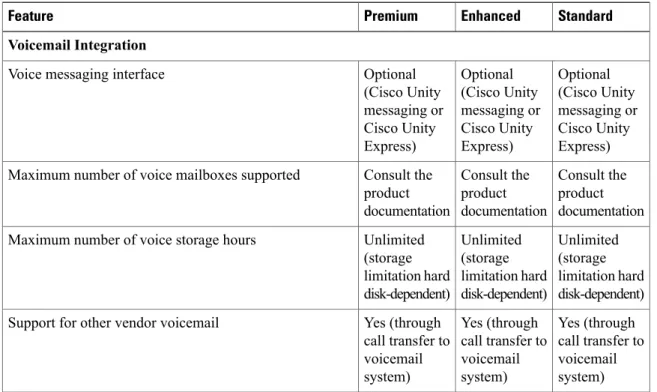
Table 15: Voicemail Integration Features Available in Each Unified CCX Package
Standard Enhanced Premium Feature Voicemail Integration Optional (Cisco Unity messaging or Cisco Unity Express) Optional (Cisco Unity messaging or Cisco Unity Express) Optional (Cisco Unity messaging or Cisco Unity Express) Voice messaging interface
Consult the product documentation Consult the product documentation Consult the product documentation Maximum number of voice mailboxes supported
Unlimited (storage limitation hard disk-dependent) Unlimited (storage limitation hard disk-dependent) Unlimited (storage limitation hard disk-dependent) Maximum number of voice storage hours
Yes (through call transfer to voicemail system) Yes (through call transfer to voicemail system) Yes (through call transfer to voicemail system) Support for other vendor voicemail
Table 16: Integration with Cisco IM and Presence Server with Unified CCX Seat License Features Available in Each Unified CCX Package
Standard Enhanced
Premium Feature
Integration with Cisco IM and Presence Server with Cisco Unified Contact Center Express Seat License
Included Included
Included Support for Cisco IM and Presence Server
Included Included
Included Support for Cisco IM and Presence Server fault tolerance
Included Included
Included Support for intercluster and foreign domains as supported
by Cisco IM and Presence Server
Included Included
Included Contact ("buddy") lists under administrator control; contact
lists assigned to workflow groups; agents have visibility to appropriate contacts only
Standard Enhanced Premium Feature Not available with Cisco Unified IP Phone Agent (Agent may use nonintegrated Cisco IP Phone Messenger only) Included Included Persistent, independent presence popup window
continuously updated with agent state and subject-matter-expert presence state
Quality Management and Compliance Recording
Each user license is for a named (not concurrent) user. For example, a contact center with three shifts of 100 agents and supervisors needs 300 named user licenses. Each person in a shift of 100 users uses the license associated with them during their shift.
Quality Management is licensed on a per named user basis and provides all the server software required with the exception of the Windows operating system and database software for the QM server, which must be purchased off the shelf.
The following table lists the license types and features available.
Table 17: License and Features
Advanced QM Quality Management Compliance Recording Feature/License Included Included Included Compliance Recording Included Included Included Endpoint Recording Included Included Included Server Based Recording
(via SPAN port)
Included Included
Included Network Recording (Built
In Bridge) Included Included Included Mediasense Recording Included Included Included Gateway Recording Included Included Included Role Based Scoping
Included Included
Included Users Synchronized with
Included Included Included Finesse Recording Controls - (Pause, Resume, Delete) Included Included Included Attach Custom Metadata
Included Included
Included Role Based Dashboards
Included Included Included Exporting of Recordings Included Included Included Monitoring and Notification Service Included Included Included Recording Monitoring Dashboard Included Included Included Reporting Included Included Included Live Audio Monitoring
Included Included Included Barge-In Included Included Not available Quality Evaluation Included Included Not available Evaluator Comments Included Not available Not available Screen Recording Included Not available Not available Live Screen Monitoring
Workforce Management
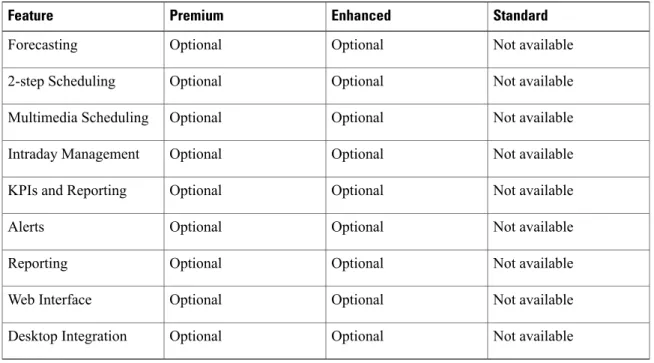
Cisco Workforce Management allows supervisors and contact center managers to develop schedules for their agents and manage key performance indicators and real-time adherence. Managers can create and manage schedules for an unlimited number of sites, manage scheduling for offices spread out in different time zones, and schedule alternative media sources seamlessly, including email. Cisco Workforce Management is available with Unified CCX Enhanced and Premium licenses.
Each user license is for a configured (not concurrent) user. For example, a contact center with three shifts of 100 agents and supervisors needs 300 configured user licenses. Each person in a shift of 100 users uses the license associated with them during their shift.
The following table describes the Workforce Management features that are available in each Cisco Unified CCX package.