Responsive Web Design
Version of 06 Dec 2011
Eva Harb, Paul Kapellari, Steven Luong, Norbert Spot
Abstract
Nowadays, a large range of different devices exist to visit websites and each of them has a different screen size. So, web designers have to deal with the problem of how to present the website on different screens. On large screens, there is space for more information than on tiny screens. Furthermore, a mobile user has other needs than a user who browses from a PC. Recently, a new way of thinking emerged to answer to this problematic: Responsive Web Design. Responsive Web Design is a new technique to develop one single website which looks different for different screen sizes so that it is usable on every device.
This survey as part of the course ”Information Architecture and Web Usability” lectured by Ao.Univ.-Prof. Dr. Keith Andrews, presents the state-of-the-art article of Responsive Web Design. First, the problem with fixed width websites is introduced and a definition of the problem is stated. Then, some different ways of thinking are introduced: the desktop first philosophy, the mobile first philosophy as well as some thoughts about when to develop a native application and when to develop a web application. In the next chapter, all existing techniques to create a responsive website are explained: Flexible Grids, Flexible Images, Media Queries, Responsive Typography, and Responsive E-Mail Systems. Before the conclusion, where the limits of Responsive Web Design are disclosed, two pretty good examples of how a responsive website could look like, are presented and explained.
For this survey, we used the LaTeX skeleton of Ao.Univ.-Prof. Dr. Keith Andrews [2011]with his kind permission.
Contents
1 Introduction 1
1.1 Context and Problematic . . . 1
1.2 Purpose of this survey . . . 2
2 What is Responsive Web Design ? 5 2.1 Definition . . . 5
2.2 Origin of the name . . . 5
2.3 Objectives . . . 6
3 Ways of Thinking 7 3.1 Growth . . . 7
3.2 Desktop first . . . 7
3.3 Mobile first . . . 8
3.4 Native App vs. Web App . . . 8
3.5 Conclusion . . . 9
4 Existing Techniques 13 4.1 Flexible Grid . . . 13
4.1.1 Example Fluid Grids . . . 14
4.2 Fluid Images . . . 16 4.2.1 CSS Cropping . . . 17 4.2.2 Max-Width Attribute . . . 18 4.2.3 Multiple Images . . . 19 4.3 Media Queries . . . 20 4.4 Responsive Typography . . . 21
4.5 Responsive E-Mail Systems . . . 22
5 Examples of responsive websites 25 5.1 3200 Tigres . . . 25
5.2 The Boston Globe . . . 26
6 Conclusion 27
References 30
List of Figures
1.1 Most common screen sizes and formats . . . 1
1.2 Fixed design at the website of ORF on widescreens . . . 2
1.3 Fixed design at the website of ORF on optimised screens . . . 2
1.4 Fixed design at the website of ORF on small devices . . . 3
1.5 Fixed design at the website of ORF on tiny devices . . . 3
2.1 Example of a responsive web site . . . 5
2.2 Responsive Architecture . . . 6
3.1 AT&T Mobile data traffic . . . 8
3.2 Southwest Airlines website . . . 9
3.3 Desktop site and Mobile optimized site on iPhone . . . 10
3.4 Southwest Airlines iOS App . . . 11
4.1 Proportion of an element in relation to another . . . 14
4.2 Concept Flexible Grid Example . . . 14
4.3 Flexible Grid Example - High Screen Resolution . . . 16
4.4 Flexible Grid Example - Low Screen Resolution . . . 16
4.5 Flexible Image Cropping - Normal . . . 18
4.6 Flexible Image Cropping - Cropped . . . 18
4.7 Flexible Image Example - Max-Width . . . 19
4.8 iPhone - A good solution to realise a responsive e-mail system . . . 23
5.1 Example of a responsive web site: 3200 Tigres . . . 25
5.2 Example of a responsive web site: The Boston Globe . . . 26
List of Listings
4.1 Flexible Grid Example - CSS file . . . 15
4.2 Flexible Images Example - Cropping HTML . . . 17
4.3 Flexible Images Example - Max-Width HTML . . . 18
4.4 Flexible Images Example - Multiple Images HTML . . . 19
4.5 Media query example - link the stylesheet . . . 20
4.6 Media query general example . . . 21
Chapter 1
Introduction
Responsive web design is a very new topic and continuously draws attention. This chapter presents a detailed explanation why responsive web design became very important and why it is not possible to go on designing websites with a fixed width style. At the end of this chapter a short annotation is pronounced with which aim this survey was written.
1.1
Context and Problematic
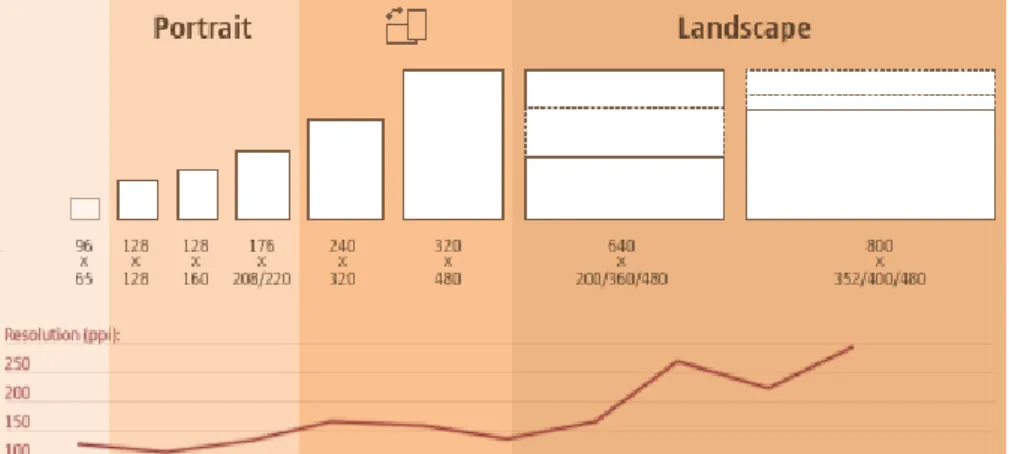
Nowadays we live in a time with a huge amount of different devices which are able to connect to the Internet. It is not only the PC any more, for example there are mobile phones, iPhones, iPads, BlackBerrys, net-books, laptops, game platforms, TVs, feed readers and many more. It is expected, that in the next years, the number of different devices connected to the Internet will increase rapidly. All of these devices have different screen sizes and in the future, screen sizes will get larger than they are now and at the same time smaller. Coming along with that, the different sizes have different formats, for example, landscape, portrait or even quadratic. Morten Hjerde [2008] took a look at a device database filled with about 400 different device models collected during the years 2005 to 2008 and found out what the most common screen sizes and formats are. See Figure 1.1 for the result. Furthermore, in the year 2007, a survey confirmed, that only about 50 % of users maximise their web browser window [Johansson, 2007]. All these arguments point out that there is an infinite amount of different used screen sizes and it can never be assured that users really take advantage of all the screen space.
Figure 1.1:These are the most common screen sizes and formats after evaluating about 400 device models
collected during the years 2005 to 2008. Adapted from [Hjerde, 2008]
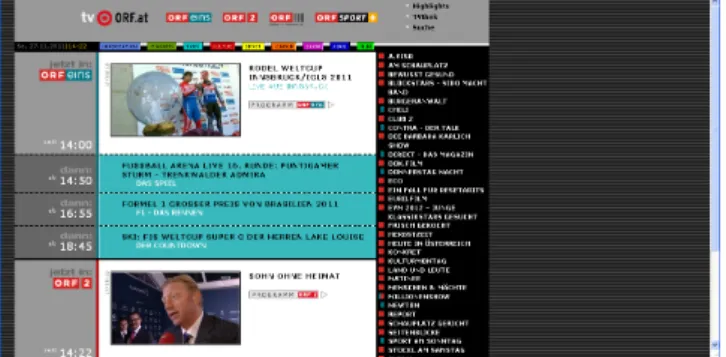
Many website developers do not care about this problem. They do not use small devices and do not think about their users. What often comes out is a fixed website without any flexibility in space. For example see the
2 CHAPTER 1. INTRODUCTION
website of ORF shown in Figures 1.2, 1.3, 1.4, and 1.5. Some of the web developers implement two different styles for their site: one for PCs and another one for mobile devices. As it was just mentioned before, that there is an infinite amount of displays nowadays and some of them can switch their display from portrait to landscape, so, it is absolutely impossible to design an extra site for all that devices and views. There is the idea of grouping the most common sizes and designing for them, but who knows what common sizes there will be in the next years? To get this problem under control, a new approach is born: responsive web design!
Figure 1.2:The website of ORF is developed in a fixed style. On wide screens, much space is lost on the
right hand side.
Figure 1.3:The website of ORF is developed in a fixed style. Only for that screen size the page is
opti-mised.
1.2
Purpose of this survey
In this survey, the new approach of responsive web design is introduced. Readers should get appreciation of the problem of the huge amount of different screen sizes and what can be done to solve this problem. For that reason this survey provides a broad state of the art summary of responsive web design with all its different techniques and shows some good examples how to design modern responsive websites.
1.2. PURPOSE OF THIS SURVEY 3
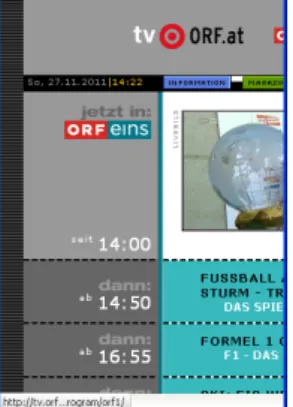
Figure 1.4:The website of ORF is developed in a fixed style. On small devices, the design looks messy
and completely unmanageable.
Chapter 2
What is Responsive Web Design ?
This chapter explains what Responsive Web Design is, where the name comes from, as well as its objectives.
2.1
Definition
”Responsive Web Design” is a name given to the set of techniques applied at the level of the layout, so that it allows a website to adapt itself to any device or width of screen. (Figure 5.2)
Another name used to describe this set of techniques is ”Adaptive Web Design”. According to Harry Roberts and Paul Gordon, this name would match more since ”the website really adapts to the device, rather than responding continuously to changes in its environment”. [Doyle, 2011]
Figure 2.1:Example of a responsive web site : the layout changes according to the size of the
screen.[WebDesignShock, 2011]
2.2
Origin of the name
The name ”Responsive Web Design” has been found by Ethan Marcotte who is a developer and a web designer as well. He is particularly interested in architecture and he wrote in his book Marcotte [2011], that he discovered a new kind of architecture: ”Responsive Architecture”. This recent type of architecture is original in the fact that it tends to break properties of architecture defined until now as constraints: moving structure, color-changing walls (Figure 2.2).
Inspired by this way of thinking, he wanted it applied to web design, a web design which would adapted itself to the users. That’s how he came with the idea of ”Responsive Web Design”.
6 CHAPTER 2. WHAT IS RESPONSIVE WEB DESIGN ?
Figure 2.2:Responsive Architecture: The color of the wall is changing according to people’s need.
[SmartGlass International, 2011]
2.3
Objectives
Concretely, the main goals would be:
• Adapting the layout to suit different screen sizes, from wide-screen desktops to tiny phones • Resizing images to suit the screen resolution
• Serving up lower-bandwidth images to mobile devices • Simplifying page elements for mobile use
• Hiding non-essential elements on smaller screens
• Providing larger, finger-friendly links and buttons for mobile users, and
• Detecting and responding to mobile features such as Geo-location and device orientation. [Doyle, 2011]
Chapter 3
Ways of Thinking
In this chapter we will discuss different ways of thinking when creating a web page. We will talk about the Mobile First philosophy and explain why it’s getting more and more popular today.
This chapter is based on the book of Luke Wroblewski [2011] called Mobile First.
3.1
Growth
The main reason why responsive Web design and all these techniques exist is that ”mobile is growing like crazy”. While analysts around the world have predicted that mobile will be the ”next big thing”, their words are just becoming true in a very big way. In a very big way, because global smartphone shipments surpassed global PC shipments two years earlier than they predicted [Ferguson, 2011]. That means more people will be using mobile devices to access the web than those getting online via desktops or laptops. In the last years, namely november 2010, visitors to web-based email sites declined 6%, but the number of users accessing their emails on a smartphone grew up by 36% [comScore, 2011]. And here are some more numbers: traffic to mobile websites in 2010 grew 600% after tripling between 2009 and 2010 [Daly, 2010].
But something had to happen that started this avalanche of mobile internet growth. On June 29, 2007, Steve Jobs introduced the first iPhone. It’s hard to deny the impact this device has had on the mobile internet. It was the first mobile phone, the first smartphone on which browsing the internet was really fun. Looking at AT&T’s mobile data traffic from 2006 to 2009 (when it was the exclusive carrier of the iPhone in the US), well the chart speaks clearly (Figure 3.1).
But mobile isn’t growing just because devices are getting better. They are also getting cheaper. People who could never afford a desktop or laptop can now get online using cheap mobile devices and increasingly affordable mobile data plans. But this isn’t the only thing helping mobile internet to grow. Broader coverage of faster networks has also been helping. In 2010 alone, mobile network speeds doubled. As networks became twice as fast, the average data usage of smart phones doubled as well.
Well, if this isn’t a good reason of creating mobile websites than what is?
3.2
Desktop first
Most web teams have designed websites and services for desktops and laptops for years. They used this, now so called, Desktop first philosophy. Well they were right, very few people used the web on mobiles, there was no special need of creating mobile web pages or mobile optimized sites. In the past few years however things have changed significantly. Starting with the desktop may be an increasingly backward way of thinking about a web product. Figure 3.2 shows an example of a website and its mobile web experience companion.
8 CHAPTER 3. WAYS OF THINKING
Figure 3.1:AT&T Mobile data traffic increases between 2006 and 2009.
3.3
Mobile first
Browsing a desktop site in a mobile browser is not a fun experience. A desktop site appears in a mobile browser as seen on Figure 3.3.
We have to pan and zoom and the use of such a website is not so comfortable and user friendly.
Mobile first is a whole new way of thinking that’s spreading really fast. It’s about designing websites for the mobile first. Taking care of the mobile version first, how will the site look like and act in a mobile browser. Figure 3.3 shows the same website like the previous one but already optimized for mobile experience.
Use only those techniques and technologies that work in the major mobile browsers. After that, create a layout to fit the desktop. In this way one can achieve that the site will provide a great user experience in a mobile browser and on a desktop as well. With the growth of mobile internet designing sites for mobile devices can not only open up new opportunities, it can lead to a better user experience for a website or service. In fact, some of the biggest internet companies of the world are adopting the mobile first philosophy. Google ChairmanEric Schmidtadvises: “The simple guideline is whatever you are doing — do mobile first.” OrKevin LynchAdobe’s CTO: “We really need to shift to think mobile first... This is a bigger shift than we saw with the personal computing revolution.”
There is nothing to complain, with the help of capable devices and faster networks, mobile internet usage is exploding. Building mobile first helps you not only take advantage of this growth, it gives us new opportunities also. It’s not only the opportunity to create mobile version of our web product, it gives the chance to provide an improved user experience for our visitors.
3.4
Native App vs. Web App
When it comes to creating a mobile web experience for our customers, we have two general options. We can either create aNative Appfor our web product or we can make a mobile optimized websiteor aWeb App. While many try to argue for one side or the other, in fact there are good reasons to make both. Native applications are great because they run natively. They run smooth generally without lags, in many cases with nice system wide user interface transition. Both the native app and mobile web can look like and act the same. Trying to replicate these effects in the browser is possible, however with techniques available today whatever
3.5. CONCLUSION 9
Figure 3.2:Southwest Airlines website - desktop website and mobile web experience example.
we do, it won’t be as smooth and as responsive as a native application. Figure 3.4 shows an example of a native App.
But it’s not just that what counts. Native applications gives us access to the devices hardware capabilities, that we currently can’t get through mobile web browsers. Features like access to the built-in sensors, camera, audio inputs, system databases like SMS, address book are unavailable through a mobile web browser. A native app can also benefit from the devices whole computation power. The ability to run processes in the background is also absent in a mobile browser. And an other important thing is that web apps can’t get to the native app store and have it much harder to get to users bookmarks or home screen. So if our application requires deeper hardware access the way to go is the way of native apps, but we can’t put a dot here. If we build a native app for one platform (but which one?) we might not be able to create one for every platform. There is Apple iOS, Google Android, Microsoft Windows Phone 7, Samsung’s Bada, Nokia’s Symbian, RIM’s Blackberry. Every platform requires an other technology, other programming language and other techniques. But even if we could create a native app for every platform that doesn’t mean it would be affordable. The mobile web could be our most popular mobile web experience anyway. 14% of Twitter users use the mobile web compared to 8% using the native iOS app and 7% using the Blackberry native app. The rest of Twitter’s native applications are used by less than 4% of the users [Williams, 2010]. Facebook is in a similar situation. Mobile strategist Jason Grigsby is pointing out: “Web links don’t open apps, they go to web pages” [Grigsby, 2011]. Whether is through search, email, social networks, or on web pages, if we have useful information online, people will find and share links to it. Not having a mobile web solutions means anyone following those links wont have a great mobile web experience.
3.5
Conclusion
Today’s mobile device is our true personal computer: always with us, connected to the internet, packed with all the mails and content we need for our digital life. The idea of starting with the mobile devices allow us to take advantage of the huge growth in mobile internet usage and find new ways for people to use our websites and applications. So the simple guideline is, whatever you do, do it mobile first.
10 CHAPTER 3. WAYS OF THINKING
Figure 3.3:On the left: viewing a desktop website in Mobile Safari on iPhone. Not a fun experience.
3.5. CONCLUSION 11
Chapter 4
Existing Techniques
This chapter presents a description and expamples of the main techniques of Responsive Web Design : • Flexible Grid
• Flexible Images • Media Queries
• Responsive Typography • Responsive E-Mail Systems
It is important to notice that most of the sources we use in this chapter are based Ethan Marcotte’s book [Marcotte, 2011].
4.1
Flexible Grid
One of the most important techniques to achieve responsive web design is “Flexible Grid”. Before flexible grids became popular, most websites were implemented with a fixed width style layout and centred content, because nearly every computer has the same screen resolution. Now, where more and more screen resolutions are in use, a fixed width design is not a good solution for a website, because it is not resizeable. [WebDesignShock, 2011]
So, the main idea of flexible grids is to create a layout where all elements are based on the calculated percentage width and so all elements in the layout are resizable in relation to one another. To put this idea into practice, it is necessary to stop thinking in pixels and start thinking in proportions. To calculate an element’s proportions, designers have to take the width of the element and divide it by the size of the parent element, for example 200 px / 960 px = 0.2083 and multiply the result by 100 to get the percentage value to perform a correct resizing 0.2083 * 100 = 20,83% as shown in Figure 4.1.
To achieve a flexible grid design, it is important to deal with some values: • Layout width
• Minimal width • Maximal width
The layout width defines the general layout size and should be a percentage value, to assure that the hole design resized in relation to the available width of the browser window. To make sure that the content fits perfectly in the provided grid it is necessary to set the minimal width in fixed pixel. The maximum width should be specified in em (a unit of measurement in the field of typography which defines the size in relation to
14 CHAPTER 4. EXISTING TECHNIQUES
Figure 4.1:Proportion of a 200px element. [WebDesignShock, 2011]
the font size of the parent element) and takes care that the design gets not too large when the screen resolutions increases. [Jesse, 2008]
Although fluid grids provide an accurate resizing when the screen resolution changes, sometimes there appear some problems. For example, a user wants to view a multiple column design on his smartphone screen. So the designer can choose between different options to handle this problem. The first one is to use media queries, which are considered more exact in chapter 4.3, or to design two versions of the website, one for mobile devices and one for desktops. [WebDesignShock, 2011]
4.1.1 Example Fluid Grids
Figure 4.2:Concept for a flexible grid design with a header and two coloums, information and content.
The example shows how to build up a flexible grid design for the concept as it is shown in Figure 4.2. First, of all the proportions of all elements have to be calculated:
4.1. FLEXIBLE GRID 15
Layout-Width: 960px/16px(font-size)= 60em Header: 960px/960px∗100 = 100%
Content: 627px/960px∗100 = 70%−2% (for padding)= 68%
Afterwards, the elements has to be defined in CascadeStyleSheet (CSS):
1 2 #home{ 3 margin: 25px auto; 4 max−width: 60em;} 5 6 .header{ 7 width: 98%; 8 height18%; 9 padding: 1%; 10 background−color: #FD6579;} 11 12 .main{ 13 width: 100%; 14 background−color: #C0C0C0;} 15 16 .main .content{ 17 margin−left: 30%; 18 width: 68%; 19 padding: 1 % ;
20 background−color: #ADFF2F;} 21 22 .main .info{ 23 float: left; 24 width: 28%; 25 padding: 1 % ; 26 background−color: #FFD700;}
Listing 4.1:CSS file of the flexible grid example shown in Figure 4.2.
Finally, it is necessary to build up the “Hypertext Markup Language” (HTML) File with the above defined elements. Below, the finished flexible grid design is shown for a small (Figure 4.3) and a large (Figure 4.4) screen resolution.
16 CHAPTER 4. EXISTING TECHNIQUES
Figure 4.3:The flexible grid example on a high screen resolution.
Figure 4.4:The flexible grid example resized on a low screen resolution.
4.2
Fluid Images
After the design has changed to a flexible grid, it is necessary to adjust the images. In fixed width styles the images are simply resized through width and height attributes with fixed pixels, which provides a kind of resizing but not a dynamic one.
Another problem with the fixed width and height is the loading time optimisation. This optimisation is important, because on mobile devices the internet connection is not as fast as the connection at home or at the university.[WebDesignShock, 2011]
To handle the above described problems, web designers have to use some of the following simple tech-niques:
4.2. FLUID IMAGES 17
• CSS Cropping
• Max-Width Attribute by Richard Rutter
• Multiple Images with HTML5, CSS3 and Media Queries
4.2.1 CSS Cropping
The CSS cropping method is one method to achieve a dynamic resizing by using the width and height attributes in CSS. In this technique, images needs to be placed into a parent element like a paragraph or something similar. It is only important that the parent element is a floating element or set to a certain width to reach the required impact.
Afterwards one of the values, width or height, gets a fixed pixel value and the other a flexible one. If the screen resolution now changes, the flexible part of the image will be cut off. To declare which side will be cut off, it is necessary to define the float attribute of the image with the value, right or left. [Gillenwater, 2009] Example
1 <html>
2 <head><title>Flexible Images − Cropping</title>
3
4 <style type=”text/css”>
5 div#foreground { 6 overflow:hidden;
7 width: 5 0 % : / * flexible value * / 8 height: 206px; / * fixed value * / 9 border: 2px solid # 0 0 0 ;
10 } 11
12 div#foreground img {
13 float: left; / *defines which side gets cut * / 14 }
15
16 </style></head>
17 <body>
18 <div id=”foreground”>
19 <img src=”logo_big.png” width= ” 4 5 0 ” height=”206”/>
20 </div>
21 </body>
22 </html>
18 CHAPTER 4. EXISTING TECHNIQUES
Figure 4.5:Example with cropping on high screen resolutions.
Figure 4.6:Example with cropping on low screen resolutions.
4.2.2 Max-Width Attribute
Another method to provide a flexible image resizing is to use the max-width attribute which was invented by Richard Rutter. Rutter binds his images to an parent element with a defined size and sets the max-width value to 100%. If now the website loads on a screen with a small resolution, the image loads in its original size. Is the screen resolution bigger than the original one, the image’s maximum width will readjust to fits perfectly. [WebDesignShock, 2011]
Example
1 <html>
2 <head><title>Flexible Images − Max Width</title>
3
4 <style type=”text/css”>
5 div#foreground { 6 width: 5 0 % ;
7 border: 2px solid # 0 0 0 ;
8 }
9
10 div#foreground img {
11 max−width: 100%; / * low screen resolution = low width * / 12 }
13
14 </style></head>
15 <body>
4.2. FLUID IMAGES 19
17 <img src=”logo_big.png”/>
18 </div>
19 </body>
20 </html>
Listing 4.3:Html-file for the flexible image method max-width shown in Figure 4.7.
Figure 4.7:Example of the max-width method.
4.2.3 Multiple Images
To ensure a dynamic image resizing and also an optimisation of loading time, designers have to use multiple images in different resolutions. This method uses HTML5 and CSS3 to define two sources for every image. One source for high screen resolutions and one for lower ones. With the help of media queries it is possible to check the users screen resolution and to choose the right source for the user. The only problem is that no Web-Browser can handle these CSS attributes at the time of writing. [Gallagher, 2011]
Example
1 <html>
2 <head><title>Flexible Images − Multiple Images</title>
3
4 <style type=”text/css”>
5 @media (min−device−width: 4 0 0px) { 6 img[data−src−400px] {
7 content: attr(data−src−400px, url) ;
8 }
9 } 10
11 @media (min−device−width: 8 0 0px) { 12 img[data−src−800px] {
13 content: attr(data−src−800px, url) ;
14 }
20 CHAPTER 4. EXISTING TECHNIQUES 16 17 </style></head> 18 <body> 19 <img src=”logo.png” 20 data−src−400px=”logo.png” 21 data−src−800px=”logo_big.png” /> 22 </body> 23 </html>
Listing 4.4:Html-file for the flexible image method multiple images.
4.3
Media Queries
Media queries are an essential part of responsive web design techniques. There would be no real responsive Web design without media queries. Media queries allow to get the users screens size to apply the CSS styles that can provide the best user experience to the visitor.
CSS2 supported media-dependent style sheets tailored for different media types. For example, a document may use sans-serif fonts when displayed on a screen and serif fonts when printed. “screen” and “print” are two media types that have been defined. Media queries, introduced in CSS3, extend the functionality of media types by allowing more precise labeling of style sheets.
Among the media features that can be used in media queries are “width”, “height”, “orientation” and “color”. By using media queries, presentations can be tailored to a specific range of output devices without changing the content itself.
With media queries, designers can build multiple layouts using single HTML documents and selectively provide stylesheets based on different features such as browser size, orientation, resolution or color. Although media queries provide a great solution for developing highly responsive websites, there’s still a lot to work with in order to offer a complete solution for mobile devices. [WebDesignShock, 2011]
This is an example how a default media query might look like: Example
1 <link rel=”stylesheet” type=”text/css”
2 media=”screen and (max−device−width: 480px) ”
3 href=”style.css” />
Listing 4.5:Example of linking a stylesheet if the device screen matches the query.
The query contains two components: 1. a media type (screen), and
2. the actual query enclosed within parentheses, containing a particular media feature (max-device-width) to inspect, followed by the target value (480px).
In this example we ask the device, whether it’s screen size is equal to or less than 480px. If the test passes, for example if we are viewing the site on an iPhone, the CSS style ”style.css” is applied. Otherwise the link is ignored.
We are of course not limited to use the query in the link only. If we include them in the CSS, is enough if we link one CSS to the site and all the media-query stuff and style can be done there. The next one is a just a general media query example.
4.4. RESPONSIVE TYPOGRAPHY 21
Example
1 @media screen and (max−device−width: 480px) { 2 .column {
3 float: none;
4 }
5 }
Listing 4.6:General example of a media query.
But in each case, the effect is the same: If the device passes the test put forth by our media query, the relevant CSS is applied to our markup. Media queries are, in short, conditional comments for the rest of us. Rather than targeting a specific version of a specific browser, we can surgically correct issues in our layout as it scales beyond its initial, ideal resolution. [Marcotte, 2010]
The ”min-width” and ”max-width” properties do exactly what they suggest. The min-width property sets a minimum browser or screen width that a certain set of styles (or separate style sheet) would apply to. If anything is below this limit, the style sheet link or styles will be ignored. The max-width property does just the opposite. Anything above the maximum browser or screen width specified would not apply to the respective media query. [Knight, 2011]
While the above ”min-width” and ”max-width” can apply to either screen size or browser width, sometimes we’d like a media query that is relevant to device width specifically. This means that even if a browser or other viewing area is minimized to something smaller, the media query would still apply to the size of the actual device. The ”min-device-width” and ”max-device-width” media query properties are great for targeting certain devices with set dimensions, without applying the same styles to other screen sizes in a browser that mimics the device’s size. [Knight, 2011]
For example the query@media screen and(max−device−width: 480px)will be applied on an iPhone. The query@media screen and(min−device−width: 768px)will be applied on an iPad. The media query property “orientation” is useful when designing a page for the iPad. The value can be either landscape (hori-zontal orientation) or portrait (vertical orientation).
Unfortunately, this property works only on the iPad. When determining the orientation for the iPhone and other devices, the use of max-device-width and min-device-width should do the trick. [Knight, 2011]
Another method that can be used is JavaScript, especially as a back-up to devices that don’t support all of the CSS3 media query options. Fortunately, there is already a pre-made JavaScript library that makes older browsers (IE 5+, Firefox 1+, Safari 2) support CSS3 media queries. There are many solutions for pairing up JavaScript with CSS media queries. Remember that media queries are not an absolute answer, but rather are fantastic options for responsive Web design when it comes to pure CSS-based solutions. With the addition of JavaScript, we can accomodate far more variations. [Knight, 2011]
4.4
Responsive Typography
In responsive web design, typefaces play an important role, because most of the Internet’s content is text. So it is a big challenge how to deal with typefaces so that people, using all different screen sizes, feel comfortable with it. It is important, that a font size does not get too small on tiny screens, or too large on big screens.
There are two different approaches to decide how to use fonts for responsive web pages: 1. Using percentage units
2. Using min-/max-width
Often, both approaches are used together. Using percentage units (em) in the CSS files is the common solution to receive decent measures for every screen size. On the website of WebDesignShock [2011] it is
22 CHAPTER 4. EXISTING TECHNIQUES
recommended to base the whole layout on setting all font sizes in percentage units (em), because in this way it is assured that the page remains resolution independent and that is why it is perfectly useable for different envi-ronments. WebDesignShock also recommends to use the max-width property in addition, to define a maximum line length of a paragraph. The max-width property is important for large screens, especially for wide-screens, because long lines are hard to read and users will not read long line text. Contrariwise, extremely short lines are exhausting to read, too. Users will not read text where every single word stands in a new line or every word is cut off at the end of a short line. Therefore, the min-width property should be used in the CSS file to avoid this problem.
Using about 66 characters per line makes the text readable in a comfortable way, but of course, the amount of the characters depends on the font. Usually, using around 30em will work fine. [WebDesignShock, 2011]
Elliot Jay Stocks [2011] writes in his article that for some people who are doing responsive web design, using max-width property appears completely wrong, because on larger screens, some fluid layouts may at first appear to use a fixed width. For Elliot Jay Stocks using max-width is an important tool for responsive web design, because ”if a layout continues to grow until the measure becomes uncomfortably long and the reader struggles to move from line to line, that is not responsive” [Stocks, 2011].
4.5
Responsive E-Mail Systems
A study from David Greiner from Campaign Monitor [Greiner, 2011b] showed, that the usage of e-mails on mobile phones increased importantly in the last two years. As in May 2009 only 4 % of the users logged into their account from a mobile device, in May 2011 it were almost 20 %. During the same time, desktop email clients lost 11 % of usage. This study points out, that e-mail users check their mails from a large amount of different devices with different screen sizes. So it is a fact that responsive e-mail systems became very important and should be provided for every single system.
As the people from WebDesignShock [2011] mention on their website, most of the e-mail providers do not care about this problematic so far. So, by using small screens, in most cases, the text is scaled down to a tiny font size and is almost unreadable. Additionally to that the design looses its structure and users have to scroll a lot which is really annoying.
David Greiner [2011b] confirmed that all e-mail clients of smart phones support CSS and Eugene Fedorenko [2011] confirmed that the Mobile Mail program on iPhones support media queries so that it is possible to use one single responsive web design for both desktop and mobile phone screens. With the help of the media query @media only screen and(max−device−width: 480px){...}
in the CSS file, it can be ensured, that displays with a screen dimension of up to 480 pixels use the styles specified in that closure, whereas 480px is the width of a flipped iPone’s display. For that size it would be a good idea to override the inline styles, modify the paddings and margins of the header and the body as well as the font size of the header so that the headings are not too large and the content of the mail is readable in a comfortable way. Furthermore, pictures should be scaled down for small screens so that scrolling is prevented. [WebDesignShock, 2011]
For screens of the iPad,
@media only screen and(min−device−width: 768px)and(max−device−width: 1024px){...}
should be used. Font sizes and margins should be a bit bigger than for the smart phones to profit from the larger screen space. If it is possible or necessary, the navigation should be reorganised to avoid wrapping. [Fedorenko, 2011]
With the help of
4.5. RESPONSIVE E-MAIL SYSTEMS 23
used in the CSS file, it can be ensured, that the text font is not scaled down to an unreadable size. The minimum text size must not get smaller than 12 pixels, better would be 17 to 22 pixels. [WebDesignShock, 2011]
Another important aspect of creating a responsive e-mail system is to hide unimportant content for smaller displays especially for mobile devices, so that the main content is as easy to read as possible and users get a good overview of the contend. This can be done with a simple hide class command in the CSS for any images, tables or paragraphs. [Greiner, 2011a]
Figure 4.8 provides a good example design of how to show a responsive e-mail on an iPhone.
Figure 4.8:A good solution to realise a responsive e-mail system, here pictured on an iPhone device.
Chapter 5
Examples of responsive websites
In this chapter, we present two examples which make particulary good use of the responsive design techniques we presented in Chapter 4: 3200 Tigres and The Boston Globe.
5.1
3200 Tigres
The first example we chose to illustrate the responsive design techniques is 3200 Tigres. The website may be found at this address:http://3200tigres.wwf.fr/.
There are a few elements which are really interesting to notice.
First, the image in the background. It resizes according to the width of the screen and even disappears if the width is too short.
Second, the title of the page and the written content of the page adapt their typography according to the width while still respecting the layout of the page. The title is still centered, and the content is still left-aligned. Third, the whole layout moves along with the screen.
Finally, the menu, which is certainly a really nice element of the responsiveness of this website. It shows in this website three different views and matches perfectly with the picture of the tiger.
Figure 5.1:Example of a responsive web site: 3200 Tigres.
26 CHAPTER 5. EXAMPLES OF RESPONSIVE WEBSITES
5.2
The Boston Globe
The second example we would like to focus on, is the website of The Boston Globe, which can be consulted at this address:http://www.bostonglobe.com/. In comparison with the first example, this website presents lot more of content but by making most of the responsive web design techniques, it remains ergonomic and easy to read.
This example is really interesting because even if the layout changes by resizing the screen, we can observe that the emphasis is still on the main articles, specially the one on ”Kraft, Wynn: No Foxborough casino if residents object” which is in the center of the large screen, and at the first position on the smaller screens.
Chapter 6
Conclusion
In this survey, we presented in which context appeared ”Responsive Web Design”. With the development of mobile devices, different size of screen appeared. Then we defined what it exactly is and how it answered to that problematic. And finally, we showed the main techniques used to make responsive websites with a few examples to illustrate them.
Since we tried those techniques ourself, we can say that they are really efficient and easy to implement. However it is important to present a few limits.
First, mobile and desktop don’t have the same resources and speed. So it may be necessary to study the possibility to develop a mobile version independently to the desktop version, in order to improve the mobile user experience. This can be done through a mobile version of the website or an application for smartphone for example.
Second, mobile needs may be different from the desktop needs. For example, an user who visits the website of a restaurant may want to see pictures of the menu or pictures of the restaurant, whereas an user who visits the website from its mobile may want to see opening times or location of the restaurant. Thus, it is necessary to study and focus on users’ needs.
To conclude, ”Responsive Web Design” is still a recent concept. It presents of course limits and alternatives, but it may also evolve to become an unavoidable good practice in web designing.
References
Andrews, Keith [2011]. Survey Template. http://courses.iicm.tugraz.at/iaweb/materials/ survey/.
comScore, Inc. [2011]. Email Evolution: Web-based Email Shows Signs of Decline in the U.S. While Mobile Email Usage on the Rise. http://www.comscore.com/Press_Events/Press_Releases/2011/ 1/Web-based_Email_Shows_Signs_of_Decline_in_the_U.S._While_Mobile_Email_Usage_ on_the_Rise.
Daly, Vanessa [2010]. Smartphone market drives 600% growth in mobile web usage. http://news.bango. com/2010/02/16/600-percent-growth-in-mobile-web-usage/.
Doyle, Matt [2011]. Responsive Web Design Demystified. http://www.elated.com/articles/ responsive-web-design-demystified.
Fedorenko, Eugene [2011]. Responsive design for email - the largest mobile audience. http://wildbit. com/blog/2011/06/30/design-for-the-largest-mobile-audience-email-clients/. Ferguson, Jeremy [2011]. Smartphones sales pass PC sales for the first time in history! http:
//www.smartonline.com/smarton-products/smarton-mobile/smartphones-pass-pc-sales-for-the-first-time-in-history/.
Gallagher, Nicolas [2011]. Responsive images using CSS3. http://nicolasgallagher.com/ responsive-images-using-css3/.
Gillenwater, Zoe Mickley [2009]. Hiding and revealing portions of images. http://zomigi.com/blog/ hiding-and-revealing-portions-of-images/.
Greiner, David [2011a]. Mobile email design in practice: the new Campaign Monitor newsletter. http: //www.campaignmonitor.com/blog/post/3442/mobile-email-design-in-practice/. Greiner, David [2011b]. The prolific rise of mobile email. http://www.campaignmonitor.com/blog/
post/3495/the-rise-of-mobile-email/.
Grigsby, Jason [2011]. Links Don’t Open Apps. http://www.cloudfour.com/links-do-not-open-apps/.
Hjerde, Morten [2008]. Mobile screen size trends. http://sender11.typepad.com/sender11/2008/ 04/mobile-screen-s.html.
Jesse, Dirk [2008].Flexible Layouts - die Herausforderung der Zukunft.http://www.drweb.de/magazin/ flexible-layouts-die-herausforderung-der-zukunft/.
Johansson, Roger [2007]. Poll results: 50.4% of respondents maximise windows. http: //www.456bereastreet.com/archive/200704/poll_results_504_of_respondents_
maximise_windows/.
30 REFERENCES
Knight, Kayla [2011]. Responsive Web Design: What It Is and How To Use It. http://coding. smashingmagazine.com/2011/01/12/guidelines-for-responsive-web-design/.
Marcotte, Ethan [2010]. Responsive Web Design. http://www.alistapart.com/articles/ responsive-web-design/.
Marcotte, Ethan [2011]. Responsive Web Design. A Book Apart Edition. Jeffrey Zeldman. ISBN 978-0-9844425-7-7. http://www.abookapart.com/products/responsive-web-design.
SmartGlass International [2011]. Showroom. http://www.smartglassinternational.com.
Stocks, Elliot Jay [2011]. The typography-out approach in the world of browser-based web de-sign. http://elliotjaystocks.com/blog/the-typography-out-approach-in-the-world-of-browser-based-web-design/.
WebDesignShock [2011]. Responsive Web Design, most complete guide. http://www.webdesignshock. com/responsive-web-design/.
Williams, Evan [2010]. The Evolving Ecosystem. http://blog.twitter.com/2010/09/evolving-ecosystem.html.
Wroblewski, Luke [2011]. Mobile First. first Edition. Jeffrey Zeldman. ISBN9781937557027. http://www. abookapart.com/products/mobile-first.
![Figure 2.1: Example of a responsive web site : the layout changes according to the size of the screen.[WebDesignShock, 2011]](https://thumb-us.123doks.com/thumbv2/123dok_us/8714975.2359530/13.892.217.722.642.856/figure-example-responsive-layout-changes-according-screen-webdesignshock.webp)