NTMA MT
Connect
Starter Program
V2.18.13NTMA Objectives
The National Tooling and Machining Association (NTMA) is offering to their members a program to help them understand the benefits of implementing technologies that will bring about improvements in their plants through increases in equipment productivity and utilization. This program offers the ability to implement a trial system to get a sense of the advantages of shop floor monitoring.
This is a guide to that “NTMA Starter Program” that utilizes products offering MTConnect connectivity.
Background
MTConnect is a universal factory floor communications standard that is designed specifically for the shop floor environment to enable the efficient transfer of data between devices and software applications. While there are numerous communication solutions available for the shop floor, MTConnect offers one very distinct difference. MTConnect defines a “dictionary” for manufacturing data. This means that data from multiple devices will have a common definition – name, units, values, and context. It also allows multiple software tools to gather data from a single piece of equipment.
There are a number of configurations that can be used when implementing a shop floor monitoring system. The “Getting Started with MTConnect – Connectivity Guide” discusses a number of these layouts. For this program, however, only one configuration will be addressed.
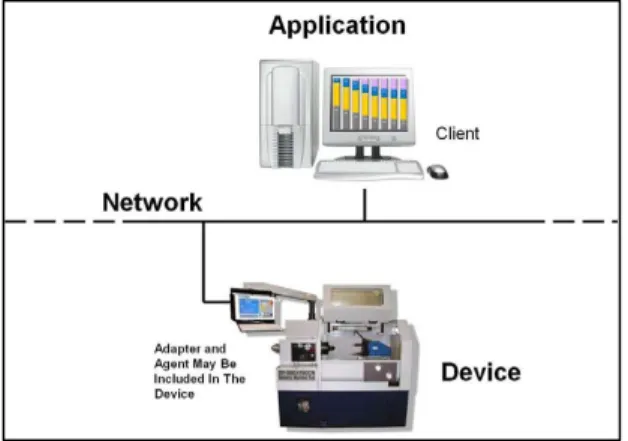
The “Starter Implementation Program” will only use the MTConnect Native Devices configuration illustrated in Figure 1.
MT
Connect Starter Program
This configuration only uses devices (machines or equipment) that are provided with MTConnect functions and the data dictionary integrated into the device capable to be connected to a network that is linked to an MTConnect compliant software application.
No additional functions must be added to enable communications. Basically, the Device natively communicates using the MTConnect Standard.
Configuration requirements
There are three main pieces needed for this configuration: MTConnect compliant devices (machine tools), a network, and an application that can read MTConnect data. Each one of these pieces can be obtained and configured to implement a monitoring system.
The first requirement is an MTConnect compliant device. The compliant device or machine tool to be used for this program will be offered by a machine tool builder participating in the program. The builders have agreed to provide the necessary adaptors, if required, and communication agents on machines as defined in the vendor offerings below.
NOTE: If you already have an MTConnect compliant device or equipment, it can be used in this program.
The second requirement is an Ethernet network. This network is required to connect the machine tools to the application. Usually the shop has to supply this connectivity or one could work with an application provider to install the network. For some applications, the network will need connectivity to the Internet.
The third requirement is a monitoring application that is supplied by a software vendor. For this program, listed software providers have agreed to provide initial trial offerings so that one can get an initial sense of the benefits of shop monitoring.
Responsibilities
The following chart provides a summary of the responsibilities of each MTConnect Native Device configuration.
Machine Tool (MT) Network Application Option 1 MT Builder Plant Owner Software Provider
MT
Connect Starter Program
Participating Organizations
The following is a listing of companies who have agreed to participate in this program. Following the listing, there is a brief description providing an understanding of each companies offering, cost and requirements.
Machine Tool Builders
• DMG/Mori Seiki USA Inc. • Mazak Corporation
• Okuma America Corporation
Software Application Providers
• DMG/Mori Seiki USA Inc.
• Lemoine Multinational Technologies Inc. • MAG Industrial Automation Systems • Real Time Development Corporation • Scadaware
• Scytec
• System Insights, Inc. • TechSolve, Inc.
Vendor Offerings
The following are offerings being provided by OEMs in support of this program. Terms used on these sheets are defined as:
Machine Tool Builders
Applicable Controls Existing controls that can be provided with or updated with an MTConnect interface.
Installation Cost Cost to have the machine tools updated for this program.
Maximum No. Machines This is the maximum number of machines that a builder is offering to update.
Application Software Providers
Computer Requirements Identifies if a product is PC, Server or Cloud based. May include minimum operating system requirements.
Product Name Software application product that is being offered.
MT
Connect Starter Program
Vendor Offering – Machine Tool Builder
DMG/Mori Seiki USA Inc
.
Applicable
Controls
Mori Seiki machines with MAPPS-‐2, MAPPS-‐3 and MAPPS-‐4
Maximum No.
Machines
3
Installation Cost
$500.00 per machine OR $1000.00 when all 3(max.)
Machines are scheduled for installation in one visit. (US
installations only).
Contact
Surya
Kommareddy
916-‐201-‐
3052
[email protected]
Website
http://www.dmgmoriseikiusa.com/mori-‐seiki-‐application-‐
systems/remote-‐machine-‐monitoring
Comments
MTConnect Adapters & Agent software – FREE
Customer to provide PC for Agent software installation.
Customer to supply networking equipment and takes care of
connectivity setup.
DMGMS also provides cloud-‐based monitoring application.
MT
Connect Starter Program
Vendor Offering – Machine Tool Builder
Mazak Corporation
Applicable Controls Matrix Matrix II Maximum No. Machines 3
Installation Cost $500.00 (USA only)
Contact Neil
Desrosiers 859-‐342-‐1881 [email protected]
Website http://www.mazakusa.com/mtconnectsupport.asp
Comments MTConnect Adapters – FREE
MTConnect Agent -‐ FREE
CNC Main Software Upgrade – FREE
End User to supply Network Connectivity and settings
MT
Connect Starter Program
Vendor Offering – Machine Tool Builder
Okuma America Corporation
Applicable Controls OSP-‐P300 OSP-‐P200A OSP-‐P200 OSP-‐P100II
Maximum No. Machines No limit for above CNC versions
Installation Cost Typical Okuma Distributor service call charges apply
Contact Brian Sides 704-‐588-‐7000 [email protected]
Website http://www.okuma.com/mtconnect
Comments MTConnect Adapters – FREE
MTConnect Agent -‐ FREE
CNC Software Upgrade(if applicable) – FREE
*Note: If CNC Software Upgrade not required, customer can choose to install and configure without Okuma Distributor support.
End User to supply Network Connectivity and settings.
Okuma makes no claim of endorsement for Application Provider capability or support.
MT
Connect Starter Program
Vendor Offering – Application Provider
DMG/Mori Seiki USA Inc.
Product Name Mori-‐WebMonitor
Trial Period 3 months Up to 3 machines Computer
Requirements Cloud based system
Other Requirements Requires connectivity to the Internet Installation Cost None Up to 3 machines
Key Features • Web-‐based real-‐time tracking of machine utilization and performance.
• Gantt chart, Cycle Time, Run rate, Alarm History/Pareto diagram, Work count reports.
Contact Surya Kommareddy 916-‐201-‐3052 [email protected] Website http://www.dmgmoriseikiusa.com/mori-‐seiki-‐application-‐ systems/remote-‐machine-‐monitoring
Comments Customer to take care of network connectivity and IT requirements.
MT
Connect Starter Program
Vendor Offering – Application Provider
Lemoine Multinational Technologies Inc.
Product Name Lemoine
Trial Period 60 days
Computer
Requirements Includes the free use of a locally installed server for the duration of the trial period. Other Requirements
Installation Cost No charge
Key Features Monitoring machining operations
Contact Yigal Ziv 248-‐960-‐5989 [email protected]
Website http://www.lemoineautomation.com
Comments
MT
Connect Starter Program
Vendor Offering – Application Provider
MAG Industrial Automation Systems
Product Name Freedom eLOG
Trial Period 60 Days
Computer
Requirements Option 1 (Locally Hosted on customer supplied computer per MAG-‐IAS specification, or Remotely Hosted) Option 2 (Locally Hosted on MAG-‐IAS supplied computer.
Other Requirements MTConnect Enabled Machines, Internet Connection
Installation Cost Option 1
(Customer Installed) No Charge
Option 2
Installed by MAG-‐IAS at $500 plus travel and living cost.
Key Features • Web-‐Based Real-‐Time reports viewable with Desktop, Laptop, Tables, and Mobile Devices.
• Multiple reports covering Availability, Performance, Quality, OEE, Speed and Feed Override Values, CNC Alarms
• Multiple language support selectable by facility or individual users.
• Integration with Business Systems (ERP, MES, Maintenance) • Scalable Implementation
• Asset Agnostic
• Solution for legacy equipment without native MTConnect® capability.
• Configurable email and Text Notification of Events and Conditions.
Contact Pete Tecos (586) 202-‐3285 pete.tecos@mag-‐ias.com Website http://www.mag-‐ias.com/en/mag/products-‐services/software.html
Comments Freedom eLOG is developed and supported by Machine Tool and Manufacturing professionals who understand the challenges of today’s global manufacturing environment. It has been implemented across a wide range of industries including Automotive, Aerospace, Energy, Agriculture / Construction, as well as Job Shops. Freedom eLOG provides information that enables manufacturers to Minimize Waste, Increase Productivity, and Maximize Profit.
MT
Connect Starter Program
Vendor Offering – Application Provider
Real Time Development Corporation
Product Name Solution Family: Solution Builder, Solution Engine, Solution Manager, Quick Start Platform
Trial Period Lite Version
No limit Full Evaluation Version – 4 hours full operation Computer
Requirements Any Windows based computer Other Requirements
Installation Cost Customer installed
Key Features Solution Family is a full Application Platform that integrates
MTConnect® devices in a simple visual, drag and drop environment. Solution Manager allows for the management of MTConnect® based machine tools.
Contact Nat Frampton 862-‐244-‐4611
Website http://www.solution-‐family.com/
Comments Solution Manager Lite allows monitoring and full evaluation of a single machine tool OEE, Production Counts, Histories and all features of the Solution Manager product are available for a single machine tool. Solution Builder Lite provides a full MTConnect® Visualization tool. The Lite version allows for connection, visualization and trending to an unlimited number of MTConnect® Agents or Quick Start Platforms.
MT
Connect Starter Program
Vendor Offering – Application Provider
SCADAware
Product Name StatusWatch Production Monitoring Software
Trial Period 30 days
Computer
Requirements Hosted locally – 2.66GHz, 2GB memory, 10 GB HD, Database – MSSQL, Oracle, or PostgreSQL
Cloud based – Internet connection required
Other Requirements Ethernet to equipment, MTConnect compatible controller Installation Cost Customer
installed – no cost
SCADAware standard engineering
rates if required
Key Features • Custom web based report configuration and viewing. No limit to number of reports.
• Native iPad application with animated live shop floor view and reporting
Contact Rick Caldwell 309-‐665-‐0135 [email protected]
Website http://www.scadaware.com/
Comments More than 3,000 systems installed in 9 countries
MT
Connect Starter Program
Vendor Offering – Application Provider
Scytec Consulting Inc.
Product Name DataXchange
Trial Period 30 days
Computer Requirements
Cloud based system
Other Requirements One PC requires connectivity to the CNC’s and the Internet Installation Cost If on-‐site time is required for connectivity
• $1000 per day plus expenses If all of the machines are connected
• $500 for remote configuration and training
Key Features • Track multiple types of cycle time and downtime • Real-‐time dash board of machine statuses
• iPad, iPhone, Android phone and Android tablet charting and real time status viewing
Contact Josh
Davids 720-‐482-‐8250 x111 [email protected][email protected]
Website http://www.scytec.com
Comments Fees that are postponed for 30 days • One Time Setup Fee
- Bronze version: $1000 - Silver version: $1500 • Monthly Fee per Machine
- Bronze version: $45 - Silver version: $65
MT
Connect Starter Program
Vendor Offering – Application Provider
System Insights, Inc.
Product Name Vimana
Trial Period 30 day trial
Computer
Requirements SaaS hosted solution – uses local PC to create a secure encrypted connection to the service Other Requirements Requires connectivity to the Internet
Installation Cost $0.00
Key Features Real-‐time production efficiency monitoring and analysis with email and SMS alerts – mobile device support from anywhere in the world
Contact William Sobel 510-‐684-‐6400 [email protected]
Website http://www.systeminsights.com/vimana
Comments
MT
Connect Starter Program
Vendor Offering – Application Provider
TechSolve, Inc.
Product Name ShopViz
Trial Period 60 days 4 machines
Computer
Requirements Cloud-‐based
Other Requirements Internet connection
Installation Cost None
Key Features Cloud based, OEE, downtime, quality, performance, energy monitoring, MES integration, video monitoring, compressed air monitoring,
document management, reporting, maintenance management, event notification (SMS, email) Contact Amit Deshpande [email protected] 513-‐948-‐2118 Website www.shopviz.org
Comments Geared towards small-‐medium manufacturers