Viewing Documents Using OpenDocument
■
SAP BusinessObjects Business Intelligence platform 4.0 Support Package 2
© 2011 SAP AG. All rights reserved.SAP, R/3, SAP NetWeaver, Duet, PartnerEdge, ByDesign, SAP Business ByDesign, and other SAP products and services mentioned herein as well as their respective
Copyright
logos are trademarks or registered trademarks of SAP AG in Germany and other countries. Business Objects and the Business Objects logo, BusinessObjects, Crystal Reports, Crystal Decisions, Web Intelligence, Xcelsius, and other Business Objects products and services mentioned herein as well as their respective logos are trademarks or registered trademarks of Business Objects S.A. in the United States and in other countries. Business Objects is an SAP company.All other product and service names mentioned are the trademarks of their respective companies. Data contained in this document serves informational purposes only. National product specifications may vary.These materials are subject to change without notice. These materials are provided by SAP AG and its affiliated companies ("SAP Group") for informational purposes only, without representation or warranty of any kind, and SAP Group shall not be liable for errors or omissions with respect to the materials. The only warranties for SAP Group products and services are those that are set forth in the express warranty statements accompanying such products and services, if any. Nothing herein should be construed as constituting an additional warranty.
Contents
Getting started...5 Chapter 1
About this documentation...5 1.1
Who should use this documentation?...5 1.1.1
About OpenDocument...5 1.1.2
What's new in SAP BusinessObjects Business Intelligence platform 4.0...6 1.2
Migrating your links...6 1.3
Changes to the default URL path...6 1.3.1
Deprecated parameters...7 1.3.2
OpenDocument syntax...9 Chapter 2
Basic URL syntax...9 2.1
URL syntax considerations...9 2.2 Session management...11 Chapter 3 Serialized sessions...11 3.1 Logon tokens...12 3.2
User sessions ...12 3.3
Parameter reference...15 Chapter 4
Session management parameters...17 4.1
serSes...17 4.1.1
token...18 4.1.2
Document identifier parameters...19 4.2 iDocID...19 4.2.1 sDocName...19 4.2.2 sIDType...20 4.2.3 sInstance...21 4.2.4 Input parameters...21 4.3 lsC...21 4.3.1 lsM[NAME]...22 4.3.2 lsR[NAME]...23 4.3.3
sPartContext...25 4.3.5
sRefresh...25 4.3.6
sReportMode...26 4.3.7
sReportName...27 4.3.8
sReportPart...27 4.3.9
Output parameters...28 4.4
NAII...28 4.4.1
sOutputFormat...28 4.4.2
sViewer...29 4.4.3
More Information...31 Appendix A
Index 33
Getting started
1.1 About this documentation
This documentation provides you with information for constructing parameterized URLs with the OpenDocument syntax. OpenDocument URLs link to Business Intelligence (BI) documents in an SAP BusinessObjects Business Intelligence platform installation. A parameter reference, including syntax and usage examples, is provided for each OpenDocument URL parameter.
For information about deploying the OpenDocument web application after the installation of the BI
platform, see theSAP BusinessObjects Business Intelligence platform Web Application Deployment
Guide.
1.1.1 Who should use this documentation?
This documentation is for anyone creating URLs to BI documents with the OpenDocument syntax. We recommend consulting this guide if you are:
• Providing end users with hyperlinks to a document through email or other direct means.
• Embedding hyperlinks in one document to another.
• Programmatically generating hyperlinks to documents in your custom application.
Familiarity with the management and organization of objects in your BI platform installation is beneficial.
1.1.2 About OpenDocument
OpenDocument is one of many deployed web applications within a BI platform installation. It processes incoming URL requests for documents and any other viewable object type in the Central Management Server (CMS), and delivers the correct document to the end user in the appropriate viewer. This allows you to send users direct links to a document and avoid having them navigate through a folder hierarchy, such as in BI launch pad. The OpenDocument syntax and its parameters allow you to construct URLs that link to these documents. For example, consider the following URL:
Note:
Replace <servername>:<port> with the name and port number of your web server where OpenDocument is deployed.
This URL accesses the object in the CMS with the CUID value ofAa6GrrM79cRAmaOSMGoadKI. If
this is a Crystal report, for example, then the report is rendered to the user in a default SAP Crystal
Reports viewer. In this example,iDocIDis one of many URL parameters. These parameters specify
how to access a particular document in the CMS, or determine how to display the document to the user. You can link to many viewable object types with the OpenDocument syntax. Some examples include: • Crystal reports
• Web Intelligence documents
• Analysis workspaces
• BI launch pad workspaces
• Dashboard Design objects (formerly Xcelsius)
Some of the designers for these BI document types provide GUI-based URL builders to help you embed openDocument URLs into your documents. Consult their respective product documentation for information on these features.
1.2 What's new in SAP BusinessObjects Business Intelligence platform 4.0
serSes parameter
TheserSesparameter can now be used to pass a serialized Enterprise session to an OpenDocument URL. Use this parameter so users avoid encountering additional logon prompts in your custom application.
For more information on theserSesparameter and managing user sessions, seeSession management
andserSes.
1.3 Migrating your links
1.3.1 Changes to the default URL path
Getting startedThe default URL to the OpenDocument web application bundle has changed in SAP BusinessObjects Business Intelligence platform 4.0. New absolute OpenDocument links need to use the new default URL:
http://<servername>:<port>/BOE/OpenDocument/opendoc/openDocument.jsp?<parameter1>&<parameter2>&...&<parameterN> If you are migrating reports with existing links from an XI 3.x release platform, resolve the issue by setting up the following redirect in your web server:
• Redirect:../OpenDocument/opendoc/openDocument.jsp
• To:../BOE/OpenDocument/opendoc/openDocument.jsp Note:
• Ensure that all URL request parameters are forwarded correctly by your redirect. Refer to your web server documentation for detailed steps on implementing a redirect.
• SAP BusinessObjects Business Intelligence platform 4.0 only supports a Java deployment of
OpenDocument. The OpenDocument web bundle is part of theBOE.warfile.
1.3.2 Deprecated parameters
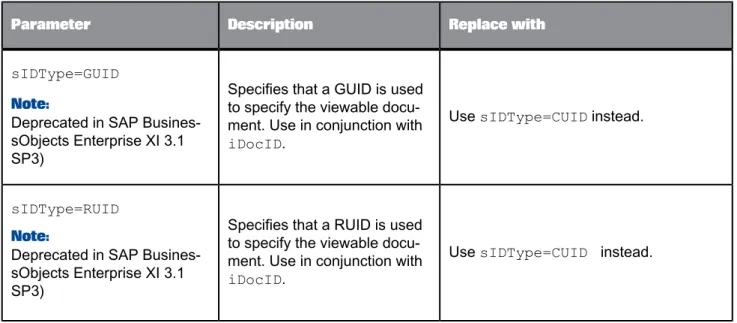
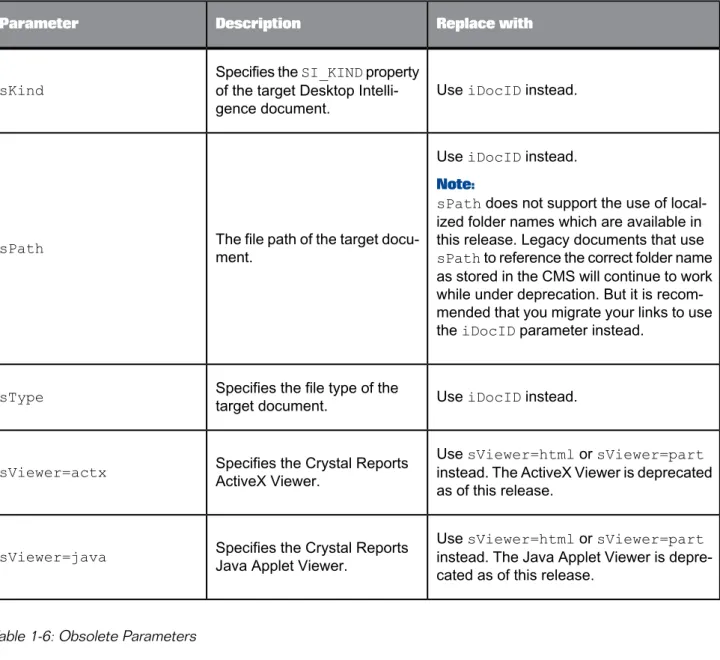
This section lists deprecated and obsolete OpenDocument parameters as of SAP BusinessObjects Business Intelligence platform 4.0. Obsolete parameters are unsupported.
Note:
Deprecated and obsolete members as of SAP BusinessObjects Enterprise XI 3.1 Service Packs are also listed for reference.
Table 1-5: Deprecated Parameters
Replace with Description
Parameter
UsesIDType=CUIDinstead. Specifies that a GUID is used
to specify the viewable docu-ment. Use in conjunction with iDocID.
sIDType=GUID Note:
Deprecated in SAP Busines-sObjects Enterprise XI 3.1 SP3)
UsesIDType=CUID instead. Specifies that a RUID is used
to specify the viewable docu-ment. Use in conjunction with iDocID.
sIDType=RUID Note:
Deprecated in SAP Busines-sObjects Enterprise XI 3.1 SP3)
Replace with Description
Parameter
UseiDocIDinstead. Specifies theSI_KINDproperty
of the target Desktop Intelli-gence document.
sKind
UseiDocIDinstead. Note:
sPathdoes not support the use of local-ized folder names which are available in this release. Legacy documents that use sPathto reference the correct folder name as stored in the CMS will continue to work while under deprecation. But it is recom-mended that you migrate your links to use theiDocIDparameter instead.
The file path of the target docu-ment.
sPath
UseiDocIDinstead. Specifies the file type of the
target document. sType
UsesViewer=htmlorsViewer=part instead. The ActiveX Viewer is deprecated as of this release.
Specifies the Crystal Reports ActiveX Viewer.
sViewer=actx
UsesViewer=htmlorsViewer=part instead. The Java Applet Viewer is depre-cated as of this release.
Specifies the Crystal Reports Java Applet Viewer.
sViewer=java
Table 1-6: Obsolete Parameters
Replace with Description
Parameter
Use the HTML anchor'starget
at-tribute or an equivalent. For example: <a href="..." tar
get="_blank">...</a> Indicates whether the target
docu-ment will open in the current browser window or whether a new window will be launched.
sWindow Note:
Obsolete as of SAP Busines-sObjects Enterprise XI 3.1 SP3 Getting started
OpenDocument syntax
2.1 Basic URL syntax
The basic syntax for an OpenDocument URL is as follows:
http://<servername>:<port>/BOE/OpenDocument/opendoc/openDocument.jsp?<parameter1>&<parameter2>&...&<parameterN> Note:
Variables are denoted with angle brackets. You must substitute the proper value for these variables. For example, you must use the name of your BI platform server where OpenDocument is hosted in place of<servername>and you must use the correct port number in place of<port>to access the OpenDocument web application.
2.2 URL syntax considerations
Accessing documents
You must include theiDocIDorsDocNameparameter in your OpenDocument URL to specify the
document to be viewed. Since there may be multiple documents in the Central Management Server (CMS) with the same name, and documents can be moved or renamed, it is recommended that you useiDocIDto ensure uniqueness.
Joining parameters
Join parameters with the ampersand (&). Do not place spaces around the ampersand. For example: sType=wid&sDocName=Sales2003
The ampersand is always required between parameters.
Spaces and special characters in parameter values
Because some browsers cannot interpret spaces, the parameters of the link cannot contain spaces or other special characters that require URL encoding. To avoid the misinterpretation of special characters, you can define a URL-encoded string in the source database to replace the special character with an escape sequence. This will allow the database to ignore the special character and correctly interpret the parameter value. Note that certain RDBMS have functions that allow you to replace one special character with another.
By creating an escape sequence for the plus sign (+), you can instruct the database to interpret the plus sign as a space. In this case, a document title Sales Report for 2003 would be specified in the
DocName parameter as:&sDocName=Sales+Report+for+2003&
This syntax prevents the database from misinterpreting the spaces in the title.
In addition, values for serialized sessions (using theserSesparameter) and logon tokens (using the tokenparameter) must be URL-encoded by your application before being passed to the OpenDocument URL string.
Trailing spaces in parameter values
Trim trailing spaces at the end of parameter values and prompt names. Do not replace them with a plus sign (+). The viewer may not know whether to interpret the plus sign (+) as part of the prompt name or as a space. For example, if the prompt name displays:
Select a City:_
(where _ represents a space), enter the following text in the link: lsSSelect+a+City:=Paris
where the spaces within the prompt name are replaced with the plus sign, and the trailing space is trimmed off.
Capitalization
All of the OpenDocument parameters and parameter values are case sensitive.
URL length limit
OpenDocument may add characters to your URL when it redirects to the requested document; however, encoded URLs cannot exceed the maximum character limit for the supported browsers. For example, certain versions of Internet Explorer limit the URL length to 2083 characters. Therefore, know the browser character limit to ensure your URL will be within the maximum limit.
Parameter values in links to sub-reports
You cannot pass parameter values to a sub-report of a target Crystal report.
Opening a new window
To force OpenDocument HTML links to open a new browser window, use the HTML anchor'starget
attribute or an equivalent. For example:
<a href="http://<servername>:<port>/BOE/OpenDocument/opendoc/<platformSpecific>?iDocID=Aa6GrrM79cRAmaOSMGoad KI&sIDType=CUID" target="_blank">hyperlink text</a>
Session management
Normally when using an OpenDocument link to access documents secured in the BI platform, the user will be prompted for credentials. OpenDocument provides two parameters to avoid having the user prompted for their username and password information. You can either insert a serialized session or a logon token directly into the OpenDocument URL. This gives you control over the duration of the access to the document. OpenDocument URLs can be set to different languages.
3.1 Serialized sessions
Serialized sessions can be used in OpenDocument by inserting theserSesparameter into the
OpenDocument URL. This allows users to access files without being prompted for credentials. Creating a serialized sessions does not use up an additional licence. Serialized sessions expire if the original user's session times out or logs off.
Example:
The following example uses the BI platform Java SDK to pass in a serialized session to the
OpenDocument URL. For more information on theIEnterpriseSession.getSerializedSession
method, see theSAP BusinessObjects Business Intelligence platform Java API Reference.
String openDocumentSerSes() throws SDKException, UnsupportedEncodingException {
IEnterpriseSession sess = CrystalEnterprise.getSessionMgr().logon ("username", "password", "<cms>:<port>", "secEnterprise");
String serSession = sess.getSerializedSession();
String serSesEncode = URLEncoder.encode(serSession, "UTF-8");
return ("http://<server>:<port>/BOE/OpenDocument/opendoc/openDocument.jsp?iDocID=Aa6GrrM79cRAmaOSMGoad KI&sIDType=CUID&serSes=" + serSesEncode);
} Note:
• Replace <server>:<port> with the server name and port number of your web server.
• Replace <cms>:<port> with the Central Management Server (CMS) name and port number.
• You must URL-encode the serialized session.
• Since an OpenDocument URL with a serialized session contains the user session, they must not
be shared for security reasons. Session management
3.2 Logon tokens
Logon tokens can be used in OpenDocument by inserting thetokenparameter into the OpenDocument
URL. Logon tokens allow users access to files secured in the BI platform without being prompted for credentials, while also giving you control on the duration of the access to the file. Creating a new logon token uses up an additional licence.
Example:
The following example uses the BI platform Java SDK to pass in a logon token to the OpenDocument
URL. For more information on theILogonTokenMgr.createLogonToken method, see theSAP
BusinessObjects Business Intelligence platform Java API Reference. String openDocumentToken() throws SDKException, UnsupportedEncodingException {
IEnterpriseSession sess = CrystalEnterprise.getSessionMgr().logon ("username", "password", "<cms>:</port>", "secEnterprise");
String token = sess.getLogonTokenMgr().createLogonToken("",120,100); String tokenEncode = URLEncoder.encode(token, "UTF-8");
sess.logoff();
return ("http://<server>:<port>/BOE/OpenDocument/opendoc/openDocument.jsp?iDocID=Aa6GrrM79cRAmaOSMGoad KI&sIDType=CUID&token=" + tokenEncode);
} Note:
• Replace <server>:<port> with the server name and port number of your web server.
• Replace <cms>:<port> with the Central Management Server (CMS) name and port number. • ThecreateLogonTokenmethod allows you to specify the machine that can use the token (which
can be empty to allow any user to use the token), the number of minutes the token is valid for, and the number of logons that the token can be used for as parameters. Since the newly created logon token consumes an additional session,sess.logoffis called to logoff the original session.
• Since an OpenDocument URL with a logon token contains the user session, they must not be
shared for security reasons.
3.3 User sessions
When OpenDocument is used from BI launch pad or the CMC, it will access the current user session and the user does not need to enter credentials. When a document is viewed using an OpenDocument URL, the user will be prompted for credentials except in the following cases:
• Vintela or Siteminder SSO is configured for the deployed OpenDocument web application.
• The OpenDocument URL uses aserSesor atokenparameter.
• The OpenDocument application has an existing user session for that browser session.
If the existing session is different than the session in theserSesortokenparameter, the existing
session will be closed and a new session will be created. That is, you can useserSesortoken
parameter to over-ride an existing user session. The OpenDocument application will look for an existing user session in the Web application session and in cookies.
Note:
Only one OpenDocument session can be created from a single browser session.
If the newserSesortokenparameter is incorrect and there is an existing user session, OpenDocument will attempt to open the document using the current user session. If it can't it will then prompt the user for credentials.
Parameter reference
This section provides details about the available OpenDocument parameters, their specific uses, and relevant examples.
Note:
The document to which an OpenDocument link points to is referred to as the target document. Table 4-1: Session Management Parameters
Description Parameter
Specifies a valid serialized Enterprise session.
serSes
Specifies a valid logon token for the current Enterprise ses-sion.
token
Table 4-2: Document Identifier Parameters
Description Parameter
Specifies the unique identifier of the viewable document in
the CMS. Use in conjunction withsIDType.
iDocID
Specifies the name of the viewable document in the CMS.
sDocName
Specifies the type of object identifier used to specify the
viewable document. Use in conjunction withiDocID.
sIDType
Specifies the scheduled instance of the target document to
open. Use in conjunction withsDocNameoriDocID.
sInstance
Table 4-3: Input Parameters
Description Parameter
Specifies a contextual prompt for Web Intelligence documents if there is an ambiguity during SQL generation.
lsC
Specifies multiple values for a prompt.[NAME]is the text of the prompt.
lsM[NAME]
Specifies a range of values for a prompt.[NAME]is the text of the prompt.
lsR[NAME]
Specifies a value for a single prompt.[NAME]is the text of the prompt.
lsS[NAME]
Specifies the data context of a Crystal report part. Use in
conjunction withsReportPart.
sPartContext
Indicates whether a database refresh should be forced when the target document is opened.
sRefresh
Indicates whether the link should open the full target Crystal report or just the report part specified in.
sReportMode
Specifies the report to open if the target document contains multiple reports.
sReportName
Specifies the part of the target Crystal report to open.
sReportPart
Table 4-4: Output Parameters
Description Parameter
Indicates whether to force the display of the prompt selection page for Interactive Analysis prompts.
NAII
Specifies the format in which to open the target document.
sOutputFormat
Description Parameter
Specifies the selected report viewer.
sViewer
4.1 Session management parameters
4.1.1 serSes
Values Description
Syntax
A serialized string representing the current Enterprise session.
Specifies a valid serialized Enterprise session.
serSes
Contains a serialized session of the current user session. This can be entered into an OpenDocument URL to allow users to access files without being prompted for credentials. Creating a serialized sessions does not use up an additional licence. Serialized sessions expire if the original user's session times out or logs off.
Example:
The following example uses the BI platform Java SDK to pass in a serialized session to the
OpenDocument URL. For more information on theIEnterpriseSession.getSerializedSession
method, see theSAP BusinessObjects Business Intelligence platform Java API Reference. You can
retrieve a serialized session in a similar fashion using other BI platform SDKs such as .NET and Web Services.
String openDocumentSerSes() throws SDKException, UnsupportedEncodingException {
IEnterpriseSession sess = CrystalEnterprise.getSessionMgr().logon ("username", "password", "<cms>:<port>", "secEnterprise");
String serSession = sess.getSerializedSession();
String serSesEncode = URLEncoder.encode(serSession, "UTF-8");
return ("http://<server>:<port>/BOE/OpenDocument/opendoc/openDocument.jsp?iDocID=Aa6GrrM79cRAmaOSMGoad KI&sIDType=CUID&serSes=" + serSesEncode);
}
Note: Parameter reference
• Replace <cms>:<port> with the Central Management Server (CMS) name and port number.
• You must URL-encode the serialized session.
• Since an OpenDocument URL with a serialized session contains the user session, they must not
be shared for security reasons.
4.1.2 token
Values Description
Syntax
The logon token for the current Enter-prise session.
Specifies a valid logon token for the current Enterprise session.
token
Contains the logon token for the current user. This can be entered into an OpenDocument URL to allow users to access files without being prompted for credentials. Creating a new logon token uses up an additional licence.
Example:
The following example uses the BI platform Java SDK to pass in a logon token to the OpenDocument
URL. For more information on theILogonTokenMgr.createLogonToken method, see theSAP
BusinessObjects Business Intelligence platform Java API Reference. You can create logon tokens in a similar fashion using other BI platform SDKs such as .NET and Web Services.
String openDocumentToken() throws SDKException, UnsupportedEncodingException {
IEnterpriseSession sess = CrystalEnterprise.getSessionMgr().logon ("username", "password", "<cms>:<port>", "secEnterprise");
String token = sess.getLogonTokenMgr().createLogonToken("",120,100); String tokenEncode = URLEncoder.encode(token, "UTF-8");
return ("http://<server>:<port>/BOE/OpenDocument/opendoc/openDocument.jsp?iDocID=Aa6GrrM79cRAmaOSMGoad KI&sIDType=CUID&token=" + tokenEncode);
}
Note:
• Replace <server>:<port> with the server name and port number of your web server.
• Replace <cms>:<port> with the Central Management Server (CMS) name and port number. • ThecreateLogonTokenmethod allows you to specify the machine that can use the token (which
can be empty to allow any user to use the token), the number of minutes the token is valid for, and the number of logons that the token can be used for as parameters.
• Since an OpenDocument URL with a logon token contains the user session, they must not be shared
for security reasons. Parameter reference
4.2 Document identifier parameters
4.2.1 iDocID
Values Description
Syntax
A numerical identifier associated with the document in the CMS.
Specifies the unique identifier of the viewable document in the CMS. Use in conjunction withsIDType. iDocID
You must include theiDocIDorsDocNameparameter in your OpenDocument URL to specify the
document to be viewed. Since there may be multiple documents in the CMS with the same name, it is
recommended that you useiDocIDto ensure uniqueness.
You can see identifier values for a document within the Central Management Console (CMC) or BI launch pad applications. The properties page for each document contains the document ID and the CUID. You can also obtain the identifier programmatically using the BI platform SDK. For example, in
the Java SDK thecom.crystaldecisions.sdk.occa.infostore.IInfoObjectinterface
containsgetIDandgetCUIDmethods which you can pass to an OpenDocument URL.
Note:
If you pass in an InfoObject ID rather than a CUID, you do not need to specify thesIDTypeparameter. However, InfoObject IDs are changed when migrating documents from one CMS to another. It is recommended that the CUID be used, which is preserved during migration.
Example:
http://<servername>:<port>/BOE/OpenDocument/opendoc/openDocument.jsp?iDocID=2010
http://<servername>:<port>/BOE/OpenDocument/opendoc/openDocument.jsp?iDocID=Aa6GrrM79cRAmaOSMGoadKI&sID Type=CUID
4.2.2 sDocName
Parameter referenceValues Description
Syntax
The title of the document in the CMS. Specifies the name of the viewable
document in the CMS. sDocName
You must include theiDocIDorsDocNameparameter in your OpenDocument URL to specify the
document to be viewed. Since there may be multiple documents in the CMS with the same name, and
documents can be moved or renamed, it is recommended that you useiDocIDto ensure uniqueness.
Note:
sDocNamedoes not support the use of localized document names. Legacy documents that usesDoc Nameto reference the correct document name as stored in the CMS will continue to work. But it is
recommended that you use theiDocIDparameter instead.
Example:
http://<servername>:<port>/BOE/OpenDocument/opendoc/openDocument.jsp?sDocName=Sales+in+2003
4.2.3 sIDType
Values Description
Syntax
• InfoObjectID • ParentID • CUID Specifies the type of object identifier
used to specify the viewable
docu-ment. Use in conjunction withiDo
cID. sIDType
Note:
If you pass in an InfoObject ID as a value toiDocIDrather than a CUID, you do not need to specify thesIDTypeparameter. However, InfoObject IDs are changed when migrating documents from one CMS to another. It is recommended that the CUID be used, which is preserved during migration.
Example:
http://<servername>:<port>/BOE/OpenDocument/opendoc/openDocument.jsp?iDocID=Aa6GrrM79cRAmaOSMGoadKI&sID Type=CUID
4.2.4 sInstance
Values Description
Syntax
• User(Latest instance owned by
current user)
• Last(Latest instance of the
doc-ument)
• Param(Latest instance of the document with matching parame-ter values. Crystal reports and Web Intelligence documents only.) Specifies the scheduled instance of
the target document to open. Use in
conjunction withsDocNameoriDo
cID. sInstance
Example:
http://<servername>:<port>/BOE/OpenDocument/opendoc/openDocument.jsp?sDocName=Sales+in+2003&sInstance=User
4.3 Input parameters
4.3.1 lsC
Values Description
Syntax
A prompt value that resolves the am-biguity in the SQL generation. Specifies a contextual prompt if there
is an ambiguity during SQL genera-tion.
Note:
Only supported by Web Intelligence documents.
lsC
Example:
http://<servername>:<port>/BOE/OpenDocument/opendoc/openDocument.jsp?iDocID=Aa6GrrM79cRAmaOSMGoadKI&sID Type=CUID&lsC=Sales
4.3.2 lsM[NAME]
Values Description
Syntax
• Multiple prompt values, separated
by a comma.
• no_value(only for optional pa-rameters)
Specifies multiple values for a prompt.[NAME]is the text of the prompt.
lsM[NAME]
Note:
You can remove an optional parameter from the prompt by setting it tono_valuein the openDocument
query string. If you leave an optional parameter out of the openDocument query string, a default parameter value will be applied.
Example:
http://<servername>:<port>/BOE/OpenDocument/opendoc/openDocument.jsp?iDocID=Aa6GrrM79cRAmaOSMGoadKI&sID Type=CUID&sRefresh=Y&lsMSelect+Cities=[Paris],[London]
http://<servername>:<port>/BOE/OpenDocument/opendoc/openDocument.jsp?iDocID=Aa6GrrM79cRAmaOSMGoadKI&sID Type=CUID&sRefresh=Y&lsMparamStringDR=[c],[d]&lsMparamNumberDR=[3],[4]&lsMparamDate
DR=[Date(2003,6,3)],[Date(2003,6,4)]&lsMparamDateTimeDR=[DateTime(2003,6,1,3,1,1)],[DateTime(2003,6,1,4,1,1)]
Crystal reports
If the target is a Crystal report, each value must be enclosed in square brackets.
Web Intelligence documents
The character?is a reserved prompt value for Web Intelligence documents in an openDocument URL.
Setting the prompt value tolsM[NAME]=?in the URL forces the "Prompts" dialog box to appear for that particular prompt.
Olap Intelligence reports
If the target document is an OLAP Intelligence report (.car) you can use the IsM parameter to specify prompts. The parameters are passed in as a URL-encoded string using the unique name of the parameter set up in the OLAP Intelligence report.
Example:Setting a memberset parameter
http://<servername>:<port>/BOE/OpenDocument/openDocument.jsp?iDocID=544&sIDType=InfoObject&sType=car&ls MADC216EA-D9A5-42B5-AE%2C21%2C84%2CA9%2CF9%2C6E%2C31%2C7=[%5BCustomers%5D.%5BCountry%5D.%26%5BMexi co%5D],[%5BCustomers%5D.%5BCountry%5D.%26%5BCanada%5D]
This example opens up an OLAP Intelligence report with a memberset parameter to Customers > Country > Mexico and Customers > Country > Canada in the view.
4.3.3 lsR[NAME]
Values Description
Syntax
• A range of values for the prompt,
separated by a double period (..). • no_value(only for optional
pa-rameters) Specifies a range of values for a
prompt.[NAME]is the text of the prompt.
Note:
Not supported by OLAP Intelligence reports.
lsR[NAME]
Note:
You can remove an optional parameter from the prompt by setting it tono_valuein the openDocument
query string. If you leave an optional parameter out of the openDocument query string, a default parameter value will be applied.
Example:
http://<servername>:<port>/BOE/OpenDocument/opendoc/openDocument.jsp?iDocID=Aa6GrrM79cRAmaOSMGoadKI&sID Type=CUID&sRefresh=Y&lsRTime+Period:=[2000..2004)
http://<servername>:<port>/BOE/OpenDocument/opendoc/openDocument.jsp?iDocID=Aa6GrrM79cRAmaOSMGoadKI&sID Type=CUID&sRefresh=Y&lsRparamStringDR=[h..i]&lsRparamNumberDR=[7..8]&lsRparamCurrencyDR=[3..4]&lsRparamDat eDR=[Date(2003,6,7)..Date(2003,6,8)]&lsRparamDateTimeDR=[DateTime(2003,6,1,7,1,1)..Date
Time(2003,6,1,8,1,1)]&lsRparamTimeDR=[Time(1,1,7)..Time(1,1,8)]&lsRparamUnbound1=(..6)&lsRpara mUnbound2=[6..)&lsRparamStringR=[a..d]&lsRparamNumberR=[1..3]&lsRparamCurrencyR=[1..3]&lsRparam DateR=[Date(2003,6,1)..Date(2003,6,3)]&lsRparamDateTimeR=[DateTime(2003,6,1,1,1,1)..Date Time(2003,6,1,3,1,1)]&lsRparamTimeR=[Time(1,1,1)..Time(3,1,1)]
Crystal reports
If the target is a Crystal report, the range must be enclosed in square brackets and/or parentheses (use a square bracket next to a value to include it in the range, and parentheses to exclude it).
4.3.4 lsS[NAME]
Values Description
Syntax
• A single prompt value.
• no_value(only for optional pa-rameters)
Specifies a value for a single prompt. [NAME]is the text of the prompt. lsS[NAME]
Note:
You can remove an optional parameter from the prompt by setting it tono_valuein the OpenDocument
URL. If you leave an optional parameter out of the OpenDocument URL, a default parameter value will be applied.
Example:
http://<servername>:<port>/BOE/OpenDocument/opendoc/openDocument.jsp?iDocID=Aa6GrrM79cRAmaOSMGoadKI&sID Type=CUID&sRefresh=Y&lsSparamString=h&lsSparamNumber=1&
lsSparamCurrency=121&lsSparamDate=Date(2003,6,11)&
lsSparamDateTime=DateTime(2003,6,11,14,38,37)&lsSparamBoolean=false& lsSparamTime=Time(12,39,2)&lsSparamStringDR=a&lsSparamDateDR=Date(2003,6,1)
Web Intelligence documents
The character?is a reserved prompt value for Web Intelligence documents in an openDocument URL.
Setting the prompt value tolsS[NAME]=?in the URL forces the "Prompts" dialog box to appear for that particular prompt.
OLAP Intelligence reports
If the target document is an OLAP Intelligence report (.car) you can use the IsS parameter to specify prompts. The parameters are passed in as a URL-encoded string using the unique name of the parameter set up in the OLAP Intelligence report.
Example:Opening an OLAP report to a specific page
If23CAA3C1-8DBB-4CF3-BA%2CB8%2CD7%2CF0%2C68%2CEF%2C9C%2C6Fis the URL-encoded unique name for the page parameter in the OLAP Intelligence report, you would use the following URL to open the OLAP Intelligence report to page 2:
http://<servername>:<port>/BOE/OpenDocument/openDocument.jsp?iDocID=440&sIDType=InfoOb ject&sType=car&lsS23CAA3C1-8DBB-4CF3-BA%2CB8%2CD7%2CF0%2C68%2CEF%2C9C%2C6F=2
Example:Setting a cube parameter
If8401682C-9B1D-4850-8B%2C5E%2CD9%2C1F%2C20%2CF8%2C1%2C62is the URL-encoded unique name for the cube parameter opening the warehouse cube in the catalogue FoodMart 2000 on MSAS, you would use the following URL to open this cube parameter:
http://<servername>:<port>/BOE/OpenDocument/openDocument.jsp?iDocID=616&sIDType=InfoOb ject&sType=car&lsS8401682C-9B1D-4850-8B%2C5E%2CD9%2C1F%2C20%2CF8%2C1%2C62=CATALOG%3DFood Mart%202000,CUBE%3Dwarehouse
4.3.5 sPartContext
Values Description
Syntax
The name of the report part data context.
Specifies the data context of a report part. Use in conjunction withsRe portPart.
Note:
Only supported by Crystal reports. sPartContext
Note:
Only mandatory if a value is specified forsReportPart.
Example:
http://<servername>:<port>/BOE/OpenDocument/opendoc/openDocument.jsp?iDocID=Aa6GrrM79cRAmaOSMGoadKI&sID Type=CUID&sReportPart=Part1&sPartContext=0-4-0
Note:
ThesReportPartandsPartContextparameters are only supported with the DHML parts viewer (sViewer=part).
4.3.6 sRefresh
Parameter referenceValues Description
Syntax
• Y • N Indicates whether a database refresh should be forced when the target document is opened.
sRefresh
Certain documents can contain saved settings to specify that a database refresh must occur when the
document is opened in a viewer. These document settings will overridesRefresh=N.
Example:
http://<servername>:<port>/BOE/OpenDocument/opendoc/openDocument.jsp?iDocID=Aa6GrrM79cRAmaOSMGoadKI&sID Type=CUID&sRefresh=Y
Crystal reports
ThesRefreshparameter is only supported with thehtmlandpartCrystal report viewers, and not
theactxandjavaviewers.
4.3.7 sReportMode
Values Description
Syntax
• Full • Part Indicates whether the link should
open the full target Crystal report or just the report part specified insRe portPart.
Note:
Only supported by Crystal reports. sReportMode
Note:
Defaults toFullif this parameter is not specified. Only applies if a value is specified forsReportPart.
Example:
http://<servername>:<port>/BOE/OpenDocument/opendoc/openDocument.jsp?iDocID=Aa6GrrM79cRAmaOSMGoadKI&sID Type=CUID&sReportPart=Part1&sReportMode=Part
4.3.8 sReportName
Values Description
Syntax
The report name for Web Intelligence documents and page name for OLAP Intelligence reports.
Specifies the report to open if the target document contains multiple reports.
sReportName
Note:
Defaults to the first report if this parameter is not specified.
Example:
http://<servername>:<port>/BOE/OpenDocument/opendoc/openDocument.jsp?iDocID=Aa6GrrM79cRAmaOSMGoadKI&sID Type=CUID&sReportName=First+Report+Tab
4.3.9 sReportPart
Values Description
Syntax
Name of the Crystal report part. Specifies the part of the target Crystal
report to open. Note:
Only supported by Crystal reports. sReportPart
Example:
http://<servername>:<port>/BOE/OpenDocument/opendoc/openDocument.jsp?iDocID=Aa6GrrM79cRAmaOSMGoadKI&sID Type=CUID&sReportPart=Part1
Note:
ThesReportPartandsPartContextparameters are only supported with the DHML parts viewer (sViewer=part).
4.4 Output parameters
4.4.1 NAII
Values Description
Syntax
• Y (prompt values that are passed
withlsS,lsM, orlsRin the URL are applied and not displayed in the "Prompts" dialog box) Indicates whether to force the display
of the prompt selection page. Note:
Only supported by Web Intelligence documents.
NAII
Note:
• NAII=Yraises the "Prompts" dialog box for any values not specified in the URL. Prompts created with default values are still displayed in the "Prompts" dialog box.
• If all prompt values are specified in the URL, the prompt window does not appear even ifNAII=Y
is specified.
Example:
This example assumes there are two prompts in the Web Intelligence document:YearandCountry.
NAII=Yforces the "Prompts" dialog box to appear and allows the user to specify a value for the Countryprompt. TheYearprompt is already set to a value ofFY1999in the URL using thelsS parameter and therefore is not prompted for.
http://<servername>:<port>/BOE/OpenDocument/opendoc/openDocument.jsp?iDocID=Aa6GrrM79cRAmaOSMGoadKI&sID Type=CUID&lsSYear=FY1999&NAII=Y&sRefresh=Y
4.4.2 sOutputFormat
Parameter referenceValues Description
Syntax
• H(HTML)
• P(PDF)
• E(Microsoft Excel (972003)
-Crystal reports only)
• W(Rich Text Format (RTF)
-Crystal reports only) Specifies the format in which to open
the target document. sOutputFormat
Note:
Defaults to HTML if this parameter is not specified.
Example:
http://<servername>:<port>/BOE/OpenDocument/opendoc/openDocument.jsp?iDocID=Aa6GrrM79cRAmaOSMGoadKI&sID Type=CUID&sOutputFormat=E
4.4.3 sViewer
Values Description
Syntax
• html
• part(Crystal reports only)
Specifies the selected report viewer. sViewer
Example:
http://<servername>:<port>/BOE/OpenDocument/opendoc/openDocument.jsp?iDocID=Aa6GrrM79cRAmaOSMGoadKI&sID Type=CUID&sViewer=html
More Information
Location Information Resource
http://www.sap.com
SAP BusinessObjects product infor-mation
Navigate tohttp://help.sap.com/businessobjectsand on the "SAP Busi-nessObjects Overview" side panel clickAll Products.
You can access the most up-to-date documentation covering all SAP BusinessObjects products and their deployment at the SAP Help Portal. You can download PDF versions or installable HTML libraries.
Certain guides are stored on the SAP Service Marketplace and are not available from the SAP Help Portal. These guides are listed on the Help Portal accompanied by a link to the SAP Service Marketplace. Customers with a maintenance agreement have an authorized user ID to access this site. To obtain an ID, contact your customer support representative. SAP Help Portal
http://service.sap.com/bosap-support> Documentation
• Installation guides:https://service.sap.com/bosap-instguides
• Release notes:http://service.sap.com/releasenotes
The SAP Service Marketplace stores certain installation guides, upgrade and migration guides, deployment guides, release notes and Supported Platforms documents. Customers with a maintenance agreement have an authorized user ID to access this site. Contact your customer support representative to obtain an ID. If you are redirected to the SAP Service Marketplace from the SAP Help Portal, use the menu in the navigation pane on the left to locate the category containing the documentation you want to access.
SAP Service Marketplace
https://cw.sdn.sap.com/cw/community/docupedia
Docupedia provides additional documentation resources, a collaborative authoring environment, and an interactive feedback channel.
Docupedia
https://boc.sdn.sap.com/
https://www.sdn.sap.com/irj/sdn/businessobjects-sdklibrary
Developer resources More Information
Location Information Resource
https://www.sdn.sap.com/irj/boc/businessobjects-articles
These articles were formerly known as technical papers. SAP BusinessObjects articles on
the SAP Community Network
https://service.sap.com/notes
These notes were formerly known as Knowledge Base articles. Notes
https://www.sdn.sap.com/irj/scn/forums
Forums on the SAP Community Network
http://www.sap.com/services/education
From traditional classroom learning to targeted e-learning seminars, we can offer a training package to suit your learning needs and preferred learning style.
Training
http://service.sap.com/bosap-support
The SAP Support Portal contains information about Customer Support programs and services. It also has links to a wide range of technical in-formation and downloads. Customers with a maintenance agreement have an authorized user ID to access this site. To obtain an ID, contact your customer support representative.
Online customer support
http://www.sap.com/services/bysubject/businessobjectsconsulting
Consultants can accompany you from the initial analysis stage to the delivery of your deployment project. Expertise is available in topics such as relational and multidimensional databases, connectivity, database design tools, and customized embedding technology.
Consulting More Information
Index
I
iDocID 19
L
logon tokens 12 lsC 21
lsM 22 lsR 23 lsS 24
M
migration 6
N
NAII 28
P
parameters deprecated 7 list of 15 obsolete 7
S
sDocName 19 serialized sessions 11 serSes 17
session management 11 sIDType 20
sInstance 21 sOutputFormat 28 sPartContext 25 sRefresh 25
sReportMode 26 sReportName 27 sReportPart 27 sViewer 29 syntax 9
T
token 18
U
user sessions 12