GVRP
Contents
Overview . . . 3-2 Introduction . . . 3-3 General Operation . . . 3-4 Per-Port Options for Handling GVRP “Unknown VLANs” . . . 3-6 Per-Port Options for Dynamic VLAN Advertising and Joining . . . 3-8 GVRP and VLAN Access Control . . . 3-10 Port-Leave From a Dynamic VLAN . . . 3-10 Planning for GVRP Operation . . . 3-11 Configuring GVRP On a Switch . . . 3-11 Menu: Viewing and Configuring GVRP . . . 3-12 CLI: Viewing and Configuring GVRP . . . 3-13 Web: Viewing and Configuring GVRP . . . 3-16 GVRP Operating Notes . . . 3-17
Overview
This chapter describes GVRP and how to configure it with the switch’s built-in built-interfaces, and assumes an understandbuilt-ing of VLANs, which are described in Chapter 2, “Static Virtual LANs (VLANs)”.
For general information on how to use the switch’s built-in interfaces, refer to these chapters in the Management and Configuration Guide for your switch: ■ Chapter 3, “Using the Menu Interface”
■ Chapter 4, “Using the Command Line Interface (CLI)” ■ Chapter 5, “Using the Web Browser Interface”
Introduction
GVRP—GARP VLAN Registration Protocol—is an application of the Generic Attribute Registration Protocol—GARP. GVRP is defined in the IEEE 802.1Q standard, and GARP is defined in the IEEE 802.1D-1998 standard.
N o t e
To understand and use GVRP you must have a working knowledge of 802.1Q VLAN tagging. (See “Port-Based Virtual LANs (Static VLANs)” on page 2-3.) GVRP uses “GVRP Bridge Protocol Data Units” (“GVRP BPDUs”) to “adver-tise” static VLANs. In this manual, a GVRP BPDU is termed an advertisement. Advertisements are sent outbound from ports on a switch to the devices directly connected to those ports.GVRP enables the switch to dynamically create 802.1Q-compliant VLANs on links with other devices running GVRP. This enables the switch to automati-cally create VLAN links between GVRP-aware devices. (A GVRP link can include intermediate devices that are not GVRP-aware.) This operation reduces the chances for errors in VLAN configuration by automatically pro-viding VLAN ID (VID) consistency across the network. That is, you can use GVRP to propagate VLANs to other GVRP-aware devices instead of manually having to set up VLANs across your network. After the switch creates a dynamic VLAN, you can optionally use the CLI static <vlan-id> command to convert it to a static VLAN or allow it to continue as a dynamic VLAN for as long as needed. You can also use GVRP to dynamically enable port member-ship in static VLANs configured on a switch.
Feature Default Menu CLI Web
view GVRP configuration n/a page 3-12 page 3-13 page 3-16 list static and dynamic VLANs
on a GVRP-enabled switch
n/a — page 3-15 page 3-16 enable or disable GVRP disabled page 3-12 page 3-14 page 3-16 enable or disable GVRP on
individual ports
enabled page 3-12 page 3-14 — control how individual ports
will handle advertisements for new VLANs
Learn page 3-12 page 3-14 page 3-16
convert a dynamic VLAN to a static VLAN
n/a — page 3-16 —
configure static VLANs DEFAULT_VLAN (VID = 1)
General Operation
When GVRP is enabled on a switch, the VID for any static VLANs configured on the switch is advertised (using BPDUs—Bridge Protocol Data Units) out all ports, regardless of whether a port is up or assigned to any particular VLAN. A GVRP-aware port on another device that receives the advertisements over a link can dynamically join the advertised VLAN.
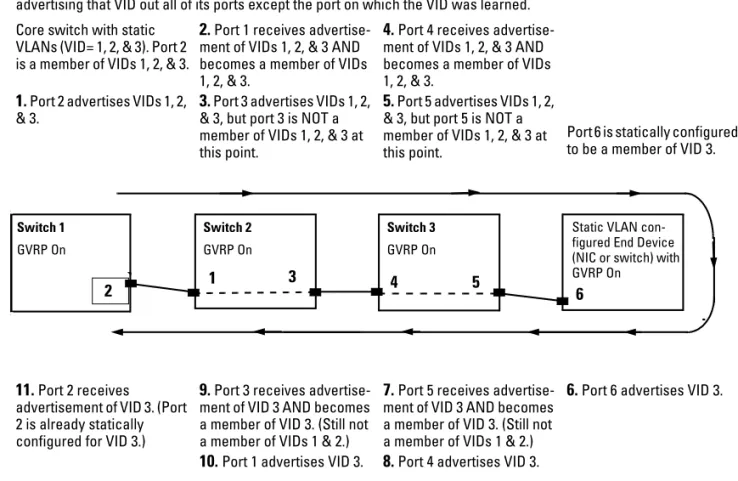
A dynamic VLAN (that is, a VLAN learned through GVRP) is tagged on the port on which it was learned.Also, a GVRP-enabled port can forward an advertise-ment for a VLAN it learned about from other ports on the same switch (internal source), but the forwarding port will not itself join that VLAN until an adver-tisement for that VLAN is received through a link from another device (exter-nal source) on that specific port
Figure 3-1. Example of Forwarding Advertisements and Dynamic Joining
Operating Note: When a GVRP-aware port on a switch learns a VID through GVRP from another device, the switch begins advertising that VID out all of its ports except the port on which the VID was learned.
Core switch with static VLANs (VID= 1, 2, & 3). Port 2 is a member of VIDs 1, 2, & 3.
1. Port 2 advertises VIDs 1, 2, & 3.
2. Port 1 receives advertise-ment of VIDs 1, 2, & 3 AND becomes a member of VIDs 1, 2, & 3.
3. Port 3 advertises VIDs 1, 2, & 3, but port 3 is NOT a member of VIDs 1, 2, & 3 at this point.
4. Port 4 receives advertise-ment of VIDs 1, 2, & 3 AND becomes a member of VIDs 1, 2, & 3.
5. Port 5 advertises VIDs 1, 2, & 3, but port 5 is NOT a member of VIDs 1, 2, & 3 at this point.
Port 6 is statically configured to be a member of VID 3.
11. Port 2 receives advertisement of VID 3. (Port 2 is already statically configured for VID 3.)
9. Port 3 receives advertise-ment of VID 3 AND becomes a member of VID 3. (Still not a member of VIDs 1 & 2.)
10. Port 1 advertises VID 3.
7. Port 5 receives advertise-ment of VID 3 AND becomes a member of VID 3. (Still not a member of VIDs 1 & 2.)
8. Port 4 advertises VID 3.
6. Port 6 advertises VID 3.
1 4 6 5 3 Switch 1 GVRP On 2 Switch 2 GVRP On Switch 3 GVRP On
Static VLAN con-figured End Device (NIC or switch) with GVRP On
Note that if a static VLAN is configured on at least one port of a switch, and that port has established a link with another device, then all other ports of that switch will send advertisements for that VLAN.
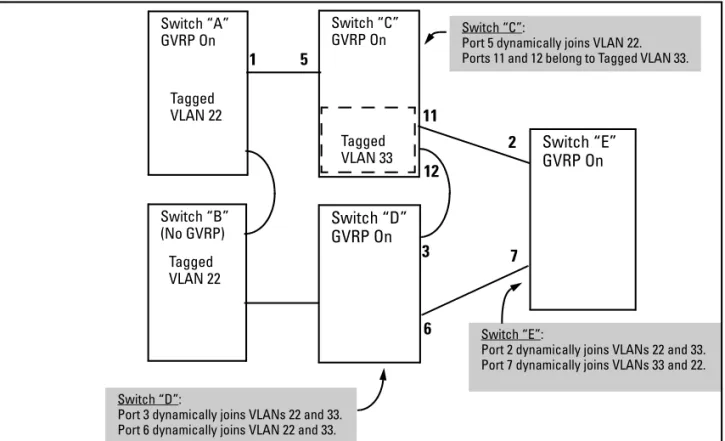
For example, in the following figure, Tagged VLAN ports on switch “A” and switch “C” advertise VLANs 22 and 33 to ports on other GVRP-enabled switches that can dynamically join the VLANs.
Figure 3-2. Example of GVRP Operation
N o t e
A port can learn of a dynamic VLAN through devices that are not aware of GVRP (Switch “B”, above). VLANs must be disabled in GVRP-unaware devices to allow tagged packets to pass through.A GVRP-aware port receiving advertisements has these options: ■ If there is not already a static VLAN with the advertised VID on the
receiving port, then dynamically create the VLAN and become a member. Switch “A”
GVRP On
Switch “B” (No GVRP)
Switch “C” GVRP On
Switch “D” GVRP On
Tagged VLAN 22
Tagged VLAN 22
Switch “E” GVRP On
Tagged VLAN 33
Switch “C”:
Port 5 dynamically joins VLAN 22. Ports 11 and 12 belong to Tagged VLAN 33.
Switch “E”:
Port 2 dynamically joins VLANs 22 and 33. Port 7 dynamically joins VLANs 33 and 22. Switch “D”:
Port 3 dynamically joins VLANs 22 and 33. Port 6 dynamically joins VLAN 22 and 33.
1 5
12 11
2
7 3
■ If the switch already has a static VLAN assignment with the same VID as in the advertisement, and the port is configured to Auto for that VLAN, then the port will dynamically join the VLAN and begin moving that VLAN’s traffic. (For more detail on Auto, see “Per-Port Options for Dynamic VLAN Advertising and Joining” on page 3-8.)
■ Ignore the advertisement for that VID. ■ Don’t participate in that VLAN.
Note also that a port belonging to a Tagged or Untagged static VLAN has these configurable options:
■ Send VLAN advertisements, and also receive advertisements for VLANs on other ports and dynamically join those VLANs.
■ Send VLAN advertisements, but ignore advertisements received from other ports.
■ Avoid GVRP participation by not sending advertisements and dropping any advertisements received from other devices.
IP Addressing. A dynamic VLAN does not have an IP address, and moves traffic on the basis of port membership in VLANs. However, after GVRP creates a dynamic VLAN, you can convert it to a static VLAN. Note that it is then necessary to assign ports to the VLAN in the same way that you would for a static VLAN that you created manually. In the static state you can configure IP addressing on the VLAN and access it in the same way that you would any other static (manually created) VLAN.
Per-Port Options for Handling GVRP “Unknown
VLANs”
An “unknown VLAN” is a VLAN that the switch learns of by receiving an advertisement for that VLAN on a port that is not already a member of that VLAN. If the port is configured to learn unknown VLANs, then the VLAN is dynamically created and the port becomes a tagged member of the VLAN. For example, suppose that in figure 3-2 (page 3-5), port 1 on switch “A” is con-nected to port 5 on switch “C”. Because switch “A” has VLAN 22 statically configured, while switch “C” does not have this VLAN statically configured (and does not “Forbid” VLAN 22 on port 5), VLAN 22 is handled as an “Unknown VLAN” on port 5 in switch “C”. Conversely, if VLAN 22 was statically configured on switch C, but port 5 was not a member, port 5 would become a member when advertisements for VLAN 22 were received from switch “A”. When you enable GVRP on a switch, you have the per-port join-request options listed in Table 3-1.
Table 3-1. Options for Handling “Unknown VLAN” Advertisements:
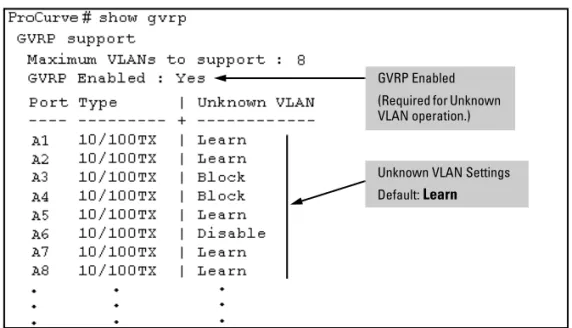
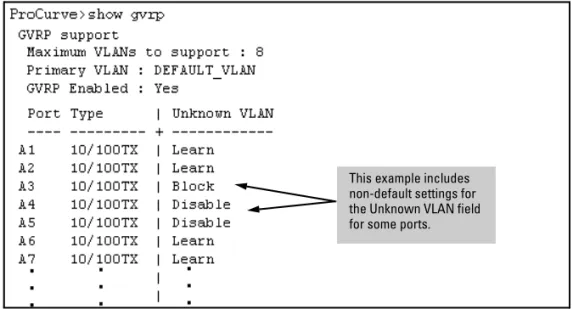
The CLI show gvrp command and the menu interface VLAN Support screen show a switch’s current GVRP configuration, including the Unknown VLAN settings.
Figure 3-3. Example of GVRP Unknown VLAN Settings
Unknown VLAN Mode
Operation Learn
(the Default)
Enables the port to become a member of any unknown VLAN for which it receives an advertisement. Allows the port to advertise other VLANs that have at least one other port on the same switch as a member.
Block Prevents the port from joining any new dynamic VLANs for which it receives an advertisement.
Allows the port to advertise other VLANs that have at least one other port as a member.
Disable Causes the port to ignore and drop all GVRP advertisements it receives and also prevents the port from sending any GVRP advertisements.
GVRP Enabled (Required for Unknown VLAN operation.)
Unknown VLAN Settings Default: Learn
Per-Port Options for Dynamic VLAN Advertising and
Joining
Initiating Advertisements. As described in the preceding section, to enable dynamic joins, GVRP must be enabled and a port must be configured to Learn (the default). However, to send advertisements in your network, one or more static (Tagged, Untagged, or Auto) VLANs must be configured on one or more switches (with GVRP enabled), depending on your topology. Enabling a Port for Dynamic Joins. You can configure a port to dynami-cally join a static VLAN. The join will then occur if that port subsequently receives an advertisement for the static VLAN. (This is done by using the Auto
and Learn options described in table 3-2, below.
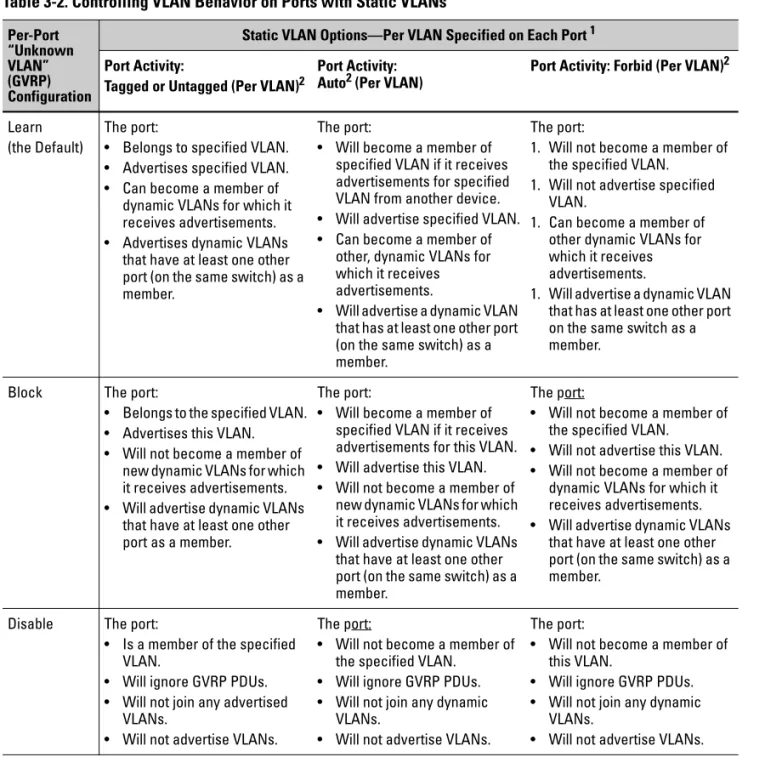
Parameters for Controlling VLAN Propagation Behavior. You can con-figure an individual port to actively or passively participate in dynamic VLAN propagation or to ignore dynamic VLAN (GVRP) operation. These options are controlled by the GVRP “Unknown VLAN” and the static VLAN configuration parameters, as described in the following table:
Table 3-2. Controlling VLAN Behavior on Ports with Static VLANs Per-Port “Unknown VLAN” (GVRP) Configuration
Static VLAN Options—Per VLAN Specified on Each Port 1 Port Activity:
Tagged or Untagged (Per VLAN)2
Port Activity: Auto2 (Per VLAN)
Port Activity: Forbid (Per VLAN)2
Learn (the Default)
The port:
• Belongs to specified VLAN. • Advertises specified VLAN. • Can become a member of
dynamic VLANs for which it receives advertisements. • Advertises dynamic VLANs
that have at least one other port (on the same switch) as a member.
The port:
• Will become a member of specified VLAN if it receives advertisements for specified VLAN from another device. • Will advertise specified VLAN. • Can become a member of
other, dynamic VLANs for which it receives advertisements.
• Will advertise a dynamic VLAN that has at least one other port (on the same switch) as a member.
The port:
1. Will not become a member of the specified VLAN.
1. Will not advertise specified VLAN.
1. Can become a member of other dynamic VLANs for which it receives advertisements.
1. Will advertise a dynamic VLAN that has at least one other port on the same switch as a member.
Block The port:
• Belongs to the specified VLAN. • Advertises this VLAN. • Will not become a member of
new dynamic VLANs for which it receives advertisements. • Will advertise dynamic VLANs
that have at least one other port as a member.
The port:
• Will become a member of specified VLAN if it receives advertisements for this VLAN. • Will advertise this VLAN. • Will not become a member of
new dynamic VLANs for which it receives advertisements. • Will advertise dynamic VLANs
that have at least one other port (on the same switch) as a member.
The port:
• Will not become a member of the specified VLAN.
• Will not advertise this VLAN. • Will not become a member of
dynamic VLANs for which it receives advertisements. • Will advertise dynamic VLANs
that have at least one other port (on the same switch) as a member.
Disable The port:
• Is a member of the specified VLAN.
• Will ignore GVRP PDUs. • Will not join any advertised
VLANs.
• Will not advertise VLANs.
The port:
• Will not become a member of the specified VLAN.
• Will ignore GVRP PDUs. • Will not join any dynamic
VLANs.
• Will not advertise VLANs.
The port:
• Will not become a member of this VLAN.
• Will ignore GVRP PDUs. • Will not join any dynamic
VLANs.
• Will not advertise VLANs.
1 Each port on the switch must be a Tagged or Untagged member of at least one VLAN. Thus, any port configured for
GVRP to Learn or Block will generate and forward advertisements for static VLAN(s) configured on the switch and also for dynamic VLANs the switch learns on other ports.
2 To configure tagging, Auto, or Forbid, see “Configuring Static VLAN Name and Per-Port Settings” on page 2-24 (for the
As the preceding table indicates, when you enable GVRP, a port that has a Tagged or Untagged static VLAN has the option for both generating advertise-ments and dynamically joining other VLANs.
N o t e
In table 3-2, above, the Unknown VLAN parameters are configured on a per-port basis using the CLI. The Tagged, Untagged, Auto, and Forbid options are configured per static VLAN on every port, using either the menu interface or the CLI.Because dynamic VLANs operate as Tagged VLANs, and because a tagged port on one device cannot communicate with an untagged port on another device, ProCurve recommends that you use Tagged VLANs for the static VLANs you will use to generate advertisements.
GVRP and VLAN Access Control
When you enable GVRP on a switch, the default GVRP parameter settings allow all of the switch’s ports to transmit and receive dynamic VLAN adver-tisements (GVRP adveradver-tisements) and to dynamically join VLANs. The two preceding sections describe the per-port features you can use to control and limit VLAN propagation. To summarize, you can:
■ Allow a port to advertise and/or join dynamic VLANs (Learn mode—the default).
■ Allow a port to send VLAN advertisements, but not receive them from other devices; that is, the port cannot dynamically join a VLAN but other devices can dynamically join the VLANs it advertises (Block mode). ■ Prevent a port from participating in GVRP operation (Disable mode).
Port-Leave From a Dynamic VLAN
A dynamic VLAN continues to exist on a port for as long as the port continues to receive advertisements of that VLAN from another device connected to that port or until you:
■ Convert the VLAN to a static VLAN (See “Converting a Dynamic VLAN to a Static VLAN” on page 2-23.)
■ Reconfigure the port to Block or Disable
■ Disable GVRP ■ Reboot the switch
The time-to-live for dynamic VLANs is 10 seconds. That is, if a port has not received an advertisement for an existing dynamic VLAN during the last 10 seconds, the port removes itself from that dynamic VLAN.
Planning for GVRP Operation
These steps outline the procedure for setting up dynamic VLANs for a seg-ment.
1. Determine the VLAN topology you want for each segment (broadcast domain) on your network.
2. Determine the VLANs that must be static and the VLANs that can be dynamically propagated.
3. Determine the device or devices on which you must manually create static VLANs in order to propagate VLANs throughout the segment.
4. Determine security boundaries and how the individual ports in the seg-ment will handle dynamic VLAN advertiseseg-ments. (See table 3-1 on page 3-7 and table 3-2 on page 3-9.)
5. Enable GVRP on all devices you want to use with dynamic VLANs and configure the appropriate “Unknown VLAN” parameter (Learn, Block, or
Disable) for each port.
6. Configure the static VLANs on the switch(es) where they are needed, along with the per-VLAN parameters (Tagged, Untagged, Auto, and Forbid— see table 3-2 on page 3-9) on each port.
7. Dynamic VLANs will then appear automatically, according to the config-uration options you have chosen.
8. Convert dynamic VLANs to static VLANs where you want dynamic VLANs to become permanent.
Configuring GVRP On a Switch
The procedures in this section describe how to: ■ View the GVRP configuration on a switch ■ Enable and disable GVRP on a switch
■ Specify how individual ports will handle advertisements
To view or configure static VLANs for GVRP operation, refer to “Per-Port Static VLAN Configuration Options” on page 2-8.
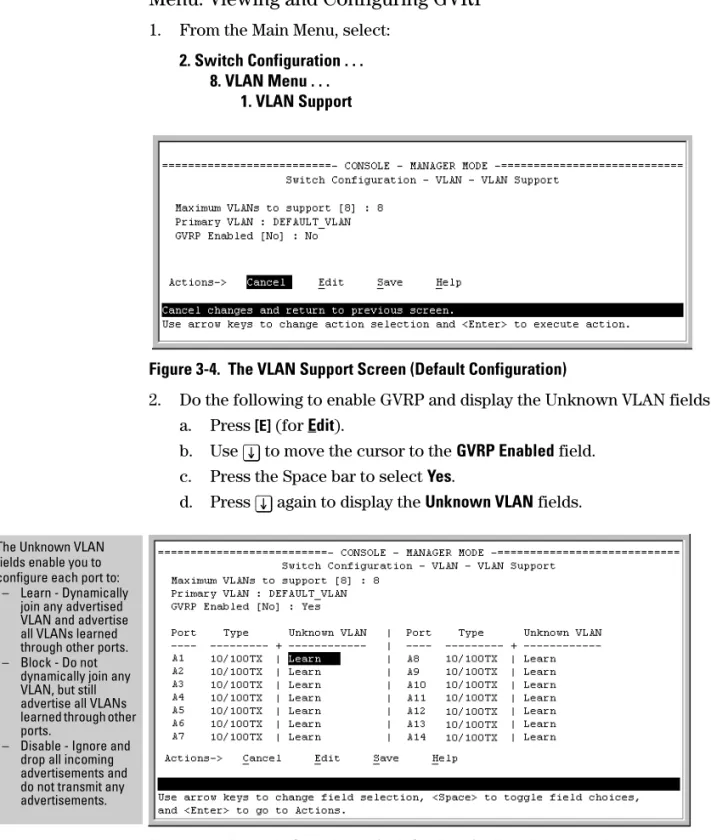
Menu: Viewing and Configuring GVRP
1. From the Main Menu, select:2. Switch Configuration . . . 8. VLAN Menu . . .
1. VLAN Support
Figure 3-4. The VLAN Support Screen (Default Configuration)
2. Do the following to enable GVRP and display the Unknown VLAN fields: a. Press [E] (for Edit).
b. Use [v] to move the cursor to the GVRP Enabled field. c. Press the Space bar to select Yes.
d. Press [v] again to display the Unknown VLAN fields.
Figure 3-5. Example Showing Default Settings for Handling Advertisements
The Unknown VLAN fields enable you to configure each port to:
– Learn - Dynamically join any advertised VLAN and advertise all VLANs learned through other ports. – Block - Do not
dynamically join any VLAN, but still advertise all VLANs learned through other ports.
– Disable - Ignore and drop all incoming advertisements and do not transmit any advertisements.
3. Use the arrow keys to select the port you want, and the Space bar to select Unknown VLAN option for any ports you want to change.
4. When you finish making configuration changes, press [Enter], then [S] (for
Save) to save your changes to the Startup-Config file.
CLI: Viewing and Configuring GVRP
GVRP Commands Used in This Section
Displaying the Switch’s Current GVRP Configuration. This command shows whether GVRP is disabled, along with the current settings for the maximum number of VLANs and the current Primary VLAN. (For more on the last two parameters, see “Port-Based Virtual LANs (Static VLANs)” on page 2-3.)
Syntax: show gvrp Shows the current settings.
Figure 3-6. Example of “Show GVRP” Listing with GVRP Disabled
show gvrp below
gvrp page 3-14
Figure 3-7. Example of Show GVRP Listing with GVRP Enabled
Enabling and Disabling GVRP on the Switch. This command enables GVRP on the switch.
Syntax: gvrp
This example enables GVRP:
ProCurve(config)# gvrp
This example disables GVRP operation on the switch:
ProCurve(config)# no gvrp
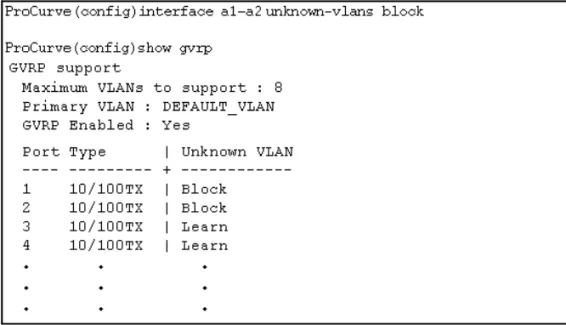
Enabling and Disabling GVRP On Individual Ports. When GVRP is enabled on the switch, use the unknown-vlans command to change the Unknown VLAN field for one or more ports. You can use this command at either the Manager level or the interface context level for the desired port(s). Syntax: interface <port-list> unknown-vlans < learn | block | disable >
Changes the Unknown VLAN field setting for the specified port(s).
For example, to change and view the configuration for ports A1-A2 to Block:
This example includes non-default settings for the Unknown VLAN field for some ports.
Figure 3-8. Example of Preventing Specific Ports from Joining Dynamic VLANs
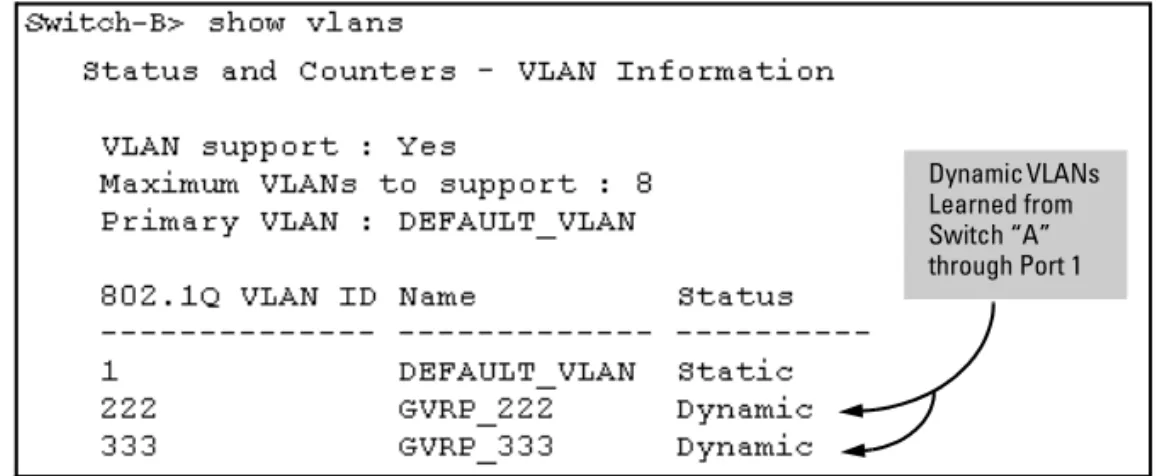
Displaying the Static and Dynamic VLANs Active on the Switch. The
show vlans command lists all VLANs present in the switch. Syntax: show vlans
For example, in the following illustration, switch “B” has one static VLAN (the default VLAN), with GVRP enabled and port 1 configured to Learn for Unknown VLANs. Switch “A” has GVRP enabled and has three static VLANs: the default VLAN, VLAN-222, and VLAN-333. In this scenario, switch B will dynamically join VLAN-222 and VLAN-333:
Figure 3-9. Example of Switches Operating with GVRP Enabled
The show vlans command lists the dynamic (and static) VLANs in switch “B” after it has learned and joined VLAN-222 and VLAN-333.
Switch “A”
GVRP enabled. 3 Static VLANs:
– DEFAULT_VLAN – VLAN-222 – VLAN-333
Switch “B”
GVRP enabled. 1 Static VLANs:
– DEFAULT_VLAN
Port 1: Set to “Learn” Mode
Figure 3-10. Example of Listing Showing Dynamic VLANs
Converting a Dynamic VLAN to a Static VLAN. If a port on the switch has joined a dynamic VLAN, you can use the following command to convert that dynamic VLAN to a static VLAN:
Syntax: static <dynamic-vlan-id>
For example, to convert dynamic VLAN 333 (from the previous example) to a static VLAN:
ProCurve(config)# static 333
When you convert a dynamic VLAN to a static VLAN, all ports on the switch are assigned to the VLAN in Auto mode.
Web: Viewing and Configuring GVRP
To view, enable, disable, or reconfigure GVRP: 1. Click on the Configuration tab.2. Click on VLAN Configuration and do the following: • To enable or disable GVRP, click on GVRP Enabled. • To change the Unknown VLAN field for any port:
i. Click on GVRP Security and make the desired changes. ii. Click on Apply to save and implement your changes to the
Unknown VLAN fields.
For web-based Help on how to use the web browser interface screen, click on the [?] button provided on the web browser screen.
Dynamic VLANs Learned from Switch “A” through Port 1
GVRP Operating Notes
■ A dynamic VLAN must be converted to a static VLAN before it can have an IP address.
■ The total number of VLANs on the switch (static and dynamic combined) cannot exceed the current Maximum VLANs setting. For example, in the factory default state, the switch supports eight VLANs. Thus, in a case where four static VLANs are configured on the switch, the switch can accept up to four additional VLANs in any combination of static and dynamic. Any additional VLANs advertised to the switch will not be added unless you first increase the Maximum VLANs setting. In the Menu inter-face, click on 2. Switch Configuration ... | 8. VLAN Menu | 1. VLAN Support. In the global config level of the CLI, use max-vlans.
■ Converting a dynamic VLAN to a static VLAN and then executing the write memory command saves the VLAN in the startup-config file and makes it a permanent part of the switch’s VLAN configuration.
■ Within the same broadcast domain, a dynamic VLAN can pass through a device that is not GVRP-aware. This is because a hub or a switch that is not GVRP-ware will flood the GVRP (multicast) advertisement packets out all ports.
■ GVRP assigns dynamic VLANs as Tagged VLANs. To configure the VLAN as Untagged, you must first convert it to a static VLAN.
■ Rebooting a switch on which a dynamic VLAN exists deletes that VLAN. However, the dynamic VLAN re-appears after the reboot if GVRP is enabled and the switch again receives advertisements for that VLAN through a port configured to add dynamic VLANs.
■ By receiving advertisements from other devices running GVRP, the switch learns of static VLANs on those other devices and dynamically (automat-ically) creates tagged VLANs on the links to the advertising devices. Similarly, the switch advertises its static VLANs to other GVRP-aware devices, as well as the dynamic VLANs the switch has learned.
■ A GVRP-enabled switch does not advertise any GVRP-learned VLANs out of the port(s) on which it originally learned of those VLANs.