General
Specifications
LHS1150, LHM1150
Server for Remote Operation
and Monitoring Function
GS 33K05D20-50E
GENERAL
CENTUM VP Server for Remote Operation and Monitoring Function can be executed from the remote PCs for plant operation and monitoring. By using the terminal service (TS) server of the Windows Server, the Server for Remote Operation and Monitoring Function allows multiple PCs which are connected with one server simultaneously operating and monitoring in the TS server. If a PC is located away from the instrument room, as long as the PC is connected to the HIS terminal service server through the network, the operation and monitoring view on the HIS can be displayed on the remote PC. The remote PC does not need to have the operation and monitoring applications. LHM1150 is a package for CENTUM VP Entry Class, which is suitable for small systems. The basic features are the same as LHS1150.
FUNCTION SPECIFICATIONS
System Configuration
The Server for Remote Operation and Monitoring Function runs on a in Windows Server OS, allowing it to be a server for remote-access operation and monitoring. If user names are entered and logged on from a network client PC connected to the server for remote operation and monitoring, the functions running on the server for remote operation and monitoring can be used on the client PC.
Client PC Site CENTUM VP HIS FCS Vnet/IP
Central control room
Office building
F01E.ai
Client PC
Intranet
Server for Remote Operation and Monitoring GR0001 Distillation column LICA 48.9 FIC 45.7 % FIC 25.4 % LICA 38.9 ? RC-10 23.4 % TRC 49.2 ? FIC 41.4 TDT 53.8 ? TDA 37.5 ? 51.3 ?PAC
Distillation column Tank1FIC100
TIC301 100.0 0.0 AUT NR FIC100 100.0 0.0 20.0 40.0 60.0 80.0 PV M3/H70.0 AUT NR SV M3/H 50.0 MV 65.0% Column flow FIC100 TIC301 TG1001 Block:10 Group:01 13:34
● 1 FIC001. PV Inlet flow 72.1 M3/h 100.0 0.0
● 2 FIC002. PV Outlet flow 53.3 M3/h 100.0 0.0
● 3 LIC100. PV Level 3.8 M 100.0 0.0
● 4 TIC100. PV Temp A 25.7 DEGC 100.0 0.0
● 5 TIC200. PV Temp B 14.1 DEGC 100.0 0.0
● 6 ● 7 ● 8 □ □ □ □ □ □ □ □ 13:36 13:38 13:40 13:42 13:44 82.3 62.3 42.3 22.3 2.3 VP. 10 0CIF 102.3 00:12:00100% 1 2
Figure Example of Configuration of Server for Remote Operation and Monitoring Function
A maximum of eight simultaneous sessions (a session stands for a logic connection to the server for remote operation and monitoring function started from logon and ended at logoff) can be run on one server for remote operation and monitoring. Logging on from the server for remote operation and monitoring is also counted as one session. A client PC can display screens on a session-by-session basis regardless of the screens displayed on the server for remote operation and monitoring or on other clients. It may take a few seconds for the client PC to display the screens depending on the network speed.
When using the Server for Remote Operation and Monitoring Function, please set up one or more standard HIS along with the client PC on the control network (Vnet/IP or V net). The standard HIS has better reliability for real-time
Functions Available for Remote Operation and Monitoring
The functions running on the server for remote operation and monitoring can be used on the client PC.
Standard builder functions realize engineering with a remote PC using the TS functions directly. In this case, the standard builder function can connect only one session apart from eight sessions for operation and monitoring. System views on multiple PCs, including the server for remote operation and monitoring, cannot be started
simultaneously. However, if reference builders are called up in reference mode, screens can be displayed on multiple PCs.
If LHM1150 (CENTUM VP Entry Class) is used, select the packages that are in parentheses. Packages with no parentheses can be directly used in CENTUM VP Entry Class (except for LHS4000).
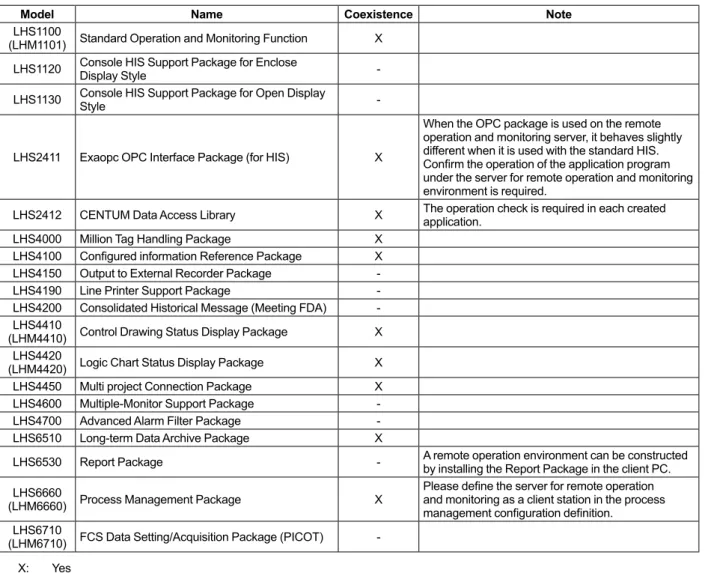
Table Package Coexistence in the Server for Remote Operation and Monitoring (1/2)
Model Name Coexistence Note
LHS1100
(LHM1101) Standard Operation and Monitoring Function X LHS1120 Console HIS Support Package for Enclose Display Style -LHS1130 Console HIS Support Package for Open Display Style
-LHS2411 Exaopc OPC Interface Package (for HIS) X
When the OPC package is used on the remote operation and monitoring server, it behaves slightly different when it is used with the standard HIS. Confirm the operation of the application program under the server for remote operation and monitoring environment is required.
LHS2412 CENTUM Data Access Library X The operation check is required in each created application. LHS4000 Million Tag Handling Package X
LHS4100 Configured information Reference Package X LHS4150 Output to External Recorder Package -LHS4190 Line Printer Support Package -LHS4200 Consolidated Historical Message (Meeting FDA) -LHS4410
(LHM4410) Control Drawing Status Display Package X LHS4420
(LHM4420) Logic Chart Status Display Package X LHS4450 Multi project Connection Package X LHS4600 Multiple-Monitor Support Package -LHS4700 Advanced Alarm Filter Package -LHS6510 Long-term Data Archive Package X
LHS6530 Report Package - A remote operation environment can be constructed by installing the Report Package in the client PC. LHS6660
(LHM6660) Process Management Package X
Please define the server for remote operation and monitoring as a client station in the process management configuration definition.
LHS6710
(LHM6710) FCS Data Setting/Acquisition Package (PICOT) -X: Yes
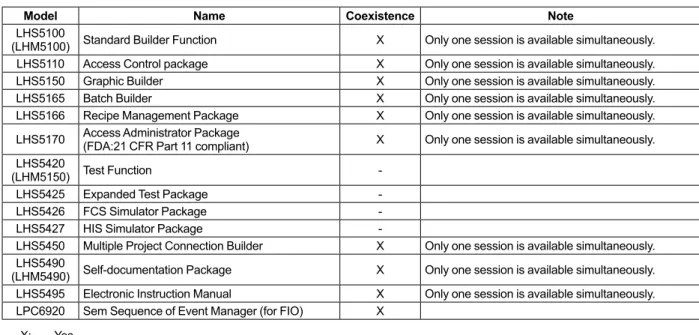
Table Package Coexistence in the Server for Remote Operation and Monitoring (2/2)
Model Name Coexistence Note
LHS5100
(LHM5100) Standard Builder Function X Only one session is available simultaneously. LHS5110 Access Control package X Only one session is available simultaneously. LHS5150 Graphic Builder X Only one session is available simultaneously. LHS5165 Batch Builder X Only one session is available simultaneously. LHS5166 Recipe Management Package X Only one session is available simultaneously. LHS5170 Access Administrator Package (FDA:21 CFR Part 11 compliant) X Only one session is available simultaneously. LHS5420
(LHM5150) Test Function
-LHS5425 Expanded Test Package
-LHS5426 FCS Simulator Package
-LHS5427 HIS Simulator Package
-LHS5450 Multiple Project Connection Builder X Only one session is available simultaneously. LHS5490
(LHM5490) Self-documentation Package X Only one session is available simultaneously. LHS5495 Electronic Instruction Manual X Only one session is available simultaneously. LPC6920 Sem Sequence of Event Manager (for FIO) X
X: Yes - : No
Operation Screen Mode and Display Mode
HIS provides two operation screen modes, full-screen mode and window mode. In each mode, HIS displays views such as the Graphic View or the Trend View. Moreover, a remote HIS terminal connected through the Server for Remote Operation and Monitoring Function package also has two display modes.
Operation Screen Mode
• Full-Screen Mode
In this mode, HIS displays a frame that consists of several views assigned for a certain function or purpose. On a standard HIS, a number of tabbed frames can be displayed and overlapped in full-screen mode. However, on a remote HIS terminal connected through the Server for Remote Operation and Monitoring Function package, only a fixed frame can be displayed. In this mode, a Pop-Up Window such as a Faceplate View can be displayed in front of the frame.
• Window Mode
In this mode, several windows can be displayed in cascade style of Microsoft Windows so that the windows are overlapped. Each window contains only one view.
Display Mode
On a remote HIS terminal connected through the Server for Remote Operation and Monitoring Function package, the display mode can be either desktop mode or panel mode. The mode can be selected when the client PC is connecting to the server for the remote operation and monitoring services.
• Desktop Mode
In desktop mode, the operation and monitoring activities on a remote HIS can be carried out in the same style as on a standard HIS where the System Message Banner is displayed on the top and the Browser Bar is displayed on the left. Recycle Bin HIS0163T... 40% 12% 12 6 9 1011 12 3 4 5 7 8
HIS0163 - Remote Desktop
LICA 48.9 FIC 45.7 % FIC 25.4 % LICA 38.9 ? TRC 49.2 °C FIC 41.4 % TDT 53.8 °C TDA 37.5 °C 51.3 °C PAC
Distillation column
GR0001 Distilation Column ? Copy 2008/03/03 14:35 FCS0101 Batch Manager Ready FCS0101 RIGHT Control FCS0101 RIGHT Manual Reset Start
17 0 0 Overview Trend Plant Search TG0701 TG0801 GR0003 GR0004 GR0005 TG0901 GR0006 GR0007 ? View Comment
Address /SYSTEM/.ALProcess Alarm Favorite PP SYSTEM PRODUCT .AL .OG .SO .SH .SA .SF FCS0101 .SF FCS0102 .PR 100.0 20.0 40.0 60.0 80.0 Reactor flow AUT NR PV SV MV FIC200 FIC001 M3/H 55.3 M3/H 50.0 % 65.1 favorite-1 MYPJT1 Pop-Up Window System Message Banner
• Panel Mode
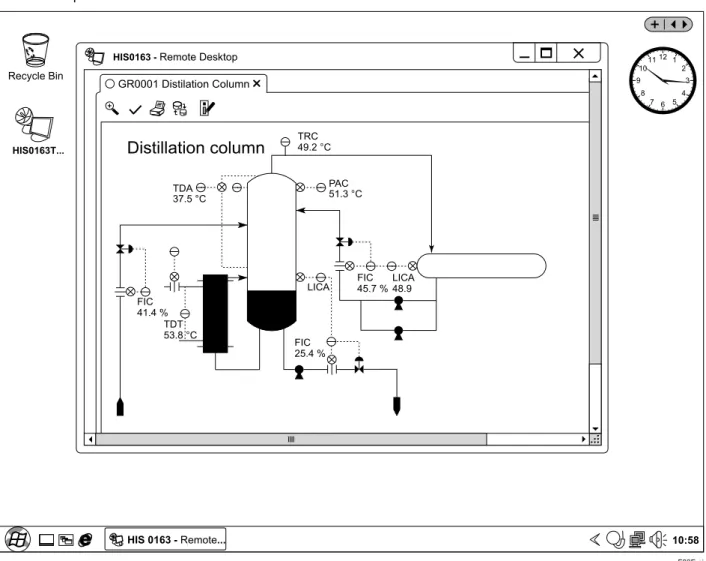
In panel mode, a designated view such as Graphic View or Trend View can be displayed on desktop. The System Message Banner and the Browser Bar are not displayed. The session can be established much faster than it is in the desktop mode.
F03E.ai HIS0163T... 12 6 9 1011 12 3 4 5 7 8 10:58 HIS 0163 - Remote... Recycle Bin
HIS0163 - Remote Desktop
LICA 48.9 FIC 45.7 % FIC 25.4 % LICA 38.9 ? TRC 49.2 °C FIC 41.4 % TDT 53.8 °C TDA 37.5 °C 51.3 °C PAC
Distillation column
GR0001 Distilation ColumnFigure Panel Mode HIS Window Display in Full-Screen
Maximum Number of Windows
Maximum number of windows can be displayed on a client PC varies according to the HIS operation screen mode and the display mode defined in the Server for Remote Operation and Monitoring Function package.
Operation Screen Mode Display Mode
Full-Screen Mode Window Mode
Frame Pop-Up Window Window
Desktop Mode 1(Fixed) Maximum 2 Maximum 5
Window Update Period
The update period for windows displayed on a client PC can be specified in seconds (1 to 30 seconds). This is commonly set during each client session logged onto the server for remote operation and monitoring.
Security System
The Server for Remote Operation and Monitoring Function can be run in an independent operation and monitoring security system for each client PC by logging on using different user names. The security system for remote monitoring can be restricted.
Operating Record
Operating messages generated at terminal equipment identify the client PC.
Buzzer
A client PC can issue a buzzer via a sound device. In the panel mode, because buzzer reset key is not displayed, buzzer output is restricted compared with the desktop mode as follows:
Buzzer Panel mode Desktop mode
System N Y
Process (high-priority alarm N Y Process (medium- or low-priority alarm) N Y
Operator guide message N Y
Illegal operation Y Y Confirmation Y Y Recovery N Y Click Y Y Y: Buzz N: Silent
Automatic Log-off
If there are no operations carried out at a client PC within a specified period of time, automatic log-off occurs. This is commonly set during each client session logged onto the server for remote operation and monitoring. The inactive period for automatic log-off can be set in minutes (1 to 59 minutes). Automatic log-off can be disabled.
Functional Difference between the Server
for Remote Operation and Monitoring
Function and the Standard HIS
Below is functional difference between the Server for Remote Operation and Monitoring Function and the standard HIS.
• A sound function is required on the client PC in order to use a buzzer with the remote operation and monitoring function server.
• The operation and monitoring range on a remote HIS terminal can be defined by the settings on the User Security Builder. The operation and monitoring range on a standard HIS is the range that is permitted by both the settings on HIS Constants Builder defined for each HIS and the settings on the User Security Builder defined for each user. The security settings on HIS Constants Builder defined for each HIS are not valid for the remote HIS terminal, only the settings on the User Security Builder are valid. • When restricting the range of operation and
monitoring of a user according to the security seetings for the user, the alarm and operator guide messages can be inhibited but not the corresponding buzzer sounds. The buzzer sound of a message will be triggered anyway as long as an alarm or an operator guide message occurs even though the message is inhibited by security settings. Therefore, when applying user security settings to restrict user’s operation and monitoring range, it is necessary to turn off the buzzer of the client PC.
• Operation keyboards cannot be used on both the server PC and the client PC.
• Up to 50 simultaneous primitives of the trend can be displayed in the client PC.
Displaying the Graphic Window to which a number of primitive trends are allocated in several sessions might not display some primitive trends.
• The function automatically printing messages such as the process alarm is not equipped.
The print function from the historical report window and the process data window and the hard copy button are available just like HIS.
Functional Difference between the Client
PC and the Server PC
Below is functional difference between the client PC and the server PC.
• The function from the scheduler is executed only on the server PC.
• The request of the sequence message is processed only on the server PC.
• The panel set is displayed only on the server PC. • When the Windows are called up from another HIS,
OPERATING ENVIRONMENT
LHS1150, LHM1150 Server for Remote Operation and Monitoring Function
Hardware Operating Environment For Windows Server 2008
CPU Required Xeon dual core minimum 2.93 GHz
Main memory Required 4 GB
Hard disk Required Free space of minimum 40 GB (*1) Recommended Free space of minimum 70 GB (*1)
Display Required Minimum SXGA (1280x1024) resolution, True Color (min. 16.77 million colors) For wide screen Minimum WXGA+ (1440x900) resolution, True Color (min. 16.77 million colors)
Graphics Required
DirectX 9-class GPU(Graphics Processing Unit) that supports • A WDDM(Windows Driver Display Model) Driver
• Pixel Shader 2.0 in hardware • 32 bits per pixel
• 128 MB Graphics memory
Expansion slot Required 1 slot is used for control network interface (*2)
Mouse Required
Optical disc drive Required DVD-ROM
*1: When the optional software package (Long-term Data Archive Package) is used, see also the GS Long-term Data Archive Package (GS 33K05J10-50E).
*2: VI702/VI701 or VF702/VF701 is required for control network interface card.
For Windows Server 2008 R2
CPU Required Xeon dual core minimum 2.93 GHz
Main memory Required 8 GB
Hard disk Required Free space of minimum 40 GB (*1) Recommended Free space of minimum 70 GB (*1)
Display Required Minimum SXGA (1280x1024) resolution, True Color (min. 16.77 million colors) For wide screen Minimum WXGA+ (1440x900) resolution, True Color (min. 16.77 million colors)
Graphics Required
DirectX 9-class GPU(Graphics Processing Unit) that supports • A WDDM(Windows Driver Display Model) Driver
• Pixel Shader 2.0 in hardware • 32 bits per pixel
• 128 MB Graphics memory
Expansion slot Required 1 slot is used for control network interface (*2)
Mouse Required
Optical disc drive Required DVD-ROM
*1: When the optional software package (Long-term Data Archive Package) is used, see also the GS Long-term Data Archive Package (GS 33K05J10-50E).
*2: VI702/VI701 or VF702/VF701 is required for control network interface card.
Software Operating Environment Windows OS
The relations between Windows and CENTUM VP
Windows Server 2008 Standard
Edition Windows Server 2008 Standard Edition R2
32-bit 64-bit
SP2 SP1
R5.01 Yes Yes
R5.02 Yes Yes
R5.03 Yes Yes
Yes: Compatible No: Incompatible
Note: Service Pack is abbreviated as SP (Example: SP1 stands for Service Pack 1).
Note: To enable this function, LHS1100 or LHM1101 Standard Operation and Monitoring Function is required for the server PC. Neither LHS1100 nor LHM1101 Standard Operation and Monitoring Function is required for the client PC.
Client PC Operating Environment
Hardware Operating Environment
Maintain the operating environment of the hardware requirements for LHS1100, LHM1101 Standard Operation and Monitoring Function.
If used in desktop mode, it is recommended that the display resolution be at least 1280 x 1024 pixels. If used in panel mode, it is recommended that the display resolution be 1024 x 768 pixels or greater.
Software Operating Environment
Windows 7, Windows Vista
MODELS AND SUFFIX CODES
DescriptionModel LHS1150 Server for Remote Operation and Monitoring Function
Suffix Codes -V Software License 1 Always 1 1 English version Option Codes
/N0004 Number of client PCs that can be simultaneously connected: Up to four /N0008 Number of client PCs that can be simultaneously connected: Up to eight Note: Be sure to specify one of the optional
specifications.
Description
Model LHS1150 Server for Remote Operation and Monitoring Function
Suffix Codes
-E Additional Client License 1 Always 1
1 English version
/N0408 Additional number of client PCs that can be connected simultaneously (up to four →up to eight)
Description
Model LHM1150 Server for Remote Operation and Monitoring Function (for CENTUM VP
Entry Class) Suffix Codes -V Software License 1 Always 1 1 English version Option Codes
/N0004 Number of client PCs that can be simultaneously connected: Up to four /N0008 Number of client PCs that can be simultaneously connected: Up to eight Note: Be sure to specify one of the optional
specifications.
Description
Server for Remote Operation and
ORDERING INFORMATION
Specify model and suffix codes.
TRADEMARKS
• CENTUM is a registered trademark of Yokogawa Electric Corporation.
• Windows is a registered trademark of Microsoft Corporation in the United States and/or other countries.
• Ethernet is a registered trademark of XEROX Corporation in the United States and/or other countries.
• Other product and company names appearing in this document are trademarks or registered trademarks of their respective holders.