Model 77 Series IV
Digital Multimeter
Calibration Information
Introduction
XWWarning
To avoid electric shock or injury, do not perform the performance tests or calibration adjustment procedures unless qualified to do so.
The information provided in this document is for the use of qualified personnel only.
The Model 77 Series IV Calibration Information provides the information necessary to adjust and verify the performance of the Fluke Model 77 Series IV Digital Multimeter (hereafter known as the Meter). The following information is included in this document:
• Safety Information (page 2)
• International Electrical Symbols (page 3)
• Test Lead Alert (page 3)
• Specifications (page 4)
• Testing and Replacing the Fuses (page 7)
• Replacing the Battery (page 8)
• Cleaning (page 9)
• Replacing the LCD (page 9)
• Performance Tests (page 10)
• Calibration Adjustment (page 14)
• Replaceable Parts and Accessories (page 17)
• Complete Warranty (page 19)
See the Model 77 Series IV Users Manual for complete operating instructions.
Service Information
To contact Fluke, call one of the following telephone numbers: USA: 1-888-99-FLUKE (1-888-993-5853)
Canada: 1-800-36-FLUKE (1-800-363-5853) Europe: +31 402-675-200
Safety Information
Warning and Caution Statements
A XW Warning identifies hazardous conditions and actions that could cause bodily harm or death.
A W Caution identifies conditions and actions that could damage the Meter, the equipment under test, or
cause permanent loss of data.
XWWarnings and Precautions
To avoid possible electric shock or personal injury, and to avoid possible damage to the Meter or to the equipment under test, adhere to the following practices:
• Use the Meter only as specified in this manual or the protection provided by the Meter might be impaired.
• Do not use the Meter or test leads if they appear damaged, or if the Meter is not operating properly. If in doubt, have the Meter serviced.
• Always use the proper terminals, switch position, and range for measurement.
• Verify the Meter's operation by measuring a known voltage.
• Do not apply more than the rated voltage, as marked on the Meter, between the terminals or between any terminal and earth ground.
• Use caution with voltages above 30 V ac rms, 42 V ac peak, or 60 V dc. These voltages pose a shock hazard.
• Disconnect circuit power and discharge all high-voltage capacitors before testing resistance, continuity, diodes, or capacitance.
• Do not use the Meter around explosive gas or vapor.
• When using the test leads, keep your fingers behind the finger guards.
International Electrical Symbols
International Electrical Symbols
The following international symbols appear in this document, and on the Meter.
Symbols Description Symbols Description
B
AC (Alternating Current)I
FuseF
DC (Direct Current)P
Conforms to European Union directivesF
B DC/AC
$
Conforms to relevant Canadian Standards Association directives
J
Earth groundT
Double-insulatedW
Important Information; see manual.X
Hazardous Voltageb
Battery. (Low battery when shown ondisplay)
!
Underwriters Laboratories, Inc.
Meter in accordance with IEC 61010-1. 54CJ
s
Inspected and licensed by TÜV (Technischer Überwachungs Verein) Product Services.;
N10140 Conforms to relevant Australian standards
#
Verband Deutscher Electroniker. German electronics association.Test Lead Alert
XWWarning
Attempting to make a measurement with a test lead in an incorrect terminal might blow a fuse, damage the Meter, and cause serious personal injury.
As a reminder to check that the test leads are in the correct terminals, LEAd is momentarily displayed when
Specifications
Accuracy is specified for 1 yr after calibration, at operating temperatures of 18 °C to 28 °C, with relative humidity at 0 % to 90 %. Accuracy specifications take the form of ±([ % of Reading ] + [ Counts ]).
Maximum voltage between any
terminal and earth ground... 1000 V
Surge protection... 8 kV peak per IEC 61010 W Fuse for mA inputs... 440 mA, 1000 V FAST Fuse W Fuse for A inputs... 11 A, 1000 V FAST Fuse
Display
Digital... 6000 counts, updates 4/sec Bar Graph ... 33 segments; Updates 32/sec Frequency... 10,000 counts Capacitance... 1,000 counts Altitude Operating ... 2,000 meters Storage ... 12,000 meters Temperature Operating ... -10 °C to +50 °C Storage ... -40 °C to +60 °C
Temperature coefficient... 0.1 X (specified accuracy / °C (<18 °C or >28 °C)
Electromagnetic Compatibility
(EN 61326-1:1997)... In an RF field of 3 V/M, accuracy = specified accuracy except in temperature: specified accuracy ± 5 °C (9 °F)
Relative Humidity (Maximum Non-condensing). 90 % to 35 °C 75 % to 40 °C; 45 % to 50 °C
Battery Life... 400 hrs typical (Alkaline)
Size (H x W x L)... 4.3 cm x 9 cm x 18.5 cm
Weight... 420 g
Safety Compliance... ANSI/ISA S82.02.01, CSA C22.2-1010.1, IEC 61010 to 1000 V Measurement Category III, 600 V Measurement Category IV
Specifications
Function Range Resolution Accuracy ± ( [ % of Reading ] + [ Counts ] )
AC Volts (Average responding) 6.000 V 60.00 V 600.0 V 1000 V 0.001 V 0.01 V 0.1 V 1 V 2.0 % + 2 (45 Hz to 1 kHz) DC mV 600.0 mV 0.1 mV 0.3 % + 1 DC Volts 6.000 V 60.00 V 600.0 V 1000 V 0.001 V 0.01 V 0.1 V 1 V 0.3 % + 1
Continuity 600 Ω 1 Ω Meter beeps at <25 Ω, beeper turns off at >250 Ω; detects opens or shorts of 250 μs or longer. Ohms 600.0 Ω 6.000 kΩ 60.00 kΩ 600.0 kΩ 6.000 MΩ 50.00 MΩ 0.1 Ω 0.001 kΩ 0.01 kΩ 0.1 kΩ 0.001 MΩ 0.01 MΩ 0.5 % + 2 0.5 % + 1 0.5 % + 1 0.5 % + 1 0.5 % + 1 2.0 % + 1 Diode test 2.400 V 0.001 V 1 % + 2 Capacitance 1000 nF 10.00 μF 100.0 μF 9999 μF[1] 1 nF 0.01 μF 0.1 μF 1 μF 1.2 % + 2 1.2 % + 2 1.2 % + 2 10 % typical AC Amps (Average responding)[2] 60.00 mA 400.0 mA[3] 6.000 A 10.00 A[4] 0.01 mA 0.1 mA 0.001 A 0.01 A 2.5 % + 2 (45 Hz to 1 kHz) Notes:
[1] In the 9999 μF range for measurements to 1000 μF, the measurement accuracy is 1.2 % + 2. [2] Amps input burden voltage (typical): 400 mA input 2 mV/mA, 10 A input 37 mV/A.
[3] 400.0 mA accuracy specified up to 600 mA overload. [4] >10 A unspecified.
Function Range Resolution Accuracy ± ( [ % of Reading ] + [ Counts ] )
DC Amps[3] 60.00 mA 400.0 mA[4] 6.000 A 10.00 A[5] 0.01 mA 0.1 mA 0.001 A 0.01 A 1.5 % + 2 Hz[1], [2]
(ac voltage input )
99.99 Hz 999.9 Hz 9.999 kHz 99.99 kHz 0.01 Hz 0.1 Hz 0.001 kHz 0.01 kHz 0.1 % + 1
MIN MAX AVG For dc functions, accuracy is the specified accuracy of the measurement function ±12 counts for changes longer than 350 ms in duration.
For ac functions, accuracy is the specified accuracy of the measurement function ±40 counts for changes longer than 350 ms in duration.
Notes:
[1] Frequency is specified from 2 Hz to 99.99 kHz. [2] Below 2 Hz, the display shows zero Hz.
[3] Amps input burden voltage (typical): 400 mA input 2 mV/mA, 10 A input 37 mV/A. [4] 400.0 mA accuracy specified up to 600 mA overload.
Function Overload
Protection[1] Input Impedance
(Nominal)
Common Mode Rejection Ratio
(1 kΩ Unbalanced) Normal Mode Rejection
Volts AC 1000 V >10 MΩ <100 pF >60 dB @ dc, 50 Hz or 60 Hz
Volts DC 1000 V >10 MΩ <100 pF >120 dB @ dc, 50 Hz or 60 Hz >60 dB @ 50 Hz or 60 Hz mV 1000 V2 >10 MΩ <100 pF >120 dB @ dc, 50 Hz or 60 Hz >60 dB @ 50 Hz or 60 Hz
Full Scale Voltage To: Open Circuit Test
Voltage 6.0 MΩ 50 MΩ Short Circuit Current
Ohms/Capacitance 1000 V2 < 8.0 V dc <660 mV dc <4.6 V dc <1.1 mA Continuity/Diode test 1000 V2
<8.0 V dc 2.4 V dc <1.1 mA [1] 10 7 V-Hz maximum.
[2] For circuits <0.3 A short circuit. 660 V for high energy circuits.
Function Overload Protection Overload
mA Fused, 440 mA, 1000 V FAST Fuse 600 mA overload for 2 minutes maximum, 10 minutes rest.
A Fused, 11 A, 1000 V FAST Fuse 20 A overload for 30 seconds maximum, 10 minutes rest.
Testing the Fuses
Testing the Fuses
XWWarning
To avoid electrical shock or personal injury:
• Remove the test leads and any input signals before replacing the battery or fuses.
• To avoid electrical shock, arc blast, or damage to the Meter, install only fuses with the amperage, interrupt, voltage, and speed ratings specified in Table 4.
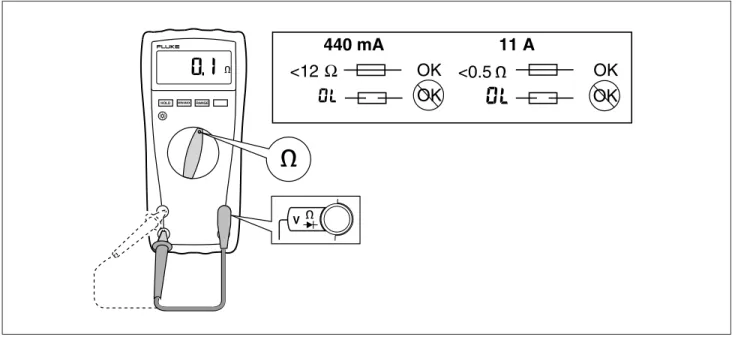
To test the fuses (refer to Figure 1): 1. Set the Rotary Switch to e.
2. Plug a test lead into the VeG terminal and touch the probe to the 400 mA to test the 440 mA Fuse or 10 A terminal to test the 11 A Fuse.
• If the display shows a resistance value in the range shown in Figure 1, the fuse is good.
• If the display reads OL, replace the fuse and test again.
• If the display shows any other value, have the Meter serviced. See “Service Information” earlier in this manual. 11 A 440 mA <0.5 Ω <12 OK OK OK OK RANGE HOLD MIN MAX
V
aik12f.eps
Replacing the Fuses
XWWarning
To avoid electrical shock, arc blast, or damage to the Meter, install only fuses with the amperage, interrupt, voltage, and speed ratings specified in
Table 4.
To replace the Fuses (refer to Figure 2): 1. Turn the Rotary Switch to OFF.
2. Disconnect the test leads and/or any connectors from the terminals.
3. Remove the four screws from the Case Bottom and separate the Case Top from the Case Bottom. 4. Remove the fuses F1 and F2 by gently prying one end loose, then slide the fuse out of its bracket, and
replace with exact replacement only.
5. Rejoin the Case Bottom, Case Top, Battery compartment door, and reinstall the four screws.
Replacing the Battery
To replace the Battery (refer to Figure 2):
1. Turn the Rotary Switch to OFF and remove the test leads from the terminals.
2. Remove the two screws from the Battery Compartment Door, and remove it from the Case Bottom. 3. Remove the Battery (B1) from the battery connector.
4. Replace the Battery with a new 9 V battery (NEDA A1604, 6F22, or 006P).
5. Reattach the Battery Compartment Door to the Case Bottom, and reinstall the two screws.
F2 F1
B1
aik13f.eps
Cleaning
Cleaning
XWWarning
To avoid electrical shock:
• Remove test leads and any input signals before cleaning.
• Do not reinstall the pca until it is completely dry.
• Dirt or moisture in the terminals can affect readings.
W Caution
To avoid damaging the Meter, do not use aromatic hydrocarbons or chlorinated solvents for cleaning. These solutions will react with the plastics used in the instruments.
Do not use detergents of any kind for cleaning the pca. Clean the instrument case with a damp cloth and mild detergent.
The pca may be washed with isopropyl alcohol or hot deionized water and a soft brush. Remove excess cleaning material with clean dry air at low pressure, then dry the pca at 50 °C.
Replacing the LCD
W Caution
To prevent contamination, do not handle the conductive edges of the LCD or the LCD Elastomeric Connectors.
If the edges are contaminated, clean them with alcohol. Allow the alcohol to dry before reassembling.
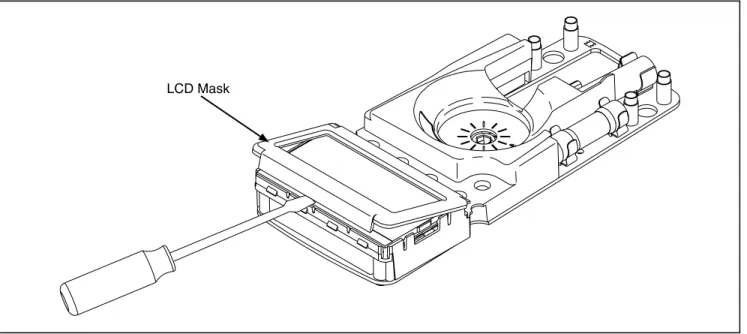
To remove and replace the LCD, perform the following procedure (refer to Figure 3): 1. Turn the rotary switch to OFF and remove the test leads from the Meter terminals.
2. Remove the four screws from the case bottom, and separate the case top from the case bottom The circuit board remains attached to the case bottom.
3. Remove the battery compartment and disconnect the battery from the battery connector.
4. Remove the pca screw located under the 440 mA fuse, and lift the pca out of the case bottom. The beeper is loose in the case. Exercise caution not to damage it.
5. Loosen the four screws in the area of the LCD on the back of the pca. This will facilitate reinstalling the LCD.
6. Insert a small, flat-head screwdriver under the LCD mask edge and gently pry the LCD mask from the snaps.
W Caution
Take care to not break the LCD with the screwdriver. 7. Lift out the LCD.
8. Make sure that all connector contact points are clean. Refer to “Cleaning” for more information. 9. Install a new LCD, taking care that it is correctly oriented.
LCD Mask
aik15f.eps
Figure 3. Removing the LCD Mask
Performance Tests
The following performance tests verify the complete operation of the Meter and check the accuracy of each Meter function against its specifications. The recommended calibration interval is 12 months. If the Meter fails any part of the test, calibration adjustment and/or repair is indicated.
Performance Tests
Required Equipment
A Fluke 5500A Multi-Product Calibrator (or equivalent) is required for the performance test procedures in this document.
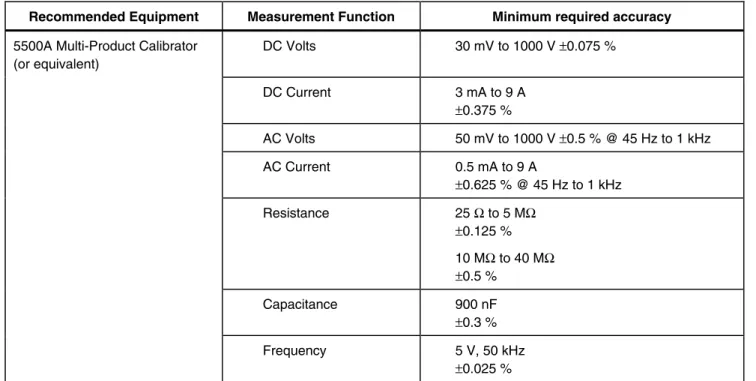
If an equivalent calibrator is used, it must meet the accuracy specifications shown in Table 1.
Table 1. Calibrator Specifications
Recommended Equipment Measurement Function Minimum required accuracy
5500A Multi-Product Calibrator (or equivalent) DC Volts 30 mV to 1000 V ±0.075 % DC Current 3 mA to 9 A ±0.375 % AC Volts 50 mV to 1000 V ±0.5 % @ 45 Hz to 1 kHz AC Current 0.5 mA to 9 A ±0.625 % @ 45 Hz to 1 kHz Resistance 25 Ω to 5 MΩ ±0.125 % 10 MΩ to 40 MΩ ±0.5 % Capacitance 900 nF ±0.3 % Frequency 5 V, 50 kHz ±0.025 % Preparing for the Performance Test
XWWarning
To avoid possible electric shock or personal injury:
• Do not perform the following procedures unless qualified to do so. Some procedures involve the use of high voltages.
• Before handling the test connections, and in between tests, make sure the calibrator is in standby (STBY) mode.
• Do not perform the performance test procedures unless the Meter is fully assembled
To prepare for the performance test:
1. Make sure that you have the required equipment (refer to Table 1). 2. Warm up the calibrator as required by its specifications.
Performance Tests
Note
When calibrating or measuring ac current, avoid the potential for errors from coupled noise by either: 1. Shorting the VeG to the COM input
or
2. Having no connection to the VeG input.
1. Set the Meter’s Rotary Switch to the position called for in Table 2, and for all measurements other than current (amps), connect the calibrator to the VeG and COM input terminals.
• If testing the milliamps function, connect the calibrator to the Meter 400 mA and COM input terminals.
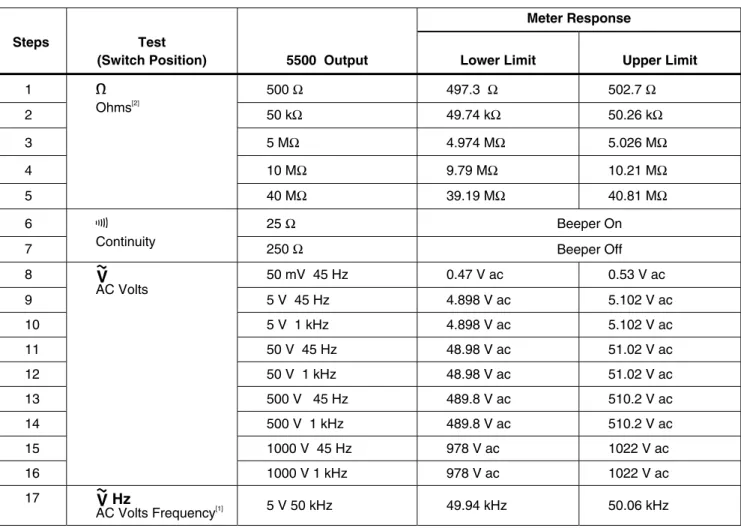
• If testing the amps function, connect the calibrator to the Meter 10A and COM input terminals. 2. Referring to Table 2 or Table 3, apply the indicated calibrator output voltages to the UUT for each test. 3. Verify that the UUT displays a reading that is within the limits shown in the Meter Response column.
Table 2. Performance Tests
Meter Response
Steps Test
(Switch Position) 5500 Output Lower Limit Upper Limit
1 500 Ω 497.3 Ω 502.7 Ω 2 50 kΩ 49.74 kΩ 50.26 kΩ 3 5 MΩ 4.974 MΩ 5.026 MΩ 4 10 MΩ 9.79 MΩ 10.21 MΩ 5 e Ohms[2] 40 MΩ 39.19 MΩ 40.81 MΩ 6 25 Ω Beeper On 7 R Continuity 250 Ω Beeper Off 8 50 mV 45 Hz 0.47 V ac 0.53 V ac 9 5 V 45 Hz 4.898 V ac 5.102 V ac 10 5 V 1 kHz 4.898 V ac 5.102 V ac 11 50 V 45 Hz 48.98 V ac 51.02 V ac 12 50 V 1 kHz 48.98 V ac 51.02 V ac 13 500 V 45 Hz 489.8 V ac 510.2 V ac 14 500 V 1 kHz 489.8 V ac 510.2 V ac 15 1000 V 45 Hz 978 V ac 1022 V ac
K
AC VoltsPerformance Tests
Table 2. Performance Tests (cont)
Meter Response
Steps Test
(Switch Position) 5500 Output Lower Limit Upper Limit
18 5 V 4.984 V dc 5.016 V dc 19 300 V 299.0 V dc 301.0 V dc 20 1000 V 996 V dc 1004 V dc 21
L
DC Volts -1000 V -1004 V dc -996 V dc 22 30 mV 29.8 mV dc 30.2 mV dc 23 -300 mV -301.0 mV dc -299.0 mV dc 24E
DC Millivolts 600 mV 598.1 mV dc 601.9 mV dc 25 E Capacitance[1] Apply 900 nF 887 nF 913 nF 26 0.5 mA 45 Hz 0.47 mA ac 0.53 mA ac 27 50 mA 1 kHz 48.73 mA ac 51.27 mA ac 28 G Diode Test[1]
F
AC Milliamps 400 mA 1 kHz 389.8 mA ac 410.2 mA ac 29 4.0 A 45 Hz 3.898 A ac 4.102 A ac 30 ? AC Amps 9.0 A 1 kHz 8.75 A ac 9.25 A ac 31 3 mA, 0 Hz 2.93 mA dc 3.07 mA dc 32 50 mA 49.23 mA dc 50.77 mA dc 33 mI
DC Milliamps[1] -400 mA −406.2 mA dc −393.8 mA dc 34 4.0 A 3.938 A dc 4.062 A dc 35 A DC Amps1 -9.0 A −9.16 A dc −8.84 A dc1. Press the YELLOW button to access this function. 2. Does not include test lead resistance.
Calibration Adjustment
Perform the calibration adjustment procedures if the Meter fails the performance tests. The Meter buttons behave as follows when the calibration mode is enabled:
H
Press and hold this button to test the present function. This measurement is uncalibrated and
may be inaccurate. This is normal.
M
Press and hold this button to display the required input.B
Press this YELLOW button to store the calibration value and advance to the next step. This
button is also used to exit calibration mode after the calibration adjustment sequence is complete.
Calibration Adjustment Procedure
Use the following steps to adjust the Meter’s calibration: Switch the Meter to
E
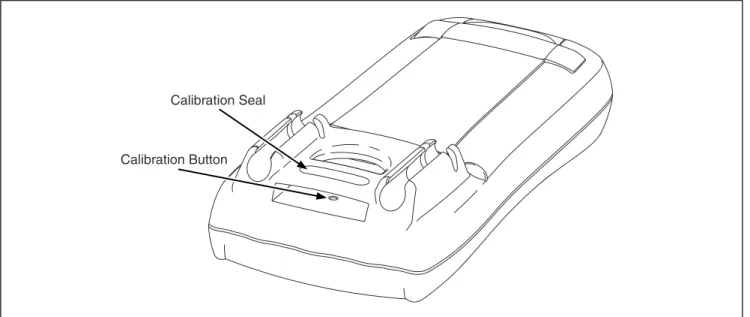
DC.1. Turn the Meter over and find the Calibration Seal located near the top of the Meter (refer to Figure 4). 2. With a small probe, break the Calibration Seal and press the Calibration Button for 1 second. The
Meter will beep and change to the calibration mode. The display reads C-01, designating the first
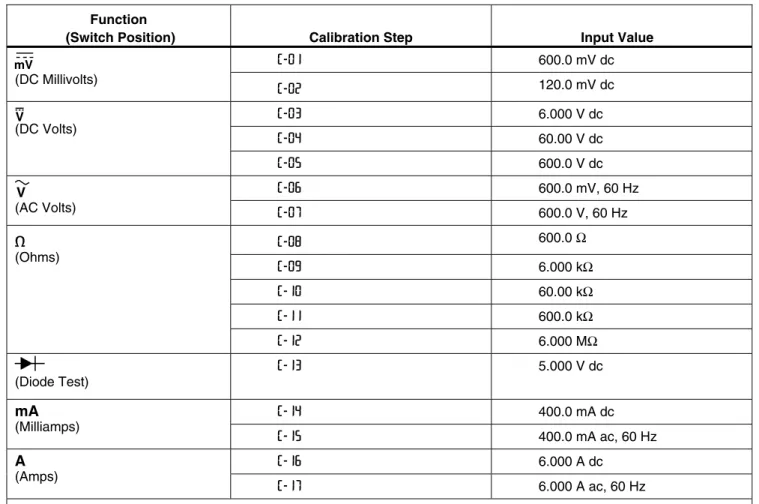
calibration step. The Meter remains in calibration mode until the Rotary Function Switch is turned off. 3. Proceed through the calibration steps by entering the input value listed in the table for each step.
Note
When calibrating or measuring ac current, avoid the potential for errors from coupled noise by either: 1. Shorting the VeG to the COM input
or
2. Having NO connection to the VeG input. Note
After pressing the yellow button, wait until the step number advances before changing the calibrator source or turning the Rotary Switch.
4. After each input value is applied, press the yellow button to accept the value and proceed to the next step (C-02 and so forth).
5. When the last step in a function is reached, turn the Rotary Function Knob to the next required function. The Meter will not allow a step to be completed if the Rotary Function Knob is turned to the wrong function.
Note
If the calibration adjustment procedure is not completed correctly, the Meter will not operate correctly. When calibration adjustment is not performed correctly, the Meter displays the messages
CAL and Errand the Meter must be recalibrated.
Calibration Adjustment
Calibration Seal
Calibration Button
aik14f.eps
Table 3. Calibration Steps Function
(Switch Position) Calibration Step Input Value
C-01 600.0 mV dc
E
(DC Millivolts) C-02 120.0 mV dc C-03 6.000 V dc C-04 60.00 V dc L (DC Volts) C-05 600.0 V dc C-06 600.0 mV, 60 HzC
(AC Volts) C-07 600.0 V, 60 Hz C-08 600.0 Ω C-09 6.000 kΩ C-10 60.00 kΩ C-11 600.0 kΩ e (Ohms) C-12 6.000 MΩ O (Diode Test) C-13 5.000 V dc C-14 400.0 mA dc mA (Milliamps) C-15 400.0 mA ac, 60 Hz C-16 6.000 A dc A (Amps) C-17 6.000 A ac, 60 HzReplaceable Parts and Accessories
Replaceable Parts and Accessories
Replaceable parts and accessories are shown in Table 4 and Figure 5. XW Warning
To avoid electric shock, injury, or damage to the meter, use exact replacement parts only.
Table 4. Replaceable Parts
Item Description Part No Qty
-- (Not shown) TL75 Test Lead Set* 855705 1
-- (Not Shown)
77 Series IV Users Manual (English only)
77 Series IV Users Manual CD (English, and all translated versions)
2695884 2695825 1 1 1 Case Top 2695766 1 2 Window 648714 1 3 Shock Absorber 428441 1 4 Keypad 1560052 1 5 LCD Mask 2695775 1 6 LCD 1560856 1 7 LCD Light Pipe 1564806 1
8 WFuse, 11 A, (fast acting), 1000 V ac/dc, minimum interrupt rating 17 kA 803293 1 9 WFuse, 440 mA (fast acting), 1000 V ac/dc, minimum interrupt rating 10 kA 943121 1
10 PCA Screw 1626602 1
11 AC Shield 648755 1
12 AC Shield and Internal Cover screws 448456 5
13 Case Bottom (includes bottom shield and calibration button) 2095692 1
14 Battery, 9 V (Alkaline, 9 V, 0-200 mA) 614487 1
15 Battery Compartment Door 1564799 1
16 Case Screws 832246 4 17 Tilt Stand 648961 1 18 LCD Elastomeric Connector 650264 2 19 Internal Cover 1564786 1 20 Battery Connector 1988201 1 21 Beeper 2041050 1
22 Swtich Detent Spring 822643 1
23 Switch Knob 648706 1
24 Calibration Button 1564889 1
17 15 14 21 20 13 24 19 18 10 9 22 3 7 6 5 4 1 2 8 12 16 11
Replaceable Parts and Accessories
Lifetime Limited Warranty
Each Fluke 20, 70, 80, 170, and 180 Series DMM will be free from defects in material and workmanship for its lifetime. As used herein, “lifetime” is defined as seven years after Fluke discontinues manufacturing the product, but the warranty period shall be at least ten years from the date of purchase. This warranty does not cover fuses, disposable batteries, damage from neglect, misuse, contamination, alteration, accident or abnormal conditions of operation or handling, including failures caused by use outside of the product’s specifications, or normal wear and tear of mechanical components. This warranty covers the original purchaser only and is not transferable.
For ten years from the date of purchase, this warranty also covers the LCD. Thereafter, for the lifetime of the DMM, Fluke will replace the LCD for a fee based on then current component acquisition costs.
To establish original ownership and prove date of purchase, please complete and return the registration card
accompanying the product, or register your product on http://www.fluke.com. Fluke will, at its option, repair at no charge, replace or refund the purchase price of a defective product purchased through a Fluke authorized sales outlet and at the applicable international price. Fluke reserves the right to charge for importation costs of repair/replacement parts if the product purchased in one country is sent for repair elsewhere.
If the product is defective, contact your nearest Fluke authorized service center to obtain return authorization information, then send the product to that service center, with a description of the difficulty, postage and insurance prepaid (FOB Destination). Fluke assumes no risk for damage in transit. Fluke will pay return transportation for product repaired or replaced in-warranty. Before making any non-warranty repair, Fluke will estimate cost and obtain authorization, then invoice you for repair and return transportation.
THIS WARRANTY IS YOUR ONLY REMEDY. NO OTHER WARRANTIES, SUCH AS FITNESS FOR A PARTICULAR PURPOSE, ARE EXPRESSED OR IMPLIED. FLUKE SHALL NOT BE LIABLE FOR ANY SPECIAL, INDIRECT, INCIDENTAL OR CONSEQUENTIAL DAMAGES OR LOSSES, INCLUDING LOSS OF DATA, ARISING FROM ANY CAUSE OR THEORY. AUTHORIZED RESELLERS ARE NOT AUTHORIZED TO EXTEND ANY DIFFERENT
WARRANTY ON FLUKE’S BEHALF. Since some states do not allow the exclusion or limitation of an implied warranty or of incidental or consequential damages, this limitation of liability may not apply to you. If any provision of this warranty is held invalid or unenforceable by a court or other decision-maker of competent jurisdiction, such holding will not affect the validity or enforceability of any other provision.
Fluke Corporation Fluke Europe B.V. P.O. Box 9090 P.O. Box 1186 Everett, WA 98206-9090 5602 BD Eindhoven
U.S.A. The Netherlands