XenDesktop®
7.5
on
Amazon Web Services (AWS)
Design Guide
2
Revision
History
Revision Change Description Updated By Date
0.1 Document Created Peter Bats April 17, 2014
3
Table of Contents
About This Design Guide ... 5
Overview ... 5
Use Case ... 5
Business Objectives ... 6
Technical Objectives ... 6
Citrix XenDesktop 7.5 on AWS ... 6
XenDesktop 7.5 on AWS Architecture ... 9
User Group ... 12
Access Layer ... 14
Desktop Layer ... 17
Control Layer ... 20
Management and Operations ... 22
Solution Capabilities and Constraints ... 22
AWS as an IaaS Platform ... 22
Networking ... 22
Storage ... 22
Provisioning ... 23
Secure Access ... 23
Microsoft Instances and Services Used for this Guide ... 24
Citrix Components Supported in AWS for this Solution ... 24
Scenario: Augmenting On-Premises Services with XenDesktop 7.5 Controllers and
Workers Hosted in AWS ... 25
Set Up the VPC Network ... 26
Create the VPC Network Infrastructure ... 26
Add Security Groups ... 29
Configure DHCP Options ... 38
Set up the XenApp or XenDesktop Infrastructure Instances ... 40
Launch and Configure a Domain Controller Amazon Machine Image (AMI) ... 40
Launch Remaining XenApp or XenDesktop AMIs ... 44
4
Conclusion ... 50
5
About This Design Guide
This Citrix Design Guide provides an overview of the XenDesktop® 7.5 on Amazon Web Services (AWS) solution architecture and implementation. This design has been created through architectural design best practices obtained from Citrix Consulting Services and thorough lab testing, and it is intended to provide guidance for solution evaluation and the introduction of proof of concepts.
The Design Guide incorporates generally available products into the design and employs repeatable processes for the deployment, operation, and management of components within the solution.
Overview
Citrix customers wanting to leverage public cloud Infrastructure as a Service (Iaas) in order to expand their on-premises datacenter capabilities, without investing in new capital resources, can now host and provision desktops and applications using XenDesktop 7.5 within AWS. This capability enables faster proof of concept and pilot builds for migration to XenDesktop 7 for existing XenDesktop implementations or as part of a new or hybrid XenDesktop implementation where the leverage of public cloud
infrastructure is preferred.
This document provides high-level design guidance using a sample implementation of XenDesktop 7.5 Hosted Shared and Server Virtual Desktop Infrastructure (VDI) FlexCast® models within the AWS cloud.
• Hosted Shared Desktops are built upon Windows Server 2008 R2 and Windows Server 2012
RDS Session Host servers where multiple user sessions execute on a single shared server instance.
• Server VDI Desktops are built upon Windows Server 2008 R2 and Windows Server 2012 for use
cases where a single user requires a VDI-based dedicated or pooled server instance, which provides an execution environment that is not shared.
Used in conjunction with the XenDesktop Modular Reference Architecture, this document provides basic best-practice guidance for companies looking to leverage Citrix and AWS cloud technologies to deliver a state-of-the-art solution for their users.
Use Case
Let us assume “Contoso Corp.” (Contoso) plans to leverage AWS and Citrix products to deliver a hosted desktop solution for their accounting department. The solution will provide value to the department by enabling access to hosted desktops and applications from any device. The value of this solution for Contoso is most evident in the ability to quickly bring new desktop services on line through a subscription to AWS infrastructure services rather than a protracted capital investment and datacenter build out project. Since the new desktops are an extension of the existing Contoso datacenter, the infrastructure already in place at Contoso will be connected to AWS through a NetScaler CloudBridge Connector. This connectivity enables the AWS-hosted XenDesktop infrastructure components to communicate with the Contoso corporate Active Directory and back-office services like Microsoft Exchange or Microsoft Lync, as well as the corporate Secure Remote Access services enabled through Citrix NetScaler Gateway™. The objective of this guide is to outline Contoso’s business considerations and show how hosting their new XenDesktop 7.5 Windows Server-based FlexCast models in AWS could address them.
6
Business Objectives
• Provide secure access to desktops and applications for the accounting team • Avoid the need to build new infrastructure within the Contoso datacenter
• Leverage as much existing corporate infrastructure as possible to align with current IT
practices and policies and to keep new expenses as low as possible
• Use monthly programmatic funding instead of capital expenses for this project
• Manage the service within a public cloud environment in order to scale based on seasonal
resource requirements
• Provide support for any device, enabling temporary contractors to “bring your own device”
(BYOD)
Technical Objectives
• Quickly design and implement an environment to establish the value and metrics • Ensure high availability of critical components to ensure business continuity • Implement an “n+1” highly available solution to avoid any business interruption
• Support access from user-owned devices that vary in form factor and operating system
Citrix XenDesktop 7.5 on AWS
Contoso selected XenDesktop as their solution since it enables the best user experience across the public Internet from any device according to independent analysis and, after reviewing the Citrix
XenDesktop Modular Reference Architecture and AWS IaaS capabilities, they believed they could build a solution without a large upfront capital investment.
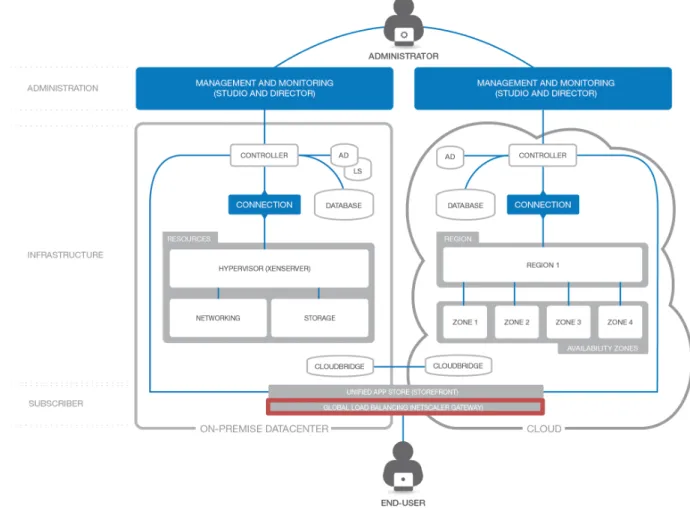
The Citrix XenDesktop 7.5 solution (see Figure 1) hosted on AWS consisted of a small number of components:
• Citrix XenDesktop 7.5 Delivery controllers
• Hosted Shared workers (Windows Server RDS Session Host enabling session isolation) • Server VDI Workers (Windows Server pooled or dedicated VDI-based instance isolation)
• An AWS local Active Directory Domain Controller (DC) that is a member of the Contoso corporate
forest
• An AWS local SQL Server Instance
7
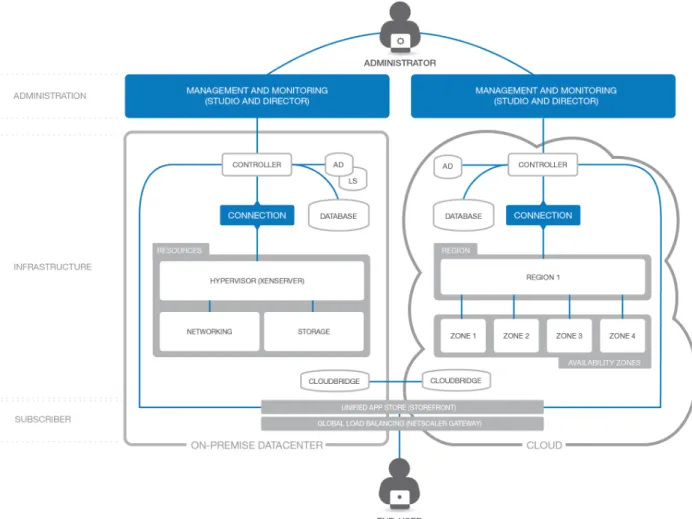
Figure 1. Architectural diagram of hybrid XenDesktop deployment.
The remaining components were already in place in the Contoso on-premises corporate datacenter. A brief description of key Citrix components follows:
• Citrix Receiver. Citrix Receiver is an easy-to-install client software component that lets you
access your documents, applications and desktops from any of your devices including smartphones, tablets and PCs.
• Citrix XenDesktop Delivery Controllers. These XenDesktop 7.5 Servers are used to manage
and deliver the Windows applications and desktops.
• Hosted Shared Workers. These XenDesktop 7.5 workloads, leveraging Windows Server
Remote Desktop Services Session Host as the foundation, are used to deliver shared hosted applications and desktops for most users.
• Server VDI Workers. These XenDesktop 7.5 workloads, using Windows Server without the
Remote Desktop Services Session Host role, provide VDI-based instance- or server-level isolation of an individual server instance for those users that require more customization or administrative control of their virtual desktop.
• Citrix License Server. The Citrix License Server hosts all the licenses that enable Citrix products
8
• NetScaler Gateway. NetScaler Gateway is a secure application and data access solution that
provides administrators granular application- and data-level control while empowering users with remote access from anywhere.
• StoreFront Services.StoreFront Services provides authentication and resource delivery
services for Citrix Receiver, enabling users to create centralized enterprise stores to deliver desktops, applications, and other resources to users on any device, anywhere.
9
XenDesktop 7.5 on AWS Architecture
Once Contoso had completed their assessment and concluded that a Citrix XenDesktop 7.5 solution on AWS could meet their objectives, they quickly moved into the design phase. Contoso wanted a simple, easy process to determine the hardware and storage sizing to support their individual implementation based on the needs of their subscribers. Contoso used Citrix Project Accelerator—an open, web-based application where you can manage your move to virtualized desktops and applications based on best practices of Citrix’s top consultants—to assist with the user assessment and environment design. In conjunction with project accelerator guidance, Contoso made the following design decisions:
• Although Project Accelerator is currently designed for the 5.6 and 7.1 versions of XenDesktop,
Contoso decided that its output could be used as a foundational design to work from in conjunction with their own testing to determine the final requirements when they went to production. [Please note: Although in order to remain consistent with the true outputs of the Project Accelerator tool we have left the original graphic outputs of the Project Accelerator that show “Windows 7” or “Windows 8.1” as one of the desktop images to deploy, the actual
implementation on AWS must use Windows Server 2008 R2 or Windows Server 2012 instances to enable “Server VDI” for these desktops. Windows Client operating systems are not supported for hosting on AWS at this time (http://aws.amazon.com/windows/).] The output of Project
Accelerator is only part of the data used to design the complete solution, and some AWS-specific adjustments must be made in order to remain compliant with Microsoft licensing. More detail is available in the “Solution Capabilities and Constraints” section of this guide on page 22.
• High availability is important for a robust solution, so an “N+1” configuration was chosen to
ensure that the solution sizing included a spare server to handle user capacity in the event of a failure.
• All users would need to connect to AWS over an encrypted connection through a CloudBridge
Site-to-Site VPN between AWS and the Contoso corporate network. Secure remote access would be provided by the NetScaler Gateway within the corporate network.
• Active Directory, DNS/DHCP, and SQL Server would be provisioned in AWS to reduce login
times for this solution.
• A variety of financial applications as well as MS Office would be made available as part of the
standard desktop image for this group of users.
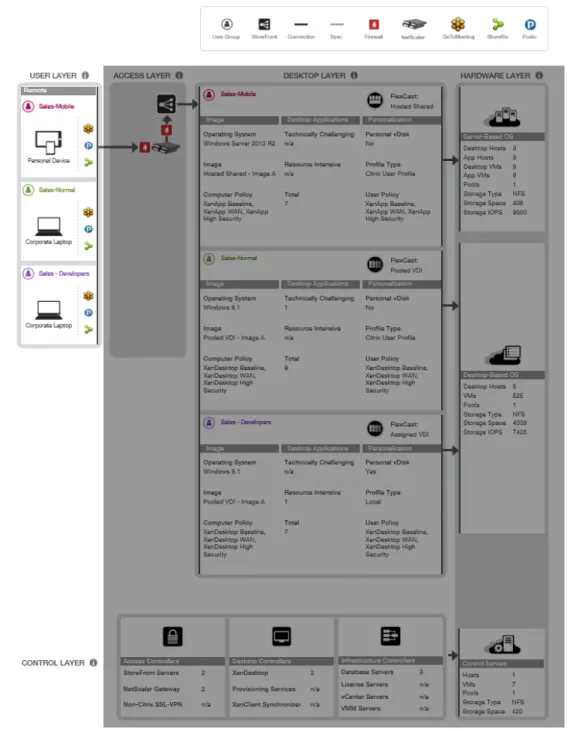
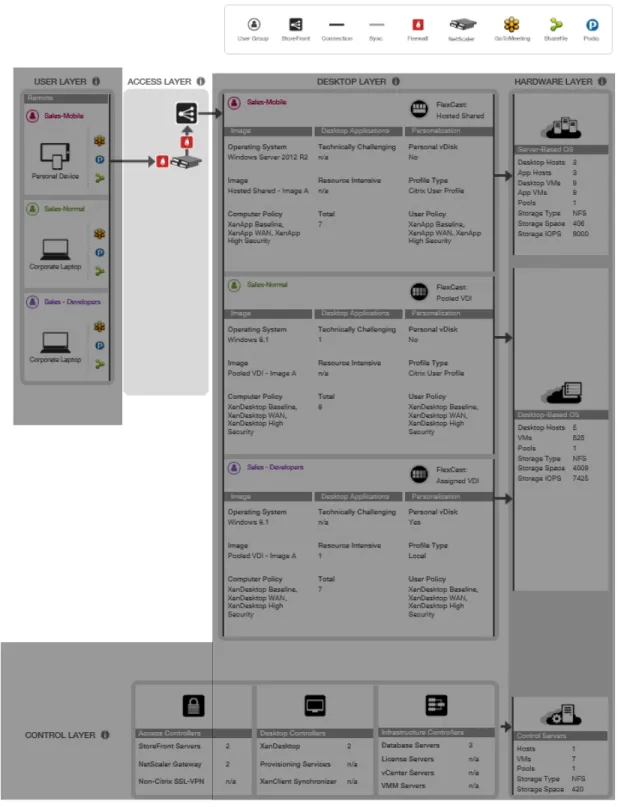
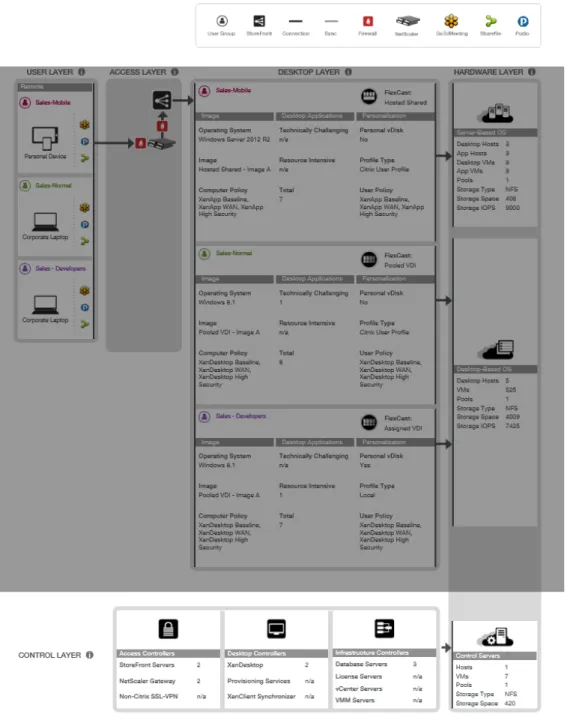
The following architecture (see Figure 2 and Figure 3) is a visual representation of the solution as recommended by Citrix Project Accelerator. Where Figure 2 shows the on-premises resources, Figure 3 shows the AWS-hosted resources. Additional considerations that leverage this output as the base are documented later in this guide. The following diagrams represents Contoso’s projected hardware and infrastructure requirements based on a team of 2325 users, spread over multiple types of users:
Customer Service reps, Sales – Mobile, Sales – Normal, Sales – Developers, Accounting – Task Workers and Accounting – Content Creators.
10
11
12
User Group
The user group layer (see Figure 4) represents the subscriber types that will access the AWS or on-premises hosted desktops or applications from their own end-point devices. Although the graphic represents these devices as “Corporate Laptops” and “Personal Devices,” these devices can be anything from a smartphone or tablet to a PC, Mac, or Linux desktop or laptop. These user groups represent the use cases of “Task Worker” or “Content Creator.” The details of what is delivered to these different user groups are enabled within the desktop layer, behind the access layer section.
Figure 4. The user group layer includes subscribers that access the AWS or on-premises hosted desktops or application from their own devices.
13
Contoso requires the following Citrix component on each end-point device:• Citrix Receiver. Citrix Receiver is a universal thin client that runs on virtually any device
operating platform, including Windows, Mac, Linux, iOS and Android. This is the one client users need to access business-critical apps and data from today’s latest tablet and smartphone devices and improve their mobility. Citrix Receiver can be downloaded and installed by employees on their personal devices.
14
Access Layer
The access layer (see Figure 5) consists of the servers responsible for providing connectivity to the entire XenDesktop 7.5 environment on AWS.
15
Contoso’s solution required the following Citrix components to provide secure remote access:• StoreFront Services. StoreFront Servicesprovides a self-service subscription service to
desktops and applications via an enterprise app store, giving users convenient access to all the resources they need. Contoso created a centralized enterprise app store with StoreFront Services within their on-premises datacenter to enumerate and aggregate the resources available for each user. Contoso deployed a pair of StoreFront servers to ensure high availability.
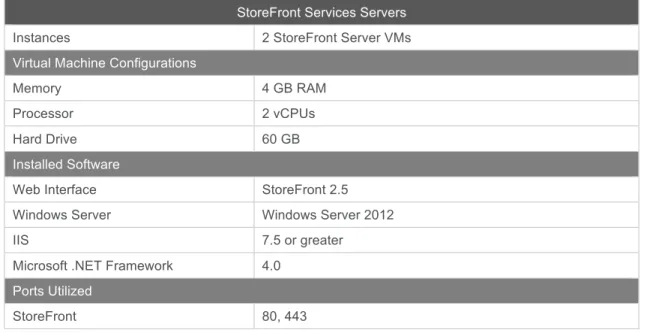
Table 1. StoreFront Service Configuration.
StoreFront Services Servers
Instances 2 StoreFront Server VMs
Virtual Machine Configurations
Memory 4 GB RAM
Processor 2 vCPUs
Hard Drive 60 GB
Installed Software
Web Interface StoreFront 2.5
Windows Server Windows Server 2012
IIS 7.5 or greater
Microsoft .NET Framework 4.0 Ports Utilized
StoreFront 80, 443
•
NetScaler Gateway
. NetScaler Gateway is a secure application and data access solutionthat gives administrators granular application and data-level control while empowering users with remote access from anywhere. IT administrators gain a single point of management for controlling access and limiting actions within sessions based on user identity and the endpoint device. The results are better application security, data protection and compliance
management.
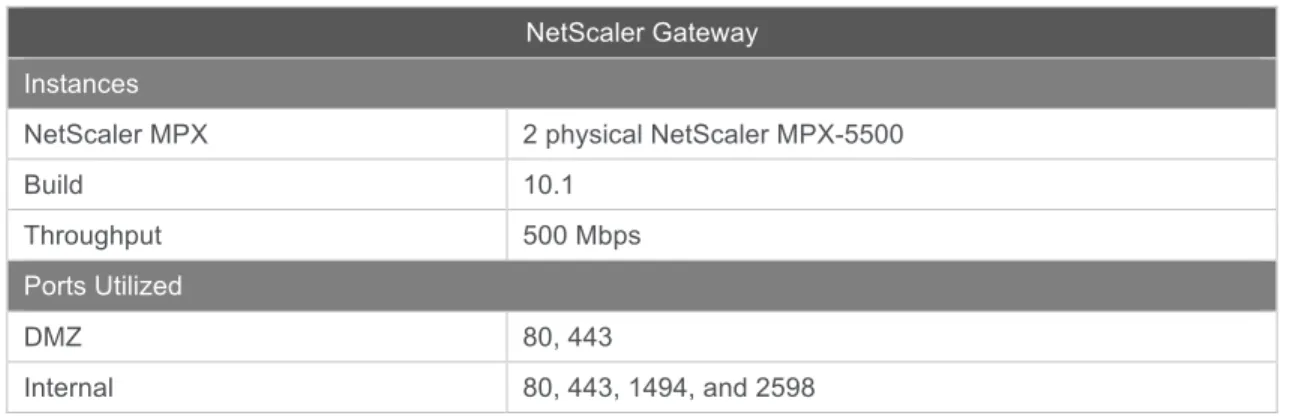
NetScaler Gateway works in conjunction with StoreFront Services to authenticate the user and create an SSL tunnel between the end user and NetScaler Gateway to ensure secure remote access from any device. NetScaler Gateway requires either a physical or a virtual NetScaler appliance. Contoso selected two physical NetScaler MPX appliances to host NetScaler Gateway in an active/active mode to ensure secure access is highly available and maximum capacity.
16
Table 2. NetScaler Gateway Configuration.
NetScaler Gateway Instances
NetScaler MPX 2 physical NetScaler MPX-5500
Build 10.1
Throughput 500 Mbps
Ports Utilized
DMZ 80, 443
Internal 80, 443, 1494, and 2598
Citrix recommends installing NetScaler Gateway in the network DMZ. When installed in the DMZ, NetScaler Gateway participates on two networks: a private network and the Internet with a publicly routable IP address. NetScaler Gateway can be used to partition local area
networks internally in the organization for access control and security by creating partitions between wired or wireless networks and between data and voice networks.
17
Desktop Layer
The desktop layer (see Figure 6) represents the separate use cases that Contoso will service: plans for 500 users to access Sales – Mobile resources, 500 users to access Sales – Normal resources, and 25 users to access Sales – Developers resources.
18
The Contoso solution required the following Citrix components to provide the desktop layer:• Citrix XenDesktop Delivery controllers. These XenDesktop 7.5 Infrastructure Servers are
used to manage and deliver the Windows applications and desktops. XenDesktop Controller Servers
Instances 2 XenDesktop Controllers
Virtual Machine Configurations
Instance Type M3.large
Memory 7.5 GB RAM
Processor 2 vCPUs
Disk 60 GB HD
Installed Software
XenDesktop Version 7.5
Winders Server Windows Server 2012
• Hosted Shared Workers. These XenDesktop 7.5 workloads, leveraging Windows Server
Remote Desktop Services Session Host as the foundation, are used to deliver shared hosted applications and desktops for most users.
Hosted Shared Desktop Workers
Instances 9 XenApp Desktop Workers
Virtual Machine Configurations
Instance Type M3.2xlarge
Memory 30 GB RAM
Processor 8 vCPUs
Disk 160 GB HD
Installed Software
XenDesktop VDA Version 7.5
Winders Server Windows Server 2012 – Hosted Shared Hosted Shared App Workers
Instances 9 XenApp Application Workers
Virtual Machine Configurations
Instance Type M3.2xlarge
Memory 30 GB RAM
Processor 8 vCPUs
Disk 160 GB HD
Installed Software
XenDesktop VDA Version 7.5
19
Pooled VDI Desktop WorkersInstances 500 Pooled VDI Desktop Workers
Virtual Machine Configurations
Instance Type c3.large
Memory 3.75 GB RAM
Processor 2 vCPUs
Disk 50 GB HD
Installed Software
XenDesktop VDA Version 7.5
Winders Server Windows Server 2012 – Server VDI
• Server VDI Workers. These XenDesktop 7.5 workloads, using Windows Server without the
Remote Desktop Services Session Host role, provide VDI-based VM or server-level isolation of an individual server instance for those users that require more customization or
administrative control of their virtual desktop.
Pooled VDI Desktop Workers
Instances 500 Pooled VDI Desktop Workers
Virtual Machine Configurations
Instance Type c3.large
Memory 3.75 GB RAM
Processor 2 vCPUs
Disk 50 GB HD
Installed Software
XenDesktop VDA Version 7.5
Winders Server Windows Server 2012 – Server VDI Assigned VDI Desktop Workers
Instances 25 Pooled VDI Desktop Workers
Virtual Machine Configurations
Instance Type g2.2xlarge
Memory 15 GB RAM
Processor 8 vCPUs
Disk 60 GB HD (SSD)
Installed Software
XenDesktop VDA Version 7.5
20
Control Layer
The control layer (see Figure 7) contains all the infrastructure components required to support the access and desktop layers. The Access Controllers and Desktop Controllers were previously discussed in their respective sections. This section outlines Contoso’s implementation of the
Infrastructure Controllers and Control Hosts placed in AWS to decrease WAN traffic for logon and the potential increased logon times that can result.
21
According to the Project Accelerator, Contoso’s solution required the following Citrix and Microsoft infrastructure components within the control layer:•
Active Directory.
Citrix XenDesktop and XenApp leverage Active Directory forauthentication and policy setting enforcement on both users and computers. Active Directory Controller Requirements
Instances 2 Active Directory Controllers Virtual Machine Configurations
Instance Type m3.medium
Memory 3.75 GB RAM
Processor 1 vCPUs
Disk 60 GB HD
Installed Software
Winders Server Windows Server 2012
• SQL Server Database (SQL Mirroring). The SQL Server Database provides high availability
with automatic failover Database Services used by XenDesktop 7.5. SQL Server Requirements
Instances 3 SQL Server database servers Virtual Machine Configurations
Instance Type c3.xlarge
Memory 7.5 GB RAM
Processor 4 vCPUs
Disk 60 GB
Installed Software
SQL Server version SQL 2012
Authentication Mixed
TCP/IP Enabled
Named Pipes Enabled
IP Address 10.16.3.50
Port 1436
Disk space data files 60Gb Disk space log files 20Gb
22
Management and Operations
For day-to-day administration, Desktop Director was leveraged to manage and support the environment. Support staff and administrators were granted access to the console.
Administrators manage the site using Citrix Studio. This console handles all site-level responsibilities including policies, device and user allocations. Only senior administrators are granted access to the Citrix Studio. The console was installed on each XenDesktop controller for high availability.
Solution Capabilities and Constraints
The Project Accelerator outputs provide the base sizing and architecture. The following sections provide additional considerations, tools and optimizations specific to Amazon Elastic Compute Cloud (Amazon EC2) platform itself. By taking these additional factors into consideration, along with the base sizing and architecture, a complete hybrid solution in the Contoso datacenter and Amazon EC2 could be
implemented.
The following sections outline some of the considerations within AWS that have influenced this design beyond the recommendations from the Project Accelerator.
AWS as an IaaS Platform
The AWS platform has evolved to include several technologies that enable Infrastructure as a Service (IaaS). This section provides a brief overview of those technologies that are leveraged as a part of the Citrix XenDesktop solution on AWS.
More information about Amazon EC2 and Windows VM Instance capabilities and Citrix CloudBridge can be found at:
• http://aws.amazon.com/ec2/instance-types/ • https://www.citrix.it/products/cloudbridge
o Installing CloudBridge VPX on AWS
o CloudBridge Technical Overview
Networking
Amazon Virtual Private Cloud (Amazon VPC) enables a logically isolated section of the Amazon Web Services (AWS) Cloud where you can launch AWS resources in a virtual network that you define. Administrators have complete control over the virtual networking environment, including multiple layers of security, to control access to the Amazon EC2 instances in this VPC.
The example in this guide uses a single VPC for all AWS-hosted XenDesktop 7.5 workloads. A Citrix CloudBridge Site-to-Site VPN connection was used between Contoso’s on-premises corporate datacenter and the AWS-hosted virtual network (VPC).
More information regarding AWS Networking can be found at http://aws.amazon.com/vpc/
Storage
The scenario in this document leverages Amazon Elastic Block Store (Amazon EBS) shared storage as provided to the VM instances provisioned within AWS. In addition, a Windows Server 2012 File Server has been configured within AWS as a shared file service for the storage of user profiles and data. Additional storage can be allocated within the environment as required for other workloads not documented in this guide.
23
Important! Because Citrix Provisioning Service is not supported with AWS at this time, the storage
calculations from the Project Accelerator can differ significantly from the storage actually used. Please select Machine Creation Services (MCS) as the storage technology to “provide” your storage requirements as part of your cost models.
Provisioning
The provisioning of VM Instances within AWS is accomplished entirely from the Citrix Studio console. Larger scale environments can be provisioned using Citrix XenDesktop SDK combined with AWS CloudFormation templates. The console UI examples in this guide are used for the sake of clarity, while it is generally recommended that a Citrix Service Provider (CSP) or enterprise deployments leverage the XenDesktop SDK and AWS CloudFormation templates to ensure continuity when provisioning instances over time or at larger scale.
More information about AWS CloudFormation and samples can be found at http://aws.amazon.com/cloudformation/aws-cloudformation-templates
Secure Access
For the scenario in this guide, secure access to desktops and applications within AWS is provided through the Contoso on-premises NetScaler Gateway when connecting to AWS-hosted workloads. The connections made through the NetScaler Gateway are then passed through the CloudBridge Site-to-Site VPN to the AWS-hosted desktops and applications (see Figure 8).
Figure 8. Citrix NetScaler Gateway provides unified and secure access to on-premises and AWS-hosted desktops and applications.
24
More information about Citrix NetScaler Gateway can be found at http://www.citrix.com/edocs.Microsoft Instances and Services Used for this Guide
Microsoft Windows Server 2012 Datacenter Instances were used for all Windows Servers in this guide. Some of the roles and services enabled on various servers include:
• Active Directory Services • File Services
• Internet Information Services
• Microsoft SQL Server 2012 Service Pack 1 • .NET 3.5
• .NET 4.0
• Remote Desktop Services
• Remote Desktop Service License Server
Citrix Components Supported in AWS for this Solution
The following Citrix components for this solution are currently supported within AWS:
• Citrix XenDesktop 7.5 Delivery controllers, Hosted Shared Workers and Server VDI Workers • NetScaler Application Delivery Controllers, CloudBridges and NetScaler Gateways
25
Scenario: Augmenting On-Premises Services with
XenDesktop 7.5 Controllers and Workers Hosted in AWS
The following sections walk through creation of an AWS virtual private cloud (VPC) to be used for
XenDesktop. This scenario augments on-premises services with XenDesktop 7.5 controllers and workers hosted in AWS. The key steps include:
• Creating the AWS virtual private cloud (VPC) network. This includes creating the VPC network
infrastructure, adding security groups, and configuring DHCP options.
• Configuring and launching the XenApp and XenDesktop infrastructure instances.
Figure 9 shows the sample architecture used for this scenario.
Figure 9. Sample architecture used by the scenario to augment on-premises services with XenDesktop 7.5 controllers and workers hosted in AWS.
26
Set Up the VPC Network
The following sections cover the key steps in setting up the VPC network: creating the VPC network infrastructure, adding security groups, and configuring DHCP options.
Create the VPC Network Infrastructure
Creating a site involves creating the Virtual Private Cloud (VPC) network infrastructure in your Amazon Web Services account.
1. Log in to your AWS account, and navigate to the VPC tab. Click Get started creating a
27
2. Select VPC with Public and Private Subnets.Note: To create a hybrid setup between your on-premises environment and AWS:
a. Select VPC with Public and Private Subnets and Hardware VPN.
b. Alternatively, use a NetScaler VPX Platinum Edition enabling NetScaler Gateway as well as CloudBridge Connector. The CloudBridge Connector enables a WAN-optimized VPN function between your on-premises environment and your Amazon VPC.
28
3. Next, the wizard displays the default settings for the VPC and provides an opportunity tomake adjustments. This sample deployment uses the default network settings. Adjust these settings accordingly, and then click Create VPC.
4. A confirmation message is displayed, indicating the VPC has been successfully created.
Note: When the VPC is automatically created, it includes the public and private subnets, the router,
NAT gateway, and the Internet gateway.
29
Add Security Groups
The security groups in Amazon VPC provide communication between the Internet and public network, and the public and private network. The security groups contain ACLs and are the basis of the firewalls for the subnets and instances used in this deployment.
You must create the following security groups:
• NAT security group • Public security group • Private security group
Add NAT Security Group
30
2. Add ACL rules for inbound and outbound traffic. Select:a. Create a new rule b. Port number c. Source IP address
Note: A source IP address of 0.0.0.0/0indicates that you want to allow all inbound or
31
Create ACL rules to match the inbound and outbound traffic table (see Table 3).Table 3. NAT security group rules.
Inbound Outbound
Type Traffic Source Type Traffic Source
All All privateSG All All 0.0.0.0/0
TCP 22 (SSH) 0.0.0.0/0
32
3. Go to the EC2/Instances page, and locate the instance. Right-click the instance, and33
Add Public Security Group
34
2. Add ACL rules for inbound and outbound traffic. Select:a. Create a new rule b. Port number c. Source IP address
Note: Entering a Source IP address of 0.0.0.0/0allows all inbound or outbound traffic.
Create ACL rules to match the public network security group (publicSG) rules table (see Table 4).
Table 4. Public network security group (publicSG) rules.
Inbound Outbound
Type Traffic Source Type Traffic Source
All All publicSG All All 0.0.0.0/0
All publicSG All privateSG
ICMP All 0.0.0.0/0 ICMP All 0.0.0.0/0
TCP 22 (SSH) 0.0.0.0/0 80 (HTTP) 0.0.0.0/0 443 (HTTPS) 0.0.0.0/0 1494 (CA) 0.0.0.0/0 2598 (Sess) 0.0.0.0/0 3389 (RDP) 0.0.0.0/0
35
Add Private Security Group
36
2. Add ACL rules for inbound and outbound traffic. Select:a. Create a new rule b. Port number c. Source IP address
Note: Entering a Source IP address of 0.0.0.0/0 allows all inbound or outbound
traffic.
Create ACL rules to match the private network security group (privates) rules table (see Table 5).
37
Table 5. Private network security group (privateSG) rules.
Inbound Outbound
Type Traffic Source Type Traffic Source
All All NATSG All All 0.0.0.0/0
All privateSG All privates
ICMP All publicSG ICMP All 0.0.0.0/0
TCP 54 (DNS) publicSG UDP 52 (DNS) 0.0.0.0/0
80 (HTTP) publicSG
135 publicSG
389 publicSG
443 (HTTPS) publicSG 1494 (CA) publicSG 2598 (Sess) publicSG 3389 (RDP) publicSG 49152 -
65535 publicSG
UDP 53 (DNS) publicSG
38
Configure DHCP Options
There is a domain controller running DNS in the private network. The controller enables Citrix servers to authenticate and communicate with each other. To implement this communication:
• Create a new DHCP options set that contains your DNS server IP address.
• Add an open-source DNS server on the Internet in case a server needs to access the
Internet.
Create a DHCP Options Set
39
2. Select the VPC, right-click on your selection, and choose Change DHCP Options Set40
Set up the XenApp or XenDesktop Infrastructure Instances
The following sections walk through setting up the following Amazon machine images (AMIs):
• Domain Controller AMI
• Remaining XenApp or XenDesktop AMIs • NetScaler AMI
Launch and Configure a Domain Controller Amazon Machine Image (AMI)
Create a domain controller for the site as follows:1. Select AMIs in the EC2 tab.
2. Depending on operating system you use, perform a search in the Amazon AMIs for
Windows Server 2012 Base or Windows Server 2008 R Base. Ensure that the
machine is deployed to your subnet, and make sure it is in the private subnet
41
3. Assign the IP address for this server.42
5. Place the domain controller in the network by launching the AMI into the appropriatenetwork and security group. This example places the domain controller in the private network.
43
6. Review the settings, and then select Launch.44
Launch Remaining XenApp or XenDesktop AMIs
Launch the remaining XenApp or XenDesktop AMIs using the parameters in Table 6. (Note that AMI IDs will change per region and after release of updates by AWS.) Ensure that you launch them into the correct network (private or public as applicable) and assign an IP address and the elastic IP addresses.
Note: The Amazon VPC wizard automatically creates the NAT server, so you should not need this
AMI.
Table 6. XenApp / XenDesktop AMI parameters per function for AWS region US-East-1.
Function AMI Name AMI ID Network IP Address Domain Controller Microsoft Windows Server
2012 Base ami-aede32c6 private 10.0.1.5
Microsoft Windows Server
2012 R2 Base ami-088c6460 private 10.0.1.5 Microsoft Windows Server
2012 R2 Base ami-9ed834f6 private 10.0.1.5 Delivery Controller Microsoft Windows Server
2012 with SQL Standard ami-eed83486 private DHCP Microsoft Windows Server
2012 R2 with SQL Standard ami-048c646c private DHCP Microsoft Windows Server
2008 R2 with SQL ami-acd539c4 private DHCP VDA Master Microsoft Windows Server
2012 Base ami-aede32c6 private DHCP
Microsoft Windows Server
2012 R2 Base ami-088c6460 private DHCP
Microsoft Windows Server
2008 R2 Base ami-9ed834f6 private DHCP
Bastion Microsoft Windows Server
2012 Base ami-aede32c6 public DHCP
Microsoft Windows Server
2012 R2 Base ami-088c6460 public DHCP
Microsoft Windows Server
2008 R2 Base ami-9ed834f6 public DHCP
NetScaler VPX NetScaler VPX Platinum
45
Launch the NetScaler AMI
1. Ensure that you subscribe to NetScaler VPX in the AWS Marketplace.
2. In Community AMIs of the EC2 Console launch wizard, launch the AMI searching for the
AMI IDs.
46
3. Deploy the instance into the private subnet.47
4. Ensure that this instance has two interfaces:• Public subnet • Private subnet:
o eth0 is connected to the private subnet
o Primary IP address (NSIP) is 10.0.1.100 o Secondary IP address (SNIP) is 10.0.1.102
48
5. Deploy the instance into the private security group.49
6. Configure the NetScaler AWS elastic network interfaces (ENIs) to be part of theirrespective security groups.
• Public-subnet-facing ENI needs to be part of the public security group. • Private-subnet-facing ENI needs to be part of the private security group.
a. Public ENI – Public Security Group:
50
7. Assign an elastic IP address to the NetScaler public ENI – associated to the VIP(10.0.0.176).
Once the networking and compute instances are in place, the standard XenDesktop installation procedures as outlined in the product documentation can be followed. There are no special considerations when implementing XenDesktop delivery controllers or worker servers within AWS as proposed in this sample design.
Conclusion
By cross-referencing the Citrix Project Accelerator and XenDesktop Modular Reference Architecture, Contoso was able to implement a hybrid XenDesktop solution spanning the Contoso on-premises enterprise datacenter and AWS’s EC2 environment. Leveraging public cloud infrastructure such as AWS virtually eliminated any need for a new Contoso capital investment, allowing them to bring their new service online quickly in a globally available, state-of-the-art cloud-hosted infrastructure.
By leveraging Citrix XenDesktop 7.5, Contoso was capable of providing an industry-leading desktop virtualization solution, ensuring the best user experience across any device, as enabled by Citrix technologies such as HDX™.
About Citrix
Citrix (NASDAQ:CTXS) is a leader in mobile workspaces, providing virtualization, mobility management, networking and cloud services to enable new ways to work better. Citrix solutions power business mobility through secure, personal workspaces that provide people with instant access to apps, desktops, data and communications on any device, over any network and cloud. This year Citrix is celebrating 25 years of innovation, making IT simpler and people more productive. With annual revenue in 2013 of $2.9 billion, Citrix solutions are in use at more than 330,000 organizations and by over 100 million users globally. Learn more at
www.citrix.com
851 West Cypress Creek Road Fort Lauderdale, FL 33309 954-267-3000 http://www.citrix.com Copyright © 2014 Citrix Systems, Inc. All rights reserved. Citrix, FlexCast, HDX, NetScaler Gateway, and XenDesktop are trademarks of Citrix Systems, Inc. and/or one of its subsidiaries, and may be registered in the U.S. and other countries. Other product and company names mentioned herein may be trademarks of their respective companies.
citrix.com
Additional Resources
Citrix XenDesktop Product Web Site
Citrix XenDesktop Modular Reference Architecture [PDF]
How to Deploy Xenapp and Xendesktop with Amazon Web Services Flexing to the Cloud with Citrix XenDesktop and Amazon Web Services NetScaler On AWS Overview
Citrix Project Accelerator Amazon Web Services Web Site Citrix HDX technologies