Information Risk Management Solution
for Databases Functional Overview
IPLOCKS WHITE PAPER
INTRODUCTION ...2
DATABASE AND INFORMATION SECURITY...3
Information Security: Perimeter to Insider Threats...3
Database Security: Protecting Valuable Assets ...3
IPLOCKS INFORMATION RISK MANAGEMENT FOR DATABASES...3
Vulnerability Assessment: Ensuring Database Best Practices...5
Vulnerability Assessment Scheduling ...5
Vulnerability Assessment Reports ...5
Privilege Summary ...6
Monitoring...6
User Behavior Monitor: Alerting Abnormal Usage Patterns...6
Privilege Monitor: Tracking Privilege Change ...8
Metadata Monitor: Examining and Reporting Change ...9
Content Monitor: Keeping a Watchful Eye on Content...9
Transaction Monitor: Surveying Enterprise Transaction History ...10
Audit and Analysis ...10
Compliance...10
Report Manager ...10
Command Line Interface (CLI) ...10
SUMMARY...11
ABOUT IPLOCKS...12
1
TABLE OF CONTENTS
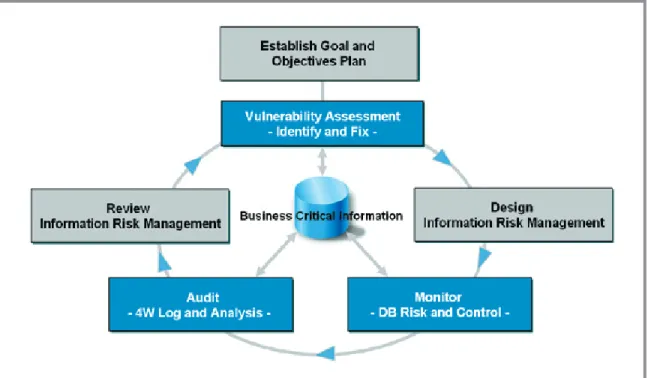
Figure 1: The IPLocks Information Risk Management process.
INTRODUCTION
Today, established companies store the majority of their business sensitive information in databases rather than in file or email systems. The security of databases is fundamental to the organization. Mission critical data requires high level protection from malicious actions—database attacks, inappropriate usage, and fraudulent events. IPLocks delivers an automated database and information risk management solution to protect business critical information for enterprise computing environments. Our strategy is to focus on database information security and management by providing a comprehensive vulnerability
assessment, monitoring, and auditing solution that addresses database security issues.
The IPLocks Information Risk Management Solution utilizes processes and technology to reduce inherent risk to business critical data that can be misappropriated. IPLocks safeguards sensitive data while creating a unique information risk management solution for enterprise customers. The IPLocks Information Risk Management Solution for databases process shown in Figure 1 is a continuous feedback loop of Plan and Assess, Design, Implement, and Review. During the planning
and design phase, an enterprise identifies its security risks by assessing the business requirements and pertinent information that need to be secured. For example, routine marketing data generally does not require the same level of security that sensitive customer information requires. Once an enterprise identifies its hierarchy of requirements, it can then create the policies and procedures in its system to adequately safeguard this information. Regular feedback and periodic review of these policies refines and improves the process and security measures already in place.
The technology components that form the three pillars of the IPLocks Information Risk Management for databases security solution include:
• Vulnerability Assessment • Monitoring
• Auditing and Analysis
The IPLocks solution assesses the vulnerability of databases, proactively monitors data users, sessions and objects, and allows forensic auditing of logs. In the following section, we will review some of the common problems in database security, the high level methodology IPLocks employs to address these problems, and discuss how each module within the IPLocks solution works to protect an enterprise’s valuable intellectual property and information.
DATABASE AND INFORMATION SECURITY
Most large enterprises have complex and expensive computing environments to archive and share information quickly and effectively among employees, partners, customers, and software applications. When computers are networked to other information repositories outside the enterprise, vast amounts of business intelligence become available. These information repositories represent considerable value and are an attractive target for employees and non-employees who wish to profit at the expense of others.In an effort to safeguard both the privacy and integrity of these information assets, enterprises have had to learn how to protect their network investment from unwanted access by non-employees or enterprise outsiders with intentions ranging from casual curiosity to malicious intent. Enterprises began to use firewalls to protect their intellectual property and keep out unauthorized users. Financial data was stored inside the company. As these assets increased in value, the incentive for people to break in or ‘hack’ through the firewall also increased. Motivated by profit, notoriety, or simply boredom, hackers posed a real threat and companies responded accordingly.
INFORMATION SECURITY: PERIMETER
TO INSIDER THREATS
Firewalls, anti-virus, intrusion detection, and virtual private networks are all considered to be measures of corporate information security. To date, most security measures have been designed for perimeter-centric protection to keep hackers out of the corporate intranet. Many of these security methods have been proven to be effective in perimeter defense, yet fail to address insider threats. An example of this is a sales person downloading customer information for non-business use. In the August 2004 “Insider Threat Study,” The Secret Service/CERT* estimated that 78% of information thefts are by authorized users. Additionally, the frequent and increasing number of worldwide newspaper headlines reporting information theft are now causing companies to pay attention to insider threats.
DATABASE SECURITY: PROTECTING
VALUABLE ASSETS
Databases are at the core of every major enterprise software application today and are critical to the operation of most companies. It is in the databases where an enterprise’s most valuable records reside, and its safekeeping is fundamental to business continuity. However, the importance of sophisticated database security has only recently become clear, and many databases are secured by little more than password access controls. It is often assumed that employees have good intentions. It is also assumed that because database servers reside behind a corporate firewall, then sufficient security measures already exist. This perception is not reality.
Aside from keeping outsiders from gaining access to the corporate computing environment, there are a number of database security challenges to consider. How do you make enterprise information available, yet secure? How do you make data available only to the people who need it? What can you do to ensure that data is not accidentally or maliciously altered? How do you distinguish from authorized and unauthorized access? Can you be certain that your databases are adequately secured? These questions of confidentiality, integrity, and availability are answered and addressed with the IPLocks Information Risk Management Solution for databases.
IPLOCKS INFORMATION RISK
MANAGEMENT FOR DATABASES
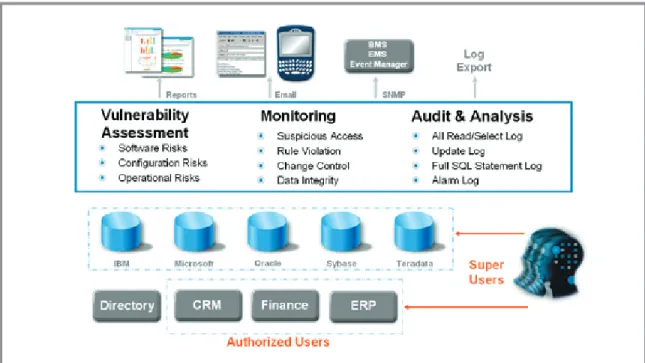
The IPLocks Information Risk Management Solution for databases, as shown in Figure 2, is an external, comprehensive, non-invasive software solution that offers a three pillar approach to securing enterprise information:
• Vulnerability Assessment ensures database best practices are enforced
• Monitoring examines and alerts on changes in user behavior, permissions, content, and metadata
• Auditing and forensic analysis provides a transactional view of changes aiding in regulatory compliance
Figure 3: IPLocks solution monitors both remote and local databases within the enterprise. Figure 2: Three pillars of the IPLocks solution: Vulnerability Assessment, Monitoring, and Auditing.
IPLocks archives all generated alerts into an internal database and sends an alert notification to assigned security personnel via email or SNMP traps.
The IPLocks Information Risk Management Solution for databases resides on its own Windows or Linux server separate from your enterprise database servers. The IPLocks solution uses an internal database and is capable of monitoring both local and remote databases within the enterprise (Figure 3).
The IPLocks Information Risk Management Solution is managed via an intuitive web-based management console. Large enterprise database environments can also be managed using our Command Line Interface (CLI).
The IPLocks Solution is capable of discovering all active databases, known and unknown, within the enterprise. By supplying IPLocks with the IP address range and port numbers, all active databases, including those at remote sites, can be discovered.
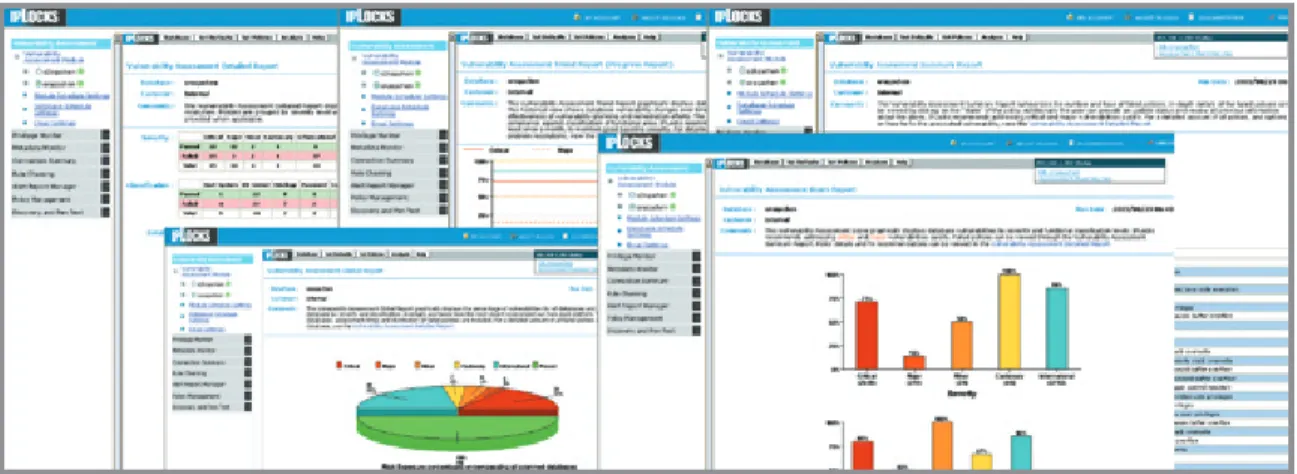
Figure 4: Vulnerability Assessment Reports.
VULNERABILITY ASSESSMENT:
ENSURING DATABASE BEST PRACTICES
While many security companies provide vulnerability assessments, they tend only to report on the operating system, network, or system files related to security issues. The IPLocks Vulnerability Assessment solution is available as either a stand-alone solution or as part of the complete IPLocks Information Risk Management Solution. Utilizing industry best practices, our Vulnerability Assessment solution ensures each database is configured securely by verifying settings, patches, and missed configuration steps. The IPLocks Vulnerability Assessment solution reviews database configuration parameters, resource allocation, database user privileges and roles, and database vendor patch levels. Because Vulnerability Assessment ensures enterprise-wide database best practices are followed, it provides IT, Security, and Audit teams with a centralized view of policy adherence.Using compiled policy lists of known databases, as well as industry best practices and vendor policies, IPLocks Vulnerability Assessment is an information repository of expert-level database configurations. Vulnerability Assessment ships with hundreds of pre-defined policies that can be modified. Users can easily create their own policies to address customer specific requirements.
Vulnerability Assessment is regularly updated to include ever-changing security threats via the IPLocks Vulnerability Assessment Up2date program. In order to expose potential vulnerabilities before, during, and after deployment, Vulnerability Assessment offers a non-intrusive, flexible, and timely view of the database configuration settings.
During the assessment phase, Vulnerability Assessment runs through a list of general and platform-specific tests, first gathering information for each database, and then comparing the settings to the established norms. Each test is assigned a pass/ fail grade and grouped by category. The categories are then ordered according to the severity of the issues and logged into the IPLocks internal database. The Vulnerability Assessment solution supports major database platforms from IBM, Microsoft, Oracle, Sybase, and Teradata1.
VULNERABILITY ASSESSMENT SCHEDULING
Since new users, structures, and data are updated regularly, it becomes important to identify any new vulnerabilities that have been introduced. For this reason, Vulnerability Assessment scheduling is critical for minimizing database vulnerabilities. By scheduling regular assessments, the databases can remain protected against newly introduced or found vulnerabilities. Customers typically begin assessing vulnerabilities on their most critical databases. Each assessment is recorded and a trend analysis report is generated to see how vulnerability factors have evolved and what specific actions are required to secure information assets.
VULNERABILITY ASSESSMENT REPORTS
The Vulnerability Assessment provides a compre-hensive suite of reports in both text and graphic form (Figure 4). An item-by-item report is generated to distinguish which items passed and which failed. Each security policy is color-coded by severity to easily gauge the database settings. A drill-down report summarizes specific information about what the test was looking for, what results were found, and what measures can be taken to resolve the issue.
For all failed items, the Vulnerability Assessment provides recommended actions to remedy the vulnerability, details explaining why the failed items resulted in a security related issue, and any database vendor-specific information about the problem. Vulnerability Assessment also provides a “global view” for all checked databases allowing an authorized user to identify the status of vulnerabilities across the enterprise’s entire information infrastructure.
All reports can be exported to a variety of formats including Acrobat, Excel, comma delimited, and tab delimited for easy integration with other reporting tools.
PRIVILEGE SUMMARY
The IPLocks Vulnerability Assessment provides a summary report of all permissions on the database, directly or indirectly. The privilege summary is important to IT, Security, and Audit as it provides a consolidated view of all permissions across disparate databases – who has access to what. Vulnerability Assessment provides the baseline for security and compliance. It is the first step to securing databases in the enterprise and minimizing the risk of data integrity and availability. Continuous monitoring and auditing are required to ensure the resilience of the database against potential attacks.
MONITORING
When addressing security requirements, enterprises have primarily focused on external security threats. Efforts are made to keep outsiders from entering the computing environment. The critical question remains: how can we ensure that internal data is used properly?
The IPLocks Information Risk Management Solution provides near real-time database monitoring to uncover any misuse or inconsistencies of data. It alerts on information risks from security and business policy violations, attacks on data, compromised structural integrity, and potential information theft.
For the area of continuous monitoring and surveillance, the IPLocks Information Risk Management Solution also offers a User Behavior Monitor, Privilege Monitor, Metadata Monitor, Content Monitor, and Transaction Monitor.
USER BEHAVIOR MONITOR:
ALERTING ABNORMAL USAGE PATTERNS
The User Behavior Monitor studies usage patterns and generates alerts on any abnormalities. User Behavior Monitor watches and records as users read and update activities (successful or not) in the database. Since database information can easily be copied, stored or transferred, knowing who, what, when, and where (“Four W’s”) data is being accessed is the first step at preventing theft.
Most major enterprises have built archival databases of customer, personal, and financial information that represent a tempting and vulnerable target both inside and outside the enterprise.
Recent media coverage exposing stolen credit card, customer, personal, and healthcare information has brought these concerns to the forefront. Corporate information theft not only tarnishes a company’s reputation and brand, but also lowers customer and investor confidence. These breaches cost companies millions of dollars and result in governmental regulations insisting organizations be responsible for securing information. Failure to act according to regulation has already resulted in fines for some companies.
Information theft is more difficult to detect than material theft. If a laptop computer has been stolen, it is likely to be missed within a few hours. But with information theft, normal database select statements occur as part of daily routines. Original information remains in tact but “abnormal” selections often go unnoticed. However, if a person in the organization was suspected of stealing data, tracking that user’s database read activities would be difficult as database log files do not capture the information necessary to prosecute.
Although access to database information is a typical daily activity and cannot be eliminated, an important step to higher security is for organizations to be aware of which users are viewing what data and when. The IPLocks User Behavior Monitor is designed to detect, alert, and report on unusual activities providing an added security advantage. For example, if a customer service employee reads an unusually large amount of customer records, an alert would be generated by the IPLocks User Behavior Monitor feature. With near real time email and pager alerts, suspicious user behavior can be identified reducing or eliminating damage well before customers become aware.
Since the goal of the User Behavior Monitor is to catch unusual behavior, it is important to understand which activities could be fraudulent. By placing all user actions and events into the perspective of how people steal information, it becomes easier to determine whether an event is normal or suspicious. User Behavior Monitor policies are categorized into three types: Object Policy, User Policy, and Session Policy. Each policy offers a slightly different viewpoint and provides a highly customizable interface for creating policies specific to each company’s application and database environment. Object Policies
Object Policies within the User Behavior Monitor are designed to monitor user behavior in terms of the tables and structures that they access. If the database administrator is reading payroll tables, User Behavior Monitor has the ability to send alerts. The IPLocks User Behavior Monitor examines for access frequency violations. Access policies are configured to alert any failed query/update actions, suspicious OS User, suspicious location, suspicious database user, suspicious client application, or any combination of suspect behavior. For example, if a particular database is accessible only through the company’s HR application, User Behavior Monitor will send an alert if anything other than the HR application accesses or attempts to access the database directly.
A firm may configure its access frequency policies to alert it to excessive access. A violation will trigger an alert based on a user-defined threshold or percentile. A threshold violation will trigger an alert if the number of times accessed exceeds the threshold. Additionally, a percentile violation will also trigger an alert if the equivalent threshold, based upon learned historic numbers, exceeds the threshold.
The SQL Capture feature of IPLocks User Behavior Monitor monitors column level changes and provide SQL statement commands run by users. Column level monitoring provides the user flexibility to continue looking at other columns while not generating false positives if the monitoring were set at the table level. For example, it may be normal behavior to update the first and last name of an HR table, but once someone accesses the social security number, an alert will be generated. User
run SQL commands are captured and associated with the alerts generated by the system. This gives security personnel an in-depth understanding of the actions and events that led to an alert. These functions are currently supported on Oracle2.
User Policies
The User Policies within IPLocks User Behavior Monitor are used to monitor a user’s behavior. Like the Object Policy, the User Policy also has access and access frequency policies. The rules work the same way as those in Object Policy, but the User Policy focuses on a configurable set of database users instead of a database table. For example, a company may want to monitor the activity of a database administrator. Since the database administrator’s job typically involves administering the database server for consistency, integrity, and availability, a user policy can be created to send an alert if the database administrator accesses the application data directly.
To emphasize the difference between User Policy and Object Policy, it is useful to compare the “Security Violation” rule under User Policy with the “Security Violation” rule under Object Policy. In User Policy, the “Security Violation” rule alerts on all failed actions by the selected database user. It does not matter which table the user was attempting to access. The “Security Violation” rule in Object Policy alerts on all failed access to the selected database table. It does not matter which database user was attempting to access the database. The rationale behind these simple “Security Violation” rules is that production databases that run seamlessly should not experience failed actions in normal operations. All failed actions deserve further investigations. Session Policies
The Session Policies in IPLocks User Behavior Monitor are used to monitor groups and users’ session activities. Session Policies identify session hijacking or unusually high resource consumption. For example, each user who connects to the database is assigned a certain percentage of database resources to complete the tasks normally associated with their job. The User Behavior Monitor profiles each user’s resource usage and compares it over time, building a specific profile for ‘normal’ behavior. User Behavior Monitor ascertains hourly access frequencies from historic information and alerts on any uncommon or excessive access activities.
7
Compared to Object or User Policy, Session Policy has some specific session rules which include login failures, suspicious login time, extremely long sessions, excessive read activities, and high read ratio. In addition to these rules, Session Policy also shares context-checking rules with User Policy including suspicious OS user, suspicious location, and suspicious client application. A Session Policy can be used to determine if a user is trying to access an application database directly. For example, if a software engineer obtained the username and password of the application server, he may be able to login to the database. This situation can be detected using a Session Policy and monitoring the application server user by activating the “Multiple Dimension Rule” and a combination of host name and application name for the application server. Any application server user readings with an invalid combination of host and application names will generate an alert.
Analysis
In order to make sense of a user’s behavior or to determine whether a particular transaction is normal, user actions must be viewed in context. The IPLocks Information Risk Management Solution examines the “Four W’s” of all database usage. Since transactions are not always sufficient to gauge a user’s intent, additional profiling information that identifies a user’s database usage is required in order to determine if a transaction is fraudulent, a session has been hijacked, or an inappropriate update could corrupt the database.
IPLocks provides advanced reporting features and allows the user to discover specific information on alerts by clicking on the alert item. This ‘drill-down’ approach creates a succinct report and gives the user the ability to pull up additional details to find out more information about the raised alerts and how they might react to the problem.
Whenever there is a violation to the Access Violation rules, the user can find out exactly which event caused the violation, which policy has been violated, and by whom. The User Behavior Monitor presents the user with enough audit information about violating events so adjustments can be made to the security policies to gather additional information or restrict user access to the objects in question. The IPLocks Information Risk Management Solution can trace all activities within the same database
session and provide a logical view of the suspicious user’s activity. For some databases, the IPLocks user will be able to view the exact query sequence of the database session providing a better understanding of the user’s intent and valuable forensic investigation information for securing the system against future attacks.
Existing Audit Log Analysis
Existing Audit Log Analysis (EALA) is a feature in User Behavior Monitor which allows auditing of existing logs within a target database or from an audit file created on the target database server. The EALA tool is used to analyze and process large amounts of previously collected data. It provides the user with a smooth transitioning path to migrate their existing homegrown, manual security auditing to a full-blown, feature-rich database security platform. Using EALA requires minimal knowledge about user behavior patterns before acquiring useful information from the existing audit log. EALA detects problems such as multiple login failures, which indicate password guessing or a precursor attack, and failed attempts to perform a specific task, which may signify an attempt to access un-authorized objects. It can also be determined from the logs if a task was performed outside business operating hours, as well as from another location. Logs files can be helpful in determining if multiple users are sharing the same user id and password or if a password is stolen. In another scenario, multiple users could be logging in from a single location indicating misuse of access privileges and potentially violating compliance regulations.
PRIVILEGE MONITOR: TRACKING PRIVILEGE CHANGE
Database privileges are granted to database users allowing them to access database resources including tables, table space, and data. Since privileges represent the first line of defense for database information, privilege settings are extremely important in ensuring data security, integrity, availability, and secrecy.
The IPLocks Privilege Monitor is responsible for monitoring changes to database privilege settings for all database users and alerts on potential threats. It tracks privilege changes through grant/ revoke statements, system/object permissions, roles, and passwords. This information is gathered from the database system tables and provides a
complete report of all changes to the resources or users being monitored.
The IPLocks Privilege Monitor allows the database administrator to configure which user, role, and/ or database actions will be monitored on each database and can be refined to monitor according to a company’s needs. The Privilege Monitor also monitors and reports cases when users have met their resource quotas often implying illicit access. Every major database vendor has its own way of implementing privilege settings. The IPLocks Privilege Monitor has database specific policies corresponding to the target database type. In addition to pre-defined policies, the Privilege Monitor also has the ability to build customized rules based on company specific security policies.
METADATA MONITOR:
EXAMINING AND REPORTING CHANGE
Metadata describes the detailed structure of a database, its objects, and their relationships. Its integrity is paramount for the consistency of the data and the operation of the database. Production databases usually consist of tables and objects containing enormous amounts of data stored within each table and providing references to other tables. Relationships among these schema objects are quite complicated, and the metadata associated with each object provides a basic roadmap for users, database administrators, application developers, and the database. Any change of schema, whether accidental or malicious, can make the data susceptible to inspection, replication, or alteration of both data and structures within the database. For these reasons, it is necessary to deny these changes to the production environment. Monitoring these events provides database management and IT staff with the assurance that policies are enforced and that data structures are not altered or duplicated. It also provides a viewable record that shows how and when intended changes occurred.
The IPLocks Metadata Monitor is designed to examine changes in the database metadata and alert those changes to authorized personnel. Similar to Privilege Monitor, Metadata Monitor has a set of built-in policies guarding metadata items for each database. The Metadata Monitor also supports customized security rules to monitor additional tables or events specific to the application suite they are running.
CONTENT MONITOR:
KEEPING A WATCHFUL EYE ON CONTENT
The IPLocks Content Monitor analyzes data access and updates. According to established behavioral rules, it detects suspicious updates. The Content Monitor guards against specifically defined events such as select or update statements run against the employee salary table. It also examines normal user activity patterns and builds a behavioral model flagging events that could indicate database corruption or other suspicious activities.
Content Monitor learns data patterns. For most of the built-in policies (i.e., Min/Max/Avg, Distribution, and Group-By Min/Max/Avg), the Content Monitor first learns a model for what constitutes a valid record or records (learn phase). It then checks to see if there are any records that are unusual or have changed in that model (guard phase). If there are records that appear to be invalid according to the learned model, the Content Monitor generates an alert message to report to the appropriate person via email.
An enterprise might have IPLocks monitoring their pricing database. IPLocks will assimilate the price range for each product category. If a price is updated and does not fall within the learned range, an alert will be generated. This helps to avoid selling products below minimum sales pricing, especially less than cost.
There are also policy types or policies that monitor a specific value and do not require a learning phase. These include clustering, defined rule, and user-defined rule differences. These rules alert and notify on changes to specific values within the database. Content Management policies check application data, which is similar to range checking and can be performed within the database. However, Content Monitor does not enforce any particular application logic, but instead detects cases where fraudulent or malicious acts are possible including attempted buffer overflows or the inclusion of control
characters. The IPLocks Content Monitor provides customers with the ability to enforce error-checking and consistency-checking independent of any other applications suite.
TRANSACTION MONITOR:
SURVEYING ENTERPRISE TRANSACTION HISTORY
Transaction Monitor3 surveys all successful
transactions within a database. To assist in proving data accuracy and integrity, the Transaction Module captures transaction history for all activities in the context of the operation. It does this by reading online REDO log files of the target database. Transaction Monitor issues alerts on any update, insert, and/or delete activity within a column or row. Details such as before and after values and equivalent SQL Statements are included in the alert. The IPLocks Transaction Monitor also detects and alerts on suspicious database transactions and provides transaction history for regulatory compliance.
AUDIT AND ANALYSIS
IPLocks forensic audit and analysis capabilities provide a transactional analysis of events by sessions, users, or objects that can be critical in investigating negligent, suspicious, or malicious activity. A single select, insert, or update statement may not provide enough information to gauge a user’s intent. A transactional analysis of sessions, user accounts, or access to database objects is therefore applied to determine if a transaction was likely illegitimate, negligent, or malicious.
Transactional analysis provides a complete picture of all activities in context to the operation. For example, if corrupted information were found in the database, transactional auditing can help determine the cause of the error. If an auditor asks a company to prove the validity of their financial tables, forensic reports can prove to auditors or regulators that all inserts, updates, and deletes in the database are accurate. Transactional analysis is also beneficial to information security. If an employee gives her two week
resignation notice, a transactional audit will identify activities related to sensitive information the employee previously had access to and warn of possible information leak. The IPLocks Auditing supports regulatory compliance requirements, ensuring data integrity and providing the necessary transactional history needed to validate database changes.
COMPLIANCE
With the growing number of governmental regulations, enterprises are discovering it nearly
impossible to interpret and implement all of the regulations. Regulatory compliance validates information through controls and process, regardless if the regulation is for SOX, GLBA, HIPAA, or any other regulation. Securing and validating the integrity of the data is important to organizations. By combining assessment, monitoring, and auditing, the IPLocks solution automates database specific internal compliance controls.
The IPLocks Information Risk Management Solution for databases assesses database administration controls, identification code controls, developer controls, end user controls, initialized files, and privilege identification code controls. Through continuous monitoring, IPLocks regularly monitors processes through password management, user identification code management, host authentication, user access, and vendor controls. The auditing feature of IPLocks Information Risk Management Solution reviews audit logs that contain information on which users have direct access to the database. The IPLocks Information Risk Management Solution also assesses and monitors for internal control adequacy providing an independent audit of the database controls and process. Thus, IPLocks provides a complete and automated database solution to facilitate business and security policy validation through assessing, monitoring, and auditing data.
REPORT MANAGER
The IPLocks Report Manager allows users to define the report definition which includes alarm searching criteria, status of an alarm, report layout information, frequency (daily, weekly, etc.), and alarm recipient. This provides the basis for generating customized reports on all alarms. The reports can be exported into third party reporting tools.
COMMAND LINE INTERFACE (CLI)
In order for the IPLocks Information Risk Management Solution for databases to operate in an environment where thousands of databases may have to be assessed, monitored, and audited in an automated fashion, IPLocks provides a Command Line Interface (CLI) to the solution. The CLI is also valuable where an external program or scheduler is responsible for creating, scheduling, and scanning of databases.
The CLI is capable of performing virtually all of the operations run from the Graphical User Interface (GUI) in a batch, un-attended, and automated mode within a trusted environment. It can be used to create database connections, run the IPLocks commands and policies against large, predefined sets of databases in a batch mode, and log the results in the system. It uses the set of existing database connections specified using the IPLocks GUI or the set created via the CLI. It also logs its own results in a log file for auditing and troubleshooting. The CLI API is exposed to external parties in order to accept an input file (XML/TXT) that contains tasks to be performed. Any data associated with the task is supplied in the input file. The input files supplied to the tool are archived once the task is complete. Reports are then generated by the IPLocks GUI application.
SUMMARY
IPLocks offers a comprehensive, automated database vulnerability assessment, continuous monitoring, and audit and forensic analysis solution for enterprise database security and compliance. From a malicious attack to subtle snooping for sensitive data, the IPLocks Information Risk Management Solution for databases provides the essential information monitoring technology that differentiates between normal and fraudulent activity. The IPLocks solution provides a true heterogeneous enterprise solution that operates across all major database platforms, including IBM, Microsoft, Oracle, Sybase, and Teradata. The IPLocks solution proactively and effectively manages database information security issues for enterprises of all sizes.
ABOUT IPLOCKS
IPLocks, Inc. is the leading provider of database security and information risk management solutions. The company works with enterprises worldwide to protect critical information assets from negligent and malicious user threats, manage database security policy vulnerabilities, ease the pain of compliance and to protect privacy. San Jose, California-based IPLocks is a privately held global corporation with customers throughout North America, Asia Pacific, South America, and Europe. For additional information, visit www.iplocks.com
IPLocks and the IPLocks logo are trademarks of IPLocks, Inc. All rights reserved. Any unauthorized use or reproduc-tion of the IPLocks logo is prohibited. ©2005 IPLocks, Inc. Rev 1 9/05.