Instant Solution Brief:
Sametime Bot Deployment Scenarios
Using Instant Agent Framework to Improve and Automate Access to Information and Expert Assistance
Introduction
This document describes how the suite of Instant Agent Framework (IAF) products can be deployed in your environment. Each IAF product is a Sametime Bot which exists under its own username and, when messaged, performs a function.
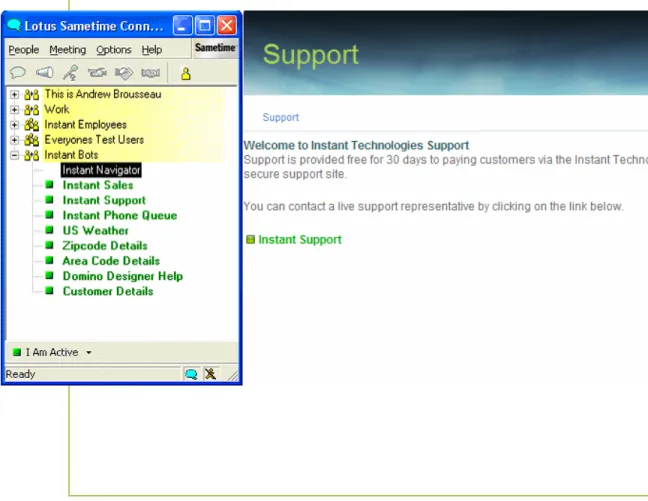
Bots can be placed on a Sametime client and messaged, or exposed on any web page using the STLinks toolkit.
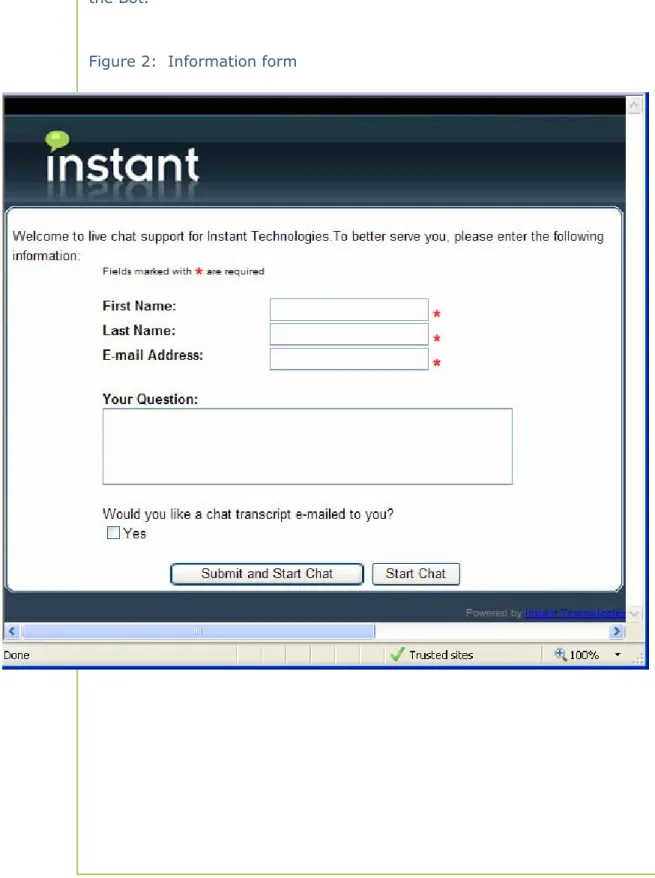
Additionally, when exposing Bots on a web page, you have the option to require visitors to complete an information form before they can access the Bot.
Bot Types
IAF QueueBots – These Bots act just like a queuing system in a call center. When a user (either an external customer or an internal employee) messages the QueueBot, it attempts to find an available support agent to render assistance. The support agent can then answer the question, pass the customer to another QueueBot, or to another agent within the same QueueBot. Each QueueBot has its own list of support agents.
IAF DataBots – These Bots perform database look-ups to help users find information. The Bot welcomes the user and asks for a search parameter that queries a particular database. DataBots can look up data from Notes databases, LDAP, and Active Directory; or they can be hooked into an ADO provider (which can, in turn, be hooked into many other data sources such as SQL or Oracle).
IAF NavigatorBots – These Bots bring all the other Bots together. When messaged, they will give the user a number of options (defined by you as the first menu). The options in the first menu direct the user to a text response, a QueueBot, a DataBot, a Sametime person, or another menu. You can offer multiple levels of menus—a decision tree, in effect—that a customer can navigate.
Bots in Action
Scenario 1 – Standard DataBot
This is the most basic scenario, in which a DataBot is set up to search a data source for information. Live personnel are not involved.
Example 1: A user enters a name (or partial name); the Bot searches through a company directory and returns complete contact details. Similarly, a user enters a product name; the Bot searches through a database and returns information specific to that product.
Example 2: A DataBot is created to automate answers to FAQs. A user enters a few key words; the Bot searches a knowledge database and then provides a list of potential solutions for the customer to browse.
Scenario 2 – Standard QueueBot
This is a basic “live help” scenario:
♦ A user messages the Bot and enters a question.
♦ The QueueBot asks its group of support agents if they would like to answer the question.
♦ When an agent accepts, the QueueBot connects the user with the support agent in a chat.
♦ The chat is logged to a Notes database for future reference.
Support agents can be set up with different levels of priority. You can have a “first-line” of support agents who answer basic questions, and “subject matter experts” whom first-line agents can invite into chats when necessary.
Scenario 3 – Primary/Secondary QueueBots
This scenario illustrates the transfer capabilities of QueueBots.
In responding to a user’s request in the primary QueueBot, the first-line support agent might need to transfer the customer to a secondary QueueBot in which the support personnel who would be more knowledgeable about the user’s request. Such QueueBot transfers increase your first-call resolution rate.
Scenario 4 – Standard NavigatorBot
This is a basic scenario that involves no personnel.
The NavigatorBot is setup like a decision tree—it asks a series of questions that drill down to an appropriate text response (which could contain web links or e-mails).
Here is an example:
Welcome to the problem NavigatorBot! What hardware are you having problems with?
Printer
Is your printer turned on?
Yes
What version of printer do you have?
1. LX456
This printer is no longer supported.
2. LX456b
Please visit www.company.com/printer/LX456b
3. LX456c
Please visit www.company.com/printer/LX456c
No
Please turn on your printer
Monitor
Is the screen visibly broken?
Yes
You will most likely need a replacement monitor.
No
Where did you purchase this?
1. The Store
Please contact the store for support
2. Your website
Please contact support at 800-555-5555
Scenario 5 – NavigatorBot Coupled with DataBots or QueueBots
This scenario offers the most options for providing solutions, as it incorporates all of the Instant Agent Framework products.
As in Scenario 4, the decision tree of the NavigatorBot is employed; this time, however, the decision tree can lead the user to a QueueBot for live help or to a DataBot for information look-up.
Below are two examples of a NavigatorBot in action. The first example illustrates how a NavigatorBot can act as a company receptionist. The second example is similar to Scenario 4 but incorporates live help and FAQ.
Keep in mind that a NavigatorBot’s decision tree can be set up anyway you like, with as many routes for a customer to choose as you wish to offer.
Example 1: NavigatorBot as Company Receptionist
Welcome to the Instant Technologies virtual receptionist! What would you like to do?
1. Speak with Sales
PASS TO SALES QUEUEBOT
2. Speak with Support
PASS TO SUPPORT QUEUEBOT
3. Company Information
Instant Technologies is an award winning company with over six years of experience in the enterprise instant messaging domain.
4. FAQ
Please choose from the following…
1. What products are available?
Instant Technologies products include: Team Sessions, Buddy List Administrator, Instant Agent Framework, OCS Archive Viewer and more!
2. I need help with STLinks configuration.
Please visit www.instant-tech.com/STLinks for more information.
3. My question is not listed here.
OK, I will pass you to a DataBot, which will give you access to our technical library. PASS TO DATABOT
Example 2: NavigatorBot with DataBot and QueueBot
Welcome to the problem NavigatorBot! What hardware are you having problems with?
Printer
Is your printer turned on?
Yes
What version of printer do you have?
1. LX456
This printer is no longer supported.
2. LX456b
Please visit www.company.com/printer/LX456b or speak with a live agent PASS TO QUEUEBOT
3. LX456c
Please visit www.company.com/printer/LX456c or speak with a live agent PASS TO QUEUEBOT
No
Please turn on your printer
Monitor
Is the screen visibly broken?
Yes
You will most likely need a replacement monitor. PASS TO SALES QUEUEBOT
No
Where did you purchase this?
1. The Store
Please contact the store for support
2. Your website
Please contact support at 800-555-5555 or speak with a live agent PASS TO QUEUEBOT