User's Guide and Software Design of
Job Tracking System for the NTC’s Machine Shop
2006-01-05
Revisions
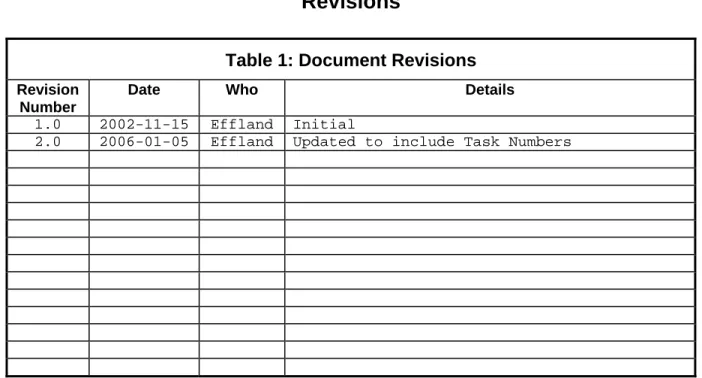
Table 1: Document Revisions
RevisionNumber
Date Who Details
1.0 2002-11-15 Effland Initial
Contents
1. INTRODUCTION ...1
2. HISTORY...1
3. FEATURES...1
4. USING THE JOB TRACKING SYSTEM ...1
4.1 SHOP JOB LISTING...2
4.2 INPUT FORM FOR NEW JOBS...2
4.3 JOB EVENT LISTING SCREEN...2
4.4 INPUT FORM FOR NEW JOB EVENTS...3
5. APPENDIX A: SOFTWARE AND DATABASE DESIGN...6
5.1 DESIGN PHILOSOPHY...6 5.2 DATABASE SCHEMA...6 5.3 WEB PAGE SOFTWARE...8 5.3.1 PHP Classes ...9 5.3.2 Software Locations ...9
List of Figures
FIGURE 1:BROWSER SCREEN SHOWING SHOP JOB LISTING...4
FIGURE 2:NEW JOB INPUT SCREEN...4
FIGURE 3:JOB EVENT LISTING SCREEN SHOWING “EVENTS” FOR THE JOB SELECTED FROM SCREEN SHOWN IN FIGURE 1 ...5
FIGURE 4:SCREEN TO ADD AN "EVENT" TO SELECTED JOB...5
FIGURE 5:PHPCLASSES AND METHODS...9
List of Tables
TABLE 1: DOCUMENT REVISIONS...II
TABLE 2:ENTRY FIELDS FOR NEW JOB INPUT FORM (FIGURE 2) ...2
TABLE 3:ENTRY FIELDS FOR JOB EVENT INPUT FORM (FIGURE 4) ...3
TABLE 4:DESCRIPTION OF TABLES IN MYSQLDATABASE FILE DBCDL ...6
TABLE 5:DESCRIPTION OF TABLE TBLSHOPJOBS...7
TABLE 6:DESCRIPTION OF TABLE TBLSHOPEVENTS...7
TABLE 7:DESCRIPTION OF TABLE SHOPCHARGENUMS...8
1. Introduction
Tracking the progress of jobs in the NTC’s machine shop improves communication between the shop and it’s customers, where the term “customer” here means anyone who submits a job to the shop.
A web-based tracking system, based on a similar design for tracking effort1, has been designed to minimize the effort required for the machine shop staff to report on a job’s status. This document provides instructions for using the system along with design methodology and code listings.
2. History
Initial attempts to track the status of shop jobs used a spreadsheet to list job names, the customer’s name, the machinist assigned to the work, expected completion dates, etc. The spreadsheet approach proved cumbersome for several reasons:
a) The shop foreman, Tony Marshall, spent too much time entering data into the spreadsheets. b) Only rudimentary status information (start date and completion date) about the job was available.
c) Viewing of the spreadsheet by customers was awkward, because Excel was required on the customer’s computer.
d) Simultaneous viewing of the spreadsheet by more than one person was cumbersome, and would occasionally lock Tony Marshall out of his own spreadsheet.
That system was abandoned in early September, 2002.
3. Features
The web-based system has been designed to manage the shop’s work flow and to provide a simple means for customer’s to view the status of their jobs.
a) All jobs are visible to anyone with a web browser inside NRAO's intranet (Figure 1).
b) The customer enters a new job using a web form, by typing a job description and notes (see Figure 2). c) Events for a job selected in the main screen are listed by clicking on the job number (see Figure 1) d) Anyone can enter a new event for a selected job (see Figure 4)
4. Using the Job Tracking System
The initial web form that displays the status of all shop jobs, as shown in Figure 1, is available at
http://www.cv.nrao.edu/~jeffland/nrao-only/Progs/Shop/Jobs1.php3
1
“Proposed System to Track Effort Expended for ALMA Band 6 Cartridge Construction,” Internal NRAO memo by J. Effland, 2002-07-31.
The contents of the form are stored in a database (see Appendix for details) and a listing of completed jobs is also available from a hyperlink on the page.
4.1 Shop Job Listing
From the screen shown in Figure 1, the user can either enter a new job by clicking the appropriate button, see events for a particular job by clicking on the job number, or view a listing of all completed jobs.
There are two important limitations that will be addressed in future software builds:
a) The only entries that can be changed after they’ve been entered into the system are task numbers, and b) the table can’t be searched or sorted by, for example, the customer’s name.
4.2 Input Form for New Jobs
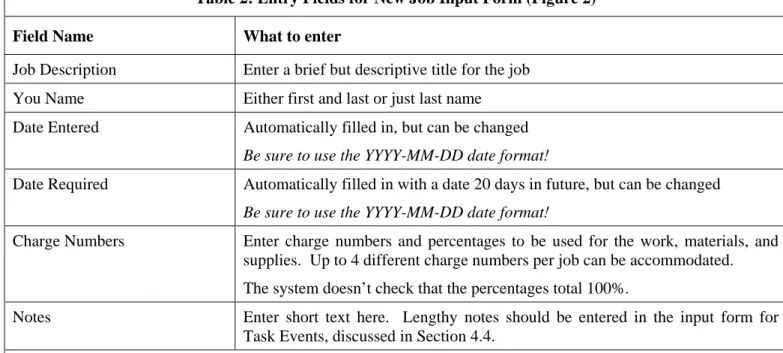
New jobs are entered using the form shown in Figure 2, which is available by clicking the Add a Job button on the main task listing screen shown in Figure 1. Fill in the fields shown in Table 2, then press the Enter job into database button on the form to add the job to the database.
Table 2: Entry Fields for New Job Input Form (Figure 2)
Field Name What to enter
Job Description Enter a brief but descriptive title for the job You Name Either first and last or just last name Date Entered Automatically filled in, but can be changed
Be sure to use the YYYY-MM-DD date format!
Date Required Automatically filled in with a date 20 days in future, but can be changed
Be sure to use the YYYY-MM-DD date format!
Charge Numbers Enter charge numbers and percentages to be used for the work, materials, and supplies. Up to 4 different charge numbers per job can be accommodated. The system doesn’t check that the percentages total 100%.
Notes Enter short text here. Lengthy notes should be entered in the input form for Task Events, discussed in Section 4.4.
Be sure to press the Enter job intodatabase buttonon the form to add the task to the database
4.3 Job Event Listing Screen
Each job has certain events associated with it, and the “Job Event Listing” screen (Figure 3) tabulates activities for a selected job. This screen is produced by clicking on the job number hyperlink in the Job Listing screen (Figure 1).
New events for a particular Job are entered using the form shown in Figure 4, which is available by clicking the Add an Event button on the “Job Event Listing” screen (Figure 3). Table 3 provides details about the fields.
Table 3: Entry Fields for Job Event Input Form (Figure 4)
Field Name What to enter
Your name Enter either your first and last name or just your last name
Drawings received on Select the check box and enter the date that the drawings were received. The system fills in the current date as a default.
Be sure to use the YYYY-MM-DD date format!
Drawings checked by Enter the name of the person who checked the drawings.
Drawings checked on Date that the drawings were checked. The system fills in the current date as a default.
Be sure to use the YYYY-MM-DD date format!
Job Assigned To Enter the name of the person who’s been assigned this job
Hours Worked Enter the hours worked for this job. Multiple entries of hours worked are okay, because the system could sum them to find the total time worked on the job. This feature was never used and should become obsolete with the ESS web-based time tracking system.
Estimated Completion Date Use one of the radio buttons or select and manually enter the new estimated completion date.
Be sure to use the YYYY-MM-DD date format!
Job Completion On Check the box and enter the date the job was completed. The system enters the current time as a default.
Be sure to use the YYYY-MM-DD HH:MM:SS date format!
Notes Notes about the task. Text from e-mails can also be pasted into this field. Add/Change Charge Nums The currently used charge numbers are shown, and can be changed or more
added.
Be sure to press the Add event todatabase buttonon the form to add the event to the database
Events cannot be changed once they are entered into the system, which admittedly is a serious limitation that will be addressed in future software versions. The work-around is to simply enter another event that includes the corrections. Figure 3 shows how the events are posted on the web page.
Figure 1: Browser Screen Showing Shop Job Listing
Figure 3: Job Event Listing Screen Showing “Events” for the Job Selected from screen shown in Figure 1
5. Appendix A: Software and Database Design
5.1 Design Philosophy
A database serves to hold the task and event information. Records in the database are displayed and updated with web-based input forms dynamically generated with PHP running on the NRAO's web server. This allows the task information to be updated by simply adding or modifying records in the database.
5.2 Database Schema
The open source program MySQL is used as the database server because it has been tightly integrated with the Apache web server program and is presently supported by the NRAO for simple access from web pages. The MySQL server is located at sql.cv.nrao.edu.
The free program “MySQL-Front” (http://www.anse.de/mysqlfront/) was used to manage the database tables. All database tables reside in the MySQL "database" file dbCDL. The database tables listed in Table 4 store the
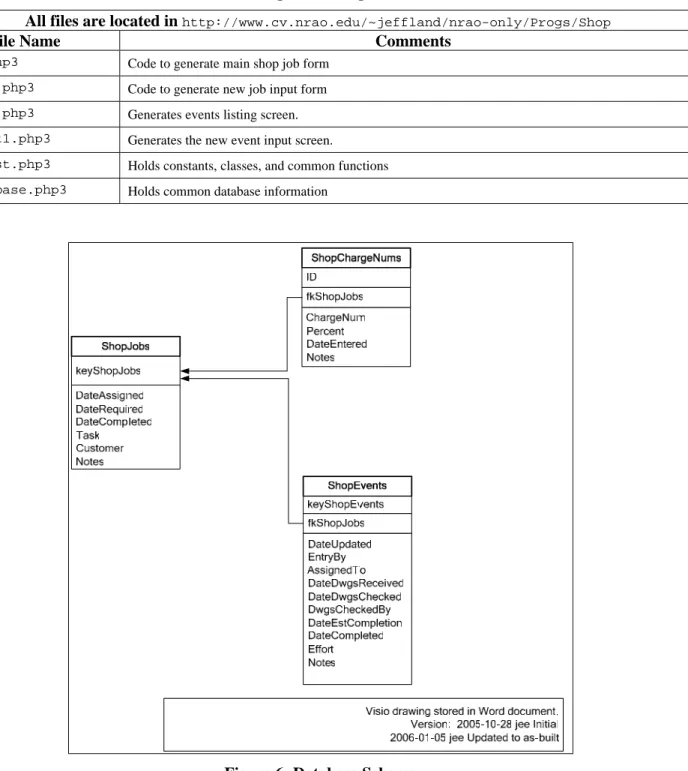
relevant data using a relational schema described in Figure 6.
The table tblShopEvents provides a way for machinists to enter on any number of occasions the times charged for
the job. For example, machinists could enter the time worked on a job every night prior to leaving. That simply adds records to the ShopEvents table and an appropriate query can simply add up all the time spend for each job
when a report is needed.
The charge number table ShopChargeNums allow multiple charge numbers to be entered for each job, along with their percent allocation.
Table 4 : Description of tables in MySQL Database file dbCDL
Table Name Comments Table Describing
Schema
tblShopJobs Holds the job information Table 5
tblShopEvents Holds events for the jobs Table 6
ShopChargeNums Holds charge numbers for each job Table 7
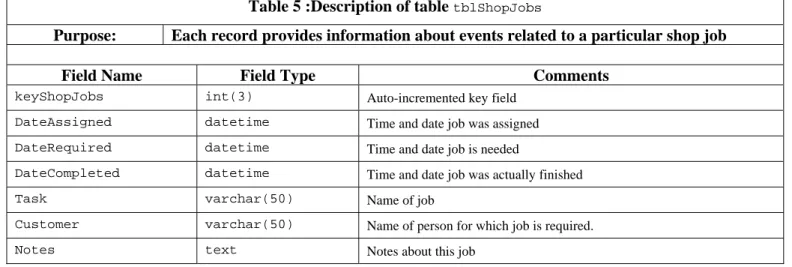
Records in table tblShopJobs contain information on each shop job. Records in table tblShopEvents are related
in a one-to-many relationship to parent records in table tblShopJobs. Likewise, records in table ShopChargeNums
hold a one-to-many relationship to parent records in table tblShopJobs.
The prefix “tbl” prepended to most of these table names is a holdout from database designs in MS Access. In that
database, prefixes are useful to differentiate different objects, for example tables from stored queries, reports, etc. Such differential now appears unnecessary in MySQL databases.
Purpose: Each record provides information about events related to a particular shop job
Field Name Field Type Comments
keyShopJobs int(3) Auto-incremented key field
DateAssigned datetime Time and date job was assigned
DateRequired datetime Time and date job is needed
DateCompleted datetime Time and date job was actually finished
Task varchar(50) Name of job
Customer varchar(50) Name of person for which job is required.
Notes text Notes about this job
Table 6:Description of table tblShopEvents
Purpose: Each record provides information about events related to a particular job
Field Name Field Type Comments
keyShopEvents int(3) unsigned Auto-Incremented key field
fkShopJobs int(10) unsigned Foreign key field linked to job number (key field) in the parent table tblShopJobs
DateUpdated datetime Date entry was made
EntryBy varchar(50) Name of person entering this event
AssignedTo varchar(50) Name of person assigned to this task
DateDwgsRec datetime Date the drawings were received
DateDwgsChecked datetime Date the drawings were checked
DwgsCheckedby varchar(50) Person’s name that checked the drawings
DateEstCompletion datetime New estimated completion date
DateCompleted datetime Date that task was actually completed
Effort float Effort required
Table 7:Description of table ShopChargeNums
Purpose: Each record provides information about the charge numbers for each shop job
Field Name Field Type Comments
ID int(10) unsigned Auto-Incremented key field
fkShopJobs int(6) Foreign key field linked to job number (key field) in the parent table
tblShopJobs
ChargeNum varchar(50) Charge number for this job
Percent float Percent of charge number allocated for this job
DateEntered timestamp Date charge number was entered into database
Notes text Notes about this task
5.3 Web Page Software
The web page and database access software was written using the scripting language PHP. Zend Studio Standard
Edition Version 4 (http://www.zend.com/) was used to write and edit the PHP code.
When a URL pointing to a PHP file is entered using a browser, the web server first executes the PHP statements in the file, and the PHP program then outputs HTML to the browser. A notable limitation is that PHP programs can't be executed from Microsoft’s Window’s explorer (as opposed in MS’s Internet Explorer) because that program somehow circumvents the HTTP protocol. You must type the URL into a browser to run this code, you can't just double-click from Windows Explorer.
Most of the PHP files are reentrant in that they can be executed multiple times and program flow changes depending on the state of certain variables. PHP builds the HTML statement
echo "<FORM METHOD=\"post\" ACTION=\"$ThisCode\">";
which causes the same code to reload when the appropriate submit button is pressed on the form. PHP sets the variable $btnNewJob to TRUE when the Add A Job button is pressed, as defined in HTML’s submit statement constructed from the PHP echo command:
echo "<TD><INPUT TYPE=\"Submit\" NAME=\"btnNewJob\" VALUE=\"Add a Job\"><BR></TD>";
Redirection to the “new job input” form is obtained from the statement
echo "<META HTTP-EQUIV=\"refresh\" CONTENT=\"0;URL=$ROOT_PATH$lnkSHOP_NEW_TASK\">";
where the constants $ROOT_PATH and $lnkSHOP_NEW_TASK, defined in the include file shopconst.php3, provide
the path to the “new job input” form.
The PHP code that builds the screen to list events for a particular job contains a large number of SQL SELECT statements to query the table tblShopEvents and returns various event records for the selected job. The selected
job is identified by the variable $JobNum that is passed with the URL as a parameter to this page. An internal PHP
associative array ($rsEvents) holds the results of each query with the key value from tblShopEvents as the
time after the user presses the Enter info into database button, which sets TRUE the variable $btnAddNewTask.
The values of fields that are input by the user are retained when the code runs a second time by the PHP line that builds hidden variable HTML statements:
echo "<INPUT Type=hidden NAME=\"JobDescription\" VALUE=\"$JobDescription\">";
Upon detecting that the variable $btnAddNewTask is TRUE, the user input fields are validated and then a new record
is added to the tblShopJobs table.
The PHP code for generating and validating data entered on the “new event” input form uses the same principles as the “new job” input form because it displays the input form when first executed and then validates the entered data the second time through and adds a new record to the tblShopEvents table in the database.
5.3.1 PHP Classes
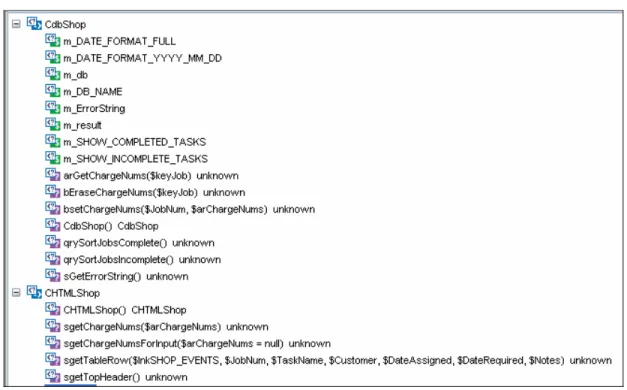
The file shopconst.php3 contains a number of PHP classes (Figure 5) that are used to better structure the software design. The classes have some useful functions, although much refactoring remains to be completed.
CHTMLShop – provides functions to generate HTML for the web pages CdbShop – provide an interface to the database functions
Figure 5: PHP Classes and Methods
5.3.2 Software Locations
Table 8:Task Management Program File Locations
All files are located in http://www.cv.nrao.edu/~jeffland/nrao-only/Progs/Shop
File Name Comments
Jobs1.php3 Code to generate main shop job form
NewJob1.php3 Code to generate new job input form
Events2.php3 Generates events listing screen. NewEvent1.php3 Generates the new event input screen.
shopconst.php3 Holds constants, classes, and common functions ../database.php3 Holds common database information