Kim Phan, Kaiser Permanente, San Diego, CA
Yuexin Cindy Chen, Kaiser Permanente, San Diego, CA
ABSTRACT
In most publications, the dominant approach for web reporting has been using ODS HTML and PROC REPORT, which is extremely powerful with very impressive results. Regrettably the layout of the report is limited to a tabular format, which hinders the creativity of the SAS users when they are trying to deliver the exact type of report that the end users requested. This paper will focus on a different approach that may provide greater flexibility to users who intend to produce highly customized reports. First, an HTML report template can be developed to one's heart's content, then SAS will populate the content using one observation in a SAS dataset.
Using this method, SAS users can take advantage all the great features that HTML has to offer to supplement what is already accomplished in SAS. Tools such as Javascript and CSS can be applied directly in the HTML report template to enhance the web report instead of trying different workarounds to integrate them. With superior data management capability of Base SAS and other SAS products such as SAS Stored Processes and SAS Information Delivery Portal, a web application can be developed that allows end users to surface eye-dazzling web reports On-Demand. Basic knowledge of HTML tags and SAS Stored Processes are recommended for this reading. This paper hopefully will broaden the horizon of web reporting thru SAS.
INTRODUCTION
After years of outputting reports using the SAS Output Delivery System (ODS), every SAS programmer must have acquired a mountain of tricks to work with HTML tags, Javascript, and Cascading Style Sheets (CSS) to meet the needs of customers. Ever wonder, wouldn’t it be nice if the report can be designed in HTML first, and let SAS do her magic to populate the values and distribute it? The technique described in this paper should give SAS users the edge to take advantage of any fancy web report that one can build with HTML and allow SAS to manage its content and distribution. This technique can benefit from a join collaboration between a web designer and a SAS programmer. It might also be a great alternative for folks who are HTML experts, but new to SAS.
BASIC CONCEPT
For demonstration, this hypothetical observation in a SAS dataset will be used. It captures a patient’s medical record number (MRN) with diagnosis (DX) and procedure (PX) information after a total knee replacement:
Data WORK.Procedures;
PRINT_DT=put(today(),mmddyy10.); MRN ="09090909"; Age=509; Gender="Female"; Race="Alien"; Height=65; Weight=123; OpSite="Knee"; OpSide="Left";
DX01="715.36"; Desc01="LOC OSTEOARTHROS NOT SPEC PRIM/SEC LOWER LEG"; DX02="458.9"; Desc02="UNSPECIFIED HYPOTENSION";
DX03="585.3"; Desc03="CHRONIC KIDNEY DISEASE STAGE 3."; DX04="333.94"; Desc04="RESTLESS LEGS.";
PX="81.54 - TOTAL KNEE REPLACEMENT"; OPDATE="JAN2015";
SurgeonNm="AAA, BBB MD."; Location="San Diego, CA"; run;
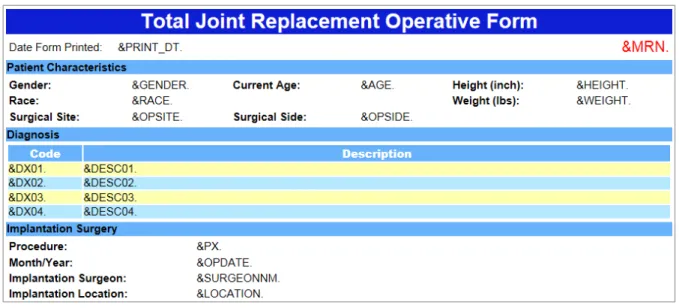
Here is a screenshot of the web report template that the end users requested (Figure 1):
Figure 1. Requested Layout of the Web Report
Here is a small part of the code used to generate the HTML template shown above. (See Appendix for the full code) <!-- Patient Characteristics-->
. . .
<tr>
<td class="lbl">Gender: </td><td>&GENDER. </td> <td class="lbl">Current Age: </td><td>&AGE. </td> <td class="lbl">Height (inch): </td><td>&HEIGHT. </td> </tr>
. . .
<tr>
<td class="lbl">Surgical Site: </td><td>&OPSITE. </td> <td class="lbl">Surgical Side: </td><td>&OPSIDE. </td> <td class="lbl"> </td><td> </td> </tr>
. . .
Please note that there are a few simple rules to follow:
1. Every value in HTML that needs to be replaced by the SAS dataset should be coded in the same way as a SAS macro variable (see yellow highlighted texts above: start with “&” and end with “.”).
2. Be sure that the macro variable name used in HTML is the same as the column name in the SAS dataset. 3. Be sure that each line has only one macro variable.
By following these 3 simple rules, the template itself becomes a documentation for SAS users to reference the variables used to populate this HTML template.
The next step is to simply save the HTML code in the Appendix to a file (e.g. WebRpt.html on the Desktop), and let SAS to read it in:
%*Step 1: Import HTML Template;
%let File_Dir= C:\XXXXXXXXXXX\Desktop; %*for demonstration, pick Desktop;
data WORK.HTML_IN;
length row_order 8. HTML $250 HTMLVarName VarName $30; infile "&File_Dir.\WebRpt.html" missover dsd dlm="|"; input HTML $;
if index(HTML,"&")>0 and index(HTML,".")>0 then do;
HTMLVarName=substr(HTML,index(HTML,"&"),index(HTML,".")-index(HTML,"&")+1); end;
else do;
HTMLVarName=""; end;
Varname=strip(upcase(compress(HTMLVarName,".&"))); row_order=_N_;
run;
Now that the HTML template is in a SAS dataset WORK.HTML_IN, the goal is simple: to populate the values needed in HTML with the values in the SAS dataset WORK.Procedures. Here is one way to do it:
%let MRN=09090909; %*for parameter driven reporting;
%*Step 2: Transpose one MRN in dataset Procedures, add it to HTML_in;
proc transpose data= WORK.Procedures (where=(MRN="&MRN.")) out=PX_Trans; var _ALL_;
run; Proc SQL;
Create table HTML_out as Select HTML.*,
PX._NAME_ as SAS_NAME, Strip(PX.COL1) as SAS_Value from HTML_in as HTML
left join PX_Trans as PX
on (Strip(upcase(HTML.Varname)) = Strip(upcase(PX._NAME_))) order by HTML.row_order;
quit;
Next, create a new variable HTML2 by replacing the macro variables in HTML with their SAS_Value. %*Step 3: populate values needed in HTML with values in SAS;
data HTML_out; set HTML_out; by row_order; if SAS_NAME>""
then HTML2=tranwrd(strip(HTML),strip(HTMLVarName),Strip(SAS_Value)); else HTML2=HTML;
run;
Finally, simply output variable HTML2 in SAS dataset WORK.HTML_out into a file (e.g. WebRpt_09090909.html). %*Step 4: Output a static new HTML;
data _null_ ; set HTML_out;
FILE "&File_Dir.\WebRpt_&MRN..html"; PUT HTML2;
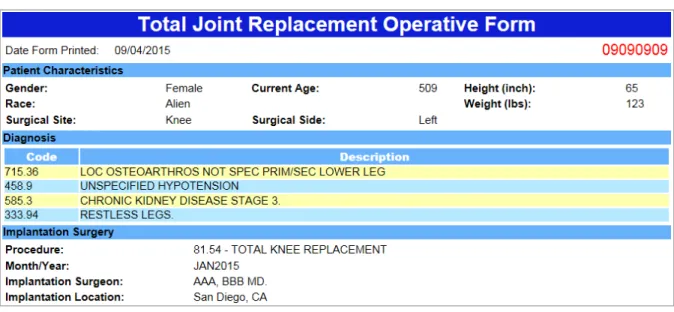
Here is how WebRpt_09090909.html looks after its creation! (Figure 2)
Figure 2. Completed Web Report for a selected patient
ADVANCED ENHANCEMENT
1. OUTPUT THE SAME REPORT FOR MULTIPLE OBSERVATIONS
Assuming there are multiple MRNs in the dataset WORK.Procedures displayed earlier, a macro %DoLoop shown below can be used to produce this report for multiple observations:
%macro Gen_Rpt(MRN);
%*<Please place Step 2, Step 3, and Step 4 in here>;
%mend Gen_Rpt; %macro DoLoop;
Data _NULL_;
set WORK.Procedures; i=strip(put(_N_,8.));
call symput ("REC"||i, strip(MRN)); call symput ("REC_cnt", strip(i)); run;
%DO i=1 %to &REC_cnt.;
%Gen_Rpt(&&REC&i.);
%end; %mend DoLoop;
%DoLoop;
2. GO DYNAMIC WITH SAS STORED PROCESSES AND SAS INFORMATION DELIVERY PORTAL
Converting the macro above into a SAS Stored Processes, and adding that to the SAS Information Delivery Portal would make underlying data highly transparent in an organization. A well designed report can utilize the power of SAS to combine data elements from multiple data sources into a single observation and feed into this type of HTML template. End users can log on to the SAS Portal anytime and retrieve such report for a desired observation by simply provide one parameter (e.g. MRN).In the authors’ affiliated department, any authorized staff can simply log on to the SAS Portal (Figure 3), enter the MRN of a specific patient, and retrieve clinical details from various sources into a single web page. This makes a labor intensive chart review extremely simple for an end user who knows nothing of SAS. Since it’s just an HTML file, the staff person can simply email it for distribution, and other users can view it easily in a web browser.
Figure 3. Snapshot of the SAS Stored Process prompt in the SAS Information Delivery Portal
When converting this example into a stored process, a SAS user can first copy Step 1 to Step 4 into the code that will be used for the stored process, remove the %let MRN= statement, then change FILE statement to _webout: %*Step 4.1: Output using SAS Stored Process thru SAS Portal;
data _null_ ; set HTML_out;
%*FILE "&File_Dir.\WebRpt_&MRN..html"; FILE _webout;
PUT HTML2; run;
At last, create a prompt for macro variable MRN when building the stored process. Once the stored process is created, add it to the SAS Portal.
3. MANAGE THE STYLE OF THE FINAL REPORT IN HTML WITH CSS OR STYLE DIRECTLY
For high level settings, CSS can be specified in the <head> section. Here is an example how it is managed:<html lang="en" xmlns="http://www.w3.org/1999/xhtml"> <head>
<style type="text/css">
body {font-family: Arial; font-size: 15px; }
table {width:900px; }
.head_main {
background-color: #0f1fd5; color:white; font-family: Arial; font-size: 28px;
font-weight: bold; text-align: center; } </style>
</head> <body>
<table border="0"> <!-- Header -->
<tr class="head_main">
<td>Total Joint Replacement Operative Form </td> </tr>
</table> </body> </html>
For a particular setting in one cell only, the style attribute can do the trick and overwrite existing styles: <html lang="en" xmlns="http://www.w3.org/1999/xhtml">
<head>
<meta charset="utf-8" />
<title>Total Joint Replacement Operative Form</title> <style type="text/css">
body {font-family: Arial; font-size: 15px; }
table {width:600px; }
</style> </head> <body>
<table border="0"> <tr>
<td>Date Form Printed: &PRINT_DT.</td>
<td style="font-size:20px; color:red; font-weight:bold; text-align:right;"> &MRN. </td>
</tr> </table> </body> </html>
Quick note on “
” used above: This non-breaking space is common in HTML, but it also has the “&”commonly used in SAS. It is best to keep it in a separate line from a macro variable (e.g.
&PRINT_DT.
) that needs to be populated.4. MANAGE HTML IN SECTIONS BY RETAINING COMMENT TAGS <!-- -->
Please refer to the full HTML code in the Appendix. The comment tags can be used to identify sections of HTML code if RETAIN statement is used in Step 1:
data HTML_in; set HTML_in;
length Section $50; retain Section;
if substr(HTML,1,2)="<!" then Section=strip(HTML); run;
If for some reason, a section needs to be removed for some observations, a code like this can be used to replace Step 4:
%*Step 4.2: This example removes the Diagnosis section completely;
data _null_ ;
set HTML_out (where=( Section ne "<!-- Diagnosis-->")); FILE "&File_Dir.\WebRpt_&MRN..html" ;
PUT HTML2; run;
Managing HTML in sections becomes necessary when the report is long and sometimes conditional statements are needed to control report layout for different populations.
5. TAKE ADVANTAGE OF HTML'S FLEXIBILITY AND HIGH ERROR TOLERANCE
In this example, please replace the original dataset WORK.Procedures with the following one: This observation does not have 3P
rd
P and 4P
th
P diagnosis (values in DX03, Desc03, DX04, and Desc04 are all blank).
Data WORK.Procedures;
PRINT_DT=put(today(),mmddyy10.); MRN ="09090909"; Age=509; Gender="Female"; Race="Alien"; Height=65; Weight=123; OpSite="Knee"; OpSide="Left";
DX01="715.36"; Desc01="LOC OSTEOARTHROS NOT SPEC PRIM/SEC LOWER LEG"; DX02="458.9"; Desc02="UNSPECIFIED HYPOTENSION";
DX03=""; Desc03=""; DX04=""; Desc04=""; PX="81.54 - TOTAL KNEE REPLACEMENT"; OPDATE="JAN2015";
SurgeonNm="AAA, BBB MD."; Location="San Diego, CA"; run;
This is the output after rerunning Step 1 thru 4 for this observation, (Figure 4).
Figure 4. Completed Web Report for a selected patient without 3P
rd
P and 4P
th
P diagnosis Notice that the row for the 3P
rd
P and 4P
th
P diagnosis conveniently disappeared instead of displaying blank rows. After examining the actual HTML produced below, it is clear that HTML ignores blank spaces, and when nothing other than the tags is specified in the <tr> tag, the entire row is ignored. Knowing how HTML behaves will help designer optimize outputs.
<tr class="data_odd">
<td>715.36 </td>
<td>LOC OSTEOARTHROS NOT SPEC PRIM/SEC LOWER LEG </td> </tr>
<tr class="data_even">
<td>458.9 </td>
<td>UNSPECIFIED HYPOTENSION </td> </tr>
<tr class="data_odd">
<td> </td>
<td> </td>
</tr>
<tr class="data_even">
<td> </td>
<td> </td>
CONCLUSION
The flexibility of HTML and the power of SAS are nicely joined together in this technique of web reporting. When this technique is used to mass produce reports, it is worth mentioning that the speed of producing the report is much quicker than an equivalent PROC REPORT. In addition, each file’s size is likely to be much smaller since the styles defined by PROC TEMPLATE tend to automatically produce a long CSS <style> tag. There are limitations, however, as this type of reporting is best suited for surfacing detail data on one subject rather than providing a summary. Some knowledge of HTML tags is also necessary to unleash its full potential.
APPENDIX
Full HTML code used to generate the web report template shown in Figure 1: <!DOCTYPE html>
<html lang="en" xmlns="http://www.w3.org/1999/xhtml"> <head>
<meta charset="utf-8" />
<title>Total Joint Replacement Operative Form</title> <style type="text/css">
body {font-family: Arial; font-size: 15px; }
table {width:900px; }
.head_main {
background-color: #0f1fd5; color:white; font-family: Arial; font-size: 28px;
font-weight: bold; text-align: center; } .head_sec {
background-color: #67b2fa; color: black; font-family: Arial; font-size: 15px;
font-weight: bold; text-align: left; } .lbl {
font-family: Arial; font-size: 15px; font-weight: bold; text-align: left; } .data_odd {
background-color: #feffb0; } .data_even {
background-color: #b6e9ff; } </style>
</head> <body>
<table border="0"> <!-- Header -->
<tr class="head_main">
<td>Total Joint Replacement Operative Form </td> </tr>
<tr> <td>
<table border="0"> <tr>
<td>Date Form Printed: &PRINT_DT. </td>
<td style="font-size:20px;color:red;text-align:right">&MRN. </td> </tr>
</table> </td> </tr>
<!-- Patient Characteristics--> <tr>
<td class="head_sec">Patient Characteristics </td> </tr>
<td>
<table border="0"> <tr>
<td class="lbl">Gender: </td><td>&GENDER. </td> <td class="lbl">Current Age: </td><td>&AGE. </td> <td class="lbl">Height (inch):</td><td>&HEIGHT. </td> </tr>
<tr>
<td class="lbl">Race: </td><td>&RACE. </td> <td class="lbl"> </td><td> </td> <td class="lbl">Weight (lbs): </td><td>&WEIGHT. </td> </tr>
<tr>
<td class="lbl">Surgical Site:</td><td>&OPSITE. </td> <td class="lbl">Surgical Side:</td><td>&OPSIDE. </td> <td class="lbl"> </td><td> </td> </tr>
</table> </td>
</tr>
<!-- Diagnosis--> <tr>
<td class="head_sec">Diagnosis </td> </tr>
<tr> <td>
<table border="0" cellpadding="0" cellpsacking="0"> <tr class="head_sec" style="color:white">
<th width="100">Code </th> <th>Description </th> </tr>
<tr class="data_odd">
<td>&DX01. </td> <td>&DESC01. </td>
</tr>
<tr class="data_even">
<td>&DX02. </td> <td>&DESC02. </td>
</tr>
<tr class="data_odd">
<td>&DX03. </td> <td>&DESC03. </td>
</tr>
<tr class="data_even">
<td>&DX04. </td> <td>&DESC04. </td>
</tr> </table> </td> </tr>
<!-- Surgery --> <tr>
<td class="head_sec">Implantation Surgery </td> </tr>
<tr> <td>
<table border="0"> <tr>
<td class="lbl" width="250">Procedure: </td><td>&PX. </td> </tr>
<td class="lbl">Month/Year: </td><td>&OPDATE. </td> </tr>
<tr>
<td class="lbl">Implantation Surgeon: </td><td>&SURGEONNM. </td> </tr>
<tr>
<td class="lbl">Implantation Location: </td><td>&LOCATION. </td> </tr>
</table> </td> </tr> </table> </body> </html>
REFERENCES
• Gilbert, Jeffery D. (2005), Web Reporting Using the ODS. SUGI 30 Paper 095-30. Available from: www2.sas.com/proceedings/sugi30/095-30.pdf [Accessed 14th July 2015]
• Haworth, Lauren (2001), HTML for the SAS® Programmer, SUGI 26 Paper 185-26. Available from: Uwww2.sas.com/proceedings/sugi26/p185-26.pdfU [Accessed 14th July 2015]
• Smith, Kevin D. (2013), Cascading Style Sheets: Breaking Out of the Box of ODS Styles, Paper 365-2013. Available from: Uhttp://support.sas.com/resources/papers/proceedings13/365-2013.pdfU [Accessed 14th July 2015]
CONTACT INFORMATION
Your comments and questions are valued and encouraged. Contact the author at:
Name: Yuexin Cindy Chen
Enterprise: Kaiser Permanente, Surgical Outcomes and Analysis Address: 8954 Rio San Diego Drive, Ste 406
City, State ZIP: San Diego, CA 92108 Work Phone: 858 / 637-6712
Fax: 858 / 637-6758
E-mail: [email protected]
Web: 2 6TUhttp://implantregistries.kp.orgU26 T
SAS and all other SAS Institute Inc. product or service names are registered trademarks or trademarks of SAS Institute Inc. in the USA and other countries. ® indicates USA registration.