Chapter 25
DHCP Snooping
Introduction ...25-2 The Binding Database ... 25-2 DHCP Filtering ... 25-4 DHCP Option 82 ... 25-4 DHCP Snooping ARP Security ... 25-5 Configuration Examples ...25-5 Command Reference ...25-6 add dhcpsnooping binding ... 25-6 delete dhcpsnooping binding ... 25-7 disable dhcpsnooping ... 25-7 disable dhcpsnooping arpsecurity ... 25-8 disable dhcpsnooping debug ... 25-8 disable dhcpsnooping option82 ... 25-9 disable dhcpsnooping strictunicast ... 25-9 enable dhcpsnooping ... 25-10 enable dhcpsnooping arpsecurity ... 25-10 enable dhcpsnooping debug ... 25-11 enable dhcpsnooping option82 ... 25-12 enable dhcpsnooping strictunicast ... 25-12 set dhcpsnooping checkinterval ... 25-13 set dhcpsnooping port ... 25-14 show dhcpsnooping ... 25-16 show dhcpsnooping counter ... 25-17 show dhcpsnooping database ... 25-18 show dhcpsnooping filter ... 25-20 show dhcpsnooping port ... 25-21
25-2 AlliedWare OS Software Reference
Introduction
DHCP snooping provides an extra layer of security via dynamic IP source filtering. Snooping filters out messages received from unknown, or ‘untrusted’ ports, and builds and maintains a DHCP snooping binding database. DHCP snooping is disabled by default, and is user configurable.
Dynamic Host Configuration Protocol (DHCP) dynamically assigns IP
addresses to client devices. The use of dynamically assigned addresses requires traceability, so that a service provider can determine which clients own a particular IP address at a certain time.
With DHCP snooping, IP sources are dynamically verified, and filtered accordingly. IP packets that are not sourced from recognised IP addresses are filtered out. This ensures the required traceability.
Trusted and
untrusted ports
DHCP snooping blocks unauthorised IP traffic from untrusted ports, and prevents it from entering the trusted network. Ports on the switch are classified as either trusted or untrusted:
■ Trusted ports receive only messages from within your network.
■ Untrusted ports receive messages from outside your network.
Enabling and
disabling DHCP
snooping
To enable DHCP snooping on the switch, use the command:
enable dhcpsnooping
To disable DHCP snooping on the switch, use the command:
disable dhcpsnooping
The Binding Database
When you enable DHCP snooping, the switch snoops client DHCP lease information and records it in a DHCP snooping binding database.
The binding database contains current, dynamically allocated IP addresses. When you enable DHCP snooping, the switch intercepts all DHCP packets it receives, and sends them to the Central Processing Unit (CPU) where they are verified. The binding database stores and maintains this information, and installs IP source filters on ports associated with client leases.
Lease structure
Each lease in the database holds the following information:■ the MAC address of the client device
■ the IP address that was allocated to that client
■ time until expiry
■ VLAN to which the client is attached
DHCP Snooping 25-3
Database structure
The binding database is split into three sections:■ current valid entries
■ entries with client lease but no listener
Listeners are processes within the switch that use the information contained in entries. The Classifier module is the listener that receives information from DHCP snooping.
■ entries with no client lease and no listeners
For more information about these database sections, see the show
dhcpsnooping database command on page 25-18.
Adding static entries
Although the switch dynamically adds information to the binding database, you can also optionally add static entries to the database. This is typically used to add a DHCP snooping entry for a client that has a preconfigured IP address on an untrusted port. To do this, use the command:add dhcpsnooping binding[=macaddr] interface=vlan ip=ipadd
port=port-number [router=ipadd,ipadd...]
Configuring a check
interval
You can configure a check interval, in seconds, for the binding database. This determines how often dynamic entries are checked for expiration. Expired entries are automatically deleted from the database.
Static entries defined with the add dhcpsnooping binding command on
page 25-6 are not checked.
To configure a check interval for the binding database, use the command:
set dhcpsnooping checkinterval=1..3600
The switch receives expiry information with the client lease. Entries expire when the time left to expiry is 0 seconds.
All dynamic entries remaining in the database after each check are written to the bind0002.dsn file (formally the bindings.dsn file). Whenever DHCP
snooping is enabled using the enable dhcpsnooping command on page 25-10,
the DHCP snooping binding database is recreated. Any entries that are still current are added to the database.
To view the current DHCP snooping binding database, use the command:
25-4 AlliedWare OS Software Reference
DHCP Filtering
DHCP filtering prevents IP addresses from being falsified or “spoofed”. This guarantees that customers cannot avoid detection by spoofing IP addresses that are not actually allocated to them.
The switch only allows packets to enter via a given port if their source IP address is currently allocated to a client connected to that port.
Filtering is automatic and does not require any configuration.You can enhance DHCP filtering so that the switch drops multicast and broadcast packets sent from a client, except for:
■ ARP packets
■ IGMP Replies and IGMP Leaves packets, when IGMP snooping is enabled
■ DHCP packets, when DHCP snooping is enabled
To enable this filtering, use the command:
enable dhcpsnooping strictunicast
DHCP Option 82
You can configure DHCP snooping to insert DHCP Option 82 information into client-originated DHCP packets.
Trusted network elements insert Option 82 into the DHCP options field when forwarding client-originated BOOTP/DHCP packets to a DHCP server. DHCP servers that are configured to recognise Option 82 may use the information to implement IP addresses, or other parameter assignment policies, based on the network location of the client device.
When you enable Option 82 information for DHCP snooping, the switch inserts Option 82 information into BOOTP request packets received from an untrusted port. The switch inserts the following Option 82 information:
■ Remote-ID. This specifies the MAC address of the switch.
■ Circuit-ID. This specifies the switch port and VLAN-ID that the
client-originated DHCP packet was received on.
■ Subscriber-ID (optional). This is a string of up to 50 characters that differentiates or groups client ports on the switch.
Regardless of whether Option 82 is enabled for DHCP snooping, if the switch receives a BOOTP request packet on:
■ an untrusted port, it drops the packet if it contains Option 82 information
■ a trusted port, and the packet contains Option 82 information, it does not update the Option 82 information for the receiver port
The switch removes Option 82 information from BOOTP reply packets
destined for an untrusted port if the DHCP client hardware is directly attached to a port on the switch.
To enable Option 82, use the command:
DHCP Snooping 25-5
To disable Option 82, use the command:
disable dhcpsnooping option82
Note that if both DHCP snooping and Option 82 for DHCP snooping are enabled, the BOOTP relay agent Option 82 is unavailable.
For more information about Option 82, see RFC 3046, DHCP Relay Agent
Information Option.
DHCP Snooping ARP Security
ARP security prevents ARP spoofing. ARP spoofing occurs when devices send fake, or 'spoofed', ARP messages to an Ethernet LAN. This makes it possible for an unauthorised host to claim to be an authorised host. The unauthorised host can then intercept traffic intended for the authorised host, and can access the wider network.
Spoofed ARP messages contain the IP address of an authorised host, with a MAC address which does not match the real MAC address of the host. When ARP security is enabled for DHCP snooping, the switch checks ARP packets sourced from untrusted ports against the entries in the DHCP snooping binding database. If it finds a matching entry, it forwards the ARP packet as normal. If it does not find a matching entry, it drops the ARP packet. This ensures that only trusted clients (with a recognised IP address and MAC address) can generate ARP packets into the network.
To enable DHCP snooping ARP security, use the command:
enable dhcpsnooping arpsecurity
To disable DHCP snooping ARP security, use the command:
disable dhcpsnooping arpsecurity
Note that ARP security is not applied to packets received on trusted ports. ARP security is applied to both dynamic and static DHCP snooping entries. For static DHCP entries without a MAC address defined, ARP security compares only the IP address details.
Configuration Examples
For an example of how to configure the switch to perform DHCP snooping, see
How to Use DHCP Snooping, Option 82 and Filtering on Rapier Series Switches.
This How To Note is available in the Resource Center on your switch’s Documentation and Tools CD-ROM, or from
25-6 add dhcpsnooping binding AlliedWare OS Software Reference
Command Reference
This section describes the commands available on the switch to configure DHCP snooping.
The shortest valid command is denoted by capital letters in the Syntax section. See “Conventions” on page lxvi of About this Software Reference in the front of this manual for details of the conventions used to describe command syntax. See Appendix A, Messages for a complete list of messages and their meanings.
add dhcpsnooping binding
Syntax ADD DHCPSnooping BINDing[=macaddr] INTerface=vlan IP=ipadd
POrt=port-number [ROUter=ipadd,ipadd...]
Description This command adds a static entry to the DHCP snooping binding database. This is typically used to add a DHCP snooping entry for a client that has a preconfigured IP address on an untrusted port. The DHCP snooping entry you define must not already exist. For more information about the binding
database, see “The Binding Database” on page 25-2.
The switch does not check static entries for expiry. You must manually delete
out-of-date static entries using the delete dhcpsnooping binding command.
Example To add a static DHCP snooping entry for a client with the IP address
192.168.12.101, on port 6 of VLAN101, that has access to two ARs with the IP addresses 66.105.1.2 and 66.105.1.4, use the command:
add dhcps bind int=vlan101 ip=192.168.12.101 po=6 rou=66.105.1.2,66.105.1.4
Related commands delete dhcpsnooping binding
enable macff interface in Chapter 26, MAC-Forced Forwarding show dhcpsnooping database
Parameter Description
BINDing The MAC address of the client. The macaddr is an Ethernet 6-octet MAC address expressed as six pairs of hexadecimal digits delimited by hyphens.
INTerface The VLAN interface that the client is attached to. The vlan is a physical VLAN interface such as vlan46 or vlan122.
IP The IP address of the client in dotted decimal notation.
POrt The switch port number that the client is attached to. Port numbers start at 1 and end at m, where m is the highest numbered Ethernet switch port, including uplink ports.
ROUter An optional comma separated list of IP addresses that gives the default Access Routers (ARs) for this client. Use this parameter if adding a DHCP snooping binding for use in conjunction with MAC-Forced Forwarding.
DHCP Snooping disable dhcpsnooping 25-7
delete dhcpsnooping binding
Syntax DELete DHCPSnooping BINDing IP=ipaddDescription This command deletes a dynamic or static entry from the DHCP snooping binding database.
The ip parameter specifies the IP address of the database entry to delete, in dotted decimal notation.
Example To delete a DHCP snooping entry for a client with the IP address 192.168.12.101, use the command:
del dhcps bind ip=192.168.12.101
Related commands add dhcpsnooping binding show dhcpsnooping database
disable dhcpsnooping
Syntax DISable DHCPSnoopingDescription This command disables DHCP snooping on the switch. The DHCP snooping binding database is updated and saved to the bind0002.dsn file (formally the bindings.dsn file).
The switch:
■ deletes all DHCP snooping filter entries
■ stops automatically dropping all IP packets
Example To disable DHCP snooping, use the command:
dis dhcps
Related commands disable dhcpsnooping arpsecurity disable dhcpsnooping debug disable dhcpsnooping option82 enable dhcpsnooping
25-8 disable dhcpsnooping arpsecurity AlliedWare OS Software Reference
disable dhcpsnooping arpsecurity
Syntax DISable DHCPSnooping ARPSecurityDescription This command disables ARP security for DHCP snooping. When the switch receives ARP packets on untrusted ports, it no longer checks to ensure that the source IP in the ARP packet is consistent with the information stored in the DHCP snooping binding database. ARP security is disabled by default.
Example To disable DHCP snooping ARP security, use the command:
dis dhcps arps
Related commands disable dhcpsnooping disable dhcpsnooping debug disable dhcpsnooping option82 enable dhcpsnooping arpsecurity show dhcpsnooping
disable dhcpsnooping debug
Syntax DISable DHCPSnoopingDEBug={ALL|ARPSecurity|CLASSifier|DATABase|PRocessing| FILter}
Description This command disables debugging for DHCP snooping.
Example To disable all DHCP snooping debugging, use the command:
dis dhcps deb=all
Related commands disable dhcpsnooping
disable dhcpsnooping arpsecurity disable dhcpsnooping option82 enable dhcpsnooping debug show dhcpsnooping
Parameter Description
DEBug The type of debugging to be disabled Default: no default
ALL Disables all DHCP snooping debugging. ARPSecurity Disables ARP security debugging.
CLASSifier Disables DHCP snooping classifier debugging. DATABase Disables DHCP snooping binding database
debugging.
FILter Disables DHCP snooping filter debugging. PRocessing Disables DHCP snooping packet processing
DHCP Snooping disable dhcpsnooping strictunicast 25-9
disable dhcpsnooping option82
Syntax DISable DHCPSnooping OPTion82Description This command disables DHCP Option 82 processing for DHCP snooped
packets. For more information about Option 82, see “DHCP Option 82” on
page 25-4
Example To disable DHCP snooping Option 82, use the command:
dis dhcps opt
Related commands disable dhcpsnooping
disable dhcpsnooping arpsecurity disable dhcpsnooping debug enable dhcpsnooping option82 set dhcpsnooping port
show dhcpsnooping
disable dhcpsnooping strictunicast
Syntax DISable DHCPSnooping STRictunicastDescription This command disables strict unicast filtering on DHCP snooping clients. This restarts normal forwarding of multicast and broadcast packets sent by clients to devices further upstream.
Example To disable strict unicast filtering on DHCP snooping clients, use the command:
dis dhcps str
Related commands enable dhcpsnooping strictunicast
25-10 enable dhcpsnooping AlliedWare OS Software Reference
enable dhcpsnooping
Syntax ENAble DHCPSnoopingDescription This command enables DHCP snooping on the switch. If the bind0002.dsn file (formally the bindings.dsn file) exists, the switch checks it, and adds any current entries to the DHCP snooping binding database. If the bind0002.dsn file (formally the bindings.dsn file) does not already exist, the switch creates it. When you enable DHCP snooping, and valid dynamic leases exist, the switch periodically writes the bind0002.dsn file (formally the bindings.dsn file) at every check interval. If no valid leases exist, the file is deleted.
By default, DHCP snooping is disabled and all ports are considered untrusted. By default the switch drops all IP packets arriving on all untrusted ports. If the switch snoops a dynamic DHCP IP allocation, it modifies the filtering
behaviour of the associated port. Instead of dropping all packets arriving on the port, it drops all packets except those coming from the allocated IP address.
Examples To enable DHCP snooping, use the command:
ena dhcps
Related commands disable dhcpsnooping
enable dhcpsnooping arpsecurity enable dhcpsnooping debug enable dhcpsnooping option82 show dhcpsnooping
enable dhcpsnooping arpsecurity
Syntax ENAble DHCPSnooping ARPSecurityDescription ARP security is disabled by default, and this command enables it for DHCP snooping. When the switch receives ARP packets on untrusted ports, it checks them to ensure that the source IP in the ARP packet is consistent with the information stored in the DHCP snooping binding database. It discards ARP packets that do not pass this check.
DHCP snooping must also be enabled for this command to have any effect.
For more information about ARP security, see “DHCP Snooping ARP Security”
on page 25-5
Example To enable DHCP snooping ARP security, use the command:
ena dhcps arps
Related commands disable dhcpsnooping arpsecurity enable dhcpsnooping
enable dhcpsnooping debug enable dhcpsnooping option82 show dhcpsnooping
DHCP Snooping enable dhcpsnooping debug 25-11
enable dhcpsnooping debug
Syntax ENAble DHCPSnoopingDEBug={ALL|ARPSecurity|CLASSifier|DATABase|PRocessing| FILter}
Description This command enables debugging for DHCP snooping.
Example To enable all DHCP snooping debugging, use the command:
ena dhcps deb=all
Related commands disable dhcpsnooping debug enable dhcpsnooping
enable dhcpsnooping arpsecurity enable dhcpsnooping option82 show dhcpsnooping
Parameter Description
DEBug The type of debugging to be enabled.
ALL Enables all DHCP snooping debugging. ARPSecurity Enables ARP security debugging.
CLASSifier Enables DHCP snooping classifier debugging. DATABase Enables DHCP snooping binding database
debugging.
FILter Enables DHCP snooping filter debugging. PRocessing Enables DHCP snooping packet processing
25-12 enable dhcpsnooping option82 AlliedWare OS Software Reference
enable dhcpsnooping option82
Syntax ENAble DHCPSnooping OPTion82Description Option 82 is disabled by default and this command enables DHCP Option 82 processing for DHCP snooped packets. When enabled, the switch:
■ inserts DHCP Option 82 into DHCP snooped packets that it receives on
untrusted ports
■ removes DHCP Option 82 from DHCP snooped packets that it sends to
untrusted ports.
DHCP snooping must also be enabled for this command to have any effect.
For more information about Option 82, see “DHCP Option 82” on page 25-4
Examples To enable DHCP snooping Option 82, use the command:
ena dhcps opt
Related commands disable dhcpsnooping option82 enable dhcpsnooping
enable dhcpsnooping arpsecurity enable dhcpsnooping debug show dhcpsnooping
enable dhcpsnooping strictunicast
Syntax ENable DHCPSnooping STRictunicastDescription This command enables strict unicast filtering on DHCP snooping clients. When strict unicast is enabled, the switch drops multicast and broadcast packets sent from a client, except for:
■ ARP packets
■ IGMP reply packets and IGMP leave packets, when IGMP snooping is
enabled.
■ DHCP packets, when DHCP snooping is enabled.
This ensures that a client cannot flood other network devices using IGMP or broadcast packets.
Example To enable strict unicast filtering on DHCP snooping clients, use the command:
en dhcps str
Related commands disable dhcpsnooping strictunicast
DHCP Snooping set dhcpsnooping checkinterval 25-13
set dhcpsnooping checkinterval
Syntax SET DHCPSnooping CHEckinterval=1..3600Description This command sets a check interval for the DHCP snooping binding database. This determines how often dynamic database entries are checked for
expiration. Static entries defined with the add dhcpsnooping binding
command are not checked.
The checkinterval parameter specifies the number of seconds between checks. The default interval is 60 seconds.
When the switch checks the database, it automatically deletes any expired entries from the database. An entry is considered expired if the time left to expiry is 0 seconds. The switch writes all dynamic entries remaining in the database after each check to the bind0002.dsn file (formally the bindings.dsn
file). Whenever you enable DHCP snooping using the enable dhcpsnooping
command, the switch recreates the DHCP snooping binding database, and adds any entries that are still current to the database.
Defining a smaller check interval ensures greater security, as expired entries are removed closer to their actual expiry time. Defining a longer check interval reduces CPU usage, as the database is checked less often.
Examples To set the check interval to 3 minutes, use the command:
set dhcps che=180
Related commands add dhcpsnooping binding delete dhcpsnooping binding enable dhcpsnooping
set dhcpsnooping port show dhcpsnooping database
25-14 set dhcpsnooping port AlliedWare OS Software Reference
set dhcpsnooping port
Syntax SET DHCPSnooping POrt={port-list|ALL} [MAXLeases=0..100] [SUBScriberid=subscriber-id]
[TRusted={YES|NO|ON|OFF|True|False}]
Description This command sets the DHCP snooping details for the specified ports.
Examples To specify ports 1-4 as trusted ports, use the command:
set dhcps po=1-4 tr=yes
To set the subscriber-id of port 10 to “user 480105”, use the command:
set dhcps po=10 subs="user 480105"
Parameter Description
POrt The ports on the device to which the specified settings will be applied. The port-list is a port number, a range (specified as n-m), or a comma-separated list of numbers and/or ranges. Port numbers start at 1 and end at m, where m is the highest numbered Ethernet switch port. Default: no default
MAXLeases The maximum number of DHCP leases that the snooping binding database holds for the specified ports. Once the limit has been reached, any further DHCP allocations made to devices on that port are not stored in the database.
Default: 1
SUBScriberid The subscriber-ID for the port. subscriber-id is a character string, 0 to 50 characters in length. Valid characters are any alphanumeric characters. If the subscriberid contains spaces, it must be enclosed in double quotes. Wildcards are not allowed.
If a subscriber-ID is specified, the subscriber-ID sub-option is included in the DHCP Option 82 field of client DHCP packets forwarded from the specified port.
The subscriber-ID sub-option is only inserted if DHCP snooping Option 82 has been enabled. If an empty string is specified (subscriberid=""
or subscriberid=) then the subscriber-ID sub-option is not inserted into client DHCP packets forwarded to a DHCP server. Use this method to delete a subscriber-ID from a port.
Default: no subscriber-ID TRusted The trusted status of the port:
Default: no
NO OFF False
Un-trusted ports are used to connect to untrusted elements in a network, such as client devices. DHCP leases snooped on these ports are eligible to be added to the DHCP snooping database. ARP security, if enabled, is also applied to un-trusted ports. The value
no sets the port as untrusted. YES
ON True
Trusted ports are used to connect to trusted elements in a network such as server devices. DHCP leases snooped on trusted ports are not added to the DHCP snooping database. Traffic is allowed to flow unchecked on these ports. The value yes sets the port as trusted.
DHCP Snooping set dhcpsnooping port 25-15
To remove the subscriber-id for port 10, use the command:
set dhcps po=10 subs=""
Related commands set dhcpsnooping checkinterval show dhcpsnooping port
25-16 show dhcpsnooping AlliedWare OS Software Reference
show dhcpsnooping
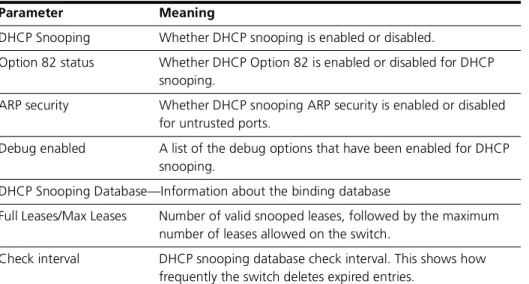
Syntax SHow DHCPSnoopingDescription This command displays the current DHCP snooping configuration (Figure 25-1, Table 25-1).
Figure 25-1: Example output from the show dhcpsnooping command
Related commands disable dhcpsnooping enable dhcpsnooping show dhcpsnooping counter show dhcpsnooping database show dhcpsnooping filter show dhcpsnooping port
DHCP Snooping Information
---DHCP Snooping ... Enabled Option 82 status ... Disabled ARP security ... Disabled Debug enabled ... None DHCP Snooping Database:
Full Leases/Max Leases ... 1/52 Check Interval ... 60 seconds
---Table 25-1: Parameters in output of the show dhcpsnooping command
Parameter Meaning
DHCP Snooping Whether DHCP snooping is enabled or disabled.
Option 82 status Whether DHCP Option 82 is enabled or disabled for DHCP snooping.
ARP security Whether DHCP snooping ARP security is enabled or disabled for untrusted ports.
Debug enabled A list of the debug options that have been enabled for DHCP snooping.
DHCP Snooping Database—Information about the binding database
Full Leases/Max Leases Number of valid snooped leases, followed by the maximum number of leases allowed on the switch.
Check interval DHCP snooping database check interval. This shows how frequently the switch deletes expired entries.
DHCP Snooping show dhcpsnooping counter 25-17
show dhcpsnooping counter
Syntax SHow DHCPSnooping COUnterDescription This command displays current DHCP snooping counter information (Figure 25-2, Table 25-2).
Figure 25-2: Example output from the show dhcpsnooping counter command
Related commands show dhcpsnooping
show dhcpsnooping database show dhcpsnooping filter show dhcpsnooping port
DHCP Snooping Counters
---DHCP Snooping
InPackets ... 1412
InBootpRequests ... 725
InBootpReplies ... 687
InDiscards ... 3
ARP Security InPackets ... 262
InDiscards ... 0
NoLease ... 0
Invalid... 0
Table 25-2: Parameters in output of the show dhcpsnooping counters command
Parameter Meaning
DHCP Snooping—Counters related to DHCP packets processed by DHCP snooping InPackets Total number of packets processed by DHCP snooping. InBootpRequests Number of BOOTP request packets processed by DHCP
snooping.
InBootpReplies Number of BOOTP reply packets processed by DHCP snooping. InDiscards Number of packets dropped by DHCP snooping.
ARP Security—Counters related to ARP packets processed by DHCP snooping ARP security InPackets Total number of ARP packets processed by ARP security. InDiscards Total number of ARP packets discarded by ARP security. NoLease Number of ARP packets discarded by ARP security because
there was no DHCP lease on the port.
Invalid Number of ARP packets discarded by ARP security because their format was invalid.
25-18 show dhcpsnooping database AlliedWare OS Software Reference
show dhcpsnooping database
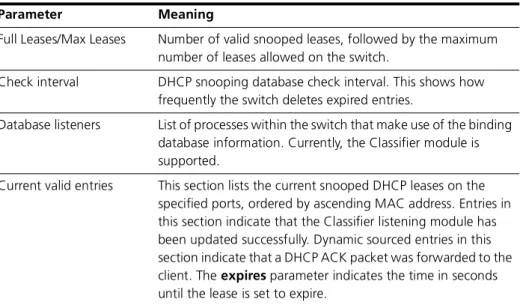
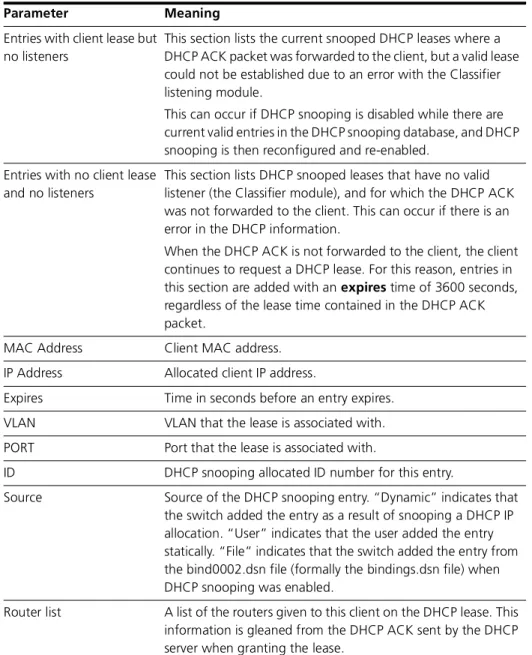
Syntax SHow DHCPSnooping DATABaseDescription This command displays the information currently stored in the DHCP snooping database (Figure 25-3, Table 25-3).
Figure 25-3: Example output from the show dhcpsnooping database command
DHCP Snooping Binding Database
---Full Leases/Max Leases ... 3/52
Check Interval ... 60 seconds Database Listeners ... CLASSIFIER Current valid entries
MAC Address IP Address Expires(s) VLAN Port ID Source Router list
---00-00-cd-08-0c-2c 192.168.12.110 566 46 15 2 Dynamic 192.168.12.254
00-00-cd-08-0d-de 192.168.12.111 1023 46 16 3 Dynamic 192.168.12.253,192.168.12.254
00-00-cd-09-43-22 192.168.12.210 Static 46 12 4 User
- ---Entries with client lease but no listeners
MAC Address IP Address Expires(s) VLAN Port ID Source ---None...
---Entries with no client lease and no listeners
MAC Address IP Address Expires(s) VLAN Port ID Source ---00-00-cd-08-1d-de 192.168.12.112 3511 46 15 4 Dynamic
Table 25-3: Parameters in output of the show dhcpsnooping database command
Parameter Meaning
Full Leases/Max Leases Number of valid snooped leases, followed by the maximum number of leases allowed on the switch.
Check interval DHCP snooping database check interval. This shows how frequently the switch deletes expired entries.
Database listeners List of processes within the switch that make use of the binding database information. Currently, the Classifier module is supported.
Current valid entries This section lists the current snooped DHCP leases on the specified ports, ordered by ascending MAC address. Entries in this section indicate that the Classifier listening module has been updated successfully. Dynamic sourced entries in this section indicate that a DHCP ACK packet was forwarded to the client. The expires parameter indicates the time in seconds until the lease is set to expire.
DHCP Snooping show dhcpsnooping database 25-19
Related commands add dhcpsnooping binding delete dhcpsnooping binding show dhcpsnooping
show dhcpsnooping counter show dhcpsnooping filter show dhcpsnooping port
Entries with client lease but no listeners
This section lists the current snooped DHCP leases where a DHCP ACK packet was forwarded to the client, but a valid lease could not be established due to an error with the Classifier listening module.
This can occur if DHCP snooping is disabled while there are current valid entries in the DHCP snooping database, and DHCP snooping is then reconfigured and re-enabled.
Entries with no client lease and no listeners
This section lists DHCP snooped leases that have no valid listener (the Classifier module), and for which the DHCP ACK was not forwarded to the client. This can occur if there is an error in the DHCP information.
When the DHCP ACK is not forwarded to the client, the client continues to request a DHCP lease. For this reason, entries in this section are added with an expires time of 3600 seconds, regardless of the lease time contained in the DHCP ACK packet.
MAC Address Client MAC address. IP Address Allocated client IP address.
Expires Time in seconds before an entry expires. VLAN VLAN that the lease is associated with. PORT Port that the lease is associated with.
ID DHCP snooping allocated ID number for this entry.
Source Source of the DHCP snooping entry. “Dynamic” indicates that the switch added the entry as a result of snooping a DHCP IP allocation. “User” indicates that the user added the entry statically. “File” indicates that the switch added the entry from the bind0002.dsn file (formally the bindings.dsn file) when DHCP snooping was enabled.
Router list A list of the routers given to this client on the DHCP lease. This information is gleaned from the DHCP ACK sent by the DHCP server when granting the lease.
Table 25-3: Parameters in output of the show dhcpsnooping database command
25-20 show dhcpsnooping filter AlliedWare OS Software Reference
show dhcpsnooping filter
Syntax SHow DHCPSnooping FILter[=ALL]Description This command displays the current DHCP snooping filter information (Figure 25-4, Table 25-4).
If all is specified, all DHCP snooping filter entries are shown, even if they are currently unallocated. If all is not specified, only allocated entries are
displayed.
Figure 25-4: Example output from the show dhcpsnooping filter command
Related commands show dhcpsnooping
show dhcpsnooping counter show dhcpsnooping database show dhcpsnooping port
DHCPSnooping ACL ( 1 entries )
ClassID FlowID Port EntryID IP Address/Port/Mac
--- 45521 1 1 1 192.168.11.19/1/00-00-cd-21-7c-fc
Table 25-4: Parameters in output of the show dhcpsnooping filter command
Parameter Meaning
ClassID Internally allocated classifier ID. FlowID Always 0.
Port Switch port number.
EntryID ID of the DHCP snooping database entry that generated the filter entry.
IP Address/Port/MAC Allocated IP address, switch port number, and client MAC address.
DHCP Snooping show dhcpsnooping port 25-21
show dhcpsnooping port
Syntax SHow DHCPSnooping POrt[={port-list|ALL}]where port-list is a port number, range (specified as n-m), or comma-separated list of numbers and/or ranges. Port numbers start at 1 and end at m, where m is the highest numbered Ethernet switch port.
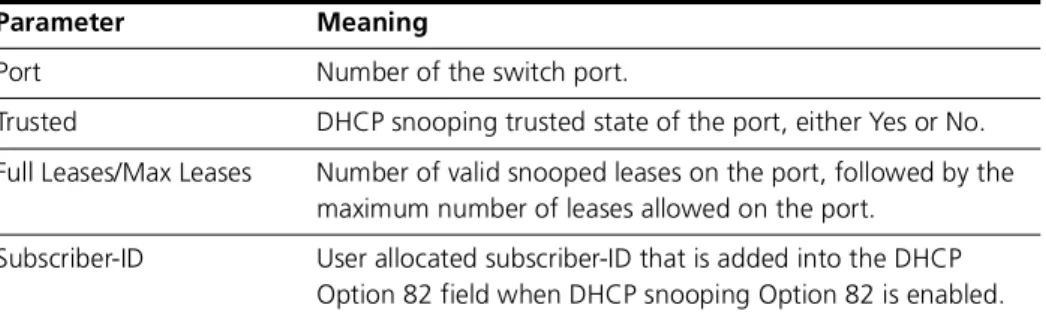
Description This command displays information about DHCP snooping for the specified ports (Figure 25-5, Table 25-5).
Figure 25-5: Example output from the show dhcpsnooping port command
Related commands set dhcpsnooping port show dhcpsnooping
show dhcpsnooping counter show dhcpsnooping database show dhcpsnooping filter
DHCP Snooping Port Information:
---Port ... 1
Trusted ... Yes Full Leases/Max Leases ... 0/0 Subscriber-ID ... Port ... 2 Trusted ... No Full Leases/Max Leases ... 0/1 Subscriber-ID ... Port ... 3 Trusted ... No Full Leases/Max Leases ... 1/1
Subscriber-ID ... UserID 14424
Table 25-5: Parameters in output of the show dhcpsnooping port command
Parameter Meaning
Port Number of the switch port.
Trusted DHCP snooping trusted state of the port, either Yes or No. Full Leases/Max Leases Number of valid snooped leases on the port, followed by the
maximum number of leases allowed on the port. Subscriber-ID User allocated subscriber-ID that is added into the DHCP