Norman Enterprise Security 7.3
Suite Version: 7.3.8.10
Version Information
Norman Enterprise Security Release Notes - Norman Enterprise Security Version 7.3 - Published: May 2013 Document Number: 02_204M_7.3_131341500
Copyright Information
Lumension
8660 East Hartford Drive, Suite 300 Scottsdale, AZ 85255
Copyright© 1999-2013; Lumension Security, Inc.; all rights reserved. Covered by one or more of U.S. Patent
Nos. 6,990,660, 7,278,158, 7,487,495, 7,823,147, 7,870,606, and/or 7,894,514; other patents pending. This
manual, as well as the software described in it, is furnished under license. No part of this manual may be reproduced, stored in a retrieval system, or transmitted in any form – electronic, mechanical, recording, or otherwise – except as permitted by such license.
LIMITATION OF LIABILITY/DISCLAIMER OF WARRANTY: LUMENSION SECURITY, INC.
(LUMENSION) MAKES NO REPRESENTATIONS OR WARRANTIES WITH REGARD TO THE ACCURACY OR COMPLETENESS OF THE INFORMATION PROVIDED IN THIS MANUAL. LUMENSION RESERVES THE RIGHT TO MAKE CHANGES TO THE INFORMATION DESCRIBED IN THIS MANUAL AT ANY TIME WITHOUT NOTICE AND WITHOUT OBLIGATION TO NOTIFY ANY PERSON OF SUCH CHANGES. THE INFORMATION PROVIDED IN THIS MANUAL IS PROVIDED “AS IS” AND WITHOUT WARRANTY OF ANY KIND, INCLUDING WARRANTIES OF MERCHANTABILITY AND FITNESS FOR A PARTICULAR PURPOSE. THE INFORMATION PROVIDED IN THIS MANUAL IS NOT GUARANTEED OR WARRANTED TO PRODUCE ANY PARTICULAR RESULT, AND THE ADVICE AND STRATEGIES CONTAINED MAY NOT BE SUITABLE FOR EVERY ORGANIZATION. NO WARRANTY MAY BE CREATED OR EXTENDED WITH RESPECT TO THIS MANUAL BY SALES REPRESENTATIVES OR WRITTEN SALES MATERIALS. LUMENSION SHALL NOT BE LIABLE TO ANY PERSON WHATSOEVER FOR ANY LOSS OF PROFIT OR DATA OR ANY OTHER DAMAGES ARISING FROM THE USE OF THIS MANUAL, INCLUDING BUT NOT LIMITED TO DIRECT, INDIRECT, SPECIAL, INCIDENTAL, CONSEQUENTIAL, OR OTHER DAMAGES.
Trademark Information
Lumension®, Lumension® Endpoint Management and Security Suite, Lumension® Endpoint Management Platform, Lumension® Patch and Remediation, Lumension® Enterprise Reporting, Lumension® Security Configuration Management, Lumension® Content Wizard, Lumension® Risk Manager, Lumension® AntiVirus, Lumension® Wake on LAN, Lumension® Power Management, Lumension® Remote Management, Lumension® Scan™, Lumension® Security Configuration Management, Lumension® Application Control, Lumension® Device Control, Lumension® Endpoint Security, Lumension® Intelligent Whitelisting, PatchLink®, PatchLink® Update™, their associated logos, and all other Lumension trademarks and trade names used here are the property of Lumension Security, Inc. or its affiliates in the U.S. and other countries.
Norman®, Norman SandBox®, Norman Virus Control®, the Norman product and service names, their associated logos, and all other Norman trademarks and trade names used here are the property of Norman ASA in the U.S., the European Union, and other countries.
RSA Secured® is a registered trademark of RSA Security Inc. Apache is a trademark of the Apache Software Foundation.
In addition, any other companies' names, trade names, trademarks, and products mentioned in this document may be either registered trademarks or trademarks of their respective owners.
We are pleased to announce the general availability of Norman Enterprise Security 7.3 (Server Suite 7.3.8.10).
Note:
• Norman recommends that all updates be tested before entering production environments. • This release supersedes Norman Enterprise Security 7.2.
Obtaining the Update
New Installations The Norman Enterprise Security (Norman ESEC) 7.3 can be installed using the application server installer. Licensed modules will then become available upon replication with the licensing server.
Existing Installs (Upgrades) • Existing Norman ESEC 7.2 installations will download the update
during the next successful replication and are able to upgrade through the integrated Installation Manager.
• Prior versions must first upgrade to a supported version, such as Norman ESEC 7.2, before upgrading to Norman ESEC 7.3. This can be performed using the Norman Enterprise Security 7.2 installer and then upgrading to the 7.3 release using the Installation Manager in the product.
New Capabilities Included in This Release
The Norman Enterprise Security (Norman ESEC) 7.3 release includes the following new capabilities.
Patch and Remediation
• Norman now provides support for all Microsoft non-security enhancement updates made available through Windows Update.
• The Norman detection engine (LM.Detection) provides support for Microsoft Windows content made available through Windows Update.
• Optimized distribution of detection files to managed endpoints by removing the need to deploy the Microsoft
wsusscn2.cab file to Norman ESEC 7.3 endpoints.
• Improved DAU (Discover Applicable Updates) performance by removing the need to call the Windows Update Agent (through mcescan) on Norman ESEC 7.3 endpoints.
Device Control
Norman Device Control includes numerous improvements which results in: • Better stability
• Improved performance • Improved user experience
Application Control
• Memory Protection from CoreTrace Bouncer has been integrated into Norman Application Control providing an additional layer of protection against Advanced Persistent Threats (APTs). An audit mode is provided to test the environment for applications with legitimate behavior prior to enforcing policy.
• Provides the ability to Authorize, Deny, or Trust files directly from the logs. Greatly simplifying the process and reducing the burden associated with whitelist maintenance.
• .MSI files are now blocked and logged by default. Providing a similar level of control over these installer files as has been provided with application files in the past. This enables administrators to define a Trusted Updater policy for an .MSI via the new Trust from logs feature, ensuring a complete install and authorization of the new application files. MSI blocking has a similar enforcement priority to Denied applications even blocking with Local Authorization, Trusted Publisher, and Trusted Path policies.
• Windows Update is now blocked by default when an Application Control endpoint is in Easy Lockdown. This ensures that end users are not accidentally installing unauthorized updates which could be blocked by whitelisting. Enterprises that want to allow Windows Update to function on their endpoints can create a Trusted Updater policy for Windows Update.
• Log query results containing data are distinguished from log query results containing no data, thus enabling administrators to filter out empty query results and focus on only those queries that require action.
AntiVirus
• Provides the ability to delay AntiVirus definition and engine distributions, enabling the ability to test new versions prior to general release.
• Quarantined files are automatically restored if they are cleaned with subsequent Anti-virus definitions, enabling the automatic remediation of false positive detections.
• Provides the ability to initiate a targeted Anti-virus scan from the endpoint, enabling specific drives, folders, or files to be scanned.
Issues Resolved
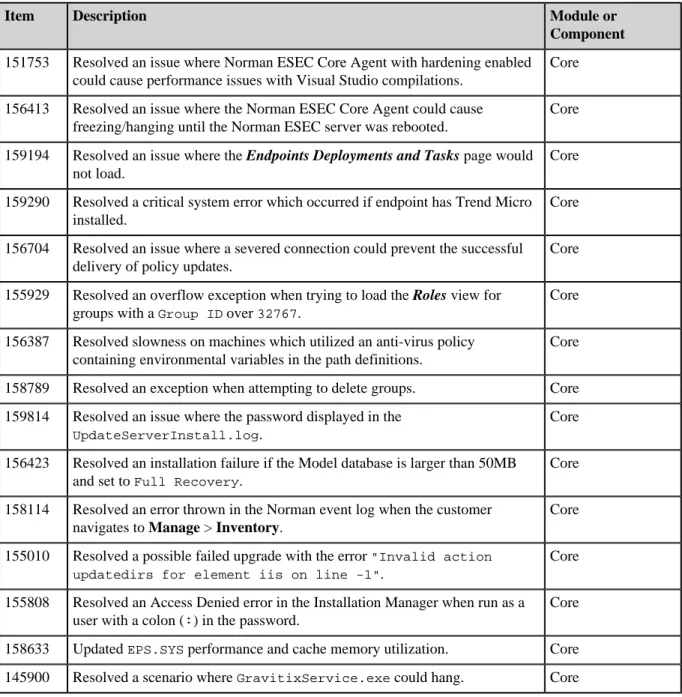
The Norman Enterprise Security (Norman ESEC) 7.3 release resolves the following issues.
Table 1: Norman ESEC 7.3 Issues Resolved
Item Description Module or
Component
151753 Resolved an issue where Norman ESEC Core Agent with hardening enabled could cause performance issues with Visual Studio compilations.
Core 156413 Resolved an issue where the Norman ESEC Core Agent could cause
freezing/hanging until the Norman ESEC server was rebooted.
Core
159194 Resolved an issue where the Endpoints Deployments and Tasks page would not load.
Core
159290 Resolved a critical system error which occurred if endpoint has Trend Micro installed.
Core 156704 Resolved an issue where a severed connection could prevent the successful
delivery of policy updates.
Core
155929 Resolved an overflow exception when trying to load the Roles view for groups with a Group ID over 32767.
Core 156387 Resolved slowness on machines which utilized an anti-virus policy
containing environmental variables in the path definitions.
Core
158789 Resolved an exception when attempting to delete groups. Core 159814 Resolved an issue where the password displayed in the
UpdateServerInstall.log.
Core
156423 Resolved an installation failure if the Model database is larger than 50MB and set to Full Recovery.
Core 158114 Resolved an error thrown in the Norman event log when the customer
navigates to Manage > Inventory.
Core
155010 Resolved a possible failed upgrade with the error "Invalid action updatedirs for element iis on line -1".
Core 155808 Resolved an Access Denied error in the Installation Manager when run as a
user with a colon (:) in the password.
Core
158633 Updated EPS.SYS performance and cache memory utilization. Core 145900 Resolved a scenario where GravitixService.exe could hang. Core
Item Description Module or Component
155009 Updated the Endpoint Name Duplicate Report to not include endpoints that don't have Norman Patch and Remediation installed.
Core
156798 Resolved an issue with long load times on Patch and Remediation page with Microsoft SQL Server 2005.
Patch and Remediation 156053 Resolved an issue with the Deployment Wizard showing all Operating
Systems applicable to a patch.
Patch and Remediation 156796 Resolved an issue where LM.Detection.exe could hang if it is unable to
access the A: drive (floppy).
Patch and Remediation 157807 Resolved an issue where the Vulnerability Analysis Report run for a group
showed the Applicable Endpoints in the Total Endpoints column.
Patch and Remediation 155795 Resolved an error thrown in the Norman event log when a user navigates to
any Endpoint Deployments and Tasks page.
Patch and Remediation 135876 Resolved an issue where Mandatory Baseline could advise that a patch
requires reboot when a reboot is not required.
Patch and Remediation 151516 Clarified text in the Deployment Wizard related to package download
location.
Patch and Remediation 155935 Updated the UPC Common notification_to_data table when no e-mail
addresses are configured.
Patch and Remediation 158622 Addressed a NullReferenceException that could occur on
NotificationManager.exe startup if the PDDM Key did not exist.
Patch and Remediation 152007 Resolved an issue where Microsoft Internet Explorer 9 did not load the
EULA for content deployments.
Patch and Remediation 60663 Resolved an issue where a Group Deployment could remain "In
Progress" indefinitely after an agent was removed from the group.
Patch and Remediation 160208 Resolved a deadlock which could occur on Microsoft Windows XP machines
with both GravitixService.exe and Trend Micro installed.
Patch and Remediation 154047 In environments with a large number of endpoints, the Device Control policy
deployment time varied from minutes to hours. Device Control policies are now updated within a maximum of 10 minutes.
Device Control
156841 Resolved an issue where if multiple Device Control policies were applicable to a specific user on a given endpoint, the resultant enforced policy was not always correct.
Item Description Module or Component
151093 When adding devices to a Device Collection using the search functionality in the Device Library, the search results did not contain all of the valid devices. This has been resolved.
Device Control
155912 The User's Guide contained incorrect information about the Global Device Policy. The documentation has been updated.
Device Control
154019 When adding devices to a Device Collection from Read-Denied and
Write-Denied events, incorrect information was shown in the error message. The information in the error message is now accurate.
Use Device Connected events to add devices to Device Collections, as Read-Denied and Write-Denied events do not contain the necessary information to add devices.
Device Control
154974 Shadowing policies assigned to Active Directory Users or User Groups were not properly applied for the CD/DVD class. This has been resolved.
Device Control 157008 Setting the filters which had no matching data on the Device Library page
resulted in an error. This has been resolved.
Device Control
155794 System-generated Log Query Results were accumulating and could not be deleted. These results can now be deleted, and new system-generated queries will overwrite previous results rather than append.
Device Control
155750 Resolved an issue where Device Control was logging errors in the Windows Event Log with Event ID of 7016.
Device Control 155924 Device Control Event Log query results now display the time and date in the
format specified in the browser.
Device Control
154042 Addressed significant delays reported when copying files over the network when Application Control and/or Device Control Modules are installed.
Application Control 152790 Addressed the significant delays which were reported when logging onto
the network using roaming profiles with netapp storage with the Application Control module enabled.
Application Control
158225 153769
Reduced the performance impact when Application Control and Device Control are added to endpoints.
Application Control
158467 Mitigated the interaction between Application Control and Trend Micro which caused endpoints to hang on reboot on some Microsoft Windows XP and Windows 7 systems.
Item Description Module or Component
156877 145090
Addressed the issue which caused “Run File Assessment” from Application Library to timeout.
To address this, the batch size has been reduced from 10,000 to 5,000 and the timeout duration was increased from 90 seconds to 5 minutes.
Application Control
157178 Resolved an issue where installing a Biztalk update or hotfix on an Application Control endpoint in Easy Auditor can cause endpoint stability issues.
Application Control
157047 Improved the performance when loading Application Library pages. Application Control 157386 Resolved a conflict where some Windows Updates would fail to install on
Microsoft Windows 8.
Application Control
156672 Internal Server error occurs when an Application Control log query created which has the same name as an existing query but has a space at the end of the name. This situation now provides the appropriate error messaging.
Application Control
158279 Addressed an issue where a Denied Application did not get blocked when executed from the desktop under certain circumstances.
Application Control
156388 Resolved an issue where if you selected more than 50 machines on the
Endpoints > AntiVirus tab and clicked the Scan Now button, the resulting
Scan Options page would display as a 404 error.
AntiVirus
154748 Addressed the issue causing a scan of a group with no eligible endpoints, from the Deployments and Tasks > AV Scans page, would show as In-Progress perpetually and did not complete when the scheduled time for the scan had elapsed.
AntiVirus
155675 Resolved the issue where if a previously scanned endpoint was removed from a group, that previous scan was no longer shown on the Deployment Details page. A record of the scan is now maintained, even if the endpoint is removed from the Group.
AntiVirus
143745 Resolved a issue that displayed the error "An argument exception has occurred while performing the requested operation" when attempting to save the AntiVirus Definition Version Status report as XML.
AntiVirus
157792 Addressed reports of slow boot-up with AntiVirus installed, significantly improving boot-up performance.
AntiVirus
153955 Resolved an intermittent anti-virus definitions download issue which occurred if the database was unavailable when DownloadManager
attempted to read its configuration settings.
Item Description Module or Component
155793 Resolved an issue which caused files to be quarantined if they had one or more square brackets ([ or ]) in the filename.
AntiVirus
Known Issues
The Norman Enterprise Security (Norman ESEC) 7.3 release contains the following known issues.
Table 2: Norman ESEC 7.3 Known Issues
Item Description Module or
Component
160209 When the server is installed on non-English operating system, there may be unpredictable behavior.
Core
130407 Managed servers used to host a VDI server will have multiple instances of
pddm.exe running on single endpoint causing performance degradation.
Core 98100 Norman ESEC server does not allow connections that are biometric or smart
card based but will allow the install to proceed.
Core
111787 Registered ghosted LMAgent will not re-register but instead it will overwrite existing agent records.
Core 148466 In VDI environments, endpoints may re-register with Norman ESEC due to
different MAC address.
Core
135694 The LMAgent component downloads after install may consume excessive bandwidth.
Core 159340 The NotificationManager.exe uses additional CPU and memory usage
when snoozing a deployment reboot.
Core
157277 Reboots without Notifications can occur if the PDDM key was not generated. Patch and Remediation 142935 High Memory Usage for managed Solaris 10 endpoints can occur during the
Discover Applicable Updates task.
Patch and Remediation 145430 Bandwidth Throttling in Agent policy set does not include Patch
Components.
Patch and Remediation 158225 When Application Control and/or Device Control are installed and hardening
is enabled, file-intensive operations such as code compilations are slowed.
Workaround: Disable hardening for improved performance. Further
performance improvements will be included in a future release.
Item Description Module or Component
157893 There is a conflict between Norman Device Control and certain versions of TrackIT software which results in a crash of TrackIT.
Device Control 148230 On the endpoint Status window, Citrix Network Shares is not translated
to Japanese.
This will be addressed in a future release.
Device Control
157141 When attempting to add a CD/DVD to a Collection which already contains that CD/DVD, the browser persists in Loading status.
Workaround: Reload the page.
Device Control
157894 Changing the server shadow directory, in system options for Device Control, takes effect only after a reboot or a restart of the EDS service. Also after changing the shadow storage directory, existing shadow files will not be accessible from log queries.
Workaround: Copy/move files manually from the old directory into the new
directory.
Device Control
157798 When the Device Control dashboard widgets refresh rate is set to Daily or
Only when refresh is clicked, the corresponding device event log query shows weekly although the log query results are correct.
Device Control
149880 File Type Filtering cannot be enforced when burning encrypted CDs. Device Control 160248 During installation, the endpoint Agent Control Panel will erroneously report
Device Control status as Failed for a few minutes until the installation is complete.
Device Control
(multiple) The Device Event Log Query Wizard displays inaccurate errors when changing scheduling, or going back and forth between wizard pages.
Device Control
160059 MSI blocking was introduced in 7.3 to prevent endpoint instability issues due to MSI installs on locked-down endpoints. However, this means that MSI installs cannot be authorized via Trusted Publisher, Trusted Path or Local Authorization as would have been possible on pre-7.3 endpoints.
Workaround: Add the MSIs as Trusted Updaters so that the endpoint whitelist is updated.
Application Control
159708 Reflective Memory Injection log events occur associated with printers, scanners or graphics applications.
Workaround: The executables which appear in the logs should be added as
exceptions in the Memory Injection policy.
Item Description Module or Component
159954 Reflective Memory Injection log events occur associated with Citrix ICA.
Workaround: The executables which appear in the logs should be added as
exceptions in the Memory Injection policy.
Application Control
156273 It is not possible to use wild-cards or system variables when adding
exceptions for Memory Injection policies. The full path and executable name must be defined.
This functionality is planned for a future release.
Application Control
156141 While it is possible to add files from the Application Control logs to the Application Library in 7.3, it is not possible to add files from the logs to a specific application or application group in the Application Library.
Workaround:When files are added to the Application Library from logs,
they are added to the Ungrouped Files folder and can be moved to applications or application groups from there.
Application Control
160429 Application Installs (such as Google Chrome) may require multiple Trusted Updaters on locked-down endpoints.
Application Control 160484 Blocked Windows Update files only appear in the All Application
Events log query and cannot be added to Trusted Updater policies from the logs.
Workaround: Select the files directly from the endpoints and add them to
the Trusted Updater policies from there. This functionality will be addressed in a future release.
Application Control
140761 Comodo Dragon does not update successfully when in Easy Lockdown. This is due to the fact that this application exhibits an updating pattern which is not currently supported by Trusted Updater.
Workaround: Add the installer for the new version of the application as a
Trusted Updater and the installed files will then be whitelisted.
Application Control
138606 Performance Issues when running Easy Auditor or Easy Lockdown scan.
Workaround:Execute the scans out of hours where possible. Easy Auditor
and Easy Lockdown scan performance improvements are planned for a future release.
Application Control
148826 While Blocking Notifications are provided for blocked .exe files they are not provided for blocked DLLs. Users will receive a Windows or Application error message reflecting the fact that the DLL was blocked.
Refer to the Norman Support Site (http://www.norman.com/support/) for additional details.
Item Description Module or Component
159365 When removing alerts from the Review > Virus and Malware Event Alerts page, they do not get removed from the Database so the AV Alert emails keep getting sent out every day, even though they have been removed them from the Virus and Malware Event Alerts page.
AntiVirus
159375 Server exception occurs when the user clears the default view on the Review > Virus and Malware Event Alerts page. This only occurs for server timezones > 0 (UTC+1 to UTC+13).
AntiVirus
159641 Files that contain Alternate Data Stream (ADS) appear to fail auto-restore action from Quarantine. ADS can only exist with files and are flagged by a colon (:) preceding the virus name (such as :ZoneIdentifier). When Norman AntiVirus cleans and restores a file it restores the ADS as well. However, Norman AntiVirus then proceeds to restore the ADS separately which will fail, since the ADS has already been restored. This is effectively a redundant function and will be removed in a future update.
AntiVirus
159822 Custom Scan Results post to the Norman ESEC server as being performed by a Recurring Scan Policy instead of a Custom Scan.
AntiVirus 149339 If the administrator runs a scan now on endpoints with a large numbers
of exclude paths (such as 200 excludes), the scan now event will not be delivered to endpoints.
AntiVirus
148199 The path name of the virus gets garbled if it contains Japanese characters. AntiVirus
Frequently Asked Questions
How Do I Obtain the Update?
New Installations The Norman Enterprise Security (Norman ESEC) 7.3 can be installed using the application server installer. Licensed modules will then become available upon replication with the licensing server.
Existing Installs (Upgrades) • Existing Norman ESEC 7.2 installations will download the update
during the next successful replication and are able to upgrade through the integrated Installation Manager.
• Prior versions must first upgrade to a supported version, such as Norman ESEC 7.2, before upgrading to Norman ESEC 7.3. This can be performed using the Norman Enterprise Security 7.2 installer and then upgrading to the 7.3 release using the Installation Manager in the
How Do I Deploy the Update?
Server Norman ESEC 7.2 customers can upgrade their existing Norman ESEC Server by selecting Tools > Installation Manager, navigating to the New/Update Components tab and selecting 7.3 (7.3.8.10), which contains the new components for the platform and any installed feature modules. All new installs of Norman ESEC 7.3 will automatically apply the latest updates.
Agent Norman ESEC 7.3 customers can upgrade their existing Norman ESEC agents by selecting Agent Versions… from either the Manage >
Endpoints page or the Manage > Groups > Endpoint Membership page.
All new installs of Norman ESEC 7.3 will have the 7.3.8.10 Agent by default.
How Do I Determine if the Update Was Successfully Applied?
Server Following installation of Norman ESEC 7.3 (suite 7.3.8.10), navigate to the Help > About page in the Norman ESEC console. The Server Suite
Version will indicate '7.3.8.10'.
Agent Upgraded agents are visible on the console by navigating to the Manage >
Endpoints page in the Norman ESEC interface, where the Agent version