Fortran 77 Programmer’s Guide
CONTRIBUTORS
Written by CJ Silverio, David Graves, and Chris Hogue Edited by Janiece Carrico
Illustrated by Melissa Heinrich Production by Gloria Ackley
Engineering contributions by Calvin Vu, Bron Nelson, and Deb Ryan © Copyright 1992, 1994, Silicon Graphics, Inc.— All Rights Reserved This document contains proprietary and confidential information of Silicon Graphics, Inc. The contents of this document may not be disclosed to third parties, copied, or duplicated in any form, in whole or in part, without the prior written permission of Silicon Graphics, Inc.
RESTRICTED RIGHTS LEGEND
Use, duplication, or disclosure of the technical data contained in this document by the Government is subject to restrictions as set forth in subdivision (c) (1) (ii) of the Rights in Technical Data and Computer Software clause at DFARS 52.227-7013 and/ or in similar or successor clauses in the FAR, or in the DOD or NASA FAR
Supplement. Unpublished rights are reserved under the Copyright Laws of the United States. Contractor/manufacturer is Silicon Graphics, Inc., 2011 N. Shoreline Blvd., Mountain View, CA 94039-7311.
Contents
Introduction xi
Corequisite Publications xi Organization of Information xii Typographical Conventions xiii
1. Compiling, Linking, and Running Programs 1 Compiling and Linking 2
Drivers 2 Compilation 2
Compiling Multilanguage Programs 4 Linking Objects 5
Specifying Link Libraries 7 Driver Options 8
Debugging 16 Profiling 16 Optimizing 17 Performance 18 Object File Tools 18 Archiver 19
Run-Time Considerations 19 Invoking a Program 19 File Formats 20
Contents
2. Storage Mapping 23
Alignment, Size, and Value Ranges 24 Access of Misaligned Data 27
Accessing Small Amounts of Misaligned Data 27
Accessing Misaligned Data Without Modifying Source 28
3. Fortran Program Interfaces 29 Fortran/C Interface 30
Procedure and Function Declarations 30 Arguments 32
Array Handling 35
Accessing Common Blocks of Data 36 Fortran/C Wrapper Interface 38
The Wrapper Generator mkf2c 38
Using Fortran Character Variables as Parameters 39 Reduction of Parameters 40
Fortran Character Array Lengths 42 Using mkf2c and extcentry 43 Makefile Considerations 45 Fortran/Pascal Interface 46
Procedure and Function Declarations 46 Arguments 48
Execution-Time Considerations 50 Array Handling 50
4. System Functions and Subroutines 55 Library Functions 55
Intrinsic Subroutine Extensions 63 DATE 64
IDATE 65 ERRSNS 65 EXIT 66 TIME 66 MVBITS 66
Function Extensions 67 SECNDS 68 RAN 68
5. Fortran Enhancements for Multiprocessors 69 Overview 70
Parallel Loops 70
Writing Parallel Fortran 71 C$DOACROSS 71 C$& 77
C$ 77
C$MP_SCHEDTYPE, C$CHUNK 78 Nesting C$DOACROSS 78
Parallel Blocks 79
Analyzing Data Dependencies for Multiprocessing 79 Breaking Data Dependencies 85
Work Quantum 90 Cache Effects 93
Contents
Advanced Features 97
mp_block and mp_unblock 97
mp_setup, mp_create, and mp_destroy 98 mp_blocktime 98
mp_numthreads, mp_set_numthreads 99 mp_my_threadnum 99
Environment Variables: MP_SET_NUMTHREADS, MP_BLOCKTIME, MP_SETUP 100
Environment Variables: MP_SCHEDTYPE, CHUNK 101 Environment Variable: MP_PROFILE 101
mp_setlock, mp_unsetlock, mp_barrier 102 Local COMMON Blocks 102
Compatibility With sproc 103 DOACROSS Implementation 104
Loop Transformation 104 Executing Spooled Routines 106
6. Compiling and Debugging Parallel Fortran 107 Compiling and Running 107
Using the–static Flag 108 Examples of Compiling 108
Profiling a Parallel Fortran Program 109 Debugging Parallel Fortran 110
Figures
Figure 1-1 Compilation Process 3
Figure 1-2 Compiling Multilanguage Programs 5 Figure 1-3 Link Editing 6
Tables
Table 1-1 Link Libraries 6
Table 1-2 Source Statement Settings for -col72 Option 10 Table 1-3 Source Statement Settings for -col120 Option 10
Table 1-4 Source Statement Settings for -extend_source Option 11 Table 1-5 Source Statement Settings for -noextend_source Option 13 Table 1-6 Optimizer Options 17
Table 1-7 Preconnected Files 21
Table 2-1 Size, Alignment, and Value Ranges of Data Types 24 Table 2-2 Valid Ranges for REAL and DOUBLE Data Types 25 Table 3-1 Main Routines 31
Table 3-2 Equivalent C and Fortran Function Declarations 31 Table 3-3 Equivalent Fortran and C Data Types 33
Table 3-4 Main Routines 46 Table 3-5 Function Declarations 47
Table 3-6 Equivalent Fortran and Pascal Data Types 48 Table 4-1 Summary of System Interface Library Routines 56 Table 4-2 Overview of System Subroutines 64
Table 4-3 Information Returned by ERRSNS 65 Table 4-4 Arguments to MVBITS 67
Introduction
This manual provides information on implementing Fortran 77 programs using IRIX™ and the IRIS®-4D™ series workstation. This implementation of Fortran 77 contains full American National Standard (ANSI)
Programming Language Institute Fortran (X3.9–1978). Extensions provide full VMS Fortran compatibility to the extent possible without the VMS operating system or VAX data representation. This implementation of Fortran 77 also contains extensions that provide partial compatibility with programs written in SVS Fortran and Fortran 66.
Fortran 77 is referred to as “Fortran” throughout this manual except where distinctions between Fortran 77 and Fortran 66 are being specifically discussed.
Corequisite Publications
Refer to theFortran 77 Language Reference Manual for a description of the Fortran language as implemented by the Silicon Graphics® IRIS-4D series workstation.
Refer to theIRIS-4D Series Compiler Guide for information on the following topics:
• an overview of the compiler system
• improving program performance by using the profiling and optimization facilities of the compiler system
Introduction
Refer to thedbx Reference Manual for a detailed description of the debugger. For information on interfaces to programs written in assembly language, refer to theAssembly Language Programmer's Guide.
Organization of Information
This manual contains the following chapters and appendix:
• Chapter 1, “Compiling, Linking, and Running Programs,” gives an overview of components of the compiler system, and describes how to compile, link edit, and execute a Fortran program. It also describes special considerations for programs running on IRIX systems, such as file format and error handling.
• Chapter 2, “Storage Mapping,” describes how the Fortran compiler implements size and value ranges for various data types and how they are mapped to storage. It also describes how to access misaligned data. • Chapter 3, “Fortran Program Interfaces,” provides reference and guide
information on writing programs in Fortran, C, and Pascal that can communicate with each other. It also describes the process of generating wrappers for C routines called by Fortran.
• Chapter 4, “System Functions and Subroutines,” describes functions and subroutines that can be used with a program to communicate with the IRIX operating system.
• Chapter 5, “Fortran Enhancements for Multiprocessors,” describes programming directives for running Fortran programs in a multiprocessor mode.
Typographical Conventions
Typographical Conventions
The following conventions and symbols are used in the text to describe the form of Fortran statements:
Bold Indicates literal command line options, filenames, keywords, function/subroutine names, pathnames, and directory names.
Italics Represents user-defined values. Replace the item in italics with a legal value. Italics are also used for command names, manual page names, and manual titles.
Courier Indicates command syntax, program listings, computer output, and error messages.
Courier bold
Indicates user input.
[ ] Enclose optional command arguments.
() Surround arguments or are empty if the function has no arguments following function/subroutine names. Surround manual page section in which the command is described following IRIX commands.
| Sseparates two or more optional items.
... Indicates that the preceding optional items can appear more than once in succession.
# IRIX shell prompt for the superuser.
Introduction
Here are two examples illustrating the syntax conventions. DIMENSION a(d) [,a(d)] …
indicates that the Fortran keywordDIMENSION must be written as shown, that the user-defined entitya(d) is required, and that one or more ofa(d) can be optionally specified. Note that the pair of parentheses ( ) enclosingd is required.
{STATIC | AUTOMATIC} v [,v] …
Chapter 1
1.
Compiling, Linking, and Running Programs
This chapter contains the following major sections:
• “Compiling and Linking” describes the compilation environment and how to compile and link Fortran programs. This section also contains examples that show how to create separate linkable objects written in Fortran, C, Pascal, or other languages supported by the compiler system and how to link them into an executable object program. • “Driver Options” gives an overview of debugging, profiling,
optimizing, and other options provided with the Fortranf77 driver. • “Object File Tools” briefly summarizes the capabilities of theodump,
stdump,nm,file, andsize programs that provide listing and other information on object files.
• “Archiver” summarizes the functions of thearprogram that maintains archive libraries.
• “Run-Time Considerations” describes how to invoke a Fortran program, how the operating system treats files, and how to handle run-time errors.
Chapter 1: Compiling, Linking, and Running Programs
Compiling and Linking
Drivers
Programs calleddrivers invoke the major components of the compiler system: the Fortran compiler, the intermediate code optimizer, the code generator, the assembler, and the link editor. Thef77 command runs the driver that causes your programs to be compiled, optimized, assembled, and link edited.
The format of thef77 driver command is as follows: f77 [option] … filename.f [option]
where
f77 invokes the various processing phases that compile, optimize, assemble, and link edit the program.
option represents the driver options through which you provide instructions to the processing phases. They can be
anywhere in the command line. These options are discussed later in this chapter.
filename.f is the name of the file that contains the Fortran source statements. The filename must always have the suffix.f, for example,myprog.f.
Compilation
Compiling and Linking
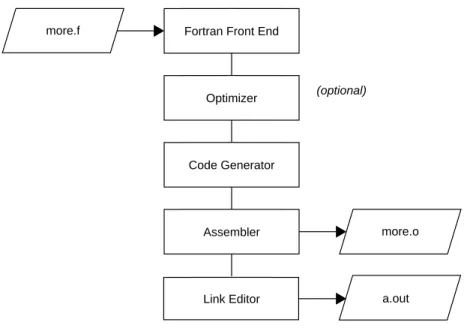
Figure 1-1 Compilation Process Note the following:
• The source file ends with the required suffixes .f or.F.
• The source file is passed through the C preprocessor,cpp, by default.cpp does not accept C-style comments in Hollerith strings. The–nocpp
option skips the pass throughcpp and therefore, allows C-style comments in Hollerith strings. (See the–nocpp option in “Driver Options” on page 8 for details.) In the example
% f77 myprog.f –nocpp
the filemyprog.f will not be preprocessed bycpp.
• The driver produces a linkable object file when you specify the–c
driver option. This file has the same name as the source file, except with the suffix.o.For example, the command line
% f77 more.f -c
produces themore.o file in the above example.
Fortran Front End
Optimizer
Code Generator
Assembler
Link Editor
(optional)
more.f
more.o
Chapter 1: Compiling, Linking, and Running Programs
• The default name of the executable object file isa.out.For example, the command line
% f77 myprog.f
produces the executable objecta.out.
• You can specify a name other thana.out for the executable object by using the driver option –oname,where name is the name of the executable object. For example, the command line
% f77 myprog.o -o myprog
link edits the object modulemyprog.o and produces an executable object namedmyprog.
• The command line
% f77 myprog.f -o myprog
compiles and link edits the source modulemyprog.f and produces an executable object namedmyprog.
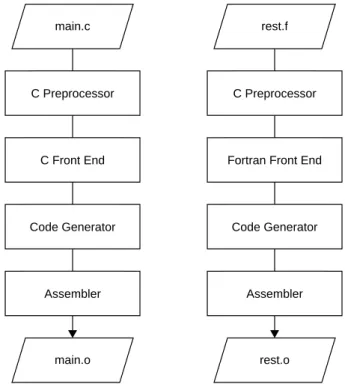
Compiling Multilanguage Programs
The compiler system provides drivers for other languages, including C, Pascal, COBOL, and PL/1. If one of these drivers is installed in your system, you can compile and link your Fortran programs to the language supported by the driver. (See theIRIX Series Compiler Guide for a list of available drivers and the commands that invoke them; refer to Chapter 3 of this manual for conventions you must follow in writing Fortran program interfaces to C and Pascal programs.)
Compiling and Linking
Figure 1-2 Compiling Multilanguage Programs
Linking Objects
You can use thef77 driver command to link edit separate objects into one executable program when any one of the objects is compiled from a Fortran source. The driver recognizes the.o suffix as the name of a file containing object code suitable for link editing and immediately invokes the link editor. The following command link edits the object created in the last example: % f77 -o myprog main.o rest.o
You can also use thecc driver command, as shown below:
% cc -o myprog main.o rest.o -lF77 -lU77 -lI77 -lisam -lm
C Preprocessor
C Front End
Code Generator
Assembler main.c
main.o
C Preprocessor
Fortran Front End
Code Generator
Assembler rest.f
Chapter 1: Compiling, Linking, and Running Programs
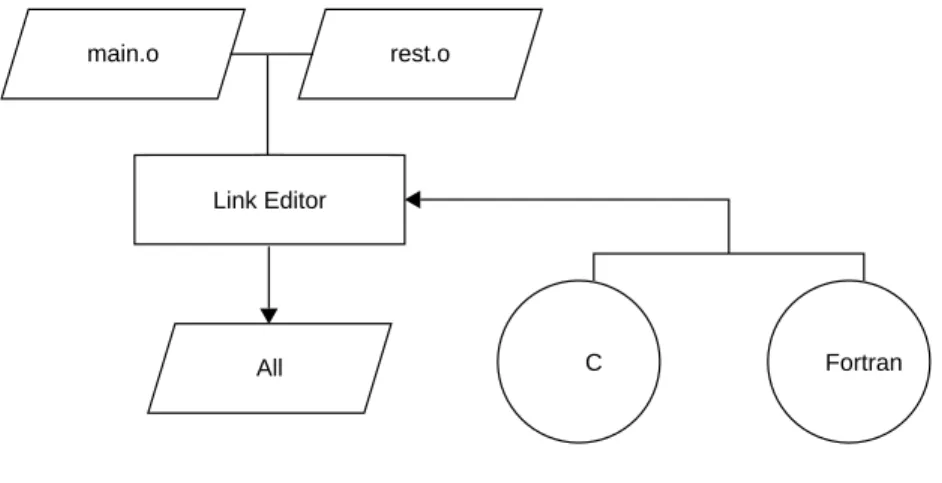
Figure 1-3 shows the flow of control for this link edit.
Figure 1-3 Link Editing
Bothf77 andcc use the C link library by default. However, thecc driver command does not know the names of the link libraries required by the Fortran objects; therefore, you must specify them explicitly to the link editor using the–l option as shown in the example. The characters following–l are shorthand for link library files as shown in Table 1-1.
Table 1-1 Link Libraries
–l Link Library Contents
F77 /usr/lib/libF77.a Fortran intrinsic function library I77 /usr/lib/libI77.a Fortran I/O library
All
main.o rest.o
Compiling and Linking
See the section called “FILES” in thef77(1) manual page for a complete list of the files used by the Fortran driver. Also refer to theld(1) manual page for information on specifying the–l option.
Specifying Link Libraries
You must explicitly load any required run-time libraries when compiling multilanguage programs. For example, when you link a program written in Fortran and some procedures written in Pascal, you must explicitly load the Pascal librarylibp.aand the math library libm.a with the options–lp and–lm
(abbreviations for the librarieslibp.a andlibm.a). This procedure is demonstrated in the next example.
% f77 main.o more.o rest.o -lp -lm
To find the Pascal library, the link editor replaces the –l withlib and adds an
.a afterp. Then, it searches the/lib,/usr/lib, and /usr/local/lib directories for this library. For a list of the libraries that a language uses, see the associated driver manual page, cc(1),f77(1), orpc(1).
You may need to specify libraries when you use IRIX system packages that are not part of a particular language. Most of the manual pages for these packages list the required libraries. For example, thegetwd(3B) subroutine requires the BSD compatibility librarylibbsd.a. This library is specified as follows:
% f77 main.o more.o rest.o -lbsd
To specify a library created with the archiver, type in the pathname of the library as shown below.
% f77 main.o more.o rest.o libfft.a
Note: The link editor searches libraries in the order you specify. Therefore,
if you have a library (for example,libfft.a) that uses data or procedures from
Chapter 1: Compiling, Linking, and Running Programs
Driver Options
This section contains a summary of the Fortran–specific driver options. See thef77(1) manual page for a complete description of the compiler options; see theld(1) manual page for a description of the link editor options.
–66 Compiles Fortran 66 source programs.
When used at compile time, the following four options generate various degrees of misaligned data in common blocks. They then generate the code to deal with the misalignment.
Note: When specified, these options can degrade program performance;
–align8 causes the greatest degree of degradation, and–align32 causes the least.
–align8 Aligns objects larger than 8 bits on 8-bit boundaries. Using this option will have the largest impact on performance. –align16 Aligns objects larger than 16 bits on 16-bit boundaries;
16-bit objects must still be aligned on 16-bit boundaries (MC68000-like alignment rules).
–align32 Aligns objects larger than 32 bits on 32-bit boundaries; 16-bit objects must still be aligned on 16-bit boundaries, and 32-bit objects must still be aligned on 32-bit boundaries. –align64 Aligns objects larger than 64 bits on 64 bit boundaries.
Objects with size 64 bits or smaller must still be aligned on the corresponding boundaries.
Driver Options
To load the system libraries capable of handling misaligned data, use the–L/usr/lib/align switch at load time. The trap handler may be needed to handle misaligned data passed to system libraries that are not included in the/usr/lib/align directory (seefixade(3f) andunalign(3x)).
–backslash Allows the backslash character to be used as a normal Fortran character instead of the beginning of an escape sequence.
–C Generates code for run-time subscript range checking. The default suppresses range checking. This option will not cause the program to core dump; it will cause the program to exit with a diagnostic message. For details on how to produce a core dump, refer to the information on the
f77_dump_flag environment variable in Appendix A, “Run-Time Error Messages.”
–check_bounds
Causes an error message to be issued at run time when the value of an array subscript expression exceeds the bounds declared for the array. This is equivalent to the–C option.
–chunk=integer
Chapter 1: Compiling, Linking, and Running Programs
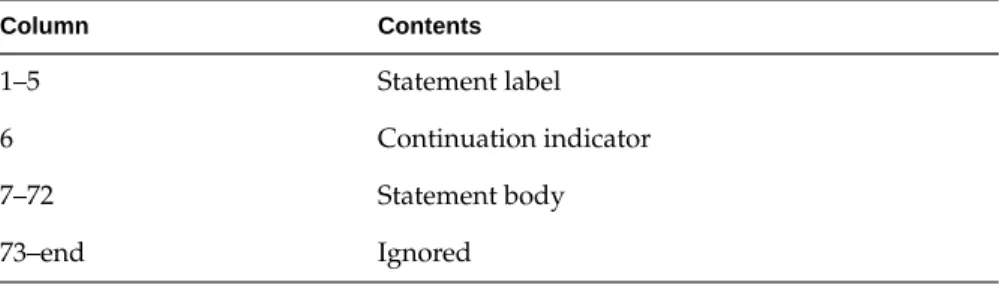
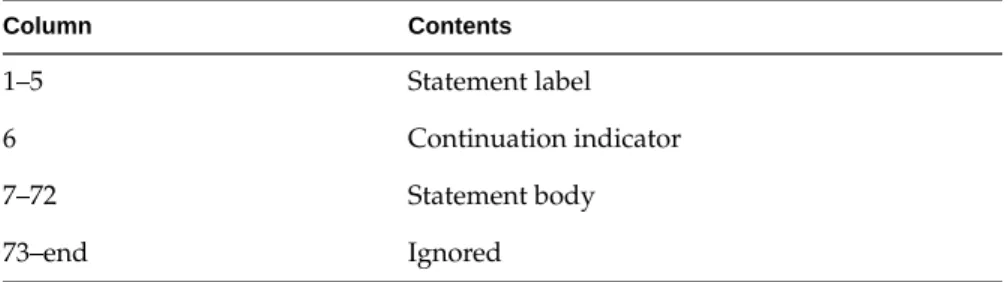
–col72 Sets the source statement format as described in Table 1-2.
If the source statement contains fewer than 72 characters, no blank padding occurs; the TAB-format facility is disabled. This option provides the SVS Fortran 72-column option mode.
–col120 Sets the source statement format as described in Table 1-3.
If the source statement contains fewer than 120 characters, Table 1-2 Source Statement Settings for -col72 Option
Column Contents
1–5 Statement label
6 Continuation indicator
7–72 Statement body
73–end Ignored
Table 1-3 Source Statement Settings for -col120 Option
Column Contents
1-5 Statement label
6 Continuation indicator
7-120 Statement body
Driver Options
–d_lines Causes any lines with a D in column 1 to be compiled. By default, the compiler treats all lines with a character in column 1 as comment lines.
–expand_include
Expands all include statements in the Fortran source listing file.L. This option is only applicable with the–listing
option.
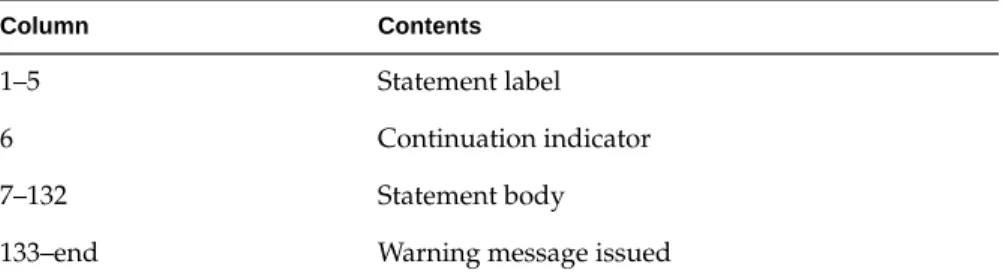
–extend_source
Sets the source statement format as described in Table 1-4.
If the source statement contains fewer than 132 characters, blanks are assumed at the end; the ability of TAB-formatted lines to extend past column 132 is disabled.
This option provides VMS Fortran 132-column mode, except that a warning, instead of a fatal error message, is generated when text extends beyond column 132.
–E Runs only the C macro preprocessor on the files and sends the results to standard output.
–F Calls the RATFOR preprocessor only and puts the output in a.f file. Does not produce.o files.
–framepointer
Defines the frame pointer register for each subroutine in the source file.
Table 1-4 Source Statement Settings for -extend_source Option
Column Contents
1–5 Statement label
6 Continuation indicator
7–132 Statement body
Chapter 1: Compiling, Linking, and Running Programs
–i2 All small integer constants become INTEGER*2. All variables and functions implicitly or explicitly declared typeINTEGER orLOGICAL (without a size designator, that is,*2,*4, and so on) will beINTEGER *2 orLOGICAL *2, respectively.
–listing Produces the source listing file with.Lsuffix containing line numbers, error messages, symbol table information, and cross references.
–m If the generic function results do not determine the precision of an integer-valued intrinsic function, the compiler chooses the precisions that returnINTEGER *2. The default is INTEGER *4. Note thatINTEGER *2 and
LOGICAL *2 quantities do not obey the Fortran standard rules for storage location.
-m4 Applies the M4 macro preprocessor to source files to be transformed with RATFOR. The driver puts the result in a
.p file. Unless you specify the–K option, the compiler removes the.p file on completion. See them4(1) manual page for details.
–mp Enable the multiprocessing directives. See Chapter 5, “Fortran Enhancements for Multiprocessors,” and
Chapter 6, “Compiling and Debugging Parallel Fortran,” of this book, and the man page onf77(1) for further options affecting multiprocessing compilation.
–mp_schedtype=type
Driver Options
–nocpp Does not run the C preprocessor on the source files. Specifying this option allows you to specify C-style comments inside Hollerith strings. Use this option when you want your program to strictly conform to the Fortran 77 standard.
–noexpopt Excludes floating point constant exponent optimization to achieve the same precision as releases prior to 4D1-4.0.
–noextend_source
Sets the source statement format as described in Table 1-5.
If the source statement contains fewer than 72 characters, blanks are assumed at the end; the ability of TAB-formatted lines to extend past Column 72 is disabled.
This option provides VMS Fortran default mode.
–noi4 Same as–i2 option.
–nof77 Same as–onetrip switch except for the following:
• The syntax and behavior ofEXTERNAL statements are altered.
• The default value for theBLANK=clause in anOPEN
statement isZERO.
• The default value for theSTATUS=clause in anOPEN
statement isNEW.
–noisam Excludes the indexed sequential access librarylibisam.a from being linked to the executable to reduce the size. Table 1-5 Source Statement Settings for -noextend_source Option
Column Contents
1–5 Statement label
6 Continuation indicator
7–72 Statement body
Chapter 1: Compiling, Linking, and Running Programs
–old_rl Interprets the record length specifier for a direct
unformatted file as a number of bytes instead of a number of words. This option provides backward compatibility with 4D1-3.1 releases and earlier.
–onetrip Same as –1 option.
–1 CompilesDO loops so that they execute at least once if reached. By default,DO loops are not executed if the upper limit is smaller than the lower limit. Similar to the–nof77
option.
–P Runs only the C macro preprocessor and puts the result of each source file into a corresponding.ifile. The.i file cannot contain # lines.
–pfa Run thepfa preprocessor to automatically discover, parallelism in the source code. This also enables the multiprocessing directives. There are two optional arguments:
• –pfa list runspfa and produces a listing file with suffix
.l explaining which loops were parallelized, and if not, why not.
• –pfa keep runs pfa, produces the listing file, and also keeps the transformed, multiprocessed Fortran intermediate file in a file with suffix.a.
–Rflags flags is a valid option for RATFOR; the flags are given in the ratfor(1) manual page.
The RATFOR input filename isfilename.r. The resulting output is placed infilename.f.You must specify the –K
Driver Options
–trapeuv Sets unitialized local variables to0xFFFA5A5A. This value is treated as a floating point NaN and causes a floating point trap.
–U Causes the compiler to differentiate upper- and lowercase alphabetic characters. For example, the compiler considers a andAas distinct characters. Note that this option causes the compiler to recognize lowercase keywords only. Therefore, lowercase keywords must be used in writing case-sensitive programs (or in writing generic header files).
–u Turns off Fortran default data typing and any data typing explicitly specified in anIMPLICIT statement. Forces the explicit declaration of all data types.
–usefpidx Uses the floating pointDO loop variable as the loop counter instead of a separate integer counter to maintain backward compatibility with releases before 4D1-4.0.
–vms_cc Uses VMS Fortran carriage control interpretation on unit 6.
–vms_endfile
Causes a VMS endfile record to be written when an
ENDFILE statement is executed, allows records to be written after an endfile record and subsequent reading from an input file after an endfile record is encountered.
–vms_library
Treats subprograms starting withLIB$,OTS$, andSMG$
as VMS run-time routines that accept a variable number of arguments.
–vms_stdin Allows rereading fromstdin afterEOF has been encountered.
–w Suppresses warning messages.
Chapter 1: Compiling, Linking, and Running Programs
Debugging
The compiler system provides a source-level, interactive debugger called dbx that you can use to debug programs as they execute. Withdbx you can control program execution to set breakpoints, monitor what is happening, modify values, and evaluate results.dbx keeps track of variables,
subprograms, subroutines, and data types in terms of the symbols used in the source language. You can use this debugger to access the source text of the program, to identify and reference program entities, and to detect errors in the logic of the program.
Reference Information
For a complete list of–g driver options, see thef77(1) manual page. See the dbx(1) manual page for information on the debugger. For a complete description see thedbx Reference Manual.
Profiling
The compiler system permits the generation of profiled programs that, when executed, provide operational statistics. This is done through driver option
–p (which provides pc sampling information) and thepixieand prof programs.
A variety of options and methods of profiling are available. To learn more about them, read Chapter 2 of theIRIX Series Compiler Guide, which
Driver Options
Optimizing
The default optimizing option,–O1, causes the code generator and assembler phases of compilation to improve the performance of your executable object. You can prevent optimization by specifying–O0.
Table 1-6 summarizes the optimizing functions available.
The default option,–O1, causes the code generator and the assembler to perform basic optimizations such as constant folding, common
subexpression elimination within individual statements, and common subexpression elimination between statements.
The global optimizer, invoked with the–O2 option, is a single program that improves the performance of an object program by transforming existing code into more efficient coding sequences. Although the same optimizer processes all compiler optimizations, it does distinguish between the various languages supported by the compiler system programs to take advantage of the different language semantics involved.
Table 1-6 Optimizer Options
Option Result
–O3 Performs all optimizations, including global register allocation. With this option, aucode object file is created for each Fortran source file and left in a.u file. The newly createducode object files, theucode object files specified on the command lines, the run-time startup routine, and all of the run-time libraries areucode linked. Optimization is done globally on the resultingucode linked file, and then it is linked as normal, producing ana.out file. No.o file is left from theucode linked result.–c cannot be specified with–O3.
–O2 The global optimizer (uopt) phase executes. It performs optimization only within the bounds of individual compilation units.
–O1 Default option. The code generator and the assembler perform basic optimizations in a more limited scope.
Chapter 1: Compiling, Linking, and Running Programs
See theIRIX Series Compiler Guide for details on the optimization techniques used by the compiler and tips on writing optimal code for optimizer processing.
Performance
In addition to optimizing options, the compiler system provides other options that can improve the performance of your programs:
• The–feedback and–cord options (see thef77(1) manual page) together with thepixie(1) andprof(1) utilities, can be used to reduce possible machine cache conflicts.
• The link editor –G num and–bestG num options control the size of the global data area, which can produce significant performance
improvements. See Chapter 2 of theIRIX Series Compiler Guide and the ld(1) manual page for more information.
• The–jmpopt option permits the link editor to fill certain instruction delay slots not filled by the compiler front end. This option can improve the performance of smaller programs not requiring extremely large blocks of virtual memory. Seeld(1) for more information.
Object File Tools
The following tools provide information on object files as indicated: odump Lists headers, tables, and other selected parts of an object or
Archiver
size Prints information about the text, rdata, data, sdata, bss, and sbss sections of the specified object or archive files. See Chapter 10 of theAssembly Language Programmer’s Guide for a description of the contents and format of section data.
For more information on these tools, see theodump(1),stdump(1),nm(1), file(1), orsize(1) manual pages.
Archiver
An archive library is a file that contains one or more routines in object (.o) file format. The termobject as used in this chapter refers to an.o file that is part of an archive library file. When a program calls an object not explicitly included in the program, the link editor ld looks for that object in an archive library. The editor then loads only that object (not the whole library) and links it with the calling program. The archiver (ar) creates and maintains archive libraries and has the following main functions:
• Copying new objects into the library • Replacing existing objects in the library • Moving objects about the library
• Copying individual objects from the library into individual object files
See thear(1) manual page for additional information on the archiver.
Run-Time Considerations
Invoking a Program
To run a Fortran program, invoke the executable object module produced by thef77 command by entering the name of the module as a command. By default, the name of the executable module isa.out. If you included the–o
Chapter 1: Compiling, Linking, and Running Programs
File Formats
Fortran supports five kinds of external files: • sequential formatted
• sequential unformatted • direct formatted • direct unformatted • key indexed file
The operating system implements other files as ordinary files and makes no assumptions about their internal structure.
Fortran I/O is based on records. When a program opens a direct file or key indexed file, the length of the records must be given. The Fortran I/O system uses the length to make the file appear to be made up of records of the given length. When the record length of a direct file is 1, the system treats the file as ordinary system files (as byte strings, in which each byte is addressable). AREAD orWRITE request on such files consumes bytes until satisfied, rather than restricting itself to a single record.
Because of special requirements, sequential unformatted files will probably be read or written only by Fortran I/O statements. Each record is preceded and followed by an integer containing the length of the record in bytes.
Run-Time Considerations
Preconnected Files
Table 1-7 shows the standard preconnected files at program start.
All other units are also preconnected when execution begins. Unitn is connected to a file namedfort.n. These files need not exist, nor will they be created unless their units are used without first executing an open. The default connection is for sequentially formatted I/O.
File Positions
The Fortran 77 standard does not specify whereOPEN should initially position a file explicitly opened for sequential I/O. The I/O system positions the file to start of file for both input and output. The execution of anOPEN
statement followed by aWRITE on an existing file causes the file to be overwritten, erasing any data in the file. In a program called from a parent process, units 0, 5, and 6 are positioned by the parent process.
Unknown File Status
When the parameterSTATUS="UNKNOWN" is specified in anOPEN
statement, the following occurs:
• If the file does not already exist, it is created and positioned at start of file.
• If the file exists, it is opened and positioned at the beginning of the file. Table 1-7 Preconnected Files
Unit # Unit
5 Standard input
6 Standard output
Chapter 1: Compiling, Linking, and Running Programs
Run-Time Error Handling
When the Fortran run-time system detects an error, the following action takes place:
• A message describing the error is written to the standard error unit (unit 0). See Appendix A, “Run-Time Error Messages,” for a list of the error messages.
• A core file is produced if thef77_dump_flag environment variable is set, as described in Appendix A, “Run-Time Error Messages.”. You can usedbx oredge to inspect this file and determine the state of the program at termination. For more information, see thedbx Reference Manual and theedge(1) manual page.
To invokedbx using the core file, enter the following:
% dbx binary-file core
wherebinary-file is the name of the object file output (the default is
a.out).For more information ondbx, see “Debugging” on page 16.
Trap Handling
The librarylibfpe.a provides two methods for handling floating point exceptions: the subroutinehandle_sigfpes and the environment variable
TRAP_FPE. Both methods provide mechanisms for handling and
classifying floating point exceptions, and for substituting new values. They also provide mechanisms to count, trace, exit, or abort on enabled
Chapter 2
2.
Storage Mapping
This chapter contains two sections:
• “Alignment, Size, and Value Ranges” describes how the Fortran compiler implements size and value ranges for various data types as well as how data alignment occurs under normal conditions.
Chapter 2: Storage Mapping
Alignment, Size, and Value Ranges
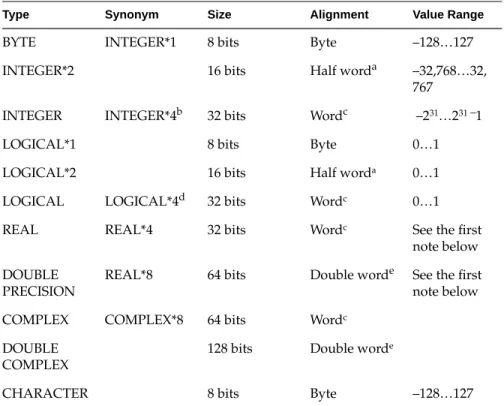
Table 2-1 contains information about various data types.
a. Byte boundary divisible by two.
b. When –i2 option is used, typeINTEGER would be equivalent toINTEGER*2. c. Byte boundary divisible by four.
Table 2-1 Size, Alignment, and Value Ranges of Data Types
Type Synonym Size Alignment Value Range
BYTE INTEGER*1 8 bits Byte –128…127
INTEGER*2 16 bits Half worda –32,768…32,
767 INTEGER INTEGER*4b 32 bits Wordc –231…231 –1
LOGICAL*1 8 bits Byte 0…1
LOGICAL*2 16 bits Half worda 0…1
LOGICAL LOGICAL*4d 32 bits Wordc 0…1
REAL REAL*4 32 bits Wordc See the first
note below DOUBLE
PRECISION
REAL*8 64 bits Double worde See the first note below
COMPLEX COMPLEX*8 64 bits Wordc
DOUBLE COMPLEX
128 bits Double worde
Alignment, Size, and Value Ranges
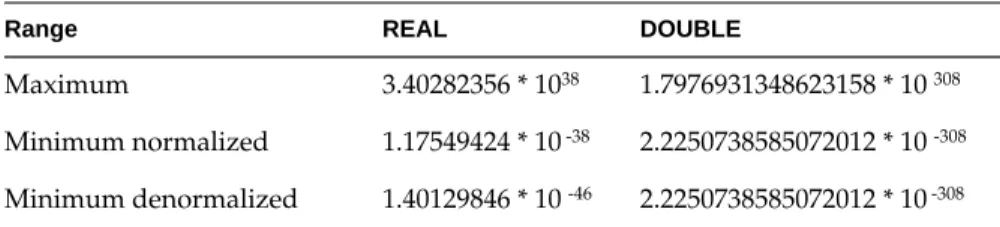
The following notes provide details on some of the items in Table 2-1. • Table 2-2 lists the approximate valid ranges forREAL andDOUBLE.
Note: When the compiler encounters aREAL*16 declaration, it issues a
warning message.REAL*16 items are allocated 16 bytes of storage per element, but only the first 8 bytes of each element are used. Those 8 bytes are interpreted according to the format forREAL*8 floating numbers.
• When the compiler encounters aREAL*16 constant in a source program, the compiler issues a warning message. The constant is treated as a double precision (REAL*8) constant.REAL*16 constants have the same form as double precision constants, except the exponent indicator isQ instead ofD.
• Table 2-1 states thatDOUBLE PRECISION variables always align on a double-word boundary. However, Fortran permits these variables to align on a word boundary if aCOMMON statement or equivalencing requires it.
• ForcingINTEGER,LOCICAL,REAL, andCOMPLEX variables to align on a halfword boundary is not allowed, except as permitted by the–align8,–align16, and–align32 command line options. See Chapter 1, “Compiling, Linking, and Running Programs.”. • ACOMPLEX data item is an ordered pair of real numbers; a
double-complex data item is an ordered pair of double-precision numbers. In each case, the first number represents the real part and the second represents the imaginary part.
• LOGICAL data items denote only the logical values TRUE and FALSE (written as.TRUE. or.FALSE.). However, to provide VMS
compatibility,LOGICAL*1 variables can be assigned all values in the range –128 to 127.
Table 2-2 Valid Ranges for REAL and DOUBLE Data Types
Range REAL DOUBLE
Chapter 2: Storage Mapping
• You must explicitly declare an array in aDIMENSION declaration or in a data type declaration. To support dimension, the compiler – allows up to seven dimensions
– assigns a default of 1 to the lower bound if a lower bound is not explicitly declared in theDIMENSION statement
– creates an array the size of its element type times the number of elements
– stores arrays in column-major mode
• The following rules apply to shared blocks of data set up by the
COMMON statements:
– The compiler assigns data items in the same sequence as they appear in the common statements defining the block. Data items will be padded according to the alignment switches or the default compiler. See “Access of Misaligned Data” on page 27 for more information.
– You can allocate both character and noncharacter data in the same common block.
– When a common block appears in multiple program units, the compiler allocates the same size for that block in each unit, even though the size required may differ (due to varying element names, types, and ordering sequences) from unit to unit. The size allocated corresponds to the maximum size required by the block among all the program units except when a common block is defined by using
Access of Misaligned Data
Access of Misaligned Data
The Fortran compiler allows misalignment of data if specified by the use of special options.
As discussed in the previous section, the architecture of the IRIS-4D series assumes a particular alignment of data. ANSI standard Fortran 77 cannot violate the rules governing this alignment. Common extensions to the dialect, particularly small integer types, allowing intermixing of character and non-character data inCOMMON andEQUIVALENCE statements and mismatching the types of formal and actual parameters across a subroutine interface, provide many opportunities for misalignment to occur.
Code using the extensions that compiled and executed correctly on other systems with less stringent alignment requirements may fail during compilation or execution on the IRIS-4D. This section describes a set of options to the Fortran compilation system that allow the compilation and execution of programs whose data may be misaligned. Be forewarned that the execution of programs that use these options will be significantly slower than the execution of a program with aligned data.
This section describes the two methods that can be used to create an executable object file that accesses misaligned data.
Accessing Small Amounts of Misaligned Data
Use the first method if the number of instances of misaligned data access is small or to provide information on the occurrence of such accesses so that misalignment problems can be corrected at the source level.
Chapter 2: Storage Mapping
To use this method, keep the Fortran front end from padding data to force alignment by compiling your program with one of two options tof77. • Use the–align8 option if your program expects no restrictions on
alignment.
• Use the –align16 option if your program expects to be run on a machine that requires half-word alignment.
You must also use the misalignment trap handler. This requires minor source code changes to initialize the handler and the addition of the handler binary to the link step (see thefixade(3f) man page).
Accessing Misaligned Data Without Modifying Source
Use the second method for programs with widespread misalignment or whose source may not be modified.
In this method, a set of special instructions is substituted by the IRIS-4D assembler for data accesses whose alignment cannot be guaranteed. The generation of these more forgiving instructions may be opted for each source file.
You can invoke this method by specifying of one of the alignment options (–align8,–align16) tof77when compiling any source file that references misaligned data (see thef77(1) man page). If your program passes
Chapter 3
3.
Fortran Program Interfaces
This chapter contains the following major sections:
• “Fortran/C Interface” describes the interface between Fortran routines and routines written in C. It contains rules and gives examples for making calls and passing arguments between the two languages. • “Fortran/C Wrapper Interface” describes the process of generating
wrappers for C routines called by Fortran.
• “Fortran/Pascal Interface” describes the interface between Fortran routines and routines written in Pascal. It contains rules and gives examples for making calls and passing arguments between the two languages.
You may need to refer to other sources of information as you read this chapter.
• For information on storage mapping (how the variables of the various languages appear in storage), refer to Chapter 1 for Fortran and to Chapter 2 in the appropriate language programmer’s guide for other languages.
• For information on the standard linkage conventions used by the compiler in generating code, see Chapter 7 of theAssembly Language Programmer’s Guide.
Chapter 3: Fortran Program Interfaces
Fortran/C Interface
When writing Fortran programs that call C functions, consider procedure and function declaration conventions for both languages. Also, consider the rules for argument passing, array handling, and accessing common blocks of data.
Procedure and Function Declarations
This section discusses items to consider before calling C functions from Fortran.
Names
When calling a Fortran subprogram from C, the C program must append an underscore (_) to the name of the Fortran subprogram. For example, if the name of the subprogram ismatrix, then call it by the namematrix_. When Fortran is calling a C function, the name of the C function must also end with an underscore.
The Fortran compiler changes all its subprogram names to lowercase. Thus, all of the following subprograms refer to the same functionmatrix when interfacing with C:
subroutine MATRIX subroutine Matrix subroutine matrix
Fortran/C Interface
Note that only one main routine is allowed per program. The main routine can be written in either C or Fortran. Table 3-1 contains an example of a C and a Fortran main routine.
Invocations
Invoke a Fortran subprogram as if it were an integer-valued function whose value specifies which alternate return to use. Alternate return arguments (statement labels) are not passed to the subprogram but cause an indexed branch in the calling subprogram. If the subprogram isnot a function and has no entry points with alternate return arguments, the returned value is undefined. The Fortran statement
call nret (*1,*2Ex,*3)
is treated exactly as if it were the computedgoto
goto (1,2,3), nret()
A C function that calls a Fortran subprogram can usually ignore the return value of a Fortran subroutine; however, the C function should not ignore the return value of a Fortran function. Table 3-2 shows equivalent function and subprogram declarations in C and Fortran programs.
Table 3-1 Main Routines
C Fortran
main () { printf("hi!\n"); }
write (6,10) 10 format ('hi!') end
Table 3-2 Equivalent C and Fortran Function Declarations C Function Declaration Fortran Function Declaration
double dfort() double precision function dfort()
double rfort() real function rfort()
int ifort() integer function ifort()
Chapter 3: Fortran Program Interfaces
Note the following:
• Avoid calling Fortran functions of typeFLOAT,COMPLEX, and
CHARACTER from C.
• You cannot write a C function so that it will return aCOMPLEX value to Fortran.
• A character-valued Fortran subprogram is equivalent to a C language routine with two extra initial arguments: a data address and a length. However, if the length is one, no extra argument is needed and the single character result is returned as in a normal numeric function. Thus
character*15 function g(…)
is equivalent to char result [1]; long int length; g_(result, length, …) …
and could be invoked in C by char chars[15]
g_(chars, 15, …);
and
character function h(…)
could be invoked in C by char c, h();
Fortran/C Interface
• When passing the address of a variable, the data representations of the variable in the calling and called routines must correspond, as shown in Table 3-3.
• Note that in Fortran,INTEGER andLOGICAL variables occupy 32 bits of memory by default, but this can be changed by using the–i2 option. • The Fortran compiler may add items not explicitly specified in the
source code to the argument list. The compiler adds the following items under the conditions specified:
– destination address for character functions, when called
– length of a character variable, when an argument is the address of a character variable
When a C function calls a Fortran routine, the C function must explicitly specify these items in its argument listin the following order:
1. If the Fortran routine is a function that returns a character variable of length greater than 1, specify the address and length of the resultant character variable.
2. Specify normal arguments (addresses of arguments or functions). a. The array length must also be passed, as discussed in the next section.
Table 3-3 Equivalent Fortran and C Data Types
Fortran C
integer*2 x short int x;
integer x long int x; or just int x;
logical x long int x; or just int x;
real x float x;
double precision x double x;
complex x struct{float real, imag;) x;
double complex x struct{double dreal,dimag;} x;
Chapter 3: Fortran Program Interfaces
3. Specify the length of each normal character parameter in the order it appeared in the argument list. The length must be specified as a constant value orINTEGER variable (that is, not an address).
The examples on the following pages illustrate these rules.
Example 1
This example shows how a C routine specifies the destination address of a Fortran function (which is only implied in a Fortran program).
Fortran
C Fortran call to SAM, a routine written C in Fortran
EXTERNAL F CHARACTER*7 S INTEGER B(3) …
CALL SAM (F, B(2), S)
C
/* C call to SAM, a routine written in Fortran */ /* We pass in the function pointer for the */ /* Fortran SUBROUTINE F */
char s[7]; int b[3];
extern void sam_(void (*)(), int *, char*);
Fortran/C Interface
Fortran
C Fortran call to F, a function written C in Fortran
EXTERNAL F
CHARACTER*10 F, G G = F()
C
/* C call to SAM, a routine written in Fortran */ /* which returns a string. */
CHAR S[10]; . . . f_(S, 10);
The function F, written in Fortran C function F, written in Fortran
CHARACTER*10 FUNCTION F() F = ‘0123456789’
RETURN END
Array Handling
Fortran stores arrays in column-major order with the leftmost subscript varying the fastest. C, however, stores arrays in the opposite arrangement (row-major order), with the rightmost subscripts varying the fastest.
Here is how the layout of the Fortran array looks: integer t (2,3)
t(1,1), t(2,1), t(1,2), t(2,2), t(1,3), t(2,3)
Here is how the layout of the C array looks: int t [2] [3]
t[0][0], t[0][1], t[0][2], t[1][0], t[1][0], t[1][1],t[1][2]
Chapter 3: Fortran Program Interfaces
When a C routine uses an array passed by a Fortran subprogram, the dimensions of the array and the use of the subscripts must be interchanged, as shown in Figure 3-1.
Figure 3-1 Array Subscripts
The Fortran caller prints out the value 99. Note the following:
• Because arrays are stored in column-major order in Fortran and row-major order in C, the dimension and subscript specifications are reversed.
• Because the lower-bound default is 1 for Fortran and 0 for C, 1 must be subtracted from the indexes in the C routine. Also, because Fortran passes parameters by reference,*j and *p are pointers in the C routine.
Accessing Common Blocks of Data
Fortran callerinteger a(2,3) call p (a, 1, 3) write (6, 10) a(1, 3) 10 format (1x, I6) stop
end
C called routine
void
p_(a, i, j)
int *i, *j, a[3] [3] { a[*j-1] [*i-1] = 99; }
A. B.
j and i are pointers to integers.
Fortran/C Interface
• If the same common block is of unequal length, the largest size is used to allocate space.
• Unnamed common blocks are given the name_BLNK_.
The following examples show C and Fortran routines that access common blocks of data.
Fortran
subroutine sam() common /r/ i, r i = 786
r = 3.2 return end
C
struct S {int i; float j;}r_; main () {
sam_() ;
printf(“%d %f\n”,r_.i,r_.j); }
Chapter 3: Fortran Program Interfaces
Fortran/C Wrapper Interface
This section describes the process of generating wrappers for C routines called by Fortran. If you want to call existing C routines (which use value parameters rather than reference parameters) from Fortran, thesewrappers convert the parameters during the call.
The programmkf2c provides an alternate interface for C routines called by Fortran.
Fortran routines called by C must use the method described in “Fortran/C Wrapper Interface” on page 38.
The Wrapper Generator mkf2c
Themkf2c program uses C data-type declarations for parameters to generate the correct assembly language interface. In generating a Fortran-callable entry point for an existing C-callable function, the C function is passed throughmkf2c,andmkf2c adds additional entry points. Native language entry points are not altered.
Use these rules withmkf2c:
• Each function given tomkf2c must have the standard C function syntax. • The function body must exist but can be empty. Function names are
transformed as necessary in the output.
Fortran/C Wrapper Interface
Here is another example: simplefunc (a)
int a; {}
In this example, the functionsimplefunc has one argument,a. The argument is of typeint. For this function,mkf2cproduces three items: a Fortran entry,
simple, and two pieces of code. The first piece of code dereferences the address ofa,which was passed by Fortran. The second passes the resulting
int to C. It then calls the C routinesimplefunc().
Using Fortran Character Variables as Parameters
You can specify the length of a character variable passed as a parameter to Fortran either at compilation or at run time. The length is determined by the declaration of the parameter in the Fortran routine. If the declaration contains a length, the passed length must match the declaration. For example, in the following declaration, the length of the string is declared to be 10 characters:
character*10 string
The passed length must be 10 in order to match the declaration.
When this next declaration is used, the passed length is taken for operations performed on the variable inside the routine:
character*(*) string
The length can be retrieved by use of the Fortran intrinsic functionLEN. Substring operations may cause Fortran run-time errors if they do not check this passed length.
Arrays of character variables are treated by Fortran as simple byte arrays, with no alignment of elements. The length of the individual elements is determined by the length passed at run time. For instance, the array sarray()
Chapter 3: Fortran Program Interfaces
This length is necessary to compute the indexes of the array elements. The programmkf2c has special constructs for dealing with the lengths of Fortran character variables.
Reduction of Parameters
The programmkf2c reduces each parameter to one of seven simple objects. The following list explains each object.
64-bit value The quantity is loaded indirectly from the passed address, and the result is passed to C. Parameters with the C type double (or long float) are reduced to 64-bit values by converting the 32-bit FortranREALparameter to double precision (see below).
32-bit value mkf2c uses the passed address to retrieve a 32-bit data value, which is passed to C. Parameters with C typesintandlong
are reduced to 32-bit values. Any parameter with an unspecified type is assumed to beint. If the–f option is specified, parameters with the C typefloat are reduced to 32-bit values.
16-bit value A 16-bit value is loaded using the passed address. The value is either extended (if type issigned in the function
parameter list) or masked (if type isunsigned) and passed to C. Any parameter whose C type isshort is reduced to a 16-bit value.
8-bit value Thechar type in C corresponds to theCHARACTER*1 type in Fortran 77. (There is no mechanism to passinteger*1
Fortran/C Wrapper Interface
character array When usingmkf2c to call C from Fortran, the address of the Fortran character variable is passed. This character array can be modified by C. It is not guaranteed to be null terminated. The length of the Fortran character variable is treated differently (as discussed in the next section). pointer The value found on the stack is treated as a pointer and is
passed without alteration. Any array or pointer that is not of typechar, any parameter with multiple levels of indirection, or any indirect array is assumed to be of type
pointer. If the type of a parameter is specified but is not one of the standard C types,mkf2c will pass it as a pointer.
Below is an example of a C specification for a function: test (i,s,c,ptr1,ar1,u,f,d,d1,str1,str2,str3) short s;
unsigned char c; int *ptr1; char *ptr2[]; short ar1[]; sometype u; float f;
long float d, *d1; char *str1;
char str2[],str3[30]; {
/* The C function body CAN go here. Nothing except the opening and closing braces are necessary */
If this function were passed tomkf2c, the parameters would be transformed as follows:
• PTR1,PTR2,AR1,D1, andU would be passed as simple pointers. • mkf2c would complain about not understanding the typeSOMETYPE
Chapter 3: Fortran Program Interfaces
• S,C, andD would be passed as values of length 16 bits, 64 bits, and 8 bits, respectively.F would be converted to a 64-bitDOUBLE before being passed, unless the–f option had been specified. If the–f option had been specified,F would be passed as a 32-bit value. Because the type ofI is not specified, it would be assumed to beINT and would also be passed as a 32-bit value. Storing values in any of these parameters would not have any effect on the original Fortran data.
Fortran Character Array Lengths
When the wrapper generator is used, a character variable that is specified as
char* in the C parameter list iscopied and null terminated. C may thus determine the length of the string by the use of the standard C function
strlen.
If a character variable is specified as a character array in the C parameter list, the address of the character variable is passed, making it impossible for C to determine its length, as it is not null terminated. When the call occurs, the wrapper code receives this length from Fortran. For those C functions needing this information, the wrapper passes it by extending the C parameter list.
For example, if the C function header is specified as follows func1 (carr1,i,str,j,carr2)
char carr1[],*str,carr2[]; int i, j;
{}
Fortran/C Wrapper Interface
varargs macrova_alist appearing at the end of the parameter name list and its counterpartva_alist appearing at the end of the parameter type list. In the case above, use of these macros would produce the function header
#include "varargs.h"
func1 (carr1,i,str,j,carr2,va_alist) char carr1[], *str, carr2[];
int i, j; va_dcl {}
The C routine could retrieve the lengths ofcarr1 andcarr2, placing them in the local variablescarr1_len andcarr2_len by the following code fragment: va_list ap;
int carr1_len, carr2_len; va_start(ap);
carr1_len = va_arg (ap, int) carr2_len = va_arg (ap, int)
Using mkf2c and extcentry
mkf2c understands only a limited subset of the C grammar. This subset includes common C syntax for function entry point, C-style comments, and function bodies. However, it cannot understand constructs such as typedefs, external function declarations, or C preprocessor directives.
To ensure that only those constructs understood bymkf2c are included in wrapper input, you need to place special comments around each function for which Fortran-to-C wrappers are to be generated (see example below).
Chapter 3: Fortran Program Interfaces
To illustrate the use ofextcentry, the C filefoo.c is shown below. It contains the functionfoo, which is to be made Fortran callable.
typedef unsigned short grunt [4]; struct {
long 1,11; char *str; } bar;
main () {
int kappa =7;
foo (kappa,bar.str); }
/* CENTRY */
foo (integer, cstring) int integer;
char *cstring; {
if (integer==1) printf(“%s”,cstring); } /* ENDCENTRY */
The special comments/* CENTRY */ and/* ENDCENTRY */ surround the section that is to be made Fortran callable. To generate the assembly language wrapperfoowrp.s from the above filefoo.c, use the following set of commands:
% extcentry foo.c foowrp.fc
% mkf2c foowrp.fc foowrp.s
Fortran/C Wrapper Interface
Makefile Considerations
make(1) contains default rules to help automate the control of wrapper generation. The following example of a makefile illustrates the use of these rules. In the example, an executable object file is created from the filesmain.f
(a Fortran main program) andcallc.c: test: main.o callc.o
f77 -o test main.o callc.o callc.o: callc.fc
clean:
rm -f *.o test *.fc
In this program,main calls a C routine incallc.c. The extension .fc has been adopted for Fortran-to-call-C wrapper source files. The wrappers created fromcallc.fc will be assembled and combined with the binary created from
callc.c. Also, the dependency ofcallc.o oncallc.fc will causecallc.fc to be recreated fromcallc.cwhenever the C source file changes. (The programmer is responsible for placing the special comments forextcentry in the C source as required.)
Note: Options tomkf2c can be specified whenmake is invoked by setting the
make variableF2CFLAGS. Also, do not create a.fc file for the modules that need wrappers created. These files are both created and removed bymake in response to thefile.o:file.fc dependency.
Themakefile above will control the generation of wrappers and Fortran objects. You can add modules to the executable object file in one of the following ways:
• If the file is a native C file whose routines are not to be called from Fortran using a wrapper interface, or if it is a native Fortran file, add the
.o specification of the finalmake target and dependencies.
• If the file is a C file containing routines to be called from Fortran using a wrapper interface, the comments forextcentry must be placed in the C source, and the.o file placed in the target list. In addition, the
dependency of the .ofile on the.fc file must be placed in themakefile. This dependency is illustrated in the examplemakefile above where
Chapter 3: Fortran Program Interfaces
Fortran/Pascal Interface
This section discusses items you should consider when writing a call between Fortran and Pascal.
Procedure and Function Declarations
This section explains procedure and function declaration considerations.
Names
In calling a Fortran program from Pascal, you must place an underscore (_) as a suffix to routine names and data names.
To call Fortran from Pascal or vice versa, specify an underscore (_) as the suffix of the name of the Fortran or Pascal routine being called. For example, if the routine is calledmatrix, then call it by the namematrix_.
In Pascal, always declare the external Fortran subprogram or function with
VAR parameters.
Note that only one main routine is allowed per program. The main routine can be written either in Pascal or Fortran. Table 3-4 contains an example of a Pascal and a Fortran main routine.
Table 3-4 Main Routines
Pascal Fortran
Fortran/Pascal Interface
Invocation
If you have alternate return labels, you can invoke a Fortran subprogram as if it were an integer-valued function whose value specifies which alternate return to use. Alternate return arguments (statement labels) are not passed to the function but cause an indexed branch in the calling subprogram. If the subprogram isnot a function and has no entry points with alternate return arguments, the returned value is undefined.
The Fortran statement call nret (*1,*2,*3)
is treated exactly as if it were the computedgoto goto (1,2,3), nret()
A Pascal function that calls a Fortran subroutine can usually ignore the return value. Table 3-5 shows equivalent function declarations in Pascal and Fortran.
Fortran has a built-in data typeCOMPLEX that does not exist in Pascal. Therefore, there is no compatible way of returning these values from Pascal.
A character-valued Fortran function is equivalent to a Pascal language routine with two initial extra arguments: a data address and a length. Table 3-5 Function Declarations
Pascal Fortran
function dfort_(): double; function rfort_(): real; function ifort_(): integer;
double precision function dfort() real function rfort()
Chapter 3: Fortran Program Interfaces
The following Fortran statement character*15 function g (…)
is equivalent to the Pascal code type string = array [1..15]; var
length: integer;
a: array[1..15] of char;
procedure g_(var a:string;length:integer;…); external;
and could be invoked by the Pascal line g_ (a, 15);
Arguments
The following rules apply to argument specifications in both Fortran and Pascal programs:
• All arguments must be passed by reference. That is, the argument must specify anaddress rather than a value. Thus, to pass constants or expressions, their values must first be stored into variables and then the addresses of the variables passed.
• When passing the address of a variable, the data representations of the variable in the calling and called routines must correspond, as shown in Table 3-6.
Table 3-6 Equivalent Fortran and Pascal Data Types