Trees
WEEK 12 DATA STRUCTURES & ALGORITHMS
Trees
Binary Tree
Binary Tree Representation
Array Representation Link List Representation
Operations on Binary Trees
Traversing Binary Trees
Pre-Order Traversal Recursively In-Order Traversal Recursively Post-Order Traversal Recursively
Trees
Trees are very flexible, versatile and powerful non-liner data structure
It can be used to represent data items possessing hierarchical relationship
A tree can be theoretically defined as a finite set of one or more data items (or nodes) such that
There is a special node called the root of the tree
Remaining nodes (or data item) are partitioned into number of subsets each of which is itself a tree, are called sub tree
Trees
Where have you seen a tree
structure before?
Examples of trees:
- Directory tree - Family tree
- Company organization chart
- Table of contents - etc.
Basic Terminologies
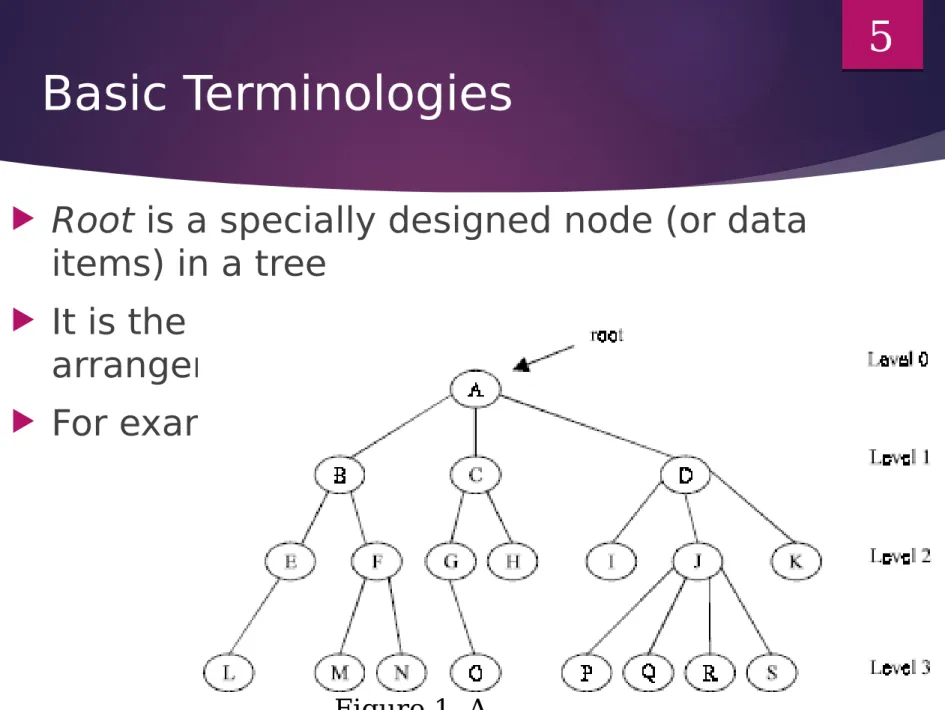
Root is a specially designed node (or data
items) in a tree
It is the first node in the hierarchical
arrangement of the data items
For example,
5
In this example ‘A’ is the root node
Each data item in a tree is known as node
It specifies the data information and links to other data items
Degree of a node
Degree of a node is the number of subtrees of a node in a given tree
In the above example
the degree of node A is 3 the degree of node B is 2 the degree of node C is 2 the degree of node D is 3
The Degree of a Tree
The degree of a tree is the maximum degree of node in a
given tree
The degree of node J is 4
All other nodes have less or equal degree So the degree of the above tree is 4
A node with degree zero (0) is called terminal node or a
leaf
In the above example, nodes M,N,I,O etc are leaf nodes Any node whose degree is not zero is called a
non-terminal node
Levels of a Tree
The tree is structured in different levels
The entire tree is leveled in such a way that
the root node is always of level 0
Its immediate children are at level 1 and their
immediate children are at level 2 and so on up to the terminal nodes
If a node is at level n then its children will be
at level n+1
Depth of a Tree
Depth of a tree is the maximum level of any
node in a given tree
The number of levels from root to the leaves is
called depth of a tree
The term height is also used to denote the depth
of a tree
A vertex (or node) is a simple object that can have a name and can carry other associated information
An edge is a connection between two vertices
A path in a tree is a list of distinct vertices in which
successive vertices are connected by edges in the tree
example: {a, b, d, i } is path
The defining property of a tree is that there is
precisely one path connecting any two nodes
Example of a Tree
Binary Trees
A binary tree is a tree in which no node can have
more than 2 children
These children are described as “left child” and
“right child” of the parent node
A binary tree T is defined as a finite set of
elements called nodes such that
T is empty if T has no nodes called the null or empty
tree
T contains a special node R, called root node of T and
the remaining nodes of T form an ordered pair of
disjoined binary trees T1 and T2. They are called left and right sub tree of R
Consider the following binary tree T
Here ‘A’ is the root node of the tree
‘B’ is the left child of ‘A’ and ‘C’ is the
right child of ‘A’
i.e. ‘A’ is the father of ‘B’ and ‘C’
The nodes ‘B’ and ‘C’ are called
brothers
Strictly Binary Tree
The tree is said to be strictly binary tree, if every
non-leaf node in a binary tree has non-empty left and right sub trees
A strictly binary tree with n level always contains
2n–1 nodes
Every node in the strictly binary tree can have
either no children or two children
They are also called 2-tree or extended binary tree
Example of a strictly binary tree
Application of an extended binary tree
The main application of a 2-tree is to represent and compute
any algebraic expression using binary operation
For example, consider an algebraic expression E
E = (a + b)/((c – d )*e)
E can be represented by means of the extended binary tree
T as shown in figure
Each variable or constant in E appears as an internal node in
T whose left and right sub tree corresponds to the operands of the operation
17
A complete binary tree
A complete binary tree at depth ‘d’ is the
strictly binary tree where all the leaves are at level d
Following figure illustration the complete binary
tree of depth 3
19 1 2 5 4 9
8 10 11
19 18
17
16 20 21 22 23
3
7 6
12 13 14 15
25
24 26
Fig. Complete tree T26
A binary tree
A binary tree with n nodes, n > 0, has exactly n – 1 edges A binary tree of depth d, d > 0, has at least d and at most 2d
– 1 nodes in it
If a binary tree contains n nodes at level l, then it contains
at most 2n nodes at level l + 1
The main difference between a binary tree and ordinary
tree is
1. A binary tree can be empty where as a tree cannot
2. Each element in binary tree has exactly two sub trees. Each element in a tree can have any number of sub trees
3. The sub tree of each element in a binary tree are ordered, left and right sub trees. The sub trees in a tree are unordered
Linked List Representation
Linked List Representation
The most popular and practical way of
representing a binary tree is using linked list
In linked list, every element is represented as
nodes
A node consists of three fields such as :
(a) Left Child (L_Child)
(b) Information of the Node (Data)
(c) Right Child (R_Child)
Linked List Representation
The L_Child links to the left child node of the parent node Info holds the information of the node
And R_Child holds the address of the right child node of
the parent node
The following figure shows the structure of a binary tree
node:
For example we have the following binary tree
We want to present this binary tree in linked list form
The linked list representation of this binary tree is:
If a node has no left or/and right node, corresponding LChild or RChild is assigned to NULL
Operations on Binary Trees
The basic operations that are commonly performed on binary trees are
listed below:
Create an empty binary tree
Traversing a binary tree
Inserting a new node
Deleting a Node
Searching for a Node
Determine the total no. of Nodes
Determine the total no. of leaf Nodes
Determine the total no. of non-leaf Nodes
Find the smallest element in the tree
Finding the largest element
Find the Height of the tree
Finding the Father/Left Child/Right Child/Brother of an arbitrary node
Traversing Binary Trees
Tree traversal is one of the most common operations
performed on trees
In traversing right sub-tree is always traversed after left
sub-tree
It is a way in which each node in the tree is visited
exactly once in a systematic manner
There are three standard ways of traversing a binary
tree
1. Pre Order Traversal (Root-left-right) 2. In order Traversal (Left-root-right) 3. Post Order Traversal (Left-right-root)
Pre-Order Traversal
Recursively
To traverse a non-empty binary tree in
pre-order following steps are to be processed
1. Visit the root node
2. Traverse the left sub tree in preorder 3. Traverse the right sub tree in preorder
That is, in pre-order traversal, the root
node is visited (or processed) first, before
traversing through left and right sub trees
recursively
Preorder using recursion
void preorder (Node * Root) {
If (Root != NULL) {
cout << Root → Data; preorder(Root → L child); preorder(Root → R child); }
}
Example of pre-order
traversing
The preorder traversal of this binary tree is
?????
In-Order Traversal Recursively
The in order traversal of a non-empty binary tree is defined as follows :
1. Traverse the left sub tree in order 2. Visit the root node
3. Traverse the right sub tree in order
In order traversal, the left sub tree is traversed recursively, before visiting the root
After visiting the root the right sub tree is traversed recursively
In-Order Traversal Recursively
The procedure for an in order traversal is given below :
void inorder (NODE *Root) {
If (Root != NULL) {
inorder(Root → L child); cout<<Root → Data; inorder(Root → R child); }
}
In-order traversal example
The in order traversal of this binary tree is
???????.
Post-Order Traversal
Recursively
The post order traversal of a non-empty binary tree can be defined as
1. Traverse the left sub tree in post order 2. Traverse the right sub tree in post order 3. Visit the root node
In Post Order traversal, the left and right sub tree(s) are recursively processed before visiting the root
Post-Order Traversal Recursively
The procedure for post order traversal is given below:
void postorder (NODE *Root) {
If (Root != NULL) {
postorder(Root → Lchild); postorder(Root → Rchild); cout<<Root → Data;
} }
Post-Order Traversal example
The post order traversal of this binary tree is
??????
Binary Search Trees
1 5 8 16 18 23 30 33 38 44 47 54 58 64 67 70 74 77 81 85 88 91 99 101 105 110 116 118 122 126 130 133
2 12 21 32 40 49 59 69 75 83 90 100 107 117 125 131
6 24 45 66 80 93 111 128
17 57 87 120
35
71
102 Example 1:
Find 47 < 71
> 35 < 57 > 45 <49 Found 63-item list Example 2: Find 112 > 71 > 102 < 120 >111 <117
Insertions and Deletions in Binary Search
Trees
1 5 8 16 18 23 30 33 38 44 47 54 58 64 67 70 74 77 81 85 88 91 99 101 105 110 116 118 122 126 130 1332 12 21 32 40 49 59 69 75 83 90 100 107 117 125 131
6 24 45 66 80 93 111 128
17 57 87 120
35 71 102 Example 1: Insert 48 < 71 > 35 < 57 > 45 <49 Example 2: Delete 116 > 71 > 102 < 120 >111 <117
> 47