David J. Smithwick Jr. The Design and Implementation of a Web-Accessible Database to
Integrate with the Existing Information System of Rainbow Soccer, Ltd. A Master’s
Paper for the M.S. in I.S. degree. April, 2004. 57 pages. Advisor: Evelyn Daniel
This project analyzes and redesigns part of the information system for Rainbow Soccer
Ltd. in Chapel Hill, NC. The goal of the project is to optimize the information system in
order to gather and disseminate information with greater accuracy and efficiency.
Rainbow Soccer’s current system primarily consists of a static, informational website
accessible to the public. There are two main problems with this system. First, there is
not an efficient way for coaches to research field availability. Second, there is no
complete, up-to-date master or individual team schedule accessible on the web.
The proposed system incorporates a web-accessible database. The database was built in
Microsoft Access while the user interface was created using ColdFusion and HTML.
This system would allow the Rainbow Soccer staff to publish up-to-date information
more easily and would help facilitate information retrieval for its users.
Headings:
Computers -- Information Systems
Information Systems / Design -- Web Sites / Design
Information Systems / Administration -- Database Management Systems
THE DESIGN AND IMPLEMENTATION OF A WEB-ACCESSIBLE DATABASE
TO INTEGRATE WITH THE EXISTING INFORMATION SYSTEM OF RAINBOW
SOCCER, LTD.
by
David J. Smithwick Jr.
A Master's paper submitted to the faculty
of the School of Information and Library Science
of the University of North Carolina at Chapel Hill
in partial fulfillment of the requirements
for the degree of Master of Science in
Information Science.
Chapel Hill, North Carolina
April, 2004
Approved by:
___________________________
Table of Contents
Table of Figures
………...…...ii
Introduction
Project Purpose and Overview……….……….…….…1
Background on Rainbow Soccer……….………….….….1
Current
System……….……….…….…2
Problems with Current System……….………….….…3
Proposed
Solutions
to
Problems……….…….……...…5
Literature Review
Microsoft
Access……….…….…..6
Cold
Fusion……….……….……..7
Development Process
Information
Collection……….…..8
Database
Design………..……...9
Web
Interface………...….….11
Proposed Database System Instructions
Rainbow
Soccer
Administration………...….12
Public………...…..17
Coaches………..…....22
Future
…………..………...28
.
Conclusion
………..…..29
Bibliography
………....30
Appendix A – Database Queries in SQL
……….…..31
Table of Figures
Figure 1 – Complete Game Schedule: Spring, 2004………...4
Figure 2 – Entity-Relationship Diagram……….9
Figure 3 – Database Schema……….10
Figure 4 - MS Access: Data Entry Form for Practices………..13
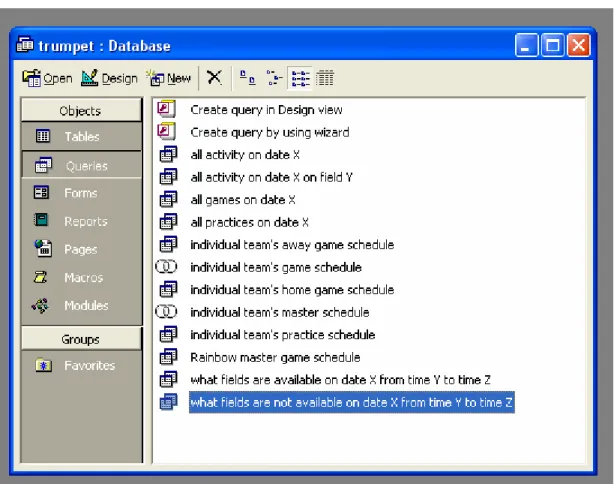
Figure 5 - MS Access: List of Queries………..…14
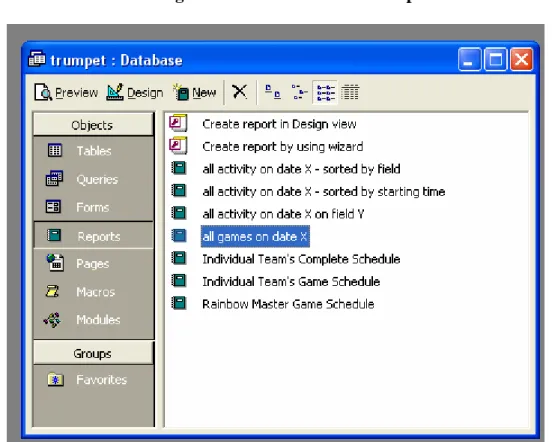
Figure 6 - MS Access: List of Reports……….….15
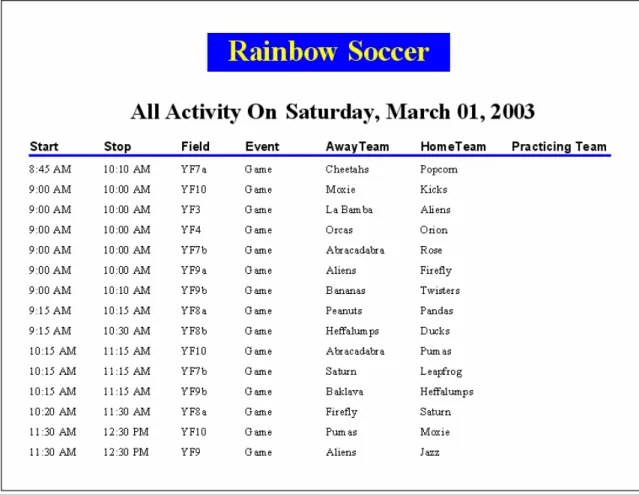
Figure 7 – MS Access Report: All Activity on Date X, Sorted by Starting
Time and Stopping Time, Ascending………..…16
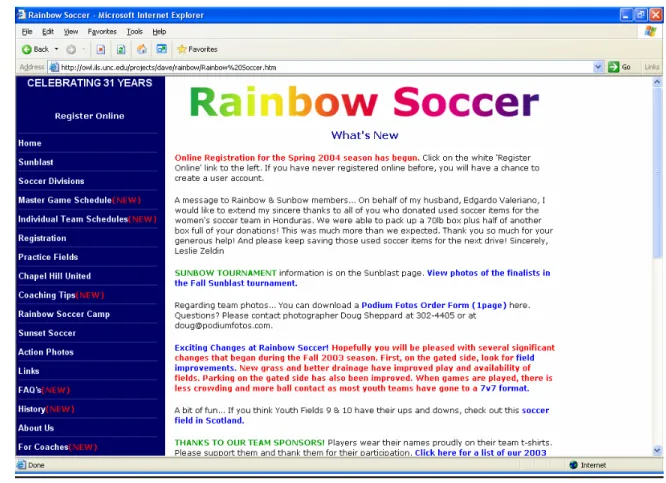
Figure 8 – Web Interface: Rainbow Soccer Homepage………17
Figure 9 - Web Interface: Rainbow Soccer Master Game Schedule………….…18
Figure 10 – Web Interface: Select Team for Schedules…….………...19
Figure 11 – Web Interface: Select Type of Schedule………..………...20
Figure 12 – Web Interface: Individual Team’s Game Schedule………...21
Figure 13 - Web Interface: Individual Team’s Complete Schedule………..22
Figure 14 – Web Interface: Coaches’ Login Page……….…………..…..23
Figure 15 – Web Interface: Coaches’ Options Page………..24
Figure 16 - Web Interface: Form to Check Field Availability……….…..…25
Figure 17 - Web Interface: Form to Select an Available Field………….…….…26
Introduction
Project Purpose and Overview
This project analyzes and redesigns part of the information system for Rainbow
Soccer Ltd. in Chapel Hill, NC. The goal of the project was to optimize the information
system in order to gather and disseminate information with greater accuracy and
efficiency. This paper discusses the current system and provides recommendations for an
addition, a web-accessible database system. The details of the design and
implementation of the new database system are examined. The future of Rainbow
Soccer’s system is also discussed.
Background on Rainbow Soccer Ltd.
“Rainbow Soccer offers recreational and competitive league soccer to children
and adults living in Chapel Hill, North Carolina and the surrounding areas. It is the
oldest soccer organization in the Chapel Hill area and recently became a member of the
North Carolina Youth Soccer Organization (NCYSA).
Rainbow Soccer is a non-profit organization that survives on fees, sponsors and
gifts from the general public. It is run by an administrative staff and overseen by a board
of directors. The coaches and referees for the non-competitive leagues are volunteers,
including many UNC-Chapel Hill students; the competitive leagues’ coaches and referees
Each year there are spring and fall seasons for each league. Every season there
are over 2000 players competing in Rainbow’s ten different leagues. The players’ ages
range from 3 to adult.
Rainbow Soccer’s main facilities, the ‘Rainbow fields’, are currently leased from
UNC-Chapel Hill. Those fields are located just of US 15-501 in Chapel Hill. Because of
the increasing need for field space, Rainbow Soccer is now also working with the Chapel
Hill and Carrboro Parks and Recreation Departments to rent public fields”
(http://rainbowsoccer.org/index.html).
Current Information System
Rainbow Soccer’s current information system primarily consists of a website
accessible to the public. The website can be found at the following URL:
http://www.rainbowsoccer.org. There is a great deal of readable information concerning
many aspects of the organization. Along the left side of the homepage is a list of links to
pages within the site. Some of the topics covered in these pages include the following:
contact information, history of the organization, FAQ’s, game schedules, diagrams and
maps of fields, information on the different soccer divisions, online registration form,
soccer camp, coaching tips, team photos, links to related sites, etc.
The website and online registration system were created by Andrew Arnold with
Mango Solutions. Mango Solutions is a web development company that specializes in
online registration applications. Brad Hemminger, a current member of the Board of
The other basic components of Rainbow Soccer’s current information system
include email, telephone, pencil, and paper. Information is often gathered and
disseminated through use of email and telephone. Some changes in information are
published to the web while others are recorded with pencil and paper.
Problems with Current System
There are two main problems with the current information system at Rainbow
Soccer. First, there is no efficient way for coaches to research field availability. Coaches
are responsible for scheduling practices, scrimmages, and make-up games. Thus, they
need to know what dates, times, and fields are available as options. Currently, the
method of finding such availability involves contacting the Rainbow staff and asking
them what is available. This process takes a considerable amount of time and is
error-prone. The staff has to scan a list of field reservations, including all games, practices,
etc., to look for field availability.
The biggest dilemma with this approach is the field divisions. There are three
different sizes of fields: adult fields, youth fields, and kid fields. Each adult field splits
into two youth fields. Each youth field splits into three kid fields. Thus, each adult field
splits into six kid fields. Therefore, when an adult filed is being used, two youth fields
and six kid fields are unavailable. The corollary is that when a kid field is being used, the
surrounding youth field and adult field are also unavailable. The problem here is that
nothing on a printed schedule of events points out that adult field one (AF1) and youth
experienced staff at Rainbow Soccer usually knows to schedule around such field
conflicts, but mistakes are sometimes made and the process is time consuming.
The other big problem with the current information system at Rainbow Soccer is
that there is no complete, up-to-date schedule accessible to the public (players, parents,
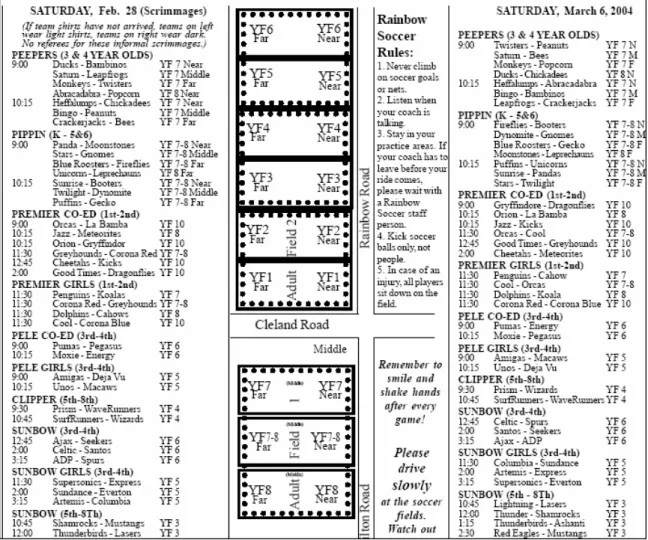
etc.). The website has a season-long schedule of all games in pdf format (portable
document format) which is published before each season begins.
Figure 1 - Complete Game Schedule: Spring, 2004
One issue is that there is no schedule of practices or scrimmages posted to the site.
Another issue is that the schedule is not updated as it changes. For example, when a
to the Rainbow Soccer website. Lastly, a player or parent of a player has to search
through every column in the above schedule to find his/her game schedule. To conclude,
there is nowhere on the website where one can find a complete, current schedule for just
one team.
Proposed Solutions to Problems
The proposed solution is a field assignments database system that can be accessed
via the web. This database would contain information about all teams, coaches, fields,
and field assignments, such as games, practices, scrimmages, and make-up games. The
database would need a web interface that is linked from the current Rainbow Soccer
website so that coaches, players, and parents can access the information from virtually
anywhere. The database should be optimized for ease of use and should require little
training to input and retrieve data. The web interface should be self-explanatory.
This proposed system would allow users to access complete and up-to-date
information as soon as the information is input into the database by the Rainbow staff.
Thus, coaches would be able to see what dates and times that fields are available so they
can schedule practices, scrimmages, or make-up games. Then, they could send requests
to the Rainbow staff for fields at certain times on certain dates. Furthermore, the staff
could grant the requests, update the database, and display the new scheduling information
on the website with very little turn-around time. This process would lessen or possibly
eliminate the need for emails and phone calls to team members regarding schedule
information. Additionally, information integrity would be higher; less time would be
conclusion, the information management process would be much more efficient and the
user community would be able to access more information and more reliable information.
Literature Review
Microsoft Access
The proposed database system employs Microsoft Access as its relational
database management system (RDBMS). Access is a product that comes bundled with
Microsoft Office, though it can be purchased separately, to be used on Windows
machines. It is used for personal applications as well as small business applications, as
opposed to Oracle, which is typically used for larger applications (Elmasri & Navathe,
2000). Many users prefer Access because it has the “look and feel” of Windows along
with its integration with other Microsoft Office family products, such as Excel and Word
(Chapple).
Access provides not only a database engine, but also a graphical user interface.
This interface provides design views, Wizards and Builders to aid in the design of a
database application. Design views provide a low-tech method of creating queries,
forms, and reports. Wizards use interactive programs that guide the user through a series
of questions to help users quickly develop queries, forms, and reports. Builders are
programs that help the users build syntactically correct expressions. SQL (structured
query language) can also be used for data definition and manipulation (Elmasri &
Navathe, 2000).
Access provides a user-friendly forms interface that allows users to enter
interface, which can quickly produce attractively formatted summaries of the data
contained in one or more tables and/or queries (Chapple). Another aspect that makes
Access easy to use is that it stores an entire database application within a single file (a
.mdb file). Thus, the process of loading the database is much easier than with a larger
RDBMS such as Oracle because only one file has to be opened and maintained (Elmasri
& Navathe, 2000).
ColdFusion
The proposed database system uses ColdFusion, a server-side web development
platform, along with standard HTML to create the web interface for the database system.
The ColdFusion web application server allows developers to develop interactive and
dynamic websites quickly with a small learning curve. ColdFusion Markup Language
(CFML) is modeled after HTML, which makes it easy to learn for those with HTML
experience. CFML extends HTML by adding tags with the following capabilities: read
data from databases and tables, modify, update, or delete data in databases and tables,
create dynamic data-driven pages, perform conditional processing, populate forms with
live data, read and write client-side cookies, etc. (Forta, 1998).
ColdFusion was developed in the mid 1990’s by Allaire but was later acquired by
Macromedia. As of April 2004, the most current version is ColdFusion MX 6.1. This
version is currently selling for $1300.00 while other competitive platforms such as PHP
and Perl are free. However, CFML is much easier to learn and work with that PHP or
Development Process
Information Collection
The first step in the development process was to meet with Dr. Brad Hemminger,
a representative of Rainbow Soccer. Dr. Hemminger also happens to be a professor in
the School of Information and Library Science at the University of North Carolina at
Chapel Hill. He informed me of Rainbow’s need for a field assignment database system
that could be accessed over the web. He told me about problems Rainbow has
encountered as a result of the current system of assigning fields. Thus, we discussed the
foundations of the new project: the database and the web interface.
First, we had to decide which RDBMS to use. Points to consider in making this
decision were the technical expertise of the users (the administrative staff at Rainbow
Soccer) and the amount of records to be stored in the database. Dr. Hemminger shared
his thoughts regarding the staff’s technical abilities and the types of information that
would need to be stored. Due to the low database experience level and the small number
of records to be stored, the obvious choice was Microsoft Access.
Next, we had to decide which platform to use to develop the web interface. We
had to use a program that can interact with a database through an ODBC connection. The
points to consider in making this decision were the availability of platforms for use by
Rainbow Soccer, my experience with web development, and the ease of further
development by others in the future. Because Dr. Hemminger is both a representative of
Rainbow Soccer and a faculty member at UNC-CH, the web site can be run on a server at
ColdFusion. I only had experience with ASP, PHP, and ColdFusion, so that eliminated a
couple of options. ColdFusion is the easiest development tool to learn of the remaining
three options. Therefore, it would be the easiest tool for someone else to use in the future
if further development of this project is pursued. Consequently, Dr. Hemminger and I
decided to use ColdFusion as the web development tool.
Database Design
The database was designed with six tables to contain the necessary information.
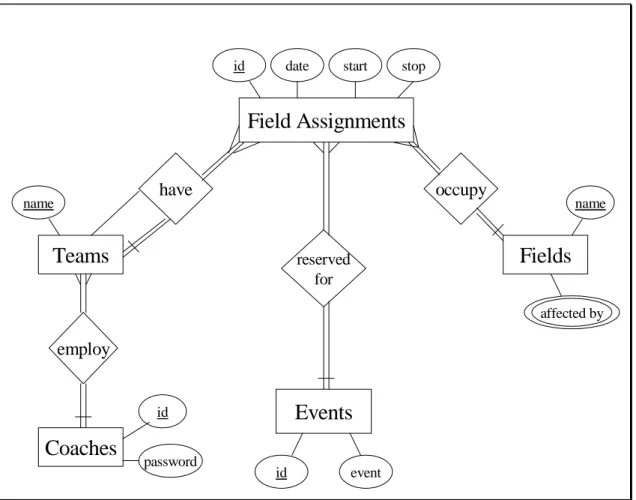
The design is represented in the Entity-Relationship diagram below.
Figure 2 - Entity-Relationship Diagram
Teams
Field Assignments
Fields
Events
have
reserved for
occupy
name
id event id date start stop
name
affected by
Coaches
employ
id
This diagram shows the teams, coaches, fields, event types, and field assignments
as entities, and shows how the entities relate to one another. All teams employ one head
coach, but a coach may coach more than one team. All teams have many field
assignments and all field assignments have at least one team. Field assignments, such as
games, involve two teams, causing a ternary relationship between teams and field
assignments. Each of the field assignments is classified as a certain type of event and all
types of events are accounted for in the field assignments table. Also, all field
assignments occupy one field each, while each field has many field assignments
scheduled. “Affected by” is a multi-valued attribute of the fields table; thus, it becomes
its own table. That table lists which fields are in use when another field is being used.
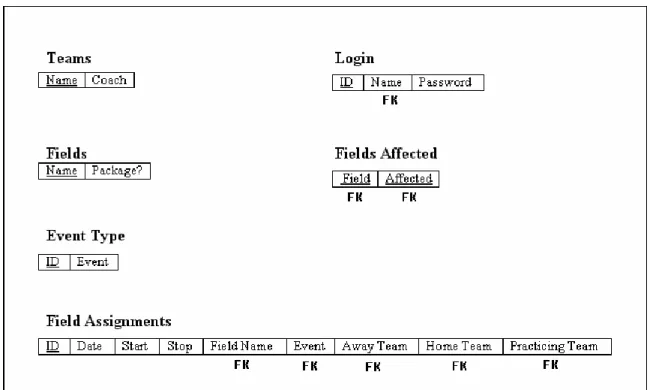
The tables, along with their primary keys, foreign keys, and other attributes, are
represented in the database schema below. The primary keys are underlined, while the
foreign keys are denoted with the “FK” below the attribute.
Steps were taken in the design process to ensure data integrity. The input forms
for field assignments have drop-down lists from which to choose a field and the team(s)
involved. Therefore, incorrectly named or misspelled team and field names will not enter
the database. The “event type” attribute has a validation rule placed upon it; input must
be “1” or “2” or “3” or “4”. Otherwise, the user gets a pop-up box that informs him/her
that he/she must enter a value between one and four.
Web Interface
The web interface uses some of the design characteristics of the original Rainbow
Soccer web site. Rainbow’s homepage was only altered by adding three links to the list
on the left side of the page. Also, the Rainbow Soccer logo was copied and pasted at the
top of every page of the new interface to provide continuity.
Similar to the database, the interface also has integrity constraints, such as
drop-down lists and radio boxes. The “For Coaches” portion of the site employs several
hidden fields in forms and a cookie to ensure the integrity of the field requests.
The page following the login page in the “For Coaches” section was designed for
expansion of that particular section in the future. Currently, there is a table on that page
with one link, “Check Field Availability”. If Rainbow Soccer decides in the future to
offer more online options for coaches, that table will be easily expandable.
The code behind the interface is commented thoroughly. The comments were
added so that it is clear which parts of the code provide certain functions. This practice is
Proposed Database System Instructions
There are three different user groups that will be utilizing the new database
system. Each group has different needs and interests.
Rainbow Soccer Administration
This user group is deals with data entry and information retrieval. All data entry
will be performed through Microsoft Access. Such data entry includes team names,
coaches’ names, coaches’ login information, and field assignments. Some team names
and coaches will change from season to season, but that will not require much data entry.
Thus, such modifications will be made directly into the appropriate tables. However,
there will be several-thousand field assignments (practices, games, scrimmages, make-up
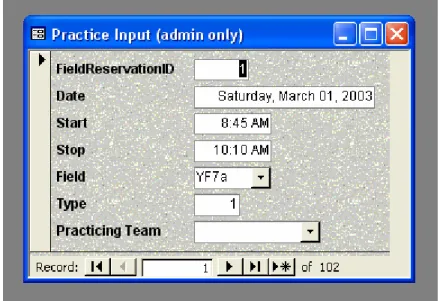
games) that need to be entered into the database each season. Therefore, data entry forms
have been created to input the field assignments. These forms are easy to use and help to
insure data integrity through the use of drop down lists for field names and team names.
Two input forms were created: one for practices, and the other for games, scrimmages,
Figure 4 - MS Access: Data Entry Form for Practices
For the information retrieval process, the administrative staff will use queries and
reports. There are twelve queries programmed into this database system. They are as
Figure 5 - MS Access: List of Queries
To access a query, the user must click on “Queries” on the left side of the page,
and then double-click on the chosen query. Most queries prompt the user to provide
Along with viewing queries on the computer screen, the administrative staff will
also be able to view and/or print information in the form of a report. There are seven
reports available in this database system. They are as follows:
Figure 6 - MS Access: List of Reports
To access a report, the user must click on “Reports” on the left side of the page,
and then double-click on the chosen report. Like queries, most reports prompt the user to
All of the reports have the same visual layout. An example of a report is given
below.
Public
This user group primarily consists of players and parents or other family members
of players. They will access the Rainbow Soccer website at http://rainbowsoccer.org and
choose from various options on the left side of the page. The new database options are
the “master game schedule” link, the “individual team schedules” link, and the “for
coaches” link.
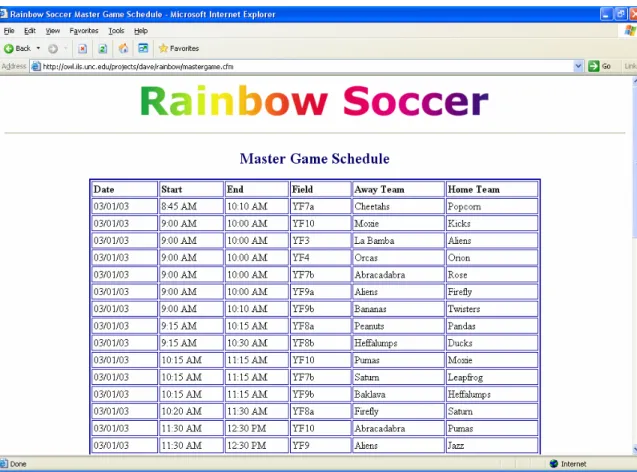
To view a schedule of all Rainbow Soccer games, users will simply click “Master
Game Schedule”. The games are ordered by date and starting time. This feature will
largely be used by Rainbow staff or families with multiple players on different teams.
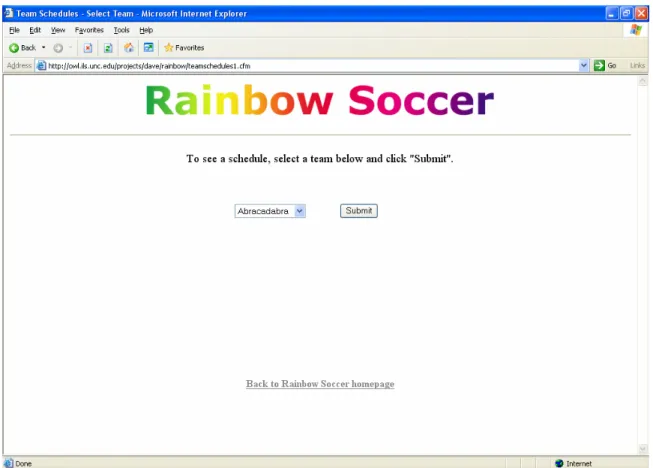
To view only one team’s schedule, users will click “Individual Team Schedules”.
After arriving at the next page, users will be prompted to select a team from a drop-down
list and click “Submit”.
Then, the user will have the option to view either a complete schedule, including
practices and games, or to view only a game schedule. The user will click the appropriate
button.
Here is an example of a game schedule for a team named “Abracadabra”.
Here is an example of a complete master schedule for “Abracadabra”.
Figure 13 - Web Interface: Individual Team’s Complete Schedule
The individual team schedules will be viewed primarily by parents, players, and
coaches.
Coaches
Coaches will have access to a section of the website that the public does not need
to access. This section will have several options, including the option to check up-to-date
field availability on a given date and time. This feature will help coaches schedule
practices, scrimmages, and make-up games at convenient times.
The coaches will access the Rainbow Soccer website at http://rainbowsoccer.org
to a login page. Here, they will enter a username (first and last names) and a password.
The password will need to be setup on an individual basis with the administrative staff.
If the username and the password do not match the database, the form will clear and the
coach will have the opportunity to re-enter the login information.
Once a coach clicks “Submit”, he/she will be directed to the following page. At
the moment, this page only has one option, to check field availability. However, the page
will be able to support more options in the future.
After clicking “check field availability”, the coach will be sent to a page with a
form. The coach will enter the date, starting time, and ending time that he/she needs a
field. There are directions just above the form on how to format the entries.
Figure 16 - Web Interface: Form to Check Field Availability
Next to appear is a page with a list of fields available between the specified times
on the specified date. The list is ordered from adult fields to youth fields to kids fields in
order to make it easier to find a desired field. There are radio buttons next to the field
names. The coach will click the radio button next to the desired field and then click
“Submit”.
Subsequently, the coach will be sent to the page where he/she will actually
request the field. On this page will be a form that is mostly completed. The previously
inputted information is derived from the forms on the preceding pages. The coach only
has to select his/her team’s name from a drop-down list and review the information
already completed in the form. If the coach would like to make changes to the form,
he/she can click “Back to Field Availability Form” to return to the form where time and
date changes can be made. Otherwise, if the form satisfies the coach, he/she will click
“Submit” to send the form information to the Rainbow Soccer administrative staff. This
information will be sent via an email.
As of April 12, 2004, the proposed web interface could be accessed at
http://owl.ils.unc.edu/projects/dave/rainbow/Rainbow%20Soccer.htm.
Future
This proposed information system should meet the needs of Rainbow Soccer for
years. However, additions to the system could enhance its capabilities in the future. One
feature that was proposed to me by the Rainbow staff was a graphical representation of
all field assignments, in addition to the lists I formed. However, this feature was beyond
my technical and coding abilities at the time this paper was written. Another
modification could be to enhance the visual layout and grouping of the master game
schedule. The current Rainbow Soccer master schedule has games divided by league and
ordered by starting time. The proposed system only lists all games by starting times
because I was unable to make the database divide teams into leagues and layout properly.
The ColdFusion platform will have to run on the server at UNC-CH, or Rainbow
will have to invest in that platform to run a server of its own. I do not know the life
expectancy of the ColdFusion server at UNC-CH, but I expect that Rainbow Soccer will
be able to use that server as long as Dr. Brad Hemminger is on staff at the School of
Information and Library Science.
I commented the web pages thoroughly so that another programmer could easily
understand my code in the future. Since this is the first database system used by
Rainbow Soccer, I expect this system to be modified and for its capabilities to grow in
Conclusion
The main goals of this project were to fix the two biggest issued with the
Rainbow Soccer information system. Both issues were solved within the users’
capabilities and my technical constraints. The proposed system is more efficient and the
information contained in the system will be more accurate. Additions and modifications
should be made to the system as both the organization and technology grow. However,
Bibliography
Alvey, B. (May 7, 2003).
A Conversation with Jeremy Allaire
. Retrieved April 1, 2004
from http://www.meet-the-makers.com/conversations/allaire.
Chapple, M.
Microsoft Access Database Fundamentals
. Retrieved on April 6, 2004,
from http://databases.about.com/library/weekly/aa120300a.htm.
Elmasri, R, & Navathe, S. B. (2000). Fundamentals of Database Systems, 3
rded.
Reading, MA: Addison-Wesley.
Forta, Ben. (1998). The ColdFusion Web Application Construction Kit, 3
rded.
Indianapolis, IN: QUE.
Appendix A - Database Queries in SQL
All activity on date X
SELECT [Field Assignments].Date, [Field Assignments].Start, [Field Assignments].Stop, [Field Assignments].Fname, EventType.Event, [Field Assignments].AwayTeam, [Field
Assignments].HomeTeam, [Field Assignments].[Practicing Team]
FROM EventType INNER JOIN [Field Assignments] ON EventType.TypeID = [Field Assignments].Type WHERE ((([Field Assignments].Date)=[Enter date]))
ORDER BY [Field Assignments].Start, [Field Assignments].Fname;
All games on date X
SELECT [Field Assignments].Date, [Field Assignments].Start, [Field Assignments].Stop, [Field
Assignments].Fname, EventType.Event, [Field Assignments].AwayTeam, [Field Assignments].HomeTeam FROM EventType INNER JOIN [Field Assignments] ON EventType.TypeID = [Field Assignments].Type WHERE ((([Field Assignments].Date)=[Enter date]) AND (([Field Assignments].Type)=1));
All practices on date X
SELECT [Field Assignments].Date, [Field Assignments].Start, [Field Assignments].Stop, [Field Assignments].Fname, EventType.Event, [Field Assignments].[Practicing Team]
FROM EventType INNER JOIN [Field Assignments] ON EventType.TypeID = [Field Assignments].Type WHERE ((([Field Assignments].Date)=[Enter date]) AND (([Field Assignments].Type)=2));
All activity on date X on field Y
SELECT [Field Assignments].Date, [Field Assignments].Start, [Field Assignments].Stop, [Field Assignments].Fname, EventType.Event, [Field Assignments].AwayTeam, [Field
Assignments].HomeTeam, [Field Assignments].[Practicing Team]
FROM EventType INNER JOIN [Field Assignments] ON EventType.TypeID = [Field Assignments].Type WHERE ((([Field Assignments].Date)=[Enter date]) AND (([Field Assignments].Fname)=[Enter field name]));
Rainbow Soccer master game schedule
SELECT [Field Assignments].Date, [Field Assignments].Start, [Field Assignments].Stop, [Field Assignments].Fname, [Field Assignments].AwayTeam, [Field Assignments].HomeTeam
FROM Teams AS Teams_1 INNER JOIN (Teams INNER JOIN [Field Assignments] ON Teams.Name = [Field Assignments].AwayTeam) ON Teams_1.Name = [Field Assignments].HomeTeam
WHERE ((([Field Assignments].Type)=1))
ORDER BY [Field Assignments].Date, [Field Assignments].Start, [Field Assignments].Fname;
Individual team’s complete schedule
(SELECT [Field Assignments].Date, [Field Assignments].Start, [Field Assignments].Stop, [Field Assignments].Fname, EventType.Event, [Field Assignments].AwayTeam, [Field
Assignments].HomeTeam, [Field Assignments].[Practicing Team]
WHERE ((([Field Assignments].AwayTeam)=[Enter Team Name]) AND (([Field Assignments].[Practicing Team]) Is Null)))
UNION
(SELECT [Field Assignments].Date, [Field Assignments].Start, [Field Assignments].Stop, [Field Assignments].Fname, EventType.Event, [Field Assignments].AwayTeam, [Field
Assignments].HomeTeam, [Field Assignments].[Practicing Team]
FROM EventType INNER JOIN [Field Assignments] ON EventType.[TypeID] = [Field Assignments].Type
WHERE ((([Field Assignments].HomeTeam)=[Enter Team Name]) AND (([Field Assignments].[Practicing Team]) Is Null)))
UNION (SELECT [Field Assignments].Date, [Field Assignments].Start, [Field Assignments].Stop, [Field Assignments].Fname, EventType.Event, [Field Assignments].AwayTeam, [Field
Assignments].HomeTeam, [Field Assignments].[Practicing Team]
FROM EventType INNER JOIN [Field Assignments] ON EventType.[TypeID] = [Field Assignments].Type
WHERE ((([Field Assignments].AwayTeam) Is Null) AND (([Field Assignments].HomeTeam) Is Null) AND (([Field Assignments].[Practicing Team])=[Enter Team Name])))
ORDER BY [Field Assignments].Date, [Field Assignments].Start;
Individual team’s game schedule
(SELECT [Field Assignments].Date, [Field Assignments].Start, [Field Assignments].Stop, [Field Assignments].Fname, [Field Assignments].AwayTeam, [Field Assignments].HomeTeam
FROM EventType INNER JOIN [Field Assignments] ON EventType.[TypeID] = [Field Assignments].Type
WHERE ((([Field Assignments].AwayTeam)=[Enter Team Name]) AND (([Field Assignments].[Practicing Team]) Is Null)))
UNION (SELECT [Field Assignments].Date, [Field Assignments].Start, [Field Assignments].Stop, [Field Assignments].Fname, [Field Assignments].AwayTeam, [Field Assignments].HomeTeam
FROM EventType INNER JOIN [Field Assignments] ON EventType.[TypeID] = [Field Assignments].Type
WHERE ((([Field Assignments].HomeTeam)=[Enter Team Name]) AND (([Field Assignments].[Practicing Team]) Is Null)))
ORDER BY [Field Assignments].Date, [Field Assignments].Start;
Individual team’s practice schedule
SELECT [Field Assignments].[Practicing Team], [Field Assignments].Date, [Field Assignments].Start, [Field Assignments].Stop, [Field Assignments].Fname
FROM [Field Assignments]
WHERE ((([Field Assignments].[Practicing Team])=[Enter Team Name])) ORDER BY [Field Assignments].Date, [Field Assignments].Start;
Individual team’s away game schedule
SELECT [Field Assignments].Date, [Field Assignments].Start, [Field Assignments].Stop, [Field
Assignments].Fname, EventType.Event, [Field Assignments].AwayTeam, [Field Assignments].HomeTeam FROM EventType INNER JOIN [Field Assignments] ON EventType.TypeID = [Field Assignments].Type WHERE ((([Field Assignments].AwayTeam)=[Enter Away Team Name]))
ORDER BY [Field Assignments].Date, [Field Assignments].Start;
Individual team’s home game schedule
SELECT [Field Assignments].Date, [Field Assignments].Start, [Field Assignments].Stop, [Field
Assignments].Fname, EventType.Event, [Field Assignments].AwayTeam, [Field Assignments].HomeTeam FROM EventType INNER JOIN [Field Assignments] ON EventType.TypeID = [Field Assignments].Type WHERE ((([Field Assignments].HomeTeam)=[Enter Home Team Name]))
What fields are available on date X from time Y to time Z?
SELECT [Fields].[name]FROM Fields WHERE name NOT IN
(SELECT [Fields Affected].Affected FROM [Fields Affected]
WHERE Field IN
(SELECT [Field Assignments].[Fname] FROM [Field Assignments]
WHERE [Field Assignments].[Date]=[Enter date] AND
( (([Field Assignments].[Start]<=[Enter start time]) AND ([Field Assignments].[Stop]>=[Enter stop time]))
Or
(( [Field Assignments].[Start]<=[Enter start time]) AND ([Field Assignments].[Stop] Between [Enter start time] And [Enter stop time]))
Or
(([Field Assignments].[Start] Between [Enter start time] AND [Enter stop time]) AND ([Field Assignments].[Stop] Between [Enter start time] And [Enter stop time]))
Or
(([Field Assignments].[Start] Between [Enter start time] AND [Enter stop time]) AND ([Field Assignments].[Stop]>=[Enter stop time])) ) ) );
What fields are not available on date X from time Y to time Z?
SELECT DISTINCT [Fields Affected].[Affected]FROM [Fields Affected] WHERE Field IN
(SELECT [Field Assignments].[Fname] FROM [Field Assignments]
WHERE (([Field Assignments].[Date]=[Enter date]) AND ([Field Assignments].[Start]<=[Enter start time]) AND ([Field Assignments].[Stop]>=[Enter stop time])) Or (([Field Assignments].[Date]=[Enter date]) AND ([Field Assignments].[Start]<=[Enter start time]) AND ([Field Assignments].[Stop] Between [Enter start time] And [Enter stop time])) Or (([Field Assignments].[Date]=[Enter date]) AND ([Field Assignments].[Start] Between [Enter start time] AND [Enter stop time]) AND ([Field Assignments].[Stop] Between [Enter start time] And [Enter stop time])) Or (([Field Assignments].[Date]=[Enter date]) AND ([Field Assignments].[Start] Between [Enter start time] AND [Enter stop time]) AND ([Field
Appendix B - Cold Fusion Code
Code for Rainbow Soccer.htm
<!DOCTYPE HTML PUBLIC "-//W3C//DTD HTML 4.0 Transitional//EN"> <!-- saved from url=(0029)http://www.rainbowsoccer.org/ -->
<HTML lang=en-US><HEAD><TITLE>Rainbow Soccer</TITLE>
<META http-equiv=Content-Type content="text/html; charset=utf-8"><LINK href="Rainbow Soccer_files/newstyles.htm" type=text/css rel=stylesheet> <META content="MSHTML 6.00.2800.1276" name=GENERATOR></HEAD>
<BODY bottomMargin=0 bgColor=#000066 leftMargin=0 topMargin=0 rightMargin=0> <TABLE cellSpacing=0 cellPadding=0 border=0>
<TBODY> <TR>
<TD width="190" vAlign=top>
<TABLE cellSpacing=0 cellPadding=3 width=235> <TBODY>
<TR>
<TD width="227" vAlign=top> <P>
<H4>CELEBRATING 31 YEARS</H4><BR>
<CENTER><A style="FONT-SIZE: 10pt; COLOR: white"
href="https://secure2.ninewire.com/~rainbowsoccer.org/onlinereg/signin.html" target=_blank>Register Online</A></CENTER>
<p><IMG height=1 src="Rainbow Soccer_files/lightblue.gif" width=220><BR> <A class=menu href="http://www.rainbowsoccer.org/index.html">Home</A><BR> <IMG height=1 src="Rainbow Soccer_files/lightblue.gif" width=220><BR>
<A class=menu href="http://www.rainbowsoccer.org/intro.html">Sunblast</A><BR> <IMG height=1 src="Rainbow Soccer_files/lightblue.gif" width=220><BR>
<A class=menu href="http://www.rainbowsoccer.org/divisions.html">SoccerDivisions</A><BR> <IMG height=1 src="Rainbow Soccer_files/lightblue.gif" width=220><BR>
<A class=menu href="http://owl.ils.unc.edu/projects/dave/rainbow/mastergame.cfm">Master Game Schedule</A><B style="COLOR: #ff0000">(NEW)</B><BR>
<!-- This link was added by Dave S. in Spring, 2004 -->
<IMG height=1 src="Rainbow Soccer_files/lightblue.gif" width=220><BR> <A class=menu
href="http://owl.ils.unc.edu/projects/dave/rainbow/teamschedules1.cfm">Individual Team Schedules</A><B style="COLOR: #ff0000">(NEW)</B><BR>
<!-- This link was added by Dave S. in Spring, 2004 -->
<IMG height=1 src="Rainbow Soccer_files/lightblue.gif" width=220><BR>
<A class=menu href="http://www.rainbowsoccer.org/registration.html">Registration</A><BR> <IMG height=1 src="Rainbow Soccer_files/lightblue.gif" width=220><BR>
<A class=menu href="http://www.rainbowsoccer.org/fields.html">Practice Fields</A><BR> <IMG height=1 src="Rainbow Soccer_files/lightblue.gif" width=220><BR>
<A class=menu href="http://www.chapelhillunited.org/" target=_blank>Chapel Hill United</A><BR>
<IMG height=1 src="Rainbow Soccer_files/lightblue.gif" width=220><BR>
<IMG height=1 src="Rainbow Soccer_files/lightblue.gif" width=220><BR>
<A class=menu href="http://www.rainbowsoccercamp.com/" target=_blank>Rainbow Soccer Camp</A><BR>
<IMG height=1 src="Rainbow Soccer_files/lightblue.gif" width=220><BR>
<A class=menu href="http://www.rainbowsoccer.org/sunset.html">Sunset Soccer</A><BR> <IMG height=1 src="Rainbow Soccer_files/lightblue.gif" width=220><BR>
<A href=http://www.photoreflect.com/scripts/prsm.dll?storefront?b=1&c=04D4 target=_blank class=menu>Action Photos</A><BR>
<IMG height=1 src="Rainbow Soccer_files/lightblue.gif" width=220><BR> <A class=menu href="http://www.rainbowsoccer.org/links.html">Links </A><BR> <IMG height=1 src="Rainbow Soccer_files/lightblue.gif" width=220><BR>
<A class=menu href="http://www.ils.unc.edu/bmh/soccer/Rainbow_FAQ.htm">FAQ's</A><B style="COLOR: #ff0000">(NEW)</B><BR>
<IMG height=1 src="Rainbow Soccer_files/lightblue.gif" width=220><BR> <A class=menu
href="http://www.ils.unc.edu/bmh/soccer/RainbowHistoryGoals.htm">History</A><B style="COLOR: #ff0000">(NEW)</B><BR>
<IMG height=1 src="Rainbow Soccer_files/lightblue.gif" width=220><BR>
<A class=menu href="http://www.rainbowsoccer.org/about.html">About Us</A><BR> <IMG height=1 src="Rainbow Soccer_files/lightblue.gif" width=220><BR>
<A class=menu href="http://owl.ils.unc.edu/projects/dave/rainbow/forcoaches.htm">For Coaches</A><B style="COLOR: #ff0000">(NEW)</B><BR>
<!-- This link was added by Dave S. in Spring, 2004 -->
<IMG height=1 src="Rainbow Soccer_files/lightblue.gif" width=220><BR> </p> </B> </TD> </TR> </TBODY> </TABLE> </TD>
<TD width="800" vAlign=top bgColor=#ffffff>
<TABLE cellSpacing=0 cellPadding=15 width=610 border=0> <TBODY>
<TR>
<TD vAlign=top bgColor=white colSpan=2><IMG height=49 alt="Rainbow Soccer" src="Rainbow Soccer_files/logo4.gif" width=600 border=0>
<SCRIPT language=JavaScript>
<!--var BROWSER_NAME = navigator.appName; var plat = navigator.appVersion;
if (BROWSER_NAME && navigator.appName.indexOf("Netscape")>=0 &&
navigator.appVersion.indexOf("4.7")>=0) {document.write('<b>This Website is best viewed using Internet Explorer or a more recent version of Netscape.</b>');}
//--> </SCRIPT>
<H3 align=center>What's New</H3> <P>
<B style="COLOR: #ff0000">Online Registration for the Spring 2004 season has begun.</B> Click on the white 'Register Online' link to the left. If you have never registered online before, you will have a chance to create a user account.
<P><B style="COLOR: #009900">SUNBOW TOURNAMENT</B> information is on the Sunblast page. <A href="http://www.rainbowsoccer.org/sunblastpicturesfall03.html">View photos of the finalists in the Fall Sunblast tournament.</A>
<P>Regarding team photos... You can download a <A
href="http://www.rainbowsoccer.org/forms/PodiumFotosOrderForm.pdf">Podium Fotos Order Form (1page)</A> here. Questions? Please contact photographer Doug Sheppard at 302-4405 or at
<P><Ahref="http://www.ils.unc.edu/bmh/soccer/Rainbow2003Changes.htm">Exciting Changes at Rainbow Soccer!</A> <B style="COLOR: #ff0000">Hopefully you will be pleased with several
significant changes that began during the Fall 2003 season. First, on the gated side, look for <A href="http://www.ils.unc.edu/bmh/soccer/Rainbow2003Changes.htm#FieldImprovements">field
improvements.</A> New grass and better drainage have improved play and availability of fields. Parking on the gated side has also been improved. When games are played, there is less crowding and more ball contact as most youth teams have gone to a <A
href="http://www.ils.unc.edu/bmh/soccer/Rainbow2003Changes.htm#7v7">7v7 format.</A><BR></B> <P>A bit of fun... If you think Youth Fields 9 & 10 have their ups and downs, check out this <A href="http://www.rainbowsoccer.org/funnyfield.jpg">soccer field in Scotland.</A>
<P><B style="COLOR: #009900">THANKS TO OUR TEAM SPONSORS!</B>Players wear their names proudly on their team t-shirts. Please support them and thank them for their participation. <A href="http://www.rainbowsoccer.org/teamsponsors.html">Click here for a list of our 2003 team sponsors.</A><BR>
<P><B style="COLOR: #009900">The Bilingual Nature Trail</B> at the Rainbow Soccer fields (gated side) is open. Follow the signs around the pond. </P>
</TD> </TR> <TR>
<TD vAlign=top width=305>
<H3 align=center><IMG height=22 src="Rainbow Soccer_files/calendar.gif" width=20 align=middle border=0> Upcoming Events
<IMG height=22 src="Rainbow Soccer_files/calendar.gif" width=20 align=middle border=0> </H3>Chapel Hill United (Challenge) tryouts will be on Saturday, December 6, 1:00 pm - 3:00 pm at the Rainbow Soccer Fields (Youth Field #3). Rain date: Saturday, December 13 at 1:00-3:00 pm. (Note: a soccer ball, water bottle, soccer shoes and shinguards are required for tryouts.)
</TD>
<TD vAlign=top width=305>
<H3 align=center><IMG height=22 src="Rainbow Soccer_files/weather.gif" width=20 align=middle border=0> Daily Weather
<IMG height=22 src="Rainbow Soccer_files/weather.gif" width=20 align=middle border=0></H3><B>Winter 2003-2004</B><BR>
<SPAN style="FONT-WEIGHT: bold; FONT-SIZE: 9pt; COLOR: #ff6600">Our fields need their rest and will be closed to the general public until the Spring season. Many areas will be re-seeded. As tempting as it may be, please stay off all fields until late February. Thank you!</SPAN>
<P><B>Phone updates:</B><BR>• <B>990-3036</B> (1pm) for the Rainbow, Orange and Smith Athletic fields.<BR>• <B>685-8277</B> (3pm) for the Scroggs Elementary and Cedar Falls/Homestead Park fields.
<P>Check the weather forecast at <A href="http://www.wral-tv.com/weather/" target=_blank>WRAL</A>.
<P>Read our <A href="http://www.rainbowsoccer.org/weatherpolicy.html">Weather Policy</A>. </P>
</TD> </TR> <TR>
<TD vAlign=top width=305>
<P>We are always looking for volunteers to act as coaches or referees. If you are interested in volunteering, please fill-out a coach or referee card, both of which can be found in the Rainbow soccer registration pamphlet. </P>
</TD>
<TD vAlign=top width=305>
<H3 align=center>Use this Website to:</H3> <UL>
<LI><A href="http://www.rainbowsoccer.org/about.html">Learn more</A> about Rainbow Soccer.
<LI><A href="http://www.rainbowsoccer.org/registration.html">Register and pay</A> for a season using our Online Registration system or by printing a registration form.
<LI>View the Rainbow <A href="http://www.rainbowsoccer.org/gameschedule.html">game schedule</A>.
<LI>Learn about <A href="http://www.rainbowsoccer.org/links.html">soccer-related activities</A> in the Triangle.
</LI> </UL> </TD> </TR> </TBODY> </TABLE>
<TABLE height=30 cellSpacing=0 cellPadding=5 width=610 bgColor=#ffffff border=0> <TBODY>
<TR>
<TD style="FONT-SIZE: 8pt" align=middle>Send comments and questions about the website to <A style="FONT-SIZE: 8pt" href="mailto:[email protected]">[email protected]</A> </TD> </TR> </TBODY> </TABLE> </TD> </TR> </TBODY> </TABLE> </BODY> </HTML>
Code for mastergame.cfm
<!--- This page was created by David Smithwick in the Spring of 2004. ---> <!--- Name: mastergame.cfm --->
<!--- This page displays a list of all games played by all teams. ---> <!--- Get data from database. --->
<CFQUERY NAME="rainbow_master_game_schedule" DATASOURCE="trumpet">
SELECT [Field Assignments].Date, [Field Assignments].Start, [Field Assignments].Stop, [Field Assignments].Fname, [Field Assignments].AwayTeam, [Field Assignments].HomeTeam
FROM Teams AS Teams_1 INNER JOIN (Teams INNER JOIN [Field Assignments] ON Teams.Name = [Field Assignments].AwayTeam) ON Teams_1.Name = [Field Assignments].HomeTeam
WHERE ((([Field Assignments].Type)=1))
ORDER BY [Field Assignments].Date, [Field Assignments].Start, [Field Assignments].Fname </CFQUERY>
<HEAD>
<TITLE>Rainbow Soccer Master Game Schedule</TITLE> </HEAD>
<BODY>
<p align="center"><img src="logo4.gif" width="600" height="49"></p> <hr>
<p align="center"><strong><font color="#000066" size="5">Master Game Schedule</font></strong></p>
<!--- Create the table. --->
<TABLE width="715" border="2" align="center" cellpadding="2" cellspacing="2" bordercolor="#000099">
<TR>
<TH width="105"><div align="left"><font size="3">Date</font></div></TH> <TH width="105"><div align="left"><font size="3">Start</font></div></TH> <TH width="105"><div align="left"><font size="3">End</font></div></TH> <TH width="100"><div align="left"><font size="3">Field</font></div></TH> <TH width="150"><div align="left"><font size="3">Away Team</font></div></TH> <TH width="150"><div align="left"><font size="3">Home Team</font></div></TH> </TR>
<!--- Fill in the table using cold fusion. --->
<CFOUTPUT QUERY="rainbow_master_game_schedule"> <TR>
<TD width="105"><font size="3">#DateFormat(Date, "MM/DD/YY")#</font></TD> <TD width="105"><font size="3">#TimeFormat(Start, "h:mm tt")#</font></TD> <TD width="105"><font size="3">#TimeFormat(Stop, "h:mm tt")#</font></TD> <TD width="100"><font size="3">#Fname#</font></TD>
<TD width="150"><font size="3">#AwayTeam#</font></TD> <TD width="150"><font size="3">#HomeTeam#</font></TD> </TR>
</CFOUTPUT> </TABLE> <p> </p> <p> </p>
<!--- Link back to the Rainbow Soccer homepage ---> <p align="center"><a
href="http://owl.ils.unc.edu/projects/dave/rainbow/Rainbow%20Soccer.htm"><strong>Back to Rainbow Soccer homepage</strong></a> </p>
</BODY> </HTML>
<!--- end of page --->
Code for teamschedules1.cfm
<!--- This page was created by David Smithwick in the Spring of 2004. ---> <!--- Name: teamschedules1.cfm --->
<!--- This page allows the user to chose a certain team for whom to view a schedule. --->
<html> <head>
<title>Team Schedules - Select Team</title>
</head> <body>
<!--- Get data from database. --->
<CFQUERY NAME="teamlist" DATASOURCE="trumpet"> SELECT Name FROM Teams ORDER BY Name
</CFQUERY>
<div align="center">
<p><img src="logo4.gif" width="600" height="49"> </p> <hr>
<p><font size="4">To see a schedule, select a team below and click "Submit".</font></p> <p> </p>
<form name="form1" method="post" action="teamschedules2.cfm"> <table width="300" border="0" cellspacing="2" cellpadding="2"> <tr>
<td width="125"> <div align="right"> <select name="Name"> <cfoutput query="teamlist"> <option>#Name#</option> </cfoutput> </select> </div> </td>
<td width="50"><div align="center"> </div></td> <td width="125"> <div align="left">
<input type="submit" name="Submit" value="Submit"> </div> </td> </tr> </table> </form> <p> </p> <p> </p> <p> </p> <p> </p> <p> </p> <p> </p>
<!--- Link back to the Rainbow Soccer homepage --->
<p><a href="http://owl.ils.unc.edu/projects/dave/rainbow/Rainbow%20Soccer.htm"><strong>Back to Rainbow Soccer homepage</strong></a> </p>
</div> </body> </html>
<!--- end of page --->
Code for teamschedules2.cfm
<!--- This page was created by David Smithwick in the Spring of 2004. ---> <!--- Name: teamschedules2.cfm --->
<html> <head>
<title>Team Schedules</title>
<meta http-equiv="Content-Type" content="text/html; charset=iso-8859-1"> </head>
<body>
<div align="center">
<p><img src="logo4.gif" width="600" height="49"> </p> <hr>
<p><font size="4" face="Arial, Helvetica, sans-serif">Select which type of schedule you would like to see for <cfoutput>#FORM.Name#</cfoutput>.</font></p>
<p> </p>
<table width="450" border="0" cellspacing="1" cellpadding="1"> <tr>
<td><form name="form2" method="post" action="teamgame.cfm"> <div align="center">
<input type="hidden" name= "Name" value=<cfoutput>#FORM.Name#</cfoutput>> <input type="submit" name="Submit2" value="Game Schedule">
</div> </form> </td>
<td><form name="form1" method="post" action="teammaster.cfm"> <div align="center">
<input type="hidden" name= "Name" value=<cfoutput>#FORM.Name#</cfoutput>> <input type="submit" name="Submit" value="Complete Schedule"> </div> </form> </td> </tr> </table> <p> </p> <p> </p> <p> </p> <p> </p> <p> </p> <p> </p>
<!--- Link back to the Rainbow Soccer homepage --->
<p><a href="http://owl.ils.unc.edu/projects/dave/rainbow/Rainbow%20Soccer.htm"><strong>Back to Rainbow Soccer homepage</strong></a></p>
</div> </body> </html>
<!--- end of page --->
Code for teamgame.cfm
<!--- This page was created by David Smithwick in the Spring of 2004. ---> <!--- Name: teamgame.cfm --->
<!--- This page displays a chosen team's game schedule. --->
<CFQUERY NAME="teamgame" DATASOURCE="trumpet">
(SELECT [Field Assignments].Date, [Field Assignments].Start, [Field Assignments].Stop, [Field Assignments].Fname, [Field Assignments].AwayTeam, [Field Assignments].HomeTeam
FROM EventType INNER JOIN [Field Assignments] ON EventType.[TypeID] = [Field Assignments].Type
WHERE ((([Field Assignments].AwayTeam)= '#FORM.Name#') AND (([Field Assignments].[Practicing Team]) Is Null)))
UNION
(SELECT [Field Assignments].Date, [Field Assignments].Start, [Field Assignments].Stop, [Field Assignments].Fname, [Field Assignments].AwayTeam, [Field Assignments].HomeTeam
FROM EventType INNER JOIN [Field Assignments] ON EventType.[TypeID] = [Field Assignments].Type
WHERE ((([Field Assignments].HomeTeam)= '#FORM.Name#') AND (([Field Assignments].[Practicing Team]) Is Null)))
ORDER BY [Field Assignments].Date, [Field Assignments].Start </CFQUERY>
<!--- Create HTML page. ---> <HTML>
<HEAD>
<TITLE>Game Schedule for <CFOUTPUT > #FORM.Name# </CFOUTPUT></TITLE> </HEAD>
<BODY>
<p align="center"><strong><font color="#000066" size="4" face="Arial, Helvetica, sans-serif">game schedule for <CFOUTPUT > #FORM.Name# </CFOUTPUT></font></strong></p>
<!--- Create the table. --->
<TABLE width="690" height="30" border="2" align="center" cellpadding="2" cellspacing="2" bordercolor="#000066"> <TR> <TH width="200">Date</TH> <TH width="90">Start</TH> <TH width="90">End</TH> <TH width="70">Field</TH>
<TH width="120">Away Team</TH> <TH width="120">Home Team</TH> </TR>
<!--- Fill in the table using cold fusion. ---> <CFOUTPUT QUERY="teamgame"> <TR>
<TD width="200">#DateFormat(Date, "DDDD, MMMM DD, YYYY")#</TD> <TD width="90">#TimeFormat(Start, "h:mm tt")#</TD>
<!--- Link back to the Rainbow Soccer homepage ---> </p>
<p align="center"><a
href="http://owl.ils.unc.edu/projects/dave/rainbow/Rainbow%20Soccer.htm"><strong>Back to Rainbow Soccer homepage</strong></a> </p>
</BODY> </HTML>
<!--- end of page --->
Code for teammaster.cfm
<!--- This page was created by David Smithwick in the Spring of 2004. ---> <!--- Name: teammaster.cfm --->
<!--- This page displays a chosen team's master schedule (all games, scrimmages, practices, etc.). --->
<HTML> <HEAD>
<TITLE>Master Schedule for <CFOUTPUT > #FORM.Name# </CFOUTPUT></TITLE> </HEAD>
<!--- Get data from database. --->
<CFQUERY NAME="teammaster" DATASOURCE="trumpet">
(SELECT [Field Assignments].Date, [Field Assignments].Start, [Field Assignments].Stop, [Field Assignments].Fname, EventType.Event, [Field Assignments].AwayTeam, [Field
Assignments].HomeTeam, [Field Assignments].[Practicing Team]
FROM EventType INNER JOIN [Field Assignments] ON EventType.TypeID = [Field Assignments].Type WHERE ((([Field Assignments].AwayTeam) = '#FORM.Name#') AND (([Field Assignments].[Practicing Team]) Is Null)))
UNION
(SELECT [Field Assignments].Date, [Field Assignments].Start, [Field Assignments].Stop, [Field Assignments].Fname, EventType.Event, [Field Assignments].AwayTeam, [Field
Assignments].HomeTeam, [Field Assignments].[Practicing Team]
FROM EventType INNER JOIN [Field Assignments] ON EventType.TypeID = [Field Assignments].Type WHERE ((([Field Assignments].HomeTeam)='#FORM.Name#') AND (([Field Assignments].[Practicing Team]) Is Null)))
UNION
(SELECT [Field Assignments].Date, [Field Assignments].Start, [Field Assignments].Stop, [Field Assignments].Fname, EventType.Event, [Field Assignments].AwayTeam, [Field
Assignments].HomeTeam, [Field Assignments].[Practicing Team]
FROM EventType INNER JOIN [Field Assignments] ON EventType.TypeID = [Field Assignments].Type WHERE ((([Field Assignments].AwayTeam) Is Null) AND (([Field Assignments].HomeTeam) Is Null) AND (([Field Assignments].[Practicing Team])='#FORM.Name#')))
ORDER BY [Field Assignments].Date, [Field Assignments].Start </CFQUERY>
<!--- Create HTML page. ---> <BODY>
<p align="center"><strong><font color="#000066" size="4">master schedule for <CFOUTPUT > #FORM.Name# </CFOUTPUT></font></strong></p>
<!--- Create the table. --->
<TR> <TH width="200">Date</TH> <TH width="90">Start</TH> <TH width="90">End</TH> <TH width="70">Field</TH> <TH width="90">Event</TH> <TH width="120">Away Team</TH> <TH width="120">Home Team</TH> </TR>
<!--- Fill in the table using cold fusion. ---> <CFOUTPUT QUERY="teammaster"> <TR>
<TD width="200">#DateFormat(Date, "DDDD, MMMM DD, YYYY")#</TD> <TD width="90">#TimeFormat(Start, "h:mm tt")#</TD>
<TD width="90">#TimeFormat(Stop, "h:mm tt")#</TD> <TD width="70">#Fname#</TD> <TD width="90">#Event#</TD> <TD width="120">#AwayTeam#</TD> <TD width="120">#HomeTeam#</TD> </TR> </CFOUTPUT> </TABLE> <p> </p> <p>
<!--- Link back to the Rainbow Soccer homepage ---> </p>
<p align="center"><a
href="http://owl.ils.unc.edu/projects/dave/rainbow/Rainbow%20Soccer.htm"><strong>Back to Rainbow Soccer homepage</strong></a> </p>
</BODY> </HTML>
<!--- end of page --->
Code for forcoaches.htm
<!--- This page was created by David Smithwick in the Spring of 2004. ---> <!--- Name: forcoaches.htm --->
<!DOCTYPE HTML PUBLIC "-//W3C//DTD HTML 4.01 Transitional//EN"> <html>
<head>
<title>Coaches Login</title>
<meta http-equiv="Content-Type" content="text/html; charset=iso-8859-1"> </head>
<body>
<div align="center">
<p><img src="logo4.gif" width="600" height="49"></p> <hr>
<form name="form1" method="post" action="login.cfm"> <table width="230" border="2" cellspacing="1" cellpadding="3"> <tr>
<td width="80"><strong>Username:</strong></td>
<td width="180"><input name="username" type="text" id="username"></td> </tr>
<tr>
<td><strong>Password:</strong></td>
<td><input name="password" type="password" id="password"></td> </tr>
<tr>
<td colspan="2"><div align="center"><input type="submit" name="Submit" value="Submit"></div></td> </tr> </table> </form> <p> </p> <p> </p> </div> </body> </html>
<!--- end of page --->
Code for login.cfm
<!--- This page was created by David Smithwick in the Spring of 2004. ---> <!--- Name: login.cfm --->
<!--- This page checks a user's username and password against the database. ---> <CFQUERY name="login" datasource ="trumpet">SELECT id FROM login WHERE name='#FORM.username#' AND password ='#FORM.password#'</CFQUERY>
<!--- If the user's username and password are correct, the user will be sent to the forcoaches2.cfm page. ---> <CFIF login.RecordCount IS 1>
<cfinclude template = "forcoaches2.cfm">
<!--- If the user's username and password are incorrect, the user will encounter another blank login form on the forcoaches.htm page. --->
<CFELSE>
<cfinclude template = "forcoaches.htm"> </CFIF>
<!--- end of page --->
Code for forcoaches2.cfm
<!--- This page was created by David Smithwick in the Spring of 2004. ---> <!--- Name: forcoaches2.cfm --->