Mary M. Howell. Kids who code: a systems analysis of visual programming interfaces used to teach programming concepts to K-12 students. A Master’s Paper for the M.S. in I.S degree. July, 2016. 54 pages. Advisor: Bradley M. Hemminger
This study is an in-depth evaluation of interfaces used by six interviewed educators to teach K-12 students how to code. Through examination of these discovered interfaces and interviewees’ experiences with them, their utility and effectiveness for coding
education is analyzed. The study reveals that much of an interface’s utility relies upon the information needs of the specific educational environment. It also reveals that an
interface’s effectiveness, as defined by the educators interviewed, has less to do with relaying specific programming concepts and more to do with creation, exploration, student interest, and fun. The results of this study may be of help to educators interested in starting coding education programs, and need to find an interface that fits their students’ needs.
Headings:
Computers in education Computer programming Computer science Students
KIDS WHO CODE: A SYSTEMS ANALYSIS OF VISUAL PROGRAMMING INTERFACES USED TO TEACH PROGRAMMING CONCEPTS TO K-12
STUDENTS
by
Mary M. Howell
A Master’s paper submitted to the faculty of the School of Information and Library Science of the University of North Carolina at Chapel Hill
in partial fulfillment of the requirements for the degree of Master of Science in
Information Science.
Chapel Hill, North Carolina July 2016
Approved by
Table of Contents
List of tables ... 2
1. Introduction ... 3
2. Literature review ... 5
2.1 Introduction ... 5
2.2 Visual programming in computer science education ... 6
2.3 User interface design & information visualization ... 7
2.4 The visual programming environments... 9
2.5 Conclusion ... 11
3. Methodology and research questions ... 12
3.1 Study methodology and population ... 12
3.2 Research questions ... 13
4. Results ... 16
4.1 The interfaces discovered ... 16
4.2 The interfaces’ utility ... 19
4.3 Evaluating the interfaces’ effectiveness ... 26
5. Discussion ... 29
5.1 Making the choice between visual and textual... 29
5.2 The benefits of gaming ... 30
5.3 Meeting the information needs of the educational environment ... 30
5.4 Measuring effectiveness ... 31
6. Conclusion ... 33
Bibliography ... 34
Interface websites... 39
Appendix A: Interview script... 41
Appendix B: Interview notes ... 44
List of tables
Table 1. Data relating to the technical aspects of the interfaces discovered 17 during the interview process.
Table 2. Interviewee numbers and corresponding roles as educators 18 Table 3a. Data relating to the educational and information-needs-related 22
considerations of the interviewees.
Table 3b. Continuation of the data relating to educational and 26 information-needs-related considerations of the interviewees.
1.
Introduction
As computer programming becomes more prevalent in all types of work, many programs have arisen to teach children how to “code” at a young age. In order to
accomplish this, many of these programs utilize existing visual programming interfaces with which the children interact directly. Some popular examples today are LEGO® Mindstorm’s EV3 and NXT-G interfaces, Scratch, Snap!, and Code.org activities. The
businesses, teachers, or volunteers who host camps, workshops, and classes--free or for a fee--use these interactive visual programming development environments to teach
children programming concepts, helping the children build games, applications, digital stories, and websites along the way. As the President of the United States publicly encourages American youth to learn how to code--publicly supporting the “Hour of Code” program occurring in December 2015, these interfaces and the teaching methods
that accompany them merit evaluation (Code.org, 2015). The questions this research intends to address are: “What interfaces are used to introduce children to programming?”; “In what ways are each useful?”; and “How can their effectiveness be evaluated, without directly measuring children’s ‘performance’?”
2.
Literature review
2.1
Introduction
Much of the current research on the use of visual programming environments in computer science education has centered on the undergraduate experience, though there has also been an increase in the focus on K-12 students in recent years. More research needs to be done on primary school computer science education, as stated before, because of the increasing prevalence of programming for many purposes. In addition, very little research has been done to compare environments, while taking into account teachers’
perspectives and their personal teaching methods, which may have some effect on the success of one environment over another. This study aims to bring together these considerations for a more balanced and nuanced comparison to better evaluate the examined environments’ utility in K-12 education.
For the purpose of this study, the term “visual programming” will refer to an
icon-based programming environment that allows the user to successfully program through visual constructs instead of having to learn the detailed syntax of programming languages. The taxonomy of the term is explored in Brad Myers’ 1990 article
“Taxonomies of visual programming and program visualization” in the Journal of Visual
Languages and Computing.
both education and K-12 children. This review will not be fully exhaustive in the exploration of computer science education in general or of user interface design; these topics are large enough to have multiple conferences dedicated to their study. To analyze all relevant sources would take more resources and time than possible for this study. This also means the limitation of environment comparison to a select few identified as “front-runners,” and those most likely utilized by the professionals who will participate in this
study. As such, the scope of the literature review appropriately corresponds to the scope of the study.
2.2
Visual programming in computer science education
As previously stated, the use of visual programming in undergraduate computer science education has been the subject of much study. After all, programming at its inception was not intended for primary education. But as early as the mid-1980s,
software engineers developed visual programming environments with the intent to make coding “easier,” and thus more approachable for novice programmers. Some notable early examples include Ben Calloni’s “BACCII” and Choi and Kimura’s Macintosh-compatible “Show and Tell” (Calloni, 1992; Choi & Kimura, 1986). Visual programming
undergraduate applications; could Scratch be useful for beginning computer science students? What led, of course, to this research was the use and perceived success of these environments in K-12 classrooms and workshops. The experiments run with
undergraduate students affirm the findings of those run with K-12 participants--that visual programming has certain merits, specifically increasing student interest in
programming; “motivation”; and “self-efficacy” (Armoni, 2015; Kalelioglu & Gülbahar,
2014); iconic programming has also been proven at a higher level to increase conceptual comprehension over textual programming (Calloni & Bagert, 1997). This literature helps to situate these particular environments and K-12 computer science education within the larger context of visual programming in the computer science education field at large, for the purpose of this study.
2.3
User interface design & information visualization
In order to effectively evaluate visual programming environments, it is important to consider significant research on user interface design principles. Therefore, I look to two specific sources on user interface design in general: Shneiderman and Plaisant’s
Designing the User Interface (2005), a later edition of Shneiderman’s pivotal 1998 work—and Preece, Rogers, and Sharp’s Interaction Design (2002). Shneiderman and Plaisant identify four key usability measures: the time it takes to learn how to use the interface; how long it takes for users to carry out tasks; the rate of errors by users in completing these tasks; how well users retain knowledge of the interface over time; and users’ “subjective satisfaction” (2005, p. 16). The two authors also address the fact that
very important for this study, where students’ reading levels and learned behaviors make
a difference in the interfaces that work for them. In Preece, Rogers, and Sharp’s Interaction Design, the authors emphasize the significance of conceptual frameworks, mental models, information needs, and evaluation in the interface design process and following its implementation (2002). Design in the context of education has some literature of import (see Rohnen-Fuhrmann & Kali, 2008), as well as user interface design specifically for children, leading to important discoveries like children’s
expectation for “drag-and-drop” as opposed to simple “click-and-point” (Inkpen, 2001). This observed tendency has serious impact for “good” visual programming environment
design where users work with icons.
Also of importance to this research are best practices and principles for information visualization and visual design. Edward Tufte’s Envisioning Information
(2006), originally published in 1990, demonstrates these best practices and how best to display visual information in order to facilitate comprehension. The bandwidth of the human visual system is great--often greater than comprehension through greater amounts of time spent reading about one thing or another; however, if systems do not adhere to certain key principles of visual design, like limiting the number of colors employed and using symbols that relay the correct sentiments, this “bandwidth” becomes useless, since users cannot understand the information they are given. Tufte’s work can serve as a point
2.4
The visual programming environments
Scratch is the most well-known visual programming environment for K-12 students, and subsequently has the largest amount of research. A great deal has been conducted in the middle-school environment, and especially for middle school girls (Sivilotti & Laugel, 2008; Adams, 2010; Franklin et al., 2013; Armoni, Meerbaum-Salant, & Ben-Ari, 2015). Other studies conducted also center on 4th through 9th graders (Kalelioglu & Gülbahar, 2014; Kaucic & Asic, 2011), and many--as mentioned before--analyze the use of Scratch in undergraduate computer science education (Malan & Leitner, 2007). All of these different studies reveal that Scratch improves student
confidence and ability to work independently, validating its use for novice programmers; however they do not evaluate Scratch in comparison with other environments for primary education.
Other interfaces like LEGO Mindstorm’s NXT-G and EV3 environments have received greater interest in the development of children’s interest in robotics and
engineering, rather than purely learning how to program. The well-known Logo interface appears much less popular now with the development of other environments, like
Scratch, however it is still widely used around the world and is the oldest existing of those named here, predating even BACCII and “Show and Tell,” mentioned previously
(Pardamean & Evelin, 2014). All of these environments have specific strengths and weaknesses, especially in learning particular concepts related to object-oriented programming. However, more research needs to be done on the actual visual design of the systems and how it contributes to these discoveries about students’ comprehension and overall experience. Furthermore, it is necessary to understand the teaching methods used when introducing these environments, so as to know whether these methods also influence the effectiveness of a program, rather than simply the interface, itself.
One unique source directly compares three of these environments--Alice, Greenfoot, and Scratch. This source provides some guidance in evaluating several interfaces at once, as this study intends to do. This article is not a true research study, but rather a discussion with several scholars about the utility of each in teaching
programming concepts to particular audiences. The focus lies mostly in conceptual grasp and complexity of the environment, however design is discussed to some degree. The overall comparison (with the general goal of the discussion being to find commonalities amongst the interfaces) between the three comes in this package statement by one scholar: “It is very interesting how the different systems, their design often being driven
solutions. The incarnations of these are necessarily different, but the spirit, the goal, the embedded philosophy is often the same” (Utting, Cooper, Kölling, Maloney, & Resnick, 2010).
2.5
Conclusion
The literature of these principal themes inform the research set to be accomplished in this study. Existing principles of user interface and information visualization design form a basis for evaluation of the interfaces examined; previous work on visual programming environments in computer science education will help generate and situate the
educational analysis of the interface; and prior research on the particular interfaces in this study will give it something with which to compare and to which to add. It should be understood that as there are so many coding applications in existence, some will be discussed here that are not addressed in any official literature. To add to the existing literature, this study’s intent has been to, unlike most related studies, explore more than a
3.
Methodology and research questions
3.1
Study methodology and population
To evaluate the methods used to introduce children to computer programming concepts, I conducted a systems analysis of those methods, by first conducting semi-structured interviews with professionals around the United States who hold workshops, conferences, camps, and the like with the goal of introducing children to computer programming along with other STEM-related activities. Through these interviews I identified the applications used by the individuals to introduce children to programming, and then examined the systems’ characteristics, contrasting them in my analysis.
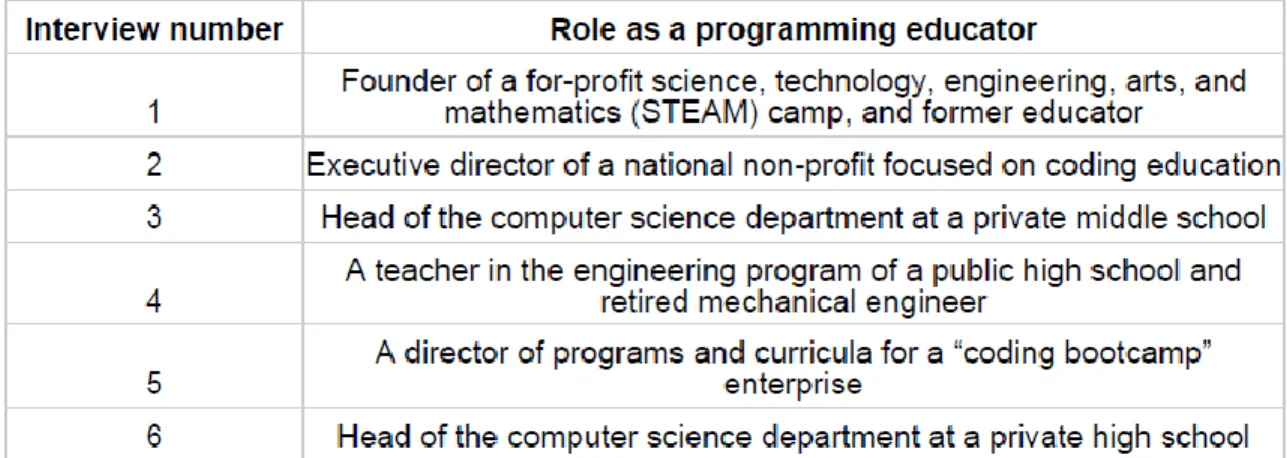
I recruited participants for the interviews by first learning of relevant professionals in the area through an online search and contacting them via email, meaning my sample was one of convenience. I interviewed six individuals, in total; as teaching children to code has only recently become a great topic of interest, I did not expect a large pool of participants from which to recruit, and had a target of between five and eight participants. In regards to demographics, the participants were largely male with only one female interviewee out of the six, and the majority of participants were white. Ages ranged from 24 to mid-60s, with the average age range between 40 and 50. Half of the participants work in the same city, with the other half spread across the United States. For a description of their backgrounds and assigned “names” for the remainder of this work, please refer to Table 2 in the Results section.
participants were geographically diverse, several were conducted the over the phone. All participants were provided with an informational sheet describing the study and its expectations, risks, and other relevant details. Interviews were captured with an audio recording device, with the participants’ consent, as well as via written notes. The
interviews took approximately 60 minutes to conduct.
Interviews were transcribed following their collection. Using analytic induction, I examined the interview data for core qualities and practices of the interviewees’
application of the interfaces and methods used to teach children how to program. In addition, I asked basic questions about experience and demographics, then aggregated and analyzed these, coding relevant aspects into tables for facile comparison. With the data collected from application specifications, I compared the characteristics discovered, creating a list of those common to most applications and those unique to specific ones. In tabular format, I documented what applications share and what they do not, situating these findings with the usage of the applications themselves in the programs led by the interviewees. These tables can be found in the results section to follow.
3.2
Research questions
Through this design, methodology, and analysis, I again hoped to answer the following research questions:
-Question 1: What interfaces are used to introduce children to programming?; -Question2: In what ways are each useful?;
The terminology used for this project should be defined; the word “interface” here refers to any application, program, or environment discussed herein, including but not limited to: integrated development environments (IDEs), text editors, command line interfaces (CLIs), game and coding applications, and others. By “useful,” the intention was to
discover what the interfaces examined accomplish and do not accomplish with their features in regards to teaching students programming concepts, like loops and debugging, and enabling certain learning environments, like individual and group work. Lastly, and interface’s “effectiveness” refers to its ability to meet the measures of student success, as
discovered through the interviews, as well as through measures examined in past research. I arrived at these questions, this terminology, and the associated requirements through literature evaluation; much of this can relate back to principles of good interface design, like Shneiderman and Plaisant’s usability measures—most especially those of the time it takes to learn to use an interface and “subjective satisfaction.”
Through these interviews and the literature review, the interfaces to examine were discovered. These and the reasoning behind their further examination will be discussed in the results section to follow. Further details of each interview, including the interfaces, were coded into several tables. The categories captured are as follows:
Interface name
Is the interface visual, textual, or physical?
Is it open source?
How many interviewees currently make use of the interface?
How many interviewees have used, but no longer use, the
What is the domain focus of the interface? Divided into the
categories: coding (development); coding (games); coding (analog); coding (data management); and robotics.
Does the interface require an additional robotic device?
Is the interface Windows compatible? Does the interface have a web client option?
What is the principle programming paradigm of the interface?
Per the interviews, what is the student grade range of use of the
interface?
What supplementary resources does the interface offer?
4.
Results
4.1
The interfaces discovered
Through the course of the six interviews conducted, over 30 interfaces, applications, development environments, and the like were mentioned as used, previously used but no longer, or considered for use by the educators consulted (see Appendix B for interview notes). Those chosen for evaluation and comparison were limited to those that
incorporated coding, as several mentioned were used for other educational purposes that did not include programming. This led to a pool of 28 interfaces for evaluation. For each of these, their features and the interviewees’ students’ usage statistics were coded into the
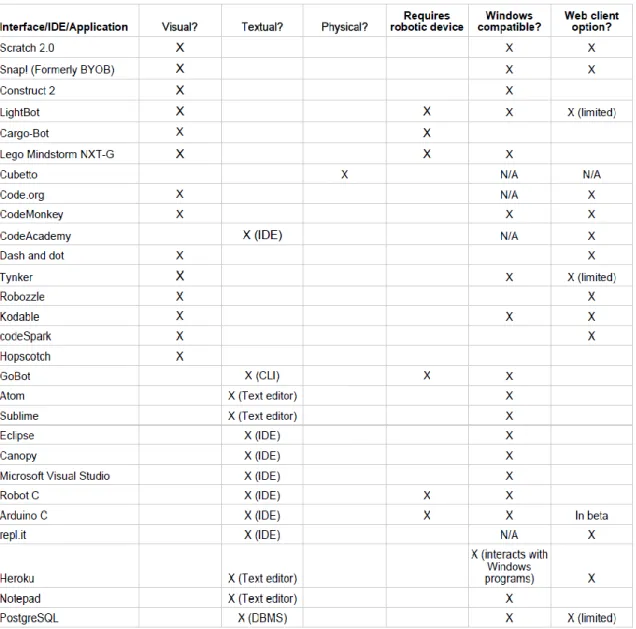
categories previously mentioned. The discovered interfaces are listed in Table 1. This table captures what may be considered as technical or factual details about each interface: whether they are visual, textual, or physical in nature; whether the interface requires the addition of a robotic device for full use; whether the interface is compatible with Windows operating systems; and whether or not there is a web-client option. “Visual” refers to those interfaces that are iconic in nature, typically using a “drag-and-drop” interaction. “Textual” refers to those that primarily function through the
kinesthetic user interaction. Only one “interface” used matched this description—a product called “Cubetto.”
Table 1: Data relating to the technical aspects of the interfaces discovered during
the interview process.
other—a director of programs and curricula for a “coding bootcamp” enterprise (hereafter “Interviewee 5”)—uses primarily text-based interfaces like text-editors and integrated
development environments (IDEs). All interviewees do not limit their students to one interface; no interviewee mentioned only one interface as used in his or her environment. Most, however, start students on a visual-based interface rather than a textual one, with the exception of two interviewees—interviewee 5, mentioned previously as using purely textual interfaces, and interviewee 6—the head of a private high school’s computer science department—though he originally started students out with Scratch. The latter’s reasoning behind abandonment of the Scratch interface will be discussed in the next sub-section.
Table 2: Interviewee numbers and corresponding roles as programming educators
Of import to an interface’s use, among those discovered, is whether it requires a
Lastly, some technical considerations discussed in the interviews relate to an interface’s platform compatibility; specifically, several interviewees emphasized the need
for Windows compatible interfaces. Above all, the desire was for applications that had the option for use in a browser—thereby surpassing compatibility issues, and useful, as noted by interviewee 2—the executive director of a national non-profit—for use on Google Chromebooks. Chromebooks are extremely inexpensive and, as a result, often used in educational environments around the United States (Google for Education, 2016).
4.2
The interfaces’ utility
One aim of this study was to evaluate how “useful” the interfaces used are to
educators and their students. “Useful,” to review from the terminology discussed in the previous section, was defined as: the intention was to discover what the interfaces examined accomplish and do not accomplish with their features in regards to teaching students programming concepts, like loops and debugging, and enabling certain learning environments, like individual and group work. To this end, interviewees were asked about their experiences with interfaces used currently and in the past, and why they chose them and/or abandoned them. This area of evaluation provides what might be the most useful for educators hoping to choose one or more interfaces that suit their information, educational, and environmental needs.
which he described as very difficult. Interviewee 5 also used Scratch at one point, but finds that his students like “hard code” better and feel like “better developers” in text editors. From his own point of view, interviewee 5 also noted that working in text editors encourages students to “figure it out” and “walk through it.” Of the K-12 range, these two
interviewees only work with high school students, with interviewee 5 also working with adults.
Interviewee 4, a teacher in the engineering program of a public high school and retired mechanical engineer, was the only of the three interviewees working with high school students that has not abandoned Scratch. During the interview, he described visual programming interfaces as the best way to introduce students of all ages to programming. He stated that he does “not see why we would start with anything other than drag-and-drop to expose students to programming”—that it facilitates education equity, no matter the student’s level. He went on to say that from his experience, the biggest objection to
drag-and- drop is that it’s inflexible, but went on to say that beginners do not need that robustness. He lauded Scratch, specifically, for its ability to teach “computational thinking without being wholly evident to students”—that it is “sneaky” that way. To briefly foray into this terminology, “computational thinking” is described by Carnegie Mellon’s Center for Computational Thinking as: “a way of solving problems, designing
systems, and understanding human behavior that draws on concepts fundamental to computer science,” and “thinking algorithmically and with the ability to apply
mathematical concepts such as induction to develop more efficient, fair, and secure solutions” (2016). To support this statement of educational equity for teaching
students of interviewee 6 are private school students in classes of 12 or fewer individuals, and those of interviewee 5 are workshop students who generally have the choice to attend and learn or not with no academic consequences, whereas interviewee 4 speaks from a public school perspective.
Most interviewees—four of the six—expressed interest in expansible interfaces—that is to say interfaces that allow for growth, levels increasing in difficulty, etc. Interviewee 1, founder of a paid coding camp for children aged five to fourteen and former educator, stated that she would like developers of coding education applications to think more about the progression of their applications for students from “sophisticated to not
sophisticated.” In addition, when she evaluates an interface, she asks herself: “where does this fit in with building code knowledge?” This helps in creating curricula for her
students and natural progression from one interface to another. She does not start
beginning students with Scratch; she starts them with block code interfaces like LightBot. From there students graduate to Snap!—a University of California-Berkeley-made
interface based off of Scratch, then to Scratch, then interaction with Raspberry Pis, and then “hard code” in Javascript, HTML, and CSS, with this last step starting no earlier
than fourth grade age. Such a progression shows the significance in this case for an interface that progresses with the student. Interviewee 3, the head of the computer science department at a private middle school, stated that the interface used should “facilitate the individual,” since each student learns at their own pace.
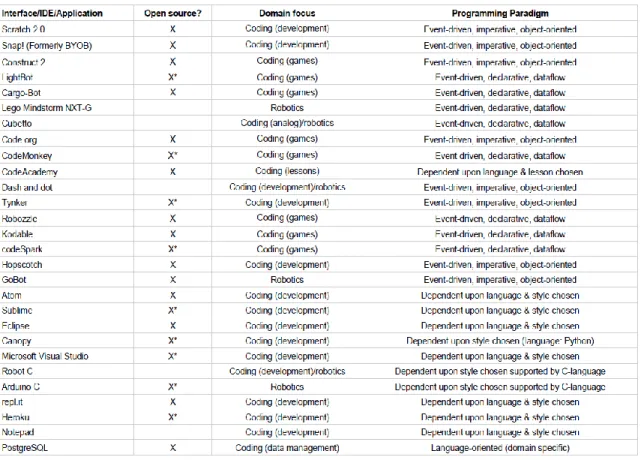
communities invested in their continued development and support, leading sometimes to better functionality and user assistance than some commercial off-the-shelf (COTS) products. Scratch is one particularly successful example of this. Other open-source interfaces used are listed in Table 3a; as one can see, the majority of those used—both by private and public entities—are largely open-source.
Table 3a: Data relating to the educational and information-needs-related
considerations of the interviewees.
*A user can download a limited version of application, and/or make or play demo coding projects up to a certain point. Beyond that, the user or educator must purchase the software or subscribe. **Repl.it is primarily open-source, but the API connection for repl.it allows virtualization, and this costs extra dependent upon the number of users and the protocol(s) used to connect.
This same table lists what has been coded as the interface’s “domain focus.” Several
many, this means the use of game-driven interfaces like codeSpark and Construct 2. Interviewee 3 believes sometimes the interface can be too “game-ified,” but that for a
middle school-aged group, such interfaces are “pedagogically appropriate” for their level. Interviewee 2 described Construct 2 as “magic” early on—much the same way as
Interviewee 4 when discussing drag-and-drop visual interfaces as a whole. Interviewee 2 continued that this interests him because it keeps students excited. With this knowledge, it appears that educators choose some interfaces not for their utility in teaching students computational thinking and programming concepts, but rather their utility in garnering student interest in coding, in general. This follows much of the existing literature in the “gamification” of programming, of which there has been quite a significant amount in
recent years (see Al-Bow et al., 2008; DiSalvo et al., 2013; Hijon-Neira, Velazquez-Iturbide, Pizarro-Romero, & Carrico, 2014; Kim, 2015; Leutenegger, & Edgington, 2007; Olsson, Mozelius, & Collin, 2015; Ouahbi, Kaddari, Darhmaoui, Elachqar, & Lahmine, 2015; Vahldick, Mendes, & Marcelino, 2014; and Werner, Denner, & Campe, 2015).
For some programs, the intent is not simply to expose students to programming, but to engineering and robotics concepts, as well. Thus several of the interfaces chosen by the interviewees have a domain focus in these areas. This intent very obviously influences the choice of interface, especially in programs like that of Interviewee 4—an engineering curriculum at a public high school. The domain foci of these interfaces thus fall into three principal categories: coding for development purposes; coding in a gaming environment; and robotics. Those focused on development may employ some aspects of gaming, storytelling, and other creative outlets, but primarily function as development
code into the game. For robotics-focused interfaces, the code serves the purpose of driving robotic devices—often limiting the code blocks in visual interfaces to those that correspond to gears, wheels, and features of the connected device.
Of interest to some educators may be, as it was to a few interviewees, the
programming paradigms the interfaces support. Most of those interfaces discovered fall into three camps: event-driven, imperative, and object-oriented; event-driven, declarative, and dataflow; and not tied to one specific paradigm, but rather dependent upon the
language and programming style chosen by the user. Those that are classed under the first camp generally follow the Scratch model in their appearance, with some programming terminology and function grouping visible to the user. Those under the second generally follow the LEGO Mindstorm NXT-G model with purely iconic blocks to drag and drop into a “dataflow” sequence. The text editors do not ascribe to a specific paradigm, as that
depends largely upon the language chosen and the paradigmatic style chosen that the language supports (Python, for example, can support both object-oriented and procedural styles, and therefore an editor like Sublime can support both for that language; it is really a matter of user preference unless the language limits the style available). Such
information may not only be useful for those looking to teach a certain style of
programming, but also those who are interested in that growth aspect the interviewees desired, as it shows how some interfaces share the same general style, perhaps making it easier to transition from one interface to the next.
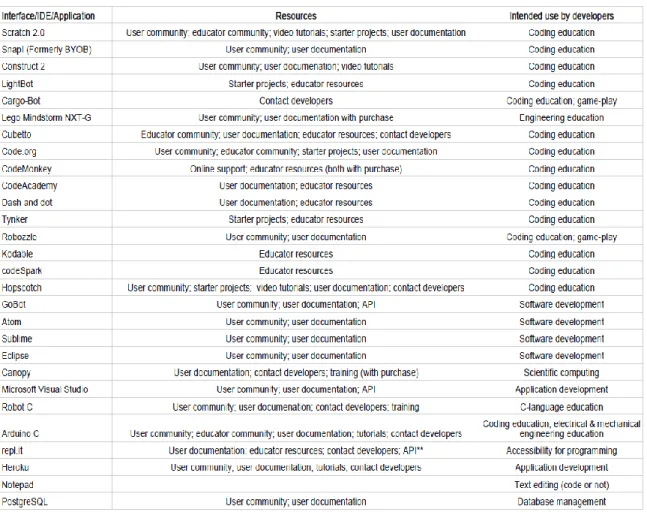
All but one of the interviewees mentioned an interface’s resources as reasoning
educators alike can ask questions. Interviewee 3 expressed the importance of starter projects and pre-made lessons as critical for use in his classroom, especially since his background is not in computer science and though he would like to spend more time learning in order to teach the students more, he does not have the time with his primary teaching duties. At least two other teachers with a richer background in the discipline expressed their concern for teachers like interviewee 3 who do not have the time to learn what they need to teach students. Thus, an interface that has some type of a curricula built-in certainly has a purpose for many.
To get a better understanding of the interface is to explore the developers’ intent in its creation. For most of the interfaces chosen by the interviewees, the developers’ intent was to teach students how to code (in Table 3b as “coding education”). For some, game
play was also considered paramount, and for a select few others, so was engineering education of some variation (mechanical, electrical, etc.). Most of the text editors were created for software development which, at its core, is still what students are doing when they are learning to code. For interviewee 5, those made specifically for software
development are critical to his environment, to recreate what students might experience in a programming work environment, stating that he strives for a true “team development experience.” Interviewee 1 also stated the importance of her students learning to work
Table 3b: Continuation of the data relating to educational and
information-needs-related considerations of the interviewees.
4.3
Evaluating the interfaces’ effectiveness
government site that promotes coding education and the government’s “Hour of Code”
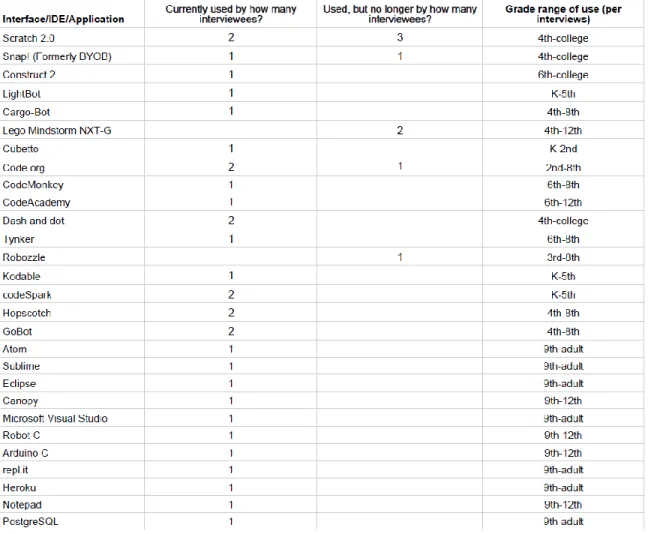
event. Code.org activity interfaces are currently in use by two interviewees and were used in the past by one other. Both of these are probably the most well-known of the
interfaces, which may or may not contribute to their usage statistics. Beyond this, the usage of interfaces is completely varied; it is difficult to make much of these data, given that the interviewed population is so small.
Table 4: Data concerning the usage details of each interface, according to the
interviews.
effectiveness for specific ages and grade levels. For example, Interviewee 1 does not start her youngest students (first through third graders) with Scratch. It cannot be fully
asserted, of course, that this means a particular interface is not suited to a certain group of individuals. However, another educator may find this information, along with
information about Interviewee 1’s background, educational environment, and teaching
methods, as helpful for making his or her own choices in regards to interfaces.
To further answer this question of effectiveness, the interviewees were asked about their measures of student performance when teaching them to code. Each interviewee stated their own definitions of an interface’s success or effectiveness: for interviewee 1, if students have fun and appear interested in coding while using an application; for
interviewee 2, simply if students continue to code with the interface after the workshop is over; for interviewee 3, if students have fun, appear interested in coding while using an application, and progress over time—similar to interviewee 1; for interviewee 4, he simply sees an interface as effective in teaching a student to code if the student creates something, no matter how simple or complex; for interviewee 5, if the interface facilitates team work well, it is effective (put another way, if it facilitates the educational
5.
Discussion
This study concerned many interfaces, as discovered through interviews with six educators. It covered in which ways those discovered are useful and effective. Though certainly not an exhaustive evaluation, the study does lend itself to several key
observations that may be of use to other educators looking to choose an interface or several to introduce their students to programming.
5.1
Making the choice between visual and textual
One key distinction expressed by the interviewees was the divide between visual and textual interfaces, and making the choice between the two for their needs. Scratch is used across grade levels starting generally no earlier than fourth grade, most citing particular use for beginners. All interviewees cited the desire for growth, eventually making the jump from visual to textual. Thus, it is not necessarily age that determines whether a visual or textual interface works best for a student, but rather their prior programming experience. Age comes into play with personal preference for one or the other, when it was revealed in the interviewees that high schoolers tend to prefer “hard coding” best. This is not necessarily because a visual interface like Scratch is too easy for them, but rather, like Interviewee 5 stated, made students “feel” like better developers. Thus, this
related to computer science education. But it something significant to consider when programming, for many, can come down to personal preference, and is largely an
individual discipline. To keep students interested and help them perform well, subjective satisfaction is very important when choosing an interface. This also reveals that educators and students often together make the final determination on an application to use.
5.2
The benefits of gaming
Though most interfaces discovered in this process were not chosen purely for the aspect of game-play, gaming still plays a large role in many interfaces used for coding education. For those educators seeking to get students excited about coding and desiring that they have fun and explore above all, a “game-ified” interface may be a good choice.
Interviewee 2, who favors Construct 2, leads a nation-wide few-hours-long coding event, and finds game play interfaces particularly “effective” in keeping students interested.
Thus, in circumstances where students do not have time for an extended curriculum, something like Construct 2 could be of great benefit. It is certainly not a wholly negative feature; though it is important to keep in mind, as some interviewees mentioned, that the focus should be on the code. Interviewee 1 experienced with at least one interface that students only concerned themselves with the play and not the code, leading to her abandonment of the application. Gaming has certainly proven a point of interest for educators and computer scientists, as revealed in literature on the subject.
focus when choosing an interface to teach K-12 students how to code, as many of these interviewees have discovered over the years. Domain focus is significant here—is the intent to develop, to learn through play, to code as a supplement to education in another non-computer science discipline, like mechanical engineering? For educators considering extended curricula that will cover study of particular programming languages and certain paradigmatic styles, it is important to choose interfaces that meet those needs, as is especially relevant in Interviewee 5’s and Interviewee 6’s environments where they teach
specific languages and/or avoid certain styles (Interviewee 6 does not teach object-oriented programming, with the stance that it is not sustainable for the long term). Support is critical for educators, and so an interface’s wealth or dearth of resources plays
a serious role in interface use. Interviewee 3, as mentioned before, appreciates starter projects, as someone with little time or significant programming background to create customized curricula, himself. In addition, the same interviewee stated the importance of self-driven work; user communities can assist the individual novice programmer. On the topic of individual work, it might be a need of the environment—as it is for Interviewees 1 and 5—to employ interfaces that facilitate team work, to represent the environments that will greet students in the working world.
5.4
Measuring effectiveness
How educators perceive an interface as effective for their students largely depends, as it turns out, on the intent of the educational environment. Do students need to create something? Must students work in teams? There is no one measure of student
he or she use proper syntax, is their code elegant—as is often the case in computer
6.
Conclusion
The goal of this work was to answer three key research questions: What interfaces are used to introduce children to programming?; In what ways are each useful?; How can their effectiveness be evaluated, without measuring children’s ‘performance’? In order to
do so, six interviews were conducted to gather information on interfaces currently used to teach students to program, and educators’ experiences with these interfaces. The
interfaces were then evaluated according to their features and resources. As a result of this exploration, it was discovered that interface effectiveness for the purpose of teaching K-12 students how to code is largely subjective and not particularly tied to learning specific programming concepts. The need for fun, creation, exploration, and interest appear to be of the greatest importance at this stage. There were several limitations for this study that concern its transferability to a larger population, namely: the size of the study population and interviewing only educators, not students. Further research is required for areas not covered in this study; two topics tangentially covered in the interviews were user frustration in the coding education process and demographic
considerations in choosing interfaces—especially in regards to gender. Not covered in the interviews, but of interest to addressing information needs when choosing an interface, is universal usability as it relates to accessibility, which would also require further
Bibliography
Adams, J. (2010). Scratching middle schoolers' creative itch. Paper presented at SIGCSE, 356-360. doi:10.1145/1734263.1734385
Al-Bow, M., Austin, D., Edgington, J., Fajardo, R., Fishburn, J., Lara, C., et al. (2008). Using Greenfoot and games to teach rising 9th and 10th grade novice programmers. Paper presented at the Sandbox Symposium. pp. 55-59.
doi:10.1145/1401843.1401853
Armoni, M., Meerbaum-Salant, O., & Ben-Ari, M. (2015). From Scratch to "real" programming. ACM Transactions on Computing Education, 14(4), 1-15. doi:10.1145/2677087
Calloni, B. A., & Bagert, D. J. (1997). Iconic programming proves effective for teaching the first year programming sequence. SIGCSE Bulletin (Association for Computing Machinery, Special Interest Group on Computer Science Education), 29(1),
262-266.
Calloni, B. A. (1992). BACCII: An iconic, syntax-directed windows system for teaching procedural programming. ProQuest Dissertations Publishing).
Carnegie Mellon Center for Computational Thinking. (2016). Retrieved from: https://www.cs.cmu.edu/~CompThink/.
Code.org. (2015). Hour of code. Retrieved 10/02, 2015, from https://hourofcode.com/us Cooper, S. (2010). The design of Alice. ACM Transactions on Computing Education
DiSalvo, B., Guzdial, M., Meadows, C., Perry, K., McKlin, T., & Bruckman, A. (2013). Workifying games: Successfully engaging African-American gamers with computer science. Paper presented at SIGCSE, 317-322. doi:10.1145/2445196.2445292 Eid, C., & Millham, R. (2012). Which introductory programming approach is most
suitable for students: Procedural or visual programming? American Journal of Business Education (Online), 5(2), 173.
Franklin, D., Conrad, P., Boe, B., Nilsen, K., Hill, C., Len, M., et al. (2013). Assessment of computer science learning in a Scratch-based outreach program. Paper presented at SIGCSE, 371-376. doi:10.1145/2445196.2445304
Google for Education. (2016). Retrieved from: https://www.google.com/edu/. Hijon-Neira, R., Velazquez-Iturbide, A., Pizarro-Romero, C., & Carrico, L. (2014).
Serious games for motivating into programming. IEEE Frontiers in Education Conference (FIE) Proceedings, 1-8. doi:10.1109/FIE.2014.7044111
Inkpen, K. (2001). Drag-and-drop versus point-and-click mouse interaction styles for children. ACM Transactions on Computer-Human Interaction (TOCHI), 8(1), 1-33. doi:10.1145/371127.371146
Jacobson, F. F. (1995). From Dewey to Mosaic : Considerations in interface design for children. Internet Research, 5(2), 67-73. doi:10.1108/10662249510094786
Karp, T., Gale, R., Lowe, L. A., Medina, V., & Beutlich, E. (2010). Generation NXT: Building young engineers with LEGOs. IEEE Transactions on Education, 53(1), 80-87. doi:10.1109/TE.2009.2024410
Kaucic, B., & Asic, T. (2011). Improving introductory programming with Scratch? Paper presented at MIPRO, 1095-1100.
Kim, B. (2015). Gamification in education and libraries. Library Technology Reports, 51(2), 20.
Lamb, A., & Johnson, L. (2011). Scratch: Computer programming for 21st century learners. Teacher Librarian, 38(4), 64.
Leutenegger, S., & Edgington, J. (2007). A games first approach to teaching introductory programming. Paper presented at SIGCSE, 115-118. doi:10.1145/1227310.1227352 Malan, D., & Leitner, H. (2007). Scratch for budding computer scientists. Paper
presented at the pp. 223-227. doi:10.1145/1227310.1227388
Maloney, J., Resnick, M., Rusk, N., Silverman, B., & Eastmond, E. (2010). The Scratch programming language and environment. ACM Transactions on Computing
Education (TOCE), 10(4), 1-15. doi:10.1145/1868358.1868363
Marcu, G., Kaufman, S., Lee, J., Black, R., Dourish, P., Hayes, G., et al. (2010). Design and evaluation of a computer science and engineering course for middle school girls. Paper presented at SIGCSE, 234-238. doi:10.1145/1734263.1734344
Myers, B. A. (1990). Taxonomies of visual programming and program visualization. Journal of Visual Languages and Computing, 1(1), 97-123.
doi:10.1016/S1045-926X(05)80036-9
Olsson, M., Mozelius, P., & Collin, J. (2015). Visualisation and gamification of e-learning and programming education. Electronic Journal of E-Learning, 13(6), 441-454.
Ouahbi, I., Kaddari, F., Darhmaoui, H., Elachqar, A., & Lahmine, S. (2015). Learning basic programming concepts by creating games with Scratch programming environment. Procedia - Social and Behavioral Sciences, 191, 1479-1482. doi:10.1016/j.sbspro.2015.04.224
Pinkston, G. (2015). Forward 50, teaching coding to ages 4-12: Programming in the elementary school. Paper presented at the 5th Annual International Conference on
Education & e-Learning, 34-39.
Preece, J., Rogers, Y., & Sharp H., (Eds.). (2002). Interaction design: Beyond human-computer interaction. Chichester, West Sussex: Wiley.
Resnick, M., Maloney, J., Monroy-Hernández, A., Rusk, N., Eastmond, E., Brennan, K., et al. (2009). Scratch: Programming for all. NEW YORK: ACM.
doi:10.1145/1592761.1592779
Ronen-Fuhrmann, T., & Kali, Y. (2008). How to design educational technologies? The development of an instructional-model. Computer-Supported Collaborative Learning Conference, CSCL, (2), 262-270.
Shneiderman, B., & Plaisant, C. (2005). Designing the user interface: strategies for effective human-computer interaction (4th ed.). Boston: Pearson/Addison Wesley. Sivilotti, P., & Laugel, S. (2008). Scratching the surface of advanced topics in software
engineering: A workshop module for middle school students. Paper presented at SIGCSE, 291-295. doi:10.1145/1352135.1352235
Taslim, J., Wan Adnan, W. A., & Abu Bakar, N. A. (01). Investigating children preferences of a user interface design. Paper presented at the Human-Computer Interaction. New Trends: 13th International Conference, HCI International 2009,
San Diego, CA, USA, July 19-24, 2009, Proceedings, Part I, pp. 510; 510-513; 513.
Tufte, E. R. (2006). Envisioning information (11th printing, Nov. 2006.). Cheshire, Conn.: Graphics Press.
Utting, I., Cooper, S., Kölling, M., Maloney, J., & Resnick, M. (2010). Alice, Greenfoot, and Scratch -- a discussion. ACM Transactions on Computing Education (TOCE), 10(4), 1-11. doi:10.1145/1868358.1868364
Vahldick, A., Mendes, A. J., & Marcelino, M. J. (2014). A review of games designed to improve introductory computer programming competencies. IEEE Frontiers in Education Conference (FIE) Proceedings, 1-7. doi:10.1109/FIE.2014.7044114
Interface websites
*LEGO Mindstorm NXT-G and Notepad do not have websites dedicated to the applications.
Scratch: https://scratch.mit.edu Snap!: snap.berkeley.edu
Construct 2: https://www.scirra.com/construct2 Lightbot: https://lightbot.com/
Cargo-Bot: http://twolivesleft.com/CargoBot/ Cubetto: www.primotoys.com/Cubetto Code.org
CodeMonkey: https://www.playcodemonkey.com/ CodeAcademy: https://www.codecademy.com/ Dash and dot: https://www.makewonder.com/dash Tynker: https://www.tynker.com/
Robozzle: www.robozzle.com Kodable: https://www.kodable.com/ codeSpark: http://codespark.org/
Hopscotch: https://www.gethopscotch.com/ GoBot: https://gobot.io/
Atom: https://atom.io/
Eclipse: https://eclipse.org/
Canopy: https://www.enthought.com/products/canopy/ Microsoft Visual Studio:
https://www.visualstudio.com/en-us/visual-studio-homepage-vs.aspx Robot C: http://www.robotc.net/
Appendix A: Interview script
General questions
Please briefly explain your organization and your role there. How did you learn to program?
What is your teaching experience and why did you choose to teach children to program?
Questions about the students and class material
What classes do you teach at your place of work? What are the ages or grades of those taught?
Are classes divided by age or grade of the students? If so, please explain. If you know it, what is the average age taught?
What proportion of your classes require previous programming experience? Which programming languages do students learn?
What led you or your organization, if you know, to choose these programming languages?
Questions on interfaces
[The next few questions are about “interfaces” used to teach your students. By interface, I mean a “development environment” used to create programs.]
Which interfaces do you use to teach programming to your students?
Do you use particular interfaces for specific programming languages? For example, only using one interface to teach Python, another for R, etc. What about these interfaces led to your decision to use them to teach certain languages?
How do certain interfaces facilitate or not facilitate teaching certain programming concepts, like decision structures or data structures?
Does the interface in any way affect your approach to teaching? How?
How, if in any way, do the interfaces encourage or discourage certain teaching methods? For example, do some interfaces not facilitate group work? Or encourage learning through gaming or storytelling? Please explain.
Questions on curricula
Do you have different curricula for teaching different languages? Please explain. Do your curricula differ according to the age or grade of your students? How? In what ways is your teaching similar across classes, no matter the students’ ages (including adults, if applicable) or the programming language?
Where do you draw inspiration for your curricula and why? For example, from
approaches seen through the online “CodeAcademy.org,” undergraduate course curricula, etc.
Questions on elements not present in the current education program
Are there any languages you or your organization purposefully choose not to teach to children? What are they and why do you choose not to teach them?
Are there interfaces that you have used before but no longer use? What are they and why do you no longer use them?
Are there any interfaces you would like to use but have not? What are they and why would you like to use them? Is there any reason why you have yet to use this interface or interfaces?
Questions on performance and “success”
Which, if any, of the interfaces have shown marked success in helping students learn to code in comparison with other interfaces and how is this success evident to you? What measures do you use of student performance, if any, and how do you use them?
Appendix B: Interview notes for interviewees 2-6*
The interview notes in this appendix are not in complete sentences, but rather untouched from their transcription.
*Notes from the interview with interviewee 1 are not included at the request of the participant.
Interviewee 2
Role: executive director of national non-profit, centered on teaching kids (and others) to code. Started out as a volunteer for the non-profit. Learned how to program first by himself, then studied computer science in college.
Designed program for the non-profit’s code event for students.
Did programming workshops in high school, teaches a high school CS class right now, and of course helped with code event (still does).
Sees computers as equalizers. Work with existing interests.
For code event: work with schools and organizations across the country, get students to participate who don’t think they’re interested, get student input on what they want to make.
Students are 60% high school, 30% college, 10% middle school. Cap events at 120 people. Does groups of 4, all ages together.
Use: Construct 2. Older students can use what they want. Encourage progression from Construct 2 to Javascript, Python, Java. Eclipse. PyCharm. Piloting Dash and Dot. JetBrains product?
The code event is about 1.5 hours, trained mentors walk around to help (teachers around area, adult & student volunteers, etc.). Mentors are trained not to “explain,” but help students learn for themselves, to help teams figure out what they want to do, and to personally engage with students.
Poll the students 2.5 months after event (“Are you still coding? What have you made?”).
Learned of interfaces through online research in 2011.
Doesn’t use: Scratch—have to learn certain things before you get going, procedural, used to use. Snap (originally BYOB). Stopped using these in favor of Construct 2, because more students reported that they were still coding with Construct 2 than other interfaces. Construct 2—“magic” early on, easier to build on knowledge, more higher level logic, build more quickly (keeping excitement)
“No multi-user authoring; concatenated group work. Allows students to work at their own pace and allows for more creativity.”
“Beginners don’t get these moments of progress as often, so have to make it fun.”
With frustration—mentors engage with students, take their minds off of it, and help them return to it. Identify when students get frustrated. If they get too far down that road, they’ll say “Okay, I don’t like programming.”
Don’t get started with Java, C, etc. They can technically do what they want, but it’s not suggested.
Would like to try Meteor.
Would like to have a “next step” interface, for a student’s second or third code event.
81% of students report that they still code; this is how they measure student success. “Doesn’t matter how good students are, just matters that they’re improving and if they keep coding they’ll keep improving.
“Very hard to measure how good students are at programming”
Interviewee 3
Teaches a “digital learning” course, learn some code, few weeks (5-6). Also teaches coding camps. Felt CS was lacking in schools. Never had a CS course. “Can barely program.”
“Don’t have to be the smartest, just need to know the resources.”
Students are middle school, grades 6-8. Camps are ages 8 to 14, with an occasional 7 year old.
Helps with the programming club (13-15 kids).
6 camps, four types. Him and two student assistants (usually upper school students). Uses: Tynker—“COTS Scratch, essentially,” CodeMonkey, CodeStudio (by Code.org), Hopscotch (more object-oriented), Google’s CSFirst (uses different tools—more a curricula/lesson plan), CodeAcademy, Auto Desk Project Ignite (3D Printing). Open source other than Tynker. Looks for accessibility, privacy, and fun.
Doesn’t have any real end result in mind, “program more than play & when playing program games, think about the code.”
Not instructor-driven.
With Tynker, students have to work through the lessons; this frustrates some students who might be above that level. Sometimes it is also too gamified—no one codes like that. But he feels it’s pedagogically appropriate for level. The use of Tynker is driven by the interface.
As a teacher, so busy teaching, can’t move forward in personal learning. Scratch & CSFirst “higher level” than Tynker?
Slightly different curricula for camps than for classes/coding club.
All about exposing them to their level of comfort and have something higher level to offer. Wants something extendable and to facilitate the individual.
Doesn’t use: Terminal (command-line). Against services where you can’t see the
business model, privacy, etc. And if it has no support (“no longevity”). Budget influences decisions.
Finds interfaces through personal research, listservs, and peers.
Learning in his environment is informal; not really trying to teach computational thinking. Wants students to create and explore.
Current interfaces don’t allow google-doc style collaboration, or tablet usage. Also would like to emphasize project learning—you have a problem, now make a solution.
Gauges student success by their engagement, excitement, progress, and interest.
To deal with student frustration: explains that most time coding will be debugging, stick with it, tries to be “less helpful” as a teacher (let them figure it out), opportunity to learn.
Interviewee 4
Role: Teacher in the engineering program at a public high school. Retired mechanical engineer. Revitalized the engineering program. Now has federal funding through
institution of Project Lead the Way (one of 5000 high schools across the US). Responded to the call for STEM teachers.
Has programming experience from when he was a senior in high school, through college, and masters. Fortran, C++.
Project Lead the Way—has 2 week bootcamp for teachers (not free, several hundred dollars). He did this and started the program at the high school
Students grades 9-12.
Uses: Code.org, Scratch (Harvard unplugged activities, “Drag-and-drop really teaches computational thinking without being wholly evident to students—“sneaky”), Canopy for Python (Scratch first, then Python; text editor; freeware for RHS, might not be for
everyone)
Doesn’t see why we would start with anything other than drag-and-drop to expose students to programming; it facilitates education equity, no matter the level. The big objection to drag-and-drop is that it’s inflexible; he says beginners don’t need that robustness.
Learned of interfaces through PLTW, research, a renowned professor/researcher at a nearby university, engineering experience.
Inspiration from Code.org, PLTW, a renowned professor/researcher at a nearby university, CodeAcademy.
Deals with frustration through use of pair programming, rewards creating something, “ask three, then me,” use each other & each other’s code. “Please collaborate and use available resources.”
Interviewee 5
Role: Works as director of programs & curriculum for a coding bootcamp enterprise. Still instructs some.
The enterprise is a coding bootcamp, with 8-week code immersion courses (4 nights/week) and smaller, more focused topics (1 night/week). All across the south. Mostly web development.
Students are mainly high school students and adults. Youngest: 13. Usually 17-19. Up to 70.
Learned programming on his own through the same coding bootcamp courses he now directs and teaches. During time there, he was paired with other students, and this led to an instructor position.
Adult students in the code class teach the high school students, because of the group’s approach that “to teach is to learn”
Free kids coding classes—five week session, 1 night/week; HTML, CSS, Ruby, Robotics, Makerspace stuff. Used to do Scratch. Also used to do Wix website builder. 8 week Ruby on Rails, 2 week version of 8 week, Next level rails course.
Does not see much difference between teaching adults and youth.
Teaches: HTML/CSS, Ruby, Swift (but not Objective-C), Javascript, Ruby with Rails framework, a bit of SQL.
Ruby is “generally thought of as the easiest programming language to pick up.” Created to “mimic English.” Object-oriented.
Use: all open-source. CloudNine (online IDE), Git, PostgreSQL, Heroku, Sublime, Atom, repl.it (for kids), notepad (for kids). Chrome browser only (for dev. Tools). Mostly text-editors with linters.
Students feel like better developers in text editors. Text editors also “encourage students to figure it out, walk through it.”
Students partner up—pair programming. Last two weeks—one big group project. For kids—individualized website project & use Slack for communication.
No difference in curricula by age group.
Workshop-style for all. Instructor has own computer up front on projected screen, live-coding with class. Students can stop and ask questions, students participate (add in the next steps, etc.).
Really strive for team development experience.
Don’t use: Scratch (students enjoyed doing “hard code” better), Wix, RubyMine
(JetBrains IDE), other text editors—found other that work best, Nitrous.io, any interfaces that keep processes running in the background. Don’t teach older languages.
Never out of the question to teach C-based languages, but don’t want students to start there.
As the company grows, they will add other languages.
Want to use a plug-in for Atom that has a google-doc style collaboration.
No “metrics” for success. Have homework assignments & quizzes, but no real “grading.” Community organizer for TTS for location asks students about their experience.
Dealing with frustration: On day one, say outright “you are going to get frustrated at some point,” and follow up with “that’s okay.” Practice! Everyone progresses at different paces, for different topics. “I don’t care if you’re talking while I’m talking—you’re figuring it out.” Help each other out. “Don’t panic. Panicking stops thinking.” Take breaks if needed.
Interviewee 6
Role: Dean of IT department. Learned to program by himself, mostly; took a course on C, psychology & programming. Started as an assistant professor of psychology in survey analytics for undergraduates at a university’s night school. Corporate since early 80s in database work. Has been at the school for 10 years. Interested in teaching new students to problem solve, logic.
“Small problems, small solutions”; modules pieced together.
Teaches engineering design (use Arduinos), web design, and Robotics. Doesn’t teach AP computer science.
Under 12 students per class. Average age taught is 16. 10th-12th.All students have their own computer.
Has a co-teacher.
Students learn: Robot & Arduino C, Java, HTML/CSS, C# (Microsoft product interface) Students learn on: Eclipse text editor—Java, IDE from Carnegie Mellon—Robot C, Arduino C (has own interface), Microsoft Visual Studio (IDE).
Stays away from text editors because of the inability to debug.
Doesn’t use: Mindstorm—moved from that to C because of ability to debug and the students didn’t appreciate the graphic-based language, Scratch. Move from Scratch to Mindstorm, and found that he almost had to reteach all concepts when he made that move. Had the same issue when moving from text editor to IDE (debugging,
acclimation). GitHub! Says it’s a “distraction and another thing to learn.” Never teaches Visual Basic. Eclipse is used for Java, but says would prefer something else because it is “difficult to maintain.”
“Whatever platform you use has to be sophisticated enough to grow with, without showing all the features.”
Learned of interfaces on his own research & through organizational membership. Interface influences teaching because you have to teach the IDE features/tools. “Cannot learn language & environment at the same time, too difficult.”
Teaches agile-style programming.
Pair-programming. Students switch between programming & typing. Found that groups of three (original set-up) was ineffective.
Group work is difficult.
“How to learn enough of all components?”
For curricula—developed own curriculum for Robot C using known resources, engineering course has textbooks.
Draws inspiration from small websites, looks for continuity & the ability for students to come up with more than one “correct” answer. “Students do not go too far with Coursera & other similar things; they find it too frustrating.”
Would like to try: Python Anywhere (online IDE, “great equalizer,” Chromebook-capable), C# over Java.
Arduino IDE—has an insufficient debugger.
Finds Robot-C to be the most successful introductory environment—“full-blown, lightweight.”
Gauges student performance through grading, but also “working code.” Also, looks for ingenuity and originality—“looking beyond the solution.”
Students should make something—“programmers produce.” “Get something simpler working.”—if facing obstacles.
“Too many teachers nowadays are put into the position of teaching students how to program, and they don’t know how. They cannot handle this, and students lose respect for the teacher. The teachers don’t have the chance or time to learn enough.”
Appendix C: Study information
K-12 Programming Environment Study Informational Sheet This project aims to discover:
What interfaces are used to introduce children to programming? In what ways are each useful?
How can their effectiveness in teaching children be evaluated, without directly measuring children’s ‘performance’?
To answer these questions, interviews with professionals who teach programming to children will be conducted. The ultimate goal of this research is publication as a master’s thesis in UNC’s School of Information and Library Science.
Participant role and information use:
The participant will be asked questions related to the research and his or her role as a programming teacher. The interview should take no more than an hour; if all questions are not answered in an hour, the participant can choose to continue, reschedule, or terminate the interview. The participant can choose not to answer any question, and may leave, at any time without consequence. Any information collected will be anonymized and will not include any personally identifiable information. All information will be stored in a locked application on a locked private device. All original data will be deleted following publication.
Associated risk:
There is no foreseen risk associated with this interview. However, should any issues, concerns, or questions of any kind arise, you as the participant can contact UNC’s Institutional Review Board at any time for assistance and information about your rights. You can do this anonymously, if you wish.
Institutional Review Board
Email: [email protected] Phone: 919-966-3113
Address: CB 7097
720 Martin Luther King Jr. Blvd. Bldg # 385, Second Floor Chapel Hill, NC 27599-7097