EVALUATION AND COMPARISON OF FREE AND COMMERCIAL USER INTERFACES OF DIGITAL LIBRARIES
R. Alijani, M.A. M. Nikkar, M.A.
Department of Library and Information Science Department of Library and Information Science Payame Noor University Payame Noor University
Firozabad, I. R. of Iran Shiraz, I. R. of Iran Corresponding author: [email protected] email: [email protected]
Abstract - In this study, at first, different free and four fee book-based Digital Libraries (DLs), available via www were reviewed. Four DLs Gutenberg, 24×7, Netlibrary and Ebrary were chosen. A comprehensive inventory consisted of general information, search features, display options and unique features was composed for comparing the interfaces of these DLs. Then chosen interfaces were compared and evaluated. Results showed that Netlibrary scored higher according to the specified criteria. However, in designing interface for such DLs, designers should take into considerations all the criteria proposed in this study.
Keywords: Electronic Book, Database, Digital Library, User Interface, Ebrary,
Netlibrary, 24×7, Gutenberg.
INTRODUCTION
This article presents the findings of a study of the user interfaces of four Digital Libraries (DLs) offering access to e-books. E-books refer to digital texts issued as individual works and designed to be accessible using special software for text navigation and ease of reading. In this paper, web-based e-books are PC and laptop-based book that can be read on the computer monitor via connection to the Internet and are produced to search, study and do a research with academic intent. Their target audiences are usually researchers, professors, and students.
have of the user friendliness of these systems. A second aim of this study was to discover potential difficulties for users of these systems and to investigate these as a preparation for the follow-up user study.
DLs are given different names by the various groups working with them. Librarians refer to DLs as “databases” and people in arts and humanities name them “electronic archives” [1]. In the UK and Western Europe, DLs are referred to as “digital surrogates” and regarded as substitutes for traditional libraries in the role of “collections of validated and structured information” [2]. One definition for DL is that: a DL is a collection of services and “information objects” that are available digitally. Information objects can be defined as anything in a digital format such as books, journal articles and sounds. DLs organize and present information objects to users and support them in dealing with these objects [14].
The above definitions all convey the same meaning which reveals that a DL is a source of information in different formats e.g. text, video or audio and that such information is stored digitally. Moreover, given the proliferation of communication technologies such as Internet, it comes as no surprise that in a modern context, DLs also represent a networked resource. In this study the definition used is that “a DL is a networked repository of digital content” [11].
Every IR1 system such as digital libraries has an interface that consists of software and hardware which are needed for users interacting with the system. User interfaces allow people to input commands to the computer, read the computer’s output, structure information and complete certain tasks related to retrieving information. Different types of interfaces allow users to perform a multitude of tasks on a computer such as creating documents, searching Internet or sending and receiving e-mail messages. A user interface may enable a user to enter, locate, manipulate, analyze, monitor or retrieve information. Effective user interfaces are extremely important and the success of an IR system depends on the interface [3]. Some users find computer interfaces difficult to use and a user’s ability to perform tasks on a computer is directly related to the effectiveness of the computer interface. Human-computer interactions should be structured and presented to ease learning, minimize errors, and facilitate use. A poorly designed interface display may lead to user mistakes, non-use of the computer system and low user satisfaction. In general, interface design needs to answer questions about when, what, and how a user completes a task. User interface designers consider issues such as human memory, color perception and task complexity to define the display requirements for a computer interface.
in designing users interfaces, designers need to find out whether DL interfaces are designed in a user-friendly manner. Findings show that users react positively to interfaces which are pleasant and/or interesting [3]. These are basic considerations that need to be taken into account while designing and/or evaluating a user interface. They apply both to system functionality and to features of usability and user friendliness [23].
Due to end user access, research into user interfaces of IR systems has gained popularity in recent years. Since IR systems designers are always reviewing, revising and changing interfaces for better interaction, they need more attention from the viewpoint of designers, experts and users. As the interfaces change according to new findings, research on the interfaces of IR systems is a task that should be done regularly.
LITERATURE REVIEW
A comprehensive search in related databases such as LISTA2 (former ISTA), LISA3, Library Literature, ACM4 Digital Library and Computer Source (CS) was conducted to discover if others had completed similar comparative studies. Many articles offered comparisons of different databases; a few compared different versions of the same database. However, we did not find any study regarding comparison of e-book DLs.
designing, modifying and improving MedlinePlus.
As the above literature review shows, almost all of the works cited were works done on e-journal DLs. In all databases we searched, just a few works were found regarding different aspects of e-book DLs. However, we did not find any study regarding comparison of e-book DLs.
METHODOLOGY
Research into user interfaces of IR systems usually demands specific approaches to evaluation, i.e. various ways of acquiring data which form the basis for their evaluation. This can be done through user or expert studies. However, frequently there is a combination of both. Sweeney et al. [23] define a user study as a study of one user performing at least one task in a chosen setting of an IR system. Conversely, an expert study is performed by an expert researcher using the IR system in a structured way to establish how the system’s characteristics correspond to previously formed criteria. Expert studies, according to Sweeney et al. [22], are qualitative, enabling the diagnosis of errors and providing guidelines. Their advantages are that, compared to user studies, they are cheaper, quicker and easier to perform. A well qualified expert with a good knowledge of the user population can predict the usability of the software and envisage potential user errors and difficulties. Similarly, Manglano-Bosch and Hancock-Beaulieu [15] state that the expert, knowing the subject area and the user population, can foresee different aspects of system usage even before it is implemented. They recommend that expert studies should use a well-structured framework, resulting in a systematic review of all interface aspects. Expert studies are diagnostic and can foresee potential difficulties users might face while working with the system. They can also serve as the predecessor to user studies since they can be used as a platform for defining the areas which need further research.
There are some IR systems that provide access to e-books, among them, we can name Ebrary5, Nelibrary6, 24×77, Gutenberg project8, NAP9, Electric library10 and others. Some of these systems such as Gutenberg project or NAP are free but most of them are commercial fee-based services. In this paper, one free and three commercial fee-based e-book IR systems were chosen. The first reason for choosing e-book used in this study was that the user interfaces of these systems should be different enough for a meaningful comparison. A second reason was that the focus of these systems is mainly providing electronic books. In addition, these are among established free and for-fee e-book IR systems [4, 6, 18, 19] and all are accessible via Internet and finally provide electronic access to the full-text of books.
comparison is based. We looked at each DL in detail and developed a list of 51 features and options that were either common to all or unique to one. To make the comparison less cumbersome, we divided the features into four categories such as general information, search features, display options and unique features. Then, we created a template showing the features to be compared and went through each database again to fill out the template. The information needed to complete the template was found either within the databases themselves or on the vendors’ web sites. Technical support personnel at these sites were very helpful in answering questions for which answers were not readily found either within the database or on the vendors’ web sites.
Comparison tables prepared in the studies of Jatkevicius and Sebold [10], Brown [5] and Vilar & Zumer [23] were used in this study. However, as these comparison tables had mainly been prepared for e-journal databases, some criteria were omitted and some new criteria were added to meet the needs of e-book interfaces. The criteria were added by observing, comparing and interacting with these systems. Then we gave a score to each of features or options in tables, having a feature or option would take 1 and absence of it would take 0. Finally, we counted the scores to rank the selected e-book DL interfaces.
Research Questions
This study tries to answer the following questions:
1. According to proposed criteria in Tables 1-4, what features and options are available in these DLs?
2. According to proposed criteria in Tables 1-4, which of these DLs have better interface with more features and options to support a user?
3. What features and options are suitable to be in interface of a book based DL?
FINDINGS
Regarding the first question, user interface was initially investigated independently of system functions, to focus on user-friendliness features. Findings presented in Table 1 shows mainly those features where the systems differed.
Although all the systems studied mainly provide access to e-books, two of them provide access to other resources such as journals. Among these systems, Ebrary provides more diverse resources such as books, journals, magazines and maps. Netlibrary not only provides e-books and e-journals but also supplies audio books.
of 51 (Table5).
In general information, 24×7 scored 5 out of 9 (Table 1); in search features scored 9 out of 17 (Table 2); in display options scored 8 out of 10 (Table 3) and in unique features scored 4 out of 15 (Table 4). Totally 24×7 received 26 scores out of 51 (Table 5).
In general information, Netlibrary scored 7 out of 9 (Table 1); in search features scored 15 out of 17 (Table 2); in display options scored 9 out of 10 (Table 3) and in unique features scored 10 out of 15 (Table 4). Totally, Netlibrary received 41 scores out of 51 (Table 5).
In general information, Ebrary scored 7 out of 9 (Table 1); in search features 12 out of 17 (table 2); in display options 6 out of 10 (Table 3) and in unique features scored 7 out of 15 (Table 4). Totally, Ebrary received 32 scores out of 51 (Table 5).
With regard to the second research question in general information, Netlibrary and Ebrary scored 7 and were positioned at the highest rank, while 24×7 scored 5 at the lowest rank. In search features, Netlibrary scored 15 and got the highest rank, while Gutenberg with 8 scores got the lowest rank. In display options, Netlibrary scored 9 and received the highest rank. Gutenberg and Ebrary got 6 scores and gained the lowest ranks. In unique features, Netlibrary with 10 scores was positioned higher than Gutenberg (5), 24×7 (4) and Ebrary (7).
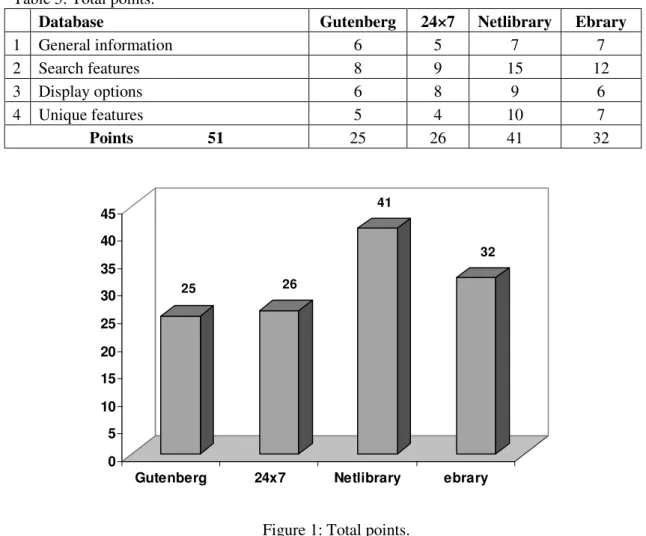
In all features and options, Netlibrary with 41 scores was the winner in this study. Table 5 and Figure 1 summarize and show the findings in this regard. As Table 5 and Figure 1 show, the followers of Nelibrary from highest to lowest were Ebrary(32), 24×7(26) and Gutenberg (25). Figure 1 summarizes the final points of the IR systems.
With regard to the third question, it should be noted that a part of this study gives some suggestions to designers of DLs interfaces. We reviewed, compared and evaluated the systems. The main features and options that are regarded as necessary have been presented in Tables 1-4. What will follow is what we have found comparing the systems and what are suitable to be presented in e-book DLs.
As interfaces are the only means that users take to interact with systems, paying attention to designing a suitable interface is important. It should be added that a good interface attracts more users and therefore can have a critical rule in the success of systems. Above tables show that some features and options of e-journal and e-book DLs are the same but some of them especially those in Table 4 are useful to e-book DLs.
General information
Along with e-books it would be better:
2. To design interfaces in a way that users do not need special hardware or software to view, save and print resources. Working with the systems, we did not have any problems with Netlibrary, Gutenberg and 24×7. These systems provide html and/or PDF formats. The problem was with Ebrary. Ebrary needs specific software called Ebrary reader. In some cases, this software is not installed, so viewing and saving options are impossible.
3. If possible, the resources be available in PDF and HTML formats as these are the most used formats.
4. That users be able to order the titles they may request via the DL interface. 5. That an icon introduces the titles which have been added recently to the DL. 6. That help mechanism be presented in all parts of the DL to enable users to use the resources better.
8. That language of interface be selectable.
9. To personalize area. In this way users will be able to have favorite list and gather the titles they want for future use.
Search features
In search features it would be better that
1. Search features such as Boolean operators, field searching, phrasal searching, truncation and other limiters that were explained in Table 2 be added.
2. Along the search features, browsing features be added. Like physical libraries, users may want to see related topics. So browsing is important.
Display options
It is better that
1.Full metadata be added for each e-book. In many cases, users want to cite the resources.
2.Searched keywords be highlighted. As users may want to scan the text. 3.Sorting by relevance, time and alphabet be available.
4.Considering copyright issues, saving and printing be partially available.
5.For better usage, options such as changing the shape, color and number of items be added to interfaces, so users can customize the interface.
6.Front cover of e-books be added. Users may want to see it. In addition, users become able to move page-to-page, part-to-part and chapter to chapter inside a book.
7.Searching inside an e-book be available.
CONCLUSION
In findings section, we provided answers to the questions of the study but a total answer to conclude is needed. It is clear that the only free, open-access e-Book DL of this study i.e. Gutenberg scored lower than commercial e-Book DLs. Readers can see the clear differences of the interfaces of the studied DLs via five tables and one chart in the text. The highest scores go for Netlibrary (Figure 1), this e-Book DL is a part of OCLC. It seems that fine funding in different aspects for commercial e-Book DLs could be an important reason for higher score of the three commercial DLs in this study.
However, the results show that a structure can not be considered as just a desired interface structure. The list of 51 features and options of the interfaces in this study which have been scattered in five tables could be a starting point for other evaluations and comparisons as well as for designers. One way to overcome the challenge is to empower systems as well as users, that is to design an IR system to facilitate interactions between users and systems. Therefore, users and IR systems become partners. To facilitate interactions, an IR system design needs to go beyond query formulation.
Findings of this study should be useful for information scientists studying and/or working with DLs and of course for the future designers and developers of the existing e-Book DLs. By uncovering potential difficulties and disadvantages of a certain interface, we can improve its usability and user friendliness, thus contributing to increase use and better results.
Table1: General information.
General interface features Gutenberg 24×7 Netlibrary Ebrary
1 Type of sources books
Other sources (Journals, Audio books…)
1
1
1
0
1
1
1
1
2 Online help 0 1 1 1
3 Interface language selection 1 0 1 1
4 Personal options 0 0 1 1
5 Number of simultaneous users 1 1 0 1
6 Ease of navigation 1 1 1 1
7 Ordering new titles by users 0 1 0 0 8 Books in different languages 1 0 1 0
Points 9 6 5 7 7
Table 2: Search features.
Features Gutenberg 24×7 Netlibrary Ebrary
1 Search mode options Basic
Advanced Power
1 1 0
1 1 0
1 1 0
1 1 0 2 Boolean operators available 1 1 1 1
3 Proximity searching 1 0 1 1
4 Truncation 0 0 1 1
5 Wild card 0 1 1 1
6 Field Searching 1 1 1 1
7 Phrase searching 1 1 1 1
8 Limiting 1 1 1 1
9 Expanding 0 0 1 1
10 Refine searching 0 1 1 1
11 Spelling suggestion 0 0 1 0
12 Save search strategy 0 0 1 0
13 Combine previous search 0 0 0 0
14 Browsing 1 1 1 1
15 Links to similar titles 0 0 1 0
Table 3: Display options.
Features
Database Gutenberg 24×7 Netlibrary Ebrary
1 Metadata 1 1 1 1
2 Highlighting keywords in retrieved items
0 0 1 1
3 Sorting 0 1 0 1
4 Marking 0 0 1 0
5 Saving 1 1 1 1
6 Printing 1 1 1 1
7 Search strategy displayed automatically 1 1 1 1 8 No need for special software to view
content
1 1 1 0
9 Formats available PDF HTML 0 1 1 1 1 1 0 0
Points 10 6 8 9 6
Table 4: Unique features.
Features
database Gutenberg 24×7 Netlibrary Ebrary
1 Viewing the items cover to cover 0 1 1 1
2 Book accessibility: Page Section Chapter 0 1 1 0 1 1 1 0 0 1 0 0
3 Browsing the content of books 1 1 1 1 4 Searching the content of books 0 0 1 1 5 Using reference resourses while
viewing a book
0 0 1 0
6 Reference resources availability 0 0 1 0
7 Borrowing a book 0 0 1 0
8 Bookmark the retrived books in personal files
1 0 1 1
9 Bookmark pages 0 0 1 1
10 Highlighting books pages 0 0 0 0 11 Printing parts of books 1 0 1 0 12 Citing saved items in personal file 0 0 0 0 13 Note adding 0 0 0 1
Table 5: Total points.
Database Gutenberg 24×7 Netlibrary Ebrary
1 General information 6 5 7 7
2 Search features 8 9 15 12
3 Display options 6 8 9 6
4 Unique features 5 4 10 7
Points 51 25 26 41 32
25 26
41
32
0 5 10 15 20 25 30 35 40 45
Gutenberg 24x7 Netlibrary ebrary
Figure 1: Total points.
ENDNOTES
1. Information Retrieval (IR)
2. Library, Information Science & Technology Abstracts (LISTA) 3. Library and Information Science Abstracts (LISA)
4. Association for Computing Machinery (ACM) 5. www.ebrary.com
6. www.netlibrary.com 7. www.24×7.com 8. www.gutenberg.org 9. www.nap.edu 10. www.elibrary.com
REFERENCES
Changes.” in: Lim, E., et al., (Eds.), Digital Libraries: People Knowledge and Technology, Proceedings of the 5th International Conference on Asian Digital Libraries, New York, pp. 392-403, 2002.
[2] Blandford, A., “Interacting with Information Resources: Digital Libraries for Education.” International Journal of Learning Technologies, Vol. 2, No. 2, pp. 185-202, 2006.
[3] Bates, M. J., “The Cascade of Interactions in the Digital Library Interface.”
Information Processing and Management, Vol. 38, No. 3, pp. 381-400, 2002.
[4] Bennett, L. and Landoni, M., “E-Books in Academic Libraries.” The Electronic
Library, Vol. 23, No. 1, pp. 9-16, 2005.
[5] Brown, J. D., “The ERIC Database: A Comparison of Four Versions.” Reference
Services Review, Vol.31, No. 2, pp. 154-174, 2003.
[6] Clark, M. L., “Electronic Books and the Humanities: A Survey at the University of Denver.” Collection Building, Vol. 26, No. 1, pp. 7-14, 2007.
[7] Fiscella, J. and Proctor, E., “An Approach to Assessing Faculty Use of Locally Loaded Databases.” College & Research Libraries, Vol. 56, No. 5, pp. 446-458, 1995.
[8] Groote, S. L. De., “PubMed, Internet Grateful Med and Ovid: A Comparison of Three Medline Internet Interfaces.” Medical Reference Services Quarterly, Vol. 19, No. 4, pp. 1-13, 2000.
[9] Jacobs, M., et al., “Criteria for Evaluating Alternative Medline Search Engines.”
Medical Reference Services Quarterly, Vol. 17, No. 3, pp. 1-12, 1998.
[10] Jatkevicius, J. and Sebold, C., “The ERIC Database: Choosing Among Free and Fee-Based Options.” College & Undergraduate Libraries, Vol. 7, No. 2, pp. 95-103, 2000.
[11] Kani-Zabihi, E., et al., “Digital Libraries: What Do Users Want?” Online
Information Review, Vol. 30, No. 4, pp. 395-412, 2006.
[12] Kennedy, B., “Comparing Menu Systems for End-Users: After Dark, Knowledge Index, and First Search.’’ Online, Vol. 17, No. 4, pp. 52-6, 58, 1993.
[13] Kottai, A., “Medline on CD-ROM: A Comparison of Dialog Ondisc and Silver Platter Interface.” Library Science and Documentation, Vol. 30, No. 1, pp. 11-16, 1993.
[14] Leiner, B. M., “The Scope of the Digital Library.” Available: at <http://en. wikipedia.org/wiki/Digital_library>, June 2006.
[16] Marill, J. L., et al., “The MedlinePlus Public User Interface: Studies of Design Challenges and Opportunities.” Journal of the Medical Library Association, Vol. 94, No. 1, 2006.
[17] Notess, G. R., “Free Medline on the Web.” Database Magazine, Vol. 21, No. 3, pp. 71-74, 1998.
[18] Peters, T. A., “Gutterda Èmmerung (Twilight of the Gutter Margins): E-Books and Libraries.” Library Hi Techology, Vol. 19, No. 1, pp. 50-62, 2001.
[19] Rao, S. S., “Familiarization of Electronic Books.” The Electronic Library, Vol. 19, No. 4, pp. 247-256, 2001.
[20] Schneider, L. C., A Comparison of the User Interface Features of the Free
Versions of Medline on the Internet World Wide Web. Ph.D. Dissertation, Nova
Southeastern University, 2000.
[21] Schoonbaert, D., “SPIRS, WinSPIRS and Ovid: A Comparison of Three Medline on CD-ROM Interfaces.” Bulletin of the Medical Library Association, Vol. 84, No. 1, pp. 63-70, 1996.
[22] Sweeney, M., et al., “Evaluating User-Computer Interaction: A Framework.”
International Journal of Man-Machine Studies, Vol. 38, pp. 689-711, 1993.
[23] Vilar, P. and Zumer, M., “Comparison and Evaluation of the User Interfaces of E-Journals.” Journal of Documentation, Vol. 61, No. 2, pp. 203-227, 2005.
[24] Xie, H. I., “Supporting Ease of Use and User Control: Desired Features and Structure of Web Based Online IR Systems.” Information Processing and