SOLUTION BRIEF
Seven Secrets to High
Availability in the Cloud
High Availability (HA) is about designing systems and applicationsthat deliver superior uptime and service. Businesses depend on their IT systems, so reliability and system availability are significant issues whether they’re an unofficial standard, a corporate service-level agreement (SLA) or a contractual obligation. To build highly availability applications, developers must design their systems to handle both routine interruptions and unplanned failures of components and infrastructure — from a single instance all the way up to an entire data center.
As more IT departments embrace the mixed cloud/on-premises construct of hybrid IT, the whole HA picture changes. While running applications in the cloud can potentially enhance availability and reliability, hybrid applications also complicate the availability equation. They combine public or private cloud with other environments such as on-premises, managed hosting and co-location systems. The resulting hybrid cloud application will likely have end-to-end availability characteristics that are considerably different from one based solely in the cloud. This brief examines the issue and offers some industry best practices guidance on ensuring HA in a Hybrid IT environment.
Overview: HA in Hybrid IT
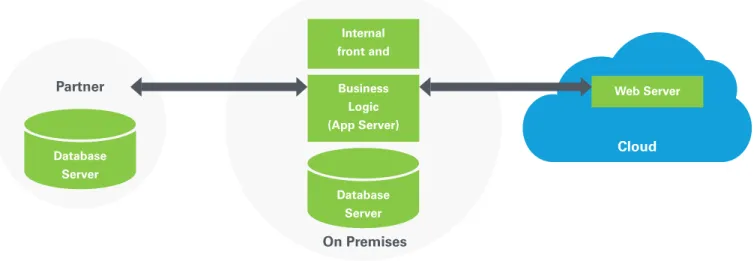
Experienced IT managers know that completely moving existing enterprises to the cloud is rarely feasible, at least not in this decade. For the next few years, most enterprises will likely take a hybrid approach to IT, one that combines on-premises data centers, public and private clouds along with the networking that securely ties it all together. Figure 1 shows a simple example of a hybrid deployment environment. In this scenario, cloud SLAs must be reconciled with on-premises availability to characterize the behavior of the end-to-end system.
Users of the cloud-based web server in Figure 1 are relying on the availability and responsiveness of an on-premises database and business logic layer, as well as a partner data source. Careful analysis is required to make this integrated hybrid cloud maintainable, functional, and highly available. This is not always easy. Hybrid IT introduces new layers of security, new network segments — and providers — as well as “build for failure” architecture patterns that don’t assume reliability of infrastructure. Storage and databases in the cloud add further elements of challenge to availability. In a sense, achieving HA represents a litmus test of whether hybrid IT is ready to support large enterprises. Managers responsible for hybrid IT need a design approach for HA regardless of the location of an IT asset.
Figure 1 - A simplified example of a hybrid IT environment, with an on-premises database and application server connected to a cloud-based web server and partner data source through a cloud-based API.
Best Practice: Architecting for HA in Hybrid IT
Hybrid IT introduces several new variations on familiar HA architectural practices. While a pure cloud deployment might depend on loosely-coupled processes that reside exclusively in the cloud, a Hybrid IT deployment will be based on loosely coupled processes that reside on many different platforms. Each will have its own failure modes. [p Private cloud, public cloud, on-premises, or colocation platforms all fail differently. As a result, an important first step is to assess and manage failure risks for your platforms.A best practice when building distributed systems on a cloud platform is to build each core component as a separate, repeatable unit. These units are typically loosely coupled, which generally makes scaling easier and failure scenarios more manageable. Figure 2 shows how the scenario depicted in Figure 1 can be set up with this approach to redundancy and failover. The on-premises database is replicated in a cloud data center along with a copy of the application server and web server. The original web server is in a different cloud data center. In this architecture, there is no single point of failure in the application topology. The database and app server fail over to Cloud Instance B. If Cloud Instance A fails, the web server from Cloud Instance B will take over.
Using Managed DNS to Implement HA Architecture
Best Practices
Overall availability through redundancy grows when infrastructure dependencies are minimized between instances of mission-critical applications. For instance, if you’re a cloud customer, you have no control over your application’s availability if there is a loss of network connectivity to the data center where it is running. However, if you’ve architected your application with HA in mind and set up a redundant instance running in a second, remote cloud data center, your application should maintain availability despite the problems in the original data center.
Partner
Internal front and Business Logic (App Server)
Database Server
On Premises
Web Server
Cloud
Database Server
Figure 2 - Architecting for HA in the hybrid environment using loosely-coupled units.
Internal front and Business Logic (App Server)
Database Server On Premises
Web Server Cloud Data Center A
Business Logic (App Server)
Database Replicated
Cloud Data Center B Web Server
Failover Failover
A managed Domain Name System (DNS) service enables you to implement the multiple data center best practice. A managed DNS service resolves all requests for a specific web application and distributes the load to multiple load balancers or servers located in one or more locations. This kind of highly reliable DNS service will enable dynamic traffic re-routing when application components become unavailable for any reason. It routes traffic away from failed data centers, services and components.
Assessing Failure Risks with Hybrid IT Deployments
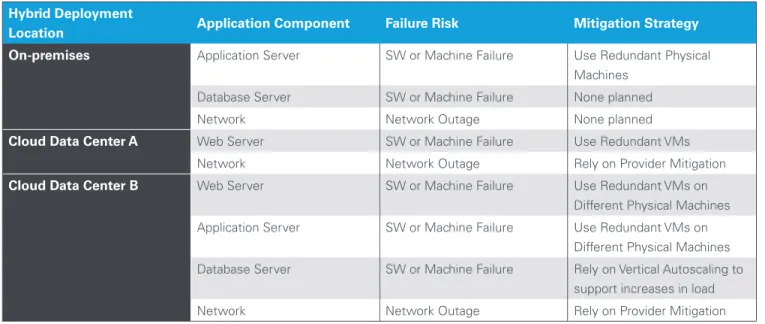
While the likelihood of a widespread outage at any individual data center is quite low, the probability is still always greater than zero. There are many reasons that data centers fail, but one of the most common is operator or human error, especially error associated with network infrastructure. Cloud providers typically offer SLAs that are reflective of recent history and future operating performance expectations. For example, CenturyLink Cloud® offers a network infrastructure availability SLA of 99.99%. In the case of Hybrid deployment scenario, applications should be designed with failure scenarios in mind. A best practice is to evaluate the reliability of networks, machines and softwarefor each location involved. One of the best predictors of future operating performance is past performance. It may be possible to estimate the statistical probability of an application failure using past performance or SLAs as numerical inputs. If a cloud data center has an SLA of 99.9% of uptime, it is likely to experience approximately 8.7 hours of downtime per year. (This is calculated as: .1% downtime x 24 hours/day x 365 days/year.) The future failure potential of new hybrid applications is not as simple as evaluating past performance or SLAs alone, however. A recommended practice for designing Hybrid IT systems for HA is to assess the costs and consequences of an outage and weigh them against the additional cost associated with server redundancy and a multi-data center deployment. Doing the assessment involves a risk mitigation matrix, which is depicted in Table 1 for the example Hybrid IT scenario previously discussed. For each deployment location, redundant physical or virtual machines have been used to ensure web servers and application servers will failover to other local machines or instances. If you were trying to assess or mitigate risk for a real application, you might want to break out the failure risks associated hardware, software and network separately for each location.
Risk Mitigation Matrix Example
Hybrid Deployment
Location Application Component Failure Risk Mitigation Strategy
On-premises Application Server SW or Machine Failure Use Redundant Physical Machines
Database Server SW or Machine Failure None planned
Network Network Outage None planned
Cloud Data Center A Web Server SW or Machine Failure Use Redundant VMs
Network Network Outage Rely on Provider Mitigation
Cloud Data Center B Web Server SW or Machine Failure Use Redundant VMs on
Different Physical Machines
Application Server SW or Machine Failure Use Redundant VMs on
Different Physical Machines
Database Server SW or Machine Failure Rely on Vertical Autoscaling to
support increases in load
Network Network Outage Rely on Provider Mitigation
Table 1 - An example of a risk mitigation matrix for the hybrid IT environment detailed in Figures 1 and 2.
In Table 1, Cloud Data Center B shows a failure mitigation step of ‘Use Redundant VMs on Different Physical Machines.’ By taking this step, you prevent a single machine failure from taking down the entire hybrid application. The CenturyLink Cloud Control Portal enables you to implement this step by creating
a ‘Hyperscale Anti-Affinity’ policy. The policy ensures that new VM instances will not be located on the same physical machine, thereby avoiding a single point of failure at the physical machine level. Figure 3 shows the interface for creating an anti-affinity policy on the CenturyLink Cloud.
Calculating Availability for Distributed Systems
Hybrid applications are inherently distributed as they run on multiple platforms. As a result, the availability of each individual platform will factor into the calculation for end-to-end application availability. Like a chain that’s no stronger than its weakest link, the environment with the least favorable availability will dominate the overall reliability outcome. The level of reliability can be quantified. Some applications place two application components in “series,” meaning that if either Component A or B fails, the end-to-end application becomes unavailable. If each component were running on a different platform that had an SLA of 99.5%, when the components are placed in series, the resultant availability would be: AR = A1 x A2 or AR = 99.5% x 99.5% = 99.0%. The resultant system will be considerably less available than either component alone.
In contrast, two application components can be placed in “parallel,” meaning that if either Component A or B fails, the other component will take over and assume the function of the component which failed with no loss of availability. In the case of parallel components, where each component x is the same, the resultant availability is calculated as: AR = 1- (1-Ax)2. If the two components each have an availability of 99.5% (as in the previous example), the resultant availability would be; AR = 1- (1- 0.995)2 = 99.9975% In this case, the resultant system becomes dramatically more reliable when redundant components are placed in parallel. Highly available Hybrid IT systems should make use of such loosely coupled, redundant and parallel components.
Best Practice: Balancing Loads
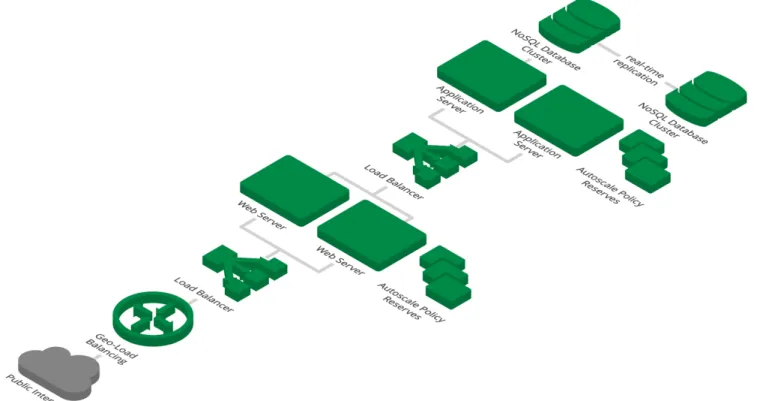
Cloud computing effectively changes the relationship between infrastructure and workloads that run on it. The workload becomes both portable and pipelined across infrastructure that is multi-tier and redundant by design. Figure 4 shows how this looks, with load balancers that route traffic between multiple application server and web server instances. These redundant web and application servers provide both additional capacity and failover. The steady state design workload for any single VM in this scenario may be as little as 50% or 60% of maximum capacity. Load balancers can be used to front-end both web server
clusters as well as application servers. At each level, load balancers will automatically redirect load to healthy instances in case availability issues arise. The goal is to ensure that there is always sufficient reserve capacity for failover in case another instance becomes unavailable.
Geo-Load Balancing is another approach. With Geo-Load Balancing, users reach web applications reliably and quickly, regardless of physical location. Administrators can direct traffic based on several scenarios including user geography and available capacity. CenturyLink Cloud offers this capability.
Figure 4 - Cloud architecture, including load balancers.
When a Hybrid IT system runs processes that consume a large amount of system resources (e.g. CPU and memory), it often makes sense to employ multiple servers to distribute the work instead of constantly adding capacity to a single server. In addition to gaining failover capacity, using multiple instances or machines for each tier in an application provides a simple path to supporting larger workloads or handling more requests.
For example, consider a website where people can register for a new, paid service. The system has to perform a fraud
for the new user. A “new user signup” message is placed in a queue, and a set of servers is tasked with reading data from the queue and processing the request. If the number of signups spikes, these worker nodes can get overwhelmed and the new customers will be stuck waiting for their signup confirmations. The best practice to avert this outcome is to scale systems dynamically with usage. However, you run the risk of over-provisioning (and over-spending) if you only plan for maximum load. It is possible to adjust capacity manually, but this is not optimal. The recommended practice is to set your environment
Best Practice: Horizontal Auto Scaling
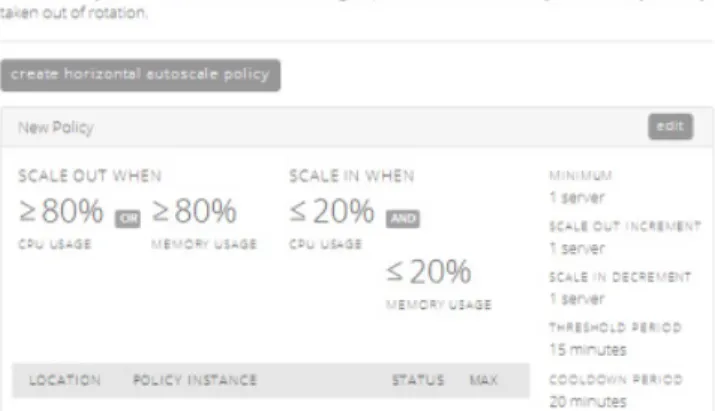
Horizontal autoscaling involves adding or removing virtual servers from a defined pool. With horizontal auto scaling, your application can respond to changes in demand or load within minutes. It will automatically accommodate peak traffic and unforeseen demand. With this approach, you can define an autoscale policy that specifies when new servers will be added or deleted based on changes in application load. Figure 5 shows how CenturyLink Cloud’s Control Portal enables you to create such a policy. In this case, the admin has set the environment to scale out when CPU or memory usage goes over 80%. The threshold period represents a sliding window time fame used to buffer changes which keeps the system from reacting to short-lived usage spikes.Figure 5 - CenturyLink Cloud’s Horizontal Autoscale interface with an Autoscale policy setting – scale out when CPU or memory usage exceeds 80%.
Best Practice: Vertical Autoscaling
Vertical Auto scaling involves adding horsepower to existing servers instead of adding additional servers as you would with Horizontal Auto scaling. The choice between horizontal and vertical auto scaling will depend on the specific use case. Both can be used to accommodate changing demand scenarios. In some cases, it will not be possible to add new instances of components to cloud-based or hybrid applications. For example, when a database supports stateful web-database applications, it may not be feasible to quickly add new database instances due to the sheer volume of data involved. It is also common to run databases on hardware that is optimized for the specific dataset and workload.Observing conventions used to maintain referential integrity further constrain adding new database servers. Examples include synchronization of data between servers or partitioned indexes where each machine handles requests for a limited range of user or items. In these cases, vertical autoscaling enables compute instances to be scaled up for greater capacity as singular units without introducing new instances. This matters because relational databases work in multi-server configurations, but each server may have significant resources allocated to it and they may divide and conquer large data set management in creative ways. In the case of databases which are specialized or customized to meet specific needs, adding more CPU/memory/storage to a given server is a perfectly viable way to handle new demand.
CenturyLink Cloud’s Vertical Autoscaling Policy can be used to reduce CPU resources assigned to an instance once server load has declined. The Vertical Autoscaling Policy will automatically remove unneeded CPU capacity and reboot the server during a time window set for minimal impact within the policy. This is a powerful way to take advantage of cloud elasticity without rebuilding your existing applications for horizontal scale. Figure 6 shows the interface for setting Vertical Autoscale policies. Schedule-based scaling is another variant of the autoscaling approach to managing load. In a seasonal business, for example, it is often a good practice to schedule the scaling up and down of resources in advance of actual loads. A scaling schedule can
be created in advance of actual loads that gives you the ability to anticipate scaling events and accommodate them in advance. A scaling event may require careful planning and manual resizing because of the complexity of the target application. Consider the potential for unintended consequences if you were to automate the resizing of your NoSQL database, cache cluster, or mission critical line of business system whenever a heavy load is
detected. While manual scaling is sometimes preferred, ideally, your cloud platform provides options to streamline manual processes. For instance, with CenturyLink Cloud user-defined scripts or system “Blueprints”, can give you the ability to initiate your scaling manually while still benefiting from automation. The series of steps required to scale a deployment can be scripted so that the sequence of events required is a push button exercise.
Best Practice: Managing HA and Storage
Storage is another factor that affects HA in a hybrid environment. The best practice is to make sure that your cloud applications have storage that’s explicitly architected for fault-tolerance. Some cloud architectures offer storage that’s directly attached to the VM. When the VM goes down or is taken out of service, this “Temporary VM Storage” goes away and is typically not recoverable. The architect should think through how application state is persisted in the event of VM failure and how VM data output will be captured and forwarded to non-volatile storage so that results are not lost when an instance goes down.
To avoid such availability challenges, it is recommended that you rely on persistent block storage or object storage and map out a volume plan so that the storage is efficiently provisioned. The storage options from the cloud provider should ideally enable block volumes that can be sized in discrete units to avoid
overprovisioning. Block Storage should be backed by Storage Area Networks (SANs) or equivalent, “striped” across multiple RAID drives and mirrored within the RAIDs. This way, even if multiple RAIDs fail, you will not lose your data. Your cloud platform should provide storage which reliably maintains your data even when virtual machines fail.
Object Storage provides a way to store diverse digital assets in a highly available, secure, shared repository. Object Storage has multiple levels of redundancy built in. Within a given data center, the best practice is to replicate your data across multiple machines. In addition, you should consider replicating data to a sister cluster in another facility. Users can then trust that data added to Object Storage will be readily available even when faced with unlikely node or data center failures.
Conclusion
Hybrid IT presents new challenges for system managers, developers and architects who need to ensure high availability while taking advantage of the flexibility offered by Hybrid IT. As connections and dependencies stretch from familiar on-premises data centers to potentially multiple cloud instances, risks and dependencies need to be evaluated understood and sometimes mitigated. The good news is that solutions and practices for HA in Hybrid IT have emerged in parallel. Today, everyone has access to a global interconnected grid of data centers on which to build applications that can achieve true high availability. Stakeholders are no longer constrained to a single region.
Addressing the challenges of HA in Hybrid IT is inherently multi-disciplinary. IT managers tasked with HA in a hybrid environment need to consider server location, redundancy, load balancing, storage and network factors that affect availability and response times. Best practices recommend assessing your specific hybrid architecture in the context of seemingly familiar issues such as server performance. They all need a second look, as actual system behavior in the cloud can be different from what is expected or actually needed. Then, with the kind of specific guidance offered in this brief, you can calibrate your hybrid environment to deliver the SLAs you require.
About CenturyLink Business
CenturyLink, Inc. is the third largest telecommunications company in the United States. Headquartered in Monroe, LA, CenturyLink is an S&P 500 company and is included among the Fortune 500 list of America’s largest corporations. CenturyLink Business delivers innovative private and public networking and managed services for global businesses on virtual, dedicated and colocation platforms. It is a global leader in data and voice networks, cloud infrastructure and hosted IT solutions for enterprise business customers.
For more information visit www.centurylink.com/enterprise.
About the Authors
This best practices guide was authored by the cloud product team at CenturyLink including Jim Battenberg, Jared Ruckle, Richard Seroter and Kevin Yurica. For more best practices in cloud and hybrid IT, follow these CenturyLink Cloud experts on the CenturyLink Cloud blog at https://www.centurylinkcloud.com/blog. Interested in seeing how CenturyLink puts these best practices to work? Sign up for a free 30 day trial.
Global Headquarters
Monroe, LA (800) 728-8471
EMEA Headquarters
United Kingdom +44 (0)118 322 6000
Asia Pacific Headquarters
Singapore +65 6591 8824
Canada Headquarters
Toronto, ON 1-877-387-3764