Proceedings of the
Fourth International Workshop on Formal Methods
for Interactive Systems
(FMIS 2011)
On formalising interactive number entry on infusion pumps
Paolo Masci, Rimvydas Rukˇs˙enas, Patrick Oladimeji, Abigail Cauchi, Andy Gimblett, Yunqiu Li, Paul Curzon, Harold Thimbleby
15 pages
Guest Editors: Judy Bowen, Steve Reeves
Managing Editors: Tiziana Margaria, Julia Padberg, Gabriele Taentzer
On formalising interactive number entry on infusion pumps
Paolo Masci1∗, Rimvydas Rukˇs˙enas1, Patrick Oladimeji2, Abigail Cauchi2, Andy Gimblett2, Yunqiu Li2, Paul Curzon1, Harold Thimbleby2
1Queen Mary University of London
School of Electronic Engineering and Computer Science
2Future Interaction Technology Lab
Swansea University, www.fitlab.eu
Abstract: We define the predictability of a user interfaceas the property that an idealised user can predict with sufficient certainty the effect of any action in a given state in a system, where state information is inferred from the perceptible output of the system. In our definition, the user is not required to have full knowledge of a history of actions from an initial state to the current state. Typically such definitions rely on cognitive and knowledge assumptions; in this paper we explore the notion in the situation where the user is an idealised expert and understands perfectly how the device works. In this situation predictability concerns whether the user can tell what state the device is in and accurately predict the consequences of an action from that state simply by looking at the device; normal human users can certainly do no better.
We give a formal definition of predictability in higher order logic and explore how real systems can be verified against the property. We specify two real number en-try interfaces in the healthcare domain (drug infusion pumps) as case studies of predictable and unpredictable user interfaces. We analyse the specifications with respect to our formal definition of predictability and thus show how to make unpre-dictable systems preunpre-dictable.
Keywords:Higher Order Logic, SAL, Interactive System Design, Predictability
1
Introduction and motivation
Interactive devices have a wide range of application domains, each of which has different require-ments and constraints. For instance, interactive systems used for entertainment (e.g., gaming consoles) need interfaces that assist users’ prompt adjustment on actions and decisions, gen-erally aiming for zero-latency response. On the other hand, in safety critical contexts such as healthcare and air traffic control, preventing (or recognising and managing) human errors and avoiding cognitive overload are driving factors in interactive system design.
In the present paper, we focus on number entry user interfaces for drug infusion pumps, an example of “simple” systems that need to be carefully designed in order to avoid unnecessary hazards that may lead to harm, in this case possibly to patient harm, even death, potentially following user error. Drug infusion pumps are interactively “programmed” to deliver controlled
volumes or rates of drugs for therapy. Infusion pumps are used in hospital wards, and some may be used in the patient’s home. An important consideration is that nurses often get interrupted from their work, including when setting up devices.
If a nurse makes an error in setting up an infusion, it can cause severe harm to the patient, and potentially death. A typical problem is that a nurse may enter a number ten times to large, for example 50 mg per hour of morphine instead of 5 mg per hour, and this would be hazardous. However, under-dosing is also a problem: if a patient receives too little of a drug, their recovery may be delayed or they may be in unnecessary pain. Such errors, unfortunately, are not rare. A recent bulletin from the UK government agency MHRA (UK Medicines and Healthcare products Regulatory Agency), which is responsible for ensuring that medicines and medical devices work, reports that between the years 2005 and 2010 there were more than one thousand incidents in-volving infusion pumps alone in the UK, and several errors were due to number entries [Med10] (this is likely to be under-reported); examples include setting the wrong rate, confusing primary and secondary rates, and not confirming the set rate or the configuration.
Nurses are usually interrupted while they carry out their tasks. There is empirical evidence that interruptions have a disruptive impact on people’s performance and reliability [TM07] that must be taken into account when designing interactive systems for safety-critical application contexts, such as emergency rooms and hospitals [TS06]. If nurses are interrupted while setting up an infusion, they need to stop their task, turn their attention to the interrupting task, and then resume the infusion task. If the pump interface does not show enough information to enable nurses to determine the exact device state, then nurses may fail to correctly resume the task, and an incorrect dosage input might be entered — for example, because they think they completed a step, and upon resumption they actually skip that step. Also, if nurses are aware of this potential threat, they may try to apply workarounds, such as resetting the number entry system and starting over again. Such workarounds considerably slow down the number entry task, but may also result in new issues, for instance, as a side-effect by resetting other parameters of the device, such as the unit of measurement.
There are many factors contributing to the low predictability of interactive medical devices. The ever-increasing functionality constrained within the limited physical dimensions tends to push developers to overload the functionality of a single user interface element. For instance, the UP button, which is typically used to increase the infusion rate, may also be used to provide other functionality in some device modes. However, though the outcome of this mode-dependent functionality will affect future interaction, its different meanings or the confirmation of its exe-cution might not be readily visible to the user in any way. Thus, it makes it difficult for the user to tell what the current state of the system is or to plan future actions.
accurate: to be systems that are consistently predictable.
In this paper, we explain how formal methods helped us to check whether device designs are predictable. Specifically, we present a formal definition of predictability, and we discuss how it can be checked on a device specification. To trial our ideas, we formally specify two real infusion pumps, the Alaris GP and the B-Braun Infusomat Space (current models, 2011), and we use the Symbolic Analyser Laboratory (SAL) model checker to verify the predictability property. The general style of user interface is common to many such devices.
We show that predictability, as defined, does not hold for the B-Braun pump, and we pro-pose some design modifications that correct the identified problems. We note that failure of predictability is not necessarily in itself a criticism of any design. There are many trade offs in design, and loss of predictability because of the presence of other features may be less important in practice than the value of the other features to the user. Indeed there may be better definitions of predictability than we consider in this paper.
The point of the paper, however, is to show that plausible safety-critical properties can be defined, that real devices can be very effectively analysed for their compliance to such properties, and that problems can be precisely identified and hence fixed. Our definition of predictability is taken from the HCI research literature, so it is a meaningful property, and it is clear that loss of predictability as we define it will increase specified hazards in operation. Whether those hazards are somehow compensated for by other design features is an important question that lies beyond the scope of the present paper.
2
Definitions of predictability
Predictability is an example of a formalisable user interface design principle that we intend to be generative, that is to capture relevant human factors concerns in such a way that software engineering can implement systems that are effective relative to those concerns [Thi85]. The interesting research questions, at their most general, are how to have something that is formally tractable, delivers critical insights to designers and evaluators, and is consistent with human factors priorities.
Several definitions of predictability have been presented in the literature when considering interactive devices. In this paper, we are concerned with the case of experienced, skilled users with essentially correct mental models of the device. We aim to check that if such users look at the device and see that it is in a particular display state, then they can predict the next display state of the device if a button is pressed. This seems to be a necessary requirement to use a device safely, certainly without experimenting and relying on an undo operation. In particular, the concern with an idealised expert user means that, if predictability fails, any user equal or less experienced than the ideal (that is, any normal human user) will certainly be unable to predict the next state — thus the definition is conservative. Our approach is similar to Rushby’s work on mode confusion [Rus02]: Rushby compared a specification of the MD-88 aircraft autopilot system with the mental model created by its users for discovering possible sources of mode confusion. In contrast to Rushby, we assume that the idealised user has a precise mental model, that is the user has a correct and complete knowledge of the device functionality.
definitions.
Following [Thi84,TH85], Abowd et al, in [ACN92], definepredictabilityin terms of whether the effect of future actions can be determined based on knowledge of the past history of actions:
Predictability — support for the user to determine the effect of future action based on past interaction history.
This is a wider definition than we address here, as we assume no knowledge of the history but complete knowledge of the system model; in contrast Abowd et al’s definition is concerned with the learnability of an interface, whereas we are concerned with expert users. Also, they draw the distinction between deterministic behaviour and predictability. The former is a system property whereas the latter is a user-centred concept. The restricted version of predictability we consider is not simply deterministic behaviour as we need it also to be a user-centred property. However, Abowd et al also link the concept of predictability to that ofoperation visibility:
Operation visibility refers to the rendering of operations in a way that expresses their availability in the current state. If an operation can be performed, then there must be some perceivable indication of this to the user.
They also discuss the property ofobservability:
Observability allows the user to evaluate the internal state of the system from the perceivable representation of that state. State evaluation allows the user to compare the current observed state with the state intended in the action plan, possibly leading to a plan revision.
This is a wider property than we consider, consisting of properties of browsability (the system allows the person to explore the interface to work out what is best to do), default-ness (providing default values), reachability and persistence.
Dix [Dix91] also considers related topics formalised within the PIE framework and discusses various forms of predictability. His core notion of predictability corresponds closely to the con-cept we consider here.
Predictability — can we work out from the current effect what the effect of future commands will be? This can be thought of as the “gone for a cup of tea” problem. When you return and have forgotten exactly what you typed to get where you are, can you work out what to do next?
Dix makes the distinction that the simplest form of predictability involves being able to tell where you are only from the state of the current persistent output of the device, such as what is on the screen. He suggests that more complex forms of predictability assume the presence of a user, for example to explore the interface. This leads to his definition of observability which essentially corresponds to Abowd et al’s notion of observability.
How should the user go about examining the system? [. . . ] Predictability can be viewed as a special case of observability when we are interested in observing the entire state as it affects subsequent interaction.
In particular, Dix argues that predictability should not be based on the full system state but on the state as (potentially) perceived by the user: a monotone closure of the system state.
3
Formal specification of number entry systems
We now develop a formal specification of the number entry systems of two real medical devices: the Alaris GP [Hea06], and the B-Braun Infusomat Space [B-B] infusion pumps. The specifica-tion is given in higher-order logic: we model informaspecifica-tion relevant to the display of the device as device states, and we specify device functionality using transition functions over device states. In our specification, we take into account the real values displayed by the devices, and the real action-effect relation of button presses. The higher-order logic specification language we use is that of the Symbolic Analysis Laboratory SAL [MOR+04], which is based on typed higher-order logic, and includes, among others, function, tuple, and record type constructors for the definition of new types. The function type with domain typeDand range typeRis denoted[D -> R]. Function, tuple, and record types can be dependent, that is the range of a function, or the type of a component of a tuple or record, may depend on the value of a function argument, or on the value of another component.
The specifications below have been obtained by reverse-engineering the real devices based using interaction walkthrough [Thi07]. We thus reverse engineered the specifications used below from the user documentation together with careful manual exploration of the actual devices and repeating until we had accurate specifications. We admit that this approach is potentially error-prone, but even so, the design and formal issues raised are real, and the complexity and level of detail of the specifications is certainly equal to real systems even if they have minor errors. Even if there are minor errors, since we are professional computer scientists, our specifications will be better than any typical user’s understanding of the systems — our approach models idealised users well. (In principle, formal specifications could have been derived from the actual specifications of the devices if these were available, perhaps as provided by the manufacturers.) In particular, we are showing that our analysis and general approach can handle and provide insights into real systems of this sort of complexity.
3.1 Alaris GP
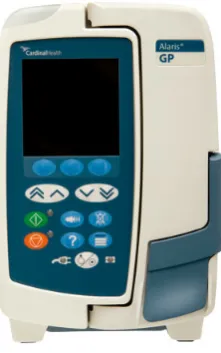
The number entry subsystem of the user interface on the Alaris GP has four buttons. A pair of buttons is used to increase the value displayed and a second pair is used to decrease the value displayed. In each pair of buttons, one of the buttons causes a change ten times bigger than the change caused by the other button. Typically, clicking either single chevron (arrow) key changes the last digit of the value displayed and clicking either double chevron key changes the second to last digit of the value displayed.
Figure 1: Alaris GP programmable infusion device.
buttons on the device interface: functionalaris upmodels the small step increase button press; functionalaris UPmodels the big step increase button press; functionsalaris dnandalaris DN
model the small step and big step decrease buttons press. In the specification, we use type alaris realfor defining the domain of the numbers handled by the device in the rate mode (alaris real: TYPE = {r: nonneg real | r <= max}, where max is a sym-bolic constant representing the maximum real number handled by the device, and function trim for enforcing that the number resulting from the button presses is within the bounds of alaris real, that is,trim(x)returns xif 0≤x≤max, otherwise the function returns ei-ther 0 (ifx<0) ormax(ifx>max).
alaris upThe function increases the number shown on the display of the device according to the following rules: if the number on the display is below one hundred, then the fractional part of the number is increased to the next decimal (e.g., if the display shows 9.1 and the small increase button is pressed, then the display becomes 9.2); if the number is between one hundred and one thousand, then the unit digit of the number is increased to the next unit digit (e.g., if the display shows 123 and the small increase button is pressed, then the display becomes 124); if the number is above one thousand, then the tens digit of the number is increased to the next tens digit (e.g., if the display shows 1080 and the small increase button is pressed, then the display becomes 1090). The specification of the function follows.
alaris_up(val: alaris_real): alaris_real =
IF val < 100 THEN trim( (floor(val*10) + 1) / 10 )
ELSIF val >= 100 AND val < 1000 THEN trim( floor(val) + 1 )
ELSE trim( (floor(val/10) + 1) * 10 )
alaris dnThe function decreases the number shown on the display of the device according to rules that are almost symmetric to those of thealaris up button: if the number on the display is below one hundred, then the fractional part of the number is decreased to the next decimal (e.g., if the display shows 9.1 and the small decrease button is pressed, then the display becomes 9); if the number is between one hundred and one thousand, then the unit digit of the number is decreased to the next unit digit (e.g., if the display shows 123 and the small decrease button is pressed, then the display becomes 122); if the number is above one thousand, then the tens digit of the number is decreased to the next tens digit (e.g., if the display shows 1080 and the small decrease button is pressed, then the display becomes 1070). The specification of the function follows.
alaris_dn(val: alaris_real): alaris_real =
IF val < 100 THEN trim( (ceil(val*10) - 1) / 10 )
ELSIF val >= 100 AND val < 1000 THEN trim( ceil(val) - 1 )
ELSE trim( (ceil(val/10) - 1) * 10 ) ENDIF;
alaris UPThe function increases the number shown on the display of the device according to rules that are similar to those of thealaris upbutton: if the number on the display is below one hundred, then the number is increased to the next unit digit (e.g., if the display shows 9.1 and the big increase button is pressed, then the display becomes 10); if the number is between one hundred and one thousand, then the tens digit of the number is increased to the next tens digit (e.g., if the display shows 123 and the big increase button is pressed, then the display becomes 130); if the number is above one thousand, then the hundreds digit of the number is increased to the next hundreds digit (e.g., if the display shows 1080 and the big increase button is pressed, then the display becomes 1100). The specification of the function follows.
alaris_UP(val: alaris_real): alaris_real =
IF val < 100 THEN trim( floor(val) + 1 )
ELSIF val >= 100 AND val < 1000 THEN trim( (floor(val/10) + 1) * 10 )
ELSE trim( (floor(val/100) + 1) * 100 ) ENDIF;
alaris DNThe function decreases the number shown on the display of the device according to rules that are similar to those of thealaris dnbutton: if the number on the display is below one hundred, then the fractional part of the number is decreased to the next unit digit (e.g., if the display shows 9.1 and the big decrease button is pressed, then the display becomes 9); if the number is between one hundred and one thousand, then the tens digit of the number is decreased to the next tens digit (e.g., if the display shows 123 and the big decrease button is pressed, then the display becomes 120); if the number is above one thousand, then the hundreds digit of the number is decreased to the next hundreds digit (e.g., if the display shows 1080 and the big decrease button is pressed, then the display becomes 1000). The specification of the function follows.
alaris_DN(val: alaris_real): alaris_real =
IF val < 100 THEN trim( ceil(val) - 1 )
ELSIF val >= 100 AND val < 1000 THEN trim( (ceil(val/10) - 1) * 10 )
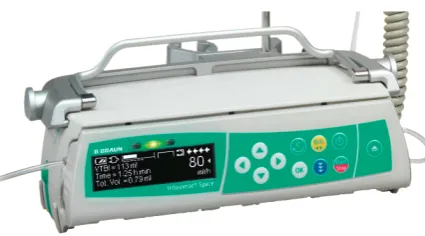
Figure 2: B-Braun Infusomat Space programmable infusion device.
3.2 B-Braun Infusomat Space
The B-Braun Infusomat Space’s number entry interface has four buttons (see figure2). The left and right buttons are used to change the cursor position. The left button increases the cursor position and the right button decreases the cursor position. The cursor is at position 0 when it selects the unit value on the number displayed. The up and down buttons increase or decrease the current number by 10cursorPositionrespectively. The device has an auxiliary memory for restoring the last displayed value when the button presses cause overshooting the maximum or the minimum values handled by the device.
In the specification each function describes the action-effect of pressing one of the four ar-row buttons on the device interface: functionsbbraun up andbbraun dn model the effect of pressing the up and down buttons; functionsbbraun lf andbbraun rtmodel the effect of press-ing the left and right navigation button. In the specification, we use type bbraun realfor defining the domain of the numbers handled by the device (bbraun real: TYPE = {r: nonneg real | r <= 99999}), and we use the structured typeState for defining the minimal information needed for specifying the behaviour of the device. The state includes three fields: current display value (display), current cursor position (cursorPosition), and content of the memory (memory). In the specification, we use the constantNAfor specifying a clear memory.
bbraun upThe function modifies the value of the number shown on the display of the device according to the following rules: if the value currently displayed by the device plus 10cursorPosition overshoots the maximum value, then the display value is stored in memory and the display gets updated with the maximum value, 99999 (e.g., when the display shows 90010 and the cursor is on the ten thousands digit, if the up button is pressed then the value 90010 is stored in memory and the display shows 99999); if the value currently displayed by the device plus 10cursorPositiondoes not overshoot the maximum value, the functionality of the up button depends on the content of the device’s memory — if the memory contains a number, then the up button acts as arecall memory
bbraun_up(st: State): State = LET val:bbraun_real = display(st),
i:cursor = position(st),
mem:bbraun_real = memory(st) IN LET new_val:real = val + pow10(i) IN
IF new_val > max THEN (max, i, val) ELSE % new_val <= max
IF valid?(mem)
THEN (value(mem), i, NA)
ELSE (new_val, i, NA) ENDIF ENDIF;
bbraun dnThe function modifies the value of the number shown on the display of the device according to rules that resemble a specular behaviour with respect to those of the up button: if the value currently displayed by the device minus 10cursorPositionovershoots the minimum value and the cursor is on a digit of the integer part of the number, then 10cursorPositionis stored in memory and the display gets updated with a default minimum value (e.g., when the display shows 10 and the cursor is on the thousands digit, if the down button is pressed then the value 1000 is stored in memory and the display shows 0.1); if the value currently displayed by the device minus 10cursorPosition overshoots the minimum value and the cursor is on a digit of the fractional part of the number, then the display becomes 0; if the value currently displayed by the device minus 10cursorPositiondoes not overshoot the minimum value, the functionality of the down button depends on the content of the device’s memory — if the memory contains a number, then the down button acts as arecall memorybutton (e.g., if the memory contains 910, the action of pressing the down button will display 910, regardless of the number shown on the display1), otherwise the displayed number is decreased by 10cursorPosition. The specification of the function follows.
bbraun_dn(st: State): State = LET val:bbraun_real = display(st),
i:cursor = position(st),
mem:bbraun_real = memory(st) IN
IF val = 0 THEN st
ELSE LET new_val:real = val - pow10(i) IN
IF new_val < 0 THEN
IF i = 4 OR i = 3 THEN (1, i, pow10(i))
ELSIF i >= 0 AND i < 3 THEN (0.1, i, pow10(i)) ELSE (0, i, NA) ENDIF
ELSE % new_val >= 0
IF valid?(mem)
THEN (value(mem), i, NA)
ELSE (new_val, i, NA) ENDIF ENDIF
ENDIF;
bbraun lfThe function moves the cursor one position to the left and acts asclear memorybutton. Specifically, if the cursor position is not on the most significant (integer) digit and the left button is pressed, then the cursor moves left one position and the device memory is cleared; otherwise,
1Due to the constraints imposed by the functionalities of the other buttons, the down buttonmayact as recall memory
the left button is disabled (i.e., any left button press does not change the device state in this situation). The specification of the function follows.
bbraun_lf(st: State): State =
LET val:bbraun_real = display(st),
i:cursor = position(st),
mem:bbraun_real = memory(st) IN IF i < 4 THEN (val, i + 1, NA) ELSE % i = 4
(val, i, mem) ENDIF;
bbraun rtThe function has a behaviour which is symmetric to that of the left button. Specif-ically, if the cursor position is not on the least significant (fractional) digit and the right button is pressed, then the cursor moves one position to the right and the device memory is cleared; otherwise, the right button is disabled. The specification of the function follows.
bbraun_rt(st: State): State = LET val:bbraun_real = display(st),
i:cursor = position(st),
mem:bbraun_real = memory(st) IN
IF i > -2 THEN (val, i - 1, NA) ELSE % i = -2
(val, i , mem)
ENDIF;
4
Analysis
Predictability in the sense we are considering concerns whether it is possible to tell the state that the device is in from the interface model. A device is not predictable if from information visible to the user on the interface there is more than one possible state it could move to as a result of some action. To analyse predictability in SAL, we specify two models: a device model and a prediction model. The device model is a specification on the interface level of how the device is programmed. The prediction model is a specification of what users might expect, based on the display information and the complete mental model of the device. Intuitively, a device is then predictable, if the device and prediction models match, where matching means that the values of the corresponding variables in the device and prediction models are equal in all the reachable states of the device.
To illustrate our approach, we describe below the analysis carried out on the B-Braun number entry model. We start by specifying in SAL the device model of its number entry system. Our specification is the following state transition system:
device : MODULE =
BEGIN
INPUT event: Event
GLOBAL st: State INITIALIZATION
TRANSITION
[ event = up --> st’ = bbraun_up(st)
[] event = dn --> st’ = bbraun_dn(st)
[] event = lf --> st’ = bbraun_lf(st) [] event = rt --> st’ = bbraun_rt(st)
] END
The transition system is initialised so that the value displayed is0, the cursor is in the position
0and the memory is clear. The input variableeventrepresents button presses (up, dn, lf, rt). Each guarded command specifies a state transition that is triggered by the corresponding event (primed variables represent new values). Thus, our model devicegenerates all possible sequences of button presses and the associated changes of the device state derived from a specific initial state. The prediction model is a reduced version of the device model. Its specification is as follows:
prediction : MODULE =
BEGIN
INPUT event: Event
INPUT st: State
OUTPUT predicted: bbraun_real INITIALIZATION
predicted = display(st); TRANSITION
[ event = up --> predicted’ =
LET new_val:real = display(st) + pow10(position(st)) IN IF new_val > max THEN max ELSE new_val ENDIF
[] event = dn --> predicted’ =
LET val:bbraun_real = display(st), i:cursor = position(st) IN
LET new_val:real = val - pow10(i) IN IF val = 0 THEN 0
ELSIF new_val >= 0 THEN new_val ELSIF i = 4 OR i = 3 THEN 1
ELSIF i >= 0 AND i <= 2 THEN 0.1 ELSE 0 ENDIF
[] ELSE --> predicted’ = display(st)
] END
The variable predicted represents a new value that users would expect to be displayed as a result of a button press. The modelpredictionabstracts away the hidden state (memory) of the device. Thus, the calculation ofpredictedis based solely on what is on display. Otherwise, it is done according to the same rules as specified bybbraun upandbbraun dn. This captures our assumption that the user has a complete mental model of the device.
Now, we can check whether both models match with respect to the number value. If they don’t (i.e., there exists a system state wheredisplay(st)andpredicteddiffer), we say that the device is unpredictable. Formally, this is specified in SAL as follows:
system: MODULE = device || prediction;
The modelsystemis a synchronous composition of thedeviceandpredictionmodels, which means that their transition systems are merged so that a transition is performed by both models in each step of the combined system. The LTL property predictable states that the predicate
display(st) = predictedis an invariant, that is, it holds in all system states.
The verification of this property with SAL fails for the B-Braun. The counter example gener-ated by the tool shows that, starting from the initial state withdisplay(st) = 0, the sequence of button pressesup, lf, dn, up leads to the system state withdisplay(st) = 10, which corresponds to what the real device produces for this input sequence: starting from(0, 0, NA), by pressing the up button, the device state changes into(1, 0, NA): the number on the display is incremented by 1; then, by pressing the left button, the state changes into(1, 1, NA): the cursor highlights the tens digit; by pressing the down button, the device overshoots the minimum value (1−10<0), and the new state is(0.1, 1, 10): the display shows the minimum value (0.1) and stores 10 (i.e.,
pow10(cursorPosition)) in memory; finally, by pressing the up button, the state becomes(10, 1, NA): the up button recalls and clears the memory.
However the value the user would expect is different:predicted = 10.1. Indeed, if we calculate the next value by using the information displayed by the pump, we get the following sequence of displayed values. Starting from 0, by pressing the up button, the device goes to 1; the left button press moves the cursor to the tens digit. Then, the down button press causes an overshoot of the minimum value (1−10 is a negative number), and the device displays a minimum default value, which is 0.1 in this case. At this point, the cursor is still selecting the tens digit; hence, by hitting the up button, the user would expect 10.1 (10+0.1).
Thus, the above example indicates that our formalisation allows the detection of issues related to predictability of interfaces of real-world safety-critical interactive systems. We have checked the same property for the specification of the Alaris pump, and such a specification doesn’t have such predictability issues. Below, we discuss several candidate solutions to the problem of B-Braun, and formally verify whether they indeed solve it.
4.1 Possible solutions to the B-Braun Issues
We now propose three possible solutions to overcome the predictability issues of the B-Braun infusion pump. For each proposed solution, we checked with SAL that the predictability property holds.
1. Don’t use memory. This reduces the functionality of the device at the boundary cases where the device becomes unpredictable. As a result a user would always be able to predict with certainty the consequence of an action just by looking at the device. The predictability of the device is confirmed by the formal verification of the property
predictablefor the modified device model so that it does not include memory. However, this solution means that the possible perception that the up button undoes the action of the down button breaks at these boundary cases.
should be used for that purpose (e.g., the C button). Again, we modified the device model so that it displays the memory when the latter is not empty. The prediction model was also modified so that it uses the displayed information to calculate the predicted value. The formal verification confirms that the propertypredictableholds in this case.
3. Avoid overshooting by ignoring the button presses that cause overshooting. This should generally be coupled with audible/visual feedback to signal that the button press has been ignored. This solution implies that setting the max and min values on the interfaces would require more effort from the user but with the possible consequence that they are more aware of setting values at these boundaries. This solution supports the classic user interface design principle of making critical actions more difficult to perform [Nor02,Nor83].
5
Discussion and conclusions
Even something as simple as number entry with four up/down/left/right keys is more complex than it appears.
It is plausible that the manufacturers write programs to handle button presses and adjust num-bers without using formal methods such as this paper demonstrates; whatever software develop-ment process is employed, it evidently results in acceptable functionality, as the devices we have examined are widely used. Yet when the devices are closely examined, there are many bound-ary cases where interactive functionality seems awkward; this compromises the predictability of the devices, and hence may lead to unnecessary hazards in use. We have stressed that whether those hazards are balanced by the possible benefits of predictability-compromising features is an essentially empirical question beyond the scope of the present paper. The fact that the present paper’s analysis raises such design questions is an important benefit of the approach.
Our modelling shows that formal methods can be conveniently used for studying predictability of non-trivial user interfaces: on the one hand, the mere exercise of building a formal specifica-tion of the interface gave us useful insights on possible design issues, even before performing the analysis with the model checking tool; on the other hand, the formal tool enabled us to ex-plore all possible behaviours, thus allowing us to exex-plore the validity of the proposed design modifications.
The increasing demand for advanced functionality forces single devices to be used for a wide variety tasks, but under the fixed physical constraints of the devices. It is understandable that over time users (or organisations) would require more sophisticated interactive systems that assist their varied tasks. However, the required generality introduces inconsistent behaviour to the user interface, which is sometimes an obstacle to the user’s mental model development. In addition, even if users have a complete and sound mental model of the system, the increasing number of hidden states that are inevitable with general-purpose systems makes it harder for them to predict the consequences of their actions.
system state also demand high level information presentation, which could potentially lead to cognitive system overload.
In future, we plan to develop use empirical evaluation and hence develop an evidence-based balance between predictability and functionality.
Acknowledgements: Funded as part of the CHI+MED: Multidisciplinary Computer-Human Interaction research for the design and safe use of interactive medical devices project, EPSRC Grant Number EP/G059063/1, Formally-based tools for user interface analysis and design, EP-SRC Grant Number EP/F020031/1, and Extreme Reasoning, Grant Number EP/F02309X/1.
Bibliography
[ACN92] G. D. Abowd, J. Coutaz, L. Nigay. Structuring the Space of Interactive System Properties. InProceedings of the IFIP TC2/WG2.7 Working Conference on Engi-neering for Human-Computer Interaction. Pp. 113–129. North-Holland Publishing Co., Amsterdam, The Netherlands, The Netherlands, 1992.
http://portal.acm.org/citation.cfm?id=647103.717569
[B-B] B-Braun Melsungen AG. Infusomat Space and Accessory: Instruction for Use.
[Dix91] A. J. Dix.Formal methods for interactive systems. Computers and people series. Academic Press, 1991.
http://www.hiraeth.com/books/formal/
[Hea06] C. Health. Alaris GP Volumetric Pump: Directions For Use. 2006.
[Med10] Medicines and Healthcare products Regulatory Agency (MHRA). Device Bulletin, Infusion systems, DB2003(02) v2.0. November 2010.
http://www.mhra.gov.uk/Publications/Safetyguidance/DeviceBulletins/ CON007321
[MOR+04] L. de Moura, S. Owre, H. Ruess, J. Rushby, N. Shankar, M. Sorea, A. Tiwari. SAL 2. In Alur and Peled (eds.),Computer Aided Verification: CAV 2004. Lecture Notes in Computer Science 3114, pp. 496–500. Springer-Verlag, July 2004.
[Nor83] D. A. Norman. Design rules based on analyses of human error.Communications of the ACM26(4):254–258, 1983.
doi:http://doi.acm.org/10.1145/2163.358092
[Nor02] D. A. Norman.The Design of Everyday Things. Basic Books, New York, reprint paperback edition, 2002.
[Ras90] J. Rasmussen. The role of error in organizing behaviour.Ergonomics33:1185–1199, 1990.
[Rus02] J. Rushby. Using Model Checking to Help Discover Mode Confusions and Other Automation Surprises. Reliability Engineering and System Safety75(2):167–177, Feb. 2002. Available athttp://www.csl.sri.com/users/rushby/abstracts/ress02.
[TH85] H. Thimbleby, M. D. Harrison. Formalising Guidelines for the Design of Interactive Systems. In Cook and Johnson (eds.),Proceedings British Computer Society Con-ference on Human Computer Interaction, HCI’85. Pp. 161–171. Cambridge Univer-sity Press, 1985.
[Thi84] H. Thimbleby. Generative User-Engineering Principles for User Interface Design. In Shackel (ed.),Proceedings First IFIP Conference on Human Computer Interaction, INTERACT’84. Volume 2, pp. 102–107. 1984.
[Thi85] H. Thimbleby. In Shackel (ed.), Human-Computer Interaction — INTERACT’84. Pp. 661–666. North-Holland, 1985.
[Thi07] H. Thimbleby. Interaction Walkthrough: Evaluation of Safety Critical Interactive Systems. In Doherty and Blandford (eds.), DSVIS 2006, The XIII International Workshop on Design, Specification and Verification of Interactive Systems. Lecture Notes in Computer Science 4323, pp. 52–66. Springer Verlag, 2007.
[TM07] G. J. Trafton, C. A. Monk. Task Interruptions. Reviews of Human Factors and Ergonomics3:111–126(16), 2007.
doi:doi:10.1518/155723408X299852
http://www.ingentaconnect.com/content/hfes/rhfe/2007/00000003/00000001/ art00005
[TS06] A. L. Tucker, S. J. Spear. Operational Failures and Interruptions in Hospital Nursing.
Health Services Research41(3p1):643–662, 2006. doi:10.1111/j.1475-6773.2006.00502.x