http://www.sciencepublishinggroup.com/j/ajmcm doi: 10.11648/j.ajmcm.20170204.14
Newton’s Method for Solving Non-Linear System of
Algebraic Equations (NLSAEs) with MATLAB/Simulink
®
and
MAPLE
®
Aliyu Bhar Kisabo
1, *, Nwojiji Cornelius Uchenna
2, Funmilayo Aliyu Adebimpe
31
Department of Dynamics & Control System, Centre for Space Transport & Propulsion (CSTP), Lagos, Nigeria
2
Department of Marine Engineering, Fleet Support Unit BEECROFT, Lagos, Nigeria
3
Department of Chemical Propulsion System, Centre for Space Transport & Propulsion (CSTP), Lagos, Nigeria
Email address:
[email protected] (A. B. Kisabo)
*
Corresponding author
To cite this article:
Aliyu Bhar Kisabo, Nwojiji Cornelius Uchenna, Funmilayo Aliyu Adebimpe. Newton’s Method for Solving Non-Linear System of Algebraic Equations (NLSAEs) with MATLAB/Simulink® and MAPLE®. American Journal of Mathematical and Computer Modelling.
Vol. 2, No. 4, 2017, pp. 117-131. doi: 10.11648/j.ajmcm.20170204.14
Received: November 25, 2017; Accepted: December 7, 2017; Published: January 3, 2018
Abstract: Interest in Science, Technology, Engineering and Mathematics (STEM)-based courses at tertiary institution is on a
steady decline. To curd this trend, among others, teaching and learning of STEM subjects must be made less mental tasking. This can be achieved by the aid of technical computing software. In this study, a novel approach to explaining and implementing Newton’s method as a numerical approach for solving Nonlinear System of Algebraic Equations (NLSAEs) was presented using MATLAB® and MAPLE® in a complementary manner. Firstly, the analytical based computational software MAPLE® was used to substitute the initial condition values into the NLSAEs and then evaluate them to get a constant value column vector. Secondly, MAPLE® was used to obtain partial derivative of the NLSAEs hence, a Jacobean matrix. Substituting initial condition into the Jacobean matrix and evaluating resulted in a constant value square matrix. Both vector and matrix represent a Linear System of Algebraic Equations (LSAEs) for the related initial condition. This LSAEs was then solved using Gaussian Elimination method in the numerical-based computational software of MATLAB/Simulink®. This process was repeated until the solution to the NLSAEs converged. To explain the concept of quadratic convergence of the Newton’s method, power function of degree 2 (quad) relates the errors and successive errors in each iteration. This was achieved with the aid of Curve Fitting Toolbox of MATLAB®. Finally, a script file and a function file in MATLAB® were written that implements the complete solution process to the NLSAEs.Keywords: Newton’s Method, MAPLE
®, MATLAB®, Non-Linear System of Algebraic Equations
1. Introduction
The current decline in post-16 uptake of science, technology, engineering and mathematics (STEM) subjects is of great concern. The global consensus is that enrolment for STEM studies and / or carriers has been in decline for more than a decade.
One of the most frequently cited reasons for inspiring young people to enjoy STEM are good teaching. The need for quality teaching for students to become and remain engaged in STEM cannot be over emphasized. As such, innovative and inspirational teaching is needed now more
than ever to salvage the situation.
Perceived degree of difficulty-another commonly cited reason in the extensive body of literature associated with the switching young people off science is that STEM subjects are perceived to be more difficult to achieve good grades than in other subjects.
Another factor aiding the decline in STEM subjects is
unaccepted stereotypes about STEM. STEM, are associated with being ‘boring’ and the perceptions that those who enjoy or succeed in STEM subjects are, or might be, geeks or nerds. Also, STEM based subjects are not seen to be ‘funky’ [1].
software goes a long way to address the factors cited above responsible for the decline in STEM-based studies. Both MATLAB® and MAPLE® come with toolboxes and packages
respectively that ease a lot of the computation associated with STEM subjects. An added edge which they both have is powerful graphical visualization of results. This single ingredient has greatly increased the understanding of STEM-base subjects. The fact that certain scientific constants need not to be memorized anymore but can be easily called for as a built-in variable from such software is also a good omen for STEM studies. These, with a lot more have reduced the computational burden on the scientists.
Many STEM-based literatures have emerged that support this understanding. We are not advocating a complete substitution of the current methods of studying and teaching STEM-based subject. The crux here is to complement the existing methods. Taking a critical look into the future we can boldly say, ‘Software will not replace STEM-based teachers but teachers who do not use such software will soon be replaced by those who do.’
For example, MAPLE® is used for purely analytical
solution processes in [2, 3, 4]. While areas where numerical
results are needed, MATLAB® is employed [4, 5, 6, 7]. The combination of MATLAB® and MAPLE® was used to enforce understanding of both analytical and numerical
computations respectively in [8]. Though, both MATLAB® and MAPLE® are capable of analytical and numerical
computation independently, their specific potential is greatly harnessed when MATLAB® is used for numerical
computations and MAPLE® for analytical computation only. In this study we intend to explore the numerical strength of MATLAB®, and the analytical power of MAPLE® to aid in the understanding of the solution process of a NLSAEs using Newton’s method.
This paper is divided in to the following sections; section two defines terms associated with a system of nonlinear algebraic equations, discusses the solution nature so desired and the concept of convergence. In section 3, Newton’s method was introduced and all the steps involve in using this method to obtain solution to a NLSAEs were highlighted. Section four presents an example and shows how Newton’s method was applied using MATLAB® and MAPLE® to finally arrive at the required solution. Section five, presents error analysis using curve fitting toolbox of MATLAB to curve fit the errors from the numerical method used so far. Finally, in section 6, MATLAB® script and function files
were written that implemented the Newton’s method for the NLSAEs. Section seven concludes the study. A Laptop with RAM 6.00GB, Intel(R) Core(TM) i5-2430M CPU @ 2.40GHz, with windows 7, running MATLAB R2016a and MAPLE 2015 versions was used throughout this study.
2. Nonlinear Algebraic Equations
Restricting our attention to algebraic equations in one unknown variable, with pen and paper, one can solve many types of equations. Examples of such equations are, ax+b =
0, and ax2+bx+c=0. One may also know that there are formulas for the roots of cubic and quartic equations too. Maybe one can do the special trigonometric equation sinx + cosx = 1 as well, but there it (probably) stops. Equations that are not reducible to one of those mentioned cannot be solved by general analytical techniques. This means that most algebraic equations arising in applications cannot be treated with pen and paper!
If we exchange the traditional idea of finding exact solutions to equations with the idea of rather finding approximate solutions (numerical), a whole new world of possibilities opens up. With such an approach, we can in principle solve any algebraic equation [9].
An equation expressed by a function f as given in (1) is defined as being nonlinear when it does not satisfy the superposition principle as given in (2),
: n
f ℝ →ℝ (1)
(
1 2)
( ) ( )
1 2f x + +x ⋯ ≠ f x + f x +⋯ (2)
where
(
1, 2,⋯)
ℝnn
x x x ∈ and each fi is a nonlinear real
function, i = 1,2,…, n.
A system of nonlinear equations is a set of equations expressed as the following:
(
)
(
)
(
)
1 1 2
2 1 2
1 2
, , 0,
, , 0,
, , 0,
⋯ ⋯ ⋮
⋯
n
n
n n
f x x x
f x x x
f x x x
= =
=
(3)
A solution of a system of equations f1, f2, …, fn in n
variables is a point (a1, …, an) ∈ℝnsuch that f1(a1,…an) = …
= fn (a1,…an) = 0.
Systems of Nonlinear Algebraic Equations cannot be solved as nicely as linear systems. Procedures called iterative methods are frequently used. An iterative method is a procedure that is repeated over and over again, to find the root of an equation or find the solution of a system of equations. When such solution converges, the iterative procedure is stopped hence, the numerical solution to the system of equations.
Let F be a real function from D Є ℝn to ℝn. If F(p) = p,
for some pЄ D, then p is said to be a fixed point of F. Let pn be a sequence that converges to p, where pn ≠ p. If
constants λ, α > 0 exist that
1
lim n
n n
p p
p pα
λ
+ →∞
− =
− (4)
Then it is said that pn converges to p of order α with a
constant λ.
converging to the root. If the convergence of an iterative method is more rapid, then a solution may be reached in fewer interactions in comparison to another method with a slower convergence
3. Newton’s Method
The Newton-Raphson method, or Newton method, is a powerful technique for solving equations numerically. It is even referred to as the most powerful method that is used to solve a nonlinear equation or system of nonlinear equations of the form f(x) = 0. It is based on the simple idea of linear approximation. The Newton’s method, properly used, usually homes in on a root with devastating efficiency.
If the initial estimate is not close enough to the root, Newton’s method may not converge, or may converge to the wrong root. With proper care, most of the time, Newton’s method works well. When it does work well, the number of correct decimal places roughly doubles with each iteration.
In his Honors Seminar, Courtney Remani explained the notion of numerical approximation very clearly, pointing to the popular fact that Newton’s method has its origin in Tailor’s series expansion of f(x) about the point x1:
2
1 1 1 1
1
( ) ( ) ( ) ( ) ( ) ( )
2!
⋯
f x = f x + −x x f x′ + x−x f′′x + (5)
where f, and its first and second order derivatives, f′and f′′
are calculated at x1. If we take the first two terms of the
Taylor's series expansion, we have:
1 1 1
( ) ( ) ( ) ( )
f x ≈ f x + x−x f′ x (6) Let (6) be set to zero (i.e. f(x) = 0) to find the root of the equation which gives us:
1 1 1
( ) ( ) ( ) 0.
f x + x−x f′ x = (7) Rearranging (7) we obtain the next approximation to the root, as:
( )
( )
11 1 , f x x x f x = −
′ (8)
Thus, generalizing (8) gives the Newton’s iterative method: 1 1 1 ( ) , ( ) ℕ i i i i f x
x x i
f x
− −
−
= − ∈
′ (9)
where xi → ̅ ( as i → ∞), ̅ is the approximation to a root of
the function f(x)
Note, as the iteration begins to have the same repeated values i.e., as xi=xi+1=x this is an indication that f(x)
converges to ̅. This xi is the root of the function f(x).
Another indicator that xi is the root of the function is if it
satisfies | ( )| < ԑ, where ԑ > 0 is a given tolerance.
Newton’s method as given in (9) can only be used to solve
nonlinear equations with only a single variable. For a multi-variable nonlinear equation, (9) has to be modified.
From Linear Algebra, we know that a system of equations can be expressed in matrices and vectors. Considering a multivariable system as expressed in (3), a modification of (9) is written as:
( ) ( )
( )
( ) 1( )
( )1 1 1
xk =xk− −J xk− − F xk− (10)
Where k = 1, 2, …, n represents the iteration, x Є ℝ, F is a
vector function, and J(x)-1 is the inverse of the Jacobian matrix. However, to solve a system of nonlinear algebraic equations instead of solving the equation f(x) = 0, we are now solving the system F(x) = 0. Component of (10) are defined as;
I. Let F be a function which maps ℝnto ℝn.
(
)
(
)
(
)
(
)
1 1 2
2 1 2 1 2
1 2
, ,
, ,
F , ,...,
, , ⋯ ⋯ ⋮ ⋯ n n n n n
f x x x
f x x x
x x x
f x x x
= (11)
where fi: ℝn →ℝ.
II. Let x∈ℝn. Then x represents the vector 1 2 x= ⋮ n x x x (12)
Where xi∈ℝ and i = 1,2,…, n.
III. J(x) is the Jacobian matrix. Thus J(x)-1 is
( )
( )
( )
( )
( )
( )
( )
( )
( )
( )
1
1 1 1
1 2
2 2 2
1
1 2
1 1
x x x
x x x
x x x
⋯ ⋯ ⋮ ⋮ ⋯ ⋮ ⋯ n n
n n n
n
f f f
x x x
f f f
x x x
J x
f f f
x x x
− − ∂ ∂ ∂ ∂ ∂ ∂ ∂ ∂ ∂ ∂ ∂ ∂ = ∂ ∂ ∂ ∂ ∂ ∂ (13)
4. Solving an Example
Considering a system of three-nonlinear algebraic equations [10] given in (14), solution to such system is desired and we intend to use Newton’s method of approximation.
(
)
(
)
1 2
1 2 3
2 2
1 2 3
3
1
3 cos 0,
2
81 0.1 sin 1.06 0,
10 3
20 0,
3
x x
x x x
x x x
e− x π
− − =
− + + + =
−
+ + =
(14)
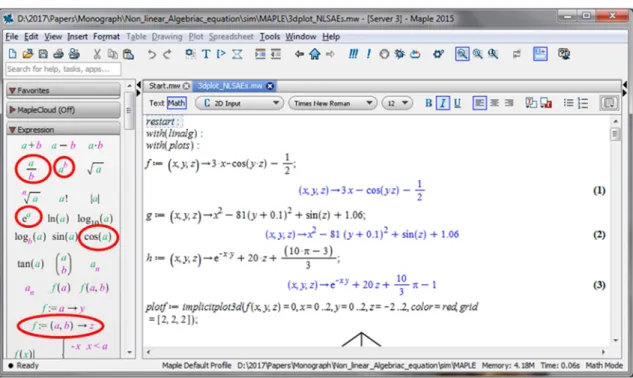
initial approximations to the solutions of 2 × 2 and often 3 × 3 nonlinear systems. To do this, we need to input (14) in a
MAPLE® worksheet. MAPLE® has in-built Palettes that can assist. These are highlighted in Figure 1.
Figure 1. MAPLE window with Palettes highlighted.
The following were used to insert the first nonlinear equation in (14), and its plot is as depicted in Figure 2.
(
)
(
)
(
)
( )
(
)
(
)
:
g :
:
1
: , , 3 cos , ;
2
: 3 , , 0, 0..2, 0..2, 2..2, , [2, 2, 2] ;
restart
with linal
with plots
f x y z x x y
plotf implicitplot d f x y z x y z color red grid
= → ⋅ − −
= = = = = − = =
Figure 2. Plot for 31 cos
(
2 3)
1 0 2x − x x − = .
Notice that the unknown variables x1, x2, and x3 in (14)
have been substituted with x, y, z respectively in the code that was fed into MAPLE®. This was done to accommodate the function assignment. To continue with the plot of the second equation, the following were added to the worksheet:
( ) ( ) ( )
( )
( )
2 2
: , , 81 y 0.1 sin 1.06;
: 3 , , 0, 0..2, 0..2, 2..2, , [2, 2, 2] ;
g x y z x z
plotg implicitplot d g x y z x y z color blue grid
= → − + + +
= = = = = − = =
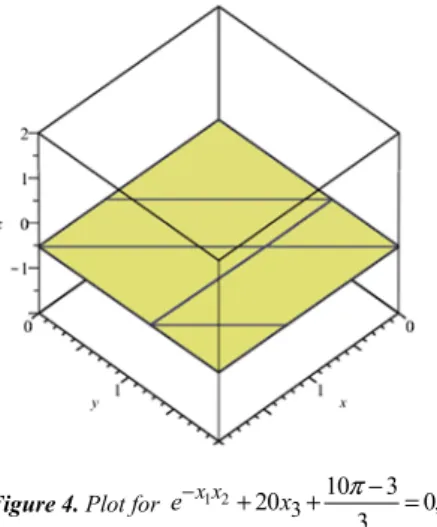
To also visualize the third equation, the following MAPLE® code gave Figure 4:
(
)
(
)
(
)
(
)
10 3
: , , 20 ;
3
: 3 , , 0, 0..2, 0..2, 2..2, , [2, 2, 2] ;
x y
h x y z e z
ploth implicitplot d h x y z x y z color yellow grid
π
− ⋅ ⋅ −
= → + ⋅ +
= = = = = − = =
Figure 4. Plot for 1 2
3
10 3
20 0,
3
x x
e− + x + π− = .
Finally, to combine the three plots (Figure 2, Figure 3, and Figure 4) on the same axis, we typed:
{
}
(
, , , ,)
;display plotf plotg ploth axes=boxed scaling=constrained
Figure 5. Plot for NLSAEs as given in (13).
From Figure 2 to Figure 5, particularly after zooming and rotating Figure 5, we agree that an initial guess of the solution to (14) as given in (15) is a good one.
( )0
0.1 0.1 .
0.1 x
=
−
(15)
Note, (15) is the first step for solving (14) using Newton’s method. The second step is to define F(x) as,
( )
(
)
(
)
1 2
1 2 3
2 2
1 2 3
3
1 3 cos
2
F x 81 0.1 sin 1.06 , 10 3 20
3
x x
x x x
x x x
e− x π
− −
= − + + +
−
+ +
(16)
To evaluate F(x(0)) is the third step. This involves substituting and evaluating (16) with (15), here we used MAPLE® [11, 12] to achieve our goal. Palettes in MAPLE® as highlighted in red in Figure 1, were used. These Palettes make entering expressions in familiar notation easier and reduces the possibility of introducing typing errors.
(
)
(
(
) (
) (
)
)
(
)
: , , , , , , , , , , :
0.1,0.1, 0.1 ;
F x y z vector f x y z g x y z h x y z
F
= →
−
Note that after executing the above expressions in MAPLE®, we got a row vector, since we know that what we need is a column vector (transpose of the row vector) we simply present it as;
( )
( )
01.19995 2.26983 8.46203 F x
−
= −
(17)
The fourth step is to obtain an expression for the partial derivatives of (16), which is the Jacobian matrix of the system. This was realized by the following code on the same
worksheet in MAPLE®;
(
)
[
]
(
, , , , ,)
;jacobian F x y z x y z
After executing the above command, the result that appears in the worksheet gave us our Jacobean matrix as,
( )
( )
( )
3 sin sin
2 162 16.2 cos .
20
x y x y
z y z y y z
J x y z
y e− ⋅ xe− ⋅
⋅ ⋅ ⋅ ⋅
= − ⋅ −
− ⋅ −
(18)
version of the NLSAEs at the given initial condition. This would be the fifth step. Two ways of doing such will be presented here. First, in MAPLE® each element of (18) will be defined as a function followed by substitution and evaluation of the function will be done by the given initial value. Hence:
1,1: 3;
j =
Note that j1,1 is already a constant value of the Jacobean
matrices in (18). To obtain the second element on the first row it will require the substitution of variable and evaluation
of the expression. This was achieved by the following codes in the same MAPLE®worksheet;
( )
(
)
(
)
1,2
1,2 12
: sin ;
: 0.1, 0.1,
f z y z
j eval sub y z f
= ⋅ ⋅
= = = −
Hence j1,2 is the second element on the first row. To proceed,
we simply copy and paste expression in MAPLE® and modify variables where necessary. The remaining codes are;
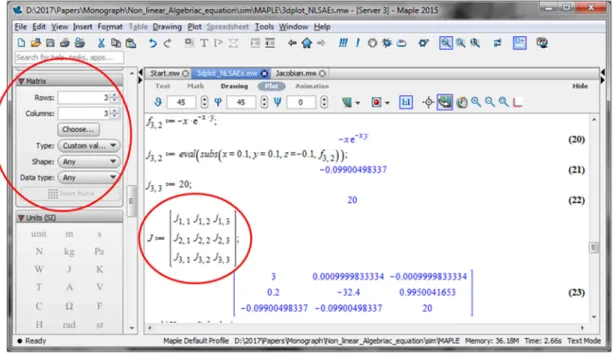
Figure 6. MAPLE window showing the matrix Pallet.
( )
(
)
(
)
(
)
(
)
(
)
(
)
( )
1,31,3 13
2,1
2,1 2,1
2,2
2,2 2,2
2,3
: sin ;
: 0.1, 0.1,
: 2 ;
: 0.1,
: 162 16.2;
: 0.1,
: cos ;
f y y z
j eval sub y z f
f y
j eval sub y f
f y
j eval sub y f
f z
= ⋅ ⋅
= = = −
= ⋅
= =
= − ⋅ −
= =
=
(
)
(
)
(
)
(
)
(
)
(
)
2,3 23
3,1
3,1 3,1
3,2
3,2 3,2
3,3
: 0.1,
: ;
: 0.1, 0.1,
: ;
: 0.1, 0.1,
: 20;
xy
xy
j eval sub z f
f y e
j eval sub x y f
f x e
j eval sub x y f
j
−
−
= = −
= − ⋅
= = =
= − ⋅
= = =
=
Hence, J(x(0)) is given by inserting a 3x3 matrix from the matrix pane of MAPLE® (Figure 6) with description as;
1,1 1,2 1,3
2,1 2,2 2,3
3,1 3,2 3,3
:
not
j j j
J j j j
j j j
=
After execution, the above MAPLE® syntax, the realized
J(x(0)) is,
( )
( )
03 0.00099 0.00099
0.2 32.4 0.99500 .
0.09900 0.09900 20
J x
−
= −
− −
(19)
The second approach of getting (19) in MAPLE® is by reverting back to the form in which (14) is presented, i.e., designating the unknown variable as x1, x2 and x3:
(
)
(
)
2(
)
2( )
1 2(
) [
] [
]
1 2 3 1 2 3 3 1 2 3
:
10 3 1
3 cos , 81 0.1 sin 1.06, 20 , , , 0.1, 0.1, 0.1 ;
2 3
x x
with VectorCalculus
Jacobian x x x x x x e− ⋅ x π x x x
⋅ −
⋅ − ⋅ − − + + + + ⋅ + = −
At this stage, the linearization of the (14) with initial values as given in (15) is completed and in concise matrix form we can write the linearized system as;
( )
( )
0 ( )0( )
( )0,
J x y = −F x (20)
where (0) 1(0) 2(0) ⋯ (0) T
n
y =y y y is the solution to the
linear system of algebraic equations.
At this stage a comprehensive MAPLE® worksheet has been successfully developed for the first iteration. This
worksheet will be used for subsequent iterations.
For the result obtained so far, we can write (20) in full for the first iteration as,
(0) 1
(0) 2 (0) 3
3 0.0009999833334 0.0009999833334 1.19995
0.2 32.4 0.9950041653 2.269833417 .
0.09900498337 0.09900498337 20 8.462025344
y
y
y
− −
− = − −
− −
(21)
Since we require just numbers for our answer, we move the information in (21) into MATLAB®, and assigned A =
J(x(0)) and b = -F(x(0)). The sixth and final step is to solve (21) using any linear method. Two methods of solving (21) are proposed in this study. First, the use of Gaussian Elimination algorithm. MATLAB® code to solve (21) using Gaussian elimination is give as;
Format long
A= [ 3 0.000999833334 -0.000999833334
0.2 -32.4 0.9950041654
-0.09900498337 -0.09900498337 20];
b=-1.*[-1.19995 -2.269833417 8.462025344]'; x=A\b
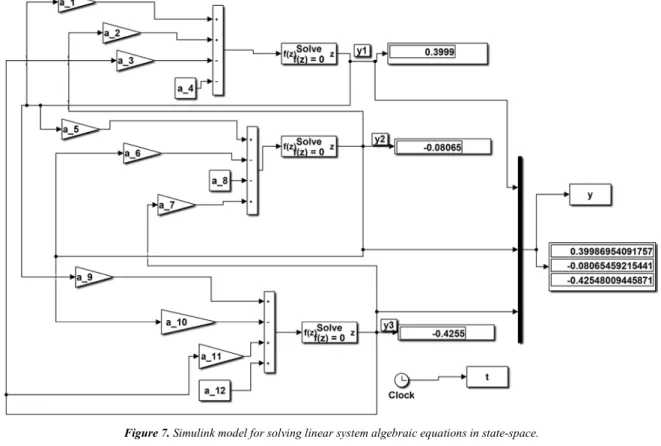
The second means by which (21) can be solve is by the use of Simulink® modelling environment to model (21). In most literatures, such type of modelling is done for a single linear system [13, 14, 15]. In this study, we were able to extend it to a SLAEs, this was achieved by re-representing (21) as;
( )
1 1 22 3 3 1 15 1 2 26 2 3 37 3 481 2 3 9 1 10 2 11 3 12
3 0.00099 0.00099 1.19995
0.2 32.4 0.995 2.26983 ,
0.099 0.099 20 8.46203
y y y a y a y a y a
G x y y y a y a y a y a
y y y a y a y a y a
+ − − + − −
= − + − ≡ − + −
− − + + − + +
(22)
To model (22) in Simulink®, we will need three summation blocks, one for each equation. The first equation will be assigned four signs (+, +, - and -). These correspond to the number of terms in it. The same applies to the second and third equation. After which, we attached gain blocks representing the coefficients labelled a1 to a12. Note that in
(22), the coefficients of each term in the equations were approximated compare to what they were in (21), This was done to accommodate presentation on paper but in the m-file
which calls the model in Figure 7, the exact value of the coefficients as computed by format long (15 decimal place) was used.
The Default Simulink® solver-VariableStepAuto was used to run the Simulation in Figure 7 for 10 seconds and the result obtained where exactly the same as those by Gaussian elimination:
(0)
0.3999869689836864 0.080533151365467 0.42152047176596 y
= −
−
(23)
Thus, the approximate solution for the first iteration is given as,
(1) (0) (0)
x =x +y (24) This implies that,
(1)
0.1 0.3999869689836864 0.499869689836864
0.1 0.080533151365467 0.019466848634533 0.1 0.42152047176596 -0.521520471765960
x
= + − =
− −
(25)
Checking for convergence in this iteration with (26) implemented as given in (27),
(1) (0)
1 0
N = x −x = (26)
1
0.499869689836864 0.1 0.399869689836864
0.019466848634533 0.1 0.080533151365467
-0.521520471765960 0.1 0.421520471765960
N
= − =
−
(27)
Notice that the value of x3 has the highest absolute value of
0.422, thus, result has not converged. Hence, we must proceed to a second iteration.
For the second iteration, (25) becomes our initial state values. We then used our new initial state values to evaluate the J(x(1)) and F(x(1)) with the MAPLE® worksheet that has been developed but saved with a different name. This gave use the linear system in (28). Solving (28) in MATLAB® using Gaussian elimination method and Simulink modelling method, both gave (29).
first iteration is copied directly from the workspace (one state solution at a time) and inserted in the appropriate field in the
MAPLE® worksheet. Hence, both MAPLE® and MATLAB® must be running at the same time on a single computer.
Figure 7. Simulink model for solving linear system algebraic equations in state-space.
(1) 1
(1) 2 (1) 3
3 0.005294572666 0.0001984870723 -0.0003393962
0.9997393796 -19.35362948 0.8670626846 -0.3443879116 ,
-0.01927833759 -0.4950291038 20 0.0318823743
y
y
y
−
= −
(28)
(1)
0.000144549904853 -0.017878257211352 -0.002036492263149 y
=
(29)
Hence, for this iteration (30) was implemented as shown in (31)
(2) (1) (1)
x =x +y (30)
(2)
0.499869689836864 0.000144549904853 0.500014239741717
0.019466848634533 -0.017878257211352 0.001588591423181 ,
-0.521520471765960 -0.002036492263149 -0.523556964029109
x
= + =
(31)
Checking for convergence here with (32) implemented as given in (33),
(2) (1)
2 0.
N = x −x = (32)
2
0.500014239741717 0.499869689836864 0.000144549904853 0.001588591423181 0.019466848634533 0.017878257211352 . -0.523556964029109 -0.521520471765960 0.002036492263149
N
= − =
(33)
For the third iteration, (31) becomes our initial state values. We then used our new initial state values to evaluate the J(x(3)) and F(x(3)) in our MAPLE®worksheet (saved with a different name from that of first and second iteration). This
gave use the linear system in (34). Solving (34) in MATLAB® using Gaussian elimination and by Simulink modelling method, both gave (35).
(2) 1
(2) 2 (2) 3
3 0.0004354517544 -0.1321260092e-5 0.0000430649
1.000028479 -16.45735181 0.8660463088 -0.258891436e-1 .
-0.1587330077e-2 -.4996172269 20 0.0000422271
y
y
y
= −
(34)
(2)
-0.000014126206338 -0.001576146592974 , -0.000041485975646 y
=
(35)
hence, for this iteration (36) was implemented as shown in (37)
(3) (2) (2)
.
x =x +y (36)
(3)
0.500014239741717 -0.000014126206338 0.500000113535379
0.001588591423181 -0.001576146592974 0.000012444830207
-0.523556964029109 -0.000041485975646 -0.523598450004755
x
= + =
,
(37)
checking for convergence here with (38) implemented as given in (39),
(3) (2)
3 0,
N = x −x = (38)
3
0.500000113535379 0.500014239741717 0.000014126206338 0.000012444830207 0.001588591423181 0.001576146592974 . -0.523598450004755 -0.523556964029109 0.000041485975646
N
= − =
(39)
Notice that x2 has the highest value of 0.00158, result has not converged. Hence, we must proceed to a fourth iteration.
To begin the fourth iteration, we evaluated J(x(4)) and F(x(4)) in MAPLE® with (37) as our initial value. From which we obtained our fourth linear state space system as given in (40). Solution to (40) is (41).
(3) 1 (3) 2 (3) 3
( 11) ( 7)
( 7)
3 0.000003411816618
1.000000227 -16.20201606 0.8660255666 -0.2012219e-3 ,
-0.1244475277e-4 -0.4999
8.109168107*10 3.40*10
2.876
970023 20 *10
y
y
y
− −
−
= −
−
(40)
(3) 4
-0.001133191811828
-0.124439507924259 10 ,
-0.003254769751605
y −
= ×
(41)
hence, for this iteration (42) was implemented as shown in (43)
(4) (3) (3)
,
x =x +y (42)
(4) 4
0.500000113535379 -0.001133191811828 0.500000000216198
0.000012444830207 -0.124439507924259 10 0.000000000879414
-0.523598450004755 -0.003254769751605 -0.523598775481731
x −
= + × =
,
(43)
checking for convergence here with (44) implemented as given in (45),
(4) (3)
4 0,
4
0.500000000216198 0.500000113535379 0.001133191811498 0.000000000879414 0.000012444830207 0.124439507924259 10 -0.523598775481731 -0.523598450004755 0.003254769751493
N
= − = ×
4
.
− (45)
Notice that x2 has the highest value of 0.124 x 10⁻⁴, result has not converged. Hence, we must proceed to a fifth iteration.
To begin the fifth iteration, we evaluated J(x(5)) and F(x(5)) in MAPLE® with (43) as our initial value. From which we obtained our fifth linear state space system as given in (46). Solution to (46) by Gaussian Elimination method in MATLAB® and Simulink® modelling method gave (47).
( 9)
( 10) ( 19)
( 8)
(
(
10) ( 10
4) 1
(4) 2
(4) )
3
3
1.000000000 -16.20000014 0.8660254038 ,
-.5
1.0 10
2.410963412 10 4.049350528 10
1.45 10
8.794139996 10 000000000 20 4. 10
y
y
y
−
− −
−
− −
= −
×
× − ×
− ×
− × − ×
(46)
(4) 9
-0.333333333259735
-0.915792604227302 10 ,
-0.002894815120339
y −
= ×
(47)
hence, for this iteration (48) was implemented as shown in (49)
(5) (4) (4)
,
x =x +y (48)
(5) 9
0.500000000216198 -0.333333333259735 0.499999999882865
0.000000000879414 -0.915792604227302 10 -0.000000000036379
-0.523598775481731 -0.002894815120339 -0.523598775484625
x −
= + × =
,
(49)
checking for convergence here with (50) implemented as given in (51),
(5) (4)
5 0,
N = x −x = (50)
5
0.499999999882865 0.500000000216198 0.333333360913457 -0.000000000036379 0.000000000879414 0.915792604227302 -0.523598775484625 -0.523598775481731 0.002894795514408
N
= − = ×
9
10 .− (51)
From (51), all values of x gave values after a decimal point with at least nine zeros. This also means that there is no difference between x(5) and x(4). Hence, our result has converged. Also, from the result of F(x(5)) in (46), it could be clearly seen that the x(5) is the root of the system because
F(x(5)) = 0.
Thus, the result obtained so far, i.e., values of x (equation (25), (31), (37), (43), (49)) and N (equations (27), (33), (39), (45), (51)) for iterations 1-5 can be summarized as given in Table 1.
Table 1. Result of Newton’s method.
n x1( )n x( )2n x3( )n Nn(Error)
0 0.100000000000000 0.100000000000000 -0.100000000000000 -
1 0.499869689836864 0.019466848634533 -0.521520471765960 0.421520471765960
2 0.500014239741717 0.001588591423181 0.523556964029109 0.017878257211352
3 0.500000113535379 0.000012444830207 -0.523598450004755 0.001576146592974
4 0.500000000216198 0.000000000879414 -0.523598775481731 0.0000124439507924259
5 0.499999999882865 0.000000000036379 -0.523598775484625 0.0000000000028947955
5. Analysing Quadratic Convergence
The rate of convergence of the Newton’s method is often “explained” by saying that, once you have determined the digit in the first decimal place, successive iteration in a quadratic convergent process roughly doubles the number of correct
having little, if any, training in numerical analysis, it is useful to see this underlying idea expanded in greater detail.
Literatures on numerical analysis, such as [16, 17] provide only technical explanation as part of formal derivations and display only the successive approximations based on a method, but tend not to look at the values of the associated errors.
However, an analysis of the behavior of the errors in the sense of data analysis and curve fitting provides a very effective way to come to an understanding of the patterns of convergence. Data analysis in the sense of fitting functions to data has become a powerful mathematical idea introduced to enhance the understanding of the concepts of convergence.
There are two ways to curve fit data in MATLAB [18]. First, method is by the use of the interactive curve fitting Tool (an app).
Table 2. Iteration and Error Values.
S/N Iteration(n) Error
1 0 -
2 1 0.422
3 2 0.0179
4 3 0.00158
5 4 0.0000124
6 5 0
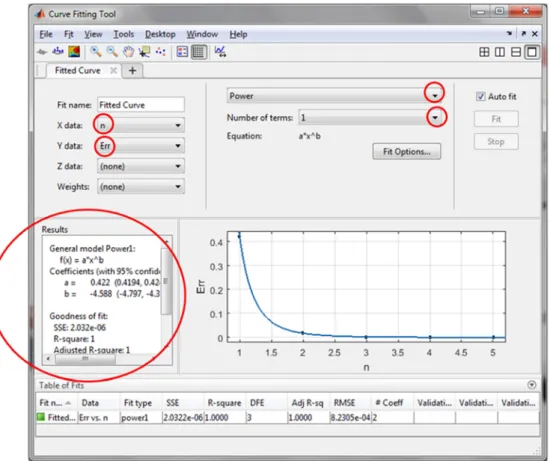
With this method your start the curve-fitting tool from the app window by double clicking on the MATLAB® app for curve fitting. The data in Table 2 (extracted from Table 1), can then be entered as variables in vector form using the command window.
In our case, the power function best fit our data and directly below it is the number of terms option for this function. This was left at the value of 1 because from the results window (Figure 8, lower left corner) the Goodness of fit has acceptable values.
After using graphical methods to evaluate how well the fitted curve matches our data, we further examined the numerical values attached to the goodness-of-fit statistics, these are;
I. Sum of Squares Due to Error (SSE). This statistic measures the total deviation of the response values from the fit. In simple words, SSE indicates how far data is from the regression line. It is also called the summed square of residuals, mathematically, it is represented as,
(
)
21
ˆ
n
i i i i
SSE w y y
=
=
∑
− (52)where wi is the weighted of the function, y is the measured
value (data) and ˆyis the predicted value (fitted curve). II. R-Square. This statistic measures how successful the fit is in explaining the variation of the data. Put another way, R-square is the R-square of the correlation between the response values and the predicted response values. It is also called the square of the multiple correlation coefficient and the
coefficient of multiple determination.
R-square is defined as the ratio of the sum of squares of the regression (SSR) and the total sum of squares (SST). Mathematically, SSR is expressed as,
(
)
2 1ˆ
n i i i
SSR w y y
=
=
∑
− (53)where yis the mean of values or measured data.
SST is also called the sum of squares about the mean, and is defined as,
(
)
2 1n i i i
SST w y y
=
=
∑
− (54)where SST = SSR + SSE. Given these definitions, R-square is expressed as,
R-square = SSR 1 SSE
SST = −SST (55)
III. Degrees of Freedom Adjusted R-Square. This statistic uses the R-square statistic defined above, and adjusts it based on the residual degrees of freedom. The residual degrees of freedom are defined as the number of response values n
minus the number of fitted coefficients m estimated from the response values.
v= −n m (56)
v indicates the number of independent pieces of information involving the n data points that are required to calculate the sum of squares. Mathematically, this is expressed as,
(
)
( )
1adjusted R-square = 1 SSE n
SST v −
− (57)
IV. Root Mean Squared Error. This statistic is also known as the fit standard error and the standard error of the regression. It is an estimate of the standard deviation of the random component in the data, and is defined as,
RMSE= =s MSE (58) where MSE is the mean square error or the residual mean square.
SSE MSE
v
= (59)
Figure 8. Interactive Curve Fitting GUI of MATLAB, error data and the fitted curve.
Figure 9. Interactive curve fitting app plot of data and fitted curve.
,
b
Error= ⋅a n (60) where, a = 0.4215, n = number of iterations and b = -4.588. The Goodness of fit attributes for (60) are; SSE = 2.032e-06, this means that (60) has a small random error. R- square =1, meaning 100% of the variance of the data in Table 2 is accounted for by (60). RMSE = 0.0008231, this tells us that (60) is good for predicting the data. Adjusted R-square = 1, means that the fit explains 100% of the total variation in the data about the average hence, (60) is perfect for prediction.
The second method of curve fitting a data in MATLAB® is by writing out commands or MATLAB® codes. To reproduce the fitted curve in Figure 9, in our case, we simply ran the following MATLAB® code;
n=[1 2 3 4 5 ]';
Err=[0.422 0.0179 0.00158 0.0000124 0]'; f_o=fit(n, Err,'power1')
plot(f_o,'predobs,95')
Note that in the above code, the variables have to be entered as column vectors. With the interactive curve fitting tool, variables were accepted as row vectors.
Figure 10. Plot of fitted curve with prediction bonds using MATLAB code.
Next, we will consider how each succeeding error value
En+1compares to the current one En, as shown in Figure 11.
Table 3. Error and successive error values.
S/N En En+1
1 0.422 0.0179
2 0.0179 0.00158
3 0.00158 0.0000124
4 0.0000124 0
In Figure 11, we see that the data appear to be linear (polynomial of first order). However, a closer examination of how the points match the regression line we found that the successor error En+1 is roughly proportional to the current
error En. This suggests the possibility that, when the
E
rr
o
convergence is quadratic, En+1,may be roughly proportional
to En. To investigate into this possibility, we perform a power
function regression on the values of En+1 versus those of En
(as given in Table 3) and found that the resulting power function is,
1 ,
b
n n
E + = ⋅a E +c (61) where a = 0.07224, b = 1.649 and c = 0.0004968.
The Goodness of fit attributes for (61) are; SSE = 1.46e-06, meaning that the random error component of (61) is very small. R- square =0.9936. This informs us that 99.36% of the variance of the data in Table 3 is accounted for by (61). RMSE = 0.001208, this value is very close to zero hence, (61) will be useful in predicting the data in Table 3. Adjusted
R-square = 0.9808. This R-square value indicates that the fit explains 98.08% of the total variation in the data about the average.
Based on a 90 percent prediction bound as shown in Figure 11, we can say that En+1 is proportional to En by
declaring that,
1.649 2
n n
E ≈E (62)
Prediction bounds (confidence bound) define the lower and upper values of the associated interval, and define the width of the interval. The width of the interval indicates how uncertain you are about the fitted coefficients, the predicted observation, or the predicted fit. From Figure 11, we can safely see that (62) is well within the prediction bound.
Figure 11. Close-up plot of error against successive error with fitted curves.
For fitting the data in Table 3 with MATLAB® code option, the following can be used to re-plicate the Figure 11:
En=[0.422 0.0179 0.00158 0.0000124]'; En_1=[0.0179 0.00158 0.0000124 0]'; f_o=fit(En, En_1,'power2')
plot(f_o,'predobs,90') hold on
plot(f_o,'predobs,95') hold off
axis([0 0.45 -0.01 0.025])
To include (61) to the plot, the following needs to be run
after the above code: En=0:0.0001:0.422; a=0.07224;
b=2
c=0.0004968; En_1=a*En.^b+c; plot(En,En_1)
Figure 12. Magnified plot of error against successive error with fitted curves.
To understand Figure 11 better, we need to re-plot it as shown in Figure 12. From En-axis of Figure 12, the range 0 to
0.025 is narrower indicating that the prediction bonds at that
interval are very certain. It should also be noted that at that region we have 3 data points which were used for fitting the curve. While at 0.425 of En axis, only one data point was
E
n
+
1
E n
+
used for fitting the curve, and this point has the perdition bonds closer to it too. This is indicating certainty of the prediction at just that point. Unfortunately, the largest region (from 0.025 to 0.4 on En-axis) of the fitted curve is very
uncertain for any form of prediction because no data exist at this region. Hence, prediction within this region is not certain. Luckily for us, we can barely notice the difference between the two curves of (61) and (62) in Figure 12. This is because the approximation is close enough. It is only in a magnified plot as shown in Figure 11 that one could differentiate visually between the two curves.
6. Matlab
®Codes for Newton’s Method
After an intuitive understanding of a mathematical process like the Newton’s method as presented in this study, a contemporary researcher will quickly want to write a computer program for it. The primary aim for doing such is for subsequent use to solve similar problems with relative easy.
This program must be concise, easy to understand and of few lines as possible. As such, in this study, two MATLAB® programs were used to implement the entire Newton’s method. The first program is written in an m-file. After executing the program, convergence of the solution can be judged by human examination of the result displayed at the command window. This solution method uses the idea of convergence as it relates to evaluating the norm for every iteration, as explained earlier in this study.
% Newton's Method format long;
n=5; % set some number of iterations, may need adjusting f = @(x) [ 3*x(1)-cos(x(2)*x(3))-0.5
x(1).^2-81*(x(2)+0.1)^2 + sin(x(3))+1.06
exp(-x(1)*x(2))+20*x(3)+((10*pi-3)/3)]; % the vector function,3x1
% the matrix of partial derivatives
df = @(x) [3 x(3)*sin(x(2)*x(3)) x(2)*sin(x(2)*x(3)) 2*x(1) -162*x(2)-16.2 cos(x(3))
-x(2)*exp(x(1)*x(2)) -x(1)*exp(x(1)*x(2)) 20];% 3x3 x = [0.1;0.1;-0.1]; % starting guess
for i = 1:n
y = -df(x)\f(x) % solve for increment, similar A\b x = x + y % add on to get new guess
f(x) % see if f(x) is really zero end
The second MATLAB® program that implements the Newton’s method for this study uses four function files of MATLAB®. The first file carries the description for (16), a vector of the functions:
function y = F(x) x1 = x(1); x2 = x(2); x3 = x(3); y = zeros(3,1);
y(1) = 3*x(1)-cos(x(2)*x(3))-0.5; % f1(x1,x2) y(2) = x(1).^2-81*(x(2)+0.1)^2 + sin(x(3))+1.06; y(3) = exp(-x(1)*x(2))+20*x(3)+((10*pi-3)/3);
end
To solve the 5 LSAE in each iteration, a second function-file that implement (18)-the Jacobian matrix is needed. The Jacobian was computed in MAPLE® and the result serves as the main input of the file.
function y = F(x) x1 = x(1); x2 = x(2); x3 = x(3); y = zeros(3,1);
y(1) = 3*x(1)-cos(x(2)*x(3))-0.5; % f1(x1,x2); y(2) = x(1).^2-81*(x(2)+0.1)^2 + sin(x(3))+1.06; y(3) = exp(-x(1)*x(2))+20*x(3)+((10*pi-3)/3); end
A third file was written to implements the algorithm of the Newton’s method with a given tolerance (1e-5) to indicate that the solution has converged and immediately halts the process.
function x = NewtonMethod(funcF, JacobianF, n) F = funcF;
J = JacobianF; x = [0.1 0.1 -0.1]'; Iter = 1;
MaxIter = 100; TOL = 1e-5; while Iter < MaxIter
disp(['Iter = ' num2str(Iter)]); y = J(x)\(-F(x));
x = x+y;
if norm(y,2)<TOL break;
end
disp(['x = ' num2str(x')]); end
if Iter >= MaxIter
disp('Maximum number of iteration exceeded!'); end
end
Finally, a fourth file contains the command that will display the solution of the entire process at the command window.
function newtonSol
x = NewtonMethod(@F,@J,2); end
All four function files must be placed in the same folder and made the working directory for MATLAB® before execution.
7. Conclusion
NLSAEs. MATLAB/Simulink® was then used to solve the LSAEs. With such approach, mental demand on the researcher is reduce and more focus would be channeled in understanding the method and its application. Such synergy between an analytical and numerical computing software can go a long way in curbing the declining interest in STEM-based courses. Notice that the final script written in MATLAB® that implements the Newton’s method, requires a Jacobian matrix of the NLSAEs as an input. For such type of numerical solution, Jacobian matrixes can be easily and intuitively obtained from MAPLE® before the final implantation of the algorithm in a numerical script like MATLAB®.
Future Work
This study can be improved in many ways, one of such is to compare the Newton’s method with other numerical algorithms such as the Quasi-Newton methods. Such methods, avoid the major disadvantage of the Newton’s method, i.e., computing a Jacobian and its inverse at each iteration. The bases for such comparison and analysis will be the number of iterations an algorithm will take before a solution converges and cost of computation. Another area of improvement being considered is the ease at which other STEM based software like Mathematica®, Mathcad®, etc., will handle such problem. Using several software to solve the same problem will go a long way in increasing interest in STEM based subjects.
References
[1] Lyn Haynes (2008). Studying Stem? What are the Barriers. A Literature Review of the Choices Students Make. A Fact-file Provided By The Institution of Engineering and Technology http://www.theiet.org/factfiles
[2] Frank Y. Wang (2015). Physics with MAPLE: The Computer Algebra Resource for Mathematical Methods in Physics. ISBN: 3-527-40640-9
[3] Ralph E. White and Venkat R. Subramanian (2010). Computational Methods in Chemical Engineering with MAPLE. ISBN 978-3-642-04310-9
[4] Robin C. and Murat T. (1994). Engineering Explorations with MAPLE. ISBN: 0-15-502338-7
[5] George Z. V and Peter I. K (2005). Mechanics of Composite Materials with MATLAB, ISBN-10 3-540-24353-4
[6] Wndy L. M and Angel R. M (2002). Computational Statistics Handbook with MATLAB. ISBN 1-58488-229-8
[7] Bassem R. M (2000). Radar Systems Analysis and Design Using MATLAB. ISBN 1-58488-182-8
[8] Glyn James et al (2015). Modern Engineering Mathematics, ISBN: 978-1-292-08073-4
[9] Linge S., Langtangen H. P. (2016) Solving Nonlinear Algebraic Equations. In: Programming for Computations - MATLAB/Octave. Texts in Computational Science and Engineering, vol 14. Springer, Cham. ISBN 978-3-319-32452-4.
[10] Burden, Richard L. and J. Douglas Faires, (2010). Numerical Analysis, 9th Ed., Brooks Cole, ISBN 0538733519
[11] Robin Carr and Murat Tanyel (1994). Engineering Exploration with MAPLE. ISBN: 0-15-502338-7
[12] MAPLE User Manual Copyright © Maplesoft, a division of Waterloo Maple Inc.1996-2009. ISBN 978-1-897310-69-4 [13] Harold Klee and Randal Allen (2011). Simulation of Dynamic
Systems with MATLAB and Simulink, ISBN -13: 978-1-4398-3674-3
[14] O. B euchre and M. Week (2006). Introduction to MATLAB & Simulink: A project Approach, Third Edition. ISBN: 978-1-934015-04-9
[15] Steven T. Karris (2006). Introduction to Simulink with Engineering Applications, ISBN 978-0-9744239-8-2
[16] Cheney, Ward and David Kincaid, (2007) Numerical Mathematics and Computing, 6th Ed., Brooks Cole, 2007, ISBN 0495114758
[17] Kincaid, David and Ward Cheney, (2002). Numerical Analysis: Mathematics of Scientific Computing, Vol. 2, 2002, ISBN 0821847880