MEAP Edition
Manning Early Access Program
Isomorphic Web Applications
Universal Development with React
Version 10
Copyright 2017 Manning Publications
For more information on this and other Manning titles go to
www.manning.com
©Manning Publications Co. We welcome reader comments about anything in the manuscript - other than typos and other simple mistakes. These will be cleaned up during production of the book by copyeditors and proofreaders.
welcome
Thanks for purchasing the MEAP for Isomorphic Web Applications: Universal Development with React. You’ll learn how to build isomorphic web applications using JavaScript, NodeJS, and React. You’ll learn how to think about building apps that work in an isomorphic architecture using tools like WebPack, Redux, Flux, Angular 2.0, and Ember.
This book is for you if you are a mid-level developer looking to expand their architectural abilities and better understand the options available for building web apps. You’ve likely built a single page application and have experience working with a node server either to serve a single page app or as an API.
I’ve been building applications with isomorphic architecture for a while now. As a team lead, I’ve used these concepts to deliver a performant product that works well for users and SEO bots.
I have a passion for mentoring and teaching. Writing this book allows me to share my knowledge with a broader audience (you!).It is my hope that you will benefit from using isomorphic development in your applications.
As you're reading, I hope you’ll take advantage of the Author Online forum. I’ll be reading your comments and responding. I appreciate any feedback, as it is very helpful in the development process.
Thanks again! —Elyse Kolker Gordon
©Manning Publications Co. We welcome reader comments about anything in the manuscript - other than typos and other simple mistakes. These will be cleaned up during production of the book by copyeditors and proofreaders.
brief contents
P
ART
1:
I
NTRODUCING
X
CODE AND
S
WIFT
1 Introduction to Isomorphic Web Application Architecture
2 A Sample Isomorphic App
P
ART
2:
B
UILDING YOUR INTERFACE
3 React Overview
4 Applying React
5 Tools: Webpack and Babel
6 Redux
P
ART
3:
B
UILDING YOUR APP
7 Building the Server
8 Isomorphic View Rendering
9 Testing and Debugging
10 Handling Server/Browser Differences
11 Optimizing for Production
P
ART
4
F
INALIZING YOUR APP
12 Other Frameworks: Implementing Isomorphic without React
13 Where to go from here
Front matter
Preface
In college, after a horrible holiday experience working for a major clothing retailer, I swore I would find a better summer job. Having been a camp counselor as a teenager, I found myself working at a tech camp. There I taught kids of all ages to make video games, build websites and write code. It was rewarding to see how the kids entered a week of camp with little technical knowledge and left with a working project to show off.
Ever since, I have been passionate about teaching, mentoring and sharing knowledge. I was lucky in my early career to work for a company that encouraged these skills. I’m in a leadership position, which gives me the opportunity to mentor many software engineers.
Despite this desire to teach and share, I never set out to write a book. It seems, however, that writing and speaking naturally lead to other opportunities. After speaking at Strange Loop, I was approached several months later by Manning to see if I would write a book on isomorphic app development. Here was a chance to a chance to take everything I’ve learned as a maker of web apps and share them with others. This was the perfect opportunity to teach a much wider audience.
At Vevo, when we first started building an isomorphic app, I thought it was overly complex. But as we continued and I could see the benefits in the long run, I became sold on the value it adds for apps. This book seeks to explain this value and to demystify the complexity of building an isomorphic app. It’s an attempt to distill what I’ve learned the past few years about both real world React apps and real world isomorphic development. Wherever possible, I’ve related the concepts to situations you will run into building production apps.
I hope this book expands your thinking and gives you a new architecture tool. It took me some time to “think isomorphically.” Once I did, I grew both my architecture skills and my understanding of the entire web stack. By sharing this knowledge with you, I hope you will be able to grow in these areas as well.
Acknowledgements
I knew that this book was going to be a significant amount of work, but I could not fully appreciate what writing a book on top of working full time would really mean. There are several people that made it possible for me to successfully undertake this endeavor. I would like to take this time to thank them.
First and most importantly I need to thank my husband, Max, for the continuous support especially during the most stressful moments (sometimes even reminding me to eat and sleep). Your willingness to sacrifice for me to work on this project means the world to me. And I love that you acted as a technical consultant too! I’d like to also thank the rest of my family for putting up with limited availability and distractedness throughout the process.
This book never would have made it without my Developmental Editor, Helen Stergius. I’m grateful for your ongoing positivity and dedication to making the book the best it could be. Additionally, your patience and understanding during this process made it easier to believe I could and would finish the book.
In addition, thanks to everyone else at Manning who worked on this book. I have learned so much from this process. Two people stand out. First, Brian Sawyer for giving me the opportunity to write this book. Second, Doug Warren, Technical Development Editor. Your thoroughness and attention to detail made the book better for the reader.
I also could not have done this without the support of all my awesome colleagues at Vevo. Everyone has been extremely supportive! I especially want to thank Alex Nunes and Scott Dale for supporting me throughout this project.
I’m lucky to have a community of friends and mentors who supported me in writing this book. I’d like to acknowledge Jeff Carnegie for introducing me to isomorphic development and for always believing in me. Additionally, I’d like to thank Jun Heider and David Hassoun who showed me what it meant to be part of a developer community. I’d also like to thank Yomi Fashoro, Ryan Kahn, Arthur Klepchukov, Grant Schofield and Natalie Serebryakova.
About this book
The main purpose of the book is to teach you to think in a way that will make you successful when working with isomorphic architecture. Given React’s prevalence in the web community and the support React provides for server-side rendering it is the logic choice to teach how to build an isomorphic app.
The book starts by explaining what isomorphic apps are and why you would want to build one. Then it shows a complete example from a 10,000-foot view. Then it moves into several chapters on the core technologies used in a React app, followed by chapters on how to implement isomorphic code and related advanced topics like testing, managing environments and performance.
Who should read this book
This book is aimed at web developers with some professional experience. It is not for beginners. If you are looking to expand your architectural toolset and better understand some of the ways you can build web apps, this is a good book for you to read. This book can also help you if you are trying to decide if you should build an isomorphic app.
You should have a solid understanding of JavaScript, CSS and HTML as the book assumes you know these technologies. You do not need to know any of the technology or libraries introduced in the book including React, Redux, webpack or Node.js with Express.
How this book is organized: a roadmap
This book has four sections divided into 13 chapters.
Part 1, First Steps, explains why you would want to use an isomorphic application and teaches you what an isomorphic app is.
• Chapter 1 goes over what an isomorphic app is and why you would want to build it (including challenges and tradeoffs). It also briefly introduces the major technologies used throughout the book.
• Chapter 2 goes through a complete isomorphic example. This provides a 10,000-foot view of a (simple) working application.
Part 2, Isomorphic App Basics, includes all the chapters that teach the foundational pieces of a React app: React, React Router, Redux and webpack/Babel.
• Chapter 3 is an introduction to React. Topics covered include the Virtual DOM, writing components with JSX, using props and implementing state.
• Chapter 4 builds on the introduction to React in chapter 3 by introducing React Router. It also covers the React component lifecycle and advanced concepts on React component architecture.
• Chapter 5 focuses on build tools: webpack and Babel. It explains the basics of using both tools including how to use Babel in both the server and browser environments. • Chapter 6 teaches you to use Redux, including how to hook it up to a React app.
Part 3, Isomorphic Architecture, covers how to implement an isomorphic app in detail as well as several advanced topics.
• Chapter 7 implements the server for an isomorphic app using Express. It also introduces all the concepts that make it possible to server render your application with Redux and React.
• Chapter 8 picks up where chapter 7 leaves off and handles the isomorphic hand off between server and browser as well as getting the Single Page Application flow up and running with React.
• Chapter 9 talks about testing and debugging isomorphic apps. The first part of the chapter focuses on various testing strategies and libraries you can use. The second part introduces several useful development debugging tools.
• Chapter 10 goes over real world challenges and how to handle them including: code that only runs in either the server or the browser, updating meta tags for SEO on the server and creating a consistent approach to working with user specific information like User Agent.
• Chapter 11 focuses on performance on both the server and browser, caching strategies and handling user sessions.
Part 4, Applying Isomorphic Architecture with Other Tools, applies the concepts taught in Part 3 to other frameworks and includes a chapter focused on what to learn this book.
• Chapter 12 introduces some alternative options for building isomorphic apps via Ember, Angular and a React isomorphic framework called Next.js.
• Chapter 13 provides suggestions for expanding your skill set in ways that will support you in building isomorphic apps and make you more hirable.
The first section (Chapters 1 & 2) provide an overview of isomorphic concepts and explain why it matters. Everyone should read these chapters. The next section introduces each of the major technologies used in building a React isomorphic app. If you have experience building React apps and working with webpack, you can skip these chapters or read them as needed for refreshers.
If you do not have experience with React apps, then make sure to read Chapters 3-6. Some reviewers found it helpful to read these chapters before Chapter 2 if they had little or no experience with React, Redux and webpack.
The third section teaches the isomorphic implementation and then goes over several advanced topics like testing, managing environments and performance. The advanced chapters (10-11) may be read straight through or ad hoc as need.
Finally, the fourth section is optional – you can explore additional frameworks and go over suggestions for expanding your skill set.
About the Code
This book contains many examples of source code both in numbered listings and in line with normal text. In both cases, source code is formatted in a fixed-width font like this to separate it from ordinary text. Sometimes code is also in bold to highlight code that has
changed from previous steps in the chapter, such as when a new feature adds to an existing line of code.
In many cases, the original source code has been reformatted; we’ve added line breaks and reworked indentation to accommodate the available page space in the book. In rare cases, even this was not enough, and listings include line-continuation markers (➥). Additionally, comments in the source code have often been removed from the listings when the code is described in the text. Code annotations accompany many of the listings, highlighting important concepts.
The code for this book is split up into several Github repositories. The full list can be found at https://github.com/isomorphic-dev-js. I’ve also provided a list mapping chapters to their repos: • Chapter 2: https://github.com/isomorphic-dev-js/chapter2-a-sample-isomorphic-app • Chapter 3: https://github.com/isomorphic-dev-js/chapter3-react-overview • Chapter 4, 7, 8, 9, 10, 11: https://github.com/isomorphic-dev-js/complete-isomorphic-example • Chapter 5: https://github.com/isomorphic-dev-js/chapter5-webpack-babel • Chapter 6: https://github.com/isomorphic-dev-js/chapter6-redux • Chapter 12: https://github.com/isomorphic-dev-js/chapter12-frameworks
Most of the repos use branches to help teach you the concepts. In each chapter that uses branches I will indicate what branch goes with each section. Each branch provides the base code for the section you are working on, but not the complete solution for that section. The complete solution is found in the next section’s branch as well as in the branches labeled with a “-complete”. The idea is to check out the branch, add the code from the section of the book
you are working on and end up with a working example. The “complete” branches are provided in case you get lost or stuck.
CODE VERSIONS
The code in the book assumes the following versions of libraries and tools are being used. You are welcome to try to upgrade versions on your own, but I make no guarantees about future versions of libraries working smoothly.
• Node.js: v6.9.2 is what everything in the book was developed and tested on. Newer versions of Node through at least 8 should also work.
• Express: v4.15.3.
• React: v15.6.1. Version 16 came out right as this book was going to print. We have verified that the code samples work with React 16 but the code in the book was built with React 15.
• React Router: v3.0.5. React Router 4 does exist, but I explicitly decided not to use it for this book. React Router 3 provides an easier to use server implementation and will continued to be supported. Feel free to explore React Router 4 for your own projects – I provided additional information in Chapter 4.
• Redux: v3.7.2 • Webpack: v3.4.1. • Babel: v6.25.0.
• Angular: v4.0.0 (casually referred to as Angular 2, as opposed to Angular 1). • Ember v2.13.2.
• Next.js: v2.4.4.
There are many other libraries introduced throughout the book. Please refer to the package.json in the chapter’s repo for a complete list of versions.
Author online
The Author Online section details the reader’s access to the forum for questions on the book hosted by Manning at http://forums.manning.com. Manning will add this information and a link to your forum.
Other online resources
If you wish, you may list a few additional websites and online resources where readers can learn more about the subject of your book.
About the authors
Elyse Kolker Gordon is an engineering leader who is experienced at building client apps in consumer spaces like sports and music. She is passionate about developing engineers, building cohesive teams and creating great consumer apps. Currently, she is Director of Web Engineering at Vevo where she regularly solves challenges with isomorphic apps. She speaks and writes regularly about web development topics. She is also an avid musician who plays the
drums and dabbles with other instruments. When she is not at work you can find her hanging out with her husband and dog, either at home or at the beach.
Dedication (optional)
• To my mom, my first editor.
• And to Norma Lee Williams and Richard Allen Kolker who each encouraged me to be creative, think critically and walk through the world with compassion.
About the cover illustration
The last section is a brief description about the costume illustration on the cover of your book. Manning will add this if needed.
©Manning Publications Co. We welcome reader comments about anything in the manuscript - other than typos and other simple mistakes. These will be cleaned up during production of the book by copyeditors and proofreaders.
Part 1
Introducing Xcode and Swift
Many people have ideas for awesome apps, but you have decided to do something about it, take the plunge and learn iOS app development. Congratulations and good luck on your journey!
Before you get too deep into the ins and outs of app development, you need to focus on foundation skills. In this part, you’ll explore the development environment and learn about Apple’s language for development in iOS, Swift.
In chapter 1, you’ll examine Xcode, Apple’s own software for building iOS apps.
Then, in chapters 2 and 3, you’ll take a lightning tour of what’s new, different, and exciting in Swift. Chapter 2 focuses more on different syntax and data types, while chapter 3 takes a look at objects in Swift. You’ll explore Swift in Xcode playgrounds, a tool that helps you focus purely on programming, without concerning yourself with app development.
©Manning Publications Co. We welcome reader comments about anything in the manuscript - other than typos and other simple mistakes. These will be cleaned up during production of the book by copyeditors and proofreaders.
https://forums.manning.com/forums/isomorphic-web-applications
1
Introduction to Isomorphic Web
Application Architecture
In this chapter, we will cover:
•
Differentiating between isomorphic, server-side rendered and single-page apps
•
Server rendering and the steps involved in transitioning from a server-rendered to a
single-page app experience
•
The advantages and challenges of isomorphic web apps
•
Building isomorphic web apps with React’s virtual DOM
•
Using Redux to handle the business logic and data flow
•
Bundling modules with dependencies via webpack
This book is intended for web developers looking to expand their architectural toolset and better understand the options available for building web apps. If you’ve ever built a single-page or server-rendered web app (say with Ruby on Rails) then you will have an easier time following the content in the book. Ideally, you are comfortable with JavaScript, HTML and CSS. If you are new to web development then this book is not for you.
Historically web apps and web sites have come in two forms: server-rendered and single-page apps (SPA). Server-rendered apps hanlde each action the user takes by making a new request to the server. On the other hand, SPA apps handle loading the content and responding to user interactions entirely in the browser. Isomorphic web apps are a combination of these two approaches.
This book aspires to take a complex application architecture and break it down into repeatable and understandable bits. By the end of this book you will be able to create a content site or an ecommerce web app with the following techniques:
• Render any page on the server using React to achieve fast perceived performance and fully render pages for SEO crawlers (like Googlebot).
• Choose not to render certain features on the server. Understand how to use the React lifecycle to achieve this.
• Handle user sessions on both the server and the browser.
• Implement single direction data flow with Redux, making prefetching data on the server and rendering in the browser feasible.
• Use webpack and Babel to enable a modern JavaScript workflow.
1.1
Isomorphic Web App Overview
My team and I had a big problem: our SEO rendering system was brittle and eating up valuable time. Instead of building new features, we were troubleshooting why Googlebot was seeing a different version of our app from what our users were seeing. The system was complex, involved a third-party provider and wasn’t scaling well for our needs. So we moved forward with a new type of app – an isomorphic one.
An isomorphic app is a web app that blends a server-rendered web app with a single-page application. On the one hand, we want to take advantage of fast perceived performance and SEO-friendly rendering from the server. On the other hand, we want to handle complex user actions in the browser (e.g., opening a modal). We also want to take advantage of the browser push history and XMLHttpRequest (XHR). These technologies prevent us from making a server request on every interaction.
To get started understanding all of this, we’re going to use an example web app called All Things Westies (you will build this app later in the book – starting in Chapter 4). On this site, you can find all kinds of products to buy for your Westie. (West Highland White Terrier, a small white dog). You can purchase dog supplies and buy products featuring Westies (socks, mugs, shirts, etc.). If you are not a pet owner, you might find this example ridiculous. As a dog owner, I even thought it was over the top. However, it turns out that dog products as mugs are a huge thing. If you don’t believe me, google “pug mugs.”
Since this is an ecommerce app, we care about having good Search Engine Optimization (SEO). We also want our customers to have a great experience with performance on the app. This makes it an ideal use case for isomorphic architecture.
1.1.1
How it works
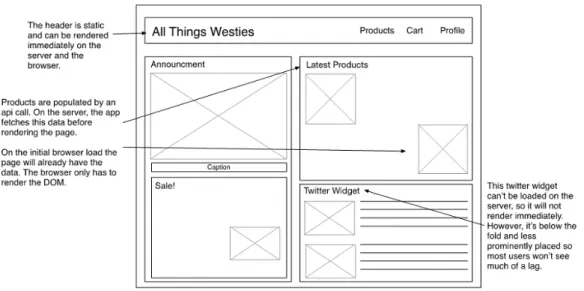
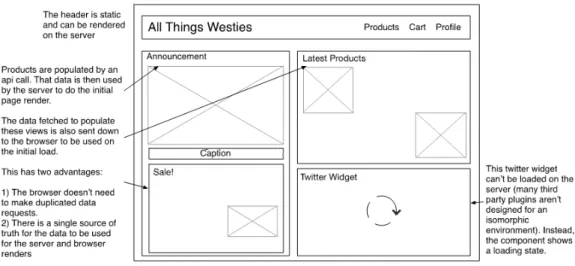
Look at Figure 1.1 which is a wireframe for the All Things Westies app. There is a standard header with some main site navigation on the right. Below the header, the main content areas promote products and the social media presence.
Figure 1.1 A wireframe showing the home page for allthingswesties.com, an isomorphic web app.
The first time you come to the site, the app content is rendered on the sever. This is done using server-rendered techniques with Node.JS. After being server-rendered, it is sent to the browser and displayed to the user. As the user navigate around the pages, looking for a dog mug or supplies, each page is rendered by the JavaScript running in the browser using SPA techniques.
The All Things Westies app relies on reusing as much code as possible between the server and the browser. The app relies on JavaScript’s ability to run in multiple environments: JavaScript runs in browsers and also runs on the server via Node.js. While JavaScript can run in other environments as well (e.g. on Internet of Things devices and on mobile via React Native), the focus here is on web apps that run in the browser.
Many of the concepts in this book could be applied without writing all of the code in JavaScript. Historically, the complexity of running an isomorphic app without being able to reuse code has been prohibitive. While possible to server-render your site with Java or Ruby and then transition to a single page app, it isn’t commonly done because it requires duplicating large portions of code in two languages. This has a high cost in the maintenance of an app.
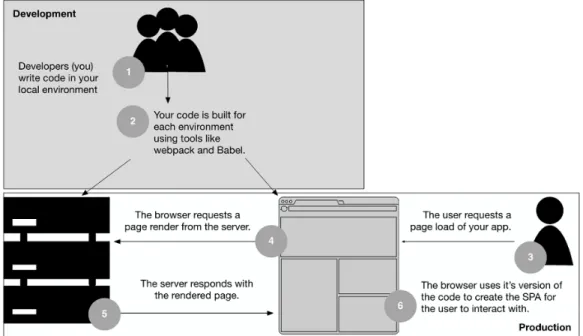
Figure 1.2 Isomorphic apps build and deploy the same JavaScript code to both environments.
To see this flow in action, take a look at Figure 1.2. It shows how the code for All Things Westies gets deployed to the server and the browser. In other words, the server code is packaged and run on a Node.JS web server, while the browser code is bundled into a file that is later downloaded in the borwser. Since we take advantage of JavaScript running in both environments, the same code that runs in the browser and talks to our API or data source also runs on the server to talk to our backend.
1.1.2
Building our stack
Building an app like All Things Westies requires putting together several well-known technologies. Many of the concepts in this book are executed with open source libraries. While it would be possible to build an isomorphic app using few or no libraries, it is highly recommended to take advantage of the JavaScript communities’ efforts in this area.
TIP
Make sure any libraries you include in an isomorphic app support running in both the server and browser environments. Checkout Chapter 10 for what to watch out for and how to handle differences in environments. If you intend to only use a library on the server, then you don’t need to check for browser computability.The HTML components that display the products, i.e. the view, will be built with React (in Chapter 12 we explore how to use other popular frameworks like Angular 2 and Ember to implement isomorphic architecture). We will use a single direction data flow via Redux, the 5
current community standard data management in React apps. We will use webpack to compile the code that runs in the browser and to enable running Node.JS packages in the browser.
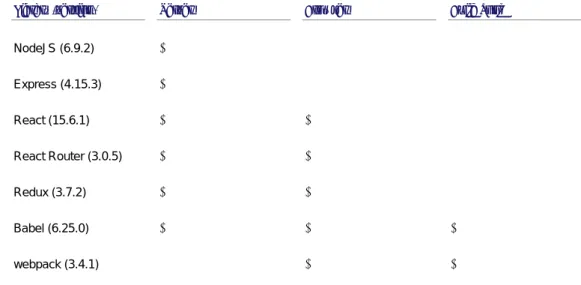
On the server side, we will build a Node.js server using Express to handle routing. We will take advantage of React’s ability to render on the server and use it to build up a complete HTML response that can be served to the browser. Table 1.3 shows how all these pieces fit together.
Library (version) Server Browser Build Tool
NodeJS (6.9.2) √ Express (4.15.3) √ React (15.6.1) √ √ React Router (3.0.5) √ √ Redux (3.7.2) √ √ Babel (6.25.0) √ √ √ webpack (3.4.1) √ √
Table 1.3 The technologies used in an isomorphic app and what environments they run in.
To make our application work everywhere, we will build in data prefetching for our routes using React Router. We will also handle differences in environments by building separate code entry points for the server and browser. In cases where code can only be run in the browser we will gate the code or take advantage of the React lifecycle to ensure the code won’t run on the server. I will introduce React in Chapter 3 and the specifics of the server logic in Chapter 7.
1.2
Architecture Overview
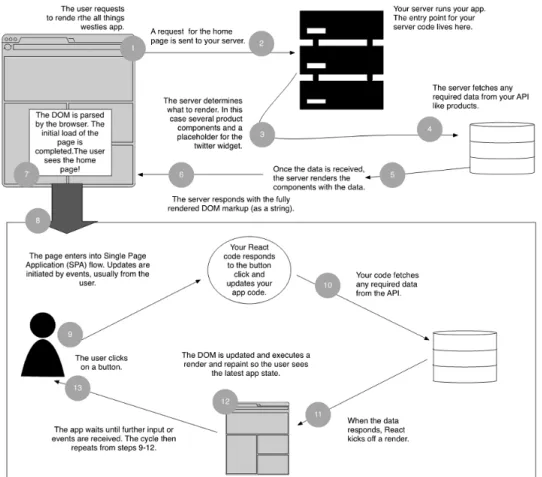
Earlier in this chapter, I told you about how an isomorphic application is the result of combining a server-rendered application and a single-page application.To get a better understanding of how we connect the concepts of a server-rendered application and a single-page application let's refer to Figure 1.4. This figure shows all the steps involved in getting an isomorphic app rendered and responding to user input like a single-page application, starting when the user enters the web address.
Figure 1.4 The isomorphic app flow from initial browser request to SPA cycle.
1.2.1
Application Flow
Every web app session is initiated when a user navigates to the web app or types the URL into the browser window. For allthingswesties.com, when a user clicks on a link to the app from an email or from searching on Google, the flow on the server goes through the following steps. (The numbers match up with Figure 1.4.)
1. The browser initiates the request. 2. The server receives a request.
3. The server determines what needs to be rendered.
4. The server gathers the data required for the part of our application being requested. If the request is for allthingswesties.com/product/mugs, the app requests the list of gift items for sale through the site. This list of mugs, along with all the information to be 7
displayed (names, descriptions, price, images), is collected before moving on to the render step.
5. The server generates the HTML for our web page using the data collected for the mugs page.
6. The server responds to the request for allthingswesties.com/product/mugs with the fully-built HTML.
The next part of the application cycle is the initial load in the browser. We differentiate the first time the user loads the app from subsequent requests because several things that will only happen once per session happen during this first load.
DEFINITION
Initial load is the first time the user interacts with our website. This means the first time the user clicks a link to our site in a Google search, from social media or types it directly into the web address bar.The first load on the browser begins as soon as the HTML response from the server is received and the DOM is able to be processed. At this point, single-page application flow takes over and the app responds to user input, browser events, timers, etc. The user can add products to their cart, navigate around the site and interact with forms.
1. The browser renders the markup received from the server. 2. The application is now able to respond to user input.
3. When the user adds an item to their cart, the code responds and runs any business logic necessary.
4. If required, the browser talks to the backend to fetch data. 5. React renders the components.
6. Updates are made and any repaints are executed. The user’s cart icon updates to show that an item has been added.
7. Each time the user interacts with the app, steps 9-12 repeat.
1.2.2
Handling the server-side request
Now let’s take a closer look at what happens when the server receives the initial request to render the page. Look at what part of the site renders on the server. Figure 1.5 is similar to the one at the beginning of the chapter (Figure 1.1) but it differs in that it does not render the twitter widget. The Twitter widget is designed to be loaded in the browser so it doesn’t render on the server.
Figure 1.5 The server-rendered version of the allthingswesties home page.
The server does three important things. First, it fetches the data required for the view. Then it takes that data and uses it to render the DOM. Finally, it attaches that data to the DOM so the browser can read in the app state. Let’s step through Figure 1.9 which shows the flow on the server.
Figure 1.6 App flow for the initial server render
1. The server receives a request.
2. The server fetches the required data for that request. This can be from either a persistent data store like a MySQL or NoSQL database or from an external API. 3. Once the data is received, the server can build the HTML. It generates the markup with
React’s virtual DOM via React’s
renderToString
method. 94. The server injects the data from step 2 into our HTML so the browser can access it later. 5. The server responds to the request with our fully built HTML.
1.2.3
Rendering in the Browser
Now let’s look more closely at what happens on the browser. Figure 1.7 shows the flow in the browser, from the point the browser receives the html to the point it bootstraps the app.
1. The browser starts to render the mugs page immediately because the HTML sent by the server is fully formed with all the content we generated on the server. This includes the header and the footer of our app along with the list of mugs for purchase. The app
won’t respond to user input yet. Things like adding a mug to the cart, or viewing the detail page for a specific mug won’t work.
2. When the browser reaches the entry JavaScript for our application, the application bootstraps.
3. The virtual DOM is recreated in React. Since the server sent down the app state, this virtual DOM is identical to the current DOM.
4. Nothing happens! React finds no differences between the DOM and the virtual DOM it built (the virtual DOM is explained in depth in Chapter 3). The user is already being shown the list of mugs in the browser. The application can now respond to user
input, like adding a mug to the cart.
Figure 1.7 Browser Render & Bootstrap – between steps 1 and 4, the app won’t respond to user input.
This is when the single-page application flow kicks again. This is the most straightforward part. It handles user events, makes XHR calls and updates the application as needed.
1.3
Advantages of Isomorphic App Architecture
At this point, you may be thinking to yourself that this sounds complicated. You may be wondering why this approach to building a web app would ever be worth it. There are several compelling reasons to go down this path:
• Simplified and improved SEO – bots and crawlers can read all of the data on page load.
• Performance gains in user perceived performance.
• Maintenance gains
• Improved accessibility because the user can view the app without JavaScript.
There are also some challenges and tradeoffs that come with isomorphic app architecture. There is an increased complexity in managing code running in multiple environments when building out a production ready app that is properly built and deployed. Debugging and testing are more complicated. Server-rendered HTML via Node.js and React can be slow for views that have many components. For example, a page that displays many items for sale might quickly end up with hundreds of React components. As this number increases, the speed at which React can build these components on the server declines. First we’ll cover the benefits of building an isomorphic app. Let’s start by discussing SEO.
1.3.1
SEO Benefits
Our example app, allthingswesties.com is an ecommerce site so to be successful it needs shoppers! It needs good SEO to maximize the number of people that come to the app from search engines. Single-page applications are difficult for search engine bots to crawl because they don’t load the data for the app until after the JavaScript has run in the browser. Isomorphic apps also need to bootstrap after JavaScript is run, but because their content is rendered by the server, neither users nor bots have to wait for the application to bootstrap in order to see the content of the site.
DEFINITION
Bootstrapping our application is when we run the code required to get everything setup. This code is only run once on the initial load of our application. This code is run from the entry point of our browser application.On the All Things Westies app, we want to make sure all of the SEO-relevant content is fetched on the server so that we don’t rely on the SEO crawlers to try and render our page. Crawlers (both search bots like Google or Bing and share bots like Facebook) either can't run all of this code or they don't want to wait long enough for this code to run. For example, Google will try to run JavaScript but penalizes sites that take too long for the content to load. This can be seen in the warning shown in Figure 1.8. This warning shows up when we enter a URL for a single-page application into the Google page speed insights tool.
Google Page Speed Insights Tool
This tool helps measure how your page is doing on a scale of 0 – 100. You get a score for both speed-related issues (size of images, size of JavaScript, magnification, roundtrips made, etc.) and UI (size of click areas, etc.). Test it out on your web app at: https://developers.google.com/speed/pagespeed/insights.
Google also has the lighthouse tool (available as a Chrome extension or command line tool) which will run an in-depth analysis of pages on your site. It makes recommendations on everything from performance, to using service workers to allow offline use, to improved accessibility for screen readers. You can learn more about lighthouse at
https://developers.google.com/web/tools/lighthouse/.
Figure 1.8 Google Page Speed Insights warning for a single-page application. The application makes too many AJAX calls to fetch visible content after the initial load of the page.
If you don’t deal with this warning, you may end up with a lower ranking and fewer customers. Also, there is no guarantee that any page content that relies on API calls will be run by the crawler. Whole services have popped into existence to solve this problem for single-page apps. Dev teams pour time into developing systems to crawl and pre-render their pages. They then redirect bots to these pre-rendered pages. These systems are complex and brittle to maintain.
Personally, I can’t wait for the day when crawlers and bots will be able to get to all our content regardless of when the data is fetched (on the server or in the browser). Until that day, server-rendering the initial content gives a big advantage over single-page application rendering. This is especially true for above-the-fold content and any other content that has SEO benefits.
DEFINITION
Above-the-fold is a term that comes from the newspaper business. It referred to all the content that showed on the front page when the newspaper was folded in half and sitting on a newsstand. For web apps, this term is used to refer to all of the content that is in the viewable area of a users screen when the app loads. In order to see below the fold content, the user must scroll.In addition to SEO crawlers, many social sites and apps that allow inline website previews (e.g. Facebook, Twitter, Slack or WhatsApp), also use bots that don’t run JavaScript. These sites assume that all of the content that is available to build a social card or inline preview will be available on the server-rendered page. Isomorphic apps are ideal for handling the social bot use case.
At the beginning of this section, I mentioned that both bots and users don’t need to wait for the isomoprhic application to bootstrap to see the dynamic content. Another way to say this is that the perceived performance of isomorphic web apps is very fast. The next section describes this in detail.
1.3.2
Performance Benefits
Users want to see the content of allthingswesties.com right away. Otherwise they will get impatient and leave before seeing all the products and information being offered. Loading a SPA can be a slow experience for a user (especially on mobile phones). Even though the browser may connect quickly to your application, it takes time to run the startup code and fetch the content which leaves the user waiting. In the best case scenario, SPAs display loading indicators and messaging for the user. In the worst case scenario, there is no visual feedback and the user is left wondering if anything is happening.
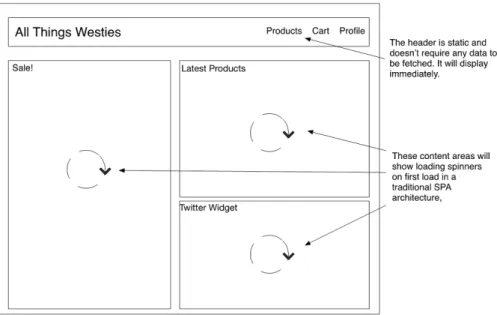
Figure 1.9 shows what the All Things Westies would look like during the initial rendering if it was a single-page application. Instead of seeing all of the content immediately, we would see loading spinners in all of the content areas.
Figure 1.9 In a single-page app version of All Things Westies spinners would be shown during the first load instead of the real content.
A server-rendered page displays its content (all of the HTML, images, CSS and data for your site) to the user as soon as the browser receives and renders the HTML. This leads to content being seen by the user several seconds faster than in a SPA. While the site still requires JavaScript to be loaded and executed before user interactions can take place, this fast load allows the user to start visually processing your content quickly. This is called perceived performance. The app content is presented to the user quickly. The user is not aware that JavaScript is being run in the background.
When executed well, the user will never know that the JavaScript loaded after the view rendered. For all practical purposes, your user has a great experience because they believe the 13
app loaded fast. This greatly cuts down on the need for loading spinners or other waiting states on the first load of the app. This leads to happier users.
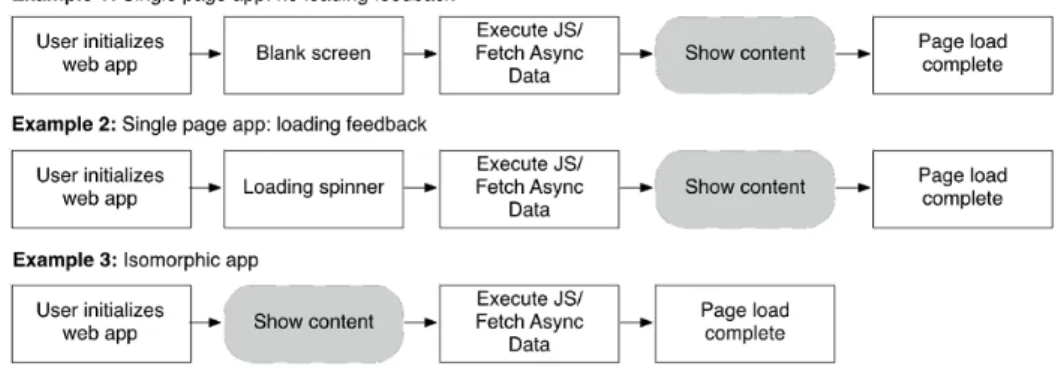
Figure 1.10 Comparison of when the user sees the content of a web app. An isomorphic app displays its content much sooner than a single-page app.
Now I will walk you through the single-page app and isomorphic scenarios in detail. You can see these flows in Figure 1.10 as well.
First take Example 1 from the figure. Imagine going to our example web app and being shown a blank screen for 6 seconds. What would you do? How likely are you to get frustrated and give up on using that web app? If you were looking to buy a pair of Westie socks, you would be inclined to give up on All Things Westies and take your business elsewhere.
Now imagine that the web app still took 6 seconds to load (like in Example 2), but this time it showed you some basic structure a loading spinner to let you know that the web app is doing something but you can’t interact with it yet, just like in Figure 1.9 earlier in this chapter. Are you willing to wait for this site to load?
Finally, let’s imagine that when you come to allthingswesties.com you see the content in under 2 seconds as shown in Example 3 in Figure 1.10. This flow mathches with Figure 1.1 at the beginning of the chapter. This time your brain starts processing the information as soon as it is displayed. You don’t feel like you had to wait. In the background, the app is still loading and working to get everything set up, but you don’t have to wait for this to finish before being able to see the content and interact with the app.
Notice how the app is able to show content much earlier in the page load flow. While the actual page load time as measured by performance metrics will be the same in all three approaches, the user perceives the performance of an isomorphic app to be much faster.
1.3.3
No JavaScript? No problem!
Another user-facing benefit of isomorphic app architecture is that you can serve portions of your site without requiring JavaScript. Users that can’t or don’t want to run JavaScript can still benefit from using your site when it’s built isomorphically. Since you serve a complete page to 14
the browser, users can at least see your content despite not being able to interact with the app.
This allows you to use progressive enhancement to better provide for users across a spectrum of browsers and devices. While it may be unlikely to encounter a user with no JavaScript running there are other good reasons for loading a full page from the server. For example, if you support older browsers or devices, isomorphic apps are a good tool for providing the best experience possible across a multitude of browser/device/OS combinations.
We’ve covered the user-facing benefit of isomorphic apps. Next we will look at the developer benefits that come with this architecture.
1.3.4
Maintenance and developer benefits
When building an isomorphic app, the majority of the code can be run on both the server and the browser. This means that if you want to render a view, you only need to write your code once. If you want to have some helper functions for a common task in the app, you only need to write this logic once and it will run in both places.
This is an advantage over apps that have server-side code written in one language and browser code written in JavaScript. It also means developers can keep their focus without having to switch between languages. Builds, environment management and dependencies are all simplified, which makes your overall workflow cleaner.
This is not to say that building isomorphic apps is easy. Writing everything in one language comes with its own set of problems.
1.3.5
Challenges and Tradeoffs
Choosing to build an app with isomorphic web architecture is not without tradeoffs. For one, it requires a new way of thinking which takes time to adjust to. The good news is that’s what you will learn in this book. Some of the challenges include:
• Handling the differences between Node.JS and the browser.
• Debugging and Testing Complexity
• Managing performance on the server
HANDLING THE DIFFERENCES BETWEEN THE SERVER AND THE BROWSER
Node has no concept of a window or document. The browser doesn’t know about Node environment variables or have any idea what a request or response object is. Both environments know about cookies, but they handle them in very different ways. In Chapter 10 we will look at strategies for dealing with these environment tensions.
DEBUGGING AND TESTING COMPLEXITY
All your code needs to be tested twice: loaded directly off of the server and as part of the single page flow. Debugging requires mastery of both browser and server debugging tools and knowing whether a bug is happening on the server, on the browser or in both environments. Additionally, a thorough unit testing strategy is needed, where tests are written and run in the 15
appropriate environments. In other words, server only code should be tested in Node, but shared code should be tested in all the environments where it will eventually be run.
MANAGING PERFORMANCE ON THE SERVER
Performance on the server also presents a challenge as the React provided
renderToString
method is slow to execute on complex pages with many components. InChapter 11 we will show you how to optimize your code as much as possible without breaking React best practices. We will also discuss caching as a tool to minimize issues with server performance.
At this point, you understand the benefits and tradeoffs that come with isomorphic app architecture. Next let’s take an in depth look at how we execute an isomorphic app.
1.4
Building the view with React
React is one of the pieces that makes building an isomorphic web app possible. React is a library, open sourced by Facebook, for creating user interfaces (the view layer in your app). React makes it easy to express your views via HTML and JavaScript. It provides a simple API that is easy to get up and running with but that is designed to be composable in order to facilitate building user interfaces quickly and efficiently. Like many other view libraries and implementations, it provides a template language (JSX) and hooks into commonly used parts of the DOM and JavaScript.
React also takes advantage of functional concepts by adhering to single direction data flows from the top level component down to its children. What makes it appealing for isomorphic apps is how it uses a virtual DOM to manage changes and updates to the application
React is not a framework like Angular or Ember. It only provides the code that you use to write your view components. It can fit easily into a Model View Controller (MVC) style architecture as the View. .However, there is a recommended way to build complex React apps, which will be covered throughout the book.
1.4.1
Understanding the Virtual DOM
The virtual DOM is a representation of the browser DOM written with JavaScript. At its core, React is composed of React Elements. Since React introduced the virtual DOM to the web community, this idea has started to show up in many major libraries and frameworks. Some people are even writing their own virtual DOM implementations.
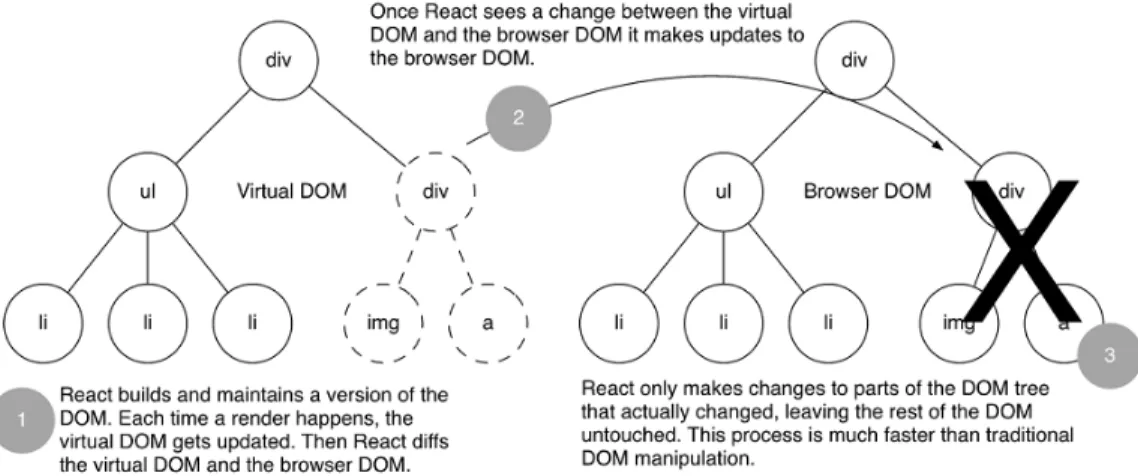
Like the Browser DOM, the virtual DOM is a tree comprised of a root node and its child nodes. Once the virtual DOM is created, React compares the virtual tree to the current tree and calculates what updates it needs to make to the browser DOM. If nothing has changed, no update is made. If changes have occurred, React updates only the parts of the browser’s DOM that have changed. Figure 1.11 shows what happens at this point. On the left, the virtual DOM has been updated to remove the right subtree with the <div> tag whose children are an <img> tag and a <a> tag. This results in these same children being removed from the browser DOM.
Figure 1.11 Comparing the DOM trees: The Virtual DOM changes are compared to the browser DOM. Then React intelligently updates the browser DOM tree based on the calculated diff.
React uses JavaScript to represent DOM nodes. In JavaScript this is written as: let myDiv = React.createElement(‘div’);
When a React render occurs, each component returns a series of React Elements. Together they form the virtual DOM, a JavaScript representation of the DOM tree.
Since the virtual DOM is a JavaScript representation of the browser DOM and is not dependent on browser-provided objects like the window and document (although certain code paths may depend on these items), it can be rendered on the server. However, rendering an actual DOM on the server wouldn’t work. Instead React provides a way to output the rendered DOM as a string (
ReactDOM.renderToString
). This string can be used to build a complete HTML page that is served from our server to the user.1.5
Business Logic and Model: Redux
In real-world web apps, you need a way to manage the data flow. Redux provides an application state implementation that works nicely with React. It’s important to note you don’t have to use Redux with React or vice-versa, but their concepts mesh well as they both leverage functional programming ideas. It is also a community best practice.
1.5.1
One Way Data Flow
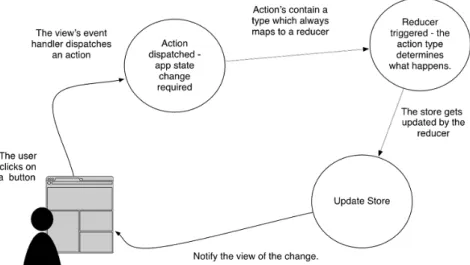
Like React, Redux follows a single direction flow of data. Redux holds the state of your app in its store, providing a single source of truth for your application. To update this store, actions (JavaScript objects that represent a discrete change of app state) are dispatched from the views. These actions in turn trigger reducers. Reducers are pure functions (a function with no side effects) that take in a change and return a new store after responding to the change. Figure 1.12 shows this flow.
Figure 1.12 The view (React) uses Redux to update the app state when the user takes an action. Redux then let’s the view know when it should update based on the new app state.
The key thing to remember about Redux is that only reducers can update the store. All other components can only read from the store. Additionally, the store is Immutable. This is enforced via the reducers. I will cover this again in Chapter 2 and do a full Redux explanation in Chapter 6.
The ability to transfer state between server and browser is important in an isomorphic app. Redux’s store provides top level state. By relying on a single root object to hold our application state, we can easily serialize our state on the server and send it down to the browser to be deserialized. Chapter 7 covers this topic in more detail. The final piece of the app is the build tool. The next section gives an overview of webpack.
1.6
Building the app: webpack
Webpack is a powerful build tool that makes packaging code into a single bundle easy. It has a plugin system in the form of loaders, allowing simple access to tools like Babel for ES6 compiling or Less/Sass/PostCSS compiling. It also lets us package Node module code (npm packages) into the bundle that will be run in the browser.
DEFINITION
There are many names for current and future JavaScript versions (ES6, ES2015, ES2016, ES7, ES Next). To keep things consistent I refer to modern JavaScript that is not yet 100% adopted in browsers as ES6.This is key for our isomorphic app. By using webpack we can bundle all of our dependencies together and take advantage of the ecosystem of libraries available via npm, the Node package 18
manager. This allows you to share nearly all of the code in your app with both environments – the browser and the server.
NOTE
We won’t use webpack for our Node.js code. This is unnecessary as we can write most ES6 code on Node and Node can already take advantage of environment variables and npm packages.Webpack also lets you use environment variables inside of your bundled code. This is important for our isomorphic app. While we want to share as much code between environments as possible, some code from the browser can’t run on the server and vice versa. On a node server, we can take advantage of an environment variable like this:
if (NODE_ENV.IS_BROWSER) { // execute code }
However, this code won’t run in the browser because it has no concept of node environment variables. We can use webpack to inject a NODE_ENV object into our webpacked code, so that this code can run in both environments. This concept will be taught in depth in Chapter 5.
1.7
Summary
In this chapter you learned that isomorphic web apps are the result of combining server-rendered HTML pages with single-page application architecture. This has several advantages but does require learning a new way of thinking about web app architecture. The next chapter presents a high level overview of an isomorphic application.
• Isomorphic web apps blend server-side architecture and single-page app architecture to provide a better overall experience for users. This leads to improved perceived performance, simplified SEO and developer benefits.
• Being able to run JavaScript on the server (Node.js) and in the browser allows us to write code once and deploy it to both environments.React’s virtual DOM lets us render HTML on the server.
• Redux helps us manage application state and easily serialize this state to be sent from the server to the browser.
• By building our app with webpack, we can use Node code in the browser and flag code to run only in the browser.
©Manning Publications Co. We welcome reader comments about anything in the manuscript - other than typos and other simple mistakes. These will be cleaned up during production of the book by copyeditors and proofreaders.
https://forums.manning.com/forums/isomorphic-web-applications