Clemson University
CPSC 424: Systems Administration and Security
Section 001
Mail Server Administration
Authors:
Joshua
Groppe
William
Collins
Instructor:
James M.
Martin
, Ph.D
April 25, 2014
1
Introduction
Email is a major form of communication in modern society, for both personal and professional purposes. While there exist many free email programs, many professional and academic entities choose to host their own mail server. Motivation for doing this can come in several forms, and have an array of benefits. However, our primary motivation for doing this is because the responsibility of running a mail server typically lies with a System Administrator. Thus, experience in this area is extremely valuable. We set up and configured a public mail server on a Linux system. While we control the creation of accounts, we have tested and proven that they can be seamlessly integrated with mail clients on both Windows and Mac operating systems, and used to send and receive email like any other type of mail service.
2
Motivation & Objectives
There exist many free email services such as Google’s Gmail or Yahoo’s Yahoo Mail. How-ever, professional and academic entities often choose to create and host their own for some or all of the following reasons:
• Privacy: Sending, storing, and managing mail internally provides a higher level of security.
• Virus and Spam: Blocking unwanted emails and determining what is potentially harmful.
• Lists: Creating groups of people to which emails can be specifically sent.
• Storage and Backup: Direct access to where mail is stored and the ability to back it up.
• Customization: Pick the applications to use, and tune them for specific needs. • Troubleshooting: When something goes wrong, it can be immediately investigated
and fixed.
• Monitoring: Logs for incoming and outgoing messages as well as for connection and authorization attempts can be viewed.
• Control: Ultimately, that is what it is all about.
The responsibility of setting up and running and mail server for a company or other orga-nization is not a trivial task, and one or both of these tasks typically lies with the System Administrator.
Our tangible objective was to set up and configure a mail server from scratch, and host it publicly. Intangibly, our personal learning goals were to learn more about Linux, using open-source packages, and building a working system. This exercise facilitated this experience.
3
Background
A mail server is composed of three major software components:
1. Mail Transfer Agent (MTA): relays mail between the mail server and the wider Internet. This includes delivering an outside email to one of the users, or sending an email from one of the users.
2. Mail Delivery Agent (MDA): takes mail from the MTA’s queue and saves it to individual mailboxes on the mail server.
3. Mail Storage and Retrieval Server: manages users and their mailboxes as they check their email over IMAP/POP3 connections.
Figure 1: Components of a Mail Server[2] There exist many open source packages to serve these functions.
4
Methodology
4.1
Overview
The implementation of our system involved the following activities/tasks: 1. Purchasing a Linux server and domain name
2. Purchasing and install an SSL certificate 3. Creating a dedicated MySQL database 4. Selecting and installing software components 5. Configuring components
4.2
Server, Domain Name, & SSL Certificate
The first step was to acquire a Linux server. We decided to purchase a virtual private service hosted by Linode, LLC:
https://www.linode.com/
We then purchased the following domain name and pointed it at our server
https://venti.in/
Finally, we purchased a signed SSL certificate from StartSSL:
https://www.startssl.com/
4.3
Selection & Installation of Components
Our criteria for selecting the open source software packages to function in the roles described in the Background section was based on the following:
• Documentation
• History of reliable usage • Community Support • Lightweight
After doing significant research on the topic, we selected the following components:
Postfix (http://www.dovecot.org/): A Mail Transfer Agent that is modern, security-oriented, and very flexible.
Dovecot (http://www.postfix.org/): A Mail Delivery Agent, and IMAP/POP3 server that is lightweight, modern, and configurable.
MySQL (http://www.mysql.com/): Database to store domain, authentication, and alias information, that is widely regarded as the world’s most popular open-source database, and for good reason.
Our go-to authority, and an extremely good source of information on this topic can be found at Linode’s library article on Running a Mail Server[2].
4.3.1 Installation
The installation of the above components was done with the following command:
sudo apt-get install postfix postfix-mysql dovecot-core dovecot-imapd dovecot-pop3d dovecot-lmtpd dovecot-mysql mysql-server
4.4
Configuration of Components
The following sections describe, on an intermediate level, the required configuration of the different mail server components.
4.4.1 MySQL
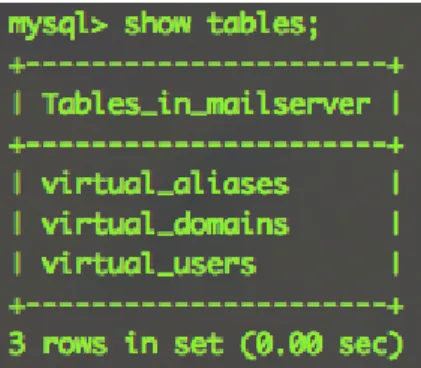
The MySQL database has a user(postman) dedicated to the mail server, and contains three tables:
1. virtual domains: the domains that will receive mail here 2. virtual users: all of the email addresses and passwords
3. virtual aliases: email aliases (lets you forward mail from one email address to an-other)
4.4.2 PostFix
We configured the following in Postfix:
1. Virtual domains, aliases, and users, so we don’t have to make an actual UNIX user for everybody who needs an email address
2. MySQL access, so it can read the list of domains for which it should be handling mail 3. Hand-off for incoming email to Dovecot’s LMTP service so it can get saved on the
server
4. STARTTLS encryption for all connections, for increased security
5. Access to ports 465 and 587 for sending, in addition to the default port 25 6. Hand-off for authentication to Dovecot
This involved making changes to the following files: 1. /etc/postfix/main.cf 2. /etc/postfix/mysql-virtual-mailbox-domains.cf 3. /etc/postfix/mysql-virtual-mailbox-maps.cf 4. /etc/postfix/mysql-virtual-alias-maps.cf 5. /etc/postfix/master.cf 4.4.3 Dovecot
We configured the following in Dovecot:
1. Set the IMAP, POP3, and LMTP protocols 2. Define the mail location
3. Use MySQL for username/password lookups for authentication 4. Configure needed sockets for authentication and LMTP
5. Require SSL encryption
This required making changes to the following files:
1. /etc/dovecot/dovecot.conf: Dovecot’s main configuration file
2. /etc/dovecot/conf.d/10-mail.conf: Deals with the server’s file system
4. /etc/dovecot/conf.d/auth-sql.conf.ext: New authentication file for SQL-type authen-tication
5. /etc/dovecot/dovecot-sql.conf.ext: An included authentication file with the MySQL connection parameters
6. /etc/dovecot/conf.d/10-master.conf: Where sockets are configured
7. /etc/dovecot/conf.d/10-ssl.conf: Where SSL-related parameters are specified
4.5
Detailed Instructions
The methodology section above provided an intermediate level description of what we did to successfully setup a mail server. For detailed instructions of how to do this using the setup and configuration we decided upon, please refer to the following Linode library article:
https://library.linode.com/email/postfix/postfix2.9.6-dovecot2.0.19-mysql
5
User’s Manual
5.1
Obtaining a user account
As of now, the only way to add new user accounts to the server is by manually adding them to the mysql database. This can be done with the following command:
INSERT INTO ‘ m a i l s e r v e r ‘ . ‘ v i r t u a l u s e r s ‘ ( ‘ i d ‘ , ‘ domain id ‘ , ‘ password ‘ , ‘ e m a i l ‘ ) VALUES
( ’ 1 ’ , ’ 1 ’ , ENCRYPT( ’ f i r s t p a s s w o r d ’ , CONCAT( ’ $6$ ’ , SUBSTRING(SHA(RAND( ) ) , −1 6 ) ) ) , ’ email1@example . com ’ ) ; For testing and grading purposes, I have created two test user accounts and passwords.
One is for Professor Martin, and the other is for Pengfei. These are listed below.
Jim Martin • username: [email protected] • password: thisdeservesana Pengfei Xuan • username: [email protected] • password: linuxmaster
5.2
Setting up your account with a mail client
In order to access the email accounts provided above, a mail client is needed. We have tested accounts with both Microsoft Outlook and Apple Mail 7.2.
5.2.1 Microsoft Outlook 2010
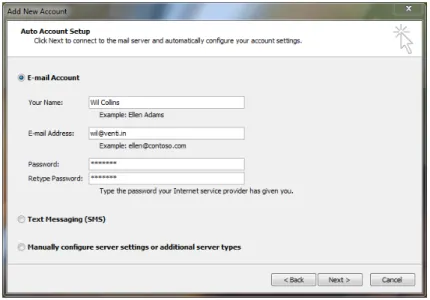
Microsoft Outlook is able to detect the server configuration with only basic details provided. Only the username and password are required in theAdd New Account context. An example configuration is shown in Figure 3 below.
Figure 3: Microsoft Outlook 2010 Account Configuration
5.2.2 Apple Mail 7.2
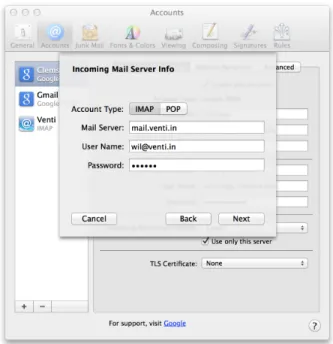
Apple Mail requires a slightly more in-depth configuration. After selecting, ”Add Other Mail Account,” in the Add New Account context, you will be prompted for the same infor-mation as Outlook (username and password), but upon clickingCreate, you will be informed, ”Account must be manually configured.” On the next page, you will be prompted to input your incoming mail settings. Enter ”mail.venti.in” as the Mail Server, and your username and password in their respective boxes. Make sure you use the entire email address in the username field. An example configuration is shown in Figure 4 below.
Figure 4: Apple Mail Incoming Mail Server Configuration
The next screen will prompt you to enter your outgoing mail server settings. Use all of the same information as the previous step, with the exception that ”mail.venti.in” is now being used as the SMTP Server.
5.2.3 Other Mail Clients
Other mail clients such as Mozilla Thunderbird or KDE’s KMail will also work with our server. Simply provide the full email address when prompted for a username andmail.venti.in when asked for both the incoming and outgoing mail servers.
6
Analysis & Results
After configuring the server, it was capable of all the planned features. These features are listed below, and were tested using both IMAP and POP delivery methods.
1. Send mail from one account managed by the server to another
2. Send mail from an account managed by the server to an account managed by another provider (Gmail)
3. Receive mail on one account managed by the server from another
4. Receive mail on an account managed by the server from another provider 5. Send and receive attachments
7. Send and receive mail using a number of mail clients
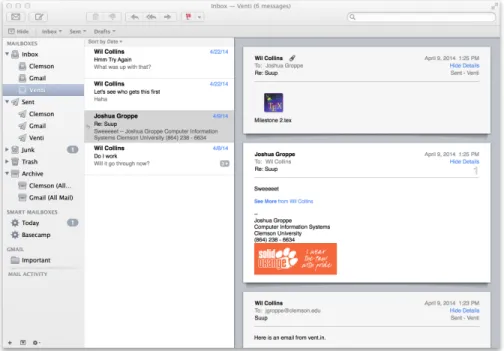
The section below shows screen shots that demonstrate successful configuration and use in both Microsoft Outlook 2010 (Figure 5) and Apple Mail 7.0 (Figure 6).
Figure 5: Microsoft Outlook Mailbox Example
7
Conclusions & Future Work
We have successfully attained our tangible goal of setting and running up a mail server. We have demonstrated that it integrates correctly and easily with popular mail clients, and that mail can be sent and received reliably and securely. In addition, we have gained significant experience in the following:
1. Learning about open-source packages
2. Adding non-trivial components to a Linux based system 3. Building, extending, and evaluating a system
All of which directly apply to this project’s goal of advancing our systems administration experience. More specifically, we now have an active hand knowledge of how an email system works, and how to configure and maintain it.
7.1
Problems Encountered
The only significant problem that we encountered was that the initial password for the MySQL database contained a character that was not understood by Postfix.
7.2
Future Work
Going forward, these are some things that we would like to and to our system: 1. Create a web interface that can be used to create and manage accounts 2. Develop a method for periodically backing up the mail database
References
[1] Sharon Campbell. Email with postfix, dovecot, and mysql. https://library.linode. com/email/postfix/postfix2.9.6-dovecot2.0.19-mysql, May 2013.
[2] Sharon Campbell. Running a mail server. https://library.linode.com/mailserver, June 2013.
![Figure 1: Components of a Mail Server[2]](https://thumb-us.123doks.com/thumbv2/123dok_us/9343653.2416659/3.918.244.672.406.986/figure-components-of-a-mail-server.webp)